1
RocketRAID 35xx
SATAII Host Adapter
User’s Guide
Revision: 1.0
Date: March 2009
HighPoint Technologies, Inc.
1
Copyright
Copyright © 2009 HighPoint Technologies, Inc. This document contains materials
protected by International Copyright Laws. All rights reserved. No part of this
manual may be reproduced, transmitted or transcribed in any form and for any
purpose without the express written permission of HighPoint Technologies, Inc.
Trademarks
Companies and products mentioned in this manual are for identification purpose only.
Product names or brand names appearing in this manual may or may not be registered
trademarks or copyrights of their respective owners. Backup your important data
before using HighPoint’s products and use at your own risk. In no event shall
HighPoint be liable for any loss of profits, or for direct, indirect, special, incidental or
consequential damages arising from any defect or error in HighPoint’s products or
manuals. Information in this manual is subject to change without notice and does not
represent a commitment on the part of HighPoint.
Notice
Reasonable effort has been made to ensure that the information in this manual is
accurate. HighPoint assumes no liability for technical inaccuracies, typographical, or
other errors contained herein.
2
Table of Contents
Table of Contents
About This Guide..................................................................................................5
Congratulations
Specifications and Features.....................................................................................................6
Understanding RAID Concepts and Terminology...............................................................9
Network Features.......................................................................................................................10
HARDWARE -- DESCRIPTION AND INSTALLATION
1 - RocketRAID Adapter layout .................................................................................. 11
2 - Installing the RocketRAID Host Adapter......................................................................17
3 - Verifying Installation..........................................................................................................19
4 - Battery Backup....................................................................................................................19
ROCKETRAID BIOS UTILITY
1 - BIOS Setting Overview .......................................................................................... 20
2 - Creating RAID Arrays........................................................................................................24
3 - Deleting Arrays...................................................................................................................29
4 - Monitoring the Host Adapter, Arrays and Devices ............................................... 30
5 - Maintaining Arrays............................................................................................................33
6 - Additional Functions and Settings..................................................................................38
3
Table of Contents
HIGHPOINT RAID MANAGEMENT AND DEVICE DRIVER CD
1 - Creating a Driver Diskette................................................................................................41
2 - Device Driver Installation.................................................................................................42
3 - HighPoint RAID Management Utilities (HRM).............................................................48
CUSTOMER SUPPORT
Troubleshooting Checklist ...................................................................................................59
CONTACT US ......................................................................................................60
4
Table of Contents
About This Guide
The RocketRAID 35xx SATAII Host Adapter’s User’s Guide provides information
about the functions and capabilities of the host adapter, and instructions for
installing, configuring and maintaining RAID arrays hosted by the adapter.
The RocketRAID 35xx Host Adapter
The RocketRAID 35xx series is based on HighPoint’s TerabyteArchitecture and highperforming Intel® IOP341 I/O Processor delivers enterprise-class SATA RAID 5 and
RAID 6 performance for storage applications that need high bandwidth and high
capacity sequential performance. The Intel® IOP341(800MHz) I/O Processor is one of
the industry’s highest performing RAID I/O processor engines for multi-channel
SATA hardware RAID 5/6 controllers. The RocketRAID 35xx series of PCI-Express
hardware RAID controllers leverages HighPoint TerabyteArchitecture and a powerful Intel® IOP341 I/O Processor to deliver the industry’s leading RAID 6 performance.
The RocketRAID 35xx series offer a comprehensive line of hardware RAID controllers
via cutting edge multi-lane connectors from 4,8,12,16 and 24 ports. All RocketRAID
35xx series controllers support RAID level 0, 1, 3, 5, 6, 10, 50 and JBOD.
The RocketRAID 35xx series offers a robust hardware RAID 6 protection, an additional disk drive failure tolerance provided by a second independent distributed parity
scheme. It provides protection for mission-critical data from two concurrent disk
failures. For instance, eliminating the risk of data loss if a second drive fails while
rebuilding is in process.
An optional Battery Back Up with integrated write journaling enhances data availability through rapid data recovery from power outage events.
Comprehensive OS Support
HighPoint offers the broadest range of support for all major operating systems to
ensure OS and hardware server compatibility. Drivers are available for all major
operating systems, including Windows , Linux, Mac OS X and FreeBSD. GPL Licensed Linux drivers into main Linux kernel help customers easily install and configure the RocketRAID 35xx.
5
Congratulations
1 - Specifications and Features
Host Adapter Architecture
•
•
•
•
TerabyteStream™ for Blazing Performance
Intel IOP 81341(800MHz)
PCI -Express x8
256 MB of DDR II memory with ECC protection(RocketRAID3522/3530/3540),
One DIMM Socket with default 1GB of DDR2-533 SDRAM with ECC
protection, upgrade to 2GB(RocketRAID 3560)
Support up to 8/12/16/24 SATAII drives(RocketRAID3522/3530/3540/3560)
Support 8 External ports(RocketRAID 3522);
Support 12/16 Internal ports(RocketRAID 3530/3540);
Automatic detect 24 Internal ports or 20 Internal & 4 External ports
(RocketRAID 3560)
Multi adapter support up to 4 adapters
Intel RAID 6 (P+Q) for large capacity RAID arrays
NVRAM for write journaling
Battery Backup Unit (BBU) Optional
RoHS compliant
•
•
•
•
•
•
•
Advance RAID Features
•
•
•
•
•
•
•
•
•
•
•
Support RAID 0, 1, 3, 5, 6,10, 50 and JBOD
Multiple RAID support
Multiple Logical Drive Support
BIOS booting support
BIOS PnP and BBS (BIOS boot specification)support
Write through and write back cache
Online array roaming
Online capacity expansion (OCE) and Online RAID level migration (ORLM)
Quick and Background initialization for instant RAID configuration
Automatic drive insertion / removal detection and rebuild
64bit LBA support greater than 2TB per volume
6
Congratulations
•
•
S.M.A.R.T monitoring hard drive status for reliability
Staggered Spinup with user selection in BIOS
•
(MAID) spin down drives when array is idle
Array Monitors, Alerts and Indicators
•
•
•
•
•
•
•
•
•
•
SMTP for email notification
Hardware Monitor function(RocketRAID 3560)
Alarm / Buzzer alerts for drive failure
SAF-TE (I2C) support
SGPIO enclosure management (RocketRAID 3530/3540/3560)
SNMP for remote management
Ethernet port for OBM (Out of Band Managment)
NTP (Network Time Protocol)
Intelli-VRM. (Intelligent Virtual RAID Managment)
SHI – Storage Health Inspector (S.M.A.R.T. and disk maintenance)
RAID Management
•
•
•
•
•
•
•
•
•
TerabyteSaver™ and TerabyteGuard™ for Data Protection and Reliability
Firmware update in the Operating System
Hot key (ctrl-h) boot-up RAID manager via BIOS
API library for customizing AP
Command Line Interface (CLI)
Web browser-base RAID management software
Disk scrubbing to prevent degraded RAID arrays
Bad sector repair and re-mapping to reduce dropped drives
ATA pass-through mode support
Operating System Support
• Windows XP, 2003, Vista, 2008 (32 and 64-bit versions)
• Linux
• FreeBSD
• Mac OS X 10.4.x & 10.5.x
• GPL licensed driver into Linux Kernel 2.6.25
7
Congratulations
PHYSICAL SPECIFICATIONS
Size: (160.0mm x 66.0mm) 6.26”L x 2.59”W (RocketRAID 3522)
(202.0mm x 96.0mm) 7.95” L x 3.77” W (RocketRAID 3530/3540)
(242.0mm x 111.0mm) 9.54” L x 4.38” W (RocketRAID 3560)
WEMI : FCC Part 15 Class B and CE
Thermal and Atmospheric Characteristics:
Work Temperature Range : +5 C ~ + 55 C
Relative Humidity Range : 5% ~ 60% non condensing
Storage Temperature : -20 C~ +80 C
MTBF: 920,585 Hours
Electrical Characteristics:
8
Congratulations
Understanding RAID Concepts and Terminology
The following concepts and terminology is commonly used when describing the
functions of the RocketRAID 35xx Host Adapter.
Disk initialization
Initializing a disk writes necessary RAID configuration information to that disk. Disks
must be initialized before configuring them into RAID arrays. The initialization
process will destroy all data on the disk.
Disk Status
New
The disk contains no data and has not been initialized.
Initialized
The disk has been initialized and can be used for array creation.
Configured The disk has been assigned to one or more arrays, or configured as a
spare disk.
Legacy
The disk was used on other controllers before use with the
RocketRAID 35xx (see legacy disk below).
Array initialization
A redundant array (RAID1,RAID5, RAID6, RAID10) needs to be initialized to ensure
full performance and reliability. Non-redundant arrays (RAID0, JBOD) do not need to
be initialized.
When you create a redundant array using the RocketRAID35xx controller’s BIOS
Configuration Utility, it will automatically start the initialization process. When
creating an array using the HighPoint RAID Management Console software, you can
specify an initialization option (Skip initialization, foreground and background).
Online RAID Level Migration
This term describes the ability to change one type of array (RAID level), into a different
type of array (changing a RAID 1 array into a RAID 10 array for example). Data is still
accessible during the migration process, and a base level of security is still active.
9
Congratulations
OCE, ORLM and the RocketRAID 35xx
The RocketRAID 35xx supports both Online Capacity Expansion (OCE), and Online
RAID Level Migration (ORLM). Both features are supported by a single function - an
array can be transformed from one RAID level to another RAID level while simultaneously being resized, even under I/O load.
Spare disk
A spare disk is a single disk that can be used to automatically rebuild a redundant array
in case of drive failure. Spare disks may also be members of a RAID array. Any available
space on these disks may be used to rebuild other broken arrays.
Legacy disk
Disks attached to the RocketRAID 35xx that contain valid partition tables will be identified as legacy disks. A legacy disk attached to the RocketRAID 35xx can be accessed by
the operating system, but cannot be used to create RAID arrays. A legacy disk must be
initialized before assigning it to an array.
Network Features
The RocketRAID 35xx offers a selection of network-oriented RAID Management
functions. These features are integrated into the card’s firmware, and can be administrated using the BIOS and Web-based management utilities.
SNMP Manager - Simple Network Management Protocol. Allows the administrator to
view the current state of the entire RAID system.
SNMP Trap - The RAID adapter can be configured to report events over the network.
When an event is generated by the RAID Management utility, the SNMP Trap will send
SNMP Trap messages to the Trap Receiver.
NTP - Network time protocol. The RocketRAID 35xx’s firmware automatically synchronizes it’s internal clock to match that of the selected server. If a NTP server is not
specified, the adapter will synchronize itself with the host system’s BIOS clock.
10
Congratulations
Hardware - Description and Installation
1-RocketRAID Adapter layout
1.1 – RocketRAID 3560 Adapter layout
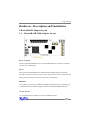
Port1 to Port6
These represent RocketRAID 3560’s 6 Internal Mini-SAS ports. Each port can direct
connect up to 4 hard drives.
Port7
This represents RocketRAID 3560’s additional External Mini-SAS port. With the
automatic port selection funtion, Port7 can be used when Port1 has no disks attached
during power up,this port can direct connect up to 4 hard drives.
DIMM1
The connector represents one DDR2-533 DIMM socket that allows for upgrading up
to 2GB of memory. By default,it supports 1GB of ECC DDR533 SDRAM memory.
A1-A6, F1-F6
A1-A6 are Disk Activity LED’s; F1-F6 are Disk Faliture LED’s.
11
Congratulations
J1
This jumper supports SAF-TE interface(I2C).
J2
LCD connector for LCD Panel and Push Button
Pins defined as follow:
12
Congratulations
J3 (BBU connector)
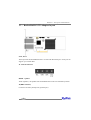
Connector for battery backup unit (optional part).
BEEP1 – Speaker
Alarm (speaker): the speaker emits and audible alarm in the case of disk/array failure.
Ethernet Port
Ethernet port(J4) for Out of Bound Manegement, support Net Time Protocol.
Cable – Internal Mini-SAS to SATA
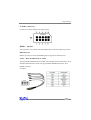
The integrated RocketRAID 3560 includes 6 Internal Mini-SAS to SATA cables, each
of the RocketRAID 3560’s cables can support SGPIO SideBand Connector. Pins
defined as follows:
As follows:
13
Congratulations
1.2 – RocketRAID 3530/3540 Adapter layout
RocketRAID 3530
RocketRAID 3540
Port1-4
These represent the RocketRAID 3530/3540’s Internal Mini-SAS ports. Each port can
support up to 4 SATA hard disks. The RR3530 is 3 Mini-SAS ports, and can support
up to 12 disks. The RR3540 is 4 Mini-SAS ports, and can support up to 16 hard disks.
A1-A4/F1-F4
LED connections. “A” refers to the disk activity connectors, and those marked “F”
function as disk failure connectors
Note: The RocketRAID 3530 supports 12 disks, and only provides 3 LED connectors
for each function (A1-A3 ,F1-F3).
14
Congratulations
Connectors A1-A4 provides LED support for Drive Activity, while connectors F1-F4
indicates Drive Failure.
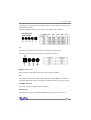
ACT LED and Fail LED have 5 pins while we just explain 4 pin’s function.
J4
This jumper is the SAF-TE interface port (for disk enclosures/chassis)
SAF-TE jumper has 4 pins while we just explain 3 pin’s function.
BEEP1 -(alarm/speaker)
the speaker emits and audible alarm in the case of disk/array failure.
J17
This jumper can be used to enable or disable the card’s alarm (BEEP1). The alarm is
enabled by default (the jumper is attached). To disable the alarm, remove the jumper
J18 (BBU connector)
Connector for battery backup unit (optional part).
Ethernet Port
Ethernet port (U32) for Out of Band Management, support Net Time Protocol.
15
Hardware – Description and Installation
1.3 – RocketRAID 3522 Adapter layout
Port1, Port2
These represent the RocketRAID 3522’s two External Mini-SAS ports. Each port can
support up to 4 hard disks.
J1 - SAF-TE connector
BEEP1 – Speaker
Alarm (speaker): the speaker emits and audible alarm in the case of disk/array failure.
J8 (BBU connector)
Connector for battery backup unit (optional part).
16
Hardware – Description and Installation
2 – Installing the RocketRAID Host Adapter
2.1 – Installing the RocketRAID 35xx Host Adapter
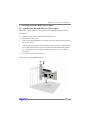
Note: Make sure the system is powered-off before installing the RocketRAID 35xx
host adapter.
1.
2.
Open the system chassis and locate an unused PCI-E x8.
Remove the PCI slot cover.
3.
Gently insert the RocketRAID 35xx into the PCI-E slot, and secure the bracket to
the system chassis.
After installing the adapter, attach the Mini-SAS connectors to the RocketRAID
35xx’s Mini-SAS port,and to chassis backplane. Each Mini-SAS cable supports
up to 4 hard disk drives. Consult the chassis’s manual for proper installation
procedures.
Close and secure the system chassis.
4.
5.
(illustration shows RocketRAID 3560)
17
Hardware – Description and Installation
2.2 .– Installing the HighPoint Ethernet Board for RocketRAID 3522
Host Adapter
1.
Installing the HighPoint Ethernet Board – the following illustration shows the
HighPoint Ethernet Board
U1 is the RJ45 connector. J1 is connector for connecting the HighPoint Ethernet
Board to the RocketRAID Host Adapter. If you want to use the Ethernet functions,
connect the HighPoint Ethernet Board to the RocketRAID Host Adapter via connectors J24 through J1, and secure the two boards to the bracket. If you do not want to
use the Ethernet function, secure the RocketRAID Host Adapter to the bracket.
2.
Illustration shows RocketRAID 3522 host adapter with Ethernet Board installing
.
18
Hardware – Description and Installation
3 - Verifying Installation
Once the RocketRAID host adapter and hard drives have been installed into the
.
chassis, boot-up the system to verify that the hardware is properly recognized.
1.
Power on the system. If the system detects the presence of the adapter, the
RocketRAID BIOS Utility will be displayed during bootup.
2.
Press Ctrl+H to access the RocketRAID adapter’s BIOS Utility.
The BIOS Utility will display information about hard disks attached to the adapter.
Make sure all attached disks are detected by this utility. If any of the hard disks are
not detected, power down the system and check the power and cable connections
4 - Battery Backup
A battery backup option is available as an optional add-on component. The battery
provides additional data security in case of a critical system failure. Data normally lost
during a major system fault, such as a power outage or CPU failure, which was in
transit at the time of the failure (stored in the card’s onboard cache), will remain viable
for up to 72 hours. The battery unit can be attached to the card using the BBU CONN.
Attach the BBU to the RocketRAID 35xx, using the cable included with the BBU unit:
(illustration shows the RocketRAID 3560)
19
RocketRAID BIOS Utility
RocketRAID BIOS Utility
The RocketRAID 35xx card will display it’s BIOS screen during the system’s boot
process.
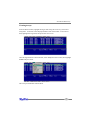
Press Control + H when prompted, to access the BIOS settings Menu.
1 - BIOS Settings Overview
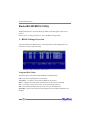
The RocketRAID 35xx BIOS utility is an interface that provides management commands and controller related settings.
Using the BIOS Utility
The following keys utilized by the RocketRAID 35xx BIOS utility:
F10 – press F10 to highlight the tool bar Menu.
Arrow keys – use these to move between different menu items
Enter – Open the selected toolbar command/execute the selected command.
Esc – move back to the previous menu, cancel the selected operation.
Tab – Switch between Disk and Array menus, move to next Menu item.
Space Bar – select an item (when selecting Block Size for a RAID configuration, for
example).
20
RocketRAID BIOS Utility
BIOS Menu Shortcuts
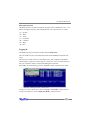
The BIOS interface can also be navigated using key stroke combinations (Alt +” X”).
When viewing the interface, letters highlighted in “red” represent the “X” values:
“S” – System
“D” – Disk
“A” – Array
“C” – Controller
“W” – Window
“H” – Help
“X” - Exit
Logging In
The BIOS Utility has two interface modes: User and Supervisor
The User mode can only view information about the RocketRAID card, disks and
arrays.
The Supervisor mode is used to create/delete arrays, and configure RocketRAID
related settings. Supervisor mode requires a password – this is the same password
that you will need in order to use the Web Management interface.
Press F10 – this should bring you to the “System” toolbar command. Press Enter.
To log on as a User, use the arrow keys to highlight “User mode”, and press Enter.
To log on as Supervisor, select “Supervisor Mode”:, and press Enter.
21
RocketRAID BIOS Utility
You will be asked to enter the Supervisor password.
The default password is “hpt”.
BIOS Commands
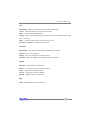
System
User/Supervisor modes – interface modes
Change password - for Supervisor mode
Exit the utility – quit and exit the RocketRAID BIOS utility
Disk
Information – displays information about the select hard disks
Initialize – initialize the selected disks (required in order to use new hard disks for
creating RAID arrays, disk replacement, or configuring spare disks.
Toggle Spare – configure spare disks.
Unplug – remove the selected disks (hot-swap)
Turn on write cache – enable write cache for the selected disks
Turn off write cache – disable write cache for the selected disks
Rescan – prompts the RocketRAID card to scan for new hard disks.
22
RocketRAID BIOS Utility
Array
Information – displays information about the selected RAID array
Create – Create a RAID array using the selected disks
Delete – Delete the selected RAID array
Unplug – Remove the selected RAID array (safe removal of disk members of the target
array - hot-swap)
Verify – Verify the selected array (checks for parity errors)
Start Task – End Task – Stop/Pause current task
Controller
Information – View information about the RocketRAID host adapter
Eventlog – View event log entries
Setting – View and configure host adapter settings
Network – View and configure host adapter network configuration
Window
Maximize – enlarge the selected Window
Restore – restore Windows sizes to default setting
1.Disk – toggle/select the Disk Window
2.Array – toggle/select the Array Window
Refresh – updates on screen information
Help
About – BIOS utility/Company information
23
RocketRAID BIOS Utility
2 - Creating RAID Arrays
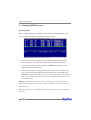
Initializing Disks:
Before creating a RAID array, the disks must be initialized. Disk initialization writes
necessary RAID configuration information to the hard disks.
1.
From the Disk window, highlight the target disks using the arrow keys, then
select using Enter. A numeral will be displayed before each selected disk.
2.
Once all target disks have been selected, select Disk from the tool bar, then
highlight Initialize and press Enter.
3.
The utility will display a warning, and ask you to press Y (yes) to initialize, or N
(no) to cancel. Once initialized, these disks can be used to create RAID arrays.
Warning: Initialization will destroy all pre- existing data on the selected hard
disks. Only initialize disks that do not contain critical data. Disks only need to
be initialized once.
Warning: Initialization will destroy all pre- existing data on the selected hard
disks. Only initialize disks that do not contain critical data. Disks only need to be
initialized once.
Disks do not have to be re-initialized after an array is deleted, or before creating a
new array.
24
RocketRAID BIOS Utility
Creating Arrays:
From the Disk window, highlight the target disks using the arrow keys, then select
using Enter. A numeral will be displayed before each selected disk. To de-select a
disk, highlight the target disk, and press Enter once more.
Once all target disks have been selected, select Array from the tool bar, then highlight
Create and press Enter.
This will open the RAID creation Menu.
25
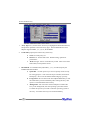
RocketRAID BIOS Utility
1.
Array Type: First, use the Tab or arrow keys to highlight the desired RAID level,
and press the Spacebar to select the Array Type. The RocketRAID 35xx host
adapters support RAID 0, 1, 3, 5, 6, 10, 50 and JBOD.
2.
Cache Policy: Specify the Cache Policy of the array.
a.
b.
c.
3.
None: No cache policy set
Write-back – utilizes disk cache. Default setting, optimal for
performance.
Write-through – data is written directly to disk. More secure than
Write-back, but will perform slower.
Init Method – For redundant arrays (RAID 0,1, 3, 5, 6, 10 and 50) specify the
RAID Initialization method.
a.
b.
c.
26
Quick init – use this option if you want to quickly create an array
for testing purposes. This will clear all previous data, and will not
build parity. Do not use this method if data integrity is priority.
Foreground – this will instruct the host adapter BIOS utility to start
the initialization process immediately after creating the array. This
option is recommended for data security.
Background – this will instruct the host adapter to initialize the
array in the background, after the operating system has booted.
Consider this option if you need to install an operating system to
the array – this allows the array to be used immediately.
RocketRAID BIOS Utility
4.
Name: Use the Tab or arrow keys and highlight Name. This feature allows you to
name an array for reference. This is an optional setting. Press Enter to use the
default name, or type in the desired name, and press Enter.
5.
Capacity (GB): The adapter will display the full available capacity by default. If
you want to specify the size of the array, type in the desired capacity (in
Gigabytes), and press Enter. Specifying the capacity allows you to create
multiple arrays using the same set of disks. Any free disk space can be used to
create additional arrays, or used as a Spare disk (if the available capacity meets
the requirement – see 5 - Maintaining Arrays – Spare Disks, for more
information).
6.
Block Size – This option allows you to specify the block size (also known as
“stripe size”) for specific array types (RAID 0, 1,3, 5, 6, 10 and 50). You can
specify block sizes ranging from 16(KB) to 1024(KB). This allows you to tailor the
array for specific applications. A balanced block size of 64 (in KB) is recommended for most applications.
7. Create / Cancel – Use Tab or arrow keys to highlight the Create or Cancel
options, and press Enter. Selecting Cancel will stop the creation process.
Selecting Create will create an array based on your selections, and open the
Sector Size window.
27
RocketRAID BIOS Utility
8.
Sector Size – Also known as VSS (Variable Sector Size), this option allows you to
specify the sector size of the array, for use With Windows operating systems.
Older, 32-bit versions of Windows do not support volumes over 2TB in size,
unless the sector size is altered. This option is not needed for Windows XP 64,
Win2003 (SP1), Windows 2008, or Windows Vista. These operating systems
support larger volumes, and introduce a partitioning method known as GPT
(GUID Partition table). Use GPT when creating arrays over 2TB in size. For
Windows 2000, or 32-bit versions of XP, refer to the following chart:
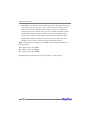
512B – Default sector size (supports up to 2TB). Use this setting for Windows OS
that support GPT.
1K – Supports arrays up to 4TB
2K – Supports arrays up to 8TB
4K – Supports arrays up to 16TB
Highlight the appropriate Sector Size, and press Enter to create the array.
28
RocketRAID BIOS Utility
3 – Deleting Arrays
From the Array window, highlight the target array and press Enter. Highlight Array
from the toolbar.
Select Delete and press Enter. The utility will display a warning message. Press Y
(yes) to delete the array, or select N (no) to cancel.
Warning: all data stored on the array will be lost – do not delete if the array
contains critical data.
29
RocketRAID BIOS Utility
4 – Monitoring the Host Adapter, Arrays and Devices
The BIOS Settings Utility allows the Administrator to check the status of the
RocketRAID host adapter, and any devices (hard disks), and arrays hosted by the
adapter.
Disk/Array Status
To check the status of any disk or array, use Tab to select the Disk or Array Windows,
highlight the target disk/array and press enter.
Array Information – this will display the array’s Name, RAID type, Block size, Sector
size, member hard disks, and status.
Disk Information – this will display the disk Model Number, serial number, firmware
revision, capacity, and various disk related settings (NCQ, TCQ, Read Ahead, Write
Cache, and Staggered Drive spinup mode).
Alternately, highlight the target disk/array, then highlight either Disk or Array from
the tool bar, select Information, and press Enter.
30
RocketRAID BIOS Utility
Controller Information
Highlight Controller from the toolbar, select Information, and press Enter.
Array Information – this will display the array’s Name, RAID type, Block size, Sector
size, member hard disks, and status.
This option will display information about the host adapter’s model (Product ID), PCIE bus location, IO Processor model, memory, firmware revision, serial number, and the
status of the BBU (battery backup unit).
Event Log
The RocketRAID host adapter automatically generates Event Log entries during the
case of routine administration (creating arrays), or in the case of a critical error (disk or
array failure).
Highlight Controller from the toolbar, select Event Log, and press Enter.
31
RocketRAID BIOS Utility
Use this option to view Event Log information, including Errors (disk or array
failure), Warnings (problems such as disk sector or Smart issues) and Information
(such as the creation or deletion of arrays).
You can filter displayed events by using Tab to highlight the Information, Warning,
and Error options towards the top of the window. Enable or disable these filter
options using the Spacebar.
Use the Clear option to delete all Event Log entries. Use the Prev and Next option to
scroll through log entries. Select Cancel (or press Esc) to exit the window.
32
RocketRAID BIOS Utility
5 – Maintaining Arrays
The BIOS Settings Utility provides several RAID and device related maintenance
functions, including device and controller settings, Network Configuration settings
(for managing the host adapter, remotely), and rebuilding broken/degraded RAID
arrays.
Network Settings
This option allows the Administrator to configure Network Settings for use with the
RocketRAID host adapter’s Out-of-Band (OOB), and In-Band (IB) Management
functions.
Highlight Controller from the toolbar, select Network, and press Enter.
This option will display information about the host adapter’s network settings. By
default, these settings are configured automatically, based on information provided
by the local network. To manually configure these settings, use the Tab or arrow keys
and highlight Use automatic config, and press the Spacebar. Type in the appropriate
network settings, highlight OK, and press Enter.
33
RocketRAID BIOS Utility
Controller Settings
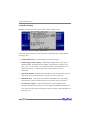
Highlight Controller from the toolbar, select Settings and press Enter.
Use the tab and arrow keys to select each item, and the Spacebar to enable/disable
the target option.
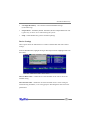
•
Enable Audible Alarm – enables/disables card’s alarm (beeper)
•
Enable Staggered drive spinup – enable/disable staggered drive spin-up. Disabled by default. If enabled, the host adapter will spin disks in sequence (one
disk, every “x#” of seconds – enter the desired value). Some hard disks do not
support this setting – consult the hard disk’s documentation for more
information.
•
Spin down idle disk – If enabled, the host adapter will power down idle (inactive)
disks/arrays based on the allotted time. Specify the value (in minutes)
•
Rebuild Priority – This option is provided for redundant arrays. This setting
determines the priority of rebuilding arrays in regards to other system tasks.
•
Provide INT13 support – enable or disable INT13 (the host adapter’s boot
function). Disabling this setting may resolve motherboard BIOS related issues in
cases where the card cannot be loaded into memory properly (option ROM/out of
memory errors).
34
RocketRAID BIOS Utility
•
Use Single BCV Entry – also related to motherboard BIOS settings
(troubleshooting)
•
Stop on Error – Enabled by default. If disabled, the host adapter BIOS menu will
bypass array or device errors when booting the system.
•
NCQ – enable/disable NCQ (native command queuing)
Device Settings
These options allow the administrator to enable or disable hard disk cache related
settings.
From the Disk Window, highlight the target disk and press Enter. Highlight Disk from
the toolbar:
Turn on Write cache – enables the use of the hard disk cache. This is the recommended setting
Turn off write cache – disable the use of the hard disk cache. Use this setting for
troubleshooting hard disks, or for testing purposes. Disabling disk cache will lower
performance
35
RocketRAID BIOS Utility
Spare Disks
Spare Disks are used to automatically rebuild Redundant RAID arrays in the case of
disk failure. As with creating RAID arrays, disks must be initialized before they can be
used as spares. To set a hard disk to act as a Spare Disk, switch to the Disk window,
use the arrow keys to select the target disk from the list of initialized disks, and press
Enter.
Highlight Disk from the toolbar, then select Toggle Spare, and press Enter.
To remove a spare, follow the same procedure. From the Disk window, select the
target Spare disk and press Enter. Highlight Disk from the toolbar, select Toggle
Spare and press Enter.
36
RocketRAID BIOS Utility
Generally, single disks are designated to act as spares (disks that are not configured
into RAID arrays).
However, in some instances, disks that are members of RAID arrays may also be
assigned to act as a spare disk. If the disks in question are part of a RAID array that
did not utilize the full available capacity at the time of creation, these disks may be
used as spares. For example: a RAID 0 array was created between two 200GB hard
disks, but only 200GB of space (out of a grand total of 400GB), was assigned to that
array. In this example, 200GB of disk space remains unallocated. This unallocated
space allows these disks to be set as spares for a separate redundant array that meets
the capacity requirement (200GB or less).
Verifying Arrays
Routine RAID verification is essential for maintaining the integrity of data stored on
redundant RAID arrays. The RocketRAID BIOS utility allows you to manually verify
RAID arrays.
From the Array window, highlight the target array and press Enter. Highlight Array
from the toolbar, select Verify, and press Enter.
Progress will be displayed towards the lower right-hand corner of the screen (percent
complete).
To stop or pause the verification process, select Stop Task from the same menu. To
continue the verification process, select Start Task.
37
RocketRAID BIOS Utility
6 – Additional Functions and Settings
Set Boot
Highlight the target array from the Array window and press Enter. Highlight Array
from the toolbar:
Note: Use this option to set an array to act as the boot device. The selected array
will act as the boot “disk”, if the motherboard’s BIOS instructs the card to act as
the system’s boot device.
Hot-Swap
The BIOS utility provides several options that allow the administrator to add or
remove disks and arrays, without powering down the system.
Adding/removing Disks
To prepare a disk for removal, first highlight the target disk using the Disk window
and press Enter. Highlight Disk from the toolbar, select Unplug, and press Enter.
38
RocketRAID BIOS Utility
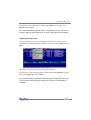
To add a disk, install the hard disk, then highlight Disk from the toolbar, select
Rescan, and press Enter.
Note: After installing the disk into the hot-swap capable drive bay, wait several
seconds to allow the disk to fully power on, before using the Rescan command.
Adding/removing Arrays
To prepare a RAID array for removal, highlight the target array using the Array
window and press Enter. Highlight Array from the toolbar, select Unplug, and press
Enter.
The interface will notify you when the disk can be removed.
To add an array, install all of the RAID hard disks, then highlight Window from the
toolbar. Select Refresh, and press Enter.
Note: After installing the hard disks into the hot-swap capable drive bays, wait
several seconds to allow the disks to fully power on, before using the Rescan
command.
39
RocketRAID BIOS Utility
Window Menu
The Window menu provides several view options.
•
•
•
•
•
Maximize – enlarge viewing area of the selected window (Disk or Array)
Minimize – reduce the viewing area of the selected window)
Disk – selects the Disk window
Array – selects the Array window
Refresh – scans for any hardware changes (used when adding arrays or disks to
the card)
40
HighPoint RAID Management and Device Driver CD
HighPoint RAID Management and Device
Driver CD
Each retail box includes a copy of the HighPoint Products Software CD.
This CD can be used to generate driver diskettes, and install the HighPoint RAID
Management Utility Suite for a variety of operating systems.
1 - Creating a driver diskette
Windows 2000, 2003 and several distributions of Linux and FreeBSD require driver
diskettes when installing the operating system directly to a disk or array hosted by
the Rocket RAID host adapter.
To create a driver floppy diskette:
1.
Insert the CD into the system’s CD/DVD drive. The program should start
automatically.
2.
3.
4.
Insert a blank floppy diskette into the system’s floppy drive.
Click on “Create Driver Diskette”.
Click on the “Please Select a Product” drop-down button, and select the appropriate host adapter model from the list.
Click on the “Please Select the Diskette you want to create” drop-down button,
and select the desired operating system from the list.
Click on the “OK” button to create the driver diskette.
5.
6.
41
HighPoint RAID Management and Device Driver CD
2 - Device Driver Installation
We recommend visiting the RocketRAID download page for the latest Windows
Device Driver updates:
you can access below website:
http://www.highpoint-tech.cn/China/biosc.htm
Then, RocketRAID controllers are represented,you can press relevant Link to access
Product Driver.
Drivers are posted in .zip archive format. Most Windows operating systems will
recognize this archive format, natively. Double click the driver download to view and
extract their contents. Drivers can be extracted and/or copied to various media.
42
HighPoint RAID Management and Device Driver CD
Windows Driver Installation (Win2000, XP, Win 2003)
Before installing the RocketRAID 35xx host adapter’s device driver, make sure the
host adapter and all required hard disks have been installed into the system’s chassis/
disk enclosure. If you are working with a supplied driver, or driver download, you will
want to extract the contents directly to a directory of your choice (or device). You will
need to browse to this location, in order to load the driver (see step 2, below).
Installing the RocketRAID 35xx driver for an existing Windows system.
After the operating system has booted, Windows will automatically detect the
RocketRAID 35xx host adapter, and request that a device driver be installed. To install
the device driver, follow the steps outlined below:
1.
When the “Found New Hardware Wizard” window appears, select “Install from
a list or specific location (Advanced)”, and click Next to continue.
2.
Click on the “Include this location in the search” option, and select the system’s
floppy drive (generally Disk A). Next, insert the Driver Installation diskette into
the system’s floppy drive, or select Browse, and browse to the location of the
driver. If you are using the RocketRAID 35xx software CD, the drivers are
located in RR3xxx_4xxx – Windows –Driver– Windows (then select the
appropriate folder).
3.
Windows may display a warning message that states the driver has “not been
signed”. Select “Continue Anyway”, then click Finish when prompted. When
windows asks to reboot the system, choose No.
4.
emove the Driver Installation diskette from the floppy drive, then Shut down and
restart the computer.
43
HighPoint RAID Management and Device Driver CD
Installation Verification
After the driver has been installed, and the system has been restarted:
1.
Click the Start button, then right-click the “My Computer” icon. Select the
Properties item from the pop up menu.
2.
In the popup window, click the “Hardware” tab then click Device Manager
button.
3.
Double click the “SCSI and RAID controllers” entry. If the RocketRAID 35xx
device entry is not displayed, or there are “?” or “!” marks displayed near the
RocketRAID 35xx entry, the driver has not been installed properly. Delete the
entries and reinstall the driver.
Installing the RocketRAID driver during a fresh Windows installation
1.
After booting from the Windows CD or DVD-ROM, when the Windows Setup
blue screen appears, look towards the bottom of the screen. Windows will prompt
you to press the F6 key if you want to install a third party SCSI or RAID driver.
Press the F6 key at this time.
2.
The setup procedure will continue, and will later instruct you to press the “S”
key to specify additional adapters. Press the “S” key as instructed.
3.
Next, the setup program will prompt for the insertion of the driver diskette. Please
insert the driver diskette, and then press ENTER to continue.
4.
The next window will display several driver options. Please select the driver for
the corresponding operating system, and press ENTER to continue.
44
HighPoint RAID Management and Device Driver CD
Windows Vista/2008 Driver Installation
Installing the driver during a fresh Windows Vista/2008 installation
1.
Boot from Windows Vista DVD.
2.
When the screen “where do you want to install Windows” appears, click “Load
driver” and browse for the driver location. Windows Vista will accept install
drivers from various sources: floppy diskette, USB flash disk or CD. If you are
using the RocketRAID 35xx software CD, the drivers are located in
RR3xxx_4xxx – Windows-Driver – VistaWin2008 – 32 (or 64, if you are
running a 64-bit version of the operating system).
3.
Select the RocketRAID 35xx controller driver, and click “Next”.
4.
The driver is now installed – you can now commence with the standard OS
installation procedures.
Installing the driver for an existing Windows Vista/2008 system
1.
Intall the RocketRAID 35xx host adapter into the PC, then boot up Windows.
2.
Windows should automatically detect the card, and display the “Found New
Hardware” wizard pop-up window. Select “Locate and install driver software”.
When Windows asks: “Windows needs your permission to continue”, select
“continue”.
3.
Select “I don’t have disc, show me other options” and then select “Browse my
computer for driver software”.
4.
Specify the location of the driver and click “Next. If you are using the
RocketRAID 35xx software CD, the drivers are located in RR3xxx_4xxx –
Windows-Driver – VistaWin2008 – 32 (or 64, if you are running a 64-bit
version of the operating system).
5.
When asked: “Would you like to install this driver software?” select “Install”.
6.
Reboot the system when prompted. The RocketRAID 35xx will be available for
use after Windows reboots.
45
HighPoint RAID Management and Device Driver CD
Installation Verification
After the driver has been installed, and the system has been restarted:
1.
Click the Start button, then right-click My Computer icon. Select the Properties
item from the popup menu.
2.
In the popup window, select Hardware tab and then click Device Manager
button.
3.
Double click the “Storage Controllers” entry. If the RocketRAID 35xx device
entry is not displayed, or there are “?” or “!” marks displayed near the
RocketRAID 35xx entry, the driver has not been installed properly. Delete the
entries and reinstall the driver.
46
HighPoint RAID Management and Device Driver CD
Linux and FreeBSD Device Driver installation
The RocketRAID 35xx host adapter is fully GPL compliant, and is natively support by
Linux kernel 2.6.25x. Linux distributions that utilize this kernel (and all later releases)
will automatically recognize the host adapter, and do not require driver installation.
In addition, binary and source driver updates are routinely posted for a variety of
older Linux operating systems including past versions of Red Hat Enterprise, CentOS,
OpenSuSE, and Fedora Core.
Drivers are also available for several FreeBSD revisions, and are available from the
same support page:
you can access below website:
http://www.highpoint-tech.com/USA/bios.htm
Then,RocketRAID controllers are represented,you can press relevant Link to access
Product Driver.
Several driver sets are included with the RocketRAID 35xx Software CD.
Each binary driver and source package includes an installation guide (.pdf format).
47
HighPoint RAID Management and Device Driver CD
Linux Driver sets:
RR3xxx_4xxx/Linux directory.
FreeBSD Driver sets:
RR3xxx_4xxx/FreeBSDdirectory.
3 - HighPoint RAID Management Utilities (HRM)
The HighPoint RAID Management Utility Suite, also known as “HRM”, includes
several user interface options. The latest version of the Web Management utility user
manual, is available from our website.
Windows Operating Systems – Installing the Web-based Management Utility
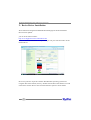
Click on “Install RAID Management Software”.
Select the desired software from the drop down menu, and click on the “OK” button.
48
HighPoint RAID Management and Device Driver CD
Red Hat Enterprise/CentOS, Fedora Core, Open SuSE – Installing
the Web-based Management utility
Linux operating systems that support .rpm packages, allow you to double-click the
HighPoint Web RAID Management .rpm file to start the installation process.
1.
Copy the Web RAID Management package from the RocketRAID 35xx Software
CD, to the desktop of the Linux operating system. The .rpm file is located in
HighPoint RAID Management Software – RR3xxx_4xxx - Linux – WebGui-Linux.
tbz.
2.
Extract the .tbz file to the desktop, and browse to the appropriate .rpm file (there
are 32 and 64-bit options).
3.
Double click the .rpm file – this should open the operating systems’ software
installer. Enter the Administrative password when prompted and proceed with
installation.
4.
The package can also be installed manually, using a terminal. Lon in as “root”,
open a terminal, and browse to the location of the .rpm file. Run the following
command:
5.
# rpm -i hptsvr-https-1.4-8.i386.rpm (or hptsvr-https-1.4-8.x86_64.rpm)
Note: The i386 rpm package can also work on 64-bit systems if you have 32-bit
runtime libraries installed. If you use the x86_64 rpm package, please make sure the
controller driver has 64-bit ioctl support.
49
HighPoint RAID Management and Device Driver CD
Debian/Ubuntu Linux Distributions – Installing the Web-based
Management Utility
For Debian/Ubuntu Linux distributions, you can use alien to convert the rpm packages to a .deb package, then use “dpkg -i” command to install each package. Some
script files may be lost during the conversion process from rpm to .deb, so you may
need to make manual corrections.
The following files will be installed/configured:
/usr/bin/hptsvr
/etc/hptcfg
/etc/rc.d/init.d/hptdaemon
/usr/share/hpt/webguiroot
- service program
- service config file
- service control script
- data files
If there is no /etc/hptcfg present, you can add it manually using by using the “echo”
command on the driver file name to /etc/hptcfg.
For example:
# echo hptiop.ko >/etc/hptcfg
Uninstalling the Utility
Open a terminal, and use the following command:
# rpm -e hptsvr-https
Linux Distributions – Command Line Interface (CLI)
Command Line interface versions of the RocketRAID management utilities are
available for Linux and FreeBSD operating systems.
These packages are posted on the HighPoint Technologies, Inc. website, under the
BIOS & Driver downloads page for the RocketRAID 35xx.
50
HighPoint RAID Management and Device Driver CD
Mac OS X Driver and Web-based RAID Management Utility
The driver and software packages for the RocketRAID 35xx includes both the device
driver for OS X, and a copy of the Web RAID Management utility.
Please check http://www.hptmac.com for the latest software/driver packages.
Driver updates are posted on the card’s product page, under the “Download Center”
section.
The latest package is posted towards the right-hand side of the page, under “Mac
Driver”. On the left-hand side of the page, there is a section devoted to user
documentation. The latest versions of the Product, and Web-based RAID Management Manuals are posted here.
51
HighPoint RAID Management and Device Driver CD
Mac OS X Driver and RAID Management Installation
The driver and software packages for the RocketRAID35xx includes both the device
driver for OS X, and a copy of the Web RAID Management utility. Copy the Mac
driver and software package from the Software CD, to the Mac Desktop. Open the .
dmg file, and double click “rr3xxx_4xxx” to begin installation.
Click “Continue” to proceed with installation
52
HighPoint RAID Management and Device Driver CD
Select the installation destination:
Click “Continue”
Click “Restart” – after OS X reboots, the card will be recognized by the system. Configure arrays using the Web RAID Management interface. User guides for the Web interface are available from http://www.hptmac.com. Check the product page for the
RocketRAID 35xx, and click on the “Download Center” link.
If the users have more requirements to boot from the Host Adapter,please performing
below step.
53
HighPoint RAID Management and Device Driver CD
Configure the cards to support booting OS X, fo Mac Pro systems
Updating the Rocket RAID Firmware – EFI
For RocketRAID 35xx and 4xxx host adapters
1) Log into RAID Management Utility (Web GUI). Open a web browser (such as Safari
or Firefox) and enter the following URL: http://localhost:7402
2) Once connected click on the Access URL – this will open the log in screen.
3) Type in the User name and Password, then click “OK”. The default Username is
RAID, while the default Password is hpt.
4) After successfully logging in, the Web GUI will display the Manage – Array screen.
Select Manage – Device from the menu, and scroll to the bottom of this page and
locate the Update Firmware function.
5) Click on the Browse button, and browse to the location of the EFI firmware update.
The EFI firmware is the second file included with Driver and Firmware download (see
step 3).
54
HighPoint RAID Management and Device Driver CD
6) Select the firmware update (.blf file) and click the Submit button. The interface will
notify you when the update is complete. Exit the Web GUI and reboot OS X.
Cloning the boot volume to a RAID Array
1) After flashing the EFI firmware update, download Carbon Copy Cloner. Carbon
Copy Cloner is a free disk imaging utility that can be used to duplicate the system’s
current boot volume, to a disk or RAID array attached to the RocketRAID card. http://
www.bombich.com/software/ccc.html
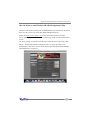
2) Clone OS disk to disk on RAID array
55
HighPoint RAID Management and Device Driver CD
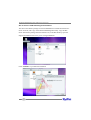
3) Start Carbon Copy Cloner. For the Source disk, select the current Mac OS X boot
drive. For the Target disk, select a disk or array attached to the RocketRAID host
adapter.
56
HighPoint RAID Management and Device Driver CD
4) Once the Source and Target disks have been selected, click Clone to start the
duplication process. The utility will display a progress bar and notify you when the
copy procedure is complete.
Change the boot volume
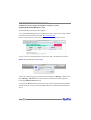
1) After cloning the boot volume, open the System Preferences window and select
“Startup Disk”.
57
HighPoint RAID Management and Device Driver CD
2) Set the RAID array or disk attached to the RocketRAID card as the startup disk,
and click “Restart”.
3) You can also select the boot volume using the Alt key, after powering up the Mac
system. This command will display available boot volumes.
58
Customer Support
Customer Support
If you encounter any problems while utilizing the RocketRAID host adapter, or have
any questions about this or any other HighPoint product, feel free to contact our
Customer Support Department.
Troubleshooting Checklist
Before contacting our Customer Support department:
•
•
Make sure the latest BIOS, driver and HighPoint RAID Management software has beein installed for the host adapter. The latest updates are available
from our website.
Prepare a list of the computer system’s hardware and software (motherboard,
CPU, memory, other PCI-E devices/host adapters, operating system,
applications)
Contact Information
E-mail address: [email protected]
Phone: 408-240-6119
9:00AM-5:00PM, Pacific Standard Time
59
Customer Support
Contact Us
HighPoint Corporate Headquarter USA
Address 1161 Cadillac Ct.
Milpitas, CA, 95035
Website: http://www.highpoint-tech.com
Phone: 1-408-942-5800 (9 am ~ 6 pm PST, M-F) Fax: 1-408-942-5801
E-mail: [email protected]
Support: [email protected]
Support Phone: 1-408-240-6108 (9 am ~ 5 pm PST, M-F)
HighPoint Taiwan
5F., No.3, Swei Lane , Jhongjheng Rd.
Sindian City, Taipei County 231, Taiwan (R.O.C.)
Website: http://www.highpoint-tech.com/Taiwan/indextw.htm
Phone: + 886-2-2218-3435 (9 am ~ 6 pm)
Fax: + 886-2-2218-3436
E-mail:[email protected]
Support: [email protected]
HighPoint China
4th Floor Kehaifulin Building, N0. 12
Zhong Guan Cun South Rd.
Haidian District Beijing, China 100081
Website: http://www.highpoint-tech.cn/
Phone: + 86-10-6213-0920 (9 am ~ 6 pm)
Fax: + 86-10-6897-5074
E-mail: [email protected]
Support: [email protected]
60
Customer Support
FCC Part 15 Class B Radio Frequency Interference
statement
This equipment has been tested and found to comply with the limits for a Class B
digital device, pursuant to part 15 of the FCC Rules. These limits are designed to
provide reasonable protection against harmful interference in a residential installation.
This equipment generates, uses and can radiate radio frequency energy and, if not
installed and used in accordance with the instructions, may cause harmful interference to radio communications. However, there is no guarantee that interference will
not occur in a particular installation. If this equipment does cause harmful interference to radio or television reception, which can be determined by turning the equipment off and on, the user is encouraged to try to correct the interference by one or
more of the following measures:
Reorient or relocate the receiving antenna.
Increase the separation between the equipment and receiver.
Connect the equipment into an outlet on a circuit different from that to which the
receiver is connected.
Consult the dealer or an experienced radio/TV technician for help.
Modifications not expressly approved by the manufacturer could void the user’s
authority to operate the equipment under FCC rules.
This device complies with part 15 of the FCC Rules. Operation is subject to the
following two conditions: (1) this device may not cause harmful interference, and (2)
this device must accept any interference received, including interference that may
cause undesired operation.
European Union Compliance Statement
This Information Technologies Equipment has been tested and found to comply
with the following European directives:
European Standard EN55022 (1998) Class B
European Standard EN55024 (1998)
61
Customer Support
Thank You
Thank you for purchasing the RocketRAID 35xx SAS/SATAII RAID Host adapter. We
appreciate your support, and welcome any questions, comments or product suggestions you may have.
62