1
Contents
About Your New Label Maker ......................................................5
Product Registration............................................................................ 5
Getting Started ..........................................................................5
Connecting the Power ............................................................................. 5
Inserting the Battery Pack ................................................................... 6
Recharging the Battery Pack ............................................................... 6
Inserting the Label Cassette .................................................................... 7
Using the Label Maker for the First Time ......................................8
Getting to Know the Label Maker ................................................9
Power ...................................................................................................... 9
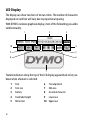
LCD Display ............................................................................................ 10
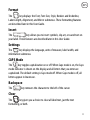
Format .................................................................................................. 11
Insert ..................................................................................................... 11
Settings ................................................................................................. 11
CAPS Mode ............................................................................................ 11
Backspace .............................................................................................. 11
Clear ...................................................................................................... 11
Navigation Keys .................................................................................... 12
Cancel ................................................................................................... 12
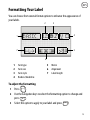
Formatting Your Label .............................................................. 13
Font Type .............................................................................................. 14
Font Size ................................................................................................ 14
Font Styles ............................................................................................ 15
Adding Borders and Underline Styles .................................................... 15
Using Mirror Text ................................................................................... 16
2