1
Switching On
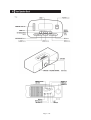
1.To turn the Speaker Dock on, press the STANDBY button.
2.To turn the Speaker Dock off, press the STANDBY button again.
DON’T FORGET! Ensure the ON/OFF Switch is in the On position before turning the Speaker
Dock on.
Adjusting the Volume
1.To increase the volume, rotate the VOLUME CONTROL clockwise.
2. To decrease the volume, rotate the VOLUME CONTROL anti-clockwise.
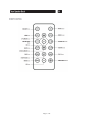
3. You can also press the MUTE button to turn the sound off. To turn the sound back on, press the
MUTE button again, or rotate the VOLUME CONTROL clockwise.
Preset equaliser
The range of the sound can be adjusted to suit the different types of music that you are listening to,
by changing the preset equaliser settings. The available settings are:
• Jazz
• Pop
• Rock
• Classic
• Bass
1.Press the EQ button to select the setting which sounds best.
Modes
The iPod Speaker Dock has three modes of operation. These are:
• iPod
• Tuner
• Aux
Brightness
1.Press the BRIGHTNESS button on the remote control repeatedly to cycle through the 4 display
brightness settings.
Page 8 of 16