1
Add, Display Picture Tag Line
Add Picture Tag Line
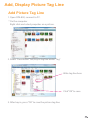
1. Open DPA-800, connect to PC.
* On the computer
Right click and select propeties on a picture.
2. Select “Describtion” tab, key in tag line under “Tag”
Write tag line here
Click “OK” to save
3. After key in, press “OK” to save the picture tag line.