1
PM45_manual.qxd
11/02/2009
11:38
Page 2
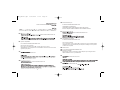
Powering the mouse on/off
The mouse will automatically switch itself on when you insert new batteries. To
save battery power when not using the mouse, press the power button on the
underside and hold for for 3-5 seconds.To restart the mouse press the button
once.
The mouse LED flashes blue to indicate the batteries are running down. When
this happens replace the batteries.
SAITEK M80X WIRELESS NOTEBOOK MOUSE
System Compatibility
PC running Windows XP/XP64/Vista/Mac OS X
Installation
k
ite
Sa
2
1
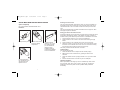
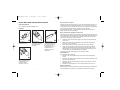
Unclip the battery cover.
Slide the cover back to
expose the battery
compartment.
k
ite
Sa
4
Insert the batteries in
the compartment in the
direction shown and
replace the cover.
2
3
Insert the wireless
receiver in one of your
PC’s USB ports. With
your PC switched on,
follow the device
installation wizard to
complete the installation
of the new USB device.
Pairing your mouse and wireless receiver
All wireless notebook mice and receivers are "paired" with each other and should
work together automatically. However, if the wireless connection is broken for
whatever reason, please follow the process below to re-establish the connection.
1. Plug the wireless receiver in to one of your PC's USB ports.
2. Press the button on the receiver for two seconds so that the green light
flashes.
3. Press the button on the underside of the mouse once (short press).
4. Wait for the mouse to connect to the receiver. If the connection fails, press
the button on the underside of the mouse once more to continue scanning
(the connection will normally be made on the first press).
The whole process should take less than 10 seconds.
Troubleshooting
If the mouse does not work:
1 Check the batteries have not expired and are inserted properly.
2 Make sure the mouse is switched on by pressing the button on the
underside.
3 Check the wireless receiver is properly inserted in one of your PC’s USB
ports.
4 Insert the wireless receiver in another of your PC’s USB ports.
Important Information
Some experts believe that using any mouse or trackball may cause serious
injury to hands, wrists, arms, neck, or back. If you feel pain, numbness, or
weakness in these areas, please consult a qualified health professional
immediately.
3