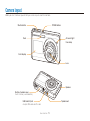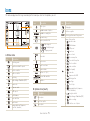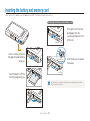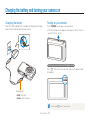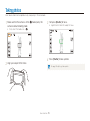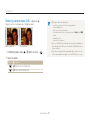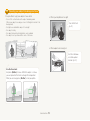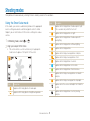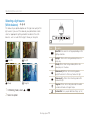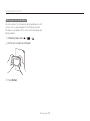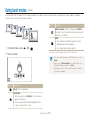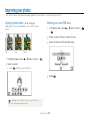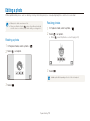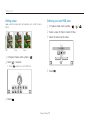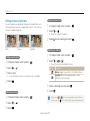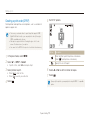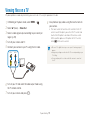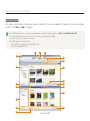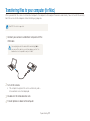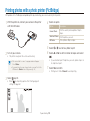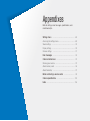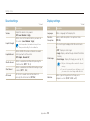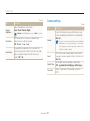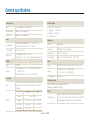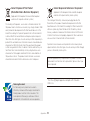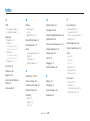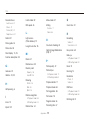
1
This user manual includes detailed usage instructions for your camera. Please read this manual thoroughly. Click a topic Common questions User Manual ST500/ST510 Quick reference Contents Basic functions Extended functions Shooting options Playback/Editing Appendixes Index Health and safety information Always comply with the following precautions and usage tips to avoid dangerous situations and ensure peak performance of your camera. Prevent damage to subjects’ eyesight Warning—situations that could cause injury to yourself or others Do not use the flash in close proximity (closer than 1 m/3 ft) to people or animals. Using the flash too close to your subject’s eyes can cause temporary or permanent damage. Caution—situations that could cause damage to your camera or other equipment Handle and dispose of batteries and chargers with care Note—notes, usage tips, or additional information t Use only Samsung-approved batteries and chargers. Incompatible batteries and chargers can cause serious injuries or damage to your camera. t Never dispose of batteries in a fire. Follow all local regulations when disposing of used batteries. t Never place batteries or cameras on or in heating devices, such as microwave ovens, stoves, or radiators. Batteries may explode when overheated. Safety warnings Do not use your camera near flammable or explosive gases and liquids Do not use your camera near fuels, combustibles, or flammable chemicals. Do not store or carry flammable liquids, gases, or explosive materials in the same compartment as the camera or its accessories. Safety precautions Keep your camera away from small children and pets Handle and store your camera carefully and sensibly Keep your camera and all accessories out of the reach of small children and animals. Small parts may cause choking or serious injury if swallowed. Moving parts and accessories may present physical dangers as well. t Do not allow your camera to get wet—liquids can cause serious damage. Do not handle your camera with wet hands. Water damage to your camera can void your manufacturer’s warranty. 1 Health and safety information Protect batteries, chargers, and memory cards from damage • Do not expose the camera to direct sunlight or high temperatures for an extended period of time. Prolonged exposure to sunlight or extreme temperatures can cause permanent damage to your camera’s internal components. • Avoid using or storing your camera in dusty, dirty, humid, or poorly-ventilated areas to prevent damage to moving parts and internal components. • Remove the batteries from your camera when storing it for an extended period of time. Installed batteries may leak or corrode over time and cause serious damage to your camera. • Protect your camera from sand and dirt when using it on beaches or in other similar areas. • Protect your camera and monitor from impact, rough handling, and excessive vibration to avoid serious damage. • Exercise caution when connecting cables or adapters and installing batteries and memory cards. Forcing the connectors, improperly connecting cables, or improperly installing batteries and memory cards can damage ports, connectors, and accessories. • Do not insert foreign objects into any of your camera’s compartments, slots, or access points. Damage due to improper use may not be covered by your warranty. • Avoid exposing batteries or memory cards to very cold or very hot temperatures (below 0º C/32º F or above 40º C/104º F). Extreme temperatures can reduce the charging capacity of your batteries and can cause memory cards to malfunction. • Prevent batteries from making contact with metal objects, as this can create a connection between the + and – terminals of your battery and lead to temporary or permanent battery damage. • Prevent memory cards from making contact with liquids, dirt, or foreign substances. If dirty, wipe the memory card clean with a soft cloth before inserting in your camera. • Do not allow liquids, dirt, or foreign substances to come in contact with the memory card slot. Doing so may cause the camera to malfunction. • Turn off the camera when inserting or removing the memory card. • Do not bend, drop, or subject memory cards to heavy impact or pressure. • Do not use memory cards that have been formatted by other cameras or by a computer. Reformat the memory card with your camera. • Never use a damaged charger, battery, or memory card. 2 Health and safety information Use only Samsung-approved accessories Exercise caution when using the camera in humid environments Using incompatible accessories may damage your camera, cause injury, or void your warranty. When transferring the camera from a cold environment to a warm and humid one, condensation can form on the delicate electronic circuitry and memory card. In this situation, wait for at least 1 hour until all moisture has evaporated before using the camera. Protect your camera’s lens t Do not expose the lens to direct sunlight, as this may discolour the image sensor or cause it to malfunction. t Protect your lens from fingerprints and scratches. Clean your lens with a soft, clean, debris-free lens cloth. Check that the camera is operating properly before use The manufacturer takes no responsibility for any loss of files or damage that may result from camera malfunction or improper use. Important usage information Allow only qualified personnel to service your camera Do not allow unqualified personnel to service the camera or attempt to service the camera yourself. Any damage that results from unqualified service is not covered by your warranty. Ensure maximum battery and charger life t Overcharging batteries may shorten battery life. After charging is finished, disconnect the cable from your camera. t Over time, unused batteries will discharge and must be recharged before use. t Disconnect chargers from power sources when not in use. t Use batteries only for their intended purpose. 3 Organisation of the user manual Basic functions ©2009 SAMSUNG DIGITAL IMAGING CO., LTD. 11 Learn about your camera’s layout, icons, and basic functions for shooting. Camera specifications or contents of this manual may be changed without prior notice due to upgrade of camera functions. Extended functions 30 Learn how to take a photo by selecting a mode and how to record a video or voice memo. Copyright information Shooting options t Microsoft Windows and the Windows logo are registered trademarks of the Microsoft Corporation. t Mac is a registered trademark of the Apple Corporation. Learn about the options you can set in Shooting mode. Playback/Editing 40 62 Learn how to play back photos, videos, or voice memos and edit photos or videos. Also, learn how to connect your camera to your photo printer, TV, or HDTV. Appendixes Refer to settings, error messages, specifications, and maintenance tips. 4 88 Indications used in this manual Icons used in this manual Shooting mode Indication Smart Auto S Icon Additional information Auto a Safety warnings and precautions Program p Scene s [ ] Camera buttons; for example: [Shutter] (represents the shutter button) DUAL IS d ( ) Page number of related information Movie v The order of options or menus you must select to perform a step; for example: Select > (represents Select >, and then ) * Annotation Shooting mode icons Function These icons indicate that a function is available in the corresponding modes. The s mode may not support functions for all scenes. e.g.) Abbreviations used in this manual Available in the Program, DUAL IS, and Movie modes 5 Abbreviation Definition ACB Auto Contrast Balance AEB Auto Exposure Bracket AF Auto Focus DIS Digital Image Stabilisation DPOF Digital Print Order Format EV Exposure Value OIS Optical Image Stabilisation WB White Balance Expressions used in this manual Pressing the shutter Exposure (Brightness) t Half-press [Shutter]: press the shutter halfway down t Press [Shutter]: press the shutter all the way down The amount of light that enters your camera determines the exposure. You can alter the exposure with shutter speed, aperture value, and ISO speed. By altering the exposure, your photos will be darker or lighter. Half-press [Shutter] Press [Shutter] Normal exposure Subject, background, and composition t Subject: the main object of a scene, such as a person, animal, or still life t Background: the objects around the subject t Composition: the combination of a subject and background Subject Composition Background 6 Overexposure (too bright) Common questions You can get answers to common questions. Solve problems easily by setting shooting options. The subject's eyes appear red. This is caused by a reflection from the camera flash. t Set the flash option to Red-eye or Red-eye Fix. (p. 45) Red-eye Fix in the edit menu. (p. 77) t If the photo has already been taken, select Photos have dust spots. Dust particles floating in the air may be captured in photos when using the flash. t Turn off the flash or avoid taking photos in a dusty place. t Set ISO speed options. (p. 46) Photos are blurred. This may be caused by taking photos in low light conditions or holding the camera incorrectly. t Use the d mode. (p. 36) t Press [Shutter] halfway down to make sure the subject is focused. (p. 28) Photos are blurred when As the camera tries to let in more light, the shutter speed slows. shooting at night. This can make it difficult to steady the camera and may result in camera shake. t Turn on the flash. (p. 45) t Select Night in the s mode. (p. 35) t Set ISO speed options. (p. 46) t Use a tripod to prevent your camera from shaking. Subjects come out too dark because of backlighting. When the light source is behind the subject or when there is a high contrast between the light and dark areas, the subject may come out shaded. t Avoid shooting in front of the sun. t Select Backlight in the s mode. (p. 32) t Set the flash option to Fill in. (p. 45) t Set the Auto Contrast Balance (ACB) option. (p. 55) t Adjust the exposure. (p. 54) Spot if a bright subject is in the centre of the frame. (p. 56) t Set the metering option to 7 Quick reference Taking photos of people t s mode > Beauty Shot, Portrait, Children f 32 t Red-eye, Red-eye Fix (to prevent or correct red-eye) f 45 t Face Detection f 50 Taking photos at night or in the dark t s mode > Night, Dawn, Fireworks f 32 t Flash options f 45 t ISO speed (to adjust the sensitivity to light) f 46 Taking action photos t Continuous, Motion Capture f 59 Taking photos of text, insects, or flowers t s mode > Close Up, Text f 32 Adjusting the exposure (brightness) t ISO speed (to adjust the sensitivity to light) f 46 t EV (to adjust exposure) f 54 t ACB (to compensate for subjects against bright backgrounds) f 55 t Metering f 56 t AEB (to take 3 photos of the same scene with different exposures) f 59 Applying a different effect t Photo styles (to apply tones) f 60 t Image adjustment (to adjust saturation, sharpness, or contrast) f 61 Reducing camera shake t Optical Image Stabilisation (OIS) f 27 t d mode f 36 t Macro, Auto Macro, Super Macro (to take close-up photos) f 47 t White Balance (to change the colour tone) f 57 8 t Viewing files by category in Smart Album f 66 t Deleting all files on the memory card f 68 t Viewing files as a slide show f 70 t Viewing files on a TV f 79 t Connecting your camera to a computer f 80 t Adjusting sound and volume f 90 t Changing the display language f 90 t Adjusting the brightness of the display f 91 t Setting the date and time f 91 t Formatting the memory card f 91 t Troubleshooting f 99 Contents Using the DUAL IS mode ..................................................... Using the Program mode ..................................................... Taking a self-portrait shot ...................................................... Recording a video ............................................................... Recording voice memos ................................................... Recording a voice memo ..................................................... Adding a voice memo to a photo .......................................... Basic functions ...................................................................... 11 Unpacking ......................................................................... Camera layout ................................................................... Icons ................................................................................. Inserting the battery and memory card .............................. Charging the battery and turning your camera on ............. Charging the battery ............................................................ Turning on your camera ........................................................ Performing the initial setup ................................................ Using the touch screen ..................................................... Selecting a shooting mode ................................................ Selecting a shooting mode using motion recognition .............. Setting the dual displays and sound .................................. Setting the front display ........................................................ Setting the display type for the touch screen .......................... Setting the touch vibration or sound ...................................... Taking photos .................................................................... Zooming ............................................................................. Reducing camera shake (OIS) .............................................. Tips for getting a clearer photo .......................................... 12 13 15 16 17 17 17 18 19 21 22 23 23 24 24 25 26 27 28 Shooting options ................................................................... 40 Selecting a resolution and quality ...................................... Selecting a resolution ........................................................... Selecting image quality ........................................................ Using the timer .................................................................. Shooting in the dark .......................................................... Preventing red-eye .............................................................. Using the flash .................................................................... Adjusting the ISO speed ...................................................... Changing the camera’s focus ............................................ Using macro ....................................................................... Using auto focus ................................................................. Using smart touch focus ...................................................... Using one touch shooting .................................................... Adjusting the focus area ....................................................... Using face detection ......................................................... Detecting faces ................................................................... Taking a smile shot .............................................................. Detecting eye blinking .......................................................... Using smart face recognition ................................................ Registering faces as your favourites (My Star) ......................... Extended functions .............................................................. 30 Shooting modes ................................................................ Using the Smart Auto mode ................................................. Using the Scene mode ........................................................ Using the Beauty Shot mode ................................................ Using the frame guide .......................................................... Using the Children mode ..................................................... Adjusting the exposure in the Night mode .............................. 36 36 37 37 39 39 39 31 31 32 33 34 34 35 9 41 41 42 43 45 45 45 46 47 47 47 48 49 49 50 50 51 51 52 53 Contents Adjusting brightness and colour ........................................ Adjusting the exposure manually (EV) .................................... Compensating for backlighting (ACB) .................................... Changing the metering option ............................................... Selecting a light source (White balance) ................................. Using burst modes ............................................................ Improving your photos ...................................................... Applying photo styles ........................................................... Defining your own RGB tone ................................................ Adjusting your photos .......................................................... 54 54 55 56 57 59 60 60 60 61 Transferring files to your computer (for Windows) .............. Transferring files using Intelli-studio ........................................ Transferring files by connecting the camera as a removable disk .................................................................................... Disconnecting the camera (for Windows XP) .......................... Transferring files to your computer (for Mac) ...................... Printing photos with a photo printer (PictBridge) ............... 83 84 85 86 Appendixes ............................................................................ 88 Settings menu ................................................................... 89 Accessing the settings menu ................................................ 89 Sound settings .................................................................... 90 Display settings ................................................................... 90 Camera settings .................................................................. 91 Error messages ................................................................. 94 Camera maintenance ........................................................ 95 Cleaning your camera .......................................................... 95 About memory cards ........................................................... 96 About the battery ................................................................. 97 Before contacting a service centre .................................... 99 Camera specifications ..................................................... 102 Index ............................................................................... 106 Playback/Editing ................................................................... 62 Playing back ...................................................................... Starting Playback mode ....................................................... Viewing photos ................................................................... Playing a video .................................................................... Playing a voice memo .......................................................... Editing a photo .................................................................. Rotating a photo .................................................................. Resizing photos .................................................................. Editing colour ...................................................................... Defining your own RGB tone ................................................ Applying a special effect ...................................................... Correcting exposure problems ............................................. Editing photos of portraits ..................................................... Creating a print order (DPOF) ................................................ Viewing files on a TV ......................................................... 80 81 63 63 69 71 72 74 74 74 75 75 76 76 77 78 79 10 Basic functions Learn about your camera’s layout, icons, and basic functions for shooting. Unpacking …………………………………… 12 Camera layout ……………………………… 13 Icons …………………………………………… 15 Inserting the battery and memory card … 16 Charging the battery and turning your camera on …………………………………… 17 Charging the battery …………………………… 17 Turning on your camera ……………………… 17 Performing the initial setup ………………… 18 Using the touch screen …………………… 19 Selecting a shooting mode ………………… 21 Selecting a shooting mode using motion recognition ……………………………………… 22 Setting the dual displays and sound ……… Setting the front display ……………………… Setting the display type for the touch screen … Setting the touch vibration or sound ………… 23 23 24 24 Taking photos ………………………………… 25 Zooming ……………………………………… 26 Reducing camera shake (OIS) ………………… 27 Tips for getting a clearer photo …………… 28 Unpacking Check your product box for the following items. Optional accessories Camera AC adapter/ USB cable Rechargeable battery Camera case Touch pen Strap User Manual CD-ROM Memory card (microSDTM) The illustrations may differ from your actual items. A/V cable Quick Start Manual Basic functions 12 Camera layout Before you start, familiarise yourself with your camera's parts and their functions. Shutter button POWER button Flash AF-assist light/ timer lamp Front display Lens Speaker Battery chamber cover Insert a memory card and battery Tripod mount USB and A/V port Accepts USB cable and A/V cable Basic functions 13 Camera layout Status lamp t Blinking: When saving a photo or video, being read by a computer or printer, or out of focus t Steady: When connecting to a computer or in focus Microphone Zoom button t Zoom in or out t Zoom in on part of a photo or view files as thumbnails 1 2 Main display* * Referred to “Touch screen” in this manual Playback button Basic functions 14 Icons The icons displayed will change according to the mode you select or the options you set. Icon Description Icon Photo styles A Display type Available number of photos Available recording time Internal memory Motion recognition M Shooting options and settings menu Memory card inserted t t t B A. Status icons Icon p : Fully charged : Partially charged : Charging needed Zoom ratio Description Shooting mode Voice memo Aperture and shutter speed Auto focus frame Photo resolution Camera shake Video resolution Option set 1 (of 3) Metering Current date and time Optical Image Stabilisation (OIS) Grid lines Frame rate Exposure value ISO speed White balance Face detection B. Option icons (touch) Icon Description Flash option Burst mode Auto focus option Image adjustment (sharpness, contrast, saturation) Timer option Basic functions Description f Image setting options t : Exposure value t : White balance t : ISO speed t : Face tone t : Face retouch t : Focus area option t : Face detection option t : Photo resolution t : Video resolution t : Photo quality t : Frame rate t : Exposure with ACB t : Metering option t : Burst type t : Photo styles t : Image adjustment (sharpness, contrast, saturation) t : Long time shutter t : Optical Image Stabilisation (OIS) t : Audio recording t <>: Another row of options 15 Inserting the battery and memory card Learn to insert the battery and an optional microSDTM memory card into the camera. Removing the battery and memory card Push gently until the card disengages from the camera and then pull it out of the slot. Memory card Insert a memory card with the gold-coloured contacts facing up. Battery lock Push the lock up to release the battery. Battery Insert the battery with the Samsung logo facing up. The internal memory can be used as a temporary storage device when the memory card is not inserted. Basic functions 16 Charging the battery and turning your camera on Charging the battery Turning on your camera Attach the USB cable to the AC adapter and then plug the end of cable with the indicator light into your camera. Press [POWER] to turn your camera on or off. t The initial setup screen appears when you turn on the camera for the first time. (p. 18) Turning on your camera in Playback mode Press [P]. The camera turns on and accesses Playback mode immediately. Indicator light t Red: Charging t Green: Fully charged Press and hold [P] to mute camera sounds. Basic functions 17 Performing the initial setup The initial setup screen appears to allow you to configure the camera's basic settings. 1 Select Language. 2 3 4 Select a language. Select Time Zone (Time Zone). Select a time zone and select . t To set the daylight-saving time, select 6 Set the date and time, select a date format, and select . 7 8 Select Calibration. Tap the target on the screen with your touch pen. . Calibration Tap directly in the centre of the target for optimal performance. 5 Select Date & Time (Date & Time). 9 Basic functions Select 18 to switch to the Shooting mode. Using the touch screen Learn basic actions to use the touch screen. Use the supplied touch pen to touch or drag on the screen. Do not use other sharp objects, such as pens or pencils, to touch the screen. Doing so may damage the screen. Touching Touch an icon to select a menu or option. t When you touch or drag on the screen, discolourations will occur. It is not a malfunction but a characteristic of the touch screen. Touch or drag lightly to reduce these annoying effects. t The touch screen may not recognise your touches correctly when: - you touch multiple items at the same time - you use the camera in high humidity environments - you use the camera with an LCD protection film or another LCD accessory t If you touch the screen with your finger, the screen may not recognise your input. t If you perform no operations for few seconds, the screen will dim to save battery life. Dragging Drag left or right to scroll horizontally. EV -2 Basic functions 19 -1 0 +1 +2 Using the touch screen Using gestures Perform certain functions by drawing commands on the touch screen. Gesture Description Draw a horizontal bar to right or left to view the next or previous file. Draw an X to delete a photo. Draw a circle to rotate a photo. Draw a diagonal to move the enlarged photo. Basic functions 20 Selecting a shooting mode Learn how to select a shooting mode. Your camera provides you with various modes for shooting. 1 2 Select the mode icon. Mode Select a mode. Basic functions 21 Description S Smart Auto: Take a photo by letting the camera select a scene mode as it detects. (p. 31) a Auto: Take a photo quickly and easily with minimal settings. (p. 25) p Program: Take a photo by setting options. (p. 36) s Scene: Take a photo with options preset for a specific scene. (p. 32) d DUAL IS: Take a photo with options suitable for reducing camera shake. (p. 36) v Movie: Record a video. (p. 37) Selecting a shooting mode Selecting a shooting mode using motion recognition Your camera features a built-in motion sensor that allows you to quickly switch the shooting mode by tilting the camera. In Shooting mode, tilt the camera while touching and holding . Access the Movie mode (p. 37) Access the Smart Auto mode (p. 31) Motion recognition may not work well if you hold the camera parallel to the ground, as shown below. Access the Program mode (p. 36) Basic functions 22 Setting the dual displays and sound Learn how to change the basic settings for the front display and touch screen according to your preferences. Setting the front display Set the front display to display shooting options, such as macro or flash options. You can also inform your subject to pose for a photo. 1 2 In Shooting mode, select Front Display. Select an option. Front Display Option t Your camera will not remember your option setting once you turn off the camera. Set options for the front display when you turn on your camera. t If the camera is subjected to a strong impact, the front display may turn on or off. t The front display will not be available in the v and modes or when you connect the camera to a TV. t When you set front display or timer options, the front display will remain active. t After tapping the front display or setting front display or timer options, the date and time will not be shown. t The front display will help you to take photos conveniently when: - you take a self-portrait shot (p. 37) - you use the timer options (p. 43) - you take photos of children (p. 34) t When using camera buttons or touch icons, the front display will not be active. t When you use the camera in brightly lit or sunny areas, you may not be able to see the front display clearly. t If you take photos using the front display, the actual photo may appear slightly different than what you compose. Main Display Description Off: Deactivate the display of the shutter or function information. On: Activate the front display Function Info: Display the flash and macro options. Shutter Info: Display graphics for your subject to inform your subject to pose for a photo when you half-press [Shutter]. Basic functions 23 Setting the dual displays and sound Setting the display type for the touch screen Setting the touch vibration or sound 1 In Shooting mode, select (In Playback mode, select Set whether your camera vibrates or emits a specified sound when you touch on the screen. 2 Select an option. Front Display Main Display. .) 1 2 In Shooting or Playback mode, select M. Select Main Display Haptic&Sound. Volume : Medium Haptic Strength Off Haptic&Sound Haptic Shutter Sound Sound Start Sound All 1/2 Option Description 3 Full: Display the name of an option when you select an icon. Select an option. Basic: Display icons without the name of an option. This option is available only in Playback mode. Hide: Hide icons on the screen if you perform no operations for 3 seconds (touch the screen to display icons again). Guide Line: Display grid lines. The grid lines are helpful for getting the photo aligned with a surface, such as the horizon or the edges of buildings. This option is available only in Shooting mode. 4 Basic functions Option Description Off The camera will neither vibrate nor sound. Haptic The camera will vibrate. Sound The camera will sound. All The camera will vibrate and sound simultaneously. Select 24 to return to the previous mode. Taking photos Learn basic actions to take photos easily and quickly in the Auto mode. 1 Make sure that the camera is in the a mode (Auto), the camera’s default shooting mode. 3 Half-press [Shutter] to focus. t A green frame means the subject in focus. t If not, select the mode icon a. F3.5 1/30s 2 4 Press [Shutter] to take a photo. Align your subject in the frame. See page 28 for tips to get clearer photos. Basic functions 25 Taking photos Digital zoom Zooming You can shoot close-up photos by adjusting the zoom. Your camera has a 4.6X optical zoom and 5X digital zoom. By using both, you can zoom in up to 23 times. If the zoom indicator is in the digital range, your camera is using the digital zoom. The picture quality may deteriorate when you use the digital zoom. Push [Zoom] right to zoom in on your subject. Push [Zoom] left to zoom out. Zoom indicator Zoom ratio Digital range Optical range Zoom out Zoom in t The digital zoom is not available when using S, d, s (in some scenes), and v modes and when used with Face Detection. t It may take longer to save a photo when using the digital zoom. The zoom ratio available for videos differs. Basic functions 26 Taking photos Reducing camera shake (OIS) apsv t OIS may not function properly when: - you move your camera to follow a moving subject - you use digital zoom - there is too much camera shake - the shutter speed is slow (e.g., when you select Night in the s mode) - the battery is low - you take a close-up shot t If you use the OIS function with a tripod, your images may be blurred by the vibration of the OIS sensor. Deactivate the OIS function when you use a tripod. t If the camera is impacted, the display will be blurry. In this case, turn off the camera and turn it on again to use the OIS function correctly. Reduce camera shake optically in Shooting mode. Before correction 1 2 After correction In Shooting mode, select f > (once or twice) . Select an option. Option Description Off: Deactivate the OIS function. On: Activate the OIS function. Basic functions 27 Tips for getting a clearer photo Holding your camera correctly Reducing camera shake t Set the Optical Image Stabilisation option to reduce camera shake optically. (p. 27) t Select the d mode to reduce camera shake both optically and digitally. (p. 36) Make sure nothing is blocking the lens. When h is displayed Half-pressing the shutter button F3.5 1/30s Half-press [Shutter] and adjust the focus. Focus and exposure will be adjusted automatically. F3.5 1/30s Camera shake The aperture value and shutter speed are automatically set. Focus frame t Press [Shutter] to take the photo if displayed in green. t Change the frame and half-press [Shutter] again if displayed in red. Basic functions When shooting in the dark, avoid setting the flash option to Slow Sync or Off. The aperture remains open longer and it may be harder to hold the camera still. t Use a tripod or set the flash option to Fill in. (p. 45) t Set ISO speed options. (p. 46) 28 Preventing your subject from being out of focus It may be difficult to get your subject in focus when: - there is little contrast between the subject and background - t When you take photos in low light (When your subject is wearing a colour of clothing that is similar to the background) the light source behind the subject is too bright the subject is shiny the subject includes horizontal patterns, such as blinds the subject is not positioned in the centre of the frame Turn on the flash. (p. 45) t When subjects are moving fast Use the continuous or motion capture function. (p. 59) Use the focus lock Half-press [Shutter] to focus. When the subject is in focus, you can reposition the frame to change the composition. When you are ready, press [Shutter] to take your photo. Basic functions 29 Extended functions Learn how to take a photo by selecting a mode and how to record a video or voice memo. Shooting modes …………………………………………… 31 Using the Smart Auto mode ……………………………… Using the Scene mode ……………………………………… Using the Beauty Shot mode ……………………………… Using the frame guide ……………………………………… Using the Children mode …………………………………… Adjusting the exposure in the Night mode ………………… Using the DUAL IS mode …………………………………… Using the Program mode …………………………………… Taking a self-portrait shot …………………………………… Recording a video …………………………………………… 31 32 33 34 34 35 36 36 37 37 Recording voice memos ………………………………… 39 Recording a voice memo …………………………………… 39 Adding a voice memo to a photo ………………………… 39 Shooting modes Take photos or record videos by selecting the best shooting mode for the conditions. Using the Smart Auto mode Icon In this mode, your camera automatically chooses the appropriate camera settings based on a detected type of scene. It will be helpful if you are not familiar with the camera settings for various scenes. 1 2 Description Appears when taking photos of landscapes at night. This is available only when the flash is off. Appears when taking portraits at night. Appears when taking photos of landscapes with backlighting. In Shooting mode, select a S. Appears when taking portraits with backlighting. Align your subject in the frame. Appears when taking portraits. t The camera selects a scene automatically. An appropriate mode icon will appear at the top left of the screen. Appears when taking close-up photos of objects. Appears when taking close-up photos of text. Appears when taking photos of sunsets. Appears when taking photos of clear skies. Appears when taking photos of forested areas. Appears when taking close-up photos of colourful subjects. Appears when taking close-up portraits of people. Icon Description Appears when the camera and subject are stable for a while. Appears when taking photos of landscapes. Appears when taking photos of actively moving subjects. Appears when taking photos of bright backgrounds. Extended functions 31 Shooting modes 3 4 2 Half-press [Shutter] to focus. This mode allows you to choose an appropriate scene for a variety of situations. Press [Shutter] to take the photo. Scene t If the camera does not recognise a proper scene mode, S will not change and the default settings will be used. t Even if there is a face detected, the camera may not select a portrait mode depending on the subject's position or lighting. t The camera may not select the correct scene depending on shooting environments, such as camera shake, lighting and distance to the subject. t Even if you use a tripod, the mode may not be detected depending on the subject's movement. t For the Beauty Shot mode, see “Using the Beauty Shot mode” on page 33. t For the Frame Guide mode, see “Using the frame guide” on page 34. t For the Night mode, see “Adjusting the exposure in the Night mode” on page 35. t For the Children mode, see “Using the Children mode” on page 34. Using the Scene mode Take a photo with options preset for a specific scene. 1 Select a scene. In Shooting mode, select a s. 3 Align your subject in the frame and half-press [Shutter] to focus. 4 Press [Shutter] to take the photo. Extended functions 32 Shooting modes 3 Using the Beauty Shot mode Take a photo of a person with options to hide facial imperfections. 1 2 In Shooting mode, select a s To hide facial imperfections, select f option. an t Select a higher setting to hide a greater number of imperfections. . To make the subject's skin tone appear lighter (face only), select f an option. t Select a higher setting to make skin tone appear lighter. Level 2 Level 2 4 Align your subject in the frame and half-press [Shutter] to focus. 5 Press [Shutter] to take the photo. The focus distance will be set to Auto Macro. Extended functions 33 Shooting modes Using the frame guide Using the Children mode When you want another person to take a photo of you, you can compose the scene with the frame guide feature. The frame guide will help the other person take a photo of you by showing the part of the pre-composed scene. In this mode, you can draw children’s attention to the camera by showing a short animation on the front display. 1 2 In Shooting mode, select a s 1 In Shooting mode, select a s . t An animation will play. t If the front display is turned off, tap the front display to turn it on. . Align your subject in the frame and press [Shutter]. t Transparent guides will appear on the left and right of the frame. Cancel Frame: Back 3 4 2 3 Ask another person to take a photo. Align your subject in the frame and half-press [Shutter]. Press [Shutter] to take the photo. t The person must align the subject in the frame by using the guides, and then press [Shutter] to take the photo. To cancel the guides, select You can download animations from the website. Visit www.samsung.com or www.samsungcamera.com for more information. . Extended functions 34 Shooting modes 4 Adjusting the exposure in the Night mode Select f In the Night mode, you can catch brief flashes of light as curved streaks by extending the exposure. Use a slow shutter speed to extend the time until the shutter closes. Increase the aperture value to prevent overexposure. 1 2 In Shooting mode, select a s Select f Shutter Speed Aperture . 1.0 2.0 4.0 8.0 16.0 Aperture. Aperture Shutter Speed 5 6 7 3 Shutter Speed. Select a value to adjust the shutter speed and select Align your subject in the frame and half-press [Shutter] to focus. Press [Shutter] to take the photo. Use a tripod to prevent your photos from blurring. Select an option. Extended functions 35 . Shooting modes Using the DUAL IS mode Using the Program mode Reduce camera shake and prevent blurred photos with Optical and Digital Image Stabilisation functions. Set various options (except for shutter speed and aperture value) in the Program mode. 1 2 Before correction 1 2 3 In Shooting mode, select a p. Set options. (For a list of options, refer to “Shooting options.”) After correction In Shooting mode, select a d. Align your subject in the frame and half-press [Shutter] to focus. Press [Shutter] to take the photo. t The digital zoom will not work in this mode. t The camera will correct photos optically only when you take them with a light source that is brighter than fluorescent light. t If your subject is moving rapidly, the photo may be blurry. t Set the Optical Image Stabilisation option to reduce camera shake in different shooting modes. (p. 27) 3 Align your subject in the frame and half-press [Shutter] to focus. 4 Press [Shutter] to take the photo. Extended functions 36 Shooting modes 4 Taking a self-portrait shot Take photos of yourself conveniently using the front display. 1 Half-press [Shutter] or select take another photo. In Shooting mode, tap the front display to turn it on. on the touch screen to t You can use this function when the front display option is set to . (p. 23) t If you use this function, you cannot set face detection options. t The focus frame to detect faces will not appear in the shooting mode that does not support face detection options. t You can tap the front display to turn it on or off. t Your camera will detect your face automatically and display a frame to indicate the detected face. t The camera automatically releases the shutter when it detects a smiling face. Recording a video Record videos of up to 20 minutes in length in high definition. The recorded video is saved as an H.264 (MPEG-4.AVC) file. t H.264 (MPEG-4 part10/AVC) is a high-compression video format established by international standard organisations ISO/IEC and ITU-T. t When the Optical Image Stabilisation ( ) is activated, your video may be recorded with the OIS operation sound. 2 3 Half-press [Shutter] to focus. Press [Shutter] to take the photo. 1 Extended functions In Shooting mode, select a v. 37 Shooting modes 2 Select f per second). a frame rate (the number of frames t As the number of frames increases, action appears more natural, but the file size is increased. 4 5 6 Set other options as desired. (For options, refer to “Shooting options.”) Press [Shutter] to start recording. Press [Shutter] again to stop recording. 30 FPS To pause recording The camera allows you to pause temporarily while recording a video. With this function, you can record your favourite scenes as a single video. Select to pause while recording. Select is available only when the video resolution is 320 x 240. 3 Select f > Option a sound option. Stop: Shutter Description Off: Record a video without sound. On: Record a video with sound. (While you are zooming, sound recording will be interrupted.) Extended functions 38 to resume. Recording voice memos apsd Learn how to record a voice memo that you can play back at any time. You can add a voice memo to a photo as a short reminder of shooting conditions. You will get the best sound quality when recording 40 cm away from the camera. Recording a voice memo 1 In Shooting mode, select f > Adding a voice memo to a photo 1 . In Shooting mode, select f > 3 4 Press [Shutter] to record. t Select to pause and to resume. t The available recording time will be displayed on the top of the screen. t You can record voice memos of up to 10 hours in length. 2 3 Align your subject in the frame and take a photo. t You will begin recording a voice memo right after taking the photo. Record a short voice memo (10 seconds maximum). t Press [Shutter] to stop recording a voice memo. Press [Shutter] to stop. Select . Memo Record 2 to switch to Shooting mode. Extended functions 39 Shooting options Learn about the options you can set in Shooting mode. Selecting a resolution and quality ………… 41 Selecting a resolution ………………………… 41 Selecting image quality ………………………… 42 Using the timer ……………………………… 43 Shooting in the dark ………………………… Preventing red-eye …………………………… Using the flash ………………………………… Adjusting the ISO speed ……………………… 45 45 45 46 Changing the camera’s focus ……………… Using macro …………………………………… Using auto focus ……………………………… Using smart touch focus ……………………… Using one touch shooting …………………… Adjusting the focus area ……………………… 47 47 47 48 49 49 Using face detection ………………………… Detecting faces ………………………………… Taking a smile shot …………………………… Detecting eye blinking ………………………… Using smart face recognition ………………… Registering faces as your favourites (My Star) 50 50 51 51 52 53 Adjusting brightness and colour ………… Adjusting the exposure manually (EV) ………… Compensating for backlighting (ACB) ………… Changing the metering option ………………… Selecting a light source (White balance) ……… 54 54 55 56 57 Using burst modes ………………………… 59 Improving your photos ……………………… Applying photo styles ………………………… Defining your own RGB tone ………………… Adjusting your photos ………………………… 60 60 60 61 Selecting a resolution and quality Learn how to change the image resolution and quality settings. Selecting a resolution Sapsdv Option Description As you increase the resolution, your photo or video will include more pixels, so it can be printed on larger paper or displayed on a larger screen. When you use a high resolution, the file size will also increase. 4000 X 3000: Print on A1 paper. When taking a photo: 3264 X 2448: Print on A3 paper. 1 In Shooting mode, select f > (In some modes, select f .) 2 Select an option. 3984 X 2656: Print on A2 paper in wide ratio (3:2). 3840 X 2160: Print on A2 paper in panorama ratio (16:9) or play back on an HDTV. 2560 X 1920: Print on A4 paper. . 2048 X 1536: Print on A5 paper. 1920 X 1080: Print on A5 paper in panorama ratio (16:9) or play back on an HDTV. 1024 X 768: Attach to an email. 3840 X 2160 Shooting options 41 Selecting a resolution and quality When recording a video: 1 2 In the v mode, select f Selecting image quality . Select an option. 1280 X 720 HQ Photos you take are compressed and saved in JPEG format. Higher quality images will result in larger sizes. 1 In Shooting mode, select f > (In some modes, select f .) 2 Select an option. Fine Option apsd Description 1280 X 720 HQ: Play back high-quality files on an HDTV. 1280 X 720: Play back on an HDTV. Option Description 640 X 480: Play back on a general TV. Super Fine 320 X 240: Post on a web page. Fine Normal Shooting options 42 . Using the timer Sapsdv Learn how to set the timer to delay shooting. 1 2 In Shooting mode, select 3 . Select an option. Press [Shutter] to start the timer. t The AF-assist light/timer lamp blinks. The camera will automatically take a photo at the specified time. t The front display will start the countdown a few seconds before shooting. Tap the front display to turn it on or off. Off Option Description Off: The timer is not active. 10 Sec: Take a photo in 10 seconds. 2 Sec: Take a photo in 2 seconds. Double: Take a photo in 10 seconds and take another in 2 seconds. 4 Half-press [Shutter] or select take another photo. Motion Timer: Detect your movement and then take a photo. (p. 44) t Select the timer icon or press [Shutter] to cancel the timer. t Depending on the selected face defection option, the timer is not available or some timer options are not available. The options may differ depending on the shooting mode. Shooting options on the touch screen to 43 Using the timer 5 Using the motion timer 1 2 3 4 In Shooting mode, select . Pose for your photo while the AF-assist light/timer lamp is blinking. t The AF-assist light/timer lamp will stop blinking just before the camera automatically takes a photo. Press [Shutter]. Stand within 3 m from the camera within 6 seconds after pressing [Shutter]. Make a motion, such as waving your arms, to activate the timer. t The AF-assist light/timer lamp will start to blink rapidly when the camera detects you. The motion timer may not work when: t you are more than 3 m away from the camera t your movements are too subtle t there is too much light or backlight The detection range of the motion timer Shooting options 44 Shooting in the dark Learn how to take photos at night or in low light conditions. Preventing red-eye Using the flash aps If the flash fires when you take a photo of a person in the dark, a red glow may appear in the eyes. To prevent this, select Red-eye or Red-eye Fix. Saps Use the flash when taking photos in the dark or when you need more light on your photos. 1 2 In Shooting mode, select . Select an option. Auto Option Description Off: t The flash will not fire. t Camera shake warning ( shooting in low light. ) will be displayed when Auto: The camera will select a proper flash setting for the detected scene in the S mode. Auto: The flash fires automatically when the subject or background is dark. Shooting options 45 Shooting in the dark Option Description Adjusting the ISO speed Red-eye*: t The flash fires when the subject or background is dark. t The camera reduces red-eyes. The ISO speed is the measure of a film’s sensitivity to light as defined by the International Organisation for Standardisation (ISO). The higher ISO speed you select, the more sensitive to light your camera becomes. With a higher ISO speed, you can get a better photo without using the flash. Fill in: t The flash always fires. t Light intensity is adjusted automatically. Slow Sync: t The flash fires and the shutter stays open longer. t Select this when you want to capture ambient light to reveal more details in the background. t Use a tripod to prevent your photos from blurring. 1 2 In Shooting mode, select f p . Select an option. t Select to use an appropriate ISO speed based on the brightness of the subject and lighting. Red-eye Fix*: t The flash fires when the subject or background is dark. t The camera corrects red-eyes through its advanced software analysis. Auto The options may differ depending on the shooting mode. * There is an interval between two bursts of the flash. Do not move until the flash fires a second time. The higher ISO speed you select, the more image noise you may get. t Flash options are not available if you set burst options or select Blink Detection. t Make sure that your subjects are within the recommended distance from the flash. (p. 102) t If there is reflected light or much dust in the air, tiny spots may appear on your photo. Shooting options 46 Changing the camera’s focus Learn how to adjust the camera's focus according to your subjects. Using macro Using auto focus apdv Use macro to take close-up photos of subjects, such as flowers or insects. Refer to macro options in “Using auto focus.” apdv To take sharp photos, select the appropriate focus according to your distance from the subject. 1 2 In Shooting mode, select . Select an option. Normal (AF) Option Description Normal (AF): Focus on a subject farther than 80 cm. Auto Macro: Focus on a subject farther than 5 cm (farther than 50 cm when using zoom). t Try to hold the camera very still to prevent blurry photos. t Turn off the flash if the distance to the subject is less than 40 cm. Macro: Focus on a subject 5 - 80 cm (50 - 80 cm when using zoom). Super Macro: Focus on a subject between 3 to 8 cm (unavailable when using zoom). The options may differ depending on the shooting mode. Shooting options 47 Changing the camera’s focus Using smart touch focus apsd t If you do not touch any area on the screen, the focus frame will appear in the centre of the screen. t Tracking a subject may fail when: - the subject is too small or the subject moves - the subject is backlit or you are shooting in a dark place - colours or patterns on the subject and the background are the same - the camera shakes excessively In these cases, the focus frame will appear as a white single-line frame. t If the camera fails to track the subject, you must reselect the subject to track. t If the camera fails to fix the focus, the focus frame will change to a red single-line frame. t If you use this function, you cannot set face detection and photo style options. Smart Touch AF allows you to track and auto focus on your subject, even when you are moving. 1 2 In Shooting mode, select f . Touch the subject you want to track in the touch area (indicated by a frame). t A focus frame will appear on the subject and will follow the subject as you move the camera. t The white frame means that your camera is tracking the subject. t The green frame means that your subject is in focus when you half-press [Shutter]. Shooting options 48 Changing the camera’s focus Using one touch shooting Adjusting the focus area apsd apsd You can focus on your subject and take a photo with a touch of your finger. You can get clearer photos by selecting an appropriate focus area according to your subject’s location in the scene. 1 2 3 1 2 In Shooting mode, select f . Touch a subject to focus. In Shooting mode, select f . Select an option. Touch and hold the subject to take the photo. t Touch and hold until the level indicator fills up. Center AF Option Description Center AF: Focus on the centre (suitable when subjects are located in the centre). Multi AF: Focus on one or more of 9 possible areas. When you use face detection, you should touch and hold the image of detected face. If you touch and hold any other area, the frame to detect faces will change to a normal frame. One Touch Shooting: Focus on the subject by touching the image on the screen. Touch and hold the subject to take the photo. Smart Touch AF: Focus on and track the subject that you touch on the screen. (p. 48) The options may differ depending on the shooting mode. Shooting options 49 Using face detection apsd If you use face detection options, your camera can automatically detect a human face. When you focus on a human face, the camera adjusts the exposure automatically. Take photos quickly and easily by using Blink Detection to detect closed eyes or Smile Shot to capture a smiling face. You can also use Smart Face Recognition to register faces and prioritise the focus on them. t In some scene modes, face detection is unavailable. t Face detection may not be effective when: - the subject is far from the camera (The focus frame will appear orange for Smile Shot and Blink Detection) - it is too bright or too dark - the subject is not facing the camera - the subject is wearing sunglasses or a mask - the subject is in backlighting or the lighting condition is unstable - the subject’s facial expression changes remarkably t Face detection is not available when using a photo style. t When you use the face detection option, the digital zoom will not work. t Depending on the selected face defection option, the timer is not available or some timer options are not available. t Depending on the selected face defection option, some burst options are not available. t When you take photos of detected faces, they will be registered in the face list. t You can view registered faces in order of priority in Playback mode. (p. 66) Even though faces are registered successfully, they may not be classified in Playback mode. t The detected face in Shooting mode may not appear in the face list or Smart Album. Detecting faces Your camera automatically detects human faces (up to 10 human faces). In Shooting mode, select f . The nearest face appears in a white focus frame and the rest of the faces appear in gray focus frames. Shooting options t The closer you are to the subject, the quicker your camera will detect faces. t If you want to focus faces in gray focus frames, touch them to focus. t When you use the burst option, the detected faces may not be registered. 50 Using face detection Taking a smile shot Detecting eye blinking The camera automatically releases the shutter when it detects a smiling face. If your camera detects closed eyes, it will automatically take 2 photos in succession. In Shooting mode, select f In Shooting mode, select f . When your subject smiles broadly, your camera can detect the smile more easily. Shooting options . t Hold your camera still while “Capturing” is displayed on the screen. t When blink detection fails, “Picture taken with eyes closed.” message appears. Take another photo. 51 Using face detection Using smart face recognition t The camera may recognise and register faces incorrectly depending on lighting conditions, remarkable changes in the subject's pose or face, and whether or not the subject is wearing glasses. t The camera can automatically register up to 14 faces. If the camera recognises a new face when there are 14 registered faces, it will replace the face in the lowest priority with the new one. t The camera can detect up to 10 faces and register 5 faces in one scene. The camera automatically registers faces that you frequently photograph. This feature will automatically prioritise the focus on those faces and favourite faces. This feature is available only when you use a memory card. In Shooting mode, select f . The nearest face appears in a white focus frame and the rest of the faces appear in gray focus frames. t : Indicate favourite faces (To register favourite faces, see page 53). t : Indicate faces that the camera automatically registers. Shooting options 52 Using face detection Registering faces as your favourites (My Star) You can register your favourite faces to prioritise the focus and exposure on those faces. This feature is available only when you use a memory card. 1 2 In Shooting mode, select f 3 4 Select to register the face as one of your favourites. Select when the face list appears. t Your favourite faces are indicated with a on the face list. t You can register up to 6 favourite faces. t The flash option will be set to Off. t If you register the same face twice, you can delete one of the faces in the face list. . Align your subject and press [Shutter] to register the face. t You can register up to 5 photos for one face. For better recognition of the face, take photos of the left, right, and front of the subject's face. Viewing your favourite faces In Shooting mode, select f t Select . to change the ranking of your favourite faces. See page 65 for more information about the face list. Shooting options 53 Adjusting brightness and colour Learn how to adjust the brightness and colour for better image quality. Adjusting the exposure manually (EV) pdv 3 Depending on the intensity of the ambient light, your photos may be too bright or dark. In these cases, you can adjust the exposure to get a better photo. Darker (-) 1 2 Neutral (0) Select Brighter (+) In Shooting mode, select f t Once you adjust the exposure, the setting will remain the same. You may need to change the exposure value later to avoid overexposure or underexposure. t If you cannot decide on an appropriate exposure, select AEB (Auto Exposure Bracket). The camera takes photos with different exposures: normal, underexposed, and overexposed. (p. 59) . Select a value to adjust the exposure. t +: brighter, -: darker EV -2 -1 0 . t The adjusted exposure value will appear as shown below. +1 +2 Shooting options 54 Adjusting brightness and colour Compensating for backlighting (ACB) p Option When the light source is behind your subject or there is high contrast between your subject and the background, your subject is likely to appear dark in the photo. In this case, set the Auto Contrast Balance (ACB) option. Description Off: ACB is off. On: ACB is on. t The ACB feature is always on in the a mode. t This feature is not available when Continuous, Motion Capture, or AEB is in use. Without ACB 1 2 With ACB In Shooting mode, select f > . Select an option. Off Shooting options 55 Adjusting brightness and colour Changing the metering option pdv Option The metering mode refers to the way in which a camera measures the quantity of light. The brightness and lighting of your photos will vary depending on the metering mode you select. 1 In Shooting mode, select f > (In the v mode, select f .) 2 Select an option. Spot: t Your camera measures only the light intensity of the very centre of the frame. t If a subject is not in the centre of the scene, your photo may be improperly exposed. t Suitable for a subject with backlighting. . Center-weighted: t Your camera averages the meter reading of the entire frame with emphasis placed on the centre. t Suitable for photos with subjects in the centre of the frame. Multi Option Description Description Multi: t Your camera divides the scene into several areas, and then measures the light intensity of each area. t Suitable for general photos. Shooting options 56 Adjusting brightness and colour Selecting a light source (White balance) p d v Auto WB The colour of your photo depends on the type and quality of the light source. If you want the colour of your photo to be realistic, select an appropriate lighting condition to calibrate the white balance, such as Auto WB, Daylight, Cloudy, or Tungsten. Icon Description Auto WB: Use automatic settings depending on the lighting conditions. Auto WB Daylight: Select when taking outdoor photos on a sunny day. Daylight Cloudy: Select when taking outdoor photos on a cloudy day or in shadows. Fluorescent_H: Select when shooting under a daylight fluorescent or three-way fluorescent light. Cloudy 1 2 Fluorescent_L: Select when shooting under white fluorescent light. Tungsten In Shooting mode, select f Tungsten: Select when taking indoor photos under incandescent bulbs or halogen lamps. . Custom Set: Use your pre-defined settings. (p. 58) Select an option. Shooting options 57 Adjusting brightness and colour Defining your own white balance You can customise the white balance by taking photos of a white surface, such as a piece of paper. This will help you to match the colours in your photo with the actual scene according to your lighting condition. 1 2 Aim the lens at a piece of white paper. 3 Press [Shutter]. In Shooting mode, select f . Shooting options 58 Using burst modes ps It can be difficult to take photos of fast-moving subjects or capture natural facial expressions and gestures of your subjects in photos. In these cases, select one of the burst modes. Option Description Motion Capture: While you are pressing [Shutter], the camera takes VGA photos (6 photos per second; maximum of 30 photos). 1 2 In Shooting mode, select f > AEB: t Take 3 photos with different exposures: normal, underexposed, and overexposed. t Use a tripod to prevent blurry photos. . The options may differ depending on the shooting mode. Select an option. t You can use the flash and timer and ACB only when you select Single. t When you select Motion Capture, the resolution will be set to VGA and the ISO speed will be set to Auto. t Depending on the selected face defection option, some burst options are not available. Single Option Description Single: Take a single photo. Continuous: t While you are pressing [Shutter], the camera takes photos continuously. t The maximum number of photos depends on the capacity of your memory card. Shooting options 59 Improving your photos Learn how to improve your photos by applying photo styles or colours, or make some adjustments. Applying photo styles Defining your own RGB tone apsdv Apply different styles to your photos, such as Soft, Vivid, or Forest. 1 2 3 Soft 1 2 Vivid In Shooting mode, select f > (once or twice) . Select a colour (R: Red, G: Green, B: Blue). Adjust the amount of the selected colour. Forest In Shooting mode, select f > (once or twice) Custom RGB . Select an option. t Select to define your own RGB tone. Normal 4 Select Depending on the selected photo style, you may not set the face detection and image adjustment options. Shooting options 60 . Improving your photos Adjusting your photos p Contrast option Description Adjust the sharpness, saturation, and contrast of your photos. - Decrease the colour and brightness. 1 2 + Increase the colour and brightness. 3 In Shooting mode, select f > (twice) . Saturation option Select an adjustment option. t t t : Sharpness : Contrast : Saturation Select a value to adjust the selected item. -1 Sharpness option 0 +1 Decrease the saturation. + Increase the saturation. Select 0 if you do not want to apply any effects (suitable for printing). Sharpness -2 Description - +2 Description - Soften the edges on your photos (suitable for editing the photos on your computer). + Sharpen the edges to improve the clarity of your photos. This may also increase the noise on your photos. Shooting options 61 Playback/Editing Learn how to play back photos, videos, or voice memos and edit photos or videos. Also, learn how to connect your camera to your photo printer, TV, or HDTV. Playing back ………………………………… Starting Playback mode ……………………… Viewing photos ………………………………… Playing a video ………………………………… Playing a voice memo ………………………… 63 63 69 71 72 Editing a photo ……………………………… Rotating a photo ……………………………… Resizing photos ……………………………… Editing colour ………………………………… Defining your own RGB tone ………………… Applying a special effect ……………………… Correcting exposure problems ……………… Editing photos of portraits …………………… Creating a print order (DPOF) ………………… 74 74 74 75 75 76 76 77 78 Viewing files on a TV ………………………… 79 Transferring files to your computer (for Windows) ………………………………… 80 Transferring files using Intelli-studio …………… 81 Transferring files by connecting the camera as a removable disk …………………………… 83 Disconnecting the camera (for Windows XP) … 84 Transferring files to your computer (for Mac) ……………………………………… 85 Printing photos with a photo printer (PictBridge) …………………………………… 86 Playing back Learn actions to play back photos, videos, or voice memos, and managing files. t You can also view files by tilting the camera. (Motion recognition may not work well if you hold the camera parallel to the ground.) Starting Playback mode View photos or play videos and voice memos stored in your camera. 1 Press [P]. t The most recent file you have taken or recorded will be displayed. t If the camera is off, it will turn on. 2 Draw a horizontal bar left or right to scroll through files. t Select < to view the previous file. Hold to view files quickly. t Select > to view the next file. Hold to view files quickly. t To deactivate this function, select M . Gesture View Off in Playback mode. t If you want to view files stored in the internal memory, remove your memory card. t The camera will not properly play back files that are too large or those taken with cameras from other manufacturers. Playback/Editing 63 Playing back Selecting a menu using motion recognition Your camera features a built-in motion sensor that allows you to quickly select a menu by tilting the camera. In Playback mode, tilt the camera while touching and holding . Set the current photo as your favourite photo* ( will appear on the top of the file.) Start a slide show (p. 70) Motion recognition may not work well if you hold the camera parallel to the ground, as shown below. Lock or unlock the current file will appear on the top of the file.) ( * You cannot set files as favourites for: - videos or voice memos photos with errors or locked photos photos taken with cameras from other manufacturers photos taken using the motion capture option set photos that are too large for the available memory Playback/Editing 64 Playing back Display in Playback mode Icon Description Select a display type (p. 24) Select a menu using motion recognition (p. 64) M Playback and settings menus Playback time of videos or voice memos Information Icon Play videos or voice memos (Video p. 71/Voice memo p. 72) Description Ranking your favourite faces Photo includes a voice memo v You can change the ranking of your favourite faces or delete them. This feature is available only when you use a memory card. Video file Print order has been set (DPOF) 1 Protected file In Playback mode, select Photo includes a registered face; Available only when you use a memory card . Face List Favourite file Folder name – File name Open the face list (p. 65); Available only when you use a memory card 1 4 2 5 3 6 Delete files (p. 68) 1/2 Play a slide show (p. 70) t Select t Select Edit photos (p. 74) Playback/Editing 65 to cancel your favourite faces. to view your favourite faces or view all faces. Playing back 2 a face. Select Option Description Type View files by the file type. Date View files by the date they were saved. Color View files by the dominant colour of the image. 2 Week View files by the weekday they were saved. 3 Favorite View your favourite files. Face View files by recognised faces and favourite faces. (Up to 20 people) Edit Ranking 1 3 4 Select , or . to change the ranking of the face and select . 2 Viewing files by category in Smart Album View and manage files by categories, such as date, file type, or week. 1 In Playback mode, select It may take some time for the camera to open Smart Album or to change the category and reorganise files. a category. t You can also access Smart Album by pushing [Zoom] left. 3 4 Select a date, file type, weekday, colour, or face. t You can also touch and hold < or > to scroll through dates, file types, weekdays, colours, or faces. Select < or > to scroll through files. Select Once you select a category and a menu that displays thumbnails (such as deleting multiple files or protecting selected files), the camera will display all files sorted by category or only those that match the category option. Type Date Color Week Favorite Face to return to the normal view. 29 1 6 2009. 7. 1 7 20 Playback/Editing 66 Playing back Protecting files Viewing files as thumbnails Scan thumbnails of files. Protect your files from accidental deletion. In Playback mode, push [Zoom] left to display 9 or 16 thumbnails (push [Zoom] right to return to the previous mode). 29 1 6 2009. 7. 1 7 To select and protect files, 1 2 3 In Playback mode, select M. Select Protect Select. Select files you want to protect. t Select t Select to select all files. to cancel your selection. 20 To Do this Scroll through files Select < or >. View a file Select a thumbnail. Delete files Select Select a category Select or drag a file to . . (p. 68) 4 Playback/Editing Select 67 . Playing back To protect all files, To delete all files, 1 2 1 2 In Playback mode, select M. Select Protect All Lock. In Playback mode, select M. Select Delete All Yes. Alternate way to delete a file Deleting files Delete single files or all files at once. You cannot delete protected files. While viewing a file in Playback mode, draw an X on the screen. To delete a single file, 1 2 In Playback mode, select a file . Select Yes to delete the file. To delete multiple files, 1 2 3 In Playback mode, select Multiple Delete. Select files you want to delete. t Select t Select Select to select all files on the current screen. to cancel your selection. Yes. Playback/Editing 68 Playing back Using the recycle bin Copying files to the memory card If you activate the recycle bin, files you delete will be sent to the recycle bin instead of being deleted permanently. This applies to single files or selected files only–if you choose to delete all files, those files will not be sent to the recycle bin. To activate the recycle bin, 1 2 You can copy files from the internal memory to a memory card. 1 2 3 In Playback mode, select M. Select . Copy to Card. Select Yes to copy files. In Playback mode, select M. Select Recycle Bin On. Viewing photos To restore files from the recycle bin, 1 2 View a photo by changing the orientation by gesture or zooming in on part of a photo or view photos as a slide show. In Playback mode, select M. Rotating a photo by gesture Select Recycle Bin Retrieve. t This function does not work for videos or voice memos. t It may take longer to delete files when using the recycle bin function. t If you format the internal memory, all files in the recycle folder will be deleted. t The recycle bin will hold up to 10 MB of files. Once you exceed the 10 MB limit, the camera asks you whether to empty the recycle bin. Select Yes to empty the recycle bin or No to delete only the current file. While viewing a single file, drag your finger as shown below to rotate the photo 90°. Playback/Editing 69 Playing back Viewing files by rotating the photo automatically You can view vertical photos in landscape view without rotating your camera. Vertical photos will be automatically rotated to an upright position in landscape view once you set this option and take vertical photos. To activate the automatic rotation, 1 2 3 In Shooting or Playback mode, select M .. Icon Delete the file. Select Auto Rotate On. Select Description Crop the enlarged photo (it will be saved as a new file). . Go back to the original view. This option may not be effective for: - photos taken when you hold the camera parallel to the ground - photos taken with the motion capture option set - videos Starting a slide show You can apply effects and audio to your slide show. This function does not work for videos or voice memos. Enlarging a photo In Playback mode, push [Zoom] right to enlarge a photo (push [Zoom] left to reduce a photo). 1 2 In Playback mode, select Set a slide show effect. The enlarged area and zoom ratio are indicated on the top of the screen. The maximum zoom ratio may vary depending on the resolution. Select arrows or draw a diagonal to move the enlarged area. Playback/Editing 70 . Playing back Playing a video You can play a video, capture an image from a video, or crop a video. 1 2 Option In Playback mode, select a video Use the following icons to control playback. Description Images: Select photos (up to 2,000) for your slide show. Play Mode: Select whether or not to loop the slide show. Interval: Set the interval between photos. t This will be available when is selected in the Effect menu. t When used with an effect option other than , the interval will be set to 1 sec. Icon Pause or resume playback. Stop playback. Effect: t Select a transition effect. t Select for no effects. Select Description Scan backward. / Music: Select background audio. 3 Scan forward. Adjust volume or mute sound. to start the slide show. t Touch on the screen (except for option icons) to pause the slide show. t Select to switch to Playback mode. Playback/Editing . 71 Playing back Trimming a video during playback Playing a voice memo 1 Select at the point where you want the new video to begin and select . 2 3 Select 4 to resume playback. Select at the point where you want the new video to end and select . Playing a voice memo 1 2 In Playback mode, select a voice memo Use the following icons to control playback. Select Yes. t The original video should be at least 10 seconds long. t The edited video will be saved as a new file. Icon Capturing an image during playback Description Scan backward. 1 Select at the point where you want to save a still image. 2 3 Select / Pause or resume playback. Stop playback. . Scan forward. Adjust volume or mute sound. Select Yes. A captured image will have the same file size as the original video file and will be saved as a new file. Playback/Editing 72 . Playing back Adding a voice memo to a photo 1 2 3 In Playback mode, select a photo M. Select Voice memo On. Press [Shutter] to record a short voice memo (10 seconds maximum). Playing a voice memo added to a photo 1 In Playback mode, select a photo that includes a voice memo . 2 Use the following icons to control playback. t Press [Shutter] to stop recording a voice memo. Icon / Description Pause or resume playback. Stop playback. Adjust volume or mute sound. Playback/Editing 73 Editing a photo Perform photo editing tasks, such as rotating, resizing, eliminating red-eyes, and adjusting brightness, contrast, or saturation. t Edited photos will be saved as new files. t When you edit photos that are or larger, they will be automatically resized to a lower resolution (except when rotating or resizing photos). Resizing photos 1 2 In Playback mode, select a photo Select . an option. t Select to save the photo as a start image. (p. 90) Rotating a photo 1 2 In Playback mode, select a photo . 1920 X 1080 Select an option. Left 90˚ 3 Select . Available options differ depending on the size of the selected photo. 3 Select . Playback/Editing 74 Editing a photo Editing colour Defining your own RGB tone Apply a different colour tone to the photo, such as Soft, Vivid, or Forest. 1 2 3 Soft 1 2 Vivid Custom RGB . an option. t Select to define your own RGB tone. 4 Select Soft 3 Select . Playback/Editing Select a colour (R: Red, G: Green, B: Blue). Adjust the amount of the colour. Forest In Playback mode, select a photo Select In Playback mode, select a photo 75 . . Editing a photo Applying a special effect Correcting exposure problems Apply special effects to the photo, such as colour filters or noise effects. Adjust ACB (Auto Contrast Balance), brightness, contrast, or saturation. 1 2 In Playback mode, select a photo Select . Adjusting an image an option. 1 2 Elegant Option Description Add Noise: Add noise to the photo to give it an aged look. 3 Select . Select t t t . an adjustment option. : Brightness : Contrast : Saturation 3 Select a value to adjust the selected item. (-: less or +: more) 4 Select Colour Filter: Change background colours to black and white to make the main subject stand out. Elegant: Apply effects to the photo to make it brighter and softer. In Playback mode, select a photo . Adjusting ACB (Auto Contrast Balance) 1 2 3 Playback/Editing In Playback mode, select a photo Select Select . 76 . . Editing a photo Applying snow effect Editing photos of portraits You can improve your photos by hiding facial imperfections and removing red-eye or you can apply effects for fun. These effects are only available for portraits. 1 2 3 Snow Mosaic Highlight Hiding imperfections 1 2 3 4 In Playback mode, select a photo Select . Select . . t Snow falls around the subjects. Select to stop snowing and select . Applying fun effects 1 2 . In Playback mode, select a photo Select or . . t Your camera automatically detects faces. Option Description Select a level. Mosaic: Apply mosaic effects to the detected faces. t As the number increases, more imperfections are hidden. Highlight: Make the background blurry to draw attention to the main subject. Select . 3 4 Removing red-eye 1 2 3 In Playback mode, select a photo In Playback mode, select a photo Select Select . Select a detected face and select Select . . . t If you select or effect, the camera will detect up to 20 faces. t You can use the effect even if the photo does not include people. . Playback/Editing 77 Editing a photo 5 Creating a print order (DPOF) Set DPOF options. Select photos to be printed and set options, such as number of copies or paper size. t The memory card can be taken to a print shop that supports DPOF (Digital Print Order Format) or you can print photos directly through a DPOF-compatible printer at home. t Wide photos may print with the left and right edges cut off, so be aware of the dimensions of your photos. t You cannot set the DPOF for the photos stored in the internal memory. Option 1 2 3 4 Description In Playback mode, select M. Select whether to print the photos as thumbnails. (Select to print photos as thumbnails.) Select . DPOF Select. Specify the size of the print. t To print all files, select All and skip to step 5. Select photos to print. t Select t Select Select to select all files. to cancel your selection. 6 7 Select , or . to set the number of copies. Select . . If you specify the print size, you can print photos only with DPOF 1.1-compatible printers. Playback/Editing 78 Viewing files on a TV Play back photos or videos by connecting your camera to a TV using the provided A/V cable. 1 2 3 4 5 In Shooting or Playback mode, select M 8 . Select . (twice) Video Out. Select a video signal output according to your country or region. (p. 92) Turn off your camera and TV. View photos or play videos using the touch screen on your camera. t The touch screen will function as the controller for the TV screen. Locate the option you want on the TV screen and touch where the option is located on the camera screen. When a pointer appears on the option on the TV screen, select on the camera screen. Connect your camera to your TV using the A/V cable. Video t On some TVs, digital noise may occur or part of an image may not appear. t Images may not appear centred on the TV screen depending on your TV settings. t You can capture photos or videos while the camera is connected to a TV. Audio 6 Turn on your TV and select the video output mode using the TV remote control. 7 Turn on your camera and press [P]. Playback/Editing 79 Transferring files to your computer (for Windows) Transfer files to your computer using the built-in Intelli-studio program. You can also edit files or upload files to your favourite websites. Requirements for Intelli-studio Item Requirements CPU Intel Pentium 4, 3.2 GHz or higher/AMD Athlon 64FX, 2.6 GHz or higher RAM Minimum 512 MB RAM (1 GB and above recommended) OS Windows XP SP2 or Vista Hard disk capacity 250 MB or more (1 GB or more recommended) Others t CD-ROM drive t 64 MB or greater video card (nVIDIA Geforce 7600GT or higher/ATI X1600 series or higher recommended) t 1024 x 768 pixels, 16-bit colour display compatible monitor (1280 x 1024 pixels, 32-bit colour display recommended) t USB port, Microsoft DirectX 9.0c or later t Intelli-studio may not perform correctly on some computers, even when the computer meets the requirements. t If your computer does not meet the requirements, videos may not play correctly or it may take longer to edit videos. t Install DirectX 9.0c or above before you use the program. t You must use Windows 2000/XP/Vista or Mac OS 10.3 or later to connect the camera as a removable disk. Using a self-assembled PC or a PC and OS that are not supported may void your warranty. Playback/Editing 80 Transferring files to your computer (for Windows) 5 Transferring files using Intelli-studio Intelli-studio will start automatically when you connect the camera to your computer with the USB cable. 6 The battery will be charged while the camera is connected to a computer with the USB cable. 7 1 2 3 4 In Shooting or Playback mode, select M Turn on the camera. t The computer recognises the camera automatically. Select a folder on your computer to save new files. t If your camera has no new files, the pop-up window for saving new files will not appear. Select Yes. t New files will be transferred to the computer. . For Windows Vista, select Run iStudio.exe from the AutoPlay window. Select . (twice) PC Software On. Turn off the camera. Connect the camera to your computer with the USB cable. You must plug the end of the cable with the indicator light (S) into your camera. If the cable is reversed, it may damage your files. The manufacturer is not responsible for any loss of data. Playback/Editing 81 Transferring files to your computer (for Windows) Using Intelli-studio Intelli-studio is a built-in program that allows you to play back and edit files. You can also upload files to websites, such as Flickr or YouTube. For details, select Menu Help in the program. t If you install Intelli-studio on your computer, the program will launch more quickly. To install the program, select Menu Install Intelli-studio on PC. t You cannot edit files directly on the camera. Transfer files to a folder on your computer before editing. t You cannot copy files in your computer to the camera. t Intelli-studio supports the following formats:s - Videos: MP4 (Video: H.264, Audio: AAC), WMV (WMV 7/8/9) - Photos: JPG, GIF, BMP, PNG, TIFF 2 3 4 1 5 6 14 7 13 10 3 4 8 9 12 4 11 10 Playback/Editing 82 Transferring files to your computer (for Windows) Icon Transferring files by connecting the camera as a removable disk Description 1 Open menus 2 Display files in the selected folder 3 Change to the Edit mode 4 Change to the Sharing mode (You can send files by email or upload files to websites, such as Flickr or YouTube.) 5 Enlarge or reduce the thumbnails in the list 6 Select a file type or a category 7 View files of the selected folder on your computer 8 Copy files to the computer 9 View files of the selected folder on the camera 10 View photos in a slide show/Play videos 11 Copy new files to your computer 12 Browse folders in the connected device 13 Select folders of your computer 14 Browse folders in your computer You can connect the camera to your computer as a removable disk. 1 2 3 In Shooting or Playback mode, select M . Select . (twice) PC Software Off. Connect the camera to your computer with the USB cable. You must plug the end of the cable with the indicator light (S) into your camera. If the cable is reversed, it may damage your files. The manufacturer is not responsible for any loss of data. Playback/Editing 83 Transferring files to your computer (for Windows) 4 Turn on the camera. Disconnecting the camera (for Windows XP) t The computer recognises the camera automatically. The way to disconnect the USB cable for Windows 2000/Vista is similar. If the camera fails to connect, a pop-up window will appear. Select Computer. 5 On your computer, select My computer Removable Disk DCIM 100PHOTO. 6 Select the files you want and drag or save them to your computer. 1 If the status lamp on your camera is blinking, wait until it stops. 2 Click on the tool bar at the bottom right of your PC screen. 3 4 Click the pop-up message. Remove the USB cable. The camera may not be removed safely when Intelli-studio is running. End the program before disconnecting the camera. Playback/Editing 84 Transferring files to your computer (for Mac) When you connect the camera to a Macintosh computer, the computer will recognise the device automatically. You can transfer files directly from the camera to the computer without installing any programs. Mac OS 10.3 or later is supported. 1 Connect your camera to a Macintosh computer with the USB cable. You must plug the end of the cable with the indicator light (S) into your camera. If the cable is reversed, it may damage your files. The manufacturer is not responsible for any loss of data. 2 3 4 Turn on the camera. t The computer recognises the camera automatically and a removable disk icon will be displayed. Double-click the removable disk icon. Transfer photos or videos to the computer. Playback/Editing 85 Printing photos with a photo printer (PictBridge) Print photos with a PictBridge-compatible printer by connecting your camera directly to the printer. 1 2 With the printer on, connect your camera to the printer with the USB cable. 5 6 Turn on your camera. t The printer recognises the camera automatically. t If the camera fails to connect, a pop-up window will appear. Select Printer. t If your printer has the mass storage feature, you must first set the USB mode to Printer in the settings menu. (p. 93) 3 4 Select Select an option. Option Description Current Photo Print the currently selected photo. Skip to step 6. Selected Photos Print the photos you want. All Photos Print all photos. Skip to step 6. Select < or > to scroll to a photo to print. Select , or . to set the number of copies and select . t If you selected to print the photos you want, repeat steps 5-6 for all photos to print. 7 Select Yes to confirm. t Printing starts. Select Cancel to cancel printing. to print. t Select to set printing options. See “Configuring print settings” on page 87. Playback/Editing 86 Printing photos with a photo printer (PictBridge) Configuring print settings Option Description Size: Specify the size of the print. Layout: Create thumbnail prints. Type: Select the type of paper. Quality: Set the printing quality. Date: Set to print the date. File Name: Set to print the name of the file. Reset: Reset the print options. Some options are not supported by some printers. Playback/Editing 87 Appendixes Refer to settings, error messages, specifications, and maintenance tips. Settings menu …………………………………………… Accessing the settings menu ……………………………… Sound settings ……………………………………………… Display settings ……………………………………………… Camera settings …………………………………………… 89 89 90 90 91 Error messages …………………………………………… 94 Camera maintenance …………………………………… Cleaning your camera ……………………………………… About memory cards ……………………………………… About the battery …………………………………………… 95 95 96 97 Before contacting a service centre …………………… 99 Camera specifications …………………………………… 102 Index ………………………………………………………… 106 Settings menu Learn about various options to configure your camera's settings. 3 Accessing the settings menu 1 2 In Shooting or Playback mode, select M. Select a menu. Volume Off Haptic Strength Low Haptic&Sound Medium High Volume : Medium Shutter Sound Haptic Strength : Medium Start Sound Haptic&Sound : All Shutter Sound :1 : Off 1/2 4 : Off Start Sound 1/2 Icon Select an option and save your settings. Description Sound settings: Set various camera sounds and volume. (p. 90) Display settings: Customise the display settings, such as language and brightness. (p. 90) Camera settings: Change the settings for the camera system, such as memory format, default file name, and USB mode. (p. 91) Appendixes 89 Select to return to the previous screen. Settings menu Sound settings Display settings * Default * Default Item Description Item Description Volume Adjust the volume of any sound. (Off, Low, Medium*, High) Language Select a language for the display text. Select a level of the vibration when you touch on the screen. (Low, Medium*, High) Function Description Display a brief description of an option or menu. (Off, On*) Haptic Strength In low temperatures, the vibration level may feel lower than your actual setting. It is not a malfunction. Haptic&Sound Select whether the camera will vibrate or sound when you touch on the screen. (Off, Haptic, Sound, All*) Shutter Sound Select a sound to be emitted when pressing the shutter button. (Off, 1*, 2, 3) Start Sound Select a sound to be emitted when turning on your camera. (Off*, 1, 2, 3) AF Sound Set to emit a sound to be emitted when halfpressing the shutter button. (Off, On*) Start Image t Only one start image will be saved in the internal memory. t If you select a new photo as a start image or reset your camera, the current image will be deleted. Grid Line Appendixes Set a start image to display when the camera turns on. t Off*: Display no start image. t Logo: Display a default image stored in the internal memory. t User Image : Display the image you want. (p. 74) 90 Select a type of the grid lines that help you to compose a scene. (2 X 2*, 3 X 3, +, X) Settings menu * Default Item Display Brightness Camera settings Description * Default Adjust the brightness of the screen. (Auto*, Dark, Normal, Bright) Item Format the internal memory and the memory card (all files-including the protected files-will be deleted). (No, Yes) Normal is fixed in Playback mode even if Auto is selected. Quick View Set the duration for reviewing a captured image before returning to Shooting mode. (Off, 0.5 sec*, 1 sec, 3 sec) Power Save If you perform no operations for 30 seconds, the camera automatically switches to Power save mode (press any button to deactivate the Power save mode). (Off*, On) Format Appendixes Description If you use a memory card used with cameras from different manufacturers or a memory card reader, or one formatted on a computer, your camera may read the card incorrectly. Format the card before using it. Reset Reset menus and shooting options (date and time, language, and video output settings will not be reset). (No, Yes) Date & Time Set the date and time and select a date format. (Off*, yyyy/mm/dd, mm/dd/yyyy, dd/mm/yyyy) Time Zone Select a region and set the daylight-saving time (DST). 91 Settings menu * Default Item Description Specify how to name files. t Reset: Set the file number to start from 0001 when inserting a new memory card, formatting a memory card, or deleting all files. t Series*: Set the file number to follow the previous file number when inserting a new memory card, formatting a memory card, or deleting all files. File No. Auto Rotate * Default Item t The default name of the first folder is 100PHOTO and the default name of the first file is SAM_0001. t The file number increases one by one from SAM_0001 to SAM_9999. t The folder number increases one by one from 100PHOTO to 999PHOTO. t The maximum number of files that can be stored in one folder is 9999. t The camera defines file names according to the Digital rule for Camera File system (DCF) standard. If you change the names of files intentionally, the camera may not play back the files. Set whether to display the date and time on your photos when printing. (Off*, Date, Date & Time) Imprint t The date and time will be displayed on the bottomright corner of the photo in yellow. t The date and time may not be printed on some printer models. t If you select in the s mode, the date and time will not be displayed. Set the camera to automatically turn off when you are not using it. (Off, 1 min, 3 min*, 5 min, 10 min) Auto Power Off AF Lamp Set the camera to automatically rotate vertical photos to view them in landscape view. (Off, On*) Appendixes Description 92 t Your settings will not change after replacing the battery. t The camera will not automatically turn off when: - it is connected to a computer or printer - you are playing a slide show or videos - you are recording a voice memo Set an assistant light to help you focus in dark places. (Off, On*) Settings menu * Default Item Description Video Out Set the video signal output according to your region. t NTSC*: USA, Canada, Japan, Korea, Taiwan, Mexico. t PAL (supports only BDGHI): Australia, Austria, Belgium, China, Denmark, England, Finland, Germany, Italy, Kuwait, Malaysia, Netherlands, New Zealand, Norway, Singapore, Spain, Sweden, Switzerland, Thailand USB Set the function to use via a USB connection with a computer or printer. t Auto*: Set your camera to select a USB mode automatically. t Computer: Connect your camera to a computer for transferring files. t Printer: Connect your camera to a printer for printing files. PC Software Set Intelli-studio to start automatically when you connect your camera to your computer. (Off, On*) Calibration Calibrate the screen so that your camera will properly recognise the input. Appendixes 93 Error messages When the following error messages appear, try these remedies. Error message Suggested remedies Card Error t Turn off your camera and then turn it on again. t Remove your memory card and insert it again. t Format your memory card. (p. 91) DCF Full Error File names do not match the DCF standard. Transfer the files on the memory card to your computer and format the card. (p. 91) File Error Delete the damaged file or contact a service centre. Low Battery Insert a charged battery or recharge the battery. Memory Full Delete unnecessary files or insert a new memory card. No Image File Take photos or insert a memory card that has some photos. Appendixes 94 Camera maintenance Camera body Cleaning your camera Wipe gently with a soft, dry cloth. Camera lens and touch screen Use a blower brush to remove dust and wipe the lens gently with a soft cloth. If any dust remains, apply lens cleaning liquid to a piece of cleaning paper and wipe gently. t Never use benzene, thinners, or alcohol to clean the device. These solutions can damage the camera or cause it to malfunction. t Do not press on the lens cover or use a blower brush on the lens cover. Appendixes 95 Camera maintenance Memory card capacity About memory cards The memory capacity may differ depending on shooting scenes or shooting conditions. These capacities are based on a 1 GB microSDTM card: Memory cards you can use You can use microSDTM (Secure Digital) memory cards. Size P h o t o s * V i d e o s Super Fine Fine Normal 60 FPS 30 FPS 15 FPS 145 281 399 - - - 166 310 436 - - - 200 363 522 - - - 209 357 531 - - - 339 630 860 - - - 526 885 1,198 - - - 873 1,455 1,909 - - - 1,697 2,037 2,350 - - - - - - - Approx. Approx. 13' 21" 23' 20" - - - - Approx. Approx. 15' 10" 32' 11" - - - - Approx. Approx. 37' 25" 66' 45" - - - Approx. Approx. Approx. 78' 20" 136' 47" 235' 02" * The recordable time may vary if you use the zoom. Several videos were recorded in succession to determine the total recording time. Appendixes 96 Camera maintenance About the battery Battery life Use only Samsung-approved batteries. Average time / Number of photos Battery specifications Mode SLB-07A Type Lithium-ion battery Cell capacity 720 mAh Voltage 3.7 V Charging time (when the camera is switched off) Approx. 150 min Test conditions (when the battery is fully charged) This is measured under the following conditions: in the a mode, 12M resolution, Fine quality, OIS on. 1. Set the flash option to Fill in, take a single shot, and zoom in or out. Approx. 100 min/ Photos Approx. 200 2. Set the flash option to Off, take a photos single shot, and zoom in or out. 3. Perform steps 1 and 2 for 30 seconds and repeat for 5 minutes. Then turn off the camera for 1 minute. 4. Repeat steps 1 to 3. Videos Approx. 60 min Record videos at 1280 x 720 HQ resolution and 30 fps. t The figures above are measured by Samsung’s standards and may differ depending on actual usage. t Several videos were recorded in succession to determine the total recording time. Appendixes 97 Camera maintenance Notes about charging the battery t If the indicator light is off, make sure that the battery is inserted correctly. t Turn off your camera when charging. t Turn on your camera after charging the battery for more than 10 minutes. t Using the flash or recording videos depletes the battery quickly. Charge the battery until the indicator light turns green. t If the indicator light blinks in orange or does not illuminate, reconnect the cable, or remove the battery and insert it again. t If you charge the battery when the cable is overheated or the temperature is too high, the indicator light may turn orange. Charging will start when the battery cools down. Notes about charging with a computer connected t Use only the provided USB cable. t The battery may not be charged when: - you use a USB hub - other USB devices are connected to your computer - you connect the cable to the port on the front side of your computer - the USB port of your computer does not support the power output standard (5 V, 500 mA) Appendixes 98 Before contacting a service centre If you are having trouble with your camera, try these troubleshooting procedures before contacting a service centre. If you have attempted the troubleshooting solution and are still having problems with your device, contact your local dealer or service centre. Situation Suggested remedies Cannot turn on the camera t Make sure that the battery is inserted. t Make sure that the battery is inserted correctly. t Charge the battery. The power turns off suddenly t Charge the battery. t Your camera may be in Power save mode. (p. 91) t The camera may turn off to prevent the memory card from being damaged due to an impact. Turn on your camera again. The camera is losing battery power quickly t The battery may lose power more quickly in low temperatures (below 0° C). Keep the battery warm by putting it into your pocket. t Using the flash or recording videos depletes the battery quickly. Recharge if needed. t Batteries are consumable parts that must be replaced over time. Get a new battery if the battery life is diminishing quickly. Appendixes Situation Suggested remedies Cannot take photos t There is no space on the memory card. Delete unnecessary files or insert a new card. t Format the memory card. (p. 91) t The memory card is defective. Get a new memory card. t Make sure that the camera is switched on. t Charge the battery. t Make sure that the battery is inserted correctly. The camera freezes Remove the battery and insert it again. The flash does not work t The flash option may be set to Off. (p. 45) t You cannot use the flash in the d, v, or some s modes. The flash fires unexpectedly The flash may fire due to static electricity. This is not a malfunction of the camera. The date and time are incorrect Set the date and time in the display settings menu. The touch screen or buttons do not work Remove the battery and insert it again. 99 Before contacting a service centre Situation Suggested remedies The camera screen works poorly If you use your camera at very low temperatures, it may cause the camera screen to malfunction or discolour. For better performance of your camera screen, use your camera in moderate temperatures. The memory card has an error The memory card has not been reset. Format the card. (p. 91) Cannot play back files If you change the name of a file, your camera may not play the file (the name of the file should meet the DCF standard). If you encounter this situation, play back files on your computer. The photo is blurry t Make sure that the focus option you set is suitable for close-up shots. (p. 47) t Make sure that the subject is within range of the flash. (p. 102) t Make sure that the lens is clean. If not, clean the lens. (p. 95) An incorrect white balance can create The colours in the unrealistic colour. Select the proper white photo do not match the balance option to suit the light source. actual scene Situation Suggested remedies The photo is too bright t Your photo is overexposed. Adjust the exposure value. (p. 54) t Turn off the flash. (p. 45) The photo is too dark Your photo is underexposed. t Adjust the exposure value. (p. 54) t Turn on the flash. (p. 45) t Adjust the ISO speed. (p. 46) The TV does not display your photos t Make sure that the camera is correctly connected to the external monitor with the A/V cable. t Make sure that your memory card contains photos. Your computer does not recognise your camera t Make sure that the USB cable is connected correctly. t Make sure that your camera is switched on. t Make sure that you are using a supported operating system. The file transmission may be interrupted by Your computer disconnects the camera static electricity. Disconnect the USB cable while transferring files and connect it again. (p. 57) Appendixes 100 Before contacting a service centre Situation Suggested remedies Your camera cannot play videos t You can play videos only with the Intellistudio program. Install the program on your computer. (p. 82) t Make sure that the USB cable is connected correctly. Intelli-studio is not functioning properly t End Intelli-studio and restart the program. t You cannot use Intelli-studio on Macintosh computers. t Make sure that the PC Software is set to On in the settings menu. (p. 93) t Depending on your computer's specification and environments, the program may not launch automatically. In this case, click Start My Computer Intelli-studio iStudio.exe on your computer. Appendixes 101 Camera specifications Image sensor Shutter speed Type 1/2.33" (Approx. 7.79 mm) CCD Effective pixels Approx. 12.2 mega-pixels Total pixels Approx. 12.4 mega-pixels t Auto: 1/8 - 1/2,000 sec. t Program: 1 - 1/2,000 sec. t Night: 8 - 1/2,000 sec. t Fireworks: 2 sec. Lens Focal length Exposure Schneider-KREUZNACH lens f = 4.9 - 22.5 mm (35 mm film equivalent: 27 - 124.2 mm) F-stop range F3.5 (W) - F5.9 (T) Digital zoom t Still image mode: 1.0X - 5.0X t Play mode: 1.0X - 12.5X (depending on image size) Display Type TFT LCD Full Touch LCD t Front Display: 1.5" (3.8 cm) 61 K TFT LCD Focusing Type TTL auto focus (Multi AF, Center AF, Face Recognition AF, Face Detection AF, Smart Touch AF, One Touch Shooting) Wide (W) Normal Range Program AE Metering Multi, Spot, Center-weighted Compensation ±2EV (1/3EV steps) ISO equivalent Auto, 80, 100, 200, 400, 800, 1600, 3200 Flash t Main Display: 3.0" (7.6 cm) Wide QVGA (230 K) Feature Control Mode Off, Auto, Red-eye, Fill in, Slow Sync, Red-eye Fix Range t Wide: 0.2 m - 3.4 m (ISO Auto) t Tele: 0.5 m - 2.0 m (ISO Auto) Recharging time Approx. 4 sec. Shake reduction DUAL IS [Optical Image Stabilisation (OIS) + Digital Image Stabilisation (DIS)] Effect Tele (T) t Photo Style Selector : Normal, Soft, Vivid, Forest, 80 cm - infinity Shooting mode Macro 5 cm - 80 cm 50 cm - 80 cm Auto Macro 5 cm - infinity 50 cm - infinity Super Macro 3 cm - 8 cm - Appendixes Retro, Cool, Calm, Classic, Negative, Custom RGB t Image Adjust: Sharpness, Contrast, Saturation 102 Camera specifications White Balance Playback Auto WB, Daylight, Cloudy, Fluorescent_H, Fluorescent_L, Tungsten, Custom Set Type Single image, Thumbnails, Multi slide show with music and effects, Movie clip, Smart Album* *Smart Album category: Type, Date, Color, Week, Face, Favorite Edit Resize, Rotate, Photo Style Selector , Image Adjust, Special Effect, Face Effect Date Imprinting Date & Time, Date, Off Shooting t Photo Style Selector : Normal, Soft, Vivid, Forest, t Modes: Smart Auto (Portrait, Night Portrait, Photos Backlight Portrait, Backlight, Landscape, White, Motion, Tripod, Night, Macro, Macro Text, Blue Sky, Sunset Sky, Natural Green, Natural Portrait, Macro Colour), Auto, Program, DUAL IS, Movie, Scene (Night, Portrait, Children, Landscape, Text, Close Up, Sunset, Dawn, Backlight, Fireworks, Beach & Snow, Frame Guide, Beauty Shot) t Drive: Single, Continuous, Motion Capture, AEB t Timer: 10 Sec, 2 Sec, Double, Motion Timer t Format: H.264 (Max recording time: 20 min) t Size: 1280 X 720 HQ (30 FPS, 15 FPS), Videos t t t t Retro, Cool, Calm, Classic, Negative, Custom RGB t Image Adjust: ACB, Brightness, Contrast, Effect Saturation t Special Effect: Colour Filter, Elegant, Add Noise t Face Effect: Face Retouch, Red-eye Fix, Snow , Mosaic, Highlight Voice recording t Voice Recording (Max. 10 hours ) t Voice Memo in a photo (Max. 10 sec.) Storage 1280 X 720 (30 FPS, 15 FPS), 640 X 480 (30 FPS, 15 FPS), 320 X 240 (60 FPS, 30 FPS, 15 FPS) Frame Rate: 60 FPS, 30 FPS, 15 FPS Effect: Photo Style Selector , White Balance Voice: Off, On (sound is muted when operating the zoom function) Video editing (embedded): Pause during recording, Still image capture, Time trimming Appendixes t Internal memory: Approx. 55 MB t External memory (Optional): Media 103 microSD card (up to 4 GB guaranteed) Internal memory capacity may not match these specifications. Camera specifications File format t Photo: JPEG (DCF), EXIF 2.21, DPOF 1.1, Power source PictBridge 1.0 t Video: H.264 (MPEG-4.AVC) t Audio: AAC Rechargeable battery For 1GB microSDTM Image size Lithium-ion battery (SLB-07A, 720 mAh) The power source may differ depending on your region. Dimensions (W x H x D) Super Fine Fine Normal 4000 X 3000 145 281 399 99.8 x 59.8 x 19.1 mm 3984 X 2656 166 310 436 Weight 3840 X 2160 200 363 522 149 g (without battery and memory card) 3264 X 2448 209 357 531 Operating temperature 2560 X 1920 339 630 860 2048 X 1536 526 885 1,198 1920 X 1080 873 1,455 1,909 1024 X 768 1,697 2,037 2,350 0 - 40˚ C Operating humidity 5 - 85 % Software These figures are measured under Samsung’s standard conditions and may vary depending on shooting conditions and camera settings. Intelli-studio Specifications are subject to change without prior notice. Interface Digital output connector USB 2.0 Audio output Mono (Internal speaker), Mono (Microphone) Video output AV: NTSC, PAL (selectable) DC power input connector 20 pin, 4.2 V Appendixes 104 Correct Disposal of This Product (Waste Electrical & Electronic Equipment) Correct disposal of batteries in this product (Applicable in the European Union and other European countries with separate battery return systems) (Applicable in the European Union and other European countries with separate collection systems) This marking on the product, accessories or literature indicates that the product and its electronic accessories (e.g. charger, headset, USB cable) should not be disposed of with other household waste at the end of their working life. To prevent possible harm to the environment or human health from uncontrolled waste disposal, please separate these items from other types of waste and recycle them responsibly to promote the sustainable reuse of material resources. Household users should contact either the retailer where they purchased this product, or their local government office, for details of where and how they can take these items for environmentally safe recycling. Business users should contact their supplier and check the terms and conditions of the purchase contract. This product and its electronic accessories should not be mixed with other commercial wastes for disposal. This marking on the battery, manual or packaging indicates that the batteries in this product should not be disposed of with other household waste at the end of their working life. Where marked, the chemical symbols Hg, Cd or Pb indicate that the battery contains mercury, cadmium or lead above the reference levels in EC Directive 2006/66. If batteries are not properly disposed of, these substances can cause harm to human health or the environment. To protect natural resources and to promote material reuse, please separate batteries from other types of waste and recycle them through your local, free battery return system. The rechargeable battery incorporated in this product is not user replaceable. For information on its replacement, please contact your service provider. This Class [B] digital apparatus complies with Canadian ICES-003. Samsung Eco-mark It is Samsung’s own symbol mark is used to effectively communicate Samsung’s environmental friendly product activities to the consumers. The mark represents Samsung’s continuous effort on development of environmental conscious products. Appendixes 105 Index A B D F ACB Battery Date and time 91 Face detection in Playback mode 76 in Shooting mode 55 Adjusting Brightness 76 Contrast in Playback mode 76 in Shooting mode 61 Saturation in Playback mode 76 in Shooting mode 61 Sharpness 61 Charging 98 Life 97 Specifications 97 Deleting files 68 Digital Image Stabilisation 36 Beauty Shot mode 33 Digital zoom 26 Blink detection 51 Disconnecting the device 84 Facial brightness 33 Burst Display brightness 91 Facial imperfections 33 Display type 24 Flash Auto Exposure Bracket (AEB) 59 Continuous 59 Motion capture 59 AF Lamp 92 DPOF 78 Dragging 19 DUAL IS mode 36 AF Sound 90 C Aperture 35 Calibration 18, 93 E Auto Contrast Balance (ACB) 55 Camera shake 28 Editing 74 Capturing an image 72 Enlarging 70 Children mode 34 Error messages 94 Cleaning Exposure 54 Auto mode 25 Blink detection 51 Face detection 50 Smart face recognition 52 Smile shot 51 Body 95 Display 95 Lens 95 Appendixes 106 Auto 45 Fill in 46 Off 45 Red-eye 46 Red-eye fix 46 Slow sync 46 Focus area Center AF 49 Multi AF 49 One touch shooting 49 Smart Touch AF 49 Index Focus distance Auto macro 47 Macro 47 Normal (AF) 47 Super macro 47 Format 91 Frame guide 34 Frame rate 38 Front display 13, 23 Function description 90 G Gestures 20 Grid line 24, 90 Intelli-studio 82 Movie mode 37 Q ISO speed 46 Muting Quick View 91 Camera 17 Video 38 L Light source (White balance) 57 O Long time shutter 35 One touch shooting 49 M Macro 47 Maintenance 95 Memory card Capacity 96 microSD 96 Metering H Half-pressing 6 I Icons 15 Imprint 92 Center 56 Multi 56 Spot 56 Motion recognition in Playback mode 64 in Shooting mode 22 Motion timer 44 Optical Image Stabilisation (OIS) 27 P R Recording Video 37 Voice memo 39 Recycle bin 69 Red-eye in Playback mode 77 in Shooting mode 45 Photo quality 42 Reset 91 Photo styles Resizing 74 in Playback mode 75 in Shooting mode 60 Playback button 17 Playback mode 63 Printing photos 86 Print order 78 Program mode 36 Protecting files 67 Appendixes 107 Resolution Photo 41 Video 42 RGB tone in Playback mode 75 in Shooting mode 60 Rotating 69, 74 Index S Smart Touch AF 48 Video Out 92 Scene mode 32 Smile shot 51 Viewing files Self-portrait 37 Special effects Service centre 99 Settings Accessing 89 Camera 91 Display 90 Sound 90 Shooting mode Auto 25 DUAL IS 36 Movie 37 Program 36 Scene 32 Smart Auto 31 Start image 90 T Voice memo Playing 72 Recording 39 Volume 90 Timer 43 Touching 19 W Touch vibration 24 White balance 57 Transferring files for Mac 85 for Windows 80 Z Zooming 26 Shutter speed 35 Slide show 70 V Smart Album 66 Video Smart Auto mode 31 as thumbnails 67 on TV 79 Slide show 70 Smart album 66 Add noise 76 Colour filter 76 Elegant 76 Playing 71 Recording 37 Smart face recognition 52 Appendixes 108 Please refer to the warranty that came with your product or visit our website http://www.samsungcamera.com/ for aftersales service or inquiries.