1
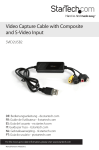
Video Capture Cable with
Composite and S-Video Input
SVID2USB2NS
*actual product may vary from photos
DE: Bedienungsanleitung - de.startech.com
FR: Guide de l'utilisateur - fr.startech.com
ES: Guía del usuario - es.startech.com
IT: Guida per l'uso - it.startech.com
NL: Gebruiksaanwijzing - nl.startech.com
PT: Guia do usuário - pt.startech.com
For the most up-to-date information, please visit: www.startech.com
Manual Revision: 05/08/2012
FCC Compliance Statement
This equipment has been tested and found to comply with the limits for a Class B digital
device, pursuant to part 15 of the FCC Rules. These limits are designed to provide reasonable
protection against harmful interference in a residential installation. This equipment generates,
uses and can radiate radio frequency energy and, if not installed and used in accordance with
the instructions, may cause harmful interference to radio communications. However, there
is no guarantee that interference will not occur in a particular installation. If this equipment
does cause harmful interference to radio or television reception, which can be determined by
turning the equipment off and on, the user is encouraged to try to correct the interference by
one or more of the following measures:
• Reorient or relocate the receiving antenna.
• Increase the separation between the equipment and receiver.
• Connect the equipment into an outlet on a circuit different from that to which the receiver
is connected.
• Consult the dealer or an experienced radio/TV technician for help.
Use of Trademarks, Registered Trademarks, and other Protected Names and Symbols
This manual may make reference to trademarks, registered trademarks, and other
protected names and/or symbols of third-party companies not related in any way to
StarTech.com. Where they occur these references are for illustrative purposes only and do not
represent an endorsement of a product or service by StarTech.com, or an endorsement of the
product(s) to which this manual applies by the third-party company in question. Regardless
of any direct acknowledgement elsewhere in the body of this document, StarTech.com hereby
acknowledges that all trademarks, registered trademarks, service marks, and other protected
names and/or symbols contained in this manual and related documents are the property of
their respective holders.
Instruction Manual
Table of Contents
Introduction.............................................................................................1
Installation...............................................................................................2
Driver Installation....................................................................................................................................... 2
Application Installation............................................................................................................................ 3
Hardware Installation............................................................................................................................... 4
Operation...................................................................................................................................................... 4
Option.......................................................................................................5
General........................................................................................................................................................... 5
Encoder Property....................................................................................................................................... 5
Troubleshooting......................................................................................7
Specifications...........................................................................................9
Technical Support...................................................................................10
Warranty Information.............................................................................10
Instruction Manual
i
Introduction
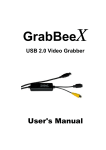
The SVID2USB2NS USB 2.0 S-Video and Composite video Capture Cable lets you
connect devices that output S-Video or Composite video to a computer, through an
available USB 2.0 port.
The perfect solution for bridging a computer and an S-Video or Composite video
source, the capture cable offers real time MPEG 1, MPEG 2 and MPEG 4 recording. Small
enough to fit in the palm of your hand, the Capture Cable is a great solution for mobile
applications and integrates seamlessly with laptop and desktop computers.
If you require audio with your video capture please see StarTech.com’s S-Video to USB
2.0 Video Capture Cable(SVID2USB).
Backed by a StarTech.com 2-year warranty and free lifetime technical support.
Packaging Contents
• 1 x SVID2USB2NS video capture cable
• 1 x User Manual
• 1 x Driver CD
System Requirements
•
•
•
•
USB 2.0 equipped computer
Pentium 4 - 1GHz or above or equivalent AMD processor
128MB of RAM
Microsoft Windows® 2000 SP4, XP SP2 or above, or Vista
Instruction Manual
1
Installation
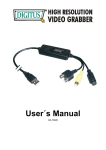
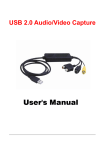
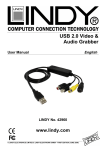
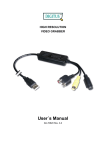
USB 2. 0
connector
Composite
input
S-Video
input
USB 2.0 connector: Connect to USB 2.0 port of your computer
S-Video input: S-Video input from external A/V device (e.g. VCR)
Composite video input: Composite video input from external A/V Device (e.g. VCR)
* If you want capture audio, please connect audio directly to Line-in of your Sound card.
Driver Installation
Note: Do not connect SVID2USB2NS adapter to computer USB port before driver
installation!
Note: Please make sure your computer has USB2.0 port correctly installed and
functioning !! ( Please update your Windows® XP to at least SP2, or Windows® 2000 to
SP4, and updating the USB 2.0 host controller drivers before installation to make sure
the computer’s USB 2.0 is functioning correctly)
1. Please insert “Multimedia Installation Kit” CD-ROM into your CDROM drive; AutoRun
will play; (if AutoRun does not run, please go to “My Computer” and double click the
CD-ROM drive).
2. From the menu, please select the “GrabBeeX-light” product.
3. Please select “Device Driver” on the next screen.
* Note: In Vista, windows will get a pop up dialogue box. Choose “Allow” to continue
the installation.
4. Click “Next”.
5. Complete Setup Wizard.
6. Click “Finish”, then please restart the computer.
Instruction Manual
2
Application Installation
1. Please insert “Multimedia Installation Kit” CD-ROM into your CDROM drive; AutoRun
will play; (if AutoRun does not run, please go to “My Computer” and double click the
CD-ROM drive).
2. From the menu, please select the “GrabBeeX-light” product.
3. Please select “Application Software” on the next screen.
4. Please select “GrabBee”.
5. Welcome to the InstallShield wizard; Click “Next”.
6. Select the language you will use for GrabBee; then click “Set”.
7. Choose the destination location; Click “Next”.
Note: Under Windows Vista, steps 8 to 17 will automatically be skipped. Please do
not worry as this is normal.
8. Install Windows Media Format 9 Series Runtime Setup;
9. Click “Yes”.
10. License agreement; Click “Yes”.
11. Finished Windows Media Format 9 Series Runtime installation;
12. Click “OK”
13. License for Windows Media Tools Setup; Click “Yes”.
14. Windows Media Tools Setup; Click “Next”.
15. Create folder; Click “Yes”.
16. Installation Options; Click “Next”.
17. Installation Directory; Click “Finish”.
18. Setup Complete; Click “OK”.
19. InstallShield Wizard Complete; Click “Finish” then please restart the computer.
Instruction Manual
3
After the AP software is installed, three icons will now be shown on screen:
GrabBee : GrabBee software main program
Record Files : Click to see your record fi les
Snapshot : Click to see your capture still image fi les
Hardware Installation
After the computer restarts, please plug the SVID2USB2NS device into the computer’s
USB 2.0 port; System will now detect the new device and install it automatically.
Please check whether the SVID2USB2NS driver was installed successfully in your computer.
Operation
Starting : Please click the “GrabBee” icon. After starting the application, you can see
video window as below.
Video Window: Please move mouse cursor into Video window and right click, function
menu will appear as below.
Resolution : There are 4 resolution video preview you can select,
NTSC mode : 352x240, 640x480, 720x480, Full screen
PAL mode : 352x288, 640x480, 720x576, Full screen
Instruction Manual
4
Option
General
• Lists your hard disk space information.
• Snapshot default storage path : The location to saved captured image fi les.
• Clip default storage path : Location to saved recorded video fi les.
• Video Format : Choose your correct video format input.
• Set Recording Time : Sets Recording Time length.
Encoder Property
• Video Setting: Recording fi le type format AVI, MPEG-1, MPEG-2, VCD, SVCD, DVD,
WMV, *MP4 selection (if you want DVD burning, please choose DVD mode)
• Profile: Video Size, Frame Rate, Video Quality, Video Bitrate setting; Information
column will display your setting
Note: File format ‘MP4’ will not appear as a selectable option under Windows Vista.
Schedule Record : Set One-time schedule here. Input your Start and Stop time, Date,
Video Source, and File Name. Click ‘Add’ after input then ‘OK.’
Video Input : Switch between Composite or S-Video input.
Slide Bar : Move to any video position during playback.
Color Setting : Brightness/Contrast/Hue/Saturation adjustment.
Mute : Volume On/Off
Pause : Pauses the playback fi le
Record : Click this button to start recording a video. After you click “Stop“ button,
a table will be shown, which asks you to rename or save the fi le; default fi le name
format is “Mddhhmmss”.
M : Month (Jan->1, Feb->2….Oct->O, Nov->N, Dec->D)
dd : Date, hh : Hour, mm : Minute, ss : Second
Stop : Stop Recording and Playback;
Playback : Play the recorded file
SnapShot : Image capture resolution is the same as Preview mode’s
Resolution; click SnapShot and a table shows as below.
Instruction Manual
5
You can “Save”, “Save All”, “Delete”, “Delete All” image fi les, fi le name’s format is
“Mddhhmmssn”.
M : Month (Jan->1, Feb->2….Oct->O, Nov->N, Dec->D)
dd : Date; hh : Hour; mm : Minute; ss : Second
n : Number
Album: The Album will show all capture fi les including image and video. Please click
“Clips” or “Images” to fi nd all listed; you can find each fi le’s information, or preview the
recording video in this window.
Full Screen mode : Double click inside your video window to switch back and forth
between full screen and previous screen size.
Instruction Manual
6
Troubleshooting
Q1 : Why can’t my system detect the SVID2USB2NS?
A1 : Check that you’ve enabled USB 2.0 in the motherboard BIOS setup.
Please make sure that your system has the latest USB 2.0 host driver.
For Windows® XP, please upgrade to Service Pack 2 or above.
For Windows® 2000, please upgrade to Service Pack 3 or above.
Q2 : Why can’t I see video display?
A2 : Perhaps the video system setup is incorrect; please check your hardware
connection and choose the correct Video Format from the Options menu
Please make sure that your system has the latest USB 2.0 host driver.
For Win XP, please upgrade to Service Pack 2 or above.
For Win 2000, please upgrade to Service Pack 3 or above.
Q3 : Why is the resolution always in 320x240 under preview mode?
A3 : It’s because you plugged the SVID2USB2NS in a USB 1.1 port, or perhaps even
though your USB port is 2.0, it may not have upgraded to USB 2.0 drivers. Please make
sure your USB port is USB 2.0, and have already upgraded the USB 2.0 host driver
available from Microsoft’s Website.
Q4 : Why does the system show “High Speed device plug into Full speed USB port…”
A4 : Please make sure your system supports USB 2.0 hardware.
Please make sure that you’ve installed USB 2.0 Host drivers.
Q5 : Why do I get unstable video during preview and recording?
A5 : If you are using Ultra DMA hard disk, please updated the latest driver of IDE ATA/
ATAPI controller. Certain motherboards’ bundled driver are not of the latest version, we
suggest that you use Windows’ own system bundled driver.
Q6 : Why can’t I hear anything under preview mode?
A6: The audio needs to go through sound card’s Line-in, please check your sound card
setting.
Instruction Manual
7
Q7 : How can I get a minimum number of dropped frames during video capture?
A7 : The best recording performance depends on your computer system performance,
but you can also take some steps described below to improve your performance.
• Try lowering the resolution format you record in.
• Enable hard disk drive DMA ; Go to My Computer->Control Panel ->System>Hardware->Device Manager->Disk drives to setup.
• Try and make more available free space on the hard disk drive.
• Use a hard disk drive with speed of more than 7200 rotation per minute
• Disable Power Management in BIOS.
• Disable Power Saving mode of monitor.
• Close unnecessary/unused programs in your system.
• Defrag your hard disk.
• Try not to run any other program(s) during recording.
Q8 : I can preview video but when recording, the system crashed/hanged.
A8 : Please make sure you’ve install DirectX 9.0 or above.
• Your VGA card driver may be incompatible with DirectDraw, please update your VGA
driver.
• Too many programs might have occupied available memory.
Close unnecessary/unused programs.
• Please lower your hardware acceleration; you can go to My Computer->Control
Panel->Display->Settings->Advanced to adjust it.
Q9 : When I start the GrabBee software, program automatically closed.
A9 : Please check to see that your sound card driver was installed successfully.
Instruction Manual
8
Specifications
Video Input
1x RCA composite, 1x S-Video
Audio Input
None
Video System
NTSC, PAL, SECAM
Video Format
MPEG (720x480@NTSC, 720x576@PAL),
MPEG4 (320x240),
AVI (352x288, 352x240, 320x240)
Still Image Format
JPG, BMP, TIFF
Performance
25 FPS @ 720x576 (PAL), 30
FPS @ 720x480 (NTSC)
Power
5VDC, 350mA (max) through USB
Operating System Support
Windows® 2000/XP/7/Vista
Instruction Manual
9
Technical Support
StarTech.com’s lifetime technical support is an integral part of our commitment to
provide industry-leading solutions. If you ever need help with your product, visit
www.startech.com/support and access our comprehensive selection of online tools,
documentation, and downloads.
For the latest drivers/software, please visit www.startech.com/downloads
Warranty Information
This product is backed by a two year warranty.
In addition, StarTech.com warrants its products against defects in materials
and workmanship for the periods noted, following the initial date of purchase.
During this period, the products may be returned for repair, or replacement with
equivalent products at our discretion. The warranty covers parts and labor costs only.
StarTech.com does not warrant its products from defects or damages arising from
misuse, abuse, alteration, or normal wear and tear.
Limitation of Liability
In no event shall the liability of StarTech.com Ltd. and StarTech.com USA LLP (or their
officers, directors, employees or agents) for any damages (whether direct or indirect,
special, punitive, incidental, consequential, or otherwise), loss of profits, loss of business,
or any pecuniary loss, arising out of or related to the use of the product exceed the
actual price paid for the product. Some states do not allow the exclusion or limitation
of incidental or consequential damages. If such laws apply, the limitations or exclusions
contained in this statement may not apply to you.
Instruction Manual
10
Hard-to-find made easy. At StarTech.com, that isn’t a slogan. It’s a promise.
StarTech.com is your one-stop source for every connectivity part you need. From
the latest technology to legacy products — and all the parts that bridge the old and
new — we can help you find the parts that connect your solutions.
We make it easy to locate the parts, and we quickly deliver them wherever they need
to go. Just talk to one of our tech advisors or visit our website. You’ll be connected to
the products you need in no time.
Visit www.startech.com for complete information on all StarTech.com products and
to access exclusive resources and time-saving tools.
StarTech.com is an ISO 9001 Registered manufacturer of connectivity and technology
parts. StarTech.com was founded in 1985 and has operations in the United States,
Canada, the United Kingdom and Taiwan servicing a worldwide market.