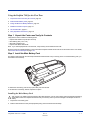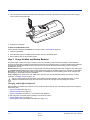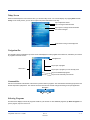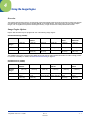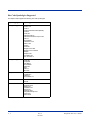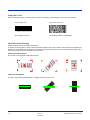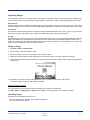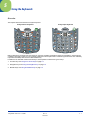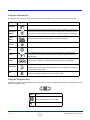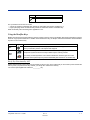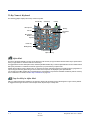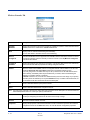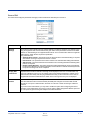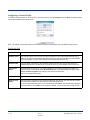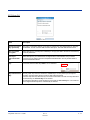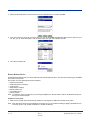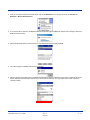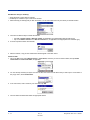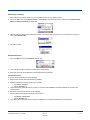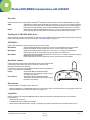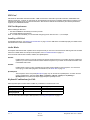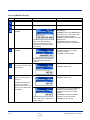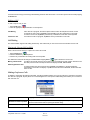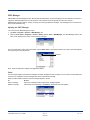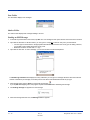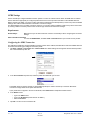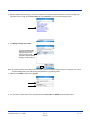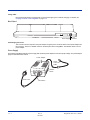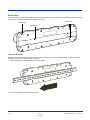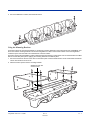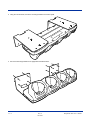
1
User’s Guide ® With Microsoft® Windows Mobile® 5.0 Disclaimer Hand Held Products, Inc. (“Hand Held Products”) reserves the right to make changes in specifications and other information contained in this document without prior notice, and the reader should in all cases consult Hand Held Products to determine whether any such changes have been made. The information in this publication does not represent a commitment on the part of Hand Held Products. Hand Held Products shall not be liable for technical or editorial errors or omissions contained herein; nor for incidental or consequential damages resulting from the furnishing, performance, or use of this material. This document contains proprietary information that is protected by copyright. All rights are reserved. No part of this document may be photocopied, reproduced, or translated into another language without the prior written consent of Hand Held Products. 2007 Hand Held Products, Inc. All rights reserved. Web Address: www.handheld.com Trademarks Dolphin, Dolphin RF, HomeBase, Mobile Base, and QuadCharger are trademarks or registered trademarks of Hand Held Products, Inc. Microsoft, Windows, Windows Mobile, Windows CE, Windows NT, Windows 2000, Windows ME, Windows XP, ActiveSync, Outlook, and the Windows logo are trademarks or registered trademarks of Microsoft Corporation. Other product names mentioned in this manual may be trademarks or registered trademarks of their respective companies and are the property of their respective owners. Intel is a registered trademark of Intel Corporation. Chapter 8 contains copyrighted information from SyChip, Inc. Chapter 8 contains copyrighted information from Meetinghouse Corporation. Meetinghouse, the Meetinghouse logo, and all other Meetinghouse trademarks/service marks contained herein are trademarks or registered trademarks of Meetinghouse. Chapter 9 is copyrighted information used by permission from Bluetooth SIG, Inc. The Bluetooth trademarks are owned by Bluetooth SIG, Inc., U.S.A. and licensed to Hand Held Products, Inc.. Chapter 10 contains information with permission from Intrynsic Software, Inc. Table of Contents Chapter 1 - Agency Approvals Label Locations................................................................................................................................... 1-2 Laser Safety Label ........................................................................................................................ 1-2 LED Safety Statement......................................................................................................................... 1-2 Regulatory and Safety Approvals ...................................................................................................... 1-2 FCC Compliance................................................................................................................................. 1-3 Chapter 2 - Getting Started Overview ............................................................................................................................................. 2-1 Dolphin 7900 Radio Configuration Options ....................................................................................... 2-2 Standard Configurations ............................................................................................................... 2-2 Custom Configurations................................................................................................................. 2-2 Dolphin 7900 Series Peripherals......................................................................................................... 2-3 Dolphin 7900 Accessories................................................................................................................... 2-4 Using the Dolphin 7900 for the First Time......................................................................................... 2-5 Today Screen....................................................................................................................................... 2-9 Navigation Bar .................................................................................................................................... 2-9 Selecting Programs.............................................................................................................................. 2-9 Pop-Up Menus .................................................................................................................................. 2-10 Resetting the Terminal ...................................................................................................................... 2-11 Soft Reset (Warm Boot) ............................................................................................................. 2-11 Hard Reset (Cold Boot) .............................................................................................................. 2-11 Suspend Mode................................................................................................................................... 2-11 Chapter 3 - Hardware Overview System Features .................................................................................................................................. 3-1 Front Panel Features............................................................................................................................ 3-2 Back Panel Features ............................................................................................................................ 3-4 Side Panel Features ............................................................................................................................. 3-6 Opening the Access Door ............................................................................................................. 3-6 Replacing the Access Door........................................................................................................... 3-8 I/O Connector...................................................................................................................................... 3-9 I/O Connector ............................................................................................................................... 3-9 Battery Power.................................................................................................................................... 3-10 Main Battery Pack ...................................................................................................................... 3-10 Internal Backup Battery.............................................................................................................. 3-10 Managing Battery Power ............................................................................................................ 3-11 Dolphin 7900 Technical Specifications ............................................................................................ 3-13 Chapter 4 - Using the Image Engine Overview ............................................................................................................................................. 4-1 Image Engine Options......................................................................................................................... 4-1 Bar Code Symbologies Supported ...................................................................................................... 4-2 Activating the Engine.......................................................................................................................... 4-3 Decoding ............................................................................................................................................. 4-3 Omni-Directional Scanning.......................................................................................................... 4-4 Dolphin® 7900 User’s Guide iii Capturing Images.................................................................................................................................4-5 Chapter 5 - Using the Keyboards Overview .............................................................................................................................................5-1 Using the Function Keys .....................................................................................................................5-2 Using the Navigation Keys..................................................................................................................5-2 Using the Modifier Keys .....................................................................................................................5-3 25-Key Numeric Keyboard .................................................................................................................5-4 Alpha Mode...................................................................................................................................5-4 Caps Lock Key in Alpha Mode.....................................................................................................5-4 Blue Key Combinations ................................................................................................................5-5 Red Key Combinations .................................................................................................................5-5 36-Key Alpha Keyboard......................................................................................................................5-7 NUM Lock Key ............................................................................................................................5-7 Caps Lock Functionality ...............................................................................................................5-7 Blue Key Combinations ...............................................................................................................5-8 Red Key Combinations ................................................................................................................5-8 NUM Key Combinations ..............................................................................................................5-8 Numeric Shift in Numeric Mode ..................................................................................................5-9 Chapter 6 - Settings Overview .............................................................................................................................................6-1 Personal Tab ........................................................................................................................................6-2 Buttons ..........................................................................................................................................6-3 Headset Control.............................................................................................................................6-4 Input ..............................................................................................................................................6-5 Menus - Adding a Program to the Start Menu ..............................................................................6-5 System Tab ..........................................................................................................................................6-7 About.............................................................................................................................................6-7 Backlight .......................................................................................................................................6-7 Certificates ....................................................................................................................................6-8 ClearType Tuner ...........................................................................................................................6-8 Clock & Alarms ............................................................................................................................6-8 CPU Speed ....................................................................................................................................6-8 Memory .........................................................................................................................................6-9 Power ..........................................................................................................................................6-11 Regional Settings ........................................................................................................................6-11 Remove Programs .......................................................................................................................6-12 Screen..........................................................................................................................................6-12 Connections Tab ................................................................................................................................6-14 Server-Assigned IP Addresses ....................................................................................................6-14 Zero-Config Wi-Fi ......................................................................................................................6-14 Com Port Assignment Table .......................................................................................................6-15 Connections Manager ........................................................................................................................6-16 Task Tab......................................................................................................................................6-16 Advanced Tab .............................................................................................................................6-17 Creating a Wireless Network Connection...................................................................................6-17 Network Cards ............................................................................................................................6-17 iv Dolphin® 7900 User’s Guide Chapter 7 - Communications Overview .............................................................................................................................................7-1 Installing Additional Software ......................................................................................................7-1 Using ActiveSync ................................................................................................................................7-2 Synchronizing from Your Desktop Computer ..............................................................................7-2 Synchronizing from the Terminal .................................................................................................7-2 Exploring the Terminal from the Desktop Computer ...................................................................7-3 Adding Programs to the Terminal Using ActiveSync ..................................................................7-3 Using Infrared......................................................................................................................................7-5 Verify That the IrDA Port is Enabled ...........................................................................................7-5 IrDA Port Location on the Terminal.............................................................................................7-5 Troubleshooting ............................................................................................................................7-7 Wireless Radio Options .......................................................................................................................7-8 Radio Combinations......................................................................................................................7-8 Radio Manager ..............................................................................................................................7-8 Using an ISP ........................................................................................................................................7-9 Chapter 8 - Wireless LAN (WLAN) Communications with 802.11b Overview .............................................................................................................................................8-1 Enabling the 802.11b Radio Driver ..............................................................................................8-1 Configuration Utility Options..............................................................................................................8-1 802.11b Settings ..................................................................................................................................8-2 Accessing 802.11b Settings ..........................................................................................................8-2 Status Tab .....................................................................................................................................8-2 Config Tab ....................................................................................................................................8-4 Advanced Tab ...............................................................................................................................8-8 About Tab .....................................................................................................................................8-8 Using the Status Icon ...................................................................................................................8-9 802.11b Wireless Security Supplement.............................................................................................8-10 Installing the 802.11b Wireless Security Supplement ................................................................8-10 Opening the Client ......................................................................................................................8-12 Main Screen ................................................................................................................................8-12 Configuring the Client ................................................................................................................8-15 Configuring a Network Profile ...................................................................................................8-22 Logging .......................................................................................................................................8-24 Installing Certificates with CertAdd ...........................................................................................8-25 Advice and Workarounds............................................................................................................8-26 Chapter 9 - Wireless PAN (WPAN) Communications with Bluetooth Overview .............................................................................................................................................9-1 Enabling the Bluetooth Radio .......................................................................................................9-1 Setting Up Your Bluetooth Card .........................................................................................................9-1 Assign COM Ports...............................................................................................................................9-2 Discover Bluetooth Device(s) .............................................................................................................9-3 Bond With Discovered Device(s) .................................................................................................9-3 Set Up Your Favorite Device........................................................................................................9-5 Turn Radio Transmitter ON/OFF ........................................................................................................9-7 Dolphin® 7900 User’s Guide v Bluetooth ActiveSync..........................................................................................................................9-7 Bluetooth LAN Access ........................................................................................................................9-9 OBEX ................................................................................................................................................9-11 Enable File Sharing .....................................................................................................................9-18 Using the Dialer.................................................................................................................................9-19 Get Connected Wizard.......................................................................................................................9-20 Dial Up Connection ...........................................................................................................................9-23 Chapter 10 - Wireless WAN (WWAN) Communications with GSM/GPRS Overview ...........................................................................................................................................10-1 GSM Radios ................................................................................................................................10-1 Dual-Band Antenna.....................................................................................................................10-1 SIM Card ...........................................................................................................................................10-2 Audio Modes .....................................................................................................................................10-2 Keyboard Combinations for Calls .....................................................................................................10-2 Using uPhone.....................................................................................................................................10-3 Icons and Bubble Messages ........................................................................................................10-3 Using the Dialler................................................................................................................................10-5 Making a Call..............................................................................................................................10-5 Receiving a Call ..........................................................................................................................10-6 Call Waiting ................................................................................................................................10-7 Making Conference Calls............................................................................................................10-7 Touchtones ..................................................................................................................................10-8 Tools Menu .................................................................................................................................10-8 Ringtone Configuration...............................................................................................................10-9 Phonebook.................................................................................................................................10-10 Charging....................................................................................................................................10-10 USSD ........................................................................................................................................10-11 Call Log.....................................................................................................................................10-11 uPhone Configuration......................................................................................................................10-13 SMS Manager ..................................................................................................................................10-17 Sending an SMS Message.........................................................................................................10-18 GPRS Settings .................................................................................................................................10-20 Chapter 11 - Dolphin 7900 with GPS Overview ...........................................................................................................................................11-1 GPS Functionality .......................................................................................................................11-1 Dolphin 7900 with GPS Configuration.......................................................................................11-1 Powering the GPS Module ................................................................................................................11-2 DeviceConfig Power Tool ..........................................................................................................11-2 Enable5VOut...............................................................................................................................11-3 Suspend/Resume with GPS ...............................................................................................................11-4 Suspend Via Keyboard Combination..........................................................................................11-4 Suspend Via Activity timeout .....................................................................................................11-4 Time to First Fix (TTFF) ...................................................................................................................11-4 Typical TTFF From No Satellite Data ........................................................................................11-4 Serial Communications......................................................................................................................11-5 Microsoft ActiveSync .................................................................................................................11-5 External Serial Devices ...............................................................................................................11-5 vi Dolphin® 7900 User’s Guide GPS Demo .........................................................................................................................................11-6 Accessing GPSdemo ...................................................................................................................11-6 Setup Tab ...................................................................................................................................11-6 Position Tab ................................................................................................................................11-7 Satellites Tab...............................................................................................................................11-7 Power Tab ...................................................................................................................................11-8 Urban Canyons ..................................................................................................................................11-8 Chapter 12 - Dolphin QuadCharger Overview ...........................................................................................................................................12-1 Dolphin QuadCharger Parts and Functions .......................................................................................12-1 Front Panel .................................................................................................................................12-1 Rear Panel ...................................................................................................................................12-2 Supplying Power to the QuadCharger ...............................................................................................12-3 Inserting and Removing Battery Packs .............................................................................................12-3 Recommendations for Storing Batteries............................................................................................12-3 Charging Batteries in the QuadCharger.............................................................................................12-3 Using the Battery Analyzer ...............................................................................................................12-4 Mounting the QuadCharger ...............................................................................................................12-5 Troubleshooting.................................................................................................................................12-6 Chapter 13 - Dolphin HomeBase Overview ...........................................................................................................................................13-1 Front Panel ........................................................................................................................................13-2 Back Panel ........................................................................................................................................13-3 RS-232 Serial Connector ...................................................................................................................13-4 Powering the Dolphin HomeBase .....................................................................................................13-4 Charging the Main Battery ................................................................................................................13-5 ActiveSync Communications with the HomeBase............................................................................13-6 Mounting the HomeBase ...................................................................................................................13-9 Desk Mounting............................................................................................................................13-9 Wall Mounting ............................................................................................................................13-9 Chapter 14 - Dolphin ChargeBase Overview ...........................................................................................................................................14-1 Dolphin ChargeBase Parts and Functions .........................................................................................14-1 Front Panel .................................................................................................................................14-1 Back Panel...................................................................................................................................14-2 Power Supply ..............................................................................................................................14-2 Supplying Power to the ChargeBase .................................................................................................14-3 Inserting and Removing Terminals ...................................................................................................14-3 Charging Terminals in the ChargeBase.............................................................................................14-3 Mounting the Dolphin ChargeBase ...................................................................................................14-3 Dolphin® 7900 User’s Guide vii Chapter 15 - Dolphin Mobile Base Overview ...........................................................................................................................................15-1 Dolphin Mobile Base Hardware Overview .......................................................................................15-2 Front Panel ..................................................................................................................................15-2 Bottom Panel...............................................................................................................................15-3 Back Panel...................................................................................................................................15-5 Powering the Dolphin Terminal ........................................................................................................15-6 Charging the Dolphin Terminal.........................................................................................................15-6 Setting Up the Mobile Base for Communications.............................................................................15-6 ActiveSync Communications with the MobileBase ..........................................................................15-6 Mounting the Dolphin Mobile Base ..................................................................................................15-7 Chapter 16 - Customer Support Product Service and Repair ...............................................................................................................16-1 Online Product Service and Repair Assistance...........................................................................16-1 Technical Assistance .........................................................................................................................16-2 Online Technical Assistance .......................................................................................................16-2 For Further Information ..............................................................................................................16-2 Limited Warranty ..............................................................................................................................16-3 viii Dolphin® 7900 User’s Guide 1 Agency Approvals Overview Congratulations on the purchase of the Dolphin 7900 mobile computer! You have made a wise choice in selecting the Dolphin, a device known worldwide for its ergonomic form factor, light-weight, rugged design and single-handed data collection capabilities. Ergonomics The patented shape of the Dolphin 7900 fits into either hand comfortably with major function keys that are easy to access. The adjustable hand strap on the back panel ensures a secure grip on the terminal for solid one-handed operation in mobile environments. Rugged Design Dolphin 7900 terminals are the most durable mobile computers on the market. Their rugged design can withstand repeated fivefoot drops onto a concrete floor, extreme temperatures, as well as high humidity, moisture, and dust conditions. The terminals are independently tested to meet IP64 specifications. Mobile Computing Features • • • • • • • Low-power, high-resolution image engine omni-directional and auto-discrimination decoding of most bar code symbologies Intel® X-Scale 400MHz RISC microprocessor for fast processing Optional Wireless Full Area Networking™(WFAN) configuration for real-time data and voice communications Microsoft Windows Mobile 2003 Second Edition Software for Pocket PCs 64MB RAM (optional 128MB) and 64MB synchronous Flash memory configuration for ample and secure data storage Mini-Secure Digital (SD) memory interface that enables memory expansion Adaptus Imaging Technology for advanced point-and-shoot bar code decoding and image capture Additional Features • • • • • • • • • • Long-lasting Lithium Ion (Li-ion) batteries 3.8”, easy-to-read 1/4 VGA (240 x 320) backlit TFT color display with industrial touch screen Two keyboard options: 25-key numeric and 36-key alpha I/O connector that supports serial and USB communications, as well as power in and out Full suite of compatible peripheral devices Decoding of stacked linear and matrix codes with Optical Character Recognition (OCR) functionality Buttons on both side panels that can activate the image engine for easy one-hand scanning with either hand Digital picture capability Audio jack for headset use Speaker and microphone on the front panel Application Development Tools • Dolphin SDK Add-on for Pocket PC 2003–supports Embedded Visual C++ 4.0 • Dolphin .NET SDK for Pocket PC 2002 and 2003–supports Visual Studio .NET 2003 (VB.NET and C#.NET) • Dolphin GSM/GPRS SDK Add-on for Pocket PC 2003–supports Embedded Visual C++ 4.0 and Visual Studio.NET 2003 This User’s Guide The Dolphin 7900 Series Mobile Computer User’s Guide provides you with the information you need to make the most of your Dolphin terminal. Dolphin® 7900 User’s Guide Rev F 10/16/07 1-1 Label Locations Dolphin terminals meet or exceed the requirements of all applicable standards organizations for safe operation. However, as with any electrical equipment, the best way to ensure safe operation is to operate them according to the agency guidelines that follow. Please read these guidelines carefully before using your Dolphin mobile computer. Laser Safety Label Compliance Label Location Laser Safety Label If the following label is attached to your product, it indicates the product contains a laser engine or laser aimer: Laser Eye Safety Statement: This device has been tested in accordance with and complies with EN60825-1: 1993+A1+A2 and 21 CFR 1040.10 and 1040.11, except for deviations pursuant to Laser Notice No. 50, dated July 26, 2001. LASER LIGHT, DO NOT STARE INTO BEAM, CLASS 2 LASER PRODUCT, 1.0 mW MAX OUTPUT: 650nM. LASER LIGHT. DO NOT STARE INTO BEAM CLASS 2 LASER PRODUCT 1.0 mW MAX OUTPUT: 650nM IEC60825-1:1993+A1+A2 Complies with 21 CFR 1040.10 and 1040.1 1 except for deviations pursuant to Laser Notice No. 50, dated July 26, 2001. Caution - use of controls or adjustments or performance of procedures other than those specified herein may result in hazardous radiation exposure. LED Safety Statement This device has been tested in accordance with IEC60825-1 LED safety, and has been certified to be under the limits of a Class 1 LED device. Regulatory and Safety Approvals Parameter Specification U.S.A. Canada European Community FCC Part 15, Class B ICES-003 EN 55022 (CISPR 22) Class B EN60950:2000 EN60825-1:1994 + A11 + A2 EN55024:1998 The CE Mark on the product indicates that the system has been tested to and conforms with the provisions noted within the 89/336/EEC Electromagnetic Compatibility Directive and the 73/23/EEC and 93/68/EEC Low Voltage Directive. For further information, please contact: Hand Held Products, Inc. Nijverheidsweg 9 5627 BT Eindhoven The Netherlands Hand Held Products, Inc. shall not be liable for use of our product with equipment (i.e., power supplies, personal computers, etc.) that is not CE marked and does not comply with the Low Voltage Directive. 1-2 Rev F 10/16/07 Dolphin® 7900 User’s Guide FCC Compliance Dolphin 7900 Series terminals comply with part 15 of the FCC rules. Operation is subject to the following two conditions: (1) this device may not cause harmful interference, and (2) this device must accept any interference received, including interference that may cause undesired operation. Dolphin 7900 RF Terminal with an 802.11b, Bluetooth, and/or GSM (MC-45, MC-46 & MC-75) Radio This device complies with Part 15 of the FCC Rules. Operation is subject to the following two conditions: (1) this device may not cause harmful interference, and (2) this device must accept any interference received, including interference that may cause undesired operation. This equipment has been tested and found to comply with the limits for a Class B digital device pursuant to Part 15 of the FCC Rules. These limits are designed to provide reasonable protection against harmful interference in a residential installation. This equipment generates, uses, and can radiate radio frequency energy and, if not installed and used in accordance with the instructions, may cause harmful interference to radio communications. However, there is no guarantee that interference will not occur in a particular installation. If this equipment does cause harmful interference to radio or television reception, which can be determined by turning the equipment off and on, the user is encouraged to try to correct the interference by one or more of the following measures: • • • • Reorient or relocate the receiving antenna. Increase the separation between the equipment and receiver. Connect the equipment into an outlet on a circuit different from that to which the receiver is connected. Consult the dealer or an experienced radio/TV technician for help. If necessary, the user should consult the dealer or an experienced radio/television technician for additional suggestions. The user may find the following booklet helpful: “Something About Interference.” This is available at FCC local regional offices. Our company is not responsible for any radio or television interference caused by unauthorized modifications of this equipment or the substitution or attachment of connecting cables and equipment other than those specified by our company. The correction is the responsibility of the user. Use only shielded data cables with this system. In accordance with FCC 15.21, changes or modifications not expressly approved by Hand Held Products, Inc. may void the FCC authorization to operate the equipment. ! This device and its antenna must not be co-located or operating in conjunction with any other antenna or transmitter. To maintain compliance with FCC RF exposure guidelines for body-worn operation, do not use accessories that contain metallic components. When using accessories where the terminal is worn on the body, the terminal’s touch screen must face away from the body. CAUTION! Any changes or modifications not expressly approved by the grantee of this device could void the user's authority to operate the equipment. Canadian Compliance for 802.11b, Bluetooth, and/or GSM (MC-45, MC-46, & MC-75) Radio This Class B digital apparatus complies with Canadian ICES-003. Operation is subject to the following two conditions: (1) this device may not cause harmful interference, and (2) this device must accept any interference received, including interference that may cause undesired operation. To prevent radio interference to the licensed service, this device is intended to be operated indoors and away from windows to provide maximum shielding. Equipment (or its transmit antenna) that is installed outdoors is subject to licensing. Cet appareil numérique de la Classe B est conforme à la norme NMB-003 du Canada. Dolphin® 7900 User’s Guide Rev F 10/16/07 1-3 RF Approvals for 802.11b and Bluetooth Parameter Specification U.S.A. Canada FCC Part 15.247 RSS 210 RF Approvals for GSM (MC-45, MC-46, & MC-75) Parameter Specification U.S.A. Canada FCC Part 24 RSS 133 R&TTE Compliance Statement for 802.11b, Bluetooth, and/or GSM (MC-45, MC-46, & MC-75) Dolphin 7900 RF terminals are in conformity with all essential requirements of the R&TTE Directive (1999/5/EC). This equipment has been assessed to the following standards as applicable: Parameter Specification R&TTE EN 300 328-2:2000 EN 301 489-1 (2002-08) EN 301 489-17 (2002-08) EN 60950: 2000 EN 50361: 2001 This product is marked with Directive, 1999/5/EC. in accordance with the Class II product requirements specified in the R&TTE The equipment is intended for use throughout the European Community. PAN European Frequency Range: 2.402–2.480 GHz. Restrictions in France are as follows: • Indoor use: Maximum power (EIRP*) of 100 mW for the entire 2.400–2.4835 GHz • Outdoor use: Maximum power (EIRP*) of 100 mW for the 2.400–2.454 GHz band and maximum power (EIRP*) of 10 mW for the 2.454–2.483 GHz band For European Community Users Hand Held Products complies with Directive 2002/96/EC OF THE EUROPEAN PARLIAMENT AND OF THE COUNCIL of 27 January 2003 on waste electrical and electronic equipment (WEEE). Waste Electrical and Electronic Equipment Information This product has required the extraction and use of natural resources for its production. It may contain hazardous substances that could impact health and the environment, if not properly disposed. In order to avoid the dissemination of those substances in our environment and to diminish the pressure on the natural resources, we encourage you to use the appropriate take-back systems for product disposal. Those systems will reuse or recycle most of the materials of the product you are disposing in a sound way. The crossed out wheeled bin symbol informs you that the product should not be disposed of along with municipal waste and invites you to use the appropriate separate take-back systems for product disposal. If you need more information on the collection, reuse, and recycling systems, please contact your local or regional waste administration. You may also contact your supplier for more information on the environmental performances of this product. 1-4 Rev F 10/16/07 Dolphin® 7900 User’s Guide Pacemakers, Hearing Aids and Other Electrically Powered Devices Most manufacturers of medical devices adhere to the IEC 601-1-2 standard. This standard requires devices to operate properly in an EM Field with a strength of 3V/m over a frequency range of 26 to 1000MHz. The maximum allowable field strength emitted by the Dolphin is 0.3V/m according to Subpart B of Part 1 of the FCC rules. Therefore, the Dolphin RF has no effect on medical devices that meet the IEC specification. Microwaves The radio in the Dolphin RF terminal operates on the same frequency band as a microwave oven. Therefore, if you use a microwave within range of the Dolphin RF terminal you may notice performance degradation in your wireless network. However, both your microwave and your wireless network will continue to function. The Dolphin Batch terminal does not contain a radio, and therefore, is not affected by microwave ovens. Dolphin® 7900 User’s Guide Rev F 10/16/07 1-5 1-6 Rev F 10/16/07 Dolphin® 7900 User’s Guide 2 Getting Started Overview The Dolphin 7900 terminal comprises one element of an enterprise data collection system that includes various models, peripherals, and accessories that you can combine to suit your exact needs. The Dolphin 7900 terminal itself combines the latest in multi-functional wireless data and voice communications technology with a unique, compact form factor, which makes it an ideal solution for today’s in-transit applications. Data Input The Dolphin 7900 mobile computer features a PDA design with a larger display and smaller recessed keyboards. The display area is 3.8 inches with a 240 X 320 VGA display in TFT color that is backlit for maximum viewability, then covered with an industrial touch screen for maximum durability. There are two keyboard options: 25-key numeric-alpha and 36-key alphanumeric. Imaging The Dolphin 7900 contains an integrated imager that can take digital images of damaged packages and recipient signatures in addition to decoding standard 1D and 2D symbologies. For the greatest ease-of-use when operating the imager, both side panels feature a scan button that initiates a scan with the touch of a thumb or forefinger. Memory The Dolphin 7900 is a Windows Mobile computer with 64 MB RAM and 64 MB non-volatile synchronous Flash memory. Communications Communications via the I/O connector supports 115 Kbps using serial RS-232 and 12 Mbps using USB. Dolphin® 7900 User’s Guide Rev F 10/16/07 2-1 Dolphin 7900 Radio Configuration Options Standard Configurations Dolphin 7900 WLAN and WPAN (802.11b and Bluetooth) This terminal features integrated 802.11b and Bluetooth radios, which means that your terminal contains the capabilities of both radios. You can operate the radios simultaneously or switch between them. Dolphin 7900 WWAN and WLAN (GSM/GPRS and 802.11b) This terminal features the functionality of both GSM/GPRS and 802.11b radio and network technologies. Dolphin 7900 WWAN and WPAN (GSM/GPRS and Bluetooth) This terminal features the functionality of both GSM/GPRS and Bluetooth radio and network technologies. Dolphin 7900 WWAN, WLAN, and WPAN (GSM/GPRS, 802.11b, and Bluetooth) This terminal features the functionality of GSM/GPRS, 802.11b, and Bluetooth radio and network technologies. Custom Configurations Please refer to the Dolphin 7900 pricing configuration guide or contact your Customer Account Representative (CAR) for details. Dolphin 7900 WLAN (802.11b) These terminals integrate the basic functionality of the Batch terminals with an integrated, IEEE 802.11b direct sequence radio that enable communication with a host computer through a wireless local area network (WLAN). Dolphin 7900 WPAN (Bluetooth) This terminal allows Bluetooth communications to Bluetooth enabled devices such as printers, mobile phones, Access Points (APs), Bluetooth-enabled PCs, etc. Dolphin 7900 WWAN (GSM/GPRS) This terminal features all the benefits of the Dolphin 7900 with the additional capabilities of GSM/GPRS technology. 2-2 Rev F 10/16/07 Dolphin® 7900 User’s Guide Dolphin 7900 Series Peripherals Each of the following items is sold separately to enhance your Dolphin 7900 terminal’s capabilities. Dolphin HomeBase™ The Dolphin HomeBase charging and communication cradle supports both RS-232 and USB communications, which enable it to interface with the majority of PC-based enterprise systems. When a terminal is seated in the HomeBase, its main battery pack charges in less than four hours. In addition, the HomeBase contains an auxiliary battery well that charges a spare Li-ion battery. For more information, see Dolphin HomeBase on page 13-1. Dolphin Mobile Base™ The Dolphin Mobile Base charging and communication cradle is designed specifically for in-premise and in-transit data collection applications. It features a flexible mounting bracket, a cigarette lighter adapter or power cable to adapt it to your environment. When a terminal is seated in the Mobile Base, its main battery pack charges in less than four hours. The serial connector supports RS-232 communication and power out to peripheral devices, such as hand held scanners. For more information, see Dolphin Mobile Base on page 15-1. Dolphin QuadCharger™ The Dolphin QuadCharger is a four-slot charging station for Dolphin Li-ion battery packs that can charge each battery in less than four hours. The fourth slot features a battery analyzer that completely resets and re-calibrates a battery, then displays remaining capacity. For more information, see Dolphin QuadCharger on page 12-1. Dolphin ChargeBase The Dolphin ChargeBase is a four-slot charging cradle that holds, powers, and charges a terminal in each slot. For more information, see Dolphin ChargeBase on page 14-1. Dolphin Net Base The Dolphin Net Base is a four-slot charging/communication cradle that holds, powers, charges, and communicates with the terminal in each slot. Ethernet communication occurs via statically and dynamically-assigned IP addresses. For more information about the Dolphin Net Base, please consult the Dolphin 7900 Net Base Quick Start Guide. Dolphin® 7900 User’s Guide Rev F 10/16/07 2-3 Dolphin 7900 Accessories Each of the following items is sold separately to enhance your Dolphin 7900 terminal’s capabilities. Note: When using accessories where the terminal is worn on the body, the terminal’s touch screen must face away from the body. Dolphin Cable Kits USB and serial cables connect the Dolphin 7900 terminal directly to both a peripheral device for communication and a power source for charging. Dolphin Mobile Charger This charging cable plugs the terminal directly into a vehicle cigarette lighter/power port to power the terminal and charge the battery pack. This accessory converts the 12 Volts from the vehicle outlet to the 9 Volts required by the terminal. Protective Enclosure This enclosure wraps around the terminal to protect it from wear and tear. Protective Holster The protective holster holds the terminal for mobile use. Dolphin Mobile Mount The Dolphin Mobile Mount solution secures Dolphin 7900 in the cab of any vehicle. Used in conjunction with the Mobile Charger, Dolphin terminals can be adapted to almost any in-transit environment. Li-ion Battery Pack The 7.4v, 14.8 watt hour Li-ion rechargeable battery pack provides the main power supply for Dolphin 7900 terminals. 2-4 Rev F 10/16/07 Dolphin® 7900 User’s Guide Using the Dolphin 7900 for the First Time 1. Unpack the Carton and Verify its Contents, page 2-5. 2. Install the Main Battery Pack, page 2-5. 3. Charge the Main and Backup Batteries, page 2-6. 4. Initialize the Mobile Computer, page 2-7. 5. Let Autoinstall Run, page 2-7. 6. Verify Operations with Demos, page 2-8. Step 1. Unpack the Carton and Verify its Contents Verify that the carton contains the following items: • Dolphin 7900 mobile computer (the terminal) • Main battery pack (7.4v Li-ion) • Microsoft Companion CD • Dolphin 7900 Quick Start Guide Note: If you ordered peripherals or accessories, verify that they are included with the order. Be sure to keep the original packaging in the event that the Dolphin terminal should need to be returned for service. For details, see Product Service and Repair on page 16-1. Step 2. Install the Main Battery Pack The Dolphin 7900 ships with the hand strap installed and fastened with a clip on the top panel. To install the battery pack, you must detach the hand strap. To detach the hand strap, push the clip up and away from the terminal. To re-attach the hand strap, slide the clip back into place. Installing the Main Battery Pack Use only the Li-ion battery packs provided by Hand Held Products. The use of any battery pack not sold/manufactured by Hand Held Products in a Dolphin terminal will void your warranty and may result in damage to the Dolphin terminal or battery. 1. Unpack the Li-ion battery pack. ! 2. Hold the terminal with the front panel (keyboard) facing down and detach the handstrap. Dolphin® 7900 User’s Guide Rev F 10/16/07 2-5 3. Take the battery and insert the end without the locking tab into the top of the battery well and push down with a hinging motion until the locking tab snaps. 4. Re-attach the handstrap. To Remove the Main Battery Pack Put the terminal in Suspend mode before removing the battery; Suspend Mode, page 2-11. 1. Detach the handstrap. 2. Press the locking tab on the battery pack and pull it away from the bottom panel. 3. Pull the battery pack up with a hinging motion. Step 3. Charge the Main and Backup Batteries The power supply consists of two types of battery power: the main battery pack and the backup battery located inside the terminal. The main battery powers the terminal and charges the internal backup battery. The internal backup battery maintains the application data stored in RAM and the system clock for up to 30 minutes when the main battery pack is completely discharged or removed. Before initial use - Because the terminals are shipped with both batteries discharged of all power, charge the main battery pack for a minimum of four hours before initial use. When installed in the terminal, the battery pack can be charged in the HomeBase, Mobile Base, or with the appropriate charging cable. When not installed in the terminal, battery packs can be charged in the QuadCharger or the auxiliary well of the HomeBase. Time to Charge - Four hours for the main battery pack, eight hours for the internal backup battery the first time. For more information, see Battery Power on page 3-10. ! Use only Dolphin 7900 Series peripherals, power cables, and power adapters. Use of peripherals, cables, or power adapters not sold/manufactured by Hand Held Products will void the warranty and may damage the terminal. Charging with Dolphin Peripherals When the battery is installed in the terminal, you can insert the terminal into any one of the following peripherals to charge the main battery pack: • Dolphin HomeBase (see page 13-1) • Dolphin Mobile Base (see page 15-1) • Dolphin ChargeBase (see page 14-1) or the Dolphin 7900 Net Base To fully charge the Li-ion battery before installing it in the terminal, use the • Dolphin QuadCharger (see page 12-1) • Auxiliary Battery Well of the Dolphin HomeBase (see page 13-5) 2-6 Rev F 10/16/07 Dolphin® 7900 User’s Guide Step 4. Initialize the Mobile Computer 1. Power on the terminal. The decode LED lights and the scan LED blinks for approximately three seconds. Do NOT press any keys while the terminal is booting up. 2. The terminal initializes and the splash screen appears for a few seconds. The Build numbers indicate the software versions. Bootloader Kernel Keyboard 9.XX/9.XX/9.XX/9.XX Initial Program Loader (IPL) 3. The system performs a hard reset. When the display activates again, follow the instructions that appear. Step 5. Align the Screen You are prompted to align the screen by tapping the target five times. Use the stylus provided by Hand Held Products. • Alignment should always be performed with a stylus designed for touch screen applications. The small point is required for accurate calibration. • Press the stylus firmly into the center of the cross-hair target once and release. Do not “double-tap” the target. • You can re-align the screen at any time by going to Start > Settings > System tab > Screen. Step 6. Let Autoinstall Run For each program that loads, a status bar indicates that the program is loading. Autoinstall occurs after each hard reset. Do NOT touch the keyboard or the screen while programs are loading! All configurations of the Dolphin 7900 terminal install Demos and Power Tools. If the terminal is configured with a wireless radio, the appropriate radio drivers and utilities for each radio install. After Autoinstall is complete, the terminal performs a soft reset automatically. When it finishes booting up after the soft reset, the Today screen appears; see Today Screen on page 2-9. Dolphin® 7900 User’s Guide Rev F 10/16/07 2-7 Step 7. Setting the Time and Date The time and date need to be reset after every hard reset of the terminal. It is a good idea to set the time and date before you begin using the device, so that the system clock is accurate. On the Today screen, tap the line that displays the time and date, The Clock Settings screen appears. Step 8. Verify Operations with Demos For details, see Using the Image Engine on page 4-1. 2-8 Rev F 10/16/07 Dolphin® 7900 User’s Guide Today Screen When the terminal powers one for the first time, you see the Today screen. You can also display it by tapping Start and then Today. On the Today screen, you can see at a glance important information for the day. Tap to adjust the volume Tap to change the date and time Tap to open to change owner information Your email messages Applications running in the background Navigation Bar The navigation bar is located at the top of the screen and displays the active program and current time, and allows you to switch to programs and close screens. Navigation bar Tap to open a program Start menu Tap to open a program you have recently used Tap to see additional programs Tap to see to customize your terminal Command Bar Use the Command bar at the bottom of the screen to perform tasks in programs. The Command bar includes popup menus and the Soft Input Panel (SIP) button. The name of the menus here and the content changes according to the open application. SIP Button Menus Selecting Programs The Start menu displays some of the programs loaded on your terminal. To see additional programs, tap Start > Programs. To open a program, tap once on the icon. Dolphin® 7900 User’s Guide Rev F 10/16/07 2-9 Pop-Up Menus With pop-up menus, you can quickly choose an action for an item. For example, you can use the pop-up menu in the contact list to quickly delete a contact, make a copy of a contact, or send an e-mail message to a contact. The actions in the pop-up menus vary from program to program. 1. Tap and hold the stylus on the item name. The pop-up menu appears. 2. Lift the stylus, and tap the action you want to perform. Note: To close the menu without performing an action, tap the screen anywhere outside the menu. Using Search The Find feature helps you quickly locate information. Tap Start > Programs > Search. Enter the text you want to find, select a data type, and then tap Go to start the search. Using File Explorer You can also use the File Explorer to find files and organize these files into folders. Tap Start > Programs > File Explorer. You can move files in File Explorer by tapping and holding the item you want to move, and then tapping Cut or Copy and Paste on the pop-up menu. 2 - 10 Rev F 10/16/07 Dolphin® 7900 User’s Guide Resetting the Terminal There are two ways to reset the Dolphin terminal: a soft and a hard reset. Soft Reset (Warm Boot) A soft reset re-boots the device without losing RAM data. You would perform a soft reset when • • • The terminal fails to respond After installing some software applications After making changes to certain system settings, such as network cards 1. Press and hold the Red + ESC keys for approximately five seconds. 2. The decode and scan LEDs flash for approximately three seconds as the terminal resets. 3. When the reset is complete, the Today screen displays. Hard Reset (Cold Boot) A hard reset resets the operating system, restores the terminal back to factory defaults, and resets the terminal after a bootloader, keyboard, and kernel upgrade. A hard reset erases all of the data stored in RAM memory and all RAM installed applications. ! 1. Press and hold the Red + TAB keys for approximately five seconds. 2. The decode and scan LEDs light for approximately three seconds. 3. The terminal re-initializes; see Initialize the Mobile Computer on page 2-7. Suspend Mode To put the Dolphin terminal into suspend mode manually, press and hold Blue + Backlight keys. The terminal also goes into suspend mode automatically when the terminal is inactive for a programmed period of time. For more information, see Power on page 6-11. To wake the Dolphin terminal from suspend mode, press the SCAN key. Dolphin® 7900 User’s Guide Rev F 10/16/07 2 - 11 2 - 12 Rev F 10/16/07 Dolphin® 7900 User’s Guide 3 Hardware Overview System Features Processor The Dolphin 7900 terminal is equipped with an Intel X-Scale 400MHz RISC microprocessor that runs on a 100 MHz RAM BUS, making it one of the most powerful mobile computers on the market. Operating System Windows Mobile 2003 Second Edition software provides a compact, highly efficient, scalable operating system. The open architecture facilitates the development of applications for energy-efficient data collection devices such as the Dolphin terminal. Memory Main Board/IPSM The standard memory configuration is 64 MB RAM (optional 128 MB) and 64 MB non-volatile synchronous Flash. For more information about each kind of memory, see Memory on page 6-9. Mini SD Card Dolphin 7900 terminals contain a mini SD memory interface on the left side panel to support memory expansion. The memory interface is covered by an access door that can be opened to insert a memory card. For more information about the access door, see Access Door on page 3-6. Wireless Radio Options For more information, see Wireless Radio Options on page 7-8. Dolphin® 7900 User’s Guide Rev F 10/16/07 3-1 Front Panel Features This section describes features on the front panel of the Dolphin 7900 terminal. The following graphic shows a Dolphin 7900 with a 25-key keyboard. Audio Jack Speaker IrDa Port Scan LED Decode LED Touch Screen Display SCAN key Recessed Keyboard SCAN Microphone Navigation keys Audio Jack Dolphin 7900 terminals contain a 2.5mm audio jack that supports both speaker (stereo) and microphone (mono) headsets. Both microphone and speaker are located on the front panel for voice communication that is fully integrated with terminal operation. Speaker The Dolphin 7900 terminal has an integrated speaker that sounds audio signals as you scan bar code labels and enter data. The operating frequency range is 500Hz at 71 dB up to 80 dB. The speaker can also be used for playing sounds (e.g., WAV or MP3 files). When used in conjunction with the microphone on the keyboard, the speaker can also be used for two-way voice communications. Both speaker and microphone are located on the front panel for voice communication that is fully integrated with terminal operation. 3-2 Rev F 10/16/07 Dolphin® 7900 User’s Guide IrDA Port The IrDA (Infrared Data Association) port communicates with IrDA-enabled devices such as PCs, printers, modems, or other Dolphin terminals. The maximum speed is 115kbps. For more information, see Using Infrared on page 7-5. Scan LED The scan LED lights red when you press the SCAN key in scanning applications. Decode LED The decode LED lights green when a scanned bar code is successfully decoded. Note: Both LEDs can be programmed by various software applications. Touch Screen Display The 3.8” liquid crystal display (LCD) is covered with an industrial, protective touch screen lens. The video graphic array (VGA) resolution is 1/4 (240 X 320 pixel). The color LCD is 16 bits/pixel and uses active display or thin film transistor (TFT) technology. By default, the display backlight lights when the screen is touched. For more details, see Backlight on page 6-7. ! For touch screen input, use the included stylus or your finger. The method you choose depends on which one is appropriate for your application. While there is a great deal of variation in different applications, for buttons or icons that are close together, you generally achieve greater accuracy with the stylus. Use of other objects, such as paper clips, pencils, or ink pens can damage the input panel and will void the warranty. Hand Held Products recommends using screen protectors to protect the touch screen; especially when used with applications that require high-volume interfacing with the touch screen. Screen protectors help prevent damage to the touch screen display and are easily installed. Screen protectors can be purchased at any major computer retail store or directly from Hand Held Products; contact Hand Held Products directly for part numbers and pricing. SCAN Key The SCAN key is centrally located for easy access with the right or left hand. When pressed, the SCAN key activates the scanner/imager. The SCAN key also functions as an on or system wakeup control for the terminal. Navigation Keys The centrally-located navigation keys enable you to move and position the cursor through software programs. The up and down arrows are programmed to perform specific functions when pressed in combination with the Blue and Red modifier keys. Recessed Keyboard The Dolphin 7900 Series features two keyboard options: 25-key numeric and 36-key alpha keyboard. Both keyboards are recessed under the overlay for maximum durability and backlit for easy viewing in various lighting conditions. For a complete overview of each keyboard, see Using the Keyboards on page 5-1. Microphone Dolphin 7900 terminals feature an integrated microphone that provides audio input to the terminal when a headset is not plugged into the audio jack. When a headset is plugged in, the terminal defaults to the microphone on the headset. For more information, see Headset Control on page 6-4. Dolphin® 7900 User’s Guide Rev F 10/16/07 3-3 Back Panel Features The following graphic describes features on the back panel of the Dolphin 7900 terminal. Image Engine Window Hand Strap Slot Stylus Fastener Stylus (in slot) Programmable Side Button Programmable Side Button Battery 3-4 Rev F 10/16/07 Dolphin® 7900 User’s Guide Image Engine Window Dolphin 7900 terminals have an optional image engine that reads and decodes linear, stacked linear (PDF417), and 2D matrix bar code symbologies. With the latest CMOS-based technology, the engine works like a digital camera and enables digital image capture, signature capture, and reading of OCR characters. The engine points out the top panel at a slight downward angle so that the terminal needs to be positioned slightly above the image or bar code when using the engine. For more information about imaging, see Using the Image Engine on page 4-1. Hand Strap Slot The Dolphin 7900 has an adjustable, elastic hand strap attached to the terminal with a slot on the top of the back panel. You can detach the hand strap from this clip when you need access to the battery or other item on the back panel. Battery The Battery well is a recessed area on the back of the Dolphin terminal that holds the Li-Ion battery pack. For more information, see Battery Power on page 3-10. Stylus and Fastener The stylus is used to operate the touch screen. The back panel features this storage slot to hold the stylus when not in use. There is also a fastener on the back panel to which you can attach stylus tethers. A stylus tether is a coiled elastic cord with one end to attach to the stylus and another to attach fasten to the back panel. Dolphin® 7900 User’s Guide Rev F 10/16/07 3-5 Side Panel Features The following graphic shows the left, side panel: Programmable Side Button Access Door Programmable Side Button Programmable buttons are located on both side panels. By default, these buttons activate the image/scan engine as a more ergonomic alternative to pressing the SCAN key on the keyboard. These buttons can be programmed to perform specific functions in the Buttons setting. For details, see Buttons on page 6-3. Access Door When the access door is open, the mini-SD memory interface and SIM card slot are available. The following graphic displays both slots as they appear when the Dolphin terminal is placed flat with the keyboard facing down. Mini-SD Interface SIM Card Slot Mini-SD Interface You can install a mini-SD card to expand the capacity of the terminal’s storage memory. 2GB cards are currently available from Hand Held Products. (The mini-SD memory interface does not support SDIO.) SIM Card SIM cards are used with a GSM/GPRS radio. Opening the Access Door Note: Access door removal requires a special tool from Hand Held Products, part number 100001024. 1. Press Blue + Backlight key to put the terminal in suspend mode; see Suspend Mode on page 2-11. 2. Remove the battery; see page 2-5. 3. Place the terminal on a flat, secure surface with the keyboard face-down. 3-6 Rev F 10/16/07 Dolphin® 7900 User’s Guide 4. Using the special tool from Hand Held Products, unscrew both screws. Installing a Mini-SD Card 1. When the access door is open, slide the mini-SD card into the appropriate slot until it clicks into place. Rubber Gasket 2. The bottom panel inside the opening displays the following guide to help you insert the mini-SD card correctly: mSD SIM To remove an installed mini-SD card, tap on the edge lightly to unlock the card; the card will pop out just enough for you to grab its edge and pull it out. 3. Replace the access door and tighten the screws. There is a rubber gasket on the inside of access door that must be in place when you seal the door. This gasket performs the sealing action for the door. Dolphin® 7900 User’s Guide Rev F 10/16/07 3-7 Installing a SIM Card Note: The SIM card must be activated by the service provider prior to installation. 1. When the access door is open, slide the SIM card into the appropriate slot. The guide on the bottom panel inside the opening illustrates the correct position; see page 3-7. 2. Replace the access door and tighten the screws. There is a rubber gasket on the inside of access door that must be in place when you seal the door. This gasket performs the sealing action for the door. 3. Power on the terminal. ! Do NOT power on the device with the SIM card installed and the access door still open. You must secure the access door before you can resume terminal operation. 4. Tap Start > Programs > uPhone > Dialler. If the SIM card is not installed properly, the uPhone Dialler indicates that no SIM card is installed. For more information about SIM cards and the GSM/GPRS radio, see SIM Card on page 10-2. Replacing the Access Door The access door must be replaced before resuming terminal operation. Replace the door and use the special tool from Hand Held Products (part number 100001024) to tighten the screws. ! 3-8 When closed, the access door seals the memory interface from moisture and particle intrusion thus preserving the terminal’s environmental rating. The access door must be properly sealed before resuming terminal operation. Failure to seal the access door will void the warranty. Rev F 10/16/07 Dolphin® 7900 User’s Guide I/O Connector I/O Connector Note: Signals referenced are for a DTE device. I/O Connector The bottom panel features a custom, industrial-grade mechanical connector with 17 pins. When seated in a Dolphin 7900 Series peripheral, the terminal is powered, the main battery charged, and communication occurs via this connector. All Dolphin 7900 Series peripherals are designed to work exclusively with this connector. The 17-pin connector communicates with Dolphin peripherals via RS-232 or USB. For RS-232, the maximum communication speed is 115 Kbps with seven baud rate settings. For USB, the communication speed is up to 12 Mbps. If the peripheral unit is connected to a PC, this connector also transmits data. Powering Out The I/O connector also provides power out 5V at 500mA. This means that, with the proper Hand Held Products cable, the terminal can power another device. By default, power out is disabled. To enable power out, alter the registry as follows: [HKEY_LOCAL_MACHINE\Drivers\BuiltIn\Serial4] Conn5Venable=1 Dolphin® 7900 User’s Guide Rev F 10/16/07 3-9 Battery Power The Dolphin 7900 features intelligent battery technology with two types of battery power: • • The main battery pack installed in the back panel The backup battery located inside the terminal Both batteries work together to prevent data loss when the terminal is used over long periods of time. Both batteries must also be charged to full capacity before using the Dolphin 7900 for the first time. Main Battery Pack Use only the Li-ion battery packs provided by Hand Held Products. The use of any battery pack not sold/manufactured by Hand Held Products in a Dolphin terminal will void your warranty and may result in damage to the Dolphin terminal or battery. The 7.4V, 14.8 watt hour Li-Ion battery pack is the primary power source for the Dolphin. The Li-Ion battery is designed to operate in a temperature range of -10 to 50°C (14 to 122°F). For the location of the Li-Ion battery on the terminal, see Battery on page 3-5. ! Charging Options When the Li-ion battery is installed in the terminal: • Place the terminal in a HomeBase (page 13-5), Mobile Base (page 15-6), ChargeBase (page 14-3), or Net Base that is connected to an appropriate power supply. • Connect a charging/communication cable to the I/O connector, plug the cable into the AC adapter, and plug the adapter cable into a power outlet. • Connect the terminal to the Mobile Charger and vehicle power port. When the Li-ion battery is not installed in the terminal: • Place the battery pack in the Dolphin QuadCharger - see Charging Batteries in the QuadCharger on page 12-3. • Place the battery pack in the auxiliary battery well of the HomeBase - see page 13-5. Charging Time The Li-ion battery pack requires four hours to charge to full capacity. Internal Backup Battery Located inside the terminal, the backup battery is a 3.6 Volt nickel metal hydride (NiMH) battery. Purpose The internal backup battery prevents the terminal from being reset if you need to remove and replace the main battery pack. It retains RAM data and allows the real-time clock to remain operational for up to 30 minutes when the main battery pack is removed. If the terminal is left without the main battery pack for more than 30 minutes, the internal backup battery needs to be recharged to function according to its specifications. Note: Data and programs stored in Flash memory are not lost even if the internal backup battery fails. However, you must reset the real-time clock; see Setting the Time and Date on page 2-8. Charging The internal backup battery is powered by the main battery pack. Therefore, charging the internal backup battery requires that the main battery pack be installed in the terminal and the terminal be connected to a charging device. The internal backup battery must be fully charged before using the terminal for the first time. The initial charge cycle takes approximately eight hours. After that, if the internal backup battery becomes fully discharged of power, it requires a minimum of 10 hours of charging time to function normally. Guidelines Follow these guidelines to maximize the life of the Dolphin’s internal backup battery: • Keep a charged Li-Ion battery pack in the Dolphin terminal. The internal battery prematurely discharges if there is not at least a partially charged battery in the terminal. • Keep the Dolphin terminal connected to power when the terminal is not in use. 3 - 10 Rev F 10/16/07 Dolphin® 7900 User’s Guide Managing Battery Power Data and files saved on the Dolphin terminal may be stored in RAM; therefore, maintain a continuous power supply to the terminal to help prevent data loss. Letting the backup battery become fully discharged causes the terminal to lose all data in RAM. The internal battery discharges prematurely if there is not at least a partially charged battery in the terminal. When you remove a battery pack, insert another charged battery pack in the Dolphin. If the main battery is low and the terminal is in suspend mode, pressing the SCAN key will not wake the Dolphin terminal; you must replace the discharged battery with a fully charged battery. Default Low and Critical Battery Points The Dolphin terminal ships with default low and critical battery points already programmed in the registry. The registry contains two DWORD settings in the [HKEY_LOCAL_MACHINE\System\CurrentControlSet\Control\Power] entry: “LowBatt”=19 (25%) This sets the Low battery point to 25 percent (19 hex=25 decimal). The low battery setting is the point at which the user is notified that the battery is low. The user is notified only once for a low battery. “CriticalBatt”=a (10%) This sets the Critical Battery point to 10 percent (a hex=10 decimal). The critical battery setting is the point at which the customer is warned that the battery charge is very low. This warning is posted every 3 minutes until the situation is corrected. The Navigation Bar (see page 2-9) at the top of the screen displays battery warning icons when the main battery reaches low and critical battery points. Note: Warnings do not appear when the terminal is on external power. Setting Critical and Low Battery Points Developers can re-reset the default battery points in the RegEdit Power Tool. 1. Tap Start > Power Tools > RegEdit. 2. Drill-down to HKEY_LOCAL_MACHINE > System > CurrentControlSet > Control > Power. 3. Tap the Value Name to change the Value Data. You can reset the Value Data from 0 (no warning) to 99 (would nearly always warn). 4. Tap OK to save changes. For more information about the RegEdit Power Tool, refer to the Dolphin Power Tools User’s Guide available for download at www.handheld.com. Dolphin® 7900 User’s Guide Rev F 10/16/07 3 - 11 Checking Battery Power Tap Start > Settings > System tab > Power. The Battery tab opens displaying the charge status of both the installed Li-ion battery pack and the NiMH backup battery inside the terminal. For more information, see Power on page 6-11. Storing Batteries To maintain optimal battery performance, follow these storage guidelines: • Avoid storing batteries outside the specified range of -4 to 104° F (-20 to 40°C) or in extremely high humidity. • For prolonged storage, do not keep batteries stored in a charger that is connected to a power source. Guidelines for Battery Use and Disposal The following are general guidelines for the safe use and disposal of batteries: • • • • • • Use only the battery supplied, recommended, or approved by Hand Held Products. Replace defective batteries immediately; using a defective battery could damage the Dolphin terminal. Never throw a used battery in the trash. It contains heavy metals and should be recycled according to local guidelines. Don’t short-circuit a battery or throw it into a fire. It can explode and cause severe personal injury. Excessive discharge damages a battery. Recharge the battery when your terminal indicates low battery power. Although your battery can be recharged many times, it will eventually be depleted. Replace it after the battery is unable to hold an adequate charge. • If you are not sure the battery or charger is working properly, please send it to Hand Held Products or an authorized Hand Held Products service center for inspection. Maintenance When needed, clean the image engine window and the LCD display with a clean, non-abrasive, lint-free cloth. The terminal can be cleaned with a damp cloth. 3 - 12 Rev F 10/16/07 Dolphin® 7900 User’s Guide Dolphin 7900 Technical Specifications System Architecture Processor Intel X-Scale PXA255 400MHz Software Development Kits Hand Held Products Dolphin SDK for Visual Studio 2005: supports C/C++, C# and Visual Basic development on Visual Studio 2005 Operating Platform Windows Mobile 5.0 Third-Party Software SOTI MobiControl (remote device management), PowerNet™ Terminal Emulation (TNVT, 3270, 5250), and ITScriptNet Memory 64MB RAM x 64MB non-volatile synchronous Flash standard 128MB RAM high memory optional Data Inputs Imager/Scanner See Image Engine Options on page 4-1. 1D Symbologies See 1D Symbologies on page 4-2. 2D Symbologies See 2D Symbologies on page 4-2. Composite Codes See Composite Codes on page 4-2. OCR Fonts See OCR Codes on page 4-2. Two Keyboard Options 25-key numeric alpha 36-key alpha numeric See Using the Keyboards on page 5-1. Data Outputs Display See Touch Screen Display on page 3-3. I/O Ports Industrial-grade I/O connector supports communications (USB 1.1, serial RS-232 up to 115Kbps) and charging via cradles or AC adapter cables, Integrated IrDA port, Integrated Speaker, Integrated Microphone, Integrated Headset jack Mass Storage User-accessible Mini Secure Digital (Mini-SD) memory interface Wireless Radio Options WWAN GSM/GPRS: MC-45: 900/1800/1900 MHz in Europe, Middle East, Asia, and Australia. MC-46: 850/1800/1900 MHz in the U.S., Canada, and Latin America. MC-75: 850/900/1800/1900 MHz in the U.S., Canada, Latin America, Europe, Middle East, Asia, and Australia. WLAN IEEE 802.11b DSSS Authentication Methodologies: LEAP, MD5, TLS, TTLS, PEAP, and WEP WPAN Bluetooth radio (Class 2) Physical Dimensions 7.3"L x 3. 5"W x 1.7"D max (185 x 89 x 43 mm), 3.2"W x 1.5"D at grip (81 x 38 mm) Weight Batch: 17 oz. (482 gm) WLAN: 17.3 oz. (490 gm) WPAN: 17.1 oz. (484 gm), WLAN/WPAN: 18.9 oz. (536 gm) Dolphin® 7900 User’s Guide Rev F 10/16/07 3 - 13 Dolphin 7900 Technical Specifications Operating Temperature 14 to 122°F (-10°C to 55°C) The terminal can operate in temperatures lower than -20°C with potential degradation in performance depending on the application. Storage Temperature -4° to 158°F (-20° to 70°C) Humidity 95% humidity, non-condensing ESD 15 KVA on all surfaces Impact Resistance Withstands multiple 5ft (1.5m) drops onto concrete Environmental Resistance Independently certified to meet IP64 standards for moisture and particle resistance Power Lithium-Ion battery technology, 7.4V, 14.8 watt-hour main battery with hot-swappable design for fast replacement in the field Other Integrated stylus with optional tether and adjustable, removable hand strap Peripherals/Accessories Dolphin HomeBase Charging/communications cradle with auxiliary battery well. Data transfer via RS-232 serial or USB ports. Dolphin Mobile Base Mobile charging/communication cradle. Data transfer via RS-232 serial. Power out 5 volts for peripheral devices. Dolphin QuadCharger Four-slot battery charger that charges four batteries in under four hours. One slot doubles as a battery analyzer. Dolphin Mobile Charger Charges a Dolphin terminal by plugging into a vehicle cigarette lighter/power port. Dolphin Net Base Four-slot charging/communication cradle designed for Ethernet-based communications. Dolphin ChargeBase Four-slot charging cradle that holds, powers, and charges a terminal in each slot. Dolphin Cable Kits USB or serial cables that charge and communicate with the terminal directly, without a cradle. Li-Ion Battery Pack 7.4V, 14.8 watt hour Li-ion rechargeable main battery for the Dolphin. Regulatory Approvals FCC-CE-Radio Country 3 - 14 US/Canada, R&TTE Rev F 10/16/07 Dolphin® 7900 User’s Guide 4 Using the Image Engine Overview The Dolphin 7900 terminal houses a compact image engine that instantly reads all popular 1D and 2D bar codes and supports omni-directional aiming and decoding for greater flexibility in real-world settings. The image engine can also capture digital images, such as signatures and pictures of damaged inventory. Images are saved in industry-standard file formats. Image Engine Options Dolphin 7900 terminals may be equipped with one of the following image engines. 5300 Standard Range (5300SR) 8 mil Linear 10 mil PDF417 13 mil UPC 15 mil QR 15 mil Data Matrix 35 mil MaxiCode Working Range (.020 cm) (.025 cm) (.033 cm) (.038 cm) (.038 cm) (.089 cm) Near 3.4 in. (8.6 cm) 3 in. (7.6 cm) 2 in. (5.1cm) 3 in. (7.6 cm) 2.2 in. (5.6 cm) 1.9 in. (4.8 cm) Far 7.5 in. (19 cm) 8.9 in. (22.6 cm) 13.1 in. (33.3 cm) 8.7 in. (22 cm) 10.1 in. (25.6 cm) 12.9 in. (32.7 cm) The 5300SR image engine contains a high-visibility aimer that projects aiming brackets around the bar code or image preview for maximum viewability. For details, see Omni-Directional Scanning on page 4-4. 5100 Smart Focus (5100SF) 5300 Smart Focus (5300SF) 6.6 mil PDF417 7.5 mil Linear 10 mil Linear (.017 cm) (.019 cm) (.025 cm) Near 2.7 in. (6.8 cm) 2.4 in. (6.1 cm) Far 5.9 in. (14.9 cm) 6.4 in. (16.2 cm) Working Range Dolphin® 7900 User’s Guide 13 mil UPC 15 mil Data Matrix (.025 cm) (.033 cm) (.038 cm) 2.1 in. (5.3 cm) 2.1 in. (5.3 cm) 1.9 in. (4.8 cm) 1.7 in. (4.3 cm) 7.5 in. (19 cm) 7.5 in. (19 cm) 8.8 in. (22.3 cm) 7.4 in. (18.8 cm) Rev F 10/16/07 10 mil PDF417 4-1 Bar Code Symbologies Supported The Dolphin 7900 supports the following bar code symbologies: Symbology Type Symbology Name 1D Symbologies Codabar Code 3 of 9 Code 11 Code 32 Pharmaceutical (PARAF) Code 93 Code 128 EAN with Add-On EAN with Extended Coupon Code EAN-13 GS1 Databar Interleaved 2 or 5 Matrix 2 of 5 Plessey PosiCode Straight 2 of 5 IATA Straight 2 of 5 Industrial Telepen Trioptic Code UCC/EAN-128 UPC and UPC-A 2D Symbologies Aztec Code 16K Composite Data Matrix GS1 Databar MaxiCode OCR PDF417 QR Code Composite Codes Aztec Mesa Codablock F EAN·UCC GS1 Databar-14 OCR Codes OCR-A OCR-B Postal Codes Postnet and most international 4 state codes Australian Post British Post Canadian Post China Post Japanese Post KIX (Netherlands) Post Korea Post Planet Code 4-2 Rev F 10/16/07 Dolphin® 7900 User’s Guide Activating the Engine The Dolphin 7900 terminal offers the following options to activate the engine: • The SCAN key located in the center of both keyboards for easy access from either hand; see SCAN key on page 3-2. • The buttons located on each side panel; see Side Panel Features on page 3-6. Programmable Side Buttons By default, the buttons on each side panel activate the imager; for exact location, see Side Panel Features on page 3-6. These buttons can be programmed to perform specific functions as well as open software applications; see Buttons on page 6-3. Demos Dolphin terminals contain demo programs that operate the image engine. To access demos, tap Start > Demos > • > Scan Demo to verify decoding; see Decoding on page 4-3. • > Imaging Demo to verify imaging; see Capturing Images on page 4-5. Use the Scan and Image Demos to test and verify image engine performance. Decoding The Dolphin terminal supports two types of image decoding for use in various bar code reading and imaging applications: fullarea imaging and Advanced Linear Decoding (ALD). Full-area Imaging Full-area imaging provides omni-directional reading of linear and non-linear 1D and 2D bar codes, OCR, signature capture, and picture taking. When reading all bar code types using full-area imaging, a positive read can be obtained from many positions; see Omni-Directional Scanning on page 4-4. To achieve the best read, the aiming beam should be centered horizontally across the bar code. ALD ALD provides fast reading of linear and stacked linear bar codes. To achieve a positive read when reading linear 1D and PDF417 bar codes, the green aiming beam should be centered horizontally across the bar code. When ALD is enabled, the reader does not read matrix or postal codes. To Decode a Bar Code 1. Tap Start > Demos > Scan Demo. 2. Position the Dolphin 7900 terminal over the bar code. A range of 4-10 inches (10-25 cm) from the bar code is recommended. 3. Project the aiming pattern by pressing and holding the SCAN key or one of the side buttons; Programmable Side Buttons (see page 4-3). The Scan LED lights red. 4. Center the aiming pattern over the bar code. For optimal decoding, make sure the aiming beam is in line with the bar code. 5. Release the SCAN key or side button. 6. When the bar code is successfully decoded, the decode LED lights and the terminal beeps; Scan LED (see page 3-2). Dolphin® 7900 User’s Guide Rev F 10/16/07 4-3 Sample Bar Codes Use the following bar codes to verify decoding. Each bar code displays a text message on the screen when scanned. Sample 128 Bar Code Sample PDF417 Bar Code Text message: Code 128 Text message: PDF417 Test Message Omni-Directional Scanning Dolphin terminals support omni-directional scanning. In general, the aiming pattern or beam is smaller when the terminal is held closer to the bar code and larger when farther from the bar code. Symbologies with smaller bars or elements (mil size) should be read closer to the terminal whereas larger bars or elements (mil size) should be read farther from the terminal. 5300 High-Vis Aiming Pattern The red high-vis aiming pattern frames the bar code. 5100 Green Aiming Beam The green aiming beam projects outward in a straight line across the bar code. 4-4 Rev F 10/16/07 Dolphin® 7900 User’s Guide Capturing Images The image-capture process is an intuitive, split-second operation for experienced users. By following the basic guidelines, new users can easily develop their own technique and, with practice, quickly learn to adapt it to different application environments. Image Preview When the imaging process is initiated, the Dolphin 7900 touch screen displays a preview of the object. This is a live video image of what the imager is currently viewing and has a slightly degraded appearance compared to the captured image. This is normal. File Formats The terminal is capable of saving images in a number of industry-standard file formats such as *.bmp, *.jpg and *.png. The default file format for images is a grayscale *.jpg. To obtain the highest quality images, take grayscale images. File Size Digital images have a maximum image size of 640 x 480 pixels and may have up to a 256 grayscale image definition. The image quality and related file size are determined by the data compression method used by the software application used to take images. The average size of the image file is approximately 4-8K. However, the size of the image depends on the content of the image - the more complex the content, the larger the file size. Taking an Image 1. Tap Start > Demos > Imaging Demo. 2. Point the Dolphin 7900 terminal at the object. 3. Activate the engine. The touch screen displays a preview of the object. 4. Adjust the terminal’s position until the object appears on the screen the way you want it to appear in the image. 5. Hold the terminal still and release the SCAN key or side button. The touch screen flashes, and the captured image appears on the screen. 6. By default, the image is saved to the My Device folder (Start > Programs > File Explorer > My Device). To save the image to another location, tap File > Save As. High-Vis Aiming Pattern You can enable the red, high-vis aiming pattern for imaging in the Image Demo application. Tap Start > Demos > Imaging Demo > Options menu > Aimer. The aiming pattern is now enabled for imaging. Uploading Images Image files can be transmitted to a host PC via • Microsoft ActiveSync and a Dolphin communication peripheral, or • Over your wireless radio network. Dolphin® 7900 User’s Guide Rev F 10/16/07 4-5 4-6 Rev F 10/16/07 Dolphin® 7900 User’s Guide 5 Using the Keyboards Overview The Dolphin 7900 Series features two keyboard options: 25-key Numeric Keyboard 36-key Alpha Keyboard DE L '(/ %.63 63 BKSP S E ND ) 6(1' ) (1' ) ) ) S TAR ART ) ) + ) 67$57 SP ) E ND F1 F2 F3 F4 ) Both keyboards are recessed under the overlay for maximum durability and backlit for maximum viewability in various lighting conditions. Keyboard overlays are color-coded to indicate the functions performed or characters typed when the color-coded key is pressed immediately after the Red or Blue Modifier key. In addition to the standard number and letter keys, both keyboards contains three types of keys: 1. Function Keys–see Using the Function Keys on page 5-2. 2. Navigation Keys–see Using the Navigation Keys on page 5-2. 3. Modifier Keys–see Using the Modifier Keys on page 5-3. Dolphin® 7900 User’s Guide Rev F 10/16/07 5-1 Using the Function Keys Function keys are those keys that perform specific functions and usually have the name of the function they perform. Name Key Function The Backlight key turns the keyboard backlight on and off. Backlight BKSP Backspace (BKSP) Delete (DEL) DE L E SC The Backspace function is performed by pressing the Red modifier key + the left arrow. Backspace moves the cursor back one space and deletes each time the key combination is pressed. If you are typing text, a character is deleted each time you backspace. The delete function is performed by tapping the Blue + ESC keys. This function deletes the next character forward each time the key combination is pressed. The Escape key performs a cancel action. Escape E SC The OK key functions as an Enter key. OK The suspend/resume function is performed by pressing the Blue + Backlight keys. Pressing this key combination puts the terminal in suspend mode and wakes it from suspend mode. Power The SCAN key activates the scan and wakes the terminals from suspend mode. Its position allows convenient one-handed image-taking and/or bar code decoding. SCAN SP Space (SP) Tab The Space function is performed by pressing the Red modifier key + right arrow. The Space key moves the cursor one space forward. If you are typing text, it moves the text one space forward as well. The Tab key moves the cursor to the next tab stop or the next field (on a form). Blue + Tab acts as a backtab that allows you to move back one field. Using the Navigation Keys Located in the center of each keyboard for easy access with either hand, the navigation keys enable you to navigate the cursor through an application screen. Press To … Move the cursor up one row or line. Move the cursor down one row or line. Move the cursor one character to the right. 5-2 Rev F 10/16/07 Dolphin® 7900 User’s Guide Press To … Move the cursor one character to the left. The up and down arrows can be used for • Volume up and down commands when pressed in combination with the blue modifier key, or • Page up and page down commands when pressed in combination with the red modifier key. Other functionality varies according to the application in use. Using the Modifier Keys Modifier keys are those keys that modify the next key pressed. They are used on combination with the keys that follow to perform functions or type special characters. In addition to the standard ALT key, the Dolphin 7900 terminal has Blue and Red modifier keys and a color-coded overlay. Name ALT Blue Red Key Function The functions performed by the ALT key depends on the software application in use and the key combination pressed. The Dolphin 7900 supports The blue and red keys are used in combination with other keys to type special characters and perform system functions. Each key modifies only the next key pressed. The overlay of each keyboard is color-coded to indicate the character typed or function performed when specific keys are pressed immediately after the blue or red modifier key. Sticky Key Functionality–ALT Dolphin 9500 terminals support sticky key functionality for the ALT key, which means that you don’t have to press and hold the ALT key when you press the next key. Instead, you can tap ALT and then the next key. You need to open RegEdit and enable the __________ key. Dolphin® 7900 User’s Guide Rev F 10/16/07 5-3 25-Key Numeric Keyboard The following graphic displays the 25-key numeric keyboard. Escape key Microphone SCAN key OK key '(/ %.63 Tab key 63 ALT key ) 6(1' Blue & Red Modifier keys Navigation keys (1' ) ) ) ) ) ) ) 67$57 ) Power key Backlight key ) Caps Lock key Alpha Mode The 25-key keyboard defaults to numeric mode. Numeric mode is when you type numbers with the number keys. Alpha mode is when you type letters or characters with the number keys. To toggle between numeric and alpha modes, double-tap the Blue modifier key. There are alpha indicators on the number buttons that specify the letters or characters that will be typed when you press that key in alpha mode. Please note that when typing in alpha mode, you must use the same multi-press method you would use when typing letters on a phone keypad. Each key press will type the next letter in the sequence as displayed by the alpha indicator. You can still use the Blue modifier key for regular Blue key combinations; just press and hold Blue modifier key with the next key in the combination. For details, see Blue Key Combinations on page 5-8. Caps Lock Key in Alpha Mode After you double-tap the Blue modifier key to switch the alpha mode and begin typing, letters appear in upper case by default. To toggle between upper and lower cases in alpha mode, tap the Caps Lock key once. 5-4 Rev F 10/16/07 Dolphin® 7900 User’s Guide Blue Key Combinations Alpha Mode - Double-tap the Blue modifier key Key Character (lower case) Character (upper case) 1 _ = / \ _ = / \ 2 abc ABC 3 def DEF 4 ghi GHI 5 jkl JKL 6 mno MNO 7 pqrs PQRS 8 tuv TUV 9 wxyz WXYZ * * * . : ; - + : ; - + , @ ? ! @ ? ! Functions - Press the Blue key once in combination with the next key. Key Combination Function Blue + Backlight Suspend/Resume Blue + * Start menu Blue + Left Arrow Send Blue + Tab Backtab Blue + Right Arrow End Blue + Up Arrow Volume up Blue + Down Arrow Volume down Red Key Combinations Key Combination Function/Special Character Red + Left Arrow Backspace Red + Right Arrow Space Red + Up Arrow Page up Red + Down Arrow Page Down Red + ESC (hold) Soft reset (warm boot) Red + TAB (hold) Hard reset (cold boot) Red + 1 F1 Red + 2 F2 Red + 3 F3 Red + 4 F4 Red + 5 F5 Dolphin® 7900 User’s Guide Rev F 10/16/07 5-5 5-6 Key Combination Function/Special Character Red + 6 F6 Red + 7 F7 Red + 8 F8 Red + 9 F9 Red + 0 F10 Red + * # Rev F 10/16/07 Dolphin® 7900 User’s Guide 36-Key Alpha Keyboard The following graphic displays the 36-key alpha keyboard. Escape key Microphone SCAN key OK key DE L ALT key Caps Lock BKSP SP S E ND E ND - Blue & Red Modifier Keys + S TAR ART Tab key F1 F2 F3 NUM Lock key Power key Navigation keys Numeric indicators F4 Backlight key NUM Lock Key The 36-key keyboard defaults to alpha mode. Alpha mode is when you type letters with the letter keys. Numeric mode is when you type numbers or characters with the letter keys. To toggle between alpha and numeric modes, tap the NUM key once. There are numeric indicators above and to the left of the alpha keys that specify the number or character that will be typed when that key is pressed in numeric mode. Caps Lock Functionality In alpha mode, the 36-key keyboard defaults to upper case. To toggle between upper and lower case, tap the Blue modifier key twice. You can still use the Blue modifier key for regular blue key combinations; just press and hold the Blue modifier key with the next key in the combination. Dolphin® 7900 User’s Guide Rev F 10/16/07 5-7 Blue Key Combinations Key Combination Function Blue + Backlight Power Blue + Left Arrow Send Blue + Right Arrow End Blue + Up Arrow Volume up Blue + Down Arrow Volume down Red Key Combinations Key Combination Function Red + Left Arrow Backspace Red + Right Arrow Space Red + ESC (hold) Soft reset (warm boot) Red + TAB (hold) Hard reset (cold boot) Red + E F1 Red + J F2 Red + O F3 Red + T F4 NUM Key Combinations Pressing the Num key once switches the keyboard to numeric mode. 5-8 Key Character A 1 B 2 C 3 D - F 4 G 5 H 6 I + K 7 L 8 M 9 N \ P . Q 0 R , S / UV * Rev F 10/16/07 Dolphin® 7900 User’s Guide Key Character WX @ YZ # Note: You do NOT need to press and hold the NUM key when pressing the next key. Numeric Shift in Numeric Mode When typing in numeric mode, tapping the Blue modifier key acts like a Shift key that enables you to type special characters in addition to those indicated on the overlay. Dolphin® 7900 User’s Guide Key Character A ! B @ C # F $ G % H ^ K & L * M ( P > Q ) R < Rev F 10/16/07 5-9 5 - 10 Rev F 10/16/07 Dolphin® 7900 User’s Guide 6 Settings Overview Customized settings are available on the Start menu. Go to Start > Settings and settings screen opens displaying the Personal tab. Settings consists of three tabs: Personal, System, and Connections. Personal Tab System Tab Connections Tab Tab Description Personal Customizes buttons, set SIP options, and adjust headset settings; see Personal Tab on page 6-2. System Adjusts system settings; see System Tab on page 6-7. Connections Establishes network connections settings; see Connections Tab on page 6-14. Dolphin® 7900 User’s Guide Rev F 10/16/07 6-1 Personal Tab To access the Personal tab, go to Start > Settings. The screen opens displaying the Personal tab. Icon Description Buttons Program the side buttons to perform specific tasks. For more information, see Buttons on page 6-3. Headset Adjust audio settings for headset use; see Headset Control on page 6-4. Input Customizes the SIP. For details, see Input on page 6-5. Lock Password protect the terminal to limit access to your device. Menus Customizes what appears on the Start and New menus; see Menus - Adding a Program to the Start Menu on page 6-5. MSN Options Sets MSN Options. Owner Information Enter your contact information. This information will appear on the Today screen. Sounds & Notifications Set the sound volume, enable and disable sounds for specific actions, and set sound parameters for system notifications. Today Customize the look and the information that is displayed on the Today screen. Note: Personal settings are stored in RAM memory. They are replaced by system defaults after each hard reset. For more information about resets, see Soft Reset (Warm Boot) on page 2-11. 6-2 Rev F 10/16/07 Dolphin® 7900 User’s Guide Buttons Buttons programs both keyboard buttons and the side buttons to launch applications or execute commands. The default button assignments that appear on the Buttons window are inactive until you enable the HotKeys Power Tool. To Enable HotKeys 1. Tap Start > Power Tools and tap the HotKeys icon once Buttons setting are active. . HotKeys is enabled and the button assignments in the 2. Verify the assignment by tapping the button on the keyboard. For more information about the HotKeys Power Tool, refer to the Dolphin Power Tools User’s Guide, which is available for download from the web at www.handheld.com. Button Assignments By default, the side buttons (for locations, see page 3-6) activate the image engine but can be programmed to launch applications or execute commands in the Buttons setting. 1. After HotKeys is enabled, tap Start > Settings > Personal tab > Buttons. Note: The buttons that appear on this window are the only buttons that can be programmed via the Buttons setting. You cannot add buttons to this window. 2. To change button assignment, tap on the name of the application in the Assignment column and select a program or command in the Assign a program drop down list. 3. Tap OK to save. Available Applications The Assign a program list contains the applications installed on the terminal. If there is a program installed that you would like to see in this list, paste a Shortcut to the program in the \\Windows\Start Menu\Programs folder. For instructions about creating shortcuts, see Using File Explorer on page 6-5. Additional Functions The Assign a program list also contains the following commands: Command Description <Input Panel> Opens the soft input panel. Dolphin® 7900 User’s Guide Rev F 10/16/07 6-3 Command Description <None> Nothing happens when the button is pressed. This is the default setting for the LSide and RSide buttons and means that pressing either button activates the image engine. <OK/Close> Performs the same function as tapping OK on the screen. <Scroll Down> Scrolls down in the open application. <Scroll Left> Scrolls left in the open application. <Scroll Right> Scrolls right in the open application. <Scroll Up> Scrolls up in the open application. <Start Menu> Opens the Start menu. <Today> Opens the Today screen. Headset Control The Headset Control setting adjusts headset audio settings. Stereo headphone Select this option if you are using a headset for audio output only. If so, you need to use the microphone on the terminal (Microphone, page 3-3) for audio input; i.e., listen via the headset and speak into the microphone. These types of headsets usually contain two earpieces for stereo sound. Tap OK to save your selection. Telephone (mono with mic) Select this option if you are using a headset that also contains a microphone. When this option is selected, you speak into the microphone on the headset and not the microphone on the terminal. These types of headsets usually have one earpiece for mono audio. Tap OK to save your selection. Mic Volume These options enable you to adjust the audio level of the microphone; Normal is the default setting. These settings apply to the selected Headset Type: Stereo headphone Telephone (mono with mic) Adjusts the volume on the terminal’s microphone (Microphone, page 3-3). Adjusts the volume on the headset’s microphone. Tap OK to save your selection. This setting does not work if you are using a GSM radio for two-way voice communication; see Audio Modes on page 10-2. Headset Volume The slider enables you to adjust the speaker volume (audio output) of the headset. Move the slider from Mute to High depending on your preference. The volume adjusts automatically as you move the slider. These headset volume settings apply to both Headset Types. 6-4 Rev F 10/16/07 Dolphin® 7900 User’s Guide Input The Input settings enables you to customize input from the SIP, adjust word completion settings in Microsoft applications, and set defaults for voice recording. Input Tab Word Completion Tab Options Tab Menus - Adding a Program to the Start Menu You can add existing programs you use often, such as File Explorer, to the Start menu for faster access. You are not installing the program, just allowing access to it from the Start menu. Note: The Start menu can hold only seven applications total. Using System Settings 1. Tap Start > Settings > Personal tab > Menus > Start Menu tab. 2. Tap the check box for the program you want to add and tap OK to save. 3. Tap the Start menu to verify that the program appears on it. Using File Explorer If you do not see the program listed, you can either use File Explorer to move the program or ActiveSync on the desktop computer to create a shortcut to the program and place the shortcut in the Start Menu folder. Dolphin® 7900 User’s Guide Rev F 10/16/07 6-5 Note: We recommend that you Copy and Paste Shortcut so that you do not alter your program configurations by accident. Using Copy and Paste Shortcut (as opposed to Cut and Paste) ensures that the program files remain where they need to be for the system to find them to perform system functions. 1. Tap Start > Programs > File Explorer, and navigate to the program. File Explorer opens to My Documents by default; to see a list of all folders, tap the folder name and then My Device. 2. Tap and hold on the program, then tap Copy on the pop-up menu. 3. Navigate to the Windows folder and open the Start Menu (My Device > Windows > Start Menu), tap and hold a blank area of the window, and tap Paste Shortcut on the pop-up menu. 4. Tap the Start menu to verify that the program now appears on it. Using ActiveSync on the Desktop Computer Here, you are performing the same basic process as on the terminal, except that you are using the Explore utility (Windows Explorer) to copy and paste the shortcut. 1. Open ActiveSync > Explore and navigate to the program. 2. Right-click on the program and select Create Shortcut. 3. Select the shortcut, right-click, and select Cut. 4. Navigate to the Start Menu folder (Windows > Start Menu). 5. Right-click on an empty area and select Paste Shortcut. 6. On the terminal, tap the Start menu. 7. Verify that program appears. 6-6 Rev F 10/16/07 Dolphin® 7900 User’s Guide System Tab The System tab enables you to verify and sometimes alter system parameters. To access the System tab, go to Start > Settings > System tab. Tap the appropriate icon to open that system setting. About The About system setting displays specific information about what is loaded on the terminal. It contains three tabs: Version tab Displays the information about the software, operating system, and processor of the terminal. Device ID tab Displays the information the terminal uses to identify itself to other devices. It can be important to know this information if the Dolphin terminal is going to be part of a networked system of devices. Copyrights tab Device name: Displays the system’s default name. This is the name used by ActiveSync. Description: Displays the description of the device ID. Displays important copyright information. Backlight The Backlight system setting enables you to customize backlight functionality for the display. The backlight for the color display is user-defined. There are two tabs - one for Battery and the other for External power. The options on each tab are the same. Tap Start > Settings > System tab > Backlight. Backlight settings open displaying the Battery tab. There are two tabs: Battery and External; the options on each tab are the same. The Battery tab determines display backlight settings when the terminal is running on battery power. The External tab determines display backlight settings when the terminal is powered by an external source, such as a Hand Held Products cable. Field Description Turn off backlight Select how many minutes you want to elapse before the backlight automatically turns off. Dolphin® 7900 User’s Guide Rev F 10/16/07 6-7 Field Description Turn on backlight Select this option if you want the backlight to turn on when the a button is pressed or the touch screen is tapped. Dim backlight if Select how many minutes you want to elapse before the backlight dims. Backlight Intensity Move the slider to set the intensity of the backlight. OK Tap OK to save settings. The display backlight functions according to the settings saved on each tab. Certificates This system setting is designed to manage certificates for 802.11b networks. However, on Dolphin terminals, you manage certificates through Meetinghouse; see Wireless LAN (WLAN) Communications with 802.11b on page 8-1. ClearType Tuner This system setting enables you to adjust the level ClearType font rendering by moving a slider. The sample text displays the setting results immediately. Of course, you must first enable ClearType font rendering to change the appearance of fonts on the screen; see ClearType Tab on page 6-13. Clock & Alarms This setting sets the system clock. Appointments, scheduled events, and any function on a schedule runs off this setting. You need to set the time zone and time after each hard reset; see Setting the Time and Date on page 2-8. CPU Speed The Central Processing Unit (CPU) always runs at the default speed of 400MHz. 6-8 Rev F 10/16/07 Dolphin® 7900 User’s Guide Memory The Memory system setting displays capacity and usage statistics for both RAM (volatile) and IPSM/Storage Card (non-volatile) memory. Access this setting whenever you receive system messages about memory. There are three tabs: Main, Storage Card, and Running Programs. Main Tab This tab displays the usage statistics of the 64MB of on-board, volatile RAM memory. Field Description Columns Storage: The part of RAM memory used for storing programs and program data. Program: The part of RAM memory used to run programs. Total Displays the current MB of memory allocated for Storage and Program use. In use Displays the total MB of that allocated memory being used in Storage and Program memory functions. Free Displays the total MB of memory available for Storage and Programs use. Storage Card Tab This tab displays the current capacity and usage statistics of the selected memory type; IPSM or Storage Card. Select the memory type from the drop-down list. IPSM is selected by default. Total storage card memory The total MB of memory capacity of the selected memory. In use The MB currently being used. Free The MB that is still available for use. Dolphin® 7900 User’s Guide Rev F 10/16/07 6-9 IPSM—Short for Internal Persistent Storage Manager, this is14MB of on-board Flash memory that is non-volatile. Because this memory is non-volatile, data or programs stored in IPSM are not affected when power is removed. Autoinstall programs, for example, are stored in IPSM so that they are always installed at cold-boot startup. Storage Card—You can install one memory card in Dolphin terminals (see Access Door on page 3-6). If a storage card is installed in the terminal, you can select it in the drop-down list and see capacity and usage statistics for the card. Running Programs Tab Displays the software programs currently using Storage memory. Check this tab when you are receiving out of memory errors or when the mobile computer is running slowly. You can • Select a program in the list and tap Stop to stop it from running (and therefore from using memory), or • Tap Stop All to automatically stop all running programs. Anytime you stop a running program, it frees up RAM memory. Be advised that, when you stop a program here, any unsaved data in that program is lost. To free up memory without risking data loss, return to the running program, save your data, and close the application. ! Find Link Underneath the three Memory tabs is a link to the Find window that enables you to search for large files using storage memory. Clicking this link opens the Search screen with Larger than 64KB already selected in the Type field. Enter the search criteria in the Find field and tap Go to perform the search. 6 - 10 Rev F 10/16/07 Dolphin® 7900 User’s Guide Power Power system settings contains three tabs: Battery, Wireless, and Advanced. Tab Description Battery Tab Checks the remaining charge of both the main and backup batteries. For more information about the terminal’s batteries, see Battery Power on page 3-10. Determines the power settings for your wireless connection. Select Wireless signals off… when you don’t want to use system power to power up the radio(s). Select Wireless signals on when you want the radio to use system power to transmit. This is the default settings. Wireless Tab The list contains the radio firmware installed in the terminal. The items in the list with a check in the checkbox are the items using system power. Determines power time-outs. Advanced Tab For On battery power, select from the drop-down list, the number of minutes of inactivity you want to pass before the terminal powers off when running on battery power. For On external power, select from the drop-down list, the number of minutes of inactivity you want to pass before the terminal powers off when running on external power. Options below the tabs: Adjust backlight… opens the Backlight settings so that you can make adjustments to conserve power usage; see Backlight on page 6-7. Change beam… opens beam settings so that you can make adjustments to conserve power usage; see Using Infrared on page 7-5. (You would turn off receiving capabilities to conserve power.) Note: You can also set automatic turn-off times for the terminal to conserve power. When the device is “turned off,” that means that it goes into suspend mode. For more information on suspend mode, see Suspend Mode on page -11. Regional Settings Regional Settings enables you to customize the appearance and formatting to your geographic region. Specifically, you can customize numbers (i.e., number of decimal places allowed), currency (i.e.,using the $ or €€ symbol), time, and date. These specifications apply to all screens, including the Today screen. The Region tab displays an overview of the region selected in the drop-down list at the top. Dolphin® 7900 User’s Guide Rev F 10/16/07 6 - 11 The terminal is loaded with a number of pre-programmed regional settings. Select one from the list and the results appear on the screen. To see specific settings or change a specific setting, tap on one of the tabs, make the change and tap OK to save it. Remove Programs The Remove Programs settings enables you to remove programs installed on the terminal. Use this setting to troubleshoot when you receive messages that the device is out of memory. The programs removed are removed from RAM memory. Any program (usually *.cab or *.dll files) stored in the Autoinstall folder (My Device > IPSM > Autoinstall) will re-install after the next hard reset. For information about the Autoinstall process, see Let Autoinstall Run on page 2-7. For information about the hard reset process, see Hard Reset (Cold Boot) on page 2-11. 1. Tap Remove Programs. In the list, select the program you want to remove. 2. Tap Remove. The following message appears: 3. Tap Yes. Wait while the program is removed. 4. Verify that the program no longer appears in the list. Screen Note: By default, dynamic screen rotation (i.e., the ability to switch between landscape and portrait orientation) is disabled on Dolphin 7900 terminals. The Screen system setting contains three tabs: Alignment, Clear Type, and Text Size. 6 - 12 Rev F 10/16/07 Dolphin® 7900 User’s Guide Alignment tab The Screen system setting opens to the Alignment tab. On this tab, you can re-align the screen. Remember, you first align the screen at bootup. You would need to re-align the screen again if tapping buttons or icons with the stylus no longer seems to work appropriately. For more information, see Align the Screen on page 2-7. ClearType Tab The Dolphin 7900 displays support ClearType font rendering. ClearType is a Microsoft technology that dramatically increases the readability of text on LCD displays. To enable ClearType font rendering, select Enable ClearType and tap OK. To adjust the level of ClearType font rendering, use the ClearType Tuner; see ClearType Tuner on page 6-8. For more information about ClearType font rendering, visit: www.microsoft.com/typography/cleartype/ what.htm?fname=%20&fsize= Text Size Tab The Text Size tab enables you to perform font scaling within certain views of the Today screen, Contacts, Calendar, Messaging, and Tasks. This means that you can increase or decrease the point size of the font on application windows. This is the default font size setting. To change the font size, move the slider toward Smallest or Largest. The Example text changes to reflect the font change. Tap OK to save the new font size setting. Dolphin® 7900 User’s Guide Rev F 10/16/07 6 - 13 Connections Tab The Connections tab enables you to manage your network connections. Icon Tapping this icon… Beam Enables you to verify and adjust the infrared settings of the IrDA port; see Using Infrared on page 7-5. Connections Opens the connections manager; see Connections Manager on page 6-16. Network Cards Enables you to access the Wireless and Network Adapters tabs; see Network Cards on page 6-17. Radio Manager Enables you to enable and disable radios installed on the terminal; see Radio Manager on page 7-8. Other Icons on the Connections Tab Other icons appear on this window if your terminal is configured with specific network software, protocols, and/or radios. 802.11b Settings This icon appears only if an 802.11b radio and driver is installed on the terminal. Tapping this icon enables you to configure your 802.11b radio; see Wireless LAN (WLAN) Communications with 802.11b on page 8-1. IrDA This icon appears only if a Bluetooth radio and driver is installed on the terminal. Tapping this icon enables you to disable or enable the IrDA port; see Verify That the IrDA Port is Enabled on page 7-5. uPhone GPRS This icon appears only if a GSM/GPRS radio and driver are installed on the terminal. Tapping this icon opens the GPRS settings; see GPRS Settings on page 10-20. Server-Assigned IP Addresses All server-assigned IP addresses use Dynamic Host Configuration Protocol (DHCP). Zero-Config Wi-Fi The zero-config Wi-Fi feature of Windows Mobile is disabled on Dolphin 7900 terminals. 6 - 14 Rev F 10/16/07 Dolphin® 7900 User’s Guide Com Port Assignment Table The Dolphin 7900 terminal ships with the com ports assigned as follows: Com Port Assignment 1 Serial port; this is the 17-pin connector on the bottom panel. See I/O Connector on page 3-9. 2 Bluetooth Module If there is no Bluetooth hardware installed on the terminal, this com port is unassigned. 3 Raw Infrared 4 Unassigned 5 USB virtual serial port 6 IrDA, if IrDA is enabled. If IrDA is disabled, this com port becomes available. See Verify That the IrDA Port is Enabled on page 7-5. 7, 8, 9 Unassigned; these are virtual com ports that are available for selection only when connecting to devices that use virtual com ports, such as Bluetooth. Dolphin® 7900 User’s Guide Rev F 10/16/07 6 - 15 Connections Manager Microsoft’s connection manager sets up various network connections to Internet Service Providers (ISPs) via external modem. All server-assigned IP addresses use Dynamic Host Configuration Protocol (DHCP). If you are using one of the on-board wireless radios to connect to a network, do not enter network parameters in the connections manager. The Dolphin terminal uses the radio’s settings to connect to the network. Note: The zero-config Wi-Fi feature of Windows Mobile is disabled on Dolphin terminals. To open the connections manager, tap Start > Settings > Connections tab > Connections icon manager opens displaying the Tasks tab. . The connection Task Tab The Task tab enables you to initially configure, then manage network settings when using a modem. Select an item in this list and then complete the setup screens that follow with the appropriate information for your network. My ISP The links under this heading enables you to add and manage modem connections to an ISP. To complete the setup screens, obtain the following information from your ISP: • • • • ISP dial-up access telephone number Username Password TCP/IP settings My Work Network These links enable you to establish the following connections types: • • • Modem Virtual Private Network (VPN) Proxy server connection To complete the setup screens, obtain the network parameters from your system administrator. Proxy Server Connections If you are connected to your ISP or private network during synchronization, the terminal should download the proper proxy settings during synchronization with the PC. If these settings are not on your PC or need to be changed, ask your ISP or network administrator for the proxy sever name, server type, port, type of Socks protocol used, and your user name and password. 6 - 16 Rev F 10/16/07 Dolphin® 7900 User’s Guide Modify an Existing Connection Manage Existing Connections appears on the Connections tab after at least one network connection has been established. Tap Manage Existing Connections on this tab and follow the setup screens. You will usually be walked through the same setup screens used to establish the connection. Advanced Tab The Advanced tab enables you to select the default network, dialing rules, and IP address exceptions for modem connections. Note: You should not need to change Advanced settings because most ISPs now use DHCP addresses. Online Help For more information about modem connection setup, consult the online help on the setup screens by tapping the Help icon . Creating a Wireless Network Connection In the Connections Manager, you can access the Wireless tab from Start > Settings > Connections tab > Network Cards > Wireless tab. However, on the Dolphin 7900 terminal, wireless networks need to be configured according to the radio installed in the terminal. For more information about 802.11b radios, see Wireless LAN (WLAN) Communications with 802.11b on page 8-1. For more information about Bluetooth radios, see Wireless PAN (WPAN) Communications with Bluetooth on page 9-1. Network Cards To see the network cards installed on the terminal, 1. Tap Start > Settings > Connections > Network Cards > Network Adapters tab. Dolphin® 7900 User’s Guide Rev F 10/16/07 6 - 17 2. In the list, tap on an adapter to review its settings. (Server-assigned IP addresses use DHCP.) 3. If you make a change on one of these tabs, tap OK. The following message appears: 4. You must perform a soft reset to update the registry; see Soft Reset (Warm Boot) on page 2-11. During the soft reset, the new registry entries created by the changes can be read by the applications that need them. ! 6 - 18 Do NOT perform a hard reset (see Hard Reset (Cold Boot) on page 2-11) after modifying an adapter here. Hard resets return the terminal to factory defaults, which means that any network adapter modifications are lost. Rev F 10/16/07 Dolphin® 7900 User’s Guide 7 Communications Overview You can exchange information between your Dolphin terminal and other mobile devices, a desktop computer, a network, or the Internet using the following connection options: • • • • Microsoft ActiveSync v4.1 or higher - see Using ActiveSync on page 7-2. Use the infrared (IrDA) port - see Using Infrared on page 7-5. Connect to an ISP - see Using an ISP on page 7-9. Connect via wireless radio - see Wireless Radio Options on page 7-8. Software Communication Programs Microsoft ActiveSync (v4.1 or Higher) Microsoft ActiveSync is a tool that enables mobile computing devices, such as the Dolphin 7900, to exchange and synchronize application data with a desktop computer. For more information, see Using ActiveSync on page 7-2. RAS Short for Remote Access Services, RAS is a feature built into Windows NT that enables users to log into an NTbased LAN using a modem, X.25 connection or WAN link. RAS is fully supported and allows the use of PPP or SLIP connections for network connectivity. General Help on Connecting More information on the procedures described here, as well as information on additional procedures, can be found in the following locations: • ActiveSync Help on the desktop computer. In ActiveSync, click Help > Microsoft ActiveSync Help. • Online Help. Tap Start > Help > View menu > All Installed Help > Inbox or Connections. For more information, go to the Windows Mobile software website at: www.microsoft.com/windowsmobile/products/pocketpc/ Installing Additional Software In addition to the default programs installed on your terminal when it is first booted up, you can install any program (created for a Windows Mobile device), as long as the terminal has enough memory to store the program and the program has an *.exe, *.cab, or *.dll extension. The most popular place to find software on the Windows Mobile website: www.microsoft.com/windowsmobile/products/pocketpc/ When selecting programs, verify that the program and version of the program are designed for the Windows Mobile 2003 Second Edition and the terminal’s processor. You can verify your processor by tapping Start > Settings > System tab > About > Version tab. Make a note of the information in the Processor field. You can install additional software via: ! • ActiveSync - see page 7-3. • Infrared - see page 7-5. • Internet (via wireless radio) - see page 7-9. Dolphin® 7900 User’s Guide Rev F 10/16/07 7-1 Using ActiveSync Using Microsoft ActiveSync, you can synchronize and transfer information between your desktop computer and Dolphin terminal. The most current version of ActiveSync can be downloaded from www.microsoft.com. Additional Capabilities With ActiveSync, you can also: • Back up and restore your device data. • Copy (rather than synchronize) files between your device and desktop computer. • Control when synchronization occurs by selecting a synchronization mode. For example, you can synchronize continually while connected to your desktop computer or only when you choose the synchronize command. • Select which information types are synchronized and control how much data is synchronized. For example, you can choose how many weeks of past appointments you want synchronized. Requirements To synchronize, ActiveSync version 4.1 or higher must be installed on both your desktop computer and the Dolphin terminal. Dolphin 7900 terminals ship with ActiveSync 4.1 already installed. Therefore, you must install ActiveSync 4.1 on your desktop computer from the Microsoft Companion CD that came with your terminal. To install ActiveSync on your desktop computer, insert the Microsoft Companion CD into the CD-ROM drive of your desktop computer. Click the yellow arrow, then Start Here, and follow the directions on your screen. When communicating via ActiveSync, your terminal must be connected to the host PC with a peripheral device sold/manufactured by Hand Held Products, such as the Dolphin HomeBase, Dolphin Mobile Base, Dolphin Net Base, Dolphin Mobile Charger or other Dolphin 7900 Series charging/communication cable. Use of any peripheral not sold/manufactured by Hand Held Products may damage your terminal and will void the warranty. For more information about communication peripherals, see Dolphin HomeBase, page 13-1, Dolphin Mobile Base, page 15-1, or Dolphin ChargeBase, page 14-1. ! Setting Up Your Desktop Computer When installation of ActiveSync is complete on your desktop computer, the ActiveSync Setup Wizard helps you • • • connect your terminal to your desktop computer, set up a partnership so you can synchronize information, and customize your synchronization settings. Synchronizing from Your Desktop Computer Because ActiveSync is already installed on the Dolphin terminal, your first synchronization process begins automatically when you finish setting up your desktop computer in the wizard and your terminal is connected to the host PC. After your first synchronization, look at Calendar, Contacts, and Tasks on the terminal. Notice that the same information from Microsoft Outlook on your desktop computer is now on the terminal. Simply remove the Dolphin from the communication peripheral and you’re ready to use it. By default, ActiveSync does not automatically synchronize all types of information. Use ActiveSync Options to specify the types of information you want to synchronize. The synchronization process makes the data (in the information types you select) identical on both your desktop computer and your device. For more information about using ActiveSync on your desktop computer, open ActiveSync, then open ActiveSync Help. Synchronizing from the Terminal ActiveSync must be setup on your desktop computer and the first synchronization process completed before you initiate synchronization from the terminal for the first time. To initiate synchronization the first time, tap Start > Programs > ActiveSync. The synchronization process begins. Note: If you have a wireless LAN card, you can synchronize remotely. After the first synchronization, when using Dolphin peripherals such as the HomeBase or Mobile Base, synchronization begins automatically whenever a terminal is properly seated in the terminal well. For more information, see Dolphin HomeBase on page 13-1 or Dolphin Mobile Base on page 15-1. 7-2 Rev F 10/16/07 Dolphin® 7900 User’s Guide Exploring the Terminal from the Desktop Computer When the terminal and desktop computer are connected, open the main ActiveSync window (on the desktop), and click Explore. The Mobile Device folder opens in Windows Explorer. The terminal is now treated as a mass storage device, and transferring files is as simple as dragging and dropping or copying and pasting as you would for moving files between folders on your hard drive. Adding Programs to the Terminal Using ActiveSync ! When selecting programs, verify that the program and version of the program are designed for Windows Mobile 2003 Second Edition and your processor. You can verify your processor by tapping Start > Settings > System tab > About > Version tab. Make a note of the information in the Processor field. Depending on the application, the software must be stored or installed on the host PC. 1. Download the program to your desktop computer from either the Internet or the CD or disk that contains the program. You may see a single *.exe or setup.exe file, a *.cab file, or *.dll. There may also be several versions of files for different device types and processors. 2. Read any installation instructions, Read Me files, or documentation that comes with the program. Many programs provide special installation instructions. 3. Connect the terminal to the desktop computer via a Hand Held Products communication peripheral. If the File is an Installer: An installer program is one that installs on the PC and the terminal simultaneously; one process installs to both devices. 1. On the PC, double-click the *.exe or *.setup.exe file. The installation wizard begins. 2. Follow the directions on the PC screen. The installation process includes transferring the software to the terminal. If the File is Not an Installer: Some programs cannot be installed on PCs because they are designed for terminals. In these cases, the appropriate files must be stored on the host PC, transferred via ActiveSync, and installed on the terminal. You will know the program cannot be installed on the PC if an error message appears when you try to install it stating that the program is valid but designed for a different type of computer. 1. If you cannot find any installation instructions for the program in the Read Me file or documentation, open ActiveSync and click Explore.* 2. Navigate to the My Windows Mobile-Based Device folder and copy the program file or files to the Program Files folder on the terminal. If you want the program to be part of the Autoinstall that occurs after every hard reset, place the program file in the Autoinstall folder (\\IPSM\AutoInstall). Dolphin® 7900 User’s Guide Rev F 10/16/07 7-3 3. Depending on the program, you may need to open File Explorer on the terminal, navigate to the folder where the program is located, and tap on the program file to install it. If you copied the file to the Autoinstall folder, you can either tap on the program inside the Autoinstall folder or perform a hard reset and the program will install as part of the Autoinstall process (page 2-7). Remember! A hard reset erases RAM data (page 2-11). 4. After installation on the terminal is complete, tap Start > Programs and the program and its icon appears on the Programs screen. Tap it to open the program. 7-4 Rev F 10/16/07 Dolphin® 7900 User’s Guide Using Infrared Dolphin 7900 terminals contain an IrDA port on the top panel (see IrDa Port on page 3-2). Using the IrDA port, you can send and receive data between the terminal and other devices equipped with infrared. This can include, but is not limited to, Windows Mobile information such as Contacts and Tasks, as well as software upgrades. Verify That the IrDA Port is Enabled The IrDA port must be enabled to transmit data. By default, the IrDA port is assigned to Com port 6 and is enabled. When a Bluetooth radio is installed, the IrDA port can be disabled to free up a Com port for Bluetooth devices. To verify that the IrDA port is enabled, tap Start > Settings > Connections tab > IrDA . If Enable IrDA ports is selected, then the IrDA port is active. Note: The IrDA icon appears on the Connections tab only if there is a Bluetooth radio installed on the terminal. IrDA Port Location on the Terminal IrDA Port For more information, see IrDA Port on page 3-3. Dolphin® 7900 User’s Guide Rev F 10/16/07 7-5 Verify That Beam Settings Are Set to Receive The Beam Settings must be set to receive for the terminal to receive data from other infrared devices. To verify, tap Start > Settings > Connections tab > Beam. The Beam Settings window should appear as follows: Sending and Receiving To send or receive, the IrDA ports of both devices - whether it’s two terminals, or a terminal and a host device - must be aligned with each other and within a close range. The maximum data-transfer speed is 115 Kbps. Sending 1. Align the IrDA ports. 2. Open the program where you created the item you want to send and locate the item in the list. You can also beam files, but not folders, from File Explorer. 3. Tap and hold the item. A pop-up menu appears. Pop-up menu Selected item 4. Select Beam File. The information begins transmitting to the other device. Receiving 1. Align the IrDA ports. 2. Have the owner of the other device send the information to you. 3. Your terminal automatically begins receiving it. To initiate a receive manually, tap the Receive an incoming beam link. 7-6 Rev F 10/16/07 Dolphin® 7900 User’s Guide Troubleshooting If the Beam Settings are not set to receive or you’ve aligned two IrDA ports and the terminal is still not receiving, go to Start > Programs > Infrared Receive. The terminal searches for the sending device. If the terminal cannot find the sending device, the following message appears: Dolphin® 7900 User’s Guide Rev F 10/16/07 7-7 Wireless Radio Options Dolphin 7900 terminals can be configured with a combination of the following radios: • 802.11b - Wireless LAN (WLAN) Communications with 802.11b (see page 8-1) • Bluetooth - Wireless PAN (WPAN) Communications with Bluetooth (see page 9-1) • GSM/GPRS - Wireless WAN (WWAN) Communications with GSM/GPRS (see page 10-1) Radio Combinations Note: Configuration of simultaneous radio operation is done during the manufacturing process according to FCC regulations. All radios and radio drivers are integrated inside the terminal. 802.11b and GSM radios cannot be enabled at the same time. Bluetooth radios can be enabled and operating with either the 802.11b or GSM radio or both. Radio Driver Installation Radio drivers install during the autoinstall process after a hard reset; see Let Autoinstall Run on page 2-7. Only the appropriate drivers for the terminal’s radio configuration install. Radio Manager The Radio Manager allows you to enable and disable radios installed in the terminal after initial bootup. If the Dolphin terminal is configured with an 802.11b radio, the Radio Manager defaults to the 802.11b radio after initial bootup. However, if the Dolphin terminal is configured with a GSM radio, the Radio Manager defaults to the GSM radio after the initial bootup. Tap Start > Settings > Connections tab > Radio Manager. The Radio Manager appears identifying which radio drivers are installed. The highlighted entry is the radio mode that is currently enabled; its Status should be Ready. Radio Modes The Radio Modes section lists the radio drivers currently installed on the terminal. Status field The Status field displays the status of the radio driver selected in the Radio Modes box. Ready - The selected radio is enabled. Success - The selected radio has been successfully enabled. Error message - The radio cannot be enabled. You cannot successfully enable the radio if the radio’s driver is not installed. An error will appear telling you that the radio driver is not installed. Enabling Radios and Radio Combinations Note: To successfully enable a radio, both the hardware module and the software driver must be installed on the terminal. If multiple radios are installed in your terminal, you must enable the radio combination and not each individual radio. To enable a radio or radio combination, select the radio in the Radio Modes list and tap Apply. The radio drivers are enabled and disabled (if necessary) in the proper sequence. For example, if the radio enabled is Bluetooth Only and you try to switch to 802.11b Only, after Apply is tapped, the Radio Manager disables the Bluetooth radio first, then enables the 802.11b radio. 7-8 Rev F 10/16/07 Dolphin® 7900 User’s Guide Disabling Radios To disable all radios, select None and tap Apply. Using an ISP The communication software for creating an ISP connection is already installed on your device. Your service provider should provide the software needed to install other services, such as paging and fax services. After you are connected (via wireless radio), you can send and receive e-mail messages by using Inbox and view web pages using Pocket Internet Explorer. For more information, see Messaging on page 12-8. You can also download software applications from the web. Adding Programs Directly from the Internet When selecting programs, verify that the program and version of the program are designed for the Windows Mobile 2003 Second Edition and your processor. You can verify your processor by tapping Start > Settings > System tab > About > Version tab. Make a note of the information in the Processor field. 1. Determine your device and processor type so that you know which version of the software to install. Go to Start > Settings > System tab > About. On the Version tab, make a note of the information in the Processor field. ! 2. Download the program to your device straight from the Internet using Pocket Internet Explorer. You may see a single *.exe or setup.exe file, or several versions of files for different device types and processors. 3. Read any installation instructions, Read Me files, or documentation that comes with the program. Many programs provide special installation instructions. 4. Tap the file, such as an *.exe file. The installation wizard begins. Follow the directions on the screen. For more information about working with Pocket Internet Explorer, see Pocket Internet Explorer on page 12-11. Dolphin® 7900 User’s Guide Rev F 10/16/07 7-9 7 - 10 Rev F 10/16/07 Dolphin® 7900 User’s Guide 8 Wireless LAN (WLAN) Communications with 802.11b Overview Dolphin terminals are available with an on-board 2.4 GHz 802.11b WLAN (Wireless Local Area Network) radio that uses Direct Sequence Spread Spectrum (DSSS) technology to spread the signal continuously over a wide frequency band at a data rate of up to 11 Mbps. In addition, the open software architecture makes the Dolphin terminal a complete solution for a variety of wireless mobile data collection applications. Dolphin terminals are interoperable with other 802.11b Wi-Fi-compliant products including Access Points (APs), printers, PCs via PC card adapters and other wireless portable terminals. Enabling the 802.11b Radio Driver When the Dolphin terminal initializes, the radio driver for 802.11b is installed. The terminal defaults to the 802.11b radio during initialization unless a GSM radio is installed, in which case, the terminal defaults to the GSM radio. The 802.11b radio must be enabled before you can configure the radio on a network. Verify the radio’s status before configuring. Note: Radios are enabled manually in the Radio Manager; tap Start > Settings > Connections tab > Radio Manager. Configuration Utility Options There are two configuration utilities for the 802.11b radio: 802.11b Settings (default) and the 802.11b Wireless Security Supplement. 802.11b Settings 802.11b Settings is the default configuration utility and should be used to configure the radio with standard WEP (64/128 bit) and no authentication. For more information, see 802.11b Settings on page 8-2. 802.11b Wireless Security Supplement The 802.11b Wireless Security Supplement (also known as the AEGIS Client) is an additional configuration utility you should use when configuring the radio with authentication/encryption greater than 128 bit WEP. This utility is loaded on the terminal but not installed during Autoinstall. You must install this utility before you can use it to set up the radio. For details, see Installing the 802.11b Wireless Security Supplement on page 8-10. Dolphin® 7900 User’s Guide Rev F 10/16/07 8-1 802.11b Settings If you want to use standard WEP encryption or no authentication, you need to use 802.11b settings to configure the radio with the 802.11b Settings utility. ! If you use 802.11b Settings to configure the radio, make sure that the 802.11b Wireless Security Supplement is not present in the \IPSM\Autoinstall folder. The should not appear in the command bar on the Today screen. Accessing 802.11b Settings Access 802.11b settings two ways: 1. Tap Start > Settings > Connections tab > 802.11b Settings. OR 2. Tap the Status icon in the command bar; see Using the Status Icon. The 802.11b Settings utility consists of four tabs: Status, Config, Advanced, and About. You configure the radio on the Status, Config and Advanced tabs. Status Tab Field Description Current Channel Shows the RF channel currently used by the radio. Current TX Rate Shows the current transmit rate. This can be 1 Mbps, 2 Mbps, 5.5 Mbps, or 11 Mbps. Disable/Enable Radio Tap this button to disable/enable the radio. Rescan Tap this button to start a rescan process to search for an AP with a stronger signal in the network. Link Quality Displays the signal to noise ratio. Strength Displays the signal strength at the receiver. IP Address Displays the IP address of the radio. Verify configuration information with your network administrator. Renew IP Tap this button to reapply the IP address from the DHCP server when automatic DHCP is enabled. State Displays the Network Name and the MAC address of the: • AP the radio is associated with in AP mode, or • Creator of IBSS into which the radio is joined in peer-to-peer (Ad-Hoc) mode. After an SSID is chosen, this field name changes to “BSS ID.” More Info Tap this button to display detailed TCP/IP information as shown in the following screen. 8-2 Rev F 10/16/07 Dolphin® 7900 User’s Guide Field Description Ping Tap this button to open the Ping Utility window where you can ping IP addresses. IP Address=Enter an IP address to ping. Size (Bytes)=The current data packet size in bytes; 32 is the default. Timeout (ms)=The current timeout; 500 is the default. Increase or decrease the timeout by tapping the up and down arrow buttons. Clear=Clears IP Address input and the ping statistics field. Ping=Pings the IP address entered in the input field. Ping Statistics=Displays the pinging IP address and the pinging results. Dolphin® 7900 User’s Guide Rev F 10/16/07 8-3 Config Tab The Config tab provides a list of all APs and peer stations in range. Use the list to create and edit SSID profiles for APs you want the terminal to associate with. ! If you decide to use the 802.11b Wireless Security Supplement (see page 8-10) to configure the radio, you must make sure that there are no profiles entered in the Preferred Profiles list! Preferred Profiles The Preferred Profiles section displays a list of your preferred profiles, the profiles you create or add from the list of Active SSIDs below. When applied, the 802.11b radio searches for the APs in the exact order shown in the list of profiles. This section is blank after the initial installation and each hard reset. This section remains blank if no automatic association preference is selected. This section contains several icons that enable you to add and configure APs. Icon Name Description New Always active, tap this button to create a new profile. The following buttons activate only when an Active SSID in the Preferred Profile list is selected. Edit Opens the configuration screens for a selected SSID in the Preferred Profiles list. Delete Deletes the selected SSID from the Preferred Profile list. Up Moves the selected SSID up one place in the Preferred Profile list so that the terminal hits it prior to the next SSID. Down Move the selected SSID down one place in the Preferred Profile list so that the terminal hits it after the prior SSID. Note: Remember that the terminal accesses the SSIDs in this list in the exact order that they appear; moving an SSID up or down in the list determines the order of contact. 8-4 Add Tap this button to add an Active SSID to the Preferred Profiles list. Apply Tap Apply to associate with a selected SSID. The SSID selected can be in the Preferred Profile or Active SSIDs lists. When applied, the Status tab opens displaying the status of the wireless connection. If the association fails, a search for another AP in the Preferred Profile list automatically takes place, and the radio attempts to associate with the station in order of preference. Refresh Tap Refresh to start a new search for all available APs or peer stations in the vicinity. Rev F 10/16/07 Dolphin® 7900 User’s Guide Active SSIDs This table shows all APs or peer stations (creator of IBSS) in the vicinity of the terminal that accept broadcast associations. Each record displays information in the following six columns (Scroll right to see all the columns.): Column This column displays… SSID The Network Name of the AP or peer station and shows the signal strength icon: =Excellent signal strength. Excellent connection. =Poor signal strength. Poor connection. =Radio disabled. No radio connection. Signal Strength in percentage for the selected SSID. Mode The mode of operation =AP =Peer station Channel The channel and applied WEP method, if any. =WEP Key-On =WEP Key-Off =Mismatched WEP Key configuration with your network. SupRate Supported data rate of the AP or the peer station. BSSID (MAC Addr) BSSID or MAC Address of the AP or the peer station. To Add an Active SSID to the Preferred Profile Table An SSID needs to be in the Preferred Profile list to be edited. 1. Select an SSID in the Active SSID list and tap Add. The SSID moves to the Preferred Profile list. If the SSID has the WEP Key turned on, the Settings window displays and prompts you to enter the WEP Method, Encryption Key, and Key ID. 2. In the Preferred Profile list, select the SSID and tap Edit . 3. Follow the same process for creating a profile. 4. When configuration is complete, tap OK. 5. The SSID and its profile are added into the Preferred Profiles list. If you’re adding an SSID with the WEP Key turned off, the Settings window does not display and the SSID is added directly to the Preferred Profile table. To Create a New Profile In the Preferred Profiles section, tap the New button . Complete the Network Profile and Authentication tab windows. To Delete a Profile Profiles may be deleted either from the Preferred List or from the Preferred List and registry. To delete a profile, select (highlight) a profile and tap the Delete button and then Yes on the popup window. Dolphin® 7900 User’s Guide Rev F 10/16/07 8-5 Network Profile Tab Field Description Network Name &Type SSID Enter an SSID, which is the Network Name. Check with your network administrator for Network Name (SSID). TX Rate Choose the transmit rate from the drop-down list - 1MB, 2 MB, Auto 1/2 MB, 5.5 MB, 11 MB, or Fully Auto. The transmit rate is set to Fully Auto by default. Type From the drop-down list, select Peer-to-Peer=For communication between two (or more) radio stations (cards) without an AP. Access Point (AP)=Infrastructure mode. Chan Scroll to select a channel for communication. AP Search Threshold Select Low Density (default), Medium Density, or High Density from the drop-down list and tap OK. AP search thresholds are used for wireless client roaming between APs. In general, the higher the density selected here, the easier your WLAN card roams between APs with the same SSID in the same network. Roaming also depends on the relative signal strength of the AP. OK Tap this button to save the profile or changes to the profile. Cancel Tap this button to close the window without saving or modifying the profile. Note: The SSID, Type, TX Rate, and Channel fields are unchangeable in AP mode, whereas TX Rate and Channel fields can be changed in Peer-to-Peer mode. 8-6 Rev F 10/16/07 Dolphin® 7900 User’s Guide Authentication Tab On the Authentication tab, you configure the WEP encryption key for secure wireless communication. To use WEP, the encryption key must be configured as part of the profile before connecting. For more information about configuring a profile, see To Create a New Profile on page 8-5. Field Description *Authentication Algorithm This drop-down list is active and configurable only when the WEP Key is enabled for the selected SSID profile. If this drop-down list is active, select one of the following options: • Automatic based on WEP setting=The algorithm automatically matches the AP's setting. This is the default selection. • WECA Compliant (always use Open)=The algorithm should match the AP’s setting for Open. • Must use Shared with WEP=The algorithm should match the AP's setting for Shared. Method The options in this drop-down list determine what characters can be used to create the WEP encryption key in the Encryption Key field. Select one of the following five: • Disabled=WEP Key is off • 64 bit (ASCII) uses 5 characters in ASCII • 128 bit (ASCII) uses 13 characters in ASCII ASCII=Any printable ASCII character can be typed. Key ID Choose from the available Key IDs: 1 (Default), 2, 3, or 4. Check with your network administrator for the WEP Key and Key ID you need to use for your network. Encryption Key Type in the encryption key for your wireless connection. The format allowed in this field depends on the character set and format selected in the Method field. *Enable 802.1X This option and drop-down list is active only when the WEP Key is enabled. Select this option if access to the network needs group authentication, then select the 802.1X security standard–PEAP or TLS–from the drop-down list. *Properties Tap the Properties button to choose the certificate that applies. Accessing 802.1x networks require personal certificates for authentication. *Please note that 802.11b Settings does not support authentication; therefore, these fields are not active. If you are using authentication with your wireless 802.11b connection, you must configure that connection in the 802.11b Wireless Security Supplement (see page 8-10). OK Tap this button to save the profile or changes to the profile. Cancel Tap this button to close the window without saving or modifying the profile. Dolphin® 7900 User’s Guide Rev F 10/16/07 8-7 Advanced Tab Field Description Power Save Mode This drop-down list determines the settings for Power Save Mode. • Disable=Disables the Power Save mode. • Always Enable=Enables Power Save mode. This is the default setting. • Auto Enable=Automatically enables the Power Save mode when the terminal is running on battery power and automatically disables Power Save mode when the terminal is running on external power. Slider The slider is active only if Power Save Mode is enabled. Move the slider between Best Performance and Best Battery Life. The setting here modulates Power Save Mode to achieve maximum performance and maximum battery life. Preamble Mode A preamble consists of a Synchronization (Sync) field and a 16-bit Start Frame Delimiter (SFD) field. • Long TX Preamble=Where Sync field consists of 128 bits. • Short TX Preamble=Where Sync field consists of 56 bits. • Auto TX Preamble=Automatically changes between long and short preamble mode transmission based on AP configurations. This is the default Preamble Mode. Defaults Resets all the settings to default values, which are: • Always Enable for Power Save Mode, • Automatic based on WEP setting for Authentication Algorithm, and • Auto TX Preamble (for Preamble Mode). Apply Applies changes. This button is active only when a change has been made on the tab. About Tab The About tab displays Version Number and time of build for Network Driver, Configuration Utility, and NIC Firmware. 8-8 Rev F 10/16/07 Dolphin® 7900 User’s Guide Using the Status Icon You access the 801.11b Settings by tapping the Status icon once on the Today screen . The following menu pops up: Menu Option Description Wireless Radio On Turns on the radio. LED is on and the Link Icon displays with signal strength. Wireless Radio Off Turns off the radio. A pop-up window will ask for your confirmation. If confirmed, the LED will be off and the Status icon will change color from green to red on the top without signal strength displayed. The WLAN card/module will stop functioning. Remove Status Icon Removes the Status Icon from the bottom tray. A pop-up window asks you to confirm. If confirmed, the Status icon does not display in the task tray, and you will need to go to Start > Settings > Connections tab > 802.11b Settings in the future. Wireless Network Status Opens the Status tab. Configuration Opens the Config tab. Advanced Configuration Opens the Advanced tab. Version Information Opens the About tab. Note: The Status Icon changes to a crossed lock for the WEP-On AP or a station. Dolphin® 7900 User’s Guide as a warning that you may have entered a wrong key (WEP Key mismatch) Rev F 10/16/07 8-9 802.11b Wireless Security Supplement The 802.11b Wireless Security Supplement is also called the AEGIS Client® offers a comprehensive IEEE 802.1X supplicant for securing wired and wireless networks. The Client is a standards-based implementation of IEEE 802.1X and can be configured to work with almost any network equipment–wired or wireless–that supports the 802.1X authentication standard. The Client is also interoperable with 802.1X-capable wireless APs and authentication servers including Microsoft's IAS and Cisco's ACS. The Client solves the problem of key distribution in wireless LANs by using public key authentication and encryption between Wireless APs (WAP) and roaming stations to exchange dynamic Wired Equivalent Privacy (WEP) keys. In addition, network managers can control 802.1X user profiles from a centralized RADIUS server or, in the case of TTLS, from a RADIUS Diameter or other AAA servers. The Client supports both wireless (802.11b/g) and Ethernet interfaces. 802.1X Supplicant Protocol Support Authentication The Client supports the following authentication methods according to the 802.1X protocols: • • • • • MD5 EAP TLS EAP TTLS Cisco LEAP and PEAP Microsoft PEAP Encryption The Client supports the following encryptions methods: • • WEP TKIP Installing the 802.11b Wireless Security Supplement The *.cab file for the Client is stored in the \IPSM folder on the terminal but is not installed because it is not stored in the \IPSM\Autoinstall folder. You have to move the *.cab file for the Client from the \IPSM folder to the \IPSM\Autoinstall folder then reboot. Note: The *.cab file for the Client will be named LeWM*.cab. 1. Open the 802.11b Settings utility; see 802.11b Settings on page 8-2. 2. Tap the Config Tab (page 8-4) and delete the all network profiles in the Preferred Profiles (page 8-4) section. 3. Tap Start > Programs > File Explorer and navigate to the \IPSM folder. 4. Tap and hold on the LeWM*.cab file and select Cut on the popup menu. 5. Scroll up and tap the AutoInstall folder to open it. 6. Tap and hold on an empty space on the window inside the folder. 8 - 10 Rev F 10/16/07 Dolphin® 7900 User’s Guide 7. Select Paste on the popup menu and the LeWM*.cab file appears in the folder. 8. Press and hold the Red + Tab keyboard buttons to cold boot the terminal. The Client installs during AutoInstall. 9. When AutoInstall is complete, a icon appears in the command bar on the Today screen. For more information, see Opening the Client on page 8-12. AP Search Threshold ! If you are using one of these authentication methodologies, you need to configure your 802.11b connection here, NOT through 802.11b Settings. However, if you want to set the AP Search Threshold above the default setting of Low Density, you do need to change that setting in 802.11b Settings; for details, see Network Profile Tab on page 8-6. Required Network Configuration Information Because the Client accesses a network that is protected by the IEEE 802.1X protocol, you must configure EAP data communication to match your network server parameters. If the EAP configuration doesn’t match your network configuration, you can’t access the network. Therefore, make sure you have the correct network server parameters on hand when you configure the client. Dolphin® 7900 User’s Guide Rev F 10/16/07 8 - 11 Opening the Client To access the client the first time, tap Start > Programs > Meetinghouse AEGIS Client. After the Client has been activated, you can tap the icon in the lower left corner of the command bar. Color Indicators The color of the icon indicates the status of the controlled ports. Icon Color This color icon indicates that … Green Authentication succeeded. Yellow Authentication is in process. Red Authentication failed. If there is no yellow, red or green in the icon then either the ports are not being controlled by 802.1X, or there is no authentication activity on the controlled ports. The absence of yellow, red or green may also indicate that the network access server is not an 802.1X aware device. Gray The port is not in use or is disabled. Either the Client isn’t running, or the port is not bound to the 802.1X protocol. Orange The port is associated, but there is no response to 802.11b packets. If using WEP without 802.1x authentication, this will be the final state when the connection is complete. If using 802.1x authentication, it is either a transient condition or can indicate that attempts to authenticate have timed out as there was no response to 802.1X packets. Blue There is no 802.11b activity. The port may not be connected to an 802.1X-aware entity. Main Screen On the terminal, open the Client. The main screen opens displaying a list of ports on the system’s network interface cards, You manage ports on this screen. Port Status icon Port Status Icon The main screen contains a port status icon to the left of each port listed. The color of this icon indicates the status of the port. The color of the icon changes as the port starts authentication, negotiates with the AP and/or authentication server, and then joins the network. As the network interface starts or stops, the color of the port icon and the status field in the Interface List updates to reflect the current state of the interface. For details about what each color means, see Color Indicators on page 8-12. 8 - 12 Rev F 10/16/07 Dolphin® 7900 User’s Guide Client Menu To open the client menu, tap Client in the command bar along the bottom of the window. Menu Item Description Close Closes the Client's interface, while leaving the client running. Start/Stop Starts or stops 802.1X authentication. After you finish the initial configuration, tap the network interface and tap Start. If the port is already active, tap Stop first, then Start to force the program to read the new configuration file. Restart Same as a Stop followed by Start. Tap this when you receive a notice such as the following: Configure Opens the Configuration screen displaying the User tab. Install Protocol Selecting this option binds the 802.1X protocol to the WLAN adapter currently installed on the device. The WLAN adapter then appears in the port list. Exit Terminates the client, which stops the 802.1X protocol. View Menu The Standard and Advanced Views control the number of columns displayed in the main menu. Menu Item Description Standard View Displays the Port (adapter name) and State columns. This is the default view. Advanced View Displays the Port (adapter name), State, Primary Wireless Network, Wireless Network, and MAC Address of AP columns. Scroll right to see all columns. Event Log The Event Log is a text file that contains status information from the logging function. Dolphin® 7900 User’s Guide Rev F 10/16/07 8 - 13 Menu Item Description Each entry is listed sequentially with a time stamp and a text message. Tap Refresh to query the log again. Tap Close to return to the main screen. Help Menu Tapping Help opens the help menu. Select Online Help to access online help. Select About to review software version information. Status Bar The status bar at the bottom of the main screen indicates the connection status between the network card and the AP. Status Bar The status bar displays one of the following depending on the status of connectivity: • “Not Associated” • “AP : [Name of the SSID] MAC : [MAC address].” Port Menu On the main screen, tapping on a port opens a popup menu that allows the port to be enabled or disabled, configured, or deleted. 8 - 14 Rev F 10/16/07 Dolphin® 7900 User’s Guide Port Menu Options The port menu enables you to use 802.1X authentication, change the port configuration, or remove it from the port list. If there are no entries in the Port list, follow the advice in the troubleshooting section to resolve the problem. Menu Item Description Enable and Disable These commands enable or disable 802.1X authentication on the port. The port should be enabled before the protocol is started. Enabling a port is not the same as starting it (see Client Menu on page 8-13); however, both actions are required for the Client to work. Configure Opens the port configuration screen Delete Selecting Delete has no effect on the Dolphin device because you cannot remove the radio driver from the device. Configuring the Client Each user account needs to define the protocol and the credentials the Client will use to authenticate a user. The Client will need to be reconfigured if the device is used on multiple networks, or if different users share the computer. Note: Fields are be grayed out if not relevant to the selected protocol. On the main screen, tap Client > Configure. The Client Configuration screen opens displaying the User tab. On this tab, You… User Settings Tab Configure authentication credentials and profiles. System Settings Tab Set the level of detail that the Client will provide in the system log and zero-config options. Server Identity Tab Control how the Client authenticates the server that handles the 802.1X protocol on the network side. This applies only to the TLS, TTLS, and PEAP authentication methods and is used to tell the Client what server credentials to accept from the authentication server to verify the server. Dolphin® 7900 User’s Guide Rev F 10/16/07 8 - 15 User Tab The User settings tab defines the protocol and the credentials used to authenticate a user. Field Description Profile Multiple user credential profiles can be created for use when the user roams from one network to another. The drop-down list contains existing authentication credential profiles. Select a profile from the list to edit it in the fields that follow. • Tapping Add permits new profiles to be added to the list. A screen appears where you can enter a name for the new profile. Enter a Profile name and tap OK. The name entered appears in the Profile drop-down list. • Tapping Delete deletes authentication profiles. To be deleted, a profile cannot be assigned to a configured network. Identity This is the 802.1X identity supplied to the authenticator. The identity value can be up to 63 ASCII characters and is case-sensitive. For tunneled authentication protocols such as TTLS and PEAP, this identity (called the Phase 1 identity) is sent outside the protection of the encrypted tunnel. Therefore, it is recommended that this field not contain a true identity, but instead the identity “anonymous” and any desired realm (e.g. [email protected]). For TTLS and PEAP, true user credentials (Phase 2 identity) are entered in the Tunneled authentication section. When used with PEAP and the .NET Enterprise Server Version 5.2, this field must contain the identity used in both Phase I and Phase II. The Phase II identity field is ignored. Password This is the password used for MD5-Challenge or LEAP authentication. It may contain up to 63 ASCII characters and is case-sensitive. Asterisks appear instead of characters for enhanced security. Authentication type This is the authentication method to be used - MD5-Challenge, LEAP, PEAP, TLS, or TTLS. Your network administrator should let you know the protocols supported by the RADIUS server. The RADIUS server sits on the network and acts as a central credential repository for Access Servers that receive the radio signals and ultimately block or allow users to attach to the network. 8 - 16 Rev F 10/16/07 Dolphin® 7900 User’s Guide Field Description Use certificate This is the certificate to be used during authentication. A certificate is required for TLS, optional for TTLS and PEAP, and unused by MD5 and LEAP. Therefore, this option becomes active only when TLS, TTLS, or PEAP is selected as the Authentication type. If Use certificate is enabled, the client certificate displayed in the field is the one that is passed to the server for verification. To select a client certificate, tap Change and select the certificate from the list that appears. To appear in this list, certificates must be installed in the system. The Issued to column should match the Identity field and the user ID on the authentication server used by the authenticator. Your certificate must be valid with respect to the authentication server. This generally means that the authentication server must accept the issuer of your certificate as a Certificate Authority. When obtaining a client certificate, do not enable strong private key protection. If you enable strong private key protection for a certificate, you will need to enter an access password for the certificate each time this certificate is used. Tunneled authentication area Tunneled authentication parameters are used by only by TLS, TTLS and PEAP protocols, in Phase 2 of authentication, and after the secure tunnel has been established. The fields in this section are active only if the TLS, TTLS, or PEAP is selected as the Authentication type. Identity The user identity used in Phase 2 authentication. The identity specified may contain up to 63 ASCII characters, is case-sensitive and takes the form of a Network Access Identifier, consisting of <name of the user>@<user’s home realm>. The user’s home realm is optional and indicates the domain to which the tunneled transaction is to be routed. Because Microsoft .NET Enterprise Server Version 5.2 does not use this parameter for PEAP, This field will have no effect for PEAP at this time. Phase 1 identity is used instead. Password The password used for the tunneled authentication protocol specified. It may contain up to 63 ASCII characters and is case-sensitive. Asterisks appear instead of characters for enhanced security. Protocol This parameter specifies the authentication protocol operating within the secure tunnel. The following protocols are currently supported for TTLS: EAP-MD5, CHAP, PAP, MS-CHAP and MS-CHAP-V2. The following protocols are currently supported for PEAP: EAP-MS-CHAP-V2, TLS/SmartCard, and Generic Token Card (EAP-GTC). Dolphin® 7900 User’s Guide Rev F 10/16/07 8 - 17 System Tab The System Settings tab controls logging and the port manger timeout period. Field Description Log Level These settings control the detail of the log messages generated by the Client. Each level is cumulative. By default, all errors, warnings, and information events are logged. Each entry records a severity code (of one [debug message] to four [error] asterisks), a time stamp, and a message. • Errors - only the most severe conditions are logged. • Warnings - less severe conditions are logged. • Information - all errors, warnings, and information events are logged. This is the default setting. • Debugging - creates a log message each time the Client detects or reacts to an event. Be advised that log entries fill memory quickly if the Debugging level is chosen. Do not use the Debugging option for a significant length of time because most internal operations generate messages. Defaults Tap this button to return log settings to the default settings. Disable Wireless Zero Config Use this option only as directed by technical support. Selecting this option disables other wireless utilities whether the Client is running or not. If not selected, other wireless utilities cannot apply their settings to the wireless card while the Client is running (although their status displays are usually unaffected). You will need to perform a soft reset whenever this setting is changed. Port Manager Timeout The interval at which the client polls the ports. This is used under different circumstances, for instance after physical changes such as card removal or insertion have been detected. This value should not be changed from the 10-second default unless so advised by technical support. 8 - 18 Rev F 10/16/07 Dolphin® 7900 User’s Guide Server Tab The Server identity tab defines the credentials the client uses to authenticate the server during TLS/TTLS/PEAP authentication message exchange. The Client uses this information to verify that the Client is communicating with a trusted server. Field Description Do not validate server certificate chain If this option is selected, the server certificate received during the TLS/TTLS/PEAP message exchange is not validated. Certificate issuer must be This is the certificate authority used during TLS/TTLS/PEAP message exchange. Any Trusted CA is the default selection and means that any certificate authority can be used during authentication. Both trusted intermediate certificate authorities and root authorities whose certificates exist in the system store are available for selection in the drop-down list. Allow intermediate certificates This option is selected by default and enables unspecified certificates to be in the server certificate chain between the server certificate and the certificate authority selected in the Certificate issuer must be field. When selected, this option allows the server certificate received during negotiation to be issued directly by the certificate authority or by one of its intermediate certificate authorities. If disabled, then the selected Certificate issuer must have directly issued the server certificate. Server name must be This is either the server name or the domain the server belongs to, depending on which option is selected below the text field. During authentication, this name will be compared to the server certificate’s Subject: CN field. Must match exactly When selected, the server name entered must match the server name found on the certificate exactly. Must contain domain name When selected, the server name field identifies a domain and the certificate must have a server name belonging to this domain or to one of its sub-domains (e.g., zeelans.com, where the server is blueberry.zeelans.com). Configuring the Port On the main screen, tap and hold on a port, and select Configure on the popup menu. The Port Settings Configuration screen opens displaying the Wireless Networks tab. Dolphin® 7900 User’s Guide Rev F 10/16/07 8 - 19 Wireless Networks Tab Field Description Available Networks Displays the networks the terminal recognizes as available to connect to. When the Client is first installed, there are no entries in the Available Networks list. Scan Displays a list of networks broadcasting their availability. You can also attach to networks who are not broadcasting. Move to Configured Activates after Scan has been tapped and the available networks have been retrieved. In the list of networks retrieved, select the network you wish to connect to, and tap Move to Configured. This selects the network. Configured Networks Displays the networks your terminal is connected to. This section adds and removes networks as well as reviews and edits the properties of existing configured networks. Default When the Client is first installed, there is a Configured Network named "default" in the list. This profile has Associate with any network selected in its Properties selection screen. If you are going to be in a location with only one AP (or more than one AP that attaches to the same network), the default profile may be sufficient for you needs, without necessitating the selection of a specific network or networks. If default is last in the list, it can act as a wildcard should you be out of the range of your primary networks (which are listed first). Do not place default at the top or middle of the list because, if it is, connection to the other list entries will never be attempted. Up Moves a selected network up one place in the list. Down Moves a selected network down one place in the list. Note: The order of the networks in this list is the exact order that connections will be attempted. The network listed first will be attempted first and so on. Place your primary networks first. Add Manually adds a network to the Configured Networks list if the AP does not broadcast its SSID or you are pre-configuring the client for an AP that is not currently in range. Remove Removes a selected network in the list. Properties Displays the properties of the network selected in the list. This button opens the same network configuration screen as the Add button does; use it to edit network configuration properties. 8 - 20 Rev F 10/16/07 Dolphin® 7900 User’s Guide Protocol Tab The Protocol tab configures parameters that apply to all the networks the selected port connects to. Field Description Protocol Settings These are the timer intervals and retry settings defined in the 802.1X standard. They determine how long the supplicant state machine will wait in a given state. These parameters shouldn’t be modified without an understanding of the supplicant state machine. For more information about the supplicant state machine, obtain its 802.1X protocol specification. The parameters are: • Authentication Timeout - The period of time the Client remains in the authenticating or acquired state without receiving a response from the AP or switch. • Held Timeout - The period of time the Client remains in the held state after failing authentication. • Start Timeout - The period of time the Client remains in the connecting state before restarting when there is no response. • Number of Start Attempts - The number of times the Client restarts before giving up. At that point, the Client then defaults to the authenticated state, but there will be no network connectivity because the protocol exchange was never completed. Display EAP notifications Specifies that the EAPOL notification message will be displayed to the user. An authenticator may use such notification to inform you, for example, about a near password expiration. However, some authenticators send chatty and annoying notifications that may, for the convenience of the user, be suppressed. Note that all notifications are written to the event log even if they are not displayed. Renew IP address Initiates a DHCP request to obtain a dynamic IP address after a successful authentication, but only if the client detects that the connected network (the SSID) has changed. The result is that renewal should not occur upon re-authentication, but does occur at boot or when connecting to a different network. If you have a slow authenticator, you may wish to enable this option when configuring the service because a slow authenticator may prevent you from getting a DHCP-assigned IP address upon bootup. This option is ignored if the given adapter has a static IP address. Dolphin® 7900 User’s Guide Rev F 10/16/07 8 - 21 Configuring a Network Profile To configure a network profile, on the main screen, tap and hold on the port, tap Configure, then tap Add. The Network Profile screen opens displaying the Profile Info tab. Note: The settings on these tab windows are interrelated. This means that selecting one may disable access to others. Profile Info Tab Field Description Network Profile Enter the name of this record. This is the name that appears in the Configured Networks list and, by default, is the same as the broadcast SSID. Note that there is nothing special about the name "default". You could configure any other record similarly and it would behave the same way. Network Name This is the SSID of the AP. If the AP broadcasts its SSID, then this value may be derived from the Available Networks list. If the SSID does not broadcast, then you must manually enter the value here. Peer-to-Peer Group Select this option to have two or more client workstations communicate with each other without the benefit of an AP. You should also select Do Active Scan and, in the WEP Management page, enable Use key for data encryption while entering a common key for both sides. WPA is not supported in this mode. Do active scan Select this option whenever the AP (or client, for ad hoc mode) is not broadcasting its SSID. Authentication Profile Select the Client Configuration (user) profile associated with this network. The drop-down list contains the profile names created on the User tab of the Client configuration area. To open the selected profile, select it in the drop-down list and tap View. The User tab opens displaying the profile details. If you tap OK (to save changes) or Cancel, you are returned to the Profile Info tab. 8 - 22 Rev F 10/16/07 Dolphin® 7900 User’s Guide WEP Mgmt Tab Field Description Provide encryption key dynamically This option is selected by default. If this option is selected, the other WEP settings on this page are disabled. To enter a custom WEP, de-select this option. The other fields become active. Use key for data encryption Select this option to manually enter a WEP key to encrypt your data to the AP. You enter that key in the Key field below. Use key to authenticate with AP Select this option if your network does not support 802.1x authentication and you need to connect to the AP without username and password authentication. The key entered below is used to authenticate instead. Key In this field, enter the WEP key. ASCII=5 or 13 characters Key Index/Transmit Key The Key Index drop-down list contains the available keys. You may enter up to four keys for reception; the Client will try all four to find one that works with the AP. From the drop-down list, select the key to be used for transmission as well. If the key selected is the transmit key, the Transmit key box is checked. To change the transmit key, select another key and check the Transmit key box. The check box of the original transmit key will be automatically de-selected. Dolphin® 7900 User’s Guide Rev F 10/16/07 8 - 23 WPA Settings Tab Field Description WPA Mode This drop-down list contains the following options: • Disabled - Do not enable WPA mode. This is the default selection. • WPA 802.1x - Enable WPA and obtain key information through the 802.1x protocol. • WPA PSK - Enable WPA with Pre-Shared Key (PSK) information entered in the field below. This mode is used if the 802.1x protocol is not being used for authentication. PSK pass-phrase This field activates if you select WPA PSK in the WPA Mode drop-down list. Asterisks appear as you type for increased security. Logging The event log is an ASCII text file named “LOG8021X.TXT” located in the directory defined by the WINDIR environment variable (usually the Windows directory). The information the log records is determined by the log settings on the System tab. The format of the entries is Time Stamp Message Text The Refresh button at the bottom of the screen is used to update the log file while you are reading it. If the file gets too large, old entries are automatically deleted. If you wish to start with a blank file, exit from the Client (so the icon no longer appears at the lower right of the screen) and delete the log file (log8021x) in File Explorer. When you restart the Client, a new log file is created. 8 - 24 Rev F 10/16/07 Dolphin® 7900 User’s Guide Installing Certificates with CertAdd Certificate Requirements During configuration, you may have specified one or two certificates to use during the authentication process. The specified identity should match the Issued to field in the certificate and should be registered on the authentication server (i.e., RADIUS server) that is used by the authenticator. In addition, your certificate must be valid on the authentication server. This requirement depends on the authentication server and generally means that the authentication server must know the issuer of your certificate as a trusted Certificate Authority (CA). If the selected certificate does require a password or pass phrase to decode the private key, enter this value in the “Certificate Pass Phrase” field. This value will be encrypted when the configuration is saved. However, on some systems, there may not be a certificate. If that is the case, you can use the section below as a primer on OS X certificate management. About CertAdd CertAdd is a standalone utility that allows certificates to be selected and installed on a Windows Mobile device. Installing Certificates Client or CA certificates can be imported from *.cer (same as *.der), *.p7b, or *.pfx files. 1. Download the certificate file to the My Documents folder. The location isn’t critical, although you may want to create a standard folder for consistency. 2. Go to Start > Programs > Meetinghouse Certificate Installer. All valid certificate file types located in the My Documents folder appear in the list. 3. Tap and hold on a certificate in the list. A pop-up appears asking if you want to install the certificate. 4. Tap OK. The certificate is loaded into the correct certificate store. Dolphin® 7900 User’s Guide Rev F 10/16/07 8 - 25 Advice and Workarounds Issue Possible Causes and Solutions The Client will not start on the device with an error message about missing files. Perform a soft reset. The wireless network interface (port) does not appear in the main AEGIS screen. • The license is not valid (If you have entered a time-limited license, is your clock on the device correct?). • Restart the client - on the main screen tap Client > Restart. • Perform a soft reset. • If the radio is turned off or the radio card is not present, this will sometimes cause the port name to not appear. • If the radio driver is very old and does not support NDIS 5.1 commands, the Client may not be able to detect it. The wireless network interface appears, but when I select it and tap Configure, the Scan button is disabled. Enable the radio; Start > Settings > Connections tab > Radio Manager. The client is not attaching to the correct AP. The default network profile instructs the client to attach to the first available AP. On the Wireless Networks window, select a network, move it to Configured Networks, and then move it above default in the list. The Client is failing authentication even though all my information was entered correctly. 1. Verify that the network profile for the AP corresponds to the authentication profile you created for it. My AP does not broadcast its SSID. Even though I have manually configured an AP with that name, the Client won't associate with it. • Make sure that the desired SSID is listed as the Network Name, not the Network Profile (which is a screen label). • Verify that Do Active Scan is selected on the Profile Info tab. If not selected, the Client will not attempt to find the AP. I am authenticated, but I don't get an IP address through DHCP. On the main screen, tap and hold on your AP, tap Configure on the popup menu, and select the Protocol tab. Verify that Renew IP Address is selected. 8 - 26 • Select the network profile in the Configured Networks list. • Tap Properties. The Profile Info tab opens; see page 8-22. • In the Authentication profiles drop-down list, select the profile you want to review. • Tap View. The User tab appears displaying the profile’s information. 2. Verify that you have configured the identity and password into the correct fields on the User tab in the authentication profile. If you are using PEAP or TTLS, the username and password are entered in the Tunneled authentication section. Rev F 10/16/07 Dolphin® 7900 User’s Guide Issue Possible Causes and Solutions I cannot attach to my old network that does not support 802.1x authentication, but is using WEP encryption. • Verify that you can see your SSID in the Available Networks list on the Wireless Networks tab. Move the SSID to the top of the Configured Networks list so that it is accessed first. If the SSID is not there, you can add it manually and enter the SSID as the network name. • Select the SSID and tap Properties. • On the Profile Info tab, select Do active scan if your AP does not broadcast its SSID. • On the WEP Mgmt tab, select Use key for data encryption and Use key to authenticate with AP. • Enter the WEP Key. • On the Protocol tab, select Renew IP Address (unless you have entered one manually separate from the Client) • Note that the port status indicator in the main screen reads "Associated," not "Authenticated" when the connection is complete; although the log file will indicate "Entered AUTHENTICATED state." I made changes, but they do not appear to have taken effect. Always tap OK before exiting a screen you have changed. Then restart the Client from the Client menu on the main screen. How do I enable peer-to-peer (ad-hoc) mode to have two clients communicate without an AP? • On the Wireless Networks tab, add a new profile to the Configured Network list. • On the Profile Info tab, give each side the same network name (SSID). • Select Peer-to-Peer Group (ad hoc mode) and Do active scan. • On the WEP management section, select Use key for data encryption and enter an identical key for both clients. • Verify that this network profile is the first (or only) one in the Configured Network list and try to restart both clients at roughly the same time. Dolphin® 7900 User’s Guide Rev F 10/16/07 8 - 27 8 - 28 Rev F 10/16/07 Dolphin® 7900 User’s Guide 9 Wireless PAN (WPAN) Communications with Bluetooth Overview Dolphin terminals are available with a Bluetooth radio for WPAN (Wireless Personal Area Network) usage. When the Dolphin is first initialized, the *.cab file and module for Bluetooth are installed. Enabling the Bluetooth Radio Before using the radio, make sure that the Bluetooth radio is enabled. When the radio is enabled, the Bluetooth icon appears in the task tray on the Today screen. Note: Radios are enabled in the Radio Manager; tap Start > Settings > Connections tab > Radio Manager. Setting Up Your Bluetooth Card Note: If you use the Get Connected! Wizard, which is recommended for normal usage, then this step is not necessary. This step would be used to change the friendly name of your device. 1. Tap the Bluetooth icon that appears in the task tray on the Today screen. 2. In the pop-up menu, select Advanced Features, then My Bluetooth Device. (If you installed OBEX, the menu also lists Transfer via Bluetooth.) 3. In the My Bluetooth Device screen, you can modify the Friendly Name and make any desired configuration changes. When done, tap OK. • In normal phone connect operation, Discoverable mode is not needed and should be disabled. • If you do enable Discoverable mode (e.g., for ActiveSync), note that it does not shut off by itself. To save power, remember to disable it when not needed. • Connectable, Use Authentication, and Use Encryption are also not required for printing or dial-up networking applications. • Check Use Authentication to enable the Use Encryption option. Dolphin® 7900 User’s Guide Rev F 10/16/07 9-1 Assign COM Ports Follow these steps to view and/or modify the Bluetooth COM ports. 1. Tap on the Bluetooth icon on the Today screen. Select Advanced Features then My Bluetooth Device. Note: If you installed OBEX, the menu also lists Transfer via Bluetooth. 2. The My Bluetooth Device screen appears. Tap on the COM Ports tab. 3. As needed, view and/or enable/disable the Bluetooth COM port assignments. Tap OK. You can also disable the IrDA port to free up a port for Bluetooth devices. Tap Start > Settings > Connections tab > IrDA and select Disable IrDA Port. Note: The Bluetooth Phone port cannot be disabled. 9-2 Rev F 10/16/07 Dolphin® 7900 User’s Guide Discover Bluetooth Device(s) Follow these steps to discover other Bluetooth devices nearby, including non-phone devices. The Device Discovery Wizard is a more detailed alternative to using the Bluetooth “Get Connected!” Wizard or Bluetooth ActiveSync or Bluetooth LAN Access options. The Device Discovery Wizard allows you to discover any type of Bluetooth device. 1. If not open, launch the Bluetooth Devices folder. Tap on the Bluetooth icon on the Today screen. Select Advanced Features then Bluetooth Devices. 2. In the Bluetooth Devices Folder, tap on the Device Discovery icon. Or you can tap on Tools. In the pop-up menu, select Device Discovery. 3. Follow the Bluetooth Device Discovery Wizard to search for Bluetooth devices nearby. When prompted, select the device type you seek. 4. When the search is complete, a screen reports the discovered Bluetooth devices. Check the box next to any device you wish to save information about, (i.e., any devices you wish to connect to). Tap Next. 5. A service discovery phase begins, 5-10 seconds per chosen device. 6. In the next screen, tap Finish. Bond With Discovered Device(s) Follow these steps to bond with an already discovered Bluetooth device. In most cases, bonding is for establishing secure communications with a Bluetooth-enabled phone. This is a more detailed alternative to using the Bluetooth “Get Connected! Wizard.” Important! • Do not try to bond with a Motorola Timeport 270C or Nokia 6310! • Do not use this method to bond with a printer! The third-party printing software included on the installation CD also handles bonding. 1. If not open, launch the Bluetooth Devices folder. Tap on the Bluetooth icon in the Today screen. Select Advanced Features, then Bluetooth Devices. Dolphin® 7900 User’s Guide Rev F 10/16/07 9-3 2. Tap and hold your stylus on the Bluetooth device you want to bond with. In the pop-up menu, select Bond. 3. Alternatively, after selecting a device, tap on the Bond icon. Or tap on Device, then select Bond. 4. The Bluetooth Device Bonding Wizard launches. Follow the wizard to bond with your selected device. 5. As prompted, make sure the Bluetooth device that you want to bond with is in Bondable mode. 9-4 Rev F 10/16/07 Dolphin® 7900 User’s Guide 6. If the remote device is set up to accept bonding, a Bluetooth Passkey screen appears. To continue bonding, enter the correct passkey and tap Reply. 7. When you have successfully bonded with the other device, tap Finish. View Device Properties Follow these steps to view the properties of an already discovered device. 1. If not open, launch the Bluetooth Devices folder. Tap on the Bluetooth icon on the Today screen. Select Advanced Features then Bluetooth Devices. 2. Select a device. Tap on the Properties icon, or tap on Device then select Properties. Alternatively, you can tap and hold your stylus on the Bluetooth device you want to view information about. In the pop-up menu, select Properties. 3. Use the General and Services screens to research device properties. If needed, assign a new device type icon by tapping on the arrow buttons in the General screen. You can also use the Device name field to rename the device. When done, tap OK for the setting to take effect. Set Up Your Favorite Device Follow these steps to set up default devices in the Bluetooth Devices folder. Please note that the Get Connected! Wizard automatically assigns the favorite phone. 1. Tap Tools > My Favorites. Dolphin® 7900 User’s Guide Rev F 10/16/07 9-5 2. Tap on the tab for the type of device you would like to set a favorite for. If needed, use the arrow buttons to scroll and find the tab you need. Note: Tabs appears only for COM ports you have enabled. To enable a port, refer to the “Assign COM Ports” section earlier in this chapter. 3. To select a favorite device, select Use the favorite selected above. In the drop-down list, select your device. Tap OK. 4. After setting a device as your favorite, its icon appears in the Bluetooth Devices folder with a heart next to it. Change Views You can switch between the Large Icons or Details views for the Bluetooth Devices folder. 1. In Bluetooth Devices, tap on View. 2. In the pop-up menu, choose between Large Icons or Details. Large Icons Details Note: In Details view, you can see the Device Class and scroll right to see the current Bonded status. Delete a Device From the Folder If you no longer plan to connect with it, you can delete a device from the Bluetooth Devices folder. 1. If not open, launch the Bluetooth Devices folder. 9-6 Rev F 10/16/07 Dolphin® 7900 User’s Guide 2. Tap and hold your stylus on the device you wish to delete. In the pop-up menu, select Delete. Turn Radio Transmitter ON/OFF You may want to turn off the radio transmitter to save power or if you are entering an area with radio restrictions (e.g., an airplane). 1. Tap on the Bluetooth icon in the task tray on the Today screen. 2. In the pop-up menu, select Turn Transmitter OFF. 3. The Bluetooth Card radio transmitter shuts off. The Bluetooth icon and menu options becomes gray. 4. To turn the radio transmitter back on, tap on the gray Bluetooth icon. In the pop-up-menu, select Turn Transmitter ON. Bluetooth ActiveSync This section explains how to quickly and easily ActiveSync to a notebook or desktop computer with Microsoft ActiveSync. 1. Tap on the Bluetooth icon. In the pop-up menu, select Bluetooth ActiveSync. 2. The next screens varies depending on if your Bluetooth Devices folder contains any computers, and if one is chosen as your favorite. Please refer to the appropriate scenario: SCENARIO #1: Your Bluetooth Devices folder contains a favorite desktop computer. (a) When you tap Bluetooth ActiveSync, your device automatically tries to connect to your favorite computer. (b) The Connect To screen appears, reporting that it is trying to connect to Wireless ActiveSync. (c) After a successful connection is made, the status screen reports Connected. Now you are ready to synchronize files, if desired. Dolphin® 7900 User’s Guide Rev F 10/16/07 9-7 SCENARIO #2: Your Bluetooth Devices folder contains no favorite desktop computer. (a) When you tap on Bluetooth ActiveSync, a screen appears that allows you to choose which computer to connect to in your Bluetooth Devices folder. Choose a computer from the list and tap Select, or tap Find to search for another computer. Note: If the computer you want to connect to is not listed, tap Find to begin a search. Proceed as described in Scenario #3 on page 9-8. (b) Your device attempts to connect to your selected computer. (c) After a successful connection is made, the status screen reports Connected. Now you are ready to synchronize files, if desired. SCENARIO #3: Your Bluetooth Devices folder contains no computers. (a) When you tap on Bluetooth ActiveSync, a Bluetooth Device Search automatically begins. Note: You can also start the device search by tapping Find in the Bluetooth Devices screen. (b) After the search is complete, select the computer you wish to ActiveSync with and tap Select. If the computer is not listed, make sure the computer is discoverable and tap Refresh to search again. (c) After you tap Select, a service discovery phase begins. 9-8 Rev F 10/16/07 Dolphin® 7900 User’s Guide (d) The Connect To screen appears, reporting that it is trying to connect to Wireless ActiveSync. (e) After a successful connection is made, the status screen reports Connected. Now you are ready to synchronize, if desired. Bluetooth LAN Access This section explains how to use the Bluetooth LAN Access feature to quickly and easily connect to a Bluetooth-enabled LAN access point. 1. Tap on the Bluetooth icon. In the pop-up menu, select Bluetooth LAN Access. 2. The next screens varies depending on if your Bluetooth Devices folder contains any access points, and if one is chosen as your favorite. Please refer to the appropriate scenario: SCENARIO #1: Your Bluetooth Devices folder contains no favorite access point. (a) When you tap Bluetooth LAN Access, a screen appears that allows you to choose which access point to connect to in your Bluetooth Devices folder. Choose an access point from the list and tap Select. Note: If your access point is not listed, tap Find and proceed as described in Scenario #3. (b) Your device tries to connect to the selected access point. (c) If your LAN requires a passkey, a screen appears asking for the passkey. Enter the passkey, then tap OK. (d) After a successful connection is made, the status screen reports Connected. (e) Now you are ready to access your LAN for Internet access, files, etc. Dolphin® 7900 User’s Guide Rev F 10/16/07 9-9 SCENARIO #2: Your Bluetooth Devices folder contains a favorite access point. (a) When you tap Bluetooth LAN Access, the device automatically tries to connect with your favorite access point. (b) If your LAN requires a passkey, a screen appears, asking for the passkey. Enter the passkey, then tap OK. (c) After a successful connection is made, the status screen reports Connected. (d) Now you are ready to access your LAN for Internet access, files, etc. SCENARIO #3: Your Bluetooth Devices folder has no access points. (a) When you tap Bluetooth LAN Access, the device automatically begins to search for new Bluetooth devices. Note: You can also start the device search by tapping Find in the Bluetooth Devices screen. See Scenario #2. (b) After the search is complete, select the access point you wish to connect to. Tap Select. If the access point is not listed, tap Refresh to search again. (c) After you tap Select, a service discovery phase begins. (d) If the LAN requires a Passkey, a screen appears, asking for the Passkey. Enter the passkey, then tap OK. (e) After a successful connection is made, the screen reports Connected. (f) 9 - 10 Now you are ready to access your LAN for Internet access, files, etc. Rev F 10/16/07 Dolphin® 7900 User’s Guide OBEX This section explains how to use the OBEX (object exchange) application to trade business cards, contacts or files with another Bluetooth device that supports OBEX. Bluetooth OBEX application supports five operations: • • • • • • Exchange Business Cards Send a Contact Send a File Browse Remote Device Receive Contact or File Enable File Sharing The first four operations - exchange business cards, send a contact, send a file, and browse remote device - are client-oriented. They involve initiating an object exchange. The last two operations - receive contact or file and enable file sharing - are server-oriented. They involve accepting objects in an exchange initiated by another Bluetooth device. Exchange Business Cards 1. Make sure both Bluetooth devices have a business card assigned to them. If each device does not have a business card assigned to it, you cannot exchange business cards. To assign a business card to your device, do the following: • Tap on the Bluetooth icon. In the pop-up menu, tap Advanced Features > My Bluetooth Device. • Tap on the Object Sharing tab. Under My business card, tap Assign • In the next screen, select your business card and tap OK. If your business card is not listed, tap Contacts to create one. When you return to the Object Sharing screen, tap OK. 2. Make sure the other Bluetooth device is set up to receive a contact. The device must support the OBEX Object Push profile. Note: If the other device is also using the Bluetooth Connection Kit, you can set it up to receive a contact by tapping the Bluetooth icon. In the pop-up menu, tap Transfer via Bluetooth > Receive Contact or File. Dolphin® 7900 User’s Guide Rev F 10/16/07 9 - 11 3. Now you are ready to exchange business cards. Tap on the Bluetooth icon. In the pop-up menu, tap Transfer via Bluetooth > Exchange Business Cards. 4. If your device has no devices in the Bluetooth Devices Folder, then it begins to search for Bluetooth devices nearby. 5. Select the Bluetooth device you wish to exchange business cards with. If the device is not listed, tap Find. 6. Your device begins exchanging business cards. After the exchange, the new business card should appear in your Contacts Send a Contact 1. Make sure the other Bluetooth device is set up to receive a contact. It must support the OBEX Object Push server profile. Refer to the documentation that came with the device for instructions. Note: If the other device is also using the Bluetooth Connection Kit, you can set it up to receive a contact by tapping the Bluetooth icon. In the pop-up menu, tap Transfer via Bluetooth > Receive Contact or File. 2. Now you are ready to send a contact. Go to your Contacts folder. 3. Tap and hold your stylus on the contact(s) you would like to send. In the pop-up menu, select Send Via Bluetooth. 9 - 12 Rev F 10/16/07 Dolphin® 7900 User’s Guide 4. If your device has no devices in the Bluetooth Devices Folder, then it begins to search for Bluetooth devices nearby. 5. Select the Bluetooth device you wish to send the contact(s) to. If the desired device is not listed, tap Find. 6. Your device processes and sends the contact(s). Send a File 1. Make sure the other Bluetooth device can receive a file; that device must support the OBEX Object Push server profile. Note: If the other device is also using the Bluetooth Connection Kit, you can set it up to receive a file by tapping the Bluetooth icon. In the pop-up menu, tap Transfer via Bluetooth > Receive Contact or File. 2. Now you are ready to send a file. Tap the Bluetooth icon. In the pop-up menu, tap Transfer via Bluetooth > Send a File. 3. If your device has no devices in the Bluetooth Devices Folder, then it begins to search for Bluetooth devices nearby. Dolphin® 7900 User’s Guide Rev F 10/16/07 9 - 13 4. Select the Bluetooth device you wish to send a file. If the desired device is not listed, tap Find. 5. In the next screen, tap on the file you wish to send. You can use the Folder and Type drop-down menus to search for your file. Also, you can scroll horizontally to view the folder, date, size, type, and location of each file. 6. Your device sends the file. Browse Remote Device The Bluetooth File Explorer lets your device share files with another Bluetooth device. The other device must support the OBEX File Transfer server profile. This section covers the following file transfer operations: • Prepare for file transfer • Send/receive file(s) or folder(s) • Create a folder • Delete file(s) or folder(s) • Refresh remote view • Connect/disconnect • Exit the program Note: “Local device” refers to the device you are running the OBEX from. “Remote device” refers to the Bluetooth device you are trying to transfer files with. Prepare for File Transfer 1. Make sure the remote device has file sharing enabled. It must support the OBEX File Transfer server profile. Note: If the other device is also using the Bluetooth Connection Kit, you can enable file sharing by tapping the Bluetooth icon. In the pop-up menu, tap Transfer via Bluetooth > Enable File Sharing. 9 - 14 Rev F 10/16/07 Dolphin® 7900 User’s Guide 2. Now you are ready to browse the remote device. Tap on the Bluetooth icon. In the pop-up menu, tap Transfer via Bluetooth > Browse Remote Device. 3. If your device has no devices in the Bluetooth Devices Folder that supports OBEX File Transfer, then it begins to search for Bluetooth devices nearby. 4. Select the Bluetooth device you wish to browse. If the desired device is not listed, tap Find. 5. Your device begins to establish a file sharing connection. 6. After the devices successfully connect, the Bluetooth File Explorer appears. Half of the screen shows contents of the remote device, while the other half shows contents of your device (the local device). The very bottom of the screen reports the connection status. Dolphin® 7900 User’s Guide Rev F 10/16/07 9 - 15 Send/Receive File(s) or Folder(s) • Single-tap items to select them for transfer. • Double-tap on a folders to open it and see its contents. 1. Select the file(s) or folder(s) that you wish to transfer. You can select items from only one device per transfer session. 2. There are two different ways to initiate the transfer: • Tap File > Send to remote or Get from remote, as applicable. The inappropriate option should be gray. • Tap on the Send to remote icon or Get from remote icon, as applicable. The inappropriate icon should be gray. 3. A screen reports the status of the transfer. 4. After the transfer, a copy of each selected item should appear in the other device. Create a Folder 1. Tap on the File menu. Select Remote device or Local device, wherever you want to create a folder, then tap Create remote folder or Create local folder, as applicable. 2. You can also tap and hold your stylus on an item in either the remote or local device that you wish to put in a new folder. In the pop-up menu, select Create folder. 3. In the next screen, enter a name for your new folder. Tap OK. 4. The new folder should be listed under the appropriate device. 9 - 16 Rev F 10/16/07 Dolphin® 7900 User’s Guide Delete File(s) or Folder(s) 1. Select the items you wish to delete. You can only delete items from one device at a time. 2. Tap on the File menu. Select Remote device or Local device, wherever the items are located, then tap Delete remote item(s) or Delete local item(s), as applicable. 3. Tap and hold your stylus an item in either the remote or local device that you wish to put in a new folder. In the pop-up menu, select Delete folder. 4. Tap Yes to confirm. Refresh Remote View 1. Tap on the Device menu. Select Refresh remote view. 2. Your local device begins to read the contents of the remote device. 3. After a few seconds, the contents view of the remote device is refreshed. Connect/Disconnect To connect to the remote device, do the following: 1. Make sure the remote device has file sharing enabled. 2. Start the connection process by either of two methods: • Tap Device > Connect. • Tap the Connect icon. 3. On the next screen, select the device you wish to connect to and tap Select. Your device attempts to connect to the selected device. To disconnect from the remote device, do the following: 1. Start the disconnection process by either of two methods: • Tap Device > Disconnect. • Tap the Connect icon. 2. Your device disconnects from the remote device. Afterwards, no contents are listed for the remote device. Dolphin® 7900 User’s Guide Rev F 10/16/07 9 - 17 Exit Bluetooth File Explorer To exit the Bluetooth File Explorer, tap File > Exit. Receive Contact or File 1. Tap on the Bluetooth icon. In the pop-up menu, tap Transfer via Bluetooth > Receive Contact or File. 2. The Receive Contact or File status screen appears. Your device waits two minutes for the contact or file. 3. After successfully connecting to the remote device, the screen reports Connected then disappear. The new contact or file should now be on your device. 4. If two minutes passes before you receive the item, tap Wait Again. 5. After you receive the file or contact, the “Receive Contact or File” feature is automatically disabled. Enable File Sharing 1. Tap on the Bluetooth icon. In the pop-up menu, tap Transfer via Bluetooth > Enable File Sharing. 2. The Enable File Sharing status screen appears. Your device waits two minutes for the remote device to connect. 3. After successfully connecting to the remote device, the screen reports that you are connected. 4. If two minutes passes before you connect, tap Wait Again. 5. File sharing is enabled until you end it by tapping Cancel. 9 - 18 Rev F 10/16/07 Dolphin® 7900 User’s Guide Using the Dialer This section explains how to assign a dialing prefix and use the Dialer to dial a number directly from your Contacts list. The Dialer makes it quick and easy to perform dial-up networking. Note: The Dialer has been verified to work with Nokia and Ericcson phones and is known not to work with the Motorola 270c, NTT Docomo Paldio 633S or Sony au C413S phone. Results may vary with other phones that are not listed as being supported by the Bluetooth system. Assign a Dialing Prefix If you have not already assigned a dialing prefix during the install process, you can do so by following these steps: 1. Tap Start > Settings > System tab > Dialer. 2. Select the appropriate Dialing Prefix, then tap OK. Dialing 1. To use the dialer, the device must already be connected to the Bluetooth phone. You can use the Get Connected! Wizard to do this. Also, the Bluetooth phone must be selected as your favorite. 2. Tap Start > Contacts. 3. Tap and hold your stylus on the contact you wish to dial to. In the pop-up menu, select Dial Contact. Alternatively, you can tap on Tools and select Dial Contact. Dolphin® 7900 User’s Guide Rev F 10/16/07 9 - 19 4. If you have multiple phone numbers for a contact, a screen appears listing them, including any dialing prefix you may have assigned. Select the phone number you wish to dial. 5. Your device connects to your phone and begins dialing. The Dialer can dial a phone number containing any of the following non-numeric characters: * # + . / ! @ - \ space A B C D T P W The following string can also be included in a phone number: (',') The Dialer cannot dial a phone number containing non-numeric characters other than those listed above. Hand Held Products recommends that you follow the standard Microsoft Outlook format for phone numbers. Get Connected Wizard The Get Connected! Wizard guides you through a one-time setup process that prepares the device and phone for Bluetooth connections. The wizard varies depending on what phone you want to connect to. Ericcson, Nokia 6210, NTT DoCoMo, Sony Phones 1. Tap on the Bluetooth task tray icon. In the pop-up menu, select Get Connected! 2. Follow the Bluetooth “Get Connected!” Wizard. In the second screen, use the drop-down list to select your Bluetooth phone. The wizard provides tailored instructions based on your selection. 3. Follow the next screen(s) to prepare your specific phone for Bluetooth connections. You may need to do 1, 2 or all of the following steps: (a) Naming your Bluetooth phone (b) Setting your Bluetooth phone in Discoverable mode 9 - 20 Rev F 10/16/07 Dolphin® 7900 User’s Guide (c) Preparing your Bluetooth passkey. 4. When the search is complete, a list of the discovered Bluetooth phones appears. Choose the phone you wish to connect to, and tap Select. A service discovery phase begins, about 5-10 seconds. 5. As prompted in the next screen, prepare your phone for bonding. For instructions on setting your phone to “Bondable” or “Pairable” mode, refer to your phone manual. Have your passkey ready, then tap Next>. 6. In the next screen, enter the passkey. Tap Reply. 7. The mobile phone may then either automatically accept the passkey or ask you to enter one. If prompted for a passkey, use the same one you entered on the mobile computer. Note: Ericsson T68/T68i only: When the phone asks you if you want to bond, select 2: Add to paired devices. Do not tap ACCEPT. 8. Tap Finish. After successfully connecting, the phone appears in the Bluetooth Devices folder. On the Today screen, the Bluetooth icon blinks. You do not need to run the Get Connected! Wizard again unless you plan to switch between different phones. Note: You may also switch between different phones by assigning a new “favorite phone” in the Bluetooth Devices folder. Motorola Timeport 270C, Nokia 3650/6310/7650/8910/8910i 1. Tap on the Bluetooth task tray icon. In the pop-up menu, select Get Connected! 2. Follow the Bluetooth “Get Connected!” Wizard. In the second screen, use the drop-down list to select your Bluetooth phone. The wizard provides tailored instructions for your phone. Note: The screens below are for the Nokia 7650. Dolphin® 7900 User’s Guide Rev F 10/16/07 9 - 21 3. As directed on the next two screens, assign the phone a unique name, set the phone to Discoverable mode, and tap Next. 4. The device searches for the phone. When the search is over, a list of the discovered Bluetooth phones appears. 5. Choose the phone you want to connect to, and tap Select. A service discovery phase begins, about 5-10 seconds. 6. The next two screens describe procedures you complete outside of the wizard. Read through each screen but do not complete the described procedures until you exit the wizard. Bonding with your phone - This must be completed to establish the Bluetooth connection and involves dial-up networking. Automatic Connections - This procedure is optional but makes future Bluetooth connections more convenient. 7. Continue to the last screen of the wizard and tap Finish. Now proceed to STEP 6 to complete the bonding process and, if desired, set up automatic connections. 9 - 22 Rev F 10/16/07 Dolphin® 7900 User’s Guide Dial Up Connection Complete the following steps to create a new Bluetooth internet connection via an ISP. Before setting up dial-up networking, prepare yourself with dial-up information and other necessary settings from your office network or isp. Also, refer to Microsoft’s connection manager for additional information. 1. Tap Start > Settings > Connections tab > Connections. 2. In the top field, select Internet Settings and tap Modify. Then, tap New. 3. Name=A name that you will remember for future connections. Modem=Bluetooth Phone. Baud Rate=115200. 4. Tap Next. 5. In the Phone number field, enter the dial-up number. Tap Next. 6. Uncheck Wait for dial tone before dialing. Tap Finish. 7. Now you are ready to start the connection. In the Connections screen, under Internet Settings, tap Connect. In Network Log On, verify the dialing settings. Tap OK. Automatic Connections for Motorola Timeport 270C: • • • • • • • • On the phone, press MENU. Scroll to Settings, then press SELECT. Scroll to Connection, then press ON. On Bluetooth Link, press SELECT. Scroll to Devices, then press SELECT. Choose your mobile computer, then press EDIT. Scroll to Access:Ask, then press CHANGE. Scroll to Automatic, then press SELECT. Press DONE. Dolphin® 7900 User’s Guide Rev F 10/16/07 9 - 23 Automatic Connections for Nokia 3650/7650: • • • • • • • • On the phone, press MENU. Scroll to Connectivity, then press OPTIONS. The Open option should be highlighted. Press SELECT. The Bluetooth option should be highlighted. Press OPTIONS. The Open option should be highlighted. Press SELECT. Scroll to the right tab to access the Paired devices list. Highlight your mobile computer, then press OPTIONS. Scroll to Set as authorized, then press SELECT. In the confirmation screen, press YES. Automatic Connections for Nokia 6310/8910/8910i: • • • • • On the phone, press MENU. Scroll to 10 Bluetooth, then press SELECT. Scroll to 4 View Paired Devices, then press SELECT. Highlight the Dolphin terminal, then press OPTIONS. Scroll to 3 Request Connection Authorization, then press NO. To use a different Bluetooth phone for dial-up networking, you can use the same connection setup, but you must make the new phone your favorite. Just run the Get Connected! Wizard again, select the new phone, and make it your new Favorite when prompted. 9 - 24 Rev F 10/16/07 Dolphin® 7900 User’s Guide 10 Wireless WAN (WWAN) Communications with GSM/GPRS Overview Dolphin terminals can be configured with a Siemens® GSM/GPRS quad-band radio module for Wireless WAN connectivity. GSM GSM stands for Global System for Mobile communications. It is an open, non-proprietary wireless wide area networking system that is constantly evolving and growing. One of its great strengths is international roaming capability, which provides standardized dialing in more than 170 countries. GPRS GPRS stands for General Packet Radio Service. It is a non-voice value added service that allows packet switched data and information to be instantly sent and received across a network. Enabling the GSM/GPRS Radio Driver When the mobile computer is first initialized, the radio driver for the GSM module is installed. Before using the radio, make sure that the GSM radio is enabled. For more information, see Radio Manager on page 7-8. GSM Radios Dolphin 7900 terminals can support an MC-45, MC-46, or MC-75 radio. MC-45 Radio Supports 900/1800/1900 MHz frequencies for use in Europe, Middle East, Asia and Australia. Dolphin terminals with an MC-45 radio have two-way voice and data communication. MC-46 Radio Supports 850/1800/1900 MHz frequencies for use in the U.S., Canada, and Latin America. Dolphin terminals with an MC-46 radio have two-way data communication only. MC-75 Radio Supports 850/900/1800/1900 MHz frequencies for use in the U.S., Canada, Latin America, Europe, Middle East, Asia, and Australia. Dolphin terminals with an MC-75 radio have two-way voice and data communication . Dual-Band Antenna Dolphin terminals configured with a GSM radio feature an external antenna that is optimized for power output and receiver sensitivity. This is an omnidirectional antenna with zero dBm gain. For the MC-75 radio, there are two different antennas based on geographical location; each supports two bandwidths: Europe Supports 900 MHz and 1800 MHz bands. This antenna is color-coded with a white O-ring on the inside of the antenna. North America Supports 850 MHz and 1900 MHz bands. This antenna is color-coded with a green O-ring on the inside of the antenna. Requirements Using GSM/GPRS on a Dolphin terminal requires a: • Network subscription to a GSM/GPRS network (you need to know what service providers are in your geographic area), and • SIM card installed on the terminal (see SIM Card on page 10-2). Capabilities Dolphin computers with integrated GSM/GPRS MC-45 radios are optimized for the following two-way voice and data communications: • GSM voice data ("dial-up") • Short Message Service (SMS) text messages • GPRS Class 10 data transmissions average - 40-60 Kbps (The speed is dependent on the wireless network carrier.) Dolphin® 7900 User’s Guide Rev F 10/16/07 10 - 1 SIM Card SIM stands for Subscriber Information Module. A SIM card stores the subscriber's personal information, GSM/GPRS radio settings, security key, contacts, etc. SIM cards can be installed and removed from compatible mobile devices, enabling you to switch devices without losing your personal information. SIM cards are obtained and activated by the network provider that supports your GSM/GPRS network. SIM Card Requirements Before installing the SIM card: • The SIM card must be activated by the service provider. • The terminal must be powered down. Note: If no SIM card is installed, you can still make emergency phone calls such as 9-1-1, for example. Installing a SIM Card For detailed instructions, see Opening the Access Door on page 3-6. If the SIM card is not installed properly, the Dialler screen will indicate that no SIM card is installed. Audio Modes The Dolphin 7900 contains both a speaker and a microphone that you can use to send and receive audio signals over the GSM network. For details about the microphone and speaker, see Front Panel Features on page 3-2. There are three audio modes: Handset, Headset, and Speakerphone Handset Handset mode is when you use the use the front panel of the terminal just as you would a cell phone, holding the speaker to your ear to receive audio information and the microphone to your mouth to send audio information. This is the default audio mode. Headset Headset mode is when you plug a headset into the audio jack and speak into the microphone. You must use a 2.5mm plug; no other audio plug will fit. For details see, see Audio Jack on page 3-2. Speakerphone The microphone on the front panel (Microphone, page 3-2) can be used as a speakerphone. To switch the front panel to speakerphone, open the Dialler (Start > Programs > uPhone > Dialler) and tap Settings > Speakerphone. The audio levels adjust appropriately for speakerphone use. Keyboard Combinations for Calls Each keyboard option contains a Blue modifier key combination to send and end a call. Keyboard To Send, Press… To End (reject), Press… 25-key keyboard Blue + Left Arrow Blue + Right Arrow 36-key keyboard Blue + Left Arrow Blue + Right Arrow For more information about Dolphin 7900 keyboards, see Using the Keyboards on page 5-1. 10 - 2 Rev F 10/16/07 Dolphin® 7900 User’s Guide Using uPhone The uPhone Application Suite contains three programs that function together to provide a complete voice, data, and text messaging solution for a mobile device fitted with a radio modem: • Dialler emulates a mobile phone and is used to make and receive telephone calls. • Call Log displays a list of the most recent calls. • SMS Manager is a text messaging program. Accessing uPhone Tap Start > Programs > uPhone. Tap one of the icons to launch the program. Navigation Bar Icons When the Dialler or SMS Manager applications are not open, the icons in the Navigation bar at the top of the screen indicates the status of the phone and messaging system. Each icon indicates s specific action and, when tapped, displays a bubble window that lets you know what is happening. Icons and Bubble Messages Icon Description Tap this icon to display: The phone is off. Bubble Options Tap Power Phone On to turn the phone on and close the bubble. Tap Hide to leave the phone off and close the bubble. The phone can only make emergency calls. This usually means there is no SIM card installed or PIN number established. Tap Hide to dismiss the bubble. The phone is registering on the network. Tap Hide to dismiss the bubble. The phone is on and registered. To the right of the phone is a bar that indicates signal strength. Tap Hide to dismiss the bubble. This icon will appear in the Navigation bar until a SIM card is installed or a PIN is entered. This is a temporary state. This icon appears only until the phone is registered on the network. Tap Power Phone Off to turn off the phone. The icon in the Navigation bar changes to indicate the phone is now off. Medium signal strength. Dolphin® 7900 User’s Guide Rev F 10/16/07 10 - 3 Icons and Bubble Messages Icon Description Tap this icon to display: Bubble Options Good signal strength. Full signal strength. Tap View to display the full message in SMS Manager. Incoming SMS message available. This bubble appears automatically when a new SMS message is received. It contains the sender’s information and the first line of the text message. A new voicemail message is available. Tap Reply to switch to the SMS Manager Compose screen. The 'To:' field is autofilled with the sender’s address. Tap Save to put the message in the SMS Manager Inbox. Tap Delete to delete the message. Tapping each button closes the bubble. Tap Call Answerphone to dial the Answerphone service and retrieve voicemail messages. Tap Hide to close the bubble. This bubble appears automatically when a voicemail notification is received. There is a call in progress to the name or number shown in the bubble. This icon appears when there is a call coming in or going out. Tap Hide to close the bubble. Tap End to end the call. For a call going out Tap End to end the call. A different bubble displays for each circumstance. If the incoming call is a conference call, a different bubble displays. If the caller is in the Phonebook, the name displays. If not in the Phonebook, the caller’s number displays; if the number can’t be read, “no number” displays. This bubble appears automatically when a call comes in and while the ringtone sounds. 10 - 4 Tap Hide to close the bubble. Rev F 10/16/07 Tap Answer to answer the call; this places any current call on hold. Tap Reject to reject the call. Dolphin® 7900 User’s Guide Using the Dialler The Dialler is the is the program that manages your GSM/GPRS cell phone calls. To launch the Dialler, tap Start > Programs > uPhone > Dialler. The program launches and the uPhone Dialler screen opens: Three information lines: Dialler screen Network–name of service provider. Number/Name–dialed, incoming, and outgoing calls. Status–status of the phone. Signal Strength Four bars is optimal. Tap to send a call or accept an incoming call Tap to end a call Tap to clear the Dialler screen Phone keypad - tap the numbers to dial Tap * and # buttons for interactive voice systems; i.e., touchtones. Making a Call Entering a Phone Number You can: • Enter the numbers manually using the phone keypad on the Dialler screen, the SIP, or the Dolphin keyboard. • As you enter each number, the digits appears on the Dialler screen in the Name/Number line. If a contact matching the entered number is found in the Phonebook, the name of the contact appears in the Name/Number line as you type; tapping on the name enters the rest of the number automatically. • Use the Phonebook to • Select an existing contact. Tap Tools > Phonebook, select a name or number in the list, and tap OK (you can also tap and hold on the entry). The number is automatically entered in the Dialler and appears on the screen. • Use speed dial. Tap and hold on the list to see a popup menu of speed dial numbers. • Use the Call Log • When the phone is in Idle status, you can tap the Send button on the screen , press the ENTER key, or tap Tools > Call Log to see a list of the last 20 calls made or received. Tap and hold on an entry in the list and select Dial. Pressing the Send button or ENTER key performs this function only when the phone is in an Idle Status. Dolphin® 7900 User’s Guide Rev F 10/16/07 10 - 5 Sending a Call You can: • Tap the Send button . • Press the ENTER key on the keyboard. • Press the appropriate key combination on the keyboard. When the call is connected, the three information lines display the following: Network Operator Displays the name of the service provider you are using. Name/Number Displays the name and/or number you called. If the number is from your Phonebook, that entry displays. Status The status of the call. Idle - means no calls are incoming or outgoing. In Call - means a phone call is in progress. Incoming Call - means that a a call is coming in. 0:00 The numbers in the lower, right corner display the minutes:seconds that have elapsed. Receiving a Call When the Dialler screen is open and an incoming call is detected, text is displayed on the Dialler screen. If the Dialler is not visible at the time of the incoming call, a Navigation Bar notification appears. When a call is coming in, the ringtone sounds and the three information lines on the Dialler screen display the following: Network Operator Displays the name of the service provider you are using. Name/Number Displays the name and/or number calling in. If the number is in your Phonebook, that entry displays. Status Incoming Call. Answering a Call You can: • Tap the Send button . • Press the ENTER key on the keyboard. • Press the appropriate key combination on the keyboard. Rejecting a Call You can: • Tap the End button . • Press the appropriate key combination on the keyboard. Call Waiting If call waiting is enabled, a second incoming call can be received while a first call is in progress. The second incoming call uses a different ringtone but displays the same incoming call notification. 10 - 6 Rev F 10/16/07 Dolphin® 7900 User’s Guide If a second call is coming in, answering it automatically places the first call on hold. You can also reject the second call by tapping the End button. Ending a Call To end or reject a call, you can: • Tap the End button . • Press the appropriate key combination on the keyboard. Call Waiting If two calls are in progress, the above options end the active call and place the other on hold. To activate the call on hold, tap Send or press ENTER or the key combination to send calls. To end the call on hold, tap End or press the key combination to end calls on the keyboard. Conference Call If a conference call is in progress, tap End or the key combination to end calls. Call Waiting The uPhone Dialler supports call waiting functionality. This means that you can receive a second call while on a first call. Placing the Current Call on Hold When a second call is coming in, to place the current call on hold • Tap the Send button . • Press the ENTER key on the keyboard. • Press the key combination for sending calls on the keyboard. The Status line of the first call changes to Call on Hold. Tapping Send Making a Second Call again restores the call on hold. To make a second call, place the current call on hold, then dial the second number. When there are two calls (one active and one held) the status line displays In Call, Call on Hold. Switching Between Calls To switch between the active and held call, tap Send, press ENTER, or the appropriate key combination to send calls. The display is updated to show the active call details, and that the other call is on hold. Making Conference Calls In addition to supporting call waiting functionality, the uPhone Dialler enables you to join two calls into a conference call. When two calls are in progress, tap the phone icon on the Navigation bar. This opens a bubble dialog that enables you to conference both calls into one. Button Tapping this button… Hold Active and Accept Held Swaps between the currently held and active calls. Tapping Send or pressing ENTER performs the same function without opening this bubble dialog. End Active and Accept Held Drops the current active call and connects the held call. Dolphin® 7900 User’s Guide Rev F 10/16/07 10 - 7 Button Tapping this button… Join Held in Conference Call Connects the held call and the currently active call in a three-way conference call. More than three parties can join a conference call via networking; each of the other parties can add another call to the conference, and so on. End Held Drops the held call, and continues with the currently active call. Hide Closes the bubble. Touchtones To transmit touchtones for interactive voice systems while in a call, you can • Tap the 0-9, *, and # buttons on the uPhone Dialler screen. • Press 0-9 keys on the Dolphin keyboard; use the uPhone Dialler screen buttons for * and #. Dialler Menus There are three menus in the Dialler application: 1. Tools—Accesses application tools. 2. Settings—Opens application settings. 3. Help—Opens the About screen. Tools Menu The Tools menu provides the following options: Menu Item Description See Page Phonebook Displays the Phonebook 10-10 Call Log Opens the Call Log 10-11 SMS Manager Opens the SMS Manager Inbox 10-17 Select Skin Selects a new skin for the uPhone Dialler application. N/A Configuration Opens the uPhone Configuration control panel. 10-13 Ringtones Opens the ring tone selection control panel. 10-9 Charging Displays call meter values. 10-10 10 - 8 Rev F 10/16/07 Dolphin® 7900 User’s Guide Menu Item Description See Page USSD Sends text messages via USSD as opposed to SMS. 10-11 Exit Exit the uPhone Dialler. Ringtone Configuration Different ringtones, with individual volume settings, can be set for the following: Ring Tone Sounds on an incoming call. Message Tone Sounds on an incoming SMS or Voicemail notification. Call Waiting Tone Sounds to indicate an incoming call while you are already on a voice call. You can access Ringtones two ways: 1. Tap Start > Settings > Personal tab > Ringtones icon OR 2. Open the Dialler (tap Start > Programs > uPhone > Dialler) and tap Tools > Ringtones. The Ringtones screen opens displaying the current settings. Select the desired ringtone for each type of tone in the drop-down lists. Tapping OK saves any changes. Opening another screen without tapping OK discards any changes. WAV Files You can customize your ringtones with *.wav files installed on your terminal. To appear here, *.wav files must be stored in the Programs Files > uPhone >Ring Tones folder. Previewing Tones You can preview each tone by selecting the *.wav file in the drop-down list and tapping the Preview button. Use the slider to set the volume for each tone. While the tone is playing, the Preview button changes to a Stop button; tap it to stop the preview. Dolphin® 7900 User’s Guide Rev F 10/16/07 10 - 9 Phonebook The Phonebook contains the contacts from the SIM card and Pocket Contacts. If fixed dialing is set in the SIM, then only those numbers in the fixed dialing list are shown in the Phonebook, and only these numbers can be called from the Dialler. You can access the Phonebook manually by opening the Dialler and going to Tools > Phonebook. When you tap and hold on an entry, a popup menu displays. Dial Opens the Dialler with the number entered ready for dialing. Send SMS Opens the SMS Manager in the Compose screen with the 'To:' field populated with the number. Speed Dial 2-9 These eight slots are used to assign the Dialler Speed Dial keys. To assign a number to a Speed Dial slot, tap on an entry to assign the number. Tapping and holding the associated button when in Dialler will automatically dial the assigned contact. Charging Accessed from the Tools menu, the Charging tool displays call meter values from the network service provider. Tap Tools > Charging and the Charging window opens displaying the current values for the phone. Field Description Call meters Current call Displays the number of charge units used on the current call. Accumulated calls Displays the number of charge units used to date. Maximum available Displays the maximum number of units available from the subscriber. Refresh Updates the Current call and Accumulated calls fields with the number of charge units used, read from the SIM card. Reset accumulated calls Display a window for the subscriber to enter a PIN number–“PIN2”–from the subscriber. When the correct PIN is entered, the accumulated call units are reset to 0 on the SIM card. 10 - 10 Rev F 10/16/07 Dolphin® 7900 User’s Guide Field Description Set maximum available Display a window for the subscriber to enter a PIN number–“PIN2”–from the subscriber. When the correct PIN is entered, the maximum available charge units for the user is set on the SIM card. USSD Short for Unstructured Supplementary Service Data, (USSD) is a technology unique to GSM that enables session-based textmessaging as opposed to SMS, which is store-and-send text-messaging. Turnaround response times for interactive applications are generally shorter for USSD than SMS. USSD is not currently available on all carrier networks. USSD communicates with a USSD application portal, a news portal or a chat session with a co-worker. Tap Tools > USSD. Send Sends the text entered in the Message section and begins the USSD session. End Ends the USSD session. Message Enter text to a USSD portal. Network message Displays the USSD message received from the network, allowing a session-based interaction. Call Log The Call Log maintains a list of the last 20 calls made or received in each of the following categories: • • • • Voice Calls In (Default) Voice Calls Out Voice Calls Missed GPRS Data You can access the Call Log two ways: 1. Tap Start > Programs > uPhone > Call Log OR 2. Open the Dialler and tap Tools > Call Log. The Call Log opens displaying the last few Voice Calls In; the most recent call always appears at the top. Dolphin® 7900 User’s Guide Rev F 10/16/07 10 - 11 Name The phone number or the name if the call was from or to a matching entry in the Phonebook. Time Time and date the call started. This is the local time and date. Duration Duration of the call (hours:minutes:seconds). The clock starts when the call connects, not when dialed. From the drop-down list, select the option you want to view. To see everything, select All Calls. Tools Menu Clear Deletes the entire Call Log. Exit Closes the Call Log. 10 - 12 Rev F 10/16/07 Dolphin® 7900 User’s Guide uPhone Configuration uPhone Settings enable you to establish the normal operating parameters for uPhone applications. Requirements To open the uPhone configuration tools, the GSM radio must be enabled and an active SIM must be installed. The configuration tools access the network directly. If you are not connected, settings cannot be configured and you will receive an error notification when you attempt to open the configuration tools. Accessing uPhone Configuration You can access uPhone Settings two ways: 1. Tap Start > Settings > System tab > uPhone icon . 2. In the Dialler application, selecting Tools > Configuration. An animated wait icon displays the following message while the system accesses the network. If there is no response from the network within 60 seconds, this message times-out and the control panel closes. If the network responds, the uPhone Settings screen displays; the General tab appears first by default. Tab Windows uPhone Configuration consists of five tabs: General, Network, Divert, Bar, and Messaging. Tapping OK accepts any changes and exits the uPhone Configuration. General Tab Field Description Phone Number This is the phone number stored on the SIM. It is displayed here for information only. Answerphone This is the number to dial to retrieve voicemail messages. To enter a new number, tap on this field and enter the digits. Call waiting Select On or Off to enable or disable call waiting functionality. Call waiting must be set to On for conference calls. PIN protection Select On or Off to enable or disable PIN protection. If enabled, a PIN number is requested when the phone is switched on. Dolphin® 7900 User’s Guide Rev F 10/16/07 10 - 13 Field Description This button is active only if PIN protection is set to On. Otherwise, the button is grayed-out. If you tap Change PIN, a dialog box appears enabling you to change the PIN. Change PIN Enter the PIN. Tap OK to save the change. While typing, the numbers appear as asterisks to hide the number from observation by third parties. Network Tab The Network tab provides the ability to choose between Automatic and Manual network selection. If you choose Manual network selection, the drop-down list of available networks activates. Choose a network from this list and tap OK. A wait icon appears while the system accesses the selected network. Divert Tab The divert tab enables you to select divert options for incoming calls when you are unavailable to answer; e.g., when the phone is off, you are out of network coverage, busy, or not able to answer. All Calls diverts all incoming calls automatically. Unavailable diverts incoming calls when you are unavailable. The options in both lists are as follows: Not Diverted 10 - 14 Select this option to not divert calls. This is the default setting for both All Calls and Unavailable lists. Rev F 10/16/07 Dolphin® 7900 User’s Guide Answerphone Select this option to divert calls to voicemail. To number Select this option to forward incoming calls to another number. Bar Tab The Bar tab sets enables you to bar both incoming and outgoing calls. Bar outgoing calls Bar incoming calls Change barring code Select one of the following options from the drop-down list: Not barred No restrictions on outgoing calls. International calls Bar international calls. International except… Only international calls to the home country designated on the SIM card can be made. All outgoing calls Bar all outgoing calls. Select one of the following options from the drop-down list: Not barred No restrictions on incoming calls. Incoming calls when… Bar incoming calls when the network coverage is in roaming status. All incoming calls Bar all incoming calls. Tap this button to change the barring code. In the Old code field, enter the current code, and enter the new code in the New code and the Confirm code fields. While typing, the numbers appear as asterisks to hide the number from observation by third parties. To save the barring options, tap OK. The system displays a dialog requesting the barring password before sending the updated settings to the network. Type in the password and tap OK. Dolphin® 7900 User’s Guide Rev F 10/16/07 10 - 15 Messaging Tab The Messaging tab enables you to adjust the default SMS settings. Request Delivery Reports By default, the SMS manager receives a confirmation report that each SMS message has been sent. These confirmation reports can take up valuable space and memory. Therefore, you can cancel these reports on this tab by selecting Off and tapping OK. SMS number of retries 10 - 16 This setting enables you to control the number of times the system will try to send an SMS message until the message is sent. Nine is the default number. To change the default, enter the number in the field and tap OK. Rev F 10/16/07 Dolphin® 7900 User’s Guide SMS Manager Abbreviated for Short Message Service, SMS enables the transmission of short messages (140-160 characters) to and from a cell phone. SMS messages travel over the system's control channel, which is separate from the voice channel. SMS Manager supports creation, sending, receiving, and storing of SMS text messages. Text messages sent or received can be up to 160 characters long. Opening the SMS Manager You can access the SMS Manager two ways: 1. Tap Start > Programs > uPhone > SMS Manager, OR 2. Open the Dialler (Start > Programs > uPhone > Dialler) and tap Tools > SMS Manager. The SMS Manager opens to the Inbox, which displays a list of your most recent text messages. There are three folders: Inbox, Sent, and Outbox. Tap the Inbox folder to see all three folders. The name of the folder appears in the gray bar just under the title bar. Tap here Note: Click the SMS box to expand and collapse the folders. Inbox The Inbox folder displays received text messages. Received messages have an envelope icon to the left. The Inbox folder also receives error messages from text messages that could not transmit successfully. When the Inbox folder is selected, received messages appear in the list. To Do this… Open a message Tap on the message and the content of the message appears. Delete a message Tap and hold on the message. Tap Delete on the popup menu that appears. Dolphin® 7900 User’s Guide Rev F 10/16/07 10 - 17 Sent Folder The Sent folder displays sent messages. Outbox Folder The Outbox folder displays text messages waiting to be sent. Sending an SMS Message 1. In the task tray at the bottom of the screen, tap New. The new message screen opens with the cursor active in the text area. 2. Tap inside the To: field. To add the number, you can type it in or tap To: to select an entry from your Phonebook. • You must type a number that is in the appropriate international ISDN format for the country you are dialing. However, you can dial a local number without the country code. • Destination numbers can start with a “+” sign. 3. Tap inside the text area. To write a message, you can use the SIP or the terminal keyboard. The Remaining characters field displays how many characters you can type in a message. Because 160 is the maximum number of characters per message, the number portion of the field counts backwards from160 as you type. 4. When finished typing, tap the Send icon to transmit the message . If you tap OK before tapping Send, the program requests confirmation before discarding the message. 5. The Sending message box appears over the message. 6. When the message has been sent, the Message sent box appears. 10 - 18 Rev F 10/16/07 Dolphin® 7900 User’s Guide Icons at the Top of the Message Screen Icon Description At the top of the window: Copy selected text. Cut selected text. Paste text. Undo the previous action. This icon appears only in a message that has been sent. Tapping this button will re-send the message. In the task tray at the bottom of the window: Send all messages in the Outbox. Edit Menu The Edit menu provides the same options as the icons at the top of the screen, with the following additional options: Select All Selects all text in the active message section. Clear Selection De-selects all text in the active message section. Dolphin® 7900 User’s Guide Rev F 10/16/07 10 - 19 GPRS Settings uPhone includes pre-configured GPRS connection profiles to connect to a GPRS network. When the GSM driver is enabled uPhone selects the appropriate pre-configured profile based on the service provider information on the installed SIM card. Before connecting to GPRS, you need to confirm and save the selected uPhone GPRS profile (or create one) in uPhone GPRS Settings, then enter the ISP information in Microsoft’s connection manager. The default profiles are for a modem connection. However, you can also configure GPRS for VPN or Proxy Server connections by creating a GPRS connection profile for that connection type in Microsoft’s connection manager. Requirements No ActiveSync Make sure that you are not connected to a host PC via ActiveSync when configuring the connection settings! Service Provider Information You need the APN Number, and User name and Password from your network service provider. Configuring the GPRS Connection The GSM driver installs pre-configured GPRS connection profiles. When enabled, the GSM driver reads the installed SIM card and selects the matching pre-configured connection profile. 1. Tap Start > System > Connections tab > uPhone GPRS. The GPRS Settings screen appears with the selected profile in the Current Profile drop-down list. . 2. In the Current Profile drop-down list, select the profile associated with your account. The Details section is already complete. A default GPRS profile (for a modem connection) is created in Microsoft’s connection manager based on the profile selected here. If your profile does not appear in the Current Profile list, select Add new and complete the Details section. 3. In the Details section • • • Type in the APN number Type in the IP address (Leave blank to use DHCP.) Select the Protocol 4. Tap OK. You return to the Connections tab. 10 - 20 Rev F 10/16/07 Dolphin® 7900 User’s Guide 5. Because GPRS is ISP technology, you need to complete the connection profile in Microsoft’s connection manager with information from your ISP. On the Connections tab, tap Connections. The connections manager opens. 6. Tap Manage existing connections. This default GPRS profile loads into the connection manager based on the service provider profile selected in uPhone’s GPRS Settings; see Step 2 above. Note: A modem connection is the default connection type. If you want to create a VPN connection, for example, you need to create a GPRS profile on the VPN tab using the parameters in the following steps. 7. Make sure that GPRS is selected and tap Edit. 8. You can enter a custom name for the connection but leave PhoneTSP Line (GPRS) as the selected modem. Dolphin® 7900 User’s Guide Rev F 10/16/07 10 - 21 9. Tap Next. 10. Enter the number provided by your ISP or leave the default “GPRS” if no number has been provided. If you leave “GPRS,” the GSM radio uses the APN Number entered in the uPhone profile (see Step 2 above). Tap Next. 11. Enter the User name and Password provided by your ISP. Tap Finish. Entering your user name and password here in the connection manager profile means that you don’t have to enter them every time you try to connect via GPRS. 12. Tap and hold on the GPRS connection and select Connect on the popup menu. 13. You terminal attempts to connect to the GPRS network. When the connection is established, the double arrows appear in the Navigation bar . 14. To verify your connection, tap Start > Programs > Internet Explorer. Your homepage should appear. 10 - 22 Rev F 10/16/07 Dolphin® 7900 User’s Guide 11 Dolphin 7900 with GPS Overview GPS functionality can be integrated into certain Dolphin 7900 terminals with GSM/GPRS. There’s no need to carry multiple devices to get the job done because the 7900 integrates into one device powerful mobile computing, wireless full-area voice and data communications, and advanced GPS functionality. GPS Functionality The integrated GPS technology allows location tracking of workers and vehicles, providing better utilization of field assets. Optional mapping and navigation software provides turn-by-turn driving directions and location information, allowing workers to arrive on time. Dolphin 7900 with GPS Configuration Dolphin 7900s with GPS feature the following configuration: • • • • • • • • 802.11 WLAN radio GSM/GPRS Quadband radio Bluetooth radio 5300SR with laser aimer 36-key keyboard 128MB RAM and 128MB Flash Color display Windows Mobile 5.0 operating system Dolphin® 7900 User’s Guide Rev F 10/16/07 11 - 1 Powering the GPS Module The GPS module is powered by the I/O Connector whose 8th pin can be set to power out at 5 volts (5V). I/O Connector In general, the 8th pin is disabled on Dolphin terminals. However, on Dolphin 7900 terminals with GPS, the 8th pin powers out by default. However, even when the 8th pin is set to power out, the I/O Connector will not power the GPS module during: • The cold boot process. 5V power out is restored after AutoInstall. • The warm boot process. 5V power out is restored after the Today Screen (see page 2-9) appears. • Suspend. 5V power out is restored immediately upon resume. There are two ways to control power out from the I/O Connector: 1) the DeviceConfig Power Tool (see page 11-2) and 2) the Enable5VOut (see page 11-3) application. The DeviceConfig Power Tool is the default method of setting the 8th pin to power out at 5 volts. DeviceConfig Power Tool The DeviceConfig.exm file configures various settings on Dolphin terminals, including the power out setting of the I/O Connector. On Dolphin 7900 terminals with GPS, the DeviceConfig.exm file sets the I/O connector to power out by default. DeviceConfig is launched During Autoinstall (which occurs after every cold boot) and the 5V power out setting is applied. Using DeviceConfig is the only way to make sure that the power out setting persists through cold boots. 11 - 2 Rev F 10/16/07 Dolphin® 7900 User’s Guide On the workstation or the terminal, open the DeviceConfig.exm file in EZConfig and navigate to DeviceConfig > System > Power Management > RS232 5V Power Out > Enable and make sure that the value is Enabled. On the workstation: On the terminal: To change the power out setting, change the Value to Disabled (on the workstation) or de-select the Enable key (on the terminal), save the DeviceConfig.exm file, and cold boot the terminal to apply the change. Note: For more information about the DeviceConfig Power Tool, download the Dolphin Power Tools User’s Guide from www.handheld.com. Enable5VOut Enable5VOut is an application on GPS terminals that modifies the power out setting between cold boots. To use, tap Start > File Explorer > Programs > Enable5VOut . Then, tap the enable or disable button to change the setting. The change is applied immediately and remains until you manually change it again here or the next cold boot when the terminal returns to the default setting. 5V Power ON is the default setting for Dolphin 7900 terminals with GPS. Note: Enable5VOut modifies the power out setting of the I/O connector temporarily. If you want the power out setting to persist through cold boots, use DeviceConfig. Dolphin® 7900 User’s Guide Rev F 10/16/07 11 - 3 Suspend/Resume with GPS When the terminal goes into suspend mode, power is removed from the GPS module. There are two ways to control the Suspend/ Resume activity of the terminal: via the keyboard or via activity timeout. Suspend Via Keyboard Combination Press Blue + Backlight keys. Suspend Via Activity timeout Dolphin terminals suspend when the device is inactive for a programmed period of time. The period of time is set in the Power System Setting; see Power on page 6-11. A GPS application can prevent this suspend by calls to SystemIdleTimerReset(). To determine the frequency to use to call SystemIdleTimerReset(), retrieve the following registry key: HKEY_LOCAL_MACHINE\SYSTEM\CurrentControlSet\Control\Power ! This function must be used appropriately! Keep in mind that a program that never suspends (or sleeps) by continually calling SystemIdleTimerReset() quickly drains the battery. Note: For complete instructions about Suspend/Resume in general, see Resetting the Terminal on page 2-11. Time to First Fix (TTFF) The duration of time spent in suspend mode affects the time it takes to acquire a positional fix when the terminal resumes normal operations. This is known as “Time To First Fix” (TTFF). Note: When the terminal boots up for the first time from the factory, TTFF can take up to 15 minutes. Typical TTFF From No Satellite Data The terminal stops acquiring GPS data when 1. The terminal goes into suspend mode, which can happen manually or due to device inactivity. GPS data acquisition begins again when the terminal resumes normal operation. You have to wake the terminal manually by pressing the Scan key. For more information, see Resetting the Terminal on page 2-11. 2. The terminal moves to a location where it cannot receive satellite signals; inside a building that blocks satellite reception, for example. Typical TTFF Type of Start Start Description Typical TTFF Cold Start No satellite data has been received for 16 hours 80 seconds Warm Start No satellite data has been received for 30 minutes 35 seconds Hot Start No satellite data has been received for 15 minutes 10 seconds 11 - 4 Rev F 10/16/07 Dolphin® 7900 User’s Guide Serial Communications The GPS module sends data to serial COM port 1 of the terminal. The default data rate is 4800 bps, which is non-configurable. Microsoft ActiveSync Because data from the GPS module is sent to the 7900 via the I/O connector, serial ActiveSync and other external serial RS-232 device input connections are not possible when the GPS module is powered on. However, USB ActiveSync is available at all times. If you need to use serial RS-232 ActiveSync or other external serial RS-232 devices, you will have to remove power from the GPS module. Because the GPS module is powered by the I/O connector, you need to disable the power out setting of that connector; see Enable5VOut on page 11-3. If the GPS module is powered on and an external RS-232 device is connected, transmitter contention occurs External Serial Devices Because data from the GPS module is sent to the 7900 via the I/O connector, contention will occur if you connect a serial input device to the 7900 while the GPS module is powered on. Therefore, if you want to connect to a serial input device to the 7900, disable the power out to the GPS module in the Enable5VOut (see page 11-3) utility. Dolphin® 7900 User’s Guide Rev F 10/16/07 11 - 5 GPS Demo GPSdemo is a software application that comes loaded on GPS units and demonstrates the basic capabilities of the GPS module. GPSdemo accesses the serial port directly. This means that GPSdemo does not use the GPS Intermediate Driver provided by Microsoft because the GPS Intermediate Driver uses virtual COM ports to communicate, which is not necessary on Dolphin GPS units. For more information about Microsoft’s GPS Intermediate Driver, follow this link: http://msdn2.microsoft.com/en-us/library/ ms850332.aspx Accessing GPSdemo When you start GPSdemo, the terminal automatically begins acquiring GPS data. Tap Start > Programs > GPSdemo . The GPSdemo opens displaying the Setup Tab (see page 11-6). Setup Tab To open a GPS connection, tap the Open Port button. After a successful open, NMEA data strings will begin to be displayed in the data window. The port can be opened only if the GPS module is powered. If the GPS module is not powered, no NMEA data strings will appear. Check the Power Tab (see page 11-8) to see the power status of the GPS module. Logging If you want the NMEA text data to be saved to a log file tap the Start Log button. You will be prompted for a file name and for a storage location of the log file. The maximum size of a log file is 5MB. If this limit is reached or if available memory has been exhausted, logging will stop and a notification message will be displayed informing you that the log file has reached its size limit. 11 - 6 Rev F 10/16/07 Dolphin® 7900 User’s Guide Position Tab The Position tab displays the positional information that results from the incoming NMEA data string. Satellites Tab The Satellites tab displays the current GPS satellite constellation, which are the satellites in view of the terminal. Vertical Bars Vertical bars with a height greater than zero indicate tracking satellites. Blue indicates that satellites are being used to determine the terminal’s position. Gray indicates that satellites are not being used to determine the terminal’s position. Last Update Displays the date and UTC (Coordinated Universal Time) time of the last update attempt. Status Displays the status of the GPS connection and the satellites used to determine the position fix. Status Description No Fix There is not enough satellite information to determine position. Estimated The position is propagated simply by assuming that the receiver is moving in the same direction and at the same speed as the last calculated position. Valid 2D 3 satellites are being used to determine fix. Valid 2D Diff 3 satellites & a GPS Reference Station are being used to determine fix. Valid 3D 4 satellites are being used to determine fix. Valid 3D Diff 4 satellites & a GPS Reference Station are being used to determine fix. Dolphin® 7900 User’s Guide Rev F 10/16/07 11 - 7 Power Tab You can verify if the GPS module is receiving power from the I/O connector on the Power tab. If 5V Power=ON, the 8th pin on the terminal’s I/O Connector (see page 11-2) is powering out and the GPS module is receiving. Enable 5V Out This button is active only if the GPS module is not currently powered. Tapping it activates the power out from the I/O connector. Disable 5V Out This button is active only if the GPS module is currently powered. Tapping it deactivates the power out from the I/O connector. Urban Canyons GPS signals can be obstructed by objects on the ground, from buildings to trees. This is called the urban canyon problem because it occurs primarily in cities where there are more objects on the ground. GPS performance in an urban canyon environment is dependent upon the ability of the GPS module to "see" enough satellites in the satellite constellation. 11 - 8 Rev F 10/16/07 Dolphin® 7900 User’s Guide Dolphin QuadCharger Overview The Dolphin QuadCharger is a four-slot charging station that can charge a Li-ion battery in less than four hours. The fourth slot features a battery analyzer that completely resets and re-calibrates a battery and displays its resulting capacity. Compatibility The QuadCharger is compatible with the Li-ion batteries that power Dolphin 7900 Series terminals. Charging Process Each charging slot works independently of the other three. As battery packs charge, the charging circuitry follows the two-step charging process (CC-CV) that is recommended for Li-Ion batteries. The process monitors changes in temperature, current, and voltage. The charger also resets and calibrates battery pack data to accurately show battery status on the Dolphin display. ! Use only the peripherals, power cables, and power adapters from Hand Held Products. Use of peripherals, cables, or power adapters not sold/manufactured by Hand Held Products will void the warranty and may damage the terminal. ! Use only the Li-ion battery packs provided by Hand Held Products. The use of any battery pack not sold/manufactured by Hand Held Products in a Dolphin terminal will void your warranty and may result in damage to the Dolphin terminal or battery. Dolphin QuadCharger Parts and Functions Front Panel Status LEDs 1 2 3 4 SLOT 4 BATT ER CAPAC Y ITY 100% Battery Capacity Indicator LEDs 0% ANALYZ E O CHAR GE/AN Analyze Button ALYZE Charging Slots Charge/Analyze Slot Charging Slots The QuadCharger contains four charging slots. Each slot holds one battery. When a battery is placed in a slot, it immediately begins charging. Charge/Analyze Slot This is the fourth slot and the only one that can be used to analyze a battery. When a battery is placed in this slot, it begins charging just as it does in the other three slots. However, if you press the ANALYZE button, it runs the battery in this slot through the complete Analyze cycle. For more information, see Using the Battery Analyzer on page 12-4. Dolphin® 7900 User’s Guide Rev F 10/16/07 12 - 1 Battery Capacity Indicator LEDs These LEDs give a readout of the remaining battery capacity after it has run through a complete analyze cycle. For more information, see Battery Capacity Indicator LEDs on page 12-2. Analyze Button Press this button to start a battery analyze cycle; see Using the Battery Analyzer on page 12-4. Status LEDs A status LED is located above each of the four battery slots. The color of the LED indicates the charge status of the batteries in its slot. Status LED color This color indicates that the battery in the slot… Green Has completed its charge cycle and is ready for use. Orange Is being charged at a maximum charge rate. Red Encountered an error during the most recent charge cycle. Rear Panel O CHARGE/ANALYZE ALYZE 0% 0% PACITY TTERY LOT 4 1 2 3 4 Swc Power Switch Status LED Power Supply Connector Power Switch Toggle the power switch to turn the QuadCharger on and off. Power Supply Connector Use this connector to attach the power supply to the QuadCharger. The universal power supply accepts input voltages between 90-265 volts. 12 - 2 Rev F 10/16/07 Dolphin® 7900 User’s Guide Supplying Power to the QuadCharger You must use the power adapter cable from Hand Held Products so that voltage is adjusted appropriately. 1. Locate the AC power adapter cable and plug it into the power source. 2. Connect the power cable to the power adapter. 3. Connect the power cable to the supply connector on the back of the QuadCharger. 4. Press the power switch to the ON position. The power LED illuminates green, and the charger performs a self-diagnostic test that lasts approximately five seconds. Inserting and Removing Battery Packs To insert a battery pack, place the end of the battery without the locking tab into the bottom of the charging pocket and snap the battery into place with a hinging motion. The Status LED for that particular slot illuminates orange when the battery has been properly inserted. To remove a battery pack, push the locking tab down and pull the battery out from the charging slot with a hinging motion. Recommendations for Storing Batteries To maintain top performance from batteries, follow these storage guidelines: • Avoid storing batteries outside of the specified temperature range of -4 to 104° F (-20 to 40°C) or in extremely high humidity. • For prolonged storage, do not keep batteries stored in a charger that is connected to a power source. Charging Batteries in the QuadCharger For best results, battery packs should be at room temperature before recharging them; temperature has a marked effect on charging. The recommended temperature range is 50° to 95° F (10° to 35° C). 1. Set up the QuadCharger. 2. Supply the QuadCharger with power and turn the power switch on. 3. Insert batteries into the appropriate slots. The Status LED for each slot turns orange to indicate that the battery has begun a charge cycle. 4. When the Status LED turns green, the battery in the slot has completed charging. Dolphin® 7900 User’s Guide Rev F 10/16/07 12 - 3 Using the Battery Analyzer Purpose Using the Charge/Analyze slot helps you monitor the charge capacity of Li-ion batteries over time. The LEDs in this slot provides a readout of the battery’s capacity after a complete discharge and full charge. They tell you the maximum charge level the battery can hold. Location The battery analyzer is located in the fourth slot of the ChargeBase. Only batteries in this slot can be analyzed. Analyze Cycle The Analyze cycle is initiated when a battery is placed in the Charge/Analyze slot and the ANALYZE button is pressed. In an Analyze cycle, batteries are completely discharged, then recharged to capacity, as well as completely reset and re-calibrated. The length of time it takes for a battery to complete the Analyze cycle varies depends on initial state of the battery’s charge. Minimum time is 8 hours, maximum time is 12 hours. Battery Capacity Indicator LEDs The Battery Capacity Indicator LEDs are located along the right side of the Charge/Analyze slot. These LEDs display the capacity of the battery at the end of the Analyze cycle. Battery capacity is displayed as a percentage of measured capacity/rated capacity. Each LED equates to 10% battery capacity. Status LED The Charge/Analyze slot also contains a standard status LED in the upper, left corner of the slot. When this slot is used for regular charging, this LED operates in the usual manner; see Status LEDs on page 12-2. When this slot is being used to analyze a battery, the status LED functions as follows: Status LED color Indicates that the battery in the slot… Solid Green Has completed the Analyze cycle. Flashing Orange Is being analyzed. Solid Red Encountered an error during the Analyze cycle. To Analyze a Battery Complete these steps: 1. Insert the battery into the Charge/Analyze slot (the fourth). 2. Press the ANALYZE button. The Status LED flashes orange to indicate that the analyzing cycle has begun. 3. Upon completion of the Analyze cycle, the Status LED lights solid green, and the Battery Capacity Indicator LEDs display the battery’s capacity. ! 12 - 4 The Dolphin QuadCharger is accumulating battery pack information during the entire Analyze cycle. Do NOT remove the battery until the cycle has been completed. Rev F 10/16/07 Dolphin® 7900 User’s Guide Mounting the QuadCharger The Dolphin QuadCharger should be on a dry, stable surface. To easily adapt the QuadCharger to your environment, it can be mounted on a flat, horizontal surface such as a desktop or workbench, or a flat, vertical surface such as a wall. When choosing a location, always bear in mind that • the mounting location must allow users easy access to power switch and power connector. • the QuadCharger should be oriented so that users can easily insert and remove battery packs and read the labels, especially for the Battery Analyzer. Using the DIN Rail Most Dolphin peripherals have a DIN Rail (7.5 high X 35 wide mm) slot on the bottom panel to enable secure mounting. To mount the Dolphin QuadCharger, you slide the DIN Rail into the slot on the bottom panel. Then, using the appropriate nuts and bolts, secure the DIN rail to the desk or wall. Desk Mounting The following graphic displays how to mount the QuadCharger to a desk: Dolphin® 7900 User’s Guide Rev F 10/16/07 12 - 5 Wall Mounting The following graphic displays how mount a QuadCharger to a wall: Troubleshooting If you encounter problems with your Dolphin QuadCharger, refer to chart below for possible solutions. If problems persist, please contact Technical Support. Problem Issue The Status LED does not come on when Check the power connections on the Dolphin QuadCharger; make sure the I insert a battery pack into the Dolphin POWER switch is ON and the battery pack is properly seated. QuadCharger The Status LED lights red during charging. Try to charge the battery in one of the other charging slots. If the red Status LED comes on again, then the problem is associated with the battery pack. If the red status stays with the charging slot, the problem is associated with the charging circuity. The Status LED lights red and stays on An error occurred during the self-diagnostic test for that particular charging without a battery in the charging slot. pocket. Call Hand Held Products Product Service and request an RMA. For additional warranty and return information, see Customer Support on page 16-1. 12 - 6 Rev F 10/16/07 Dolphin® 7900 User’s Guide Overview As the hub of your Dolphin 7900 system, the Dolphin HomeBase charging and communication cradle supports both RS-232 and USB communications, enabling your terminal to interface with the majority of PC-based enterprise systems. Communications RS-232 transmits data at speeds of up to 115 Kbps. With USB port, the data transmission rate goes up to 12 Mbps. Dolphin HomeBases cannot be physically connected to each other–sometimes referred to as “daisy-chaining,” but can be networked together via serial or USB hubs. Convenient Storage Intelligent battery charging makes the Dolphin HomeBase a safe and convenient storage receptacle for your Dolphin terminal. Capacity The Dolphin HomeBase can charge two battery packs: one that’s installed in the terminal and another in the auxiliary battery well. While charging the battery pack in the terminal, the HomeBase also powers the Dolphin terminal. The auxiliary battery well located behind the terminal well charges a battery pack independently of the terminal well. Intelligent Battery Charging The Dolphin HomeBase completes a full charge of the main battery pack in less than four hours. In addition to charging, the HomeBase powers the intelligent battery charging system in the terminal that protects the battery from being damaged by overcharging. The unit senses when a battery pack is fully charged and automatically switches to a trickle charge that maintains the battery at full capacity. As battery packs charge, the charging circuitry follows the two-step charging process (CC-CV) that is recommended for Li-Ion batteries. The process monitors changes in temperature, current, and voltage. As a result, Dolphin terminals may be stored in the HomeBase without damage to the terminals, battery packs, or peripherals. Power Supply The Dolphin HomeBase is available with US, UK, and European power supplies. Each version is designed to convert that voltage from the power sources in each geography to the 9.5 volts DC required by the Dolphin terminal. ! Use only the peripherals, power cables, and power adapters from Hand Held Products. Use of peripherals, cables, or power adapters not sold/manufactured by Hand Held Products will void the warranty and may damage the terminal. ! Use only the Li-ion battery packs provided by Hand Held Products. The use of any battery pack not sold/manufactured by Hand Held Products in a Dolphin terminal will void your warranty and may result in damage to the Dolphin terminal or battery. Dolphin® 7900 User’s Guide Rev F 10/16/07 13 - 1 Front Panel Terminal Well DOCK LED AUX Battery LED COMM LED AUX Battery LED Indicates status of the battery charging in the auxiliary battery well; see page 13-5. This color… means… Orange The auxiliary battery is charging. Green The auxiliary battery has completed charging and is ready for use. COMM LED This is the communication LED. It indicates the status of data transfer between the Dolphin terminal and the host PC. The color of this LED differs if the HomeBase is using the serial or USB port connection. If using the serial port This color… means… Red Serial data is being sent from the host device to the Dolphin HomeBase. Green Serial data is being sent from the Dolphin HomeBase to the host device. Orange Serial data is being sent at high data rates. If using the USB port This color… means… Green LED A USB connection is established with the host computer. DOCK LED Turns solid green when the Dolphin terminal is properly seated in the Dolphin HomeBase. When this light is on, the terminal is connected to the base. Terminal Well Place the Dolphin terminal in this well to communicate with a host device, power the terminal, and charge its battery pack. If the host device is a desktop computer that uses ActiveSync, synchronization begins immediately. 13 - 2 Rev F 10/16/07 Dolphin® 7900 User’s Guide Back Panel Auxiliary Battery Well DC Power RS-232 Port Jack USB Port Auxiliary Battery Well The auxiliary battery well charges an additional Li-ion battery pack independently of the terminal well. This feature ensures that you can always have a fully-charged battery for your Dolphin terminal; see Charging a Spare Battery in the Auxiliary Battery Well on page 13-5. DC Power Jack Use a power cable from Hand Held Products to supply power to this power jack. For more information, see Powering the Dolphin HomeBase on page 13-4. RS-232 Port For RS-232 data communication, use the 9-pin, RS-232 cable from Hand Held Products to connect this port to a peripheral device. For more information, see RS-232 Serial Connector on page 13-4. USB Port This USB Port is full-speed and 2.0 compliant and requires ActiveSync 4.1 or higher. Using a USB cable, you can connect the HomeBase to a USB-compliant device. When the HomeBase is connected to the device, the terminal is connected to the device when seated in the terminal well. Dolphin® 7900 User’s Guide Rev F 10/16/07 13 - 3 RS-232 Serial Connector The following diagram displays the pins of the RS-232 serial connector of the Back Panel (see page 13-3). Pin # Description 1 2 3 4 5 6 7 8 9 Internal Jumper to Pin 6 TXD RXD DSR GND DTR CTS RTS RI Note: Signals referenced are for a DTE device. The HomeBase is at a right-angle to the printed circuit board (PCB). The ninth pin has a ring indicator (RI). Powering the Dolphin HomeBase The terminal requires 9.5 volts DC input for communications and battery charging; the power adapter on the power cable converts the voltage from the power source to 9.5 volts DC. Only power adapter cables from Hand Held Products converts the voltage appropriately. We recommend that you leave the Dolphin HomeBase connected to its power source at all times, so that it is always ready to use. 1. Connect the power cable to the DC jack on the rear panel of the HomeBase. 2. Connect the power cable to the power adapter. 3. Plug the power adapter into the power source. 4. The HomeBase is now powered. When a terminal is inserted into the terminal well, the HomeBase powers the terminal, charges the terminal’s main battery pack, and launches ActiveSync communications (if applicable.) 13 - 4 Rev F 10/16/07 Dolphin® 7900 User’s Guide Charging the Main Battery The Dolphin HomeBase powers the terminal and fully charges its main battery pack in less than four hours. To check battery power, see Power on page 6-11. To Power a Terminal and Charge its Main Battery 1. Install the battery pack in the terminal; see Install the Main Battery Pack on page 2-5. 2. Power the HomeBase; see Powering the Dolphin HomeBase on page 13-4. 3. Slide the terminal into the terminal well until the Dock LED lights green to indicate that the terminal is properly seated. 4. The battery pack begins charging. Charging a Spare Battery in the Auxiliary Battery Well The auxiliary battery well located on the back panel (Auxiliary Battery Well, page 13-3) charges a spare battery. The AUX Battery LED (page 13-2) on the front panel indicates the charge status of the battery in this well. Charge time is less than four hours and the charge process is independent of the terminal well. 1. Insert the end of the battery without the locking tab into the bottom of the auxiliary well opening. 2. Snap the battery into place with a hinging motion. The Aux Battery LED lights orange. 3. The AUX Battery LED monitors the charge progress. Dolphin® 7900 User’s Guide Rev F 10/16/07 13 - 5 ActiveSync Communications with the HomeBase The HomeBase can communicate via USB or RS-232 using ActiveSync 4.1 or higher. The HomeBase should have only one type of interface cable connected at a time, either USB or RS-232. USB The USB Port (see page 13-3) on the back panel allows the Dolphin terminal to communicate with a PC or to networked through a USB hub. The HomeBase acts as a USB device by interfacing the USB signals of the Dolphin to the USB signals of the host computer. Maximum data transfer rate is 12 Mbps. RS-232 The RS-232 Port (see page 13-3) on the back panel allows the Dolphin terminal to communicate with a PC, modem, or any RS-232 device using a standard serial cable and communications software. Maximum data transfer rate is 115 Kbps. Required Equipment for Setup • • • • • HomeBase powered by a power adapter cable from Hand Held Products USB Cable Serial Cable (for RS-232) ActiveSync v4.1 or higher Windows® 98 Second Edition*, Windows® Me, Windows® 2000, or Windows® XP computer. Note: The HomeBase does not support Windows NT® when using a USB connection. This is because Windows NT does not support USB. *Windows® 98 second edition provides full USB support. USB Communications The Dolphin terminal is defaulted to support USB communications out of the box. To Install the HomeBase Using USB 1. Plug in the power supply and connect it to the back of the HomeBase. 2. Plug the USB cable into the back of the HomeBase and the PC. 3. At this point, the hardware is installed and operating. (You may need to reboot your PC to complete the installation process.) Setting up the Terminal for ActiveSync Communications Tap Start > Programs > ActiveSync > Menu and verify that ‘USB is selected as the connection method. Setting up the PC for ActiveSync Communications Verify that ActiveSync on the PC has selected the appropriate communication type by clicking File > Communication Properties. The Allow USB connection with this desktop computer box must be checked. Do not check the serial cable box. 13 - 6 Rev F 10/16/07 Dolphin® 7900 User’s Guide RS-232 Communications Connecting the Cables Connect the HomeBase to the host computer or other device by plugging an RS-232 serial cable into the RS-232 Port (see page 13-3) on the back panel. The wiring of your cable depends on whether the other device is set up as a Data Communications Equipment (DCE) or Data Terminal Equipment (DTE) device. The HomeBase communication port is configured as a DCE device. To communicate with a DCE device, use either a null modem adapter in line with a standard RS-232 cable, or a null-modem serial cable. To communicate with a DTE device such as a PC, use a standard (or straight-through) RS-232 cable. You can make your own cables by following the pin configuration in the chart below. To do so, you must determine if your host RS-232 device is 9-pin or 25-pin, and whether it is configured as a DCE or DTE device. RS-232 Pin Configuration HomeBase /Host Port (DCE) IBM AT DB9 (DTE) IBM XT DB25 (DTE) Modem DB25 (DCE) 2 / (RD) 2 3 2 3 / (TD) 3 2 3 5 / (SG) 5 7 7 4 / (DTR) 4 20 6 6 / (DSR) 6 6 20 7 / (RTS) 7 4 5 8 / (CTS) 8 5 4 Pin / Input Signal Note: The HomeBase cannot be daisy-chained. Setting up the Terminal for ActiveSync Communications via RS-232 Tap Start > Programs > ActiveSync > Menu and verify that ‘115200 Default is selected as the connection method. Setting up the PC for ActiveSync Communications ActiveSync must be installed and configured for RS-232 on the desktop computer to sync successfully with a Dolphin terminal that is configured for RS-232 communication. Verify that ActiveSync on the PC has the correct ActiveSync Connection Settings. Open ActiveSync and click File > Communication Properties. Note: You can have the USB connection box checked in addition to the serial cable box without affecting processing. However, you should use RS-232 or USB. Dolphin® 7900 User’s Guide Rev F 10/16/07 13 - 7 Communicating with the Dolphin Terminal 1. Insert the Dolphin terminal into the terminal well of the HomeBase. • • • The DOCK LED lights green. If the DOCK LED does not light, make sure that the terminal is properly seated. You may need to remove and re-insert the terminal. The Dolphin terminal activates. If the terminal does not power on, verify that the Hand Held Products power supply is properly connected to the cradle and plugged into a functioning outlet. The Dolphin terminal automatically opens ActiveSync to establish a connection. 2. The HomeBase can now transfer data between the terminal and the host device. If communication does not occur, check the port connections to ensure that the cradle is correctly configured. Verifying Communication You can verify that the USB driver is functioning by watching the COMM LED on the USB HomeBase. When the COMM LED lights solid green, the HomeBase is communicating with the PC. Verifying Data Transfer The COMM LED flashes when data is being transferred via the HomeBase. For an RS-232 connection, the COMM LED flashes red and green. For a USB connection, the COMM LED flashes green. 13 - 8 Rev F 10/16/07 Dolphin® 7900 User’s Guide Mounting the HomeBase Set the Dolphin HomeBase on a dry, stable surface, such as a desktop or workbench near an electrical outlet. Be sure to provide enough workspace with good lighting for the user to view and operate the Dolphin terminal while it is in the HomeBase. When choosing a location, bear in mind that: • The mounting location must allow users easy access to the AUX Battery LED (see page 13-2). • The serial, USB, and power jack face straight out of the rear panel. You will most likely want easy access to them in the future. Desk Mounting Dolphin charging/communication cradles have a DIN rail (7.5mm high X 35mm wide) slot on the bottom to allow for secure desk attachment of the unit if desired. Serial and USB port location (not in view) Auxiliary Battery Well DIN Rail (7.5 X 35 mm) 1. Slide the DIN rail slot along the bottom panel. 2. Using the appropriate nuts and bolts, secure the DIN rail to the desk or flat surface. Wall Mounting A wall mount kit that contains a screws and a mounting bracket can be purchased separately. The bottom panel of the HomeBase contains four rubber feet - one at each corner - that help keep it stable and secure when resting on a flat surface. Those rubber feet should be removed with pliers before wall mounting the HomeBase. 1. Secure screws to the bottom panel by sliding them into the available slots. Dolphin® 7900 User’s Guide Rev F 10/16/07 13 - 9 2. Attach the bottom panel to the mounting bracket - match the holes to the secured screws. Open slot for the connector and power cables 3. Fasten the screws to secure the HomeBase to the mounting bracket. 4. Turn the secured HomeBase right side up. 13 - 10 Rev F 10/16/07 Dolphin® 7900 User’s Guide 5. Using the appropriate screws, secure the mounting bracket to the wall or vertical surface as shown. Dolphin® 7900 User’s Guide Rev F 10/16/07 13 - 11 13 - 12 Rev F 10/16/07 Dolphin® 7900 User’s Guide Overview The Dolphin ChargeBase is a four-slot charging cradle that can power four Dolphin terminals, and charge their main batteries in less than four hours. Each charging slot charges terminals independently of the other slots. Charging The Dolphin ChargeBase completes a full charge of the main battery pack in less than four hours. The ChargeBase also provides power to the intelligent battery charging system in all Dolphin terminals that senses when a full charge has been achieved and switches to a trickle charge to maintain the full charge. As battery packs charge, the charging circuitry follows the two-step charging process (CC-CV) that is recommended for Li-Ion batteries. The process monitors changes in temperature, current, and voltage. Convenient Storage Intelligent battery charging makes the Dolphin ChargeBase a safe and convenient storage receptacle for Dolphin terminals. Capacity The ChargeBase can hold up to four Dolphin 7900 terminals. ! Use only the peripherals, power cables, and power adapters from Hand Held Products. Use of peripherals, cables, or power adapters not sold/manufactured by Hand Held Products will void the warranty and may damage the terminal. ! Use only the Li-ion battery packs provided by Hand Held Products. The use of any battery pack not sold/manufactured by Hand Held Products in a Dolphin terminal will void your warranty and may result in damage to the Dolphin terminal or battery. Dolphin ChargeBase Parts and Functions Front Panel Terminal Wells Dock LED Charge LED Terminal Wells The ChargeBase contains four terminals wells. Each terminal well • Holds and charges the main battery pack of one Dolphin terminal. • Contains the companion to the industrial-grade, 17-pin connector on the bottom panel of Dolphin terminals. • Has two LEDs on the front: the Dock LED and the Charge LED. Dock LED Each terminal well displays a Dock LED on the front that lights solid green when a terminal is properly seated, which means that the terminal and the base are connected. Dolphin® 7900 User’s Guide Rev F 10/16/07 14 - 1 Charge LEDs Each terminal well displays a Charge LED on the front that lights green to indicate charging. For details, see Charging Terminals in the ChargeBase on page 14-3. Back Panel Power Supply Connector Power Supply Connector This connector receives input from the power adapter. Plug the power connector cable from the power adapter into this connector. There is no ON/OFF switch on the back panel of the ChargeBase. The ON/OFF switch is on the power adapter. Power Supply The Dolphin ChargeBase includes a power supply that contains a power adapter to ensure the proper voltage. The power adapter plugs into standard AC/DC outlets. Power Adapter Power Connector Cable ON/OFF Switch Power Cord 14 - 2 ON Position Rev F 10/16/07 Dolphin® 7900 User’s Guide Supplying Power to the ChargeBase ! You must use the power adapter provided by Hand Held Products with the Dolphin ChargeBase. Using a non-Hand Held Products power adapter voids your warranty and could result in serious damage to the circuitry of the Dolphin ChargeBase. 1. Be sure the power switch on the power adapter is in the OFF position. 2. Plug the power cord into the power adapter. 3. Plug the power connector cable into the power connector on the back panel of the ChargeBase. 4. Plug the power cord into a standard wall outlet. 5. On the power adapter, turn the power switch to the ON position. The LEDs light as the ChargeBase powers up. 6. The Dolphin ChargeBase is ready to begin charging terminals. Inserting and Removing Terminals To insert a terminal, hold the terminal with the bottom panel perpendicular to the base. Slide the terminal into the well until the Dock LED lights solid green. Charging begins immediately. To remove a terminal, grasp it firmly in your hand and lift it up and out of the terminal well. The LEDs for the terminal well turns off. Charging Terminals in the ChargeBase The Dolphin ChargeBase charges the main battery of each terminal in less than four hours. The Dolphin ChargeBase works with the intelligent battery charging system incorporated in the Dolphin terminal to prevents overcharging. This means that Dolphin terminals may be stored in the ChargeBase indefinitely without damage to the terminals, battery packs, or the ChargeBase. 1. Power the ChargeBase; see Supplying Power to the ChargeBase on page 14-3. 2. Insert a terminal into a terminal well; see Inserting and Removing Terminals on page 14-3. 3. The Charge LED lights green to indicate that the terminal is powered and charging. Mounting the Dolphin ChargeBase The Dolphin ChargeBase should be placed on a dry, stable surface. To easily adapt the ChargeBase to your environment, it can be mounted on a flat, horizontal surface such as a desktop or workbench, or a flat, vertical surface such as a wall. When choosing a location, always bear in mind that • The mounting location must allow users easy access to the power connector. • The ChargeBase should be oriented so that users can easily read the labels. Dolphin® 7900 User’s Guide Rev F 10/16/07 14 - 3 Bottom Panel The bottom panel of the Dolphin ChargeBase offers two mounting options: insert a DIN Rail in the available slot for desk mounting or secure two mounting brackets with the available screw slots. Screw Slots Rubber Feet DIN Rail Slot Using the DIN Rail All Dolphin charging/communication cradles have a slot for a 7.5mm (high) X 35mm (wide) DIN rail on the bottom panel that enables you to mount to a desk or secure, flat surface. 1. Slide the DIN Rail into the DIN Rail slot on the bottom panel. 2. Turn the ChargeBase and DIN Rail right side up. 14 - 4 Rev F 10/16/07 Dolphin® 7900 User’s Guide 3. Secure the DIN Rail to a stable, flat horizontal surface. Using the Mounting Brackets A wall mount kit can be purchased separately. It contains two mounting brackets to secure both ends of the ChargeBase. Use the screws and the mounting brackets to mount the ChargeBase to a wall or other vertical surface. Each mounting bracket contains an open slot in the back to accommodate the connector cables. The bottom panel of the ChargeBase contains rubber feet that hold it steady on a flat surface. We recommend that those rubber feet be removed with pliers prior to applying the mounting brackets to the bottom panel. 1. Secure the screws into the four screw slots on the bottom panel. Insert the heads into the round end and slide towards the narrow end until the screw is secure. 2. Attach the bottom panel to the two mounting brackets. Washer/nut sets and screws in slots Dolphin® 7900 User’s Guide Rev F 10/16/07 14 - 5 3. Using the nuts and bolts, secure the mounting brackets to the bottom panel. 4. Secure the mounting brackets to an appropriate horizontal surface. 14 - 6 Rev F 10/16/07 Dolphin® 7900 User’s Guide Overview The Dolphin Mobile Base charging and communication cradle is designed specifically for in-premise and in-transit data collection applications. It features a flexible mounting bracket, a cigarette lighter adapter, and a power cable to adapt it to your environment. When a terminal is seated in the Mobile Base, its main battery pack charges in less than four hours. The serial connector supports RS-232 communication and power out to peripheral devices, such as hand held scanners. As the hub of your mobile data collection system, the Mobile Base performs three important functions: charging, communications, and storage. Charging The Mobile Base completes a full charge of the main battery pack in less than four hours. The Mobile Base also provides power to the intelligent battery charging system in all Dolphin terminals that senses when a full charge has been achieved and switches to a trickle charge to prevent over- and undercharging. Communications The Mobile Base transmits data at speeds of up to 115K baud via its RS-232 serial port. Convenient Storage Intelligent battery charging makes the Mobile Base a safe and convenient storage receptacle for your Dolphin terminal. Capacity The Mobile Base holds one terminal. ! Use only the peripherals, power cables, and power adapters from Hand Held Products. Use of peripherals, cables, or power adapters not sold/manufactured by Hand Held Products will void the warranty and may damage the terminal. ! Use only the Li-ion battery packs provided by Hand Held Products. The use of any battery pack not sold/manufactured by Hand Held Products in a Dolphin terminal will void your warranty and may result in damage to the Dolphin terminal or battery. Dolphin® 7900 User’s Guide Rev F 10/16/07 15 - 1 Dolphin Mobile Base Hardware Overview Front Panel Latch Spring Arm Assembly Terminal Well DOCK LED COMM LED Latch You can use the latch at the top of the spring arm assembly to snap a seated terminal into place. The latch can rest on top of the hand strap slot on the back panel of the terminal; see page 15-7. Spring Arm Assembly For more information, see Spring Arm Assembly on page 15-5. Terminal Well Place the terminal in this well to communicate with a host device and charge the main battery pack. DOCK LED Lights solid green when the Dolphin terminal is properly seated in the terminal well. COMM LED Indicates the status of data transfer between the host device and the Dolphin terminal COMM LED Color 15 - 2 Indicates that… Rev F 10/16/07 Dolphin® 7900 User’s Guide Red Data is being sent from the host device to the Dolphin Mobile Base. Green Data is being sent from the Dolphin Mobile Base to the host device. Orange Data is being sent at high data rates. Bottom Panel Power Supply Connector RS-232 Serial Communications Port Power Supply Connector Attach a power cable from Hand Held Products to this connector. The Mobile Base can be powered by an external DC power source between 11–48 VDC. To run on vehicle power, you can use the 12 VDC cable or 24 VDC cable option. The appropriate cable comes with the kit you ordered. The 12 VDC cable can be used with a cigarette lighter outlet. The 24 VDC, pigtail cable can be used to “hard-wire” into the vehicle power bus. ! Verify that the power source is always within the specified range and observe correct input voltage polarity. An improper input voltage range (above the 48 VDC maximum) or reverse polarity could damage the power conversion circuitry. Dolphin® 7900 User’s Guide Rev F 10/16/07 15 - 3 RS-232 Serial Communications Port Use a standard serial cable to connect to the host device via RS-232. The following diagram displays the pin diagram of the serial connector of the bottom panel of the Mobile Base. Pin # Description 1 2 3 4 5 6 7 8 9 Internal Jumper to Pin 6 TXD RXD DSR GND DTR CTS RTS 5 VOLT OUT Signals referenced are for a DTE device. The Mobile Base connector is straight to the printed circuit board (PCB). The ninth pin sends 500mA at 5 Volts power out. This can power a peripheral device, such as a mobile printer, as long as that peripheral device can accept 500mA at 5 Volts. 15 - 4 Rev F 10/16/07 Dolphin® 7900 User’s Guide Back Panel Latch Spring Arm Assembly Ball Joint Spring Arm Assembly The spring arm assembly holds the terminal securely in place and connects the Mobile Base to the ball joint. Ball Joint There are two ball joints: one on the back of the Mobile Base and one on the mounting bracket. Both ball joints are inserted into the mounting bracket and secured by the turnscrew. Dolphin® 7900 User’s Guide Rev F 10/16/07 15 - 5 Powering the Dolphin Terminal When seated in a Mobile Base that is connected to the appropriate power source, the Dolphin terminal receives the power to charge its main battery and run its internal circuitry. Keep the Mobile Base plugged into the power source so that the Dolphin terminal battery pack stays fully charged. Charging the Dolphin Terminal Dolphin terminals contain an intelligent battery charging system that monitors the charging of the battery pack to protect the battery from damage by overcharging. Therefore, the Dolphin terminal may be stored indefinitely in the Mobile Base without damage to the terminal, the battery pack, or the Mobile Base. 1. Insert a battery pack into the Dolphin terminal. 2. Slide the terminal, imager window up and the LCD visible, into the terminal well of the Mobile Base until it stops. 3. When the Dolphin terminal is properly seated, the DOCK LED lights solid green. The terminal begins charging automatically. Setting Up the Mobile Base for Communications The Mobile Base RS-232 interface allows the Dolphin terminal to communicate to a personal computer, modem, or any standard RS-232 device using a standard serial cable and communications software. Connecting the Cables Plug an RS-232 serial cable into the RS-232 Communications Port on the bottom panel. Plug the other end of the RS-232 serial cable into the correct port on the host RS-232 device. The wiring of your cable depends on whether the other device is set up as a Data Communications Equipment (DCE) or Data Terminal Equipment (DTE) device. The Mobile Base communication port is configured as a DCE device. To communicate with a DCE device, use either a null modem adapter in line with a standard RS-232 cable, or a null-modem serial cable. To communicate with a DTE device such as a computer, use a standard (or straight-through) RS-232 cable. RS-232 Pin Configuration Refer to this table if you want to make your own cables. To do so, you must determine if your host RS-232 device is 9-pin or 25pin and configured as a DCE or DTE device. Mobile Base /Host Port (DCE) IBM AT DB9 (DTE) IBM XT DB25 (DTE) Modem DB25 (DCE) 2 / (RD) 2 3 2 3 / (TD) 3 2 3 5 / (SG) 5 7 7 Pin / Input Signal 4 / (DTR) 4 20 6 6 / (DSR) 6 6 20 7 / (RTS) 7 4 5 8 / (CTS) 8 5 4 ActiveSync Communications with the MobileBase On the terminal, tap Start > Programs > ActiveSync > Menu and verify that ‘115200 Default is selected as the connection method. 15 - 6 Rev F 10/16/07 Dolphin® 7900 User’s Guide Mounting the Dolphin Mobile Base There are three items you use to mount the Dolphin Mobile Base: the ball joints on the both the back panel and the ball joint connector, the mounting bracket, and the turnscrew. Latch - securing the terminal Turnscrew Mounting Bracket Ball Joint Connector Turnscrew The turnscrew is located on the top of the bracket. Rotate the turnscrew to secure or loosen the ball joint slots. Mounting Bracket The bracket contains the turnscrew and two slots - one for the ball joint on the back panel and one for the ball joint connector. Both ball joints are inserted into a slot and secured with the turnscrew. Ball Joint Connector The ball joint is what you attach to the mounting surface. It is comprised of a ball joint and flat disk. The disk contains drill holes you use to secure the Mobile Base to the mounting surface. To Mount the Dolphin Mobile Base 1. Secure the ball joint connector to a stable, mounting surface. When selecting a surface, keep in mind that the power supply and serial connectors point straight out the bottom panel. 2. On the mounting bracket, loosen the turnscrew. 3. Insert both ball joints into the mounting bracket. 4. Tighten the turnscrew to secure both ball joints. Dolphin® 7900 User’s Guide Rev F 10/16/07 15 - 7 15 - 8 Rev F 10/16/07 Dolphin® 7900 User’s Guide Product Service and Repair Hand Held Products provides service for all its products through service centers throughout the world. To obtain warranty or nonwarranty service, return the unit to Hand Held Products (postage paid) with a copy of the dated purchase record attached. Contact the appropriate location below to obtain a Return Material Authorization number (RMA #) before returning the product. North America Telephone: Fax: E-mail: (800) 782-4263 (803) 835-8012 [email protected] Latin America Telephone: Telephone: Fax: E-mail: (803) 835-8000 (800) 782-4263 (239) 263-9689 [email protected] Brazil Telephone: Fax: E-mail: +55 (21) 2178-0500 +55 (21) 2178-0505 [email protected] Mexico Telephone: Fax: E-mail: +52 (55) 5203-2100 +52 (55) 5531-3672 [email protected] Europe, Middle East, and Africa Telephone: Fax: E-mail: +31 (0) 40 2901 633 +31 (0) 40 2901 631 [email protected] Asia Pacific Telephone: Fax: E-mail: +852-2511-3050 +852-2511-3557 [email protected] Japan Telephone: Fax: E-mail: +813-5770-6312 +813-5770-6313 [email protected] Online Product Service and Repair Assistance You can also access product service and repair assistance online at www.handheld.com. Dolphin® 7900 User’s Guide Rev F 10/16/07 16 - 1 Technical Assistance If you need assistance installing or troubleshooting, please call your Distributor or the nearest Hand Held Products technical support office: North America/Canada Telephone: Fax number: E-mail: (800) 782-4263 (315) 554-6705 [email protected] Latin America Telephone: Telephone: E-mail: (803) 835-8000 (800) 782-4263 [email protected] Brazil Telephone: Fax: E-mail: +55 (21) 2178-0500 +55 (21) 2178-0505 [email protected] Mexico Telephone: E-mail: (803) 835-8000 [email protected] Europe, Middle East, and Africa Telephone: Fax: E-mail: +31 (0) 40 7999 393 +31 (0) 40 2425 672 [email protected] Asia Pacific Telephone - Hong Kong: Telephone - China: E-mail: +852-3188-3485 or 2511-3050 +86 21 6361 3818 [email protected] Japan Telephone: E-mail: +813 5770-6312 [email protected] Online Technical Assistance You can also access technical assistance online at www.handheld.com. For Further Information To download the full User’s Guide for these products, visit our website at www.handheld.com. 16 - 2 Rev F 10/16/07 Dolphin® 7900 User’s Guide Limited Warranty Hand Held Products, Inc. ("Hand Held Products") warrants its products to be free from defects in materials and workmanship and to conform to Hand Held Products’ published specifications applicable to the products purchased at the time of shipment. This warranty does not cover any Hand Held Products product which is (i) improperly installed or used; (ii) damaged by accident or negligence, including failure to follow the proper maintenance, service, and cleaning schedule; or (iii) damaged as a result of (A) modification or alteration by the purchaser or other party, (B) excessive voltage or current supplied to or drawn from the interface connections, (C) static electricity or electro-static discharge, (D) operation under conditions beyond the specified operating parameters, or (E) repair or service of the product by anyone other than Hand Held Products or its authorized representatives. This warranty shall extend from the time of shipment for the duration published by Hand Held Products for the product at the time of purchase ("Warranty Period"). Any defective product must be returned (at purchaser’s expense) during the Warranty Period to Hand Held Products’ factory or authorized service center for inspection. No product will be accepted by Hand Held Products without a Return Materials Authorization, which may be obtained by contacting Hand Held Products. In the event that the product is returned to Hand Held Products or its authorized service center within the Warranty Period and Hand Held Products determines to its satisfaction that the product is defective due to defects in materials or workmanship, Hand Held Products, at its sole option, will either repair or replace the product without charge, except for return shipping to Hand Held Products. EXCEPT AS MAY BE OTHERWISE PROVIDED BY APPLICABLE LAW, THE FOREGOING WARRANTY IS IN LIEU OF ALL OTHER COVENANTS OR WARRANTIES, EITHER EXPRESSED OR IMPLIED, ORAL OR WRITTEN, INCLUDING, WITHOUT LIMITATION, ANY IMPLIED WARRANTIES OF MERCHANTABILITY OR FITNESS FOR A PARTICULAR PURPOSE. HAND HELD PRODUCTS’ RESPONSIBILITY AND PURCHASER’S EXCLUSIVE REMEDY UNDER THIS WARRANTY IS LIMITED TO THE REPAIR OR REPLACEMENT OF THE DEFECTIVE PRODUCT. IN NO EVENT SHALL HAND HELD PRODUCTS BE LIABLE FOR INDIRECT, INCIDENTAL, OR CONSEQUENTIAL DAMAGES, AND, IN NO EVENT, SHALL ANY LIABILITY OF HAND HELD PRODUCTS ARISING IN CONNECTION WITH ANY PRODUCT SOLD HEREUNDER (WHETHER SUCH LIABILITY ARISES FROM A CLAIM BASED ON CONTRACT, WARRANTY, TORT, OR OTHERWISE) EXCEED THE ACTUAL AMOUNT PAID TO HAND HELD PRODUCTS FOR THE PRODUCT. THESE LIMITATIONS ON LIABILITY SHALL REMAIN IN FULL FORCE AND EFFECT EVEN WHEN HAND HELD PRODUCTS MAY HAVE BEEN ADVISED OF THE POSSIBILITY OF SUCH INJURIES, LOSSES, OR DAMAGES. SOME STATES, PROVINCES, OR COUNTRIES DO NOT ALLOW THE EXCLUSION OR LIMITATIONS OF INCIDENTAL OR CONSEQUENTIAL DAMAGES, SO THE ABOVE LIMITATION OR EXCLUSION MAY NOT APPLY TO YOU. All provisions of this Limited Warranty are separate and severable, which means that if any provision is held invalid and unenforceable, such determination shall not affect the validity of enforceability of the other provisions hereof. Hand Held Products extends these warranties only to the first end-users of the products. These warranties are non-transferable. The limited duration of the warranty for the Dolphin 7900 Series is as follows: • • • • Terminals with an integrated imager are covered by a two-year limited warranty. Terminals with an integrated laser engine are covered by a one-year limited warranty. Touch screens are covered by a one-year limited warranty. HomeBase, Mobile Base, Mobile Charger, Net Base, ChargeBase, and QuadCharger are covered by a one-year limited warranty. • Batteries are covered by a one-year limited warranty. Use of any battery not sold/manufactured by Hand Held Products may damage the terminal and/or the battery and will void the warranty. Batteries returned to Hand Held Products in a reduced state may or may not be replaced under this warranty. Battery life will be greatly increased when following the battery instructions in the Dolphin 7900 Series User’s Guide. Use of any peripheral not manufactured/sold by Hand Held Products will void the warranty. This includes but is not limited to: cables, power supplies, cradles, and docking stations. Use only power adapters approved for use by Hand Held Products. Failure to do so may result in improper operation or damage to the unit and will void the warranty. How to Extend Your Warranty Hand Held Products offers a variety of service plans on our hardware products. These agreements offer continued coverage for your equipment after the initial warranty expires. For more information, contact your Sales Representative, Customer Account Representative, or Product Service Marketing Manager from Hand Held Products, or your Authorized Reseller. 16 - 3 Rev F 10/16/07 Dolphin® 7900 User’s Guide 16 - 4 Rev F 10/16/07 Dolphin® 7900 User’s Guide Hand Held Products, Inc. 700 Visions Drive P.O. Box 208 Skaneateles Falls, NY 13153-0208 ™ 79-UG Rev F 10/16/07