1
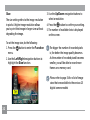
USER MANUAL
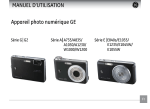
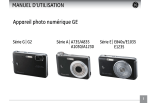
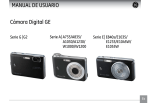
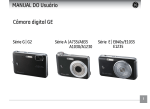
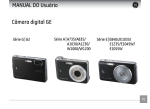
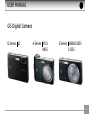
GE-Digital Camera
G Series G2
A Series A735
A835
E Series E840s/E1035
E1235
ii
WARNING
To prevent fire or shock hazard, do not expose the
unit to rain or moisture.
For customers in the U.S.A.
Tested To Comply
With FCC Standards
FOR HOME OR OFFICE USE
FCC Statement
This device complies with part 15 of the FCC Rules.
Operation is subject to the following two conditions:
(1) This device may not cause harmful interference,
and (2) this device must accept any interference
received, including interference that may cause
undesired operation.
For customers in Europe
"CE" mark indicates that this product
complies with the European requirements
for safety, health, environment and customer
protection. "CE" mark cameras are intended for
sales in Europe.
This symbol [crossed-out wheeled bin
WEEE Annex IV] indicates separate collection
of waste electrical and electronic equipment in the
EU countries. Please do not throw the equipment
into the domestic refuse. Please use the return and
collection systems available in your country for the
disposal of this product.
Declaration of Conformity
Model Name
: G2/A735/A835/
E840s/E1035/E1235
Trade Name
: GE
Responsible Party : General Imaging Co.
Address
: 2158 W.190th Street,
Torrance, CA 90504, USA
Telephone Number : 1-800-730-6597
Conforms to the following Standards:
EMC: EN 55022:1998/A1:2000/A2:2003 Class B
EN 55024:1998/A1:2001/A2:2003
EN 61000-3-2:2000/A1:2001
EN 61000-3-3:1995/A1:2001
following the provision of the EMC Directive
(89/336/EEC,2004/108/EEC)
iii
SAFETY PRECAUTIONS
iv
Camera notes:
Do not store or use the camera in the following
types of locations:
• In the rain, very humid and dusty places.
• In a place where the camera can be exposed
directly to the sunlight or subject to high
temperature, e.g. Inside a closed car in summer.
• In a place where the camera is subject to a high
magnetic field, e.g. near motors, transformers or
magnets.
Do not place the camera on a wet surface or
places where dripping water or sand may come
in contact with the camera, which may cause
irrepairable faults.
If the camera will not be used for a long period of
time, we suggest you remove the battery and the
memory card.
If you carry the camera suddenly from a cold location to a warm place, moisture may condense inside the camera. We suggest you wait for a while
before turning on the camera.
No compensation for loss of recordings. Loss of
recordings cannot be compensated for if a malfunction of your camera or recording media, etc,
makes the playback of recordings not possible.
Battery notes:
Incorrect use of the batteries may cause them to
leak, become hot, ignite or burst. Always observe the
precautions given below.
• Do not expose the batteries to water, and take
particular care to keep the terminals dry.
• Do not heat the batteries or throw them into a fire.
• Do not attempt to deform, disassemble or modify
the batteries.
• Use GE charger in the package to charge the
lithium battery only (for G and E series).
Keep the batteries out of reach of babies and small
children.
In cold locations, battery performance deteriorates
and the time for which they can be used shortens
markedly.
Memory card notes:
When using a new memory card, or a memory card
has been initialized by a PC, be sure to format the
card with your digital camera before using it.
To edit image data, copy the image data to the PC's
hard disk and then format memory card if upgrade
the firmware.
Do not change or delete the directory names, or file
names in the memory card from your PC, as this may
make it impossible to use the card in your camera.
BEFORE YOU START
Preface
Safety information
Thank you for purchasing GE digital cameras.
Please read this manual carefully and keep it in a
safe place for future reference.
Please read the following important information
carefully before using the product.
• Do not take apart or attempt to service the
camera yourself.
• Do not drop or knock the camera. Improper
handling may damage the product.
• Turn off the camera before inserting or removing
the battery and memory card.
• Use only the type of battery and charger that
came with your camera. Using other types of
batteries or chargers may damage the camera
and invalidate the warranty.
• When using Li-ion batteries in this product,
ensure that they are inserted correctly. Inserting
the batteries upside down can cause damage to
the camera and possibly start a fire.
• Do not touch the camera lens.
Copyright
© Copyright 2007 General Imaging Company All
rights reserved.
No part of this publication may be reproduced,
transmitted, transcribed, stored in a retrieval system, or translated into any language or computer
language, in any form, by any means, without
the prior written permission of General Imaging
Company.
Trademarks
All trademarks mentioned in this manual are used
for identification purposes only and may be properties of their respective owners.
• Do not expose the camera to moisture, or extreme temperatures. Extreme environments may
shorten the life of your camera or damage the
batteries.
• Do not use or store the camera in dusty, dirty, or
sandy areas, as its components may be damaged.
• Do not expose the lens to direct sunlight for
extended periods.
• Download all pictures and remove the batteries
from the camera if you are going to store the
camera for long periods.
• Do not use abrasive cleansers, alcohol-based,
or solvent-based cleaners to clean the camera.
Wipe the camera with a slightly damp soft cloth.
About this manual
This manual provides you with instructions on
how to use your GE digital camera. Every effort
has been made to ensure that the contents of
this manual are accurate, but General Imaging
Company reserves the right to make changes
without notice.
Symbols used in this manual
Throughout this manual, the following symbols
are used to help you locate information quickly
and easily.
Indicates the useful information to
know.
Indicates the precautions to be taken
while operating the camera.
CONTENTS
WARNING
SAFETY PRECAUTIONS
BEFORE YOU START................................. 1
Preface............................................................. 1
Copyright................................................... 1
Trademarks............................................... 1
Safety information......................................... 1
About this manual......................................... 2
Symbols used in this manual................ 2
CONTENTS................................................. 3
GETTING READY....................................... 7
Unpacking....................................................... 7
Camera Views: G2.......................................... 8
: A735/A835........................10
: E840s..................................12
: E1035/E1235....................16
Charging the battery..................................18
Inserting the battery...................................19
Inserting an optional SD/SDHC card.......22
Turning on and off.......................................23
Using the Mode Dial....................................24
Setting display language, date, and time
Setting the Date and Time...................25
Setting the Language...........................26
About the LCD screen.................................27
BASIC OPERATION.................................28
Shooting in Auto mode...............................28
Using the zoom function............................28
Using the flash..............................................29
Using the self-timer....................................29
Using Macro mode.......................................30
Exposure compensation.............................30
Advanced function menu...........................31
WB (White Balance)...............................31
ISO.............................................................32
Quality......................................................33
Size............................................................34
Color.........................................................35
USING THE MODES................................38
LCD Screen display......................................38
Still shooting mode display.................38
Video shooting mode display..............40
Playback mode display.........................41
Scene mode...................................................42
Sport.........................................................42
Children...................................................42
Indoor.......................................................42
Leaf...........................................................42
Snow.........................................................43
Sunset......................................................43
Fireworks.................................................43
Glass.........................................................43
Museum...................................................43
Landscape...............................................43
Night landscape.....................................43
Night portrait.........................................43
Return to the scene mode palette.....44
Panorama mode..........................................44
Image stabilization mode..........................46
Face detection..............................................47
PLAYBACK...............................................48
Viewing photos and videos........................48
Editing video...........................................50
Thumbnail view............................................53
Using zoom playback
(for still pictures only).................................52
Using the delete button.............................53
USING THE MENUS................................54
Still menu.......................................................54
AF mode (Auto-Focus mode)...............55
AF-assist beam......................................55
Expo Metering (Exposure Metering)..56
Cont.Shot (Continuous shot)...............57
Grid...........................................................57
Quick Review..........................................58
Digital Zoom...........................................58
Histogram...............................................59
Slow shutter............................................59
Date Imprint...........................................59
Movie menu...................................................60
Expo Metering (Exposure Metering)..61
Stabilization............................................61
Playback menu.............................................62
Protect.....................................................62
Delete.......................................................63
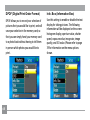
DPOF (Digital Print Order Format).....64
Info. Box (Information Box)..................65
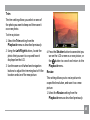
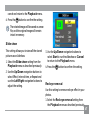
Trim...........................................................65
Resize.......................................................66
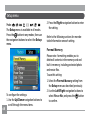
Rotate.......................................................66
Slide show...............................................67
Red-eye removal....................................68
Setup menu...................................................69
Format Memory.....................................69
Beep..........................................................70
LCD Brightness.......................................71
Power Saver............................................71
Date/Time...............................................72
World time..............................................72
File Numbering.......................................73
Language................................................73
Video system..........................................73
Copy to Card (Copy internal memory
to memory card)....................................74
Reset Settings........................................75
FW Ver. (Firmware version)..................75
CONNECTIONS.......................................76
Connecting to a TV......................................76
Connecting to a PC......................................77
Setting the USB mode...........................78
Transferring files to your PC...............78
Connecting to a PictBridge compatible
printer............................................................79
Setting the USB mode...........................80
Using the PictBridge menu........................82
Print with date.......................................82
Print without date.................................83
Print index...............................................84
Print DPOF...............................................85
Exit............................................................85
Appendices.............................................86
Specifications:
G2................................................................86
A735/A835................................................90
E840s/E1035/E1235................................94
Error messages..........................................100
Troubleshooting.........................................102
Firmware upgrade instructions..............104
GETTING READY
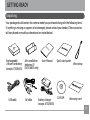
Unpacking
Your package should contain the camera model you purchased along with the following items.
If anything is missing or appears to be damaged, please contact your vendor. (The accessories
will vary based on model purchased and are noted below.)
Use
rM
Rechargeable
Lithium-ion battery
(except A735/A835)
USB cable
AA-size alkaline
batteries X2
(A735/A835 only)
AV cable
a nu
al
User Manual
Battery charger
(except A735/A835)
Quick start guide
CD-ROM
Wrist strap
Warranty card
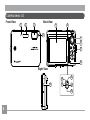
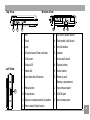
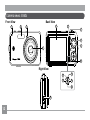
Camera views : G2
Front View
1
2
3
Back View
6
5
4
7
8
9
10
Right View
15
16
14
11
12
13
Top View
Bottom View
17
18
Left View
23
20
19
21
22
1
Mic
13 Self-timer/ Down button
2
Flash
14 Flash mode/ Left button
3
Lens
15 Func/ok button
4
AF assist beam/Timer indicator
16 Speaker
5
LCD screen
17 Zoom scroll wheel
6
Status LED
18 Shutter button
7
Mode dial
19 Power button
8
Face detection AF button
20 Memory card/
Battery compartment
9
Menu button
21 Tripod mount point
10 Erase button
22 USB/ AV port
11 Exposure compensation/ Up button
23 Wrist strap mount
12 Macro mode/ Right button
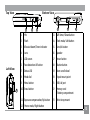
Camera views : A735/A835
Front View
1
Back View
2
5
6
8
7
9
10
4
Right View
3
14
15
11
12
13
10
16
Top View
Bottom View
17
Left View
23
18
19
20
21
22
1
Flash
13
Self-timer/ Down button
2
Lens
14
Func/ok button
3
Mic
15
Flash mode/ Left button
4
AF assist beam/Timer indicator
16
USB/ AV port
5
Status LED
17
Power button
6
LCD screen
18
Shutter button
7
Face detection AF button
19
Mode dial
8
T&W button
20
Speaker
9
Menu button
21
Tripod mount point
10 Erase button
22
Memory card
/ Battery compartment
11 Exposure compensation/ Up button 23
12 Macro mode/ Right button
Wrist strap mount
11
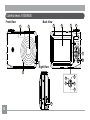
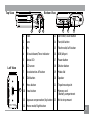
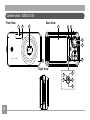
Camera views : E840s
Front View
1
Back View
2
3
5
6
7
8
9
4
10
Right View
15
11
14
12
13
16
12
Top View
Bottom View
17
Left View
23
18
20
19
21
1
Mic
13
Self-timer/ Down button
2
Flash
14
Flash mode/ Left button
3
AF assist beam/Timer indicator
15
Func/ok button
4
Lens
16
Speaker
5
LCD screen
17
Power button
6
Face detection AF button
18
Shutter button
7
Status LED
19
Zoom scroll wheel
8
Mode dial
20
Tripod mount point
9
Menu button
21
USB/ AV port
10 Erase button
22
Memory card
/ Battery compartment
11 Exposure compensation/Up button
23
Wrist strap mount
12
Macro mode/ Right button
22
13
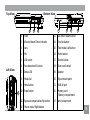
Camera views : E1035/E1235
Front View
1
2
Back View
3
5
6
7
8
9
10.1 megapix el E1035
10
4
Right View
14
15
11
12
13
14
Top View
Bottom View
W
16
Left View
23
17
T
19
18
20
21
1
Flash
13
Self-timer/ Down button
2
AF assist beam/Timer indicator
14
Func/ok button
3
Lens
15
Flash mode/ Left button
4
Mic
16
Power button
5
LCD screen
17
Shutter button
6
Face detection AF button
18
Zoom scroll wheel
7
Status LED
19
Speaker
8
Mode dial
20
Tripod mount point
9
Menu button
21
USB/ AV port
10 Erase button
22
Memory card
/ Battery compartment
11 Exposure compensation/Up button
23
Wrist strap mount
12
Macro mode/ Right button
22
15
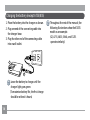
Charging the battery (except A735/835)
1. Place the battery into the charger as shown.
2. Plug one end of the connecting cable into
the charger base.
3. Plug the other end of the connecting cable
into a wall outlet.
1
2
Leave the battery to charge until the
charger light goes green.
(To maximize battery life, the first charge
should be at least 4 hours)
16
Throughout the rest of the manual, the
following illustrations show theE1035
model as an example.
(G2, A735, A835, E840s, and E1235
operate similarly.)
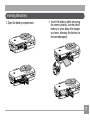
Inserting the battery
1. Open the battery compartment.
2. Insert the battery while observing
the correct polarity. Use the side of
battery to press down the stopper
as shown, allowing the battery to
be inserted properly.
17
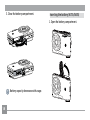
3. Close the battery compartment.
Inserting the battery (A735/A835)
1. Open the battery compartment.
Battery capacity decreases with usage.
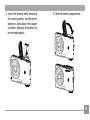
18
2. Insert the battery while observing
the correct polarity. Use the side of
battery to press down the stopper
as shown, allowing the battery to
be inserted properly.
-
+
3. Close the battery compartment.
+
-
19
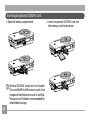
Inserting an optional SD/SDHC card
1. Open the battery compartment.
Optional SD/SDHC cards are not included.
The use of 64MB to 4GB memory cards from
recognized manufacturers such as SanDisk,
Panasonic and Toshiba is recommended for
reliable data storage.
20
2. Insert an optional SD/SDHC card into
the memory card slot as shown.
3. Close the battery compartment.
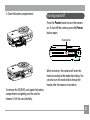
Turning on and off
Press the Power button to turn the camera
on. To turn off the camera, press the Power
button again.
Power button
W
T
When turned on, the camera will enter the
mode according to the mode dial setting. You
can also turn the mode dial to change the
modes after the camera is turned on.
To remove the SD/SDHC card, open the battery
compartment and gently push the card to
release it. Pull the card carefully.
21
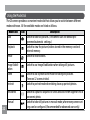
Using the Mode Dial
The GE camera provides a convenient mode dial that allows you to switch between different
modes with ease. All the available modes are listed as follows.
Mode Name
Auto
Playback
Movie
Image Stabilization
Scene
Portrait
Panorama
Manual
22
Icon
Description
Switch to take still pictures. (The camera uses the default programmed automatic settings.)
Switch to view the pictures/videos stored in the memory card and
internal memory.
Switch to record videos.
Switch to use Image Stabilization when taking still pictures.
Switch to use a preset scene mode for taking still pictures.
There are 12 scenes in total.
Switch to portrait mode when taking close-up portrait photos.
Switch to capture a sequence of shots and stitch them together into a
panoramic photo.
Switch to take still pictures in manual mode, where many camera settings can be configured. (Recommended for advanced users only)
Setting date/time and language
To set the language, date, and time, the following
settings need to be configured in the Setup
menu.
• Date / Time
• Display language
To access the Setup menu, do the following:
1 .Press Power to turn the camera on.
2. Press the
button and use Up/Down/Left/
Right to select the Setup menu.
Setting the Date and Time
1. Use the Up/Down to select Date/Time.
Then press the Right to enter the setting.
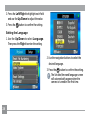
23
2. Press the Left/Right to highlight each field
and use the Up/Down to adjust the value.
3. Press the
button to confirm the setting.
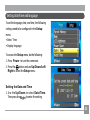
Setting the Language
1. Use the Up/Down to select Language.
Then press the Right to enter the setting.
2. Use the navigation buttons to select the
desired language.
3. Press the
button to confirm the setting.
The Set date/time and language screen
will automatically appear when the
camera is turned on the first time.
24
About the LCD screen
When you turn the camera on, various icons
are shown on the LCD screen to indicate the
current camera settings and status. To learn
more about the displayed icons, see “LCD
Screen display” on page 36.
LCD Screen notes:
Extremely high-precision technology had
been used to manufacture the LCD screen
so that most of the pixels are operational
for use. However, there may be some minute
points (black, white, red, blue or green) that
constantly appear on the LCD screen. These
points are normal in the manufacturing process and the recording is not affected in any
way.
If the LCD monitor is damaged, take
particular care with the liquid crystal in
the monitor. If any of the following
situations arise, take the urgent action
indicated.
•If liquid crystal comes in contact with your
skin, wipe the area with a cloth and then
wash thoroughly with soap and running
water.
•If liquid crystal gets into your eye, flush the
affected eye with clean water for at least 15
minutes and then seek medical assistance.
•If liquid crystal is swallowed, flush your
mouth thoroughly with water. Drink large
quantities of water and induce vomiting.
Then seek medical assistance.
25
BASIC OPERATION
Shooting in Auto mode
Auto mode is the easiest mode to take photos. While operating in this mode, the camera
automatically optimizes your photos for best
results.
Using the zoom function
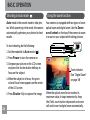
Your camera is equipped with two types of zoom:
optical zoom and digital zoom. Use the Zoom
scroll wheel on the top of the camera to zoom
in or out on your subject while taking pictures.
Zoom Scroll wheel
To start shooting, do the following:
1. Set the mode dial to Auto mode ( ).
2. Press Power to turn the camera on.
3. Compose your picture on the LCD screen
and press the shutter button halfway to
focus on the subject.
4. When the subject is in focus, the green
colored focus frame appears on the center
of the LCD screen.
5. Press Shutter fully to capture the image.
26
W
W
_T
T
Zoom indicator
(See “Digital Zoom“
on page 58)
When the optical zoom factor reaches its
maximum value, it stops momentarily. Keep
the (Tele) zoom button depressed and zoom
will switch over to digital zoom automatically.
Using the flash
Using the self-timer/Multiple shots
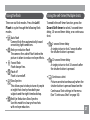
There are six flash modes. Press the Left/
Flash to cycle through the following flash
modes.
To enable the self-timer function, press the
Down/Self-timer to select 2-second timer
delay, 10-second timer delay, or a continuous
shot.
•
•
•
•
•
•
Auto flash
Camera flash fires automatically based
on existing light conditions.
Red-eye reduction flash
The camera fires a brief flash before the
picture is taken to reduce red-eye effects.
Forced flash
Flash always fires.
Flash off
Flash is turned off.
Slow Synchro
This allows you to take pictures of people
at night that clearly show both your
subjects and the night time backdrop.
Red-Eye Reduction+Slow Synchro
Use this mode for slow synchro shots
with red-eye reduction.
•
2-second timer delay
A single picture is shot 2 seconds after
the shutter button is pressed.
•
10-second timer delay
A single picture is shot 10 seconds after
the shutter button is pressed.
•
Continuous shot
Pictures are shot continuously when the
shutter button is pressed based on the
Continuous Shot settings in the menu.
(See “Continuous Shot” on page 56).
27
Using Macro mode
Exposure compensation
In Macro mode, you can capture tiny details
of the subject at a very close range. Press the
Right/Macro to take close-up shots.
The exposure compensation allows you to
adjust the background brightness to produce
the best result of photos. To change the exposure values, do the following:
1. When taking a picture, press the Up/
Exposure button to activate the set
exposure screen.
•
28
Macro
Select this to focus on subjects 5cm from
the lens.
2. Use the Left/Right to adjust the exposure
value for the picture. The range is from EV
-2.0 to EV+2.0 (steps of 0.3).
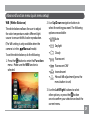
Advanced function menu (quick menu setup)
WB (White Balance)
The white balance allows the user to adjust
the color temperature under different light
source to ensure faithful color reproduction.
(The WB setting is only available when the
camera is in the
Manual mode).
To set the white balance, do the following:
1. Press the
button to enter the Function
menu. Make sure the WB function is
selected.
2. Use Up/Down navigation buttons to
select the setting you want. The following
options are available:
•
Auto
•
Daylight
•
Cloudy
•
Fluorescent
•
Fluorescent CWF
•
•
Incandescent
Manual WB adjustment (press the
menu button to set)
3. Use the Left/Right buttons to select
other options, or press the
button
once to confirm your selection and exit the
current menu.
29
ISO
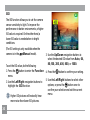
The ISO function allows you to set the camera
sensor sensitivity to light. To improve the
performance in darker environments, a higher
ISO value is required. On the other hand, a
lower ISO value is needed when in bright
conditions.
(The ISO setting is only available when the
camera is in the
Manual mode).
To set the ISO value, do the following:
1. Press the
button to enter the Function
menu.
2. Use the Left/Right navigation buttons to
highlight the ISO function.
Higher ISO pictures will naturally have
more noise than lower ISO pictures.
30
3. Use the Up/Down navigation buttons to
select the desired ISO value from Auto, 64,
80,100, 200, 400, 800, or 1600.
4. Press the
button to confirm your setting.
5. Use the Left/Right buttons to select other
options, or press the
button once to
confirm your selection and exit the current
menu.
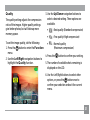
Quality
The quality setting adjusts the compression
ratio of the images. Higher quality settings
give better photos, but will take up more
memory space.
3. Use the Up/Down navigation buttons to
select a desired setting. Three options are
available.
•
: Best quality (Standard compression)
•
: Fine quality (High compression)
To set the image quality, do the following:
•
: Normal quality
(Maximum compression)
1. Press the
button to enter the Function
menu.
4. Press the
button to confirm your setting.
2. Use the Left/Right navigation buttons to
5. The number of available shots remaining is
highlight the Quality function.
displayed on the LCD.
6. Use the Left/Right buttons to select other
options, or press the
button once to
confirm your selection and exit the current
menu.
31
Size
The size setting refers to the image resolution
in pixels. A higher image resolution allows
you to print that image in larger sizes without
degrading the image.
To set the image size, do the following:
1. Press the
button to enter the Function
menu.
2. Use the Left/Right navigation buttons to
highlight the Size function.
3. Use the Up/Down navigation buttons to
select a resolution.
4. Press the
button to confirm your setting.
5. The number of available shots is displayed
on the screen.
The bigger the number of recorded pixels
is, the better the image quality becomes.
As the number of recorded pixels becomes
smaller, you will be able to record more
frames on a memory card.
Please refer to page 34 for a list of image
sizes that are available to the various GE
digital camera models
32
Color
The color setting allows you to add artistic
effects directly when taking shots. You can try
different color tones to alter the mood of your
pictures.
(The Color setting is only available when the
camera is in the
Manual mode).
To set the image color, do the following:
1. Press the
button to enter the Function
menu.
2. Use the Left/Right navigation buttons to
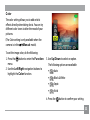
highlight the Color function.
3. Use Up/Down to select an option.
The following options are available:
•
Auto
•
Black & White
•
Sepia
•
Vivid
4. Press the
button to confirm your setting.
33
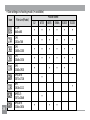
• Size settings in shooting mode. (•: available)
Icon
34
File size (Pixels)
0.3M:
640×480
1M:
1024×768
2M:
1600×1200
3M:
2048×1536
5M:
2560×1920
5M(16:9):
3072×1728
6M:
2816×2112
6M(3:2):
3072×2048
6M(16:9):
3264×1836
Model name :
A835 E840s
G2
A735
E1035
E1235
•
•
•
•
•
•
•
•
•
•
•
•
•
•
•
•
•
•
•
•
•
•
•
•
•
•
•
•
•
•
•
•
•
•
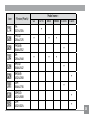
Icon
File size (Pixels)
7M:
3072×2304
7M(3:2):
3264×2176
7M(16:9):
3648×2052
8M:
3264×2448
9M(3:2):
3648×2432
9M(16:9):
4032×2268
10M:
3648×2736
10M(3:2):
4032×2688
12M:
4032×3024
G2
A735
Model name :
A835 E840s
E1035
E1235
•
•
•
•
•
•
•
•
•
•
•
•
•
35
USING THE MODES
LCD Screen display
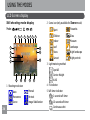
Still shooting mode display
Mode:
1
2
3
4
5
6
7
2 Scene icon (only available for Scene mode)
8
9
10
18
19
20
12
11
13
14
15
16
17
1 Shooting mode icon
Auto
Panorama
Scene
36
Manual
Portrait
Image Stabilization
Sport
Fireworks
Children
Indoor
Glass
Leaf
Landscape
Snow
Night landscape
Sunset
Night portrait
3 Light metering method
Spot AE
Center-Weight
Ai AE
4 EV indicator
5 Self-timer indicator
2-second self-timer
10-second self-timer
Continuous shot
Museum
6 Macro mode indicator
Macro mode
7 Flash mode indicator
Auto flash
Red-eye reduction flash
Forced flash
Flash off
Slow Synchro
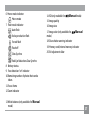
14 ISO (only available for
15 Image quality
16 Image size
Manual mode)
17 Image color (only available for
Manual
mode)
18 Slow shutter warning indicator
19 Memory card/internal memory indicator
20 EV adjustment slider
Red-Eye Reduction+Slow Synchro
8 Battery status
9 Face detection “on” indicator
10 Remaining number of photos that can be
taken.
11 Focus frame
12 Zoom indicator
13 White balance (only available for Manual
mode)
37
Video shooting mode display
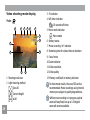
3 EV indicator
4 Self-timer indicator
Mode:
1
2
3
4
5
6
8
13
7
10
9
11
12
1 Shooting mode icon
2 Light metering method
Spot AE
Center-Weight
Ai AE
38
10-second self-timer
5 Macro mode indicator
Macro mode
6 Battery status
7 Movie recording “on” indicator
8 Remaining time for videos that can be taken.
9 Focus frame
10 Zoom indicator
11 Video resolution
12 Video quality
13 Memory card/built-in memory indicator
For best movie results, the use of SD cards is
recommended. Movie recordings using internal
memory are subject to quality degradations.
While movie recording is in progress, optical
zoom will stay fixed, but up to 1.5X digital
zoom will remain available.
Playback mode display
Mode:
1
2
3
4
5
6
7
8
11
9
12
13
14
10
15
18
17
16
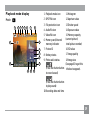
1
2
3
4
5
6
Playback mode icon
DPOF file icon
File protection icon
Audio file icon
Video file icon
Memory card/internal
memory indicator
7 Picture ID
8 Battery status
9 Photo audio status
11 Histogram
12 Aperture value
13 Shutter speed
14 Exposure value
15 Memory capacity
(current picture/
total picture number)
16 ISO value
17 Image quality
18 Image size
(See page 63 to get this
(Press the shutter button info box to appear).
to record sound)
(Press the shutter button
to play sound)
10 Recording date and time
39
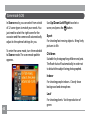
Scene mode (SCN)
In Scene mode, you can select from a total
of 12 scene types to match your needs. You
just need to select the right scene for the
occasion and the camera will automatically
adjust to the optimal settings for you.
To enter the scene mode, turn the mode dial
to Scene mode. The scene mode palette
appears.
Use Up/Down/Left/Right to select a
scene, and press the
button.
Sport
For shooting fast-moving objects. Bring lively
pictures to life.
Children
Suitable for photographing children and pets.
The flash shuts off automatically in order not
to disturb the subject being photographed.
Indoor
For shooting people indoors. Clearly show
background and atmosphere.
40
Leaf
For shooting plants. Vivid reproduction of
green.
Snow
Suitable for snowy landscape. Camera automatically adjusts and corrects exposure value
(EV).
Sunset
For shooting sunsets. Vivid reproduction of
red and yellow.
Fireworks
For shooting at night and fireworks. Shutterspeed is slower than normal.(Use of tripod is
recommended)
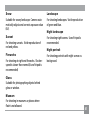
Landscape
For shooting landscapes. Vivid reproduction
of green and blue.
Night landscape
For shooting night scenes. Use of tripod is
recommended.
Night portrait
For shooting portraits with night scenes as
background.
Glass
Suitable for photographing objects behind
glass or window.
Museum
For shooting in museums or places where
flash is not allowed.
41
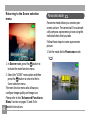
Returning to the Scene selection
menu
Panorama mode
Panorama mode allows you create a panoramic picture. The camera will to automatically compose a panoramic picture using the
individual shots that you take.
Follow these steps to create a panoramic
picture:
1. Set the mode dial to Panorama mode
(
1. In Scene mode, press the
button to
activate the main function menu.
2. Select the “SCENE” menu option and then
press the
button to return to the to
Scene selection menu.
The main function menu also allows you
configure image quality and image size.
Please refer to the "Advanced Functions
Menu" section on pages 33 and 34 for
42 detailed instructions.
).
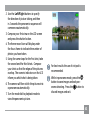
2. Use the Left/Right buttons to specify
the direction of picture taking, and then
in 2 seconds the panoramic sequence will
commence automatically.
3. Compose your first view on the LCD screen
and press the shutter button.
4. The frame record icon will display under
the focus frame to indicate the number of
photos you have taken.
5. Using the same steps for the first shot, take
the second and the third shots. Compose
your shots so that the edges of the pictures
overlap. The numeric indicators on the LCD
inform you which shot is being taken.
6. The camera will then stitch the pictures into
a panorama automatically.
7. Turn the mode dial to playback mode to
view the panoramic picture.
For best results the use of a tripod is
recommended.
While in panorama mode, press the
button to save images and exit panorama shooting. Press the
button to
discard images and exit.
43
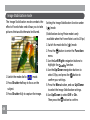
Image Stabilization mode
The Image Stabilization mode combats the
effect of hand shake and allows you to take
pictures that would otherwise be blurred.
1.Switch the mode dial to (
) mode.
2.Press Shutter halfway to focus on the
subject.
3.Press Shutter fully to capture the image.
44
Setting the Image Stabilization function under
(
) mode.
(Stabilization during Movie mode is only
available when the Frame Rate is set to 15 fps)
1.Switch the mode dial to (
) mode.
2.Press the
button to enter the Function
menu.
3.Use the Left/Right navigation buttons to
highlight the Quality function.
4.Use the Up/Down navigation buttons to
select 15fps, and press the
button to
confirm your settings.
5.Press the Menu button, and use Up/Down
to select the Image Stabilization settings.
6.Use Up/Down to select Off or On.
Then press the
button to confirm.
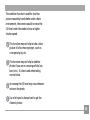
The stabilizer function is used for less blur
picture caused by hand shake under a dark
environment, the camera would increase the
ISO level under the mode to have a higher
shutter speed.
This function may not help to take a clear
picture of a fast moving target, such as
a car passing by, etc.
This function may not help to stabilize
photos if you are in a moving vehicle (car,
boat, etc.). It is best used when taking
normal shots.
Increasing the ISO level may cause heavier
noise on the photo.
Use of a tripod is always best to get the
clearest picture.
45
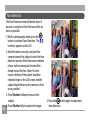
Face Detection
The Face Detection mode will detect faces of
persons in a photo so that the faces will be as
clear as possible.
1. While in photography mode, press the
button to activate Face Detection. The
indicator appears on the LCD.
46
2. Hold the camera securely, and point the
camera towards the subject to start the face
detection process. When the camera detects
a face, a white rectangular frame will be
drawn around the face. (Note: For best
results, the face of the subject should be
relatively large on the LCD screen, and the
subject should be facing the camera as front
on as possible.)
3. Press Shutter halfway to focus on the
subject.
4. Press Shutter fully to capture the image.
5. Press the
button again to deactivate
face detection.
PLAYBACK
Viewing photos and videos
To view the captured photos and video clips
on the LCD screen:
1. Turn your camera to Playback mode.
The last recorded photo or video clip is
displayed.
2. Use the Left/Right navigation buttons
to scroll through the photos or video clips
stored in the internal memory or memory
card.
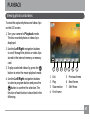
3. To play a selected video clip, press the
button to enter the movie playback mode.
4. Use the Left/Right navigation buttons
to select a program button and press the
button to confirm the selection. The
function of each button is described in the
following.
1
1
2
3
4
2
3
Exit
Play
Slow motion
First frame
4
5
6
7
5 Previous frame
6 Next frame
7 Edit Movie
47
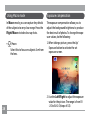
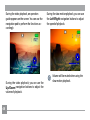
During the video playback, an operation
guide appears on the screen. You can use the
navigation pad to perform the functions accordingly.
During the video playback, you can use the
Up/Down navigation buttons to adjust the
volume of playback.
48
During the slow motion playback, you can use
the Left/Right navigation buttons to adjust
the speed of playback.
Volume will be muted when using the
slow motion playback.
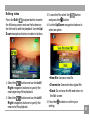
Editing video
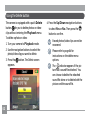
Press the Edit
program button to enter
the following screen and use the buttons on
the left side to edit the playback. Use the Up/
Down navigation buttons to select a button.
1. Select the
button and use the Left/
Right navigation buttons to specify the
new beginning of the playback.
2. Select the
button and use the Left/
Right navigation buttons to specify the
new end of the playback.
3. To save the file, select the
button
and press the
button.
4. Use the Up/Down navigation buttons to
select an option.
• New file: Save as a new file.
• Overwrite: Overwrite the original file.
• Back: Do not save the file and return to
the Edit screen.
5. Press the
button to confirm your
setting.
49
To exit the Edit screen, select the
ton and press the
button.
but-
Edited video must be at least 1 second
long .
With sufficient battery and at least 1GB
available memory, up to 30 minutes
of footage can be recorded per movie.
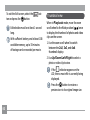
Thumbnail view
When in Playback mode, move the zoom
scroll wheel to the Wide position (
) once
to display the thumbnail of photos and video
clips on the screen.
1. Use the zoom scroll wheel to switch
between the 2x2, 3x3, and 4x4
thumbnail display.
2. Use Up/Down/Left/Right to select a
photo or video clip to view.
If the
indicator appears on the
LCD, then a movie file is currently being
displayed.
Press the
button to restore a
preview icon to its original image size.
50
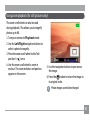
Using zoom playback (for still pictures only)
The zoom scroll wheel can also be used
during playback. This allows you to magnify
photos up to 8X.
1. Turn your camera to Playback mode.
2. Use the Left/Right navigation buttons to
select a photo to magnify.
3. Move the zoom scroll wheel to the Tele
position (
) once.
4. Use the zoom scroll wheel to zoom in
and out. The zoom indicator and pan box
appear on the screen.
5. Use the navigation buttons to pan across
the image.
6. Press the
button to return the image to
its original scale.
Movie images cannot be enlarged.
51
Using the Delete button
The camera is equipped with a quick Delete
button
for you to delete photos or videoclips without entering the Playback menu.
To delete a photo or video:
1. Turn your camera to Playback mode.
2. Use the navigation buttons to select the
photo/video clip you want to delete.
3. Press the
button. The Delete screen
appears.
52
4. Press the Up/Down navigation buttons
to select Yes or No. Then press the
button to confirm.
Erased photos/video clips cannot be
recovered.
Please refer to page 64 for
instructions on the delete menu
options.
The
indicator appears if the picture has a sound file attached. You
can choose to delete the attached
sound file alone or to delete both the
picture and the sound file.
USING THE MENUS
Still menu
Mode:
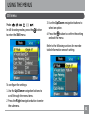
In still shooting modes, press the
to enter the Still menu.
button
3. Use the Up/Down navigation buttons to
select an option.
4. Press the
button to confirm the setting
and exit the menu.
Refer to the following sections for more detailed information on each setting.
To configure the settings:
1. Use the Up/Down navigation buttons to
scroll through the menu items.
2. Press the Right navigation button to enter
the submenu.
53
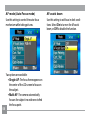
AF mode (Auto-Focus mode)
Use this setting to control the auto-focus
mechanism while taking pictures.
54
Two options are available:
• Single-AF: The focus frame appears on
the center of the LCD screen to focus on
the subject.
• Multi-AF: The camera automatically
focuses the subject in a wide area to find
the focus point.
AF-assist beam
Use this setting to aid focus in dark conditions. Select On to turn on the AF assist
beam, or Off to disable the function.
Expo Metering (Exposure Metering)
Use this setting to select an area for the
exposure to be obtained.
Three options are available:
• Spot AE (Spot Auto Exposure)
• Center-Weight
• AiAE (Artificial Intelligence AE)
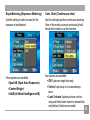
Cont. Shot (Continuous shot)
Use this setting to perform continuous shooting.
Once in this mode, you must continuously hold
the shutter button to use this function.
Four options are available:
• Off: Capture a single shot only.
• 5 shot: Capture up to 5 consecutive pictures.
• Last 5 shots: Capture pictures continuously until the shutter button is released but
only the last 5 shots are recorded.
55
• Time-Lapse : Automatically capture
pictures in at predefined intervals.
The flash is designed not to work in this
mode in order to enable quick succession
of shots.
To activate this mode, the camera must
have the self-timer for multiple shots already turned on (as described on page 27)
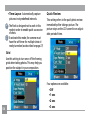
Quick Review
This setting refers to the quick photo review
immediately after taking a picture. The
picture stays on the LCD screen for an adjustable period of time.
Grid
Use this setting to turn on or off the framing
grids when taking photos. This may help you
position the subject in your composition.
56
Four options are available:
• Off
• 1 sec
• 2 sec
• 3 sec
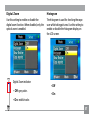
Digital Zoom
Use this setting to enable or disable the
digital zoom function. When disabled, only the
optical zoom is enabled.
Digital Zoom indicator
• Off: gray color.
• On: reddish color.
Histogram
The histogram is used for checking the exposure while taking pictures. Use this setting to
enable or disable the histogram display on
the LCD screen.
• Off
• On
57
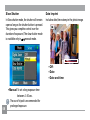
Slow Shutter
In Slow shutter mode, the shutter will remain
open as long as the shutter button is pressed.
This gives you complete control over the
duration of exposure. (The slow shutter mode
is available only in
manual mode.
Date Imprint
Include a date/time stamp in the photo image.
• Off:
• Date
• Date and time
58
• Manual: To set a long exposure time
between 2~30 sec.
The use of tripod is recommended for
prolonged exposure.
Movie menu
Mode:
In movie shooting mode, press the
to enter the Movie menu.
button
To configure the settings:
1. Use the Up/Down buttons to scroll
through menu items.
2. Press the Right navigation button to enter
the submenu.
3. Use the Up/Down navigation buttons to
select an option.
4. Press the
button to confirm the setting
and exit the menu.
Refer to the following sections for more detailed information on each setting.
59
Expo Metering (Exposure Metering)
Set metering mode for various lighting conditions.
Three options are available:
•Spot metering
•Center-weighted average metering
•Artificial intelligence automatic
exposure (Ai AE)
60
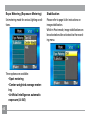
Stabilization
Please refer to page 44 for instructions on
image stabilization.
While in Movie mode, image stabilization can
be activated and de-activated via the recording menu.
Playback menu
Mode:
In playback mode, press the
enter the Playback menu.
button to
Please refer to the following sections for
detailed instructions on the various menu
options.
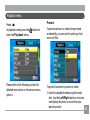
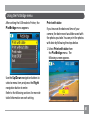
Protect
To prevent pictures or videos being erased
accidentally, you can use this setting to lock
one or all files.
To protect/unprotect a picture or video:
1. Switch to playback mode using the mode
dial. Use the Left/Right buttons to locate
and display the photo or movie that you
want to protect.
61
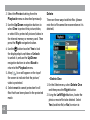
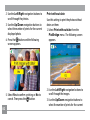
2. Select the Protect setting from the
Playback menu as described previously.
3. Use the Up/Down navigation buttons to
select One to protect this picture/video,
or select All to protect all pictures/videos in
the internal memory or memory card. Then
press the Right navigation button.
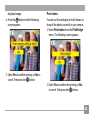
4. Use the
button to select Yes to lock
the displayed picture/video or Unlock
to unlock it, and use the Up/Down
navigation buttons to select Back to
return to the Playback menu.
5. A key (
) icon will appear on the top of
the screen to indicate that the picture/
video is protected.
6. Select reset to cancel protection for all
files that have been placed in the protected
mode.
62
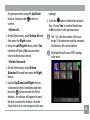
Delete
There are three ways to delete files: (please
note that a file cannot be recovered once it is
deleted.)
•Delete One:
1. On the Delete menu, select Delete One
and then press the Right button.
2. Using the Left/Right buttons, locate the
photo or movie file to be deleted. Select
Yes (to delete file) or No (to return to
the previous menu) using the Up/Down
buttons, then press the
button to
confirm.
•Delete All:
1. On the Delete menu, select Delete All and
then press the Right button.
2. Using the Left/Right buttons, select Yes
(to delete all files) or No (to cancel and
return to the previous menu).
•Delete Selected:
1. On the Delete menu, select Delete
Selected Files and then press the Right
button.
2. Use the Up/Down/Left/Right buttons
to locate each file to be deleted, and then
press the
button to mark the file for
deletion. An indicator will appear for each
file that is marked for deletion. (Use the
Zoom button to re-size image icons for easy
viewing.)
3. Press the
button to delete the selected
files. Choose Yes to confirm file deletion
or No to return to the previous menu.
The “ ” indicator means a file is protected. File protection must be removed
first before a file can be deleted.
Deleting files will cause DPOF settings
to be reset.
63
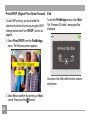
DPOF (Digital Print Order Format)
DPOF allows you to record your selection of
pictures that you would like to print, and will
save your selection in the memory card, so
that you can simply hand your memory card
to a photo kiosk without having to tell them
in person which photos you would like to
print.
64
Info. Box (Information Box)
Use this setting to enable or disable the text
display for taking pictures. The following
information will be displayed on the screen:
histogram display, aperture value, shutter
speed, exposure value, image size, image
quality, and ISO value. (Please refer to page
39 for information on the menu options
shown.
Trim
The trim setting allows you select an area of
the photo you want to keep and then save it
as a new photo.
To trim a picture:
1. Select the Trim setting from the
Playback menu as described previously.
2. Using the Left/Right buttons, locate the
photo that you want to crop and have it
displayed on the LCD.
3. Use the zoom scroll wheel and navigation
buttons to adjust the trimming box to fit the
location and size of the new picture.
4. Press the Shutter button to save what you
see on the LCD screen as a new picture, or
the
button to cancel and return to the
Playback menu.
Resize
This setting allows you to resize picture to
a specified resolution, and save it as a new
picture.
1. Select the Resize setting from the
Playback menu as described previously.
65
2. Use the Left/Right navigation buttons to
select a picture to resize.
3. Use the Up/Down navigation buttons
to select a resolution (1024X768 or
640X480) to resize the image or back to
cancel and return to the Playback menu.
4. Press the
button to confirm the setting.
Resizing an image creates a new file
that contains the image in the size you
select. The file with the original image
also remains in memory.
66
If the message “The image cannot be
edited.” appears, it means that the
current image cannot be resized.
Rotate
You can use this setting to change the picture
orientation of the picture.
1. Select the Rotate setting from the
Playback menu as described previously.
2. Use the Left/Right navigation buttons to
select a picture to rotate.
3. Use the Up/Down navigation buttons to
select the direction for rotation or Back to
cancel and return to the Playback menu.
4. Press the
button to confirm the setting.
The rotated image will be saved as a new
file, and the original image will remain
intact in memory.
Slide show
This setting allows you to view all the stored
pictures as a slideshow.
1. Select the Slide show setting from the
Playback menu as described previously.
2. Use the Up/Down navigation buttons to
select Effect, Interval time, or Repeat and
use the Left/Right navigation buttons to
adjust the setting.
3. Use the Up/Down navigation buttons to
select Start to run the slideshow or Cancel
to return to the Playback menu.
4. Press the
button to confirm the setting.
Red-eye removal
Use this setting to remove red-eye effect in your
photos.
1. Select the Red-eye removal setting from
the Playback menu as described previously.
67
Setup menu
Mode:
The Setup menu is available in all modes.
Press the
button in any modes, then use
the navigation buttons to select the Setup
menu.
68
To configure the settings:
1. Use the Up/Down navigation buttons to
scroll through the menu items.
2. Press the Right navigation button to enter
the setting.
Refer to the following sections for more detailed information on each setting.
Format Memory
Please note: formatting enables you to
delete all contents in the memory card and
built-in memory, including protected photo
and movie files.
To use this setting:
1. Select the Format Memory setting from
the Setup menu as described previously.
2. Use the Left/Right navigation buttons to
select Yes or No, and press the
button
to confirm.
menu as described previously.
2. Use the Up/Down navigation buttons
to switch between volume, shutter tone,
key tone, self-timer tone, and power tone
fields.
3. The current media is formatted.
Beep
Use this setting to adjust the volume of beep
when buttons are pressed and change the
tones for shutter, buttons, self-timer, and
power-on/power-off.
To change this setting:
1. Select the Beep setting from the Setup
3. Use the Left/Right navigation buttons to
adjust the volume and change each tone
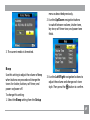
style. Then press the
button to confirm.
69
LCD Brightness
Use this setting to adjust the brightness of
your LCD screen.
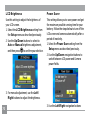
1. Select the LCD Brightness setting from
the Setup menu as described previously.
2. Use the Up/Down buttons to select to
Auto or Manual brightness adjustment,
and then press
to confirm your election.
Power Saver
This setting allows you to save power and get
the maximum possible running time for your
battery. Follow the steps below to turn off the
LCD screen and camera automatically after a
period of inactivity.
1. Select the Power Save setting from the
Setup menu as described previously.
2. Use the Up/Down navigation buttons to
switch between LCD power and Camera
power fields.
3. For manual adjustment, use the Left/
Right buttons to adjust the brightness.
70
3. Use the Left/Right navigation buttons
to specify the idle period before automatic
power-off. The level bars correspond to the
following idle periods.
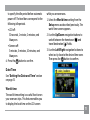
• LCD off:
30 seconds, 1 minute, 2 minutes, and
Always on.
• Camera off:
3 minutes, 5 minutes, 10 minutes, and
Always on.
4. Press the
button to confirm.
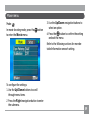
while you are overseas.
1. Select the World time setting from the
Setup menu as described previously. The
world time screen appears.
2. Use the Up/Down navigation buttons to
switch between the hometown ( ) and
travel destination ( ) fields.
3. Use the Left/Right navigation buttons to
select a city close to the desired time zone.
Then press the
button to confirm.
Date/Time
See “Setting the Date and Time“ section
on page 25.
World time
The world time setting is a useful function on
your overseas trips. This feature enables you
to display the local time on the LCD screen
71
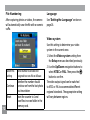
File Numbering
After capturing photos or videos, the camera
will automatically save the file with a numeric
suffix.
Language
See “Setting the Language“ section on
page 26.
Video system
Use this setting to determine your video
system in the current area.
1. Select the Video system setting from
the Setup menu as described previously.
Select this
setting:
Continue
Reset
72
Serial number is derived and
assigned to a new file as follows:
whether the number should
continue on from the last photo
you have taken
reset the counter to 1 and
save files in a new folder in the
memory card.
2. Use the Up/Down navigation buttons to
select NTSC or PAL. Then press the
button to confirm.
The video output signal can be switched
to NTSC or PAL to accommodate different
regional standards. The appropriate setting
will vary between regions.
NTSC: USA, Canada, Taiwan, Japan, etc.
PAL : Europe, Asia (excluding Taiwan),
Oceania, etc.
Note: The TV output will not display properly if
an incorrect video system is selected.
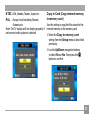
Copy to Card (Copy internal memory
to memory card)
Use this setting to copy the files stored in the
internal memory to the memory card.
1. Select the Copy to memory card
setting from the Setup menu as described
previously.
2. Use the Up/Down navigation buttons
to select Yes or No. Then press the
button to confirm.
73
Reset Settings
Use this setting to restore the camera to its
default settings.
1. Select the Reset setting from the Setup
menu as described previously.
2. Use the Up/Down navigation buttons
to select Yes or No. Then press the
button to confirm.
74
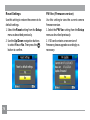
FW Ver. (Firmware version)
Use this setting to view the current camera
firmware version.
1. Select the FW Ver. setting from the Setup
menu as described previously.
2. If SD card contains a new version of
firmware, please upgrade accordingly as
necessary.
CONNECTIONS
Connecting to a TV
You can connect your camera to your
television, computer, or printer to view
picture you have taken.
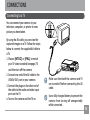
By using the AV cable, you can view the
captured images on a TV. Follow the steps
below to connect the supplied AV cable to
a TV.
1. Choose [NTSC] or [PAL] to match
your TV video standard (see page 73)
and then turn off the camera.
2. Connect one end of the AV cable to the
USB/AV OUT port on your camera.
3. Connect the plugs on the other end of
the cable to the audio and video input
ports on the TV.
4. Turn on the camera and the TV on.
Video Audio
Make sure that both the camera and TV
are turned off before connecting the AV
cable.
Use a fully charged battery to prevent the
camera from turning off unexpectedly
while connected.
75
Connecting to a PC
Use the USB cable and ArcSoft software (CDROM) supplied with your camera to copy
(transfer) pictures to a computer.
Setting the USB mode
Since the camera’s USB port can be set to
connect with either a PC or a Printer, the
following steps will allow you to ensure that
the camera is correctly configured to connect
with a PC.
1. Press the
button and use the Up/
Down navigation buttons to select USB
Connect, and then press the Right
navigation button.
2. Use the Up/Down navigation buttons to
select PC.
3. Press the
76
button to confirm the setting.
Transferring files to your PC
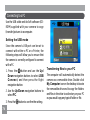
The computer will automatically detect the
camera as a removable drive. Double-click
My Computer icon on the desktop to locate
the removable drive and to copy the folders
and files in the drive to a directory on your PC
as you would copy any typical folder or file.
By using the USB cable, you can transfer the
captured photos and videos to a PC. Follow
the steps below to connect the camera to a
PC.
1. Start a computer to which ArcSoft
software has been installed.
2. Make sure both the camera and PC are
turned on.
3. Connect one end of the supplied USB
cable to the USB/AV OUT port on your
camera.
4. Connect the other end of the cable to an
available USB port on your PC.
5. Disconnect the camera once transfer is
completed.
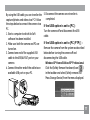
If the USB option is set to [PC] :
Turn the camera off and disconnect the USB
cable.
If the USB option is set to [PC (PTP) ] :
Remove the camera from the system as described
below before turning the camera off and
disconnecting the USB cable.
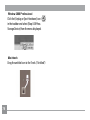
Window XP Home Edition/XP Professional
Click the [Safely Remove Hardware] icon (
)
in the taskbar and select [Safely remove USB
Mass Storage Device] from the menu displayed.
77
Window 2000 Professional
Click the [Unplug or Eject Hardware] icon (
in the taskbar and select [Stop USB Mass
Storage Device] from the menu displayed.
Macintosh
Drag the untitled icon to the Trash. ("Untitled")
78
)
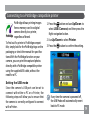
Connecting to a PictBridge compatible printer
PictBridge allows printing images
from a memory card in a digital
camera directly to a printer,
regardless of brand.
To find out if a printer is PictBridge compatible, simply look for the PictBridge logo on the
packaging or check the manual for specifications.With the PictBridge function on your
camera, you can print the captured photos
directly with a PictBridge compatible printer
using the supplied USB cable, without the
need for a PC.
Setting the USB mode
Since the camera’s USB port can be set to
connect with either a PC or a Printer, the
following steps will allow you to ensure that
the camera is correctly configured to connect
with a Printer.
1. Press the
button and use Up/Down to
select USB Connect, and then press the
Right navigation button.
2. Use Up/Down to select Printer.
3. Press the
button to confirm the setting.
Every time the camera is powered off,
the USB Mode will automatically revert
back to PC mode.
79
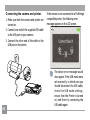
Connecting the camera and printer.
1. Make sure both the camera and printer are
turned on.
2. Connect one end of the supplied USB cable
to the USB port on your camera.
3. Connect the other end of the cable to the
USB port on the printer.
80
If the camera is not connected to a PictBridge
compatible printer, the following error
message appears on the LCD screen.
The above error message would
also appear if the USB mode were
set incorrectly, in which case you
should disconnect the USB cable,
check the USB mode settings,
ensure that the Printer is turned
on, and then try connecting the
USB cable again.
Using the PictBridge menu
After setting the USB mode to Printer, the
PictBridge menu appears.
Print with date
If you have set the date and time of your
camera, the date record would be saved with
the photos you take. You can print the photos
with date by following the steps below.
1. Select Print with date from
the PictBridge menu. The
following screen appears.
Use the Up/Down navigation buttons to
select a menu item, and press the Right
navigation button to enter.
Refer to the following sections for more detailed information on each setting.
81
2. Use the Left/Right navigation buttons to
scroll through the photos.
3. Use the Up/Down navigation buttons to
select the number of prints for the current
displayed photo.
4. Press the
button and the following
screen appears.
5. Select Yes to confirm printing, or No to
cancel. Then press the
button.
82
Print without date
Use this setting to print the photos without
dates on them.
1. Select Print without date from the
PictBridge menu. The following screen
appears.
2. Use the Left/Right navigation buttons to
scroll through the images.
3. Use the Up/Down navigation buttons to
select the number of prints for the current
displayed image.
4. Press the
button and the following
screen appears.
Print index
You can use this setting to print all indexes to
show all the photos currently in your camera.
1. Select Print index from the PictBridge
menu. The following screen appears.
5. Select Yes to confirm printing, or No to
cancel. Then press the
button.
2. Select Yes to confirm the printing, or No
to cancel. Then press the
button.
83
Print DPOF (Digital Print Order Format)
To use DPOF printing, you must make the
selection of photos for printing using the DPOF
settings before hand. See “DPOF” section on
page 64.
1. Select Print DPOF from the PictBridge
menu. The following screen appears.
Exit
To exit the PictBridge menu, select Exit.
The “Remove USB cable” message will be
displayed.
Disconnect the USB cable from the camera
and printer.
2. Select Yes to confirm the printing, or No to
cancel. Then press the
button.
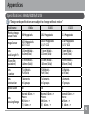
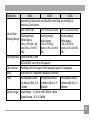
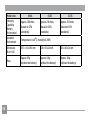
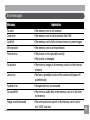
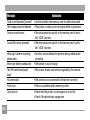
84
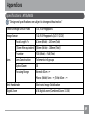
Appendices
Specifications : G2
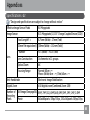
"Design and specifications are subject to change without notice."
Effective Image Sensor Pixels
8.0 Megapixels
Image Sensor
8.31 Megapixels [1/2.35” Charge Coupled Device (CCD)]
Focal Length F =
6.75mm (Wide) ~ 27mm (Tele)
[35mm film equivalent] [38mm (Wide) ~ 152mm (Tele)]
Lens
F number
F3.5 (Wide) ~ F5.15 (Tele)
Lens Construction
14 elements in 11 groups
Optical Zoom
4X
Focusing Range
Normal: 60cm ~∞
Macro: (Wide) 6cm ~ ∞; (Tele) 40cm ~ ∞
Anti-Handshake
Electronic Image Stabilization
Digital Zoom
4.5X digital zoom (Combined Zoom: 18X)
Number of
Recording
Pixels
Still Image (See page36) 8MP, 7MP (3:2), 6MP(16:9),5MP,3MP, 2MP, 1MP, 0.3MP
Movie
640x480pixels: 30fps/15fps, 320x240pixels: 30fps/15fps
85
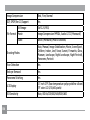
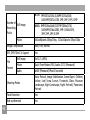
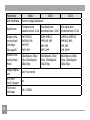
Image Compression
Best, Fine, Normal
DCF, DPOF (Ver1.1) Support
Yes
Still Image
File Format Movie
Audio
86
Exif 2.2 (JPEG)
Image Compression: MPEG4, Audio: G.711 [Monaural]
WAVE [Monaural] (Max 60 seconds)
Shooting Modes
Auto, Manual, Image Stabilization, Movie, Scene (Sport,
Children, Indoor, Leaf, Snow, Sunset, Fireworks, Glass,
Museum, Landscape, Night Landscape, Night Portrait),
Panorama, Portrait
Face-Detection
Yes
Red-eye Removal
Yes
Panorama Stitching
Yes
LCD Display
2.7 inch LTPS (low-temperature polycrystalline silicon)
TFT color LCD (230,400 pixels)
ISO Sensitivity
Auto, ISO 64/100/200/400/800/1600
AF Method
Single AF, Multi-AF (TTL 9-point), Face-Detection, AF
Assist Light (On/Off)
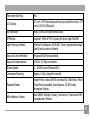
Light Metering Method
Artificial Intelligence AE (Ai AE), Center-weighted
Average, Spot (Fixed to center of frame)
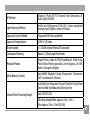
Exposure Control Method
ProgramAE (AE-lock available)
Exposure Compensation
±2 EV in 1/3 steps
Shutter Speed
4 ~ 1/2000 second (Manual 30 seconds)
Continuous Shooting
Approx. 1.8 fps (Large/Fine mode)
Playback Modes
Single Photo, Index (4/9/16 thumbnails), Slide Show,
Movie (Slow-Motion possible), Zoom (Approx. 2X~8X),
Audio , Histogram Display
White Balance Control
Auto (AWB), Daylight, Cloudy, Fluorescent , Fluorescent
CWF, Incandescent, Manual
Auto/Red-Eye Reduction/Forced Flash/No Flash/Slow
Synchro/Red-Eye Reduction+Slow Synchro
Internal Flash (Shooting Range)
Gno. 5.9 (ISO 100)
(Shooting Range) Wide: Approx. 0.3m~3.3m /
Tele: Approx. 0.3m~2.7m (ISO 400)
87
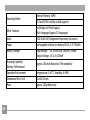
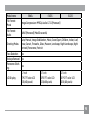
Recording Media
SD Card/SDHC Card (Up to 4GB support)
Other Features
PictBridge, Exif Print Support,
Multi-language Support (11 languages)
Jacks
USB2.0/AV-OUT (Integrated Proprietary Connector)
Power
Rechargeable Lithium-ion Battery GB-20, 3.7V 750mAh
Battery Charger
Input Voltage : AC 100 to 240V, 50/60Hz, 100mA
Output Voltage : DC 4.2V, 500mA"
Shooting Capability
(Battery Performance)
88
Internal Memory: 26MB
Approx. 200 shots (based on CIPA standards)
Operation Environment
Temperature: 0~40oC, Humidity: 0~90%
Dimensions (W x H x D)
91x 60x 20 mm
Mass
Approx. 120g (Body only)
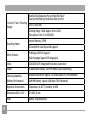
Appendices
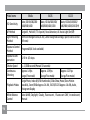
Specifications : A735/A835
"Design and specifications are subject to change without notice."
Effective Image Sensor Pixels
7.07 /8.0 Megapixels
Image Sensor
7.40 /8.5 Megapixels [1/2.5” (CCD)]
Focal Length F =
6.1mm (Wide) ~ 18.3mm (Tele)
[35mm film equivalent] [36mm (Wide) ~ 108mm (Tele)]
Lens
F number
F2.8 (Wide) ~ F4.8 (Tele)
Lens Construction
7 elements in 6 groups
Optical Zoom
3X
Focusing Range
Normal: 60cm ~∞
Macro: (Wide) 5cm ~ ∞; (Tele) 40cm ~ ∞
Anti-Handshake
Electronic Image Stabilization
Digital Zoom
4.5X digital zoom (Combined Zoom: 13.5X)
89
A735: 7MP:(3072x2304), (3:2)6MP: (3072x2048),
Number of Still Image
Recording
Pixels
Movie
A835: 8MP:(3264x2448),(3:2)7MP:(3264x2176),
(16:9)6MP:(3264x1836), 5MP: (2560x1920),
3MP, 2MP, 1MP, 0.3MP
640x480pixels: 30fps/15fps, 320x240pixels: 30fps/15fps
Image Compression
Best, Fine, Normal
DCF, DPOF (Ver1.1) Support
Yes
File
Format
90
(16:9)5MP:(3072x1728), 3MP, 2MP, 1MP, 0.3MP
Still Image
Exif 2.21 (JPEG)
Movie
Quick Time Motion JPEG, Audio: G.711 [Monaural]
Audio
WAVE [Monaural] (Max 60 seconds)
Shooting Modes
Auto, Manual, Image Stabilization, Scene (Sport, Children,
Indoor, Leaf, Snow, Sunset, Fireworks, Glass, Museum,
Landscape, Night Landscape, Night Portrait), Panorama,
Portrait
Face-Detection
Yes
Red-eye Removal
Yes
Panorama Stitching
Yes
LCD Display
2.5 inch LTPS (low-temperature polycrystalline silicon) TFT
color LCD (153,600 pixels)
ISO Sensitivity
Auto, ISO 80/100/200/400/800/1600
AF Method
Single AF, Multi-AF (TTL 9-point), AF Assist Light (On/Off)
Light Metering Method
Artificial Intelligence AE (Ai AE), Center-weighted Average,
Spot (Fixed to center of frame)
Exposure Control Method
ProgramAE (AE-lock available)
Exposure Compensation
±2 EV in 1/3 Step increments
Shutter Speed
4 ~ 1/2000 second (Manual 30s)
Continuous Shooting
Approx. 1.8 fps (Large/Fine mode)
Playback Modes
Single Photo, Index (4/9/16 thumbnails), Slide Show, Movie
(Slow-Motion possible), Zoom (Approx. 2X~8X), Audio,
Histogram Display
White Balance Control
Auto (AWB), Daylight, Cloudy, Fluorescent , Fluorescent CWF,
Incandescent, Manual
91
Auto/Red-Eye Reduction/Forced Flash/No Flash/
Slow Synchro/Red-Eye Reduction+Slow Synchro
Internal Flash (Shooting
Gno. 6.5 (ISO 100)
Range)
Shooting Range Wide: Approx. 0.3m~4.6m /
Tele: Approx. 0.3m~2.7m (ISO 400)
Recording Media
92
Internal Memory: 32MB
SD Card/SDHC Card (Up to 4GB support)
Other Features
PictBridge, ExifPrint Support,
Multi-language Support (20 languages)
Jacks
USB2.0/AV-OUT (Integrated Proprietary Connector)
Power
2X AA Alkaline Battery, AA NiMH Battery [Sold Separately]
Shooting Capability
(Battery Performance)
AA Alkaline Batteries: Approx. 130 shots (based on CIPA standards)
Operation Environment
AA NiMH Battery : Approx. 400 shots (CIPA Standards)
Temperature: 0~40oC, Humidity: 0~90%
Dimensions (W x H x D)
92 x 60 x 25 mm
Mass
Approx. 133g (Body only)
Appendices
Specifications : E840s/E1035/E1235
"Design and specifications are subject to change without notice."
Model name
Effective Image
Sensor Pixels
E840s
E1035
E1235
8.0 Megapixels
10.1 Megapixels
12.1 Megapixels
Image Sensor
8.53 Megapixels
1/2.5" CCD
Lens
Focal Length F =
6.15mm(Wide) ~
24.6mm(Tele)
10.54 Megapixels
1/1.7" CCD
7.5mm (Wide) ~
22.5mm (Tele)
12.40 Megapixels
1/1.72" CCD
7.5mm (Wide) ~
22.5mm (Tele)
[35mm film
equivalent]
[37mm (Wide) ~
148mm (Tele)]
[35mm (Wide) ~
105mm (Tele)]
[35mm (Wide) ~
105mm (Tele)]
Lens
F number
F3.4 (Wide) ~
F5.8 (Tele)
F2.8(Wide) ~
F4.9 (Tele)
F2.8(Wide) ~
F4.9 (Tele)
Lens
Construction
7 elements
in 6 groups
7 elements
in 6 groups
7 elements
in 7 groups
Optical Zoom
4X
Normal: 60cm ~∞
Macro:
(W) 6cm~∞
(T) 40cm ~∞
3X
Normal: 60cm ~∞
Macro:
(W) 6cm ~ ∞
(T) 40cm ~ ∞
3X
Normal: 60cm ~∞
Macro:
(W) 6cm ~ ∞
(T) 40cm ~ ∞
Lens
Focusing Range
93
Model name
Anti-Handshake
E840s
Electronic Image Stabilization
Digital Zoom
4.5X digital zoom
4.5X digital zoom
(Combined Zoom: 22.5X) (Combined Zoom: 13.5X)
4.5X digital zoom
(Combined Zoom: 13.5X)
Number of Recording Pixels :
Still Image
(See page36)
8MP, 7MP(3:2),
6MP(16:9), 5MP,
3MP, 2MP,
1MP, 0.3MP
10MP, 9MP(3:2),
7MP(16:9), 5MP,
3MP, 2MP,
1MP, 0.3MP
12MP(4:3), 10MP(3:2),
9MP(16:9), 6MP,
3MP, 2MP,
1MP, 0.3MP
Number of Recording Pixels :
Movie
640x480pixels: 30fps/
15fps, 320x240pixels:
30fps/15fps
640x480pixels: 25fps/
15fps, 320x240pixels:
25fps/15fps
640x480pixels: 20fps/
15fps, 320x240pixels:
20fps/15fps
Image Compression
Best, Fine, Normal
DCF, DPOF
(Ver1.1) Support
File Format :
Still Image
94
Yes
Exif 2.2 (JPEG)
E1035
E1235
Model name
E840s
E1035
File Format :
Movie
Image Compression: MPEG4, Audio: G.711 [Monaural]
File Format :
Audio
WAVE [Monaural] (Max 60 seconds)
E1235
Auto, Manual, Image Stabilization, Movie, Scene (Sport, Children, Indoor, Leaf,
Snow, Sunset, Fireworks, Glass, Museum, Landscape, Night Landscape, Night
Portrait), Panorama, Portrait
Face-Detection
Yes
Red-eye Removal Yes
Panorama Stitch- Yes
ing
2.7 inch
2.7 inch
2.7 inch
LCD Display
LTPS TFT color LCD
LTPS TFT color LCD
LTPS TFT color LCD
(230,400 pixels)
(230,400 pixels)
(230,400 pixels)
Shooting Modes
95
Model name
ISO Sensitivity
AF Method
Light Metering
Method
Exposure Control
Method
Exposure Compensation
Shutter Speed
Continuous
Shooting
Playback Modes
White Balance
Control
96
E840s
Auto, ISO 80/100/200
/400/800/1600
E1035
Auto, ISO 64/100/200/
400/800/1600/3200
E1235
Auto, ISO 64/100/200/
400/800/1600/3200 (3M)
Single AF, Multi-AF (TTL 9-point), Face-Detection, AF Assist Light (On/Off)
Artificial Intelligence AE (Ai AE), Center-weighted Average, Spot (Fixed to center
of frame)
ProgramAE (AE-lock available)
±2 EV in 1/3 steps
4 ~ 1/2000 second (Manual 30 seconds)
Approx. 1.8 fps
Approx. 1.39 fps
Approx. 1.25 fps
(Large/Fine mode)
(Large/Fine mode)
(Large/Fine mode)
Single Photo, Index (4/9/16 thumbnails), Slide Show, Movie (Slow-Motion
possible), Zoom (E840s Approx. 2X~8X , E1035/E1235 Approx. 1X~8X), Audio ,
Histogram Display
Auto (AWB), Daylight, Cloudy, Fluorescent , Fluorescent CWF, Incandescent,
Manual
Model name
Internal Flash
(Shooting Range)
Recording Media
Other Features
Jacks
Power
Battery Charger
E840s
E1035
E1235
Auto/Red-Eye Reduction/Forced Flash/No Flash/Slow Synchro/Red-Eye
Reduction+Slow Synchro
Gno. 5.9 (ISO 100)
Gno. 5.7±0.5EV (ISO 100) Gno. 5.7±0.5EV (ISO 100
(Shooting Range)
(Wide): Approx.
0.3m~3.3m (Tele) : Approx. 0.3m~2.7m (ISO
400)
(Shooting Range)
(Wide): Approx.
0.3m~4.1m (Tele) :
Approx. 0.3m~2.3m (ISO
400)
(Shooting Range)
(Wide): Approx.
0.3m~3.2m (Tele) :
Approx. 0.3m~2.0m (ISO
400)
Internal Memory: 26MB
SD Card/SDHC Card (Up to 4GB support)
PictBridge, Exif Print Support, Multi-language Support (11 languages)
USB2.0/AV-OUT (Integrated Proprietary Connector)
Rechargeable Lithium- Rechargeable LithiumRechargeable Lithiumion Battery GB-20, 3.7V ion Battery GB-40, 3.7V
ion Battery GB-40, 3.7V
750mAh
1050mAh
1050mAh
Input Voltage : AC 100 to 240V, 50/60Hz, 100mA
Output Voltage : DC 4.2V, 500mA"
97
Model name
E1035
Shooting
Capability
(Battery
Performance)
Approx. 200 shots
(based on CIPA
standards)
Operation
Environment
Dimensions
(W x H x D)
Temperature: 0~40oC, Humidity: 0~90%
Mass
98
E840s
Approx. 210 shots
(based on CIPA
standards)
E1235
Approx. 210 shots
(based on CIPA
standards)
95.7 x 56 x 19.5 mm
103 x 56 x 24 mm
103 x 56 x 24 mm
Approx. 95g
(without the battery)
Approx. 145g
(without the battery)
Approx. 145g
(without the battery)
Error messages
Messages
No card
Card error
Card full
Write protect
Picture error
No picture
Lens error
System error
No sound file
Image cannot be saved
Explanation
• The memory card is not inserted.
• The memory card is not formatted. (See P.68)
• The memory card is full and cannot store any new images.
• The memory card is write-protected.
• The picture is not captured correctly.
• The picture is damaged.
• There are no images in the memory card or in the internal
memory.
• The lens is probably stuck and the camera will power off
automatically.
• Unexpected error encountered.
• There are no audio files in the memory card or in the internal memory.
• The write protection switch in the memory card is set to
the “LOCK” position.
99
Messages
Explanation
Card is not formatted, format? • Confirm whether the memory card should be formatted.
This image cannot be deleted • The picture or video you are trying to delete is protected.
Cannot record movie
• The write protection switch in the memory card is set to
the “LOCK” position.
Sound file cannot be saved
• The write protection switch in the memory card is set to
the “LOCK” position.
Warning!! Camera recording, • No other actions allowed to perform during video/audio
please wait.
recording.
Warning!! Battery exhausted. • The battery is out of charge.
This file cannot be played
• The picture format cannot be recognized by the camera.
back
No connection
• The camera is not connected to the printer correctly.
Print error
• There is a problem with camera or printer.
Cannot print
• Check that the printer is out of paper or out of ink.
• Check if the printer has a paper jam.
100
Troubleshooting
Problem
Camera does not turn on.
Possible causes
• The battery has run out.
• The battery is not inserted correctly.
Solution
• Charge the battery or replace
with a fully charged battery.
• Re-insert the battery observing
the correct polarity.
Camera turns off suddenly • The battery has run out.
during operation.
• Charge the battery or replace
with a fully charged battery.
The picture is blurred.
• The lens is dirty.
•
appears when taking pictures.
• Use a soft cloth to clean the lens
on your camera
• Use the Image Stabilization
mode.
Images, video clips, and
audio files cannot be
saved.
• The memory card is full.
• Replace the memory card with a
new one.
• Delete unwanted images.
• Unlock the memory card.
101
Problem
102
Possible causes
Solution
No picture is taken when
pressing the shutter button.
• The memory card is full.
• No available space to
store the files.
• The mode dial is in Playback mode.
• Replace the memory card with
a new one or clean off current
memory card.
• Delete unwanted images.
• The memory card is locked.
• Turn the mode dial to any still
shooting mode.
Images cannot print from
the connected printer.
• The camera is not connected to the printer
correctly.
• The printer is not PictBridge compatible.
• The printer is out of paper
or out of ink.
• The paper is jammed.
• Check the connection between
the camera and printer.
• Use a PictBridge compatible
printer.
• Load some paper in the printer.
• Replace the ink cartridge in the
printer.
• Remove the jammed paper.