1
C HAPTE R
4
TROUBLESHOOTING
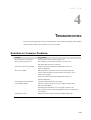
If you are experiencing trouble with your touchmonitor, refer to the following table. If the problem
persists, please contact your local dealer or our service center.
Solutions to Common Problems
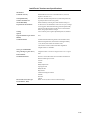
Problem
The monitor does not respond
after you turn on the system.
Characters on the screen are dim
The screen is blank
Screen flashes when initialized
“Out of Range” display
Touch doesn’t work
Suggestion(s)
Check that the monitor’s Power Switch is on.
Turn off the power and check the monitor’s power cord
and signal cable for proper connection.
Refer to the About Touchmonitor Adjustments section to
adjust the brightness.
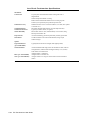
During operation, the monitor screen may automatically turn
off as a result of the Power Saving feature. Press any key to see
if the screen reappears.
Refer to the About Touchmonitor Adjustments section to
adjust the brightness.
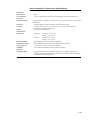
Turn the monitor off then turn it on again.
Check to see if the resolution of your computer is higher than
that of the LCD display.
Reconfigure the resolution of your computer to make it less
than or equal to 1280 x 1024. See Appendix A for more information
on resolution.
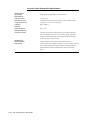
Make sure the touch cable is securely attached at both ends.
4-23