1
Getting started
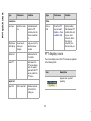
Keypad key
Operation
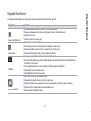
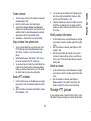
The Left and Right selection keys, Power On/Off and Pickup keys surround this key group. There
are arrows on the key that denote the direction for scrolling through information displayed on the
screen.
Up/Down
Navigation keys
Press to view the target characters by pages in the text editor.
Press to browse menus/lists at the same level.
Press to view the previous or next picture when previewing pictures.
Press to increase or decrease the volume during a call.
Left/Right
Press to move the cursor left or right in the text editor.
Press to browse the main menu.
Press to turn to previous or subsequent pages when browsing the contacts in the address book.
Press to view the previous or next picture when previewing pictures.
Press and release the Left navigation key during a call, to mute and press again to unmute.
Numeric keys
Press and release the Right navigation key to turn the speaker on and press again to turn the
speaker off.
Press the required keys to enter the desired phone number and press to make a call. Alternatively enter the number and select Options to Dial the number.
Press and hold any numeric key to create shortcuts from the available options.
Press and hold in standby mode to access your Voice mail.
When entering text, press to enter spaces.
10