1
Chapter 2. Understanding Acronis
Recovery for MS SQL Server
This chapter provides common information about working with Acronis Recovery for
MS SQL Server.
2.1 Components
Acronis Recovery for MS SQL Server includes the following components:
•
Management Tools including Acronis Recovery for MS SQL Server
Management Console
•
Acronis Recovery for MS SQL Server Agent
•
SDK (shipped separately)
2.1.1
Acronis Recovery for MS SQL Server Management
Console
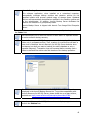
Acronis Recovery for MS SQL Server Management Console is a tool for managing data
backup/restore on the local network from a single location. Using it you can install
agents remotely, schedule tasks, recover data remotely, set backup/restore options on
remote database servers, and import a preexisting maintenance plan.
2.1.2
Acronis Recovery for MS SQL Server Agent
The Acronis Recovery for MS SQL Server Agent is installed on the computers on which
you want to backup/restore a Microsoft SQL Server database.
2.2 Components Integration
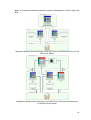
Acronis Recovery for MS SQL Server Management Console is installed on the computer
from which you plan to manage operation processes on remote database servers.
After issuing a backup or restore command from the Management Console, Acronis
Recovery for MS SQL Server sends a request to the Acronis Recovery for MS SQL
Server Agent to retrieve the required instance or database from Microsoft SQL Server
and sends it to Acronis Recovery for MS SQL Server, which backs up the selected data.
15