1
Connections
Connecting Cables
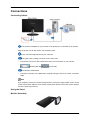
Connect the DC adapter for your monitor to the power port on the back of the monitor.
Plug the power cord for the monitor into a nearby outlet.
Use a connection appropriate for your computer.
Using the D-sub (Analog) connector on the video card.
•
Connect the 'DVI-A to D-Sub' Cable to the DVI-I port on the back of your monitor.
Monitor [DVI IN]
PC [D-sub]
Connected to a Macintosh.
•
Connect the monitor to the Macintosh computer using the 'DVI-A to D-Sub' connection
cable.
Note
If you properly connect your monitor using the DVI-I connector but get a blank screen, check
to see if the monitor status is set to analog. Press power button to have the monitor doublecheck the input signal source.
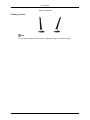
Using the Stand
Monitor Assembly