1
Installation
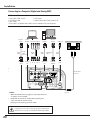
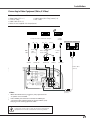
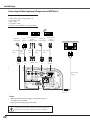
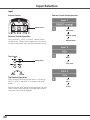
Connecting to Video Equipment (Component and RGB Scart)
Cables used for connection
• Audio Cables (Mini Plug [stereo] x 2)
• Scart-VGA Cable
• BNC Cable
• DVI-Digital Cable
(Cables are not supplied with the projector.)
RGB Scart 21-pin Input
Scart-VGA
cable
Audio
Output
Audio
cable
(stereo)
ANALOG AUDIO
IN
OUT
Digital Output
Component Video
RGB Scart (HDCP
Output
21-pin Output
(Y, Cb/Pb, Cr/Pr)
compatible)
BNC
cable
Scart-VGA
cable
Y Cb/Pb Cr/Pr
DVI-Digital
cable
ANALOG
IN
External Audio Equipment
Audio Input
DIGITAL
(DVI-D)
Audio cable
(stereo)
AUDIO OUT
(stereo)
✔Notes:
•When the AUDIO OUT is plugged-in, the projector’s builtin speaker is not available.
•See page 73 for ordering optional cables.
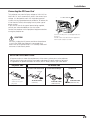
Unplug the power cords of both the projector and external
equipment from the AC outlet before connecting cables.
22