1
WELCOME
Welcome to the Plantronics family of headset products. Plantronics provides a wide
range of products from mission-critical and business-critical applications to personal
communications and entertainment. For additional information visit our web site at
www.plantronics.com where you can visit our 24/7 support, browse through our
knowledge base, chat live or ask a question. We also feature a variety of installation
tutorials to make set up quick and easy.
PACKAGE CONTENTS
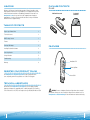
DA45
DA45 and inline control
PerSonoCall
software CD
TABLE OF CONTENTS
Register your Product Online
2
Technical Assistance
2
DA45 Package Contents 3
Features
3
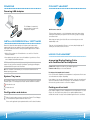
Powering USB Adapter 4
Installing PerSonoCall® Software 4
Connecting Headset 5
Using the Headset
5
Troubleshooting
7
Warranty
8
FEATURES
Mute/Mute LED
Volume Up/Down
REGISTER YOUR PRODUCT ONLINE
Visit www.plantronics.com/productregistration to register your product online
so we can provide you with the best possible service and technical support.
Answer/End
TECHNICAL ASSISTANCE
Visit our Web site at www.plantronics.com/support for technical support including
frequently asked questions, compatibility and accessibility information. The Plantronics
Technical Assistance Center (TAC) is also ready to assist you. Dial (800) 544-4660 ext. 5538
2
WARNING: Do not use headphones/headsets at high volumes for an extended
period of time. Doing so can cause hearing loss. Always listen at moderate levels. See
www.plantronics.com/healthandsafety for more information on headsets and hearing.
3