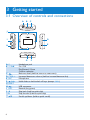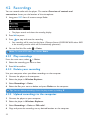
1
3.2 Main menu
Menu
Music
Recordings
Folder view
Settings
To
Play your digital music tracks
Create or listen to recordings
View files in folders
Customize the settings of your player
3.3 Install
Important Make sure to install the software provided in the supplied CD for music
transfer.
System requirements:
•
•
•
•
•
•
•
•
Windows 2000, XP or Vista
Pentium III 800MHz processor or higher
128MB RAM
500MB hard disk space
Internet connection (preferable)
Microsoft Internet Explorer 6.0 or later
CD-ROM
USB port
1 Insert the CD supplied with your product into the CD ROM drive of your PC.
2 Follow the on-screen instructions to complete the installation of Philips Device
Manager.
3 If the installation program does not start automatically, browse the CD contents with
Windows Explorer and double click on the file ending with .exe.
Lost your CD? Don’t worry, you can download the CD contents from
www.philips.com/support.
1
This feature is available only in some regions.
7