1
• Lay contents face up on the transparent, non-adhesive side
of a specially designed cold lamination pouch, but do not
close the pouch
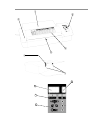
• Insert full length of sealed pouch edge into the entry, as
shown, while bending the protective sheet backwards over the
machine and grasping its free edge
• Continue holding the protective sheet, which will peel away
as the pouch is drawn through the machine.
If you see the pouch is not going in straight and might get
damaged, use the reverse mode, as described under H o t
Lamination.
Maintenance
To keep your laminator free of adhesives that could hurt the quality of your work, clean the
rollers regularly:
• Select temperature 140° C if it is not already on this setting
• Wait for the readiness light and signal, if necessary
• Insert the cleaning sheet included in the package, repeating one or two times
• Insert a plain white sheet of paper to test for remaining traces, and
• Reinsert the cleaning sheet, if necessary, and retest.
To clean the exterior of your machine, wipe with a soft cloth dampened with plain water.
Troubleshooting
If you are not getting the quality you should be, you can probably solve the problem
quickly. If, for example, your end product is:
• Cloudy - Reduce the speed and pass it through again. If the sheet is still not completely
transparent, increase the temperature in increments of 5°.
• Wavy - For the next pouch, increase the speed and/or reduce the temperature in increments of 5°. Passing through the cleaning sheet or turning up the speed will help cool
down the rollers. The green ready light C will reappear as soon as the lower temperature
has been reached.
• Spotted - Follow the cleaning procedure described under Maintenance to remove traces of
adhesive.
• Open on edges - Next time make sure the contents are at least 3 mm (1/8 inch), from the
unsealed edges of the pouch.
If the pouch or mounting board is not going in straight or gets stuck in the rollers, use the
reverse mode, as described under Hot Lamination.
If you have questions or problems with your laminator that you cannot solve, please contact
us through one of the many channels listed under Customer Service. For your safety, do not
attempt to open or otherwise repair your machine.
5