1
Operation Manual
8888
Safety Precautions/ Usage Precautions
Safety Precautions/
Usage Precautions
Safety Precautions
In this manual, symbols are used to highlight
warnings and cautions for you to read so that
accidents can be prevented. The meanings of
these symbols are as follows:
This symbol indicates
Warning explanations about extremely
dangerous matters. If users
ignore this symbol and handle
the device the wrong way,
serious injury or death could
result.
This symbol indicates
Caution explanations about
dangerous matters. If users
ignore this symbol and handle
the device the wrong way,
bodily injury and damage to
the equipment could result.
Please observe the following safety tips and
precautions to ensure hazard-free use of the
MRT-3.
About power
Warning
2
The use of an adapter other than the
specified type may damage the unit and
pose a safety hazard.
• Connect the AC adapter only to an AC
outlet that supplies the rated voltage
required by the adapter.
• When disconnecting the AC adapter from
the AC outlet, always grasp the adapter
itself and do not pull at the cable.
• If the unit is not to be used for a long
time, disconnect the AC adapter from the
outlet.
Battery operation
• Use four IEC R6 (size AA) batteries
(alkaline or manganese).
• The MRT-3 cannot be used for
recharging.
Pay close attention to the labelling of the
battery to make sure you choose the
correct type.
• If the MRT-3 is not to be used for an
extended period of time, remove the
battery from the unit.
• If batteries leakage has occurred, wipe
the battery compartment and the battery
terminals carefully to remove all
remnants of battery fluid.
• While using the unit, the battery
compartment cover should be closed.
Since power consumption of this unit is Caution Environment
Avoid using your MRT-3 in environments
fairly high, we recommend the use of an AC
where it will be exposed to:
adapter whenever possible. When powering
• Extreme temperature
the unit from the batteries, use only an
• High humidity or moisture
alkaline type.
• Excessive dust or sand
AC adapter operation
• Excessive vibration or shock
• Be sure to use only an AC adapter which
supplies 9 V DC, 300 mA and is
equipped with a "center minus" plug
(Zoom AD-0006).
ZOOM MRT-3
• Since the MRT-3 is a precision electronic
device, avoid applying excessive force to
the controls. Do not operate the keys or
controls with your foot.
• Take care that no foreign objects (coins
or pins etc.) or liquids can enter the unit.
• Be sure to turn the power to all
equipment off before making
connections.
• Before moving the unit, turn the power
off, and disconnect all cables and the AC
adapter.
Alterations
Caution
Caution
Never open the case of the MRT-3 or
attempt to modify the product in any way
since this can result in damage to the unit.
In Case of Trouble
If there seems to be a defect or a problem
with the unit, immediately disconnect the
AC adapter or remove the batteries to shut
off the power. Then disconnect any other
cables connected to the unit.
Usage Precautions
Safety Precautions/ Usage Precautions
Handling
Caution
• Electrical interference
For safety considerations, the MRT-3 has
been designed to provide maximum
protection against the emission of
electromagnetic radiation from inside the
device, and protection from external
interference. However, equipment that is
very susceptible to interference or that emits
powerful electromagnetic waves should not
be placed near the MRT-3, as the possibility
of interference cannot be ruled out entirely.
With any type of digital control device, the
MRT-3
included,
electromagnetic
interference can cause malfunctioning and
can corrupt or destroy data. Care should be
taken to minimize the risk of damage.
• Cleaning
Use a soft, dry cloth to clean the MRT-3. If
necessary, slightly moisten the cloth. Do not
use abrasive cleanser, wax, or solvents (such
as paint thinner or cleaning alcohol), since
these may dull the finish or damage the
surface.
Please keep this manual at hand for
future reference.
ZOOM MRT-3
3
Contents
Contents
Safety Precautions/
Usage Precautions • • • • • • • • • • • • • • • • • • • • • • • • • 2
Introduction
•••••••••••••••••••••••••••••••••••
32
Recording Song Patterns
••••••••••••••••
33
••••••••••••••••••••••••••••••
6
6
Changing the Song Volume
•••••••••••••••••••••••••••••••••••
6
Selecting a Dedicated Song Kit
Getting Connected
•••••••••••••••••••••••••
7
Connection Example 1
••••••••••••••••••••
7
Connection Example 2
••••••••••••••••••••
7
Preparations
••••••••••••••••••••••••••••••••••
Using Batteries
••••••••••••••••••••••••••••••
Terms Used in This Manual
Listening to the Demo Song
•••••••••••••
••••••••••
8
8
9
11
Playing the Pads (Manual Play)
••••••
12
Using Patterns (Pattern Mode)
••••••
14
••••••••••••••••••••••••••
14
Playing a Pattern
Changing the Tempo of Pattern
Playback • • • • • • • • • • • • • • • • • • • • • • • • • • • • • • • • • • 15
•••••••••••
16
••••••••••••••••••
19
Real-Time Pattern Recording
Pattern Step Recording
Changing User Pattern Resolution
After Recording • • • • • • • • • • • • • • • • • • • • • • • • • • • 21
Changing the User Pattern
Length • • • • • • • • • • • • • • • • • • • • • • • • • • • • • • • • • • • • • 21
Changing the User Pattern Beat
Copying a Pattern
•••••••
22
••••••••••••••••••••••••
23
Deleting All User Patterns
Editing a User Kit
Copying a Kit
ZOOM MRT-3
39
•••••••••••••••••••••••••••
40
Deleting All Songs
•••••••••••••••••••••••
Controlling the MRT-3 With a Foot
Switch • • • • • • • • • • • • • • • • • • • • • • • • • • • • • • • • • • • • • 42
Synchronizing Playback With an
External Device • • • • • • • • • • • • • • • • • • • • • • • • • • 44
Playing MRT-3 Sounds From an External
MIDI Component • • • • • • • • • • • • • • • • • • • • • • • • 46
Setting the Pattern/Song Playback
Swing • • • • • • • • • • • • • • • • • • • • • • • • • • • • • • • • • • • • • • 47
Setting the Precount for Real-Time
Recording • • • • • • • • • • • • • • • • • • • • • • • • • • • • • • • • • 48
Returning the MRT-3 to the Factory
Default Condition • • • • • • • • • • • • • • • • • • • • • • • • 49
Troubleshooting
•••••••••••••••••••••••••••
50
••••••••••••••••••••••••••••••
51
••••••••••••••••••••••••••••••••••••
52
••••••••••••••••••••••••••••••••••••••
52
Specifications
Reference
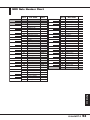
MIDI Note Number Chart
••••••••••••••••••••••••••••••
28
30
41
Other Functions • • • • • • • • • • • • • • • • • • • • • • • • • • • • 42
25
••••••••••••••••••••••••••••••••••••
38
•••••••••••••••••••••••••••
•••••••••••••••
26
37
Deleting a Song
Kit List
•••••••••••••••••••••••••
••••••••
Copying a Song
24
Creating Your Own Kit
(Kit Mode) • • • • • • • • • • • • • • • • • • • • • • • • • • • • • • • • • • • 26
•••••••••••••
Checking the Amount of Remaining
Memory for Songs • • • • • • • • • • • • • • • • • • • • • • • • • • • 39
••••••••••
Erasing a Single User Pattern
4
32
••••••••••••••••••••••••••••••••••••
Rear Panel
Kit Items
What Is a Song?
•••••••••
••••••••••••••••••••••••••
Changing the Tempo Within a
Song • • • • • • • • • • • • • • • • • • • • • • • • • • • • • • • • • • • • • • • 36
Names of Parts
Top Panel
5
Creating Songs (Song Mode)
••••••••••••••••
53
••••••••••••••••••••••••••••
54
•••••••••••••••••••••••••••••••••
56
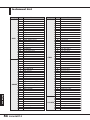
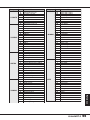
Instrument List
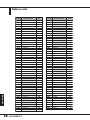
Pattern List
MIDI Implementation
•••••••••••••••••••••
MIDI Implementation Chart
Index
60
••••••••••••••
61
•••••••••••••••••••••••••••••••••••••••••••
62
Introduction
Thank you for purchasing the ZOOM Micro RhythmTrak MRT-3 (subsequently referred to as
"the MRT-3").
Introduction
The MRT-3 offers the following attractive features.
●
Sophisticated rhythm machine incorporates 199 super-realistic drum and
percussion sounds in an amazingly compact body. A full 396 preset patterns
contain a wide variety of preprogrammed rhythms. 99 additional patterns can
be programmed and stored by the user.
●
Create a backing sequence (song) with up to 99 patterns. As many as 99 such
songs can be stored for immediate use at any time.
●
Internally lit pads let you follow the rhythm pattern visually during song
playback or when using a pattern.
●
Choose up to 14 sounds from the built-in drum and percussion sources, and
then adjust level, tuning, and panning individually to create your very own
drum kit. This gives you the flexibility to realize your creative vision.
●
Perfectly intuitive and simple design lets you master the unit right away, even
if you have never used a drum machine before.
●
Optional foot switch FS01 allows pattern start/stop control or tempo switching.
You can also operate an assigned sound such as bass drum or open/closed hihat.
●
MIDI IN connector allows use with an external MIDI sequencer or other
device. The Multitrak Recording Studio ZOOM MRS-4 is an ideal match,
letting you synchronize the audio tracks from the recorder with the rhythm
track from the MRT-3. Playing the sounds of the MRT-3 with an external MIDI
component is also possible.
Please take the time to read this manual carefully so as to get the most out of your
MRT-3 and to ensure optimum performance and reliability.
ZOOM MRT-3
5
Names of Parts
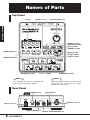
Top Panel
[VALUE +/-] keys
Display
[OUTPUT LEVEL] knob
Names of Parts
8888
[SONG] key (LED)
[PATTERN] key (LED)
[KIT] key (LED)
[TEMPO] key (LED)
[INSERT/COPY] key
[REC] key (LED)
[PLAY] key (LED)
[STOP] key (LED)
[DELETE/ERASE] key
[PAD BANK] key (LED)
Pads 1 – 7 (LEDs)
N OTE
[FUNCTION] key (LED)
H INT
Keys marked (LED) have an integrated LED
that causes the key itself to light up.
Names of top panel controls and rear panel
connectors are indicated with angle
brackets [ ] in this manual.
Rear Panel
[POWER] switch
[FOOT SW] jack
[MIDI IN] connector
[DC IN] connector
[OUTPUT MONO] jack [OUTPUT STEREO/PHONES] jack
6
ZOOM MRT-3
Getting Connected
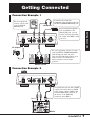
Connection Example 1
For mono playback,
connect a mono cable
to the [OUTPUT
MONO] jack.
To monitor the sound with
headphones, plug the phones into the
[OUTPUT STEREO/PHONES] jack.
Headphones
FS01
Getting Connected
If you connect the optional
foot switch FS01 to the
[FOOT SW] jack, you can
control start/stop and switch
the sound of the MRT-3 with
your foot.
AC adapter
For stereo playback, connect a Y cable
to the [OUTPUT STEREO/PHONES]
jack and plug the other end of the
cable into the L/R channel inputs of an
audio system or two channels of a
mixer assigned to left and right
positions.
Monitor system
Connection Example 2
To synchronize the unit with a MIDI
sequencer/recorder that has a MIDI
clock output, connect a MIDI cable
from the MIDI OUT connector of
the device to the [MIDI IN]
connector of the MRT-3.
AUX IN
MIDI OUT
MRS-4
ZOOM MRT-3
7
Preparations
When connections are complete, set the volume as follows.
Preparations
1.
While the playback system is still turned off and the volume is fully turned down,
double-check whether all connections have been made correctly.
If cables are connected or disconnected while power is on, or if power is turned on with the
volume turned up, damage to the speakers may occur.
2.
Turn power to the MRT-3 on.
Set the [POWER] switch to ON.
3.
Turn power to the playback system on and
set the volume to about midway.
4.
While tapping a pad to produce sound,
adjust the [OUTPUT LEVEL] knob of the
MRT-3 to obtain a suitable volume.
Using Batteries
The MRT-3 can be powered from batteries (not supplied). Follow the steps below to insert the
batteries.
1.
Turn the unit over and open the battery
compartment cover.
MRT-3 underside
2.
Insert four fresh IEC R6 (size AA) batteries
into the battery compartment. The use of
alkaline batteries is recommended.
3.
Close the battery compartment cover.
N OTE
When using batteries, a flashing dot at the right side of
the display means that the batteries are nearly
exhausted. Insert fresh batteries as soon as possible.
8
ZOOM MRT-3
Four IEC R6 (size AA) batteries
Terms Used in This Manual
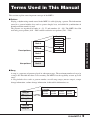
This section explains some important concepts of the MRT-3.
■ Pattern
Playing a rhythm using sounds stored in the MRT-3 is called playing a pattern. The information
stored in a pattern includes data such as pattern length, beat, and which kit (combination of
drum/percussion sounds) is used.
The patterns are organized in banks (A – D, U) and numbers (01 – 99). The MRT-3 has 396
read-only preset patterns (A01 – D99) and 99 read/write user patterns (U01 – U99).
Bank A
Bank A
Bank B
Pattern
Terms Used in This Manual
A01
A02
A03
A04
A98
A99
Preset patterns
Bank C
Bank D
User patterns
Bank U
■ Song
A song is a sequence of patterns played in subsequent steps. The maximum number of steps in
a song is 99. Provided that there is free memory, the MRT-3 has the capability to store up to 99
songs.
A song includes data such as pattern number, overall song tempo (master tempo), tempo
change information, volume change information, dedicated kit information, etc.
Master tempo
Kit number
Song 01
Pattern
number
Pattern
number
Pattern
number
Pattern
number
Song 02
Song 03
Song 98
Song 99
ZOOM MRT-3
9
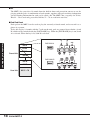
■ Kit
The MRT-3 lets you select 14 sounds from the built-in drum and percussion sources to use for
playing with the pads. A combination of such sounds, together with pad sensitivity information
and level/tuning information for each pad is called a kit. The MRT-3 has a capacity for 70 kits.
Kits 01 – 50 are read-only preset kits and kits 51 – 70 are read/write user kits.
■ Pad/Pad Bank
Each pad on the MRT-3 can be used to play the currently selected sound, and to record it as a
phrase in a pattern.
To be able to play 14 sounds with the 7 pads on the unit, pads are grouped in two banks (A and
B) which can be switched with the [PAD BANK] key. When the [PAD BANK] key is out, bank
A is selected. When the key is lit, bank B is selected.
Terms Used in This Manual
Kit 01
PAD BANK A
A02
Kit 02
A01
A04
A03
A06
A05
A07
Kit03
Preset kits
Kit 04
PAD BANK B
B02
Kit 49
Kit 50
User kits
10
Kit 51 – 70
ZOOM MRT-3
B01
B04
B03
B06
B05
B07
Listening to the Demo Song
The MRT-3 comes with a demo song already built in. Listen to this song to hear for yourself what
the MRT-3 can do.
1.
Press the [FUNCTION] key.
The [FUNCTION] key flashes.
2.
Press the [SONG] key.
The indication "dEMo" appears on the display and the demo song starts. The display
indication changes and the pads light up in sync with the song.
The demo song is played repeatedly until you stop it.
3.
To stop the demo song, press the [PATTERN] key or the [SONG] key.
ZOOM MRT-3
Listening to the Demo Song
DEMO
11
Playing the Pads
(Manual Play)
The pads on the top panel of the MRT-3 each produce a different sound when hit. The sound
depends on the currently selected kit and pad bank. Try hitting the pads to hear the realistic
sounds of the MRT-3.
1.
Press the [PATTERN] key.
The [PATTERN] key lights up and the MRT-3 goes into pattern mode (in which rhythm
pattern playback and recording can be carried out).
2.
Hit any pad.
Playing the Pads (Manual Play)
The pad lights up briefly, and the sound assigned to it is played. The volume of the sound
depends on the intensity with which the pad is hit.
3.
To switch the bank, press the [PAD BANK] key so that the key lights up.
The key lights up, and the sound assigned to pads 1 – 7 changes. To return to the earlier
sound, press the [PAD BANK] key once more.
H INT
When the [PAD BANK] key is out, bank A is selected. When the key is lit, bank B is selected.
4.
To switch the kit played by the pads, press the [KIT] key.
The [KIT] key lights up, and the MRT-3 goes into kit mode. In this mode, you select the kit
for playing the pads and patterns. The display shows the currently selected kit number.
Kit number
01P
"P" indicates a preset kit
and "U" a user kit.
N OTE
The kit can only be changed for a user pattern, not for a preset pattern.
12
ZOOM MRT-3
5.
Use the [VALUE +/-] keys to select a kit number.
The kit numbers are switched in the order 01P – 50P, 51U – 70U.
Try hitting the pads and switching the pad bank to check out which sounds are available in
the newly selected kit.
6.
When you have found the desired kit, press the [PATTERN] key to return to the
pattern mode.
Playing the Pads (Manual Play)
ZOOM MRT-3
13
Using Patterns
(Pattern Mode)
This section shows how to play and record patterns of the MRT-3 in pattern mode.
Playing a Pattern
The MRT-3 has 396 read-only preset patterns (A01 – D99) and 99 read/write user patterns (U01 –
U99). To select and play a pattern, proceed as follows.
N OTE
In the factory default condition, all user patterns are empty.
1.
Press the [PATTERN] key.
The [PATTERN] key lights up and the MRT-3 goes into pattern mode. The display shows
the bank and number of the currently selected pattern.
Bank (A - D, U)
Pattern number
A01
Using Patterns (Pattern Mode)
2.
For an empty user pattern,
"E" is shown here.
Use the [VALUE +/-] keys to select the pattern number.
In pattern mode, the [VALUE +/-] keys serve to select the pattern. For example, if you
repeatedly press the [VALUE +] key, the patterns are switched in the order U01 ... U99
➝A01 ... A99 ➝ B01 ... B99 ➝ C01 ... C99 ➝ D01 ... D99 ➝ U01.
3.
To directly switch the bank, press the [FUNCTION] key and then use the [VALUE
+/-] keys.
This switches only the bank and keeps the pattern number.
D05
@05
H INT
The [FUNCTION] key serves for making various settings of the MRT-3. The actual effect of pressing
the key depends on the currently selected mode and on which other keys are used together with it.
14
ZOOM MRT-3
4.
Press the [PLAY] key.
The [PLAY] key lights up and the pattern is played repeatedly. During playback, the
[TEMPO] key flashes in sync with the tempo. The display shows the current position in the
pattern (measure/beat).
Measure
Beat
01-3
H INT
• While a pattern is playing, you can also manually play the pads.
• While a pattern is playing, you can also switch to a different bank and pattern number. The new
pattern will begin playing as soon as you switch to it.
5.
To stop pattern playback, press the [STOP] key.
If you press the [PLAY] key instead of the [STOP] key, the unit goes into pause mode, and
the [PLAY] key flashes. If you press the [PLAY] key again in this condition, playback
resumes from the same position.
In pattern mode, you can adjust the play tempo in the range of 40 – 250 BPM (quarter note beats
per minute).
1.
Press and hold the [TEMPO] key.
The [TEMPO] key lights up and the current tempo is shown on the display.
Tempo value (BPM)
Using Patterns (Pattern Mode)
Changing the Tempo of Pattern Playback
112
2.
While keeping the [TEMPO] key depressed, use the [VALUE +/-] keys to adjust the
tempo.
114
ZOOM MRT-3
15
3.
When the tempo is as desired, release the [TEMPO] key.
4.
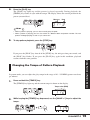
To specify the tempo manually, tap the [TEMPO] key twice or more in the desired
tempo (tap input function).
Tap twice
If you tap the [TEMPO] key twice or more often while a pattern is playing or stopped, the
tapping interval of the last two taps is taken as the quarter note tempo. This allows you to
simply set the tempo in sync with a song.
N OTE
The tempo set in pattern mode applies to all patterns. It is not possible to set the tempo for a
pattern individually.
Real-Time Pattern Recording
Using Patterns (Pattern Mode)
The MRT-3 has 99 user pattern slots which can be filled with your own patterns. Creating and
recording a pattern is possible in two ways: by actually playing the pattern on the pads (real-time
recording), or by entering each sound individually (step recording).
This section describes the procedure for real-time recording.
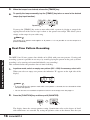
1.
In pattern mode, select an empty user pattern (U01 – U99). If necessary, select a kit.
When you select an empty user pattern, the indication "E" appears on the right side of the
display.
@01E
H INT
• If you change the kit in pattern mode while a user pattern is selected, the last selected kit will be
stored for that pattern.
• You can also erase a recorded user pattern to return it to the empty state. See page 24.
2.
Press the [FUNCTION] key and then pad 3 (QUANTIZE).
The display shows the current quantize setting. Quantization refers to the degree of detail
with which notes are recorded. By setting the quantize value to the shortest note that you
16
ZOOM MRT-3
want to use for the pattern, recording can be carried out while automatically maintaining
precise timing.
3.
Use the [VALUE +/-] keys to set the quantize value (shortest note to be recorded).
The following settings are available.
4 ••••••••
8 ••••••••
12 • • • • • • •
16 • • • • • • •
Quarter note
Eighth note
Eighth triplet note
Sixteenth note
24 • • • • • • •
32 • • • • • • •
48 • • • • • • •
Hi • • • • • • •
Sixteenth triplet note
Thirty-second note
Thirty-second triplet note
1 tick (1/96 of quarter note)
The selected setting will be used as shortest note for real-time recording.
4.
Press the [FUNCTION] key again.
H INT
• The quantize setting applies to all patterns. When recording another pattern with the same
resolution, it is not necessary to set the quantize value again.
• By changing the quantize setting after recording is completed, you can add another part with
different resolution to the same pattern. For example, after recording bass drum and snare drum
using sixteenth notes, you may want to record a hi-hat sequence with thirty-second notes.
5.
While holding down the [REC] key, press the [PLAY] key.
The [REC] key and [PLAY] key light up. The [TEMPO] key flashes in sync with the tempo,
and one measure of precount clicks is heard before recording starts. During recording,
metronome clicks are heard, and the display shows the current position in the pattern
(measure/beat).
Tock tock tock tock
Clack clack clack clack clack
Measure
Recording start
01-3
Metronome
sound
Precount
Using Patterns (Pattern Mode)
• If desired, you can change the resolution of a recorded phrase afterwards. For details, see the
section "Changing User Pattern Resolution After Recording".
Beat
H INT
• Unless specified otherwise, the beat and duration of an empty pattern where nothing has been
recorded are the same as those of the most recently selected recorded pattern. If desired, you
can change the beat and number of measures for the pattern (➝ p. 21 – 22).
• If desired, the duration of the precount can be changed, or it can be turned off (➝ p. 48).
ZOOM MRT-3
17
6.
Adjust the tempo if necessary.
The pattern tempo can be changed at any time. For recording a difficult phrase, it might be
helpful to temporarily reduce the tempo.
7.
Tap the pads in accordance with the metronome sound.
The sound of the respective pad is heard, and it is recorded for the duration set with the
quantize value. You can verify the current position in the pattern by checking the display.
When the end of the pattern is reached, the recording loops back to the beginning and
continues, allowing you to add to the recording as often as desired. (If necessary, use the
[PAD BANK] key to change the pad bank.)
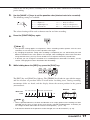
8.
To temporarily pause pattern recording, press the [REC] key while real-time
recording is in progress.
The [REC] key starts to flash. If you hit a pad in this condition, the sound will be heard, but
it is not recorded. This is useful to check the phrasing and sound before actually recording.
To resume recording, press the [REC] key once more.
Using Patterns (Pattern Mode)
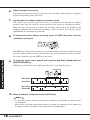
9.
To erase the sound from a specific pad, push the pad while holding down the
[DELETE/ERASE] key.
While the key is held down, the sound from that pad is erased from the pattern.
Snare drum
Bass drum
Snare drum
Bass drum
10.
When recording is completed, press the [STOP] key.
N OTE
• If a MIDI clock signal is being received, real-time recording is not possible. For details, please
refer to page 44.
• When there is not enough remaining free memory in the MRT-3, the indication "FULL" appears on
the display, and further recording is not possible. Erase unneeded patterns.
18
ZOOM MRT-3
Pattern Step Recording
This section describes step recording, which allows you to enter and record each sound separately,
step by step, while the MRT-3 is in the stop condition. Even without mastering how to play the
pads in real time, you can easily create complex drum and bass patterns. And you don't need to
stop there, because you can even create patterns that would be impossible to play in real time.
For step recording, you select the shortest note that is to be used as unit, and you create the pattern
by pressing a pad (note) or the [REC] key (rest) for each step.
For example, to create the following bass drum pattern with step recording, select an eighth note
as smallest unit and make the entry as follows:
Bass drum
[Pad] [REC] [REC] [REC] [Pad] [REC] [Pad] [REC] [REC] [REC] [REC]
1.
In pattern mode, select an empty user pattern.
2.
If required, select the kit for recording.
The kit selection procedure is the same as for manual play (➝ p. 12).
3.
Press the [FUNCTION] key and then pad 3 (QUANTIZE).
The current quantize setting appears on the display. The minimum unit (shortest note) for
step recording is determined by this setting.
Using Patterns (Pattern Mode)
When the end of a pattern is reached, it loops automatically back to the beginning, allowing you
to add other instrument sounds, to complete the pattern. By hitting two pads at the same time, you
can enter two sounds in the same position.
N OTE
The quantize setting applies to all patterns.
4.
Use the [VALUE +/-] keys to set the quantize value (shortest note to be recorded).
The following settings are available.
4 ••••••••
8 ••••••••
12 • • • • • • •
16 • • • • • • •
Quarter note
Eighth note
Eighth triplet note
Sixteenth note
24 • • • • • • •
32 • • • • • • •
48 • • • • • • •
Hi • • • • • • •
Sixteenth triplet note
Thirty-second note
Thirty-second triplet note
1 tick (1/96 of quarter note)
ZOOM MRT-3
19
5.
Press the [REC] key.
The [REC] key and [START] key light up, indicating that the MRT-3 is ready for recording.
6.
To enter a note, hit the pad corresponding to the desired sound.
For example, tapping pad 1 will enter a bass drum note (pad 1 lights up). The tapping
intensity will also be recorded. When you press the [REC] key, the current position
advances by the minimum unit. You can verify the current position (measure/beat) in the
pattern by checking the display.
7.
To enter a rest, press the [REC] key.
No sound is recorded, and the position advances by one step. If you press the [REC] key, the
current position within the beat is shown as number of ticks.
Using Patterns (Pattern Mode)
N OTE
• If you press the [PLAY] key, the current position within the beat is shown as number of ticks, for
as long as the button is held.
• When there is not enough remaining free memory in the MRT-3, the indication "FULL" appears on
the display, and further recording is not possible. Erase unneeded patterns.
When the end of the pattern is reached, the recording loops back to the beginning and
continues, allowing you to add to the recording as often as desired. (If necessary, use the
[PAD BANK] key to change the pad bank.)
8.
To erase a sound, use the [REC] key to move to the desired position. Then press
the corresponding pad while holding down the [DELETE/ERASE] key.
As you move the position with the [REC] key, the pad that has been input for the current
position lights up. Pressing the pad while holding the [DELETE/ERASE] key down causes
the pad to go out and the sound will be erased.
9.
20
When recording is completed, press the [STOP] key.
The [REC] key goes out and step recording terminates.
ZOOM MRT-3
Changing User Pattern Resolution After Recording
The resolution that is recorded together with the play information of a user pattern can be changed
later. For example, when a user pattern was recorded without quantization, it can be later set to a
sixteenth note for dynamic matching.
1.
In pattern mode, select the user pattern for which you want to change the
resolution.
2.
Press the [FUNCTION] key and then pad 3 (QUANTIZE).
The current quantize setting appears on the display.
3.
Use the [VALUE +/-] keys to set the quantize value (shortest note to be recorded).
4.
Press the [REC] key.
N OTE
If you select a quantize value in step 3 that is finer than the value with which the pattern was
recorded, no change will be made to the pattern.
Using Patterns (Pattern Mode)
The resolution of the recorded user pattern is changed, and the unit returns to the pattern
mode.
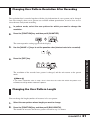
Changing the User Pattern Length
You can change the length (number of measures) of a user pattern.
1.
Select the user pattern whose length you want to change.
2.
Press the [FUNCTION] key and then pad 5 (BAR LENGTH).
The number of measures for the user pattern selected in step 1 is shown.
ZOOM MRT-3
21
2
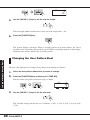
3.
Use the [VALUE +/-] keys to set the new bar length.
The bar length (number of measures) can be set in the range from 1 – 99.
4.
Press the [FUNCTION] key.
The pattern length is changed. When a recorded pattern was made shorter, the excess
measures at the end of the pattern will be cut off. When a recorded pattern was made longer,
blank measures will be added at the end of the pattern.
Changing the User Pattern Beat
Using Patterns (Pattern Mode)
The beat (time signature) of an empty user pattern can be changed as follows.
1.
Select the user pattern whose beat you want to change.
2.
Press the [FUNCTION] key and then pad 1 (TIME SIG).
The beat of the user pattern selected in step 1 is shown.
4
3.
Use the [VALUE +/-] keys to set the new beat.
The available settings for the beat are as follows: 2 (2/4), 3 (3/4), 4 (4/4), 5 (5/4), 6 (6/4),
7(7/4).
22
ZOOM MRT-3
4.
Press the [FUNCTION] key.
The pattern beat is changed.
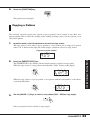
Copying a Pattern
The currently selected pattern (user pattern or preset pattern) can be copied to any other user
pattern number. This is useful for example when wishing to change only a part of a pattern, or to
add a fill-in phrase.
1.
In pattern mode, select the pattern to be used as copy source.
The copy source can be either a preset pattern or a user pattern, but an empty user pattern
(where "E" is shown on the right side of the display) cannot be selected as copy source.
Copy source pattern number
A05
Press the [INSERT/COPY] key.
The [INSERT/COPY] key flashes and the current pattern is selected as copy source.
When the copy source is a user pattern, the indication "CoPy" flashes on the display.
COPY
When the copy source is a preset pattern, a user pattern with the same number as the source
is selected and flashes.
@05
3.
Using Patterns (Pattern Mode)
2.
Use the [VALUE +/-] keys to select a user pattern (U01 – U99) as copy target.
Only user patterns can be selected as copy targets.
ZOOM MRT-3
23
N OTE
• When the copy is executed, the existing contents of the user pattern selected as copy target will
be erased. Make sure that the pattern you have selected is one that you don't mind erasing.
• When the copy source is a user pattern, the same pattern is first selected after step 2. However, it
is not possible to copy a pattern onto itself.
4.
To execute the copy process, press the [INSERT/COPY] key. To cancel the
process, press the [STOP] key.
When copying is completed, the unit returns to the pattern mode with the copy target pattern
being selected.
If copying was canceled, the unit returns to the pattern mode with the copy source pattern
being selected.
Erasing a Single User Pattern
Using Patterns (Pattern Mode)
When you no longer need a certain user pattern, you can erase its contents to return it to the
empty state. This is useful to make room for new patterns and free up memory of the unit.
N OTE
Once you have erased a user pattern, you will not be able to restore it. Make sure that you really
want to erase the pattern before carrying out the following steps.
1.
In pattern mode, select the user pattern to be erased (U01 – U99).
The pattern number is shown on the display.
@01
2.
Press the [DELETE/ERASE] key.
The [DELETE/ERASE] key flashes and the indication "dEL" alternates on the display with
the pattern number.
@01
24
ZOOM MRT-3
DEL
3.
To execute the erase process, press the [DELETE/ERASE] key. To cancel the
process, press the [STOP] key.
When erasing is completed, the unit returns to the pattern mode with the empty user pattern
being selected.
@05E
If erasing was canceled, the unit returns to the pattern mode with the original user pattern
being selected.
Deleting All User Patterns
If desired, you can erase all user patterns in one operation.
N OTE
Once you have deleted the user patterns, you will not be able to restore them. Make sure that you
really want to delete the patterns before carrying out the following steps.
In pattern mode, with playback stopped, press the [FUNCTION] key.
The [FUNCTION] key flashes.
2.
Press the [DELETE/ERASE] key.
The indications "dEL" and "ALL" alternate on the display.
ALL
3.
DEL
Using Patterns (Pattern Mode)
1.
To execute the delete process, press the [DELETE/ERASE] key. When wishing to
cancel the process, press the [STOP] key.
When you press the [DELETE/ERASE] key, all user patterns U01 – U99 are returned to the
empty state.
ZOOM MRT-3
25
Creating Your Own Kit
(Kit Mode)
This section describes how you can edit a user kit and copy any preset kit or user kit into another
user kit.
Editing a User Kit
In kit mode, you can select a user kit and change parameters such as sound, level, and pitch
assigned to each pad.
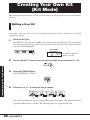
1.
Press the [KIT] key.
The [KIT] key lights up and the MRT-3 goes into kit mode. In this mode, you can select kits
to use for patterns and songs, and you can create your own user kits. The display shows the
currently selected kit number.
Kit number
01P
"P" indicates a preset kit
and "U" a user kit.
Creating Your Own Kit (Kit Mode)
2.
Use the [VALUE +/-] keys to select the user kit to edit (from kit numbers 51 – 70).
3.
Press the [FUNCTION] key.
The [FUNCTION] key flashes.
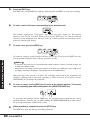
4.
Press pad 1 or 3 – 7 to select the item to change.
The selected pad lights up and the corresponding item can be edited. (The display indication
depends on which item is selected.) The following items are assigned to the pads.
26
ZOOM MRT-3
■ Items for individual pads (instrument sound)
• Pad 1 (PAD INST): • • • • • • • Select instrument sound for each pad
• Pad 3 (INST TUNE): • • • • • Adjust instrument sound pitch
• Pad 5 (INST PAN): • • • • • • • Adjust instrument sound panning (left/right stereo position)
• Pad 7 (INST LEVEL): • • • • Adjust instrument sound level
■ Items common to entire kit
• Pad 4 (KIT LEVEL): • • • • • • Overall kit level
• Pad 6 (PAD SENS): • • • • • • Pad sensitivity (response to hitting intensity) for overall kit
H INT
For details on the various items, see "Kit Items".
5.
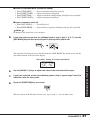
If you have selected an item for individual pads in step 4 (pad 1, 3, 5, 7), use the
[PAD BANK] key and then press the pad to specify which pad to edit.
The currently selected pad can be checked from the [PAD BANK] key lit/out status and the
pad number shown at the left of the display.
Pad number Setting of currently selected item
6.
Use the [VALUE +/-] keys to adjust the value of the item selected in step 4.
7.
If you have selected an item for individual pads in step 4, repeat steps 5 and 6 to
adjust the value for other pads.
8.
Press the [FUNCTION] key once more.
The unit returns to the kit mode. If necessary, repeat steps 3 – 8 to set other items.
ZOOM MRT-3
Creating Your Own Kit (Kit Mode)
1212
27
Kit Items
This section describes the items that make up a kit, as well as their setting range.
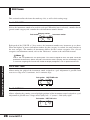
Pad 1: PAD INST
Selects the instrument sound to be used for each pad. When this item is selected, a number for the
general sound category and a number for each instrument sound is shown.
Category number
Pad number
Instrument number
1212
Each push of the [VALUE +/-] keys moves the instrument number one increment up or down.
When the highest or lowest instrument number for that category is reached, the unit switches to
the next category. The number of instruments differs for the various categories. For a list of
categories and instrument sounds, refer to the "Reference" section at the end of this manual.
H INT
Pads 5 and 7 of pad bank A are special pads. The sound assigned to these two pads cannot be
produced simultaneously. (When one pad is hit while the other is playing, the first sound stops.) This
is useful for assigning two sounds that should not be played together, such as open/closed hi-hat.
Creating Your Own Kit (Kit Mode)
Pad 3: INST TUNE
Allows tuning the pitch of the instrument sound assigned to a pad. Adjustment is possible from
zero over a range of ±7.9 semitones, in 0.1 semitone steps.
Pad number INST TUNE value
1
12
Pad 5: INST PAN
Allows adjusting the panning (stereo left/right position) of the instrument sound assigned to a pad.
Adjustment is possible over a range of L63 (fully left) – C (center) – R63 (fully right).
Pad number INST PAN value
1
28
ZOOM MRT-3
L4
Pad 7: INST LEVEL
Allows adjusting the level of an instrument sound assigned to a pad. Adjustment is possible over a
range of 1 – 15.
Pad number INST LEVEL value
1
10
Pad 4: KIT LEVEL
Allows adjusting the level of the entire kit. This adjustment is relative to the INST LEVEL
setting. Adjustment is possible over a range of 1 – 15.
KIT LEVEL value
10
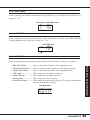
Pad 6: PAD SENS
Allows adjusting the pad sensitivity for the entire kit. The following 7 settings are available.
Gives a soft sound regardless of the tapping intensity.
Gives a medium sound regardless of the tapping intensity.
Gives a loud sound regardless of the tapping intensity.
This setting gives the highest sensitivity.
This setting gives medium sensitivity.
This setting gives low sensitivity.
This setting gives the lowest sensitivity. To achieve a loud sound,
the pads must be hit very hard.
PAD SENS value
NORM
ZOOM MRT-3
Creating Your Own Kit (Kit Mode)
• Soft (Fixed Soft): • • • • • • • • • •
• MEd (Fixed Medium): • • •
• Loud (Fixed Loud): • • • • • • •
• LItE (Light): • • • • • • • • • • • • • • • • • • •
• norM (Normal): • • • • • • • • • • • • •
• HArd (Hard): • • • • • • • • • • • • • • • • •
• Ehrd (Extra Hard): • • • • • • • • •
29
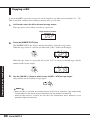
Copying a Kit
A kit of the MRT-3 (preset kit or user kit) can be copied to any other user kit number (51 – 70).
This is useful for example when wishing to change only a part of a kit.
1.
In kit mode, select the kit to be used as copy source.
The copy source can be either a user kit or a preset kit.
Copy source kit number
05P
2.
Press the [INSERT/COPY] key.
The [INSERT/COPY] key flashes and the current kit is selected as copy source.
When the copy source is a user kit, the indication "CoPy" flashes on the display.
COPY
When the copy source is a preset kit, the user kit "51U" is selected as default target, and the
number flashes on the display.
Creating Your Own Kit (Kit Mode)
51@
3.
Use the [VALUE +/-] keys to select a user kit (U51 – U70) as copy target.
Only user kits can be selected as copy targets.
N OTE
• When the copy is executed, the existing contents of the user kit selected as copy target will be
erased. Make sure that the kit you have selected is one that you don't mind erasing.
• When the copy source is a user kit, the same kit is first selected after step 2. However, it is not
possible to copy a kit onto itself.
30
ZOOM MRT-3
4.
To execute the copy process, press the [INSERT/COPY] key. When wishing to
cancel the process, press the [STOP] key.
When copying is completed, the unit returns to the kit mode with the copy target kit being
selected.
If copying was canceled, the unit returns to the kit mode with the copy source kit being
selected.
Creating Your Own Kit (Kit Mode)
ZOOM MRT-3
31
Creating Songs
(Song Mode)
This section describes how to line up user patterns in a desired order to create an entire song. This
mode of operation is called the song mode.
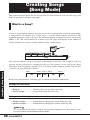
What Is a Song?
A song is a programmed sequence of preset patterns or user patterns that are played automatically.
A song consists of multiple slots (called "steps"), each of which contains one pattern. The
maximum length of a song is 99 steps. The maximum number of songs that can be stored in the
MRT-3 is 99. (The actual number of available steps and songs will depend on the number of
distinct sounds in user patterns and the number of steps in other songs.)
U02
U01
U02
U03
Pattern
U01
Song
Note that the number of steps is not equal to the number of measures. The length of each step
depends on the pattern that is contained in the step. For example, in the song in the above
illustration, if the length of the pattern U01 is 2 measures and the length of patterns U02 and U03
1 measure, the song will look as follows.
Creating Songs (Song Mode)
Step 1
U01
Step 2 Step 3 Step 4
U02
U03
U01
Step 5
U02
Besides the pattern number, each song step can contain the following information.
Settings for entire song
• Song kit: • • • • • • • • • • • • • • • • • • • • • • • Number of kit to be used for entire song
• Master tempo: • • • • • • • • • • • • • • • Tempo information for entire song
Settings for individual patterns
• Tempo change: • • • • • • • • • • • • • Information for changing the tempo within the song
• Volume change: • • • • • • • • • • • • Information for changing the volume within the song
N OTE
It is also possible to not specify a song kit and memorize individual kits for each pattern. In this
case, the kit will be switched together with the pattern.
32
ZOOM MRT-3
Recording Song Patterns
This section describes how you can collect a number of patterns into a song.
1.
Press the [SONG] key.
The MRT-3 goes into song mode, and the [SONG] key lights up. The display shows the
currently selected song number.
Song number
01
2.
Use the [VALUE +/-] keys to select an empty song number.
When you select an empty song, the indication "E" appears on the right side of the display.
02
3.
E
Press the [REC] key.
The [REC] key lights up, indicating that the MRT-3 is ready for song recording. The last
two digits of the display show the step number.
Step number
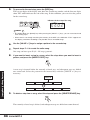
4.
Use the [VALUE +/-] keys to select the user pattern number to be assigned to the
first step.
When you press a [VALUE +/-] key, the [PATTERN] key flashes and the display shows the
pattern bank and number.
Bank / pattern number
@23
Creating Songs (Song Mode)
01
H INT
• You can also directly switch the pattern bank by pressing the [FUNCTION] key and then the
[VALUE +/-] key.
• You can listen to the currently selected pattern by pressing the [PLAY] key.
ZOOM MRT-3
33
5.
To proceed to the next step, press the [REC] key.
The last two digits of the display now show the second step number, and the first two digits
show "EE" which indicates the end of the song. In this condition, you can select the pattern
for the second step.
Indicates the last step of the song
EE02
H INT
• By holding down the [SONG] key while pressing the [VALUE +/-] keys, you can move back and
forth among steps.
• When there is not enough remaining free memory in the MRT-3, the indication "FULL" appears on
the display, and further recording is not possible. Erase unneeded songs.
6.
Use the [VALUE +/-] keys to assign a pattern to the second step.
7.
Repeat steps 5 – 6 to create the entire song.
One song can have up to 99 (01 – 99) steps (patterns).
8.
If you want to insert a step in a song, select the step where you want to insert a
pattern, and press the [INSERT/COPY] key.
Creating Songs (Song Mode)
A new step is inserted before the currently selected step, and subsequent steps are shifted
one count back. Select the pattern for the inserted keys with the [VALUE +/-] keys as
necessary.
Pattern E
Insert
9.
Pattern A
Pattern B
Pattern C
Pattern D
Pattern A
Pattern B
Pattern E
Pattern C
Pattern D
To delete a step from a song, select the step and press the [DELETE/ERASE] key.
The currently selected step is deleted, and subsequent steps are shifted one count forward.
34
ZOOM MRT-3
Delete
10.
Pattern A
Pattern B
Pattern C
Pattern A
Pattern B
Pattern D
Pattern D
When one song is completed, press the [STOP] key.
The [REC] key LED goes out, and song recording stops. The song position returns to step 1.
11.
To listen to the song, press the [PLAY] key.
The [PLAY] key lights up and the song is played back. The [TEMPO] key flashes according
to the tempo of the song. During playback, the first two digits of the display show the song
number, and the last two digits show the current step number.
Song number
Step number
0103
Pressing the [PATTERN] key during playback causes the display to show the number of
measures since the start of the song.
Measure count from start of song
Creating Songs (Song Mode)
0125
H INT
• If you switch the song during playback, the new song is played immediately.
• If you want to insert a pause in the song, program an empty pattern as a step.
12.
Press the [STOP] key whenever you want to terminate playback.
The song returns to the start position. By pressing the [PLAY] key again, you can start
playback of the song again from the beginning.
H INT
• Pressing the [PLAY] key instead of the [STOP] key causes the PAUSE key to flash, and playback
is paused. To resume playback from the same point, press the [PLAY] key once more.
ZOOM MRT-3
35
• Also during playback of a song, you can use the pads for manual play.
13.
To start playback from a point within a song, hold down the [SONG] key while
pressing the [VALUE +/-] keys.
When you press the [VALUE +] key, the step number shown on the display advances by 1,
and when you press the [VALUE -] key, the step number goes backwards by 1. By pressing
the [PLAY] key you can start playback from the selected step.
14.
To change the tempo of the song, hold down the [TEMPO] key while pressing the
[VALUE +/-] keys. This adjusts the BPM value.
As in pattern mode, you can also tap the [TEMPO] key twice or more to specify the tempo.
H INT
The MRT-3 automatically stores the tempo ("master tempo") for each song. When you switch a
song, the tempo that was last selected for that song will be selected.
Changing the Tempo Within a Song
This section describes how you can change the tempo within a song that has already been
recorded.
Creating Songs (Song Mode)
1.
In song mode, select the song whose tempo you want to alter.
2.
Press the [REC] key.
The [REC] key lights up, and the song can be edited.
3.
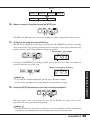
Hold down the [SONG] key while pressing the [VALUE +/-] keys to select the step
you want to edit.
The second two digits of the display show the step number.
Step number
0125
36
ZOOM MRT-3
4.
Hold down the [TEMPO] key.
While the [TEMPO] key is being pressed, the tempo change information for that step is
shown on the display. If no tempo change information is stored for that step, the indication
is "---".
--5.
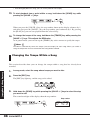
While holding down the [TEMPO] key, use the [VALUE +/-] keys to set the tempo
value (40 – 250).
122
6.
If desired, set the tempo for other song steps as well by repeating steps 3 – 5.
7.
When you have completed the tempo change input, press the [STOP] key.
Changing the Song Volume
This section describes how you can change the pattern volume within a song that has already been
recorded.
In song mode, select the song whose volume you want to alter.
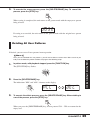
2.
Press the [REC] key.
The [REC] key lights up, and the song can be edited.
3.
Hold down the [SONG] key while pressing the [VALUE +/-] keys to select the step
you want to edit.
The last two digits of the display show the step number.
Creating Songs (Song Mode)
1.
Step number
0125
ZOOM MRT-3
37
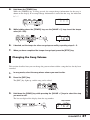
4.
Hold down the [FUNCTION] key.
While the [FUNCTION] key is being pressed, the volume change information for that step is
shown on the display. If no volume information is stored for that step, the indication is "---".
--5.
While holding down the [FUNCTION] key, use the [VALUE +/-] keys to set the
volume value (0 – 63).
60
6.
If desired, set the volume for other song steps as well by repeating steps 3 – 5.
7.
When you have completed the volume change input, press the [STOP] key.
N OTE
It is not possible to record both tempo change information and volume change information in the
same step. The most recently made setting will be valid.
Selecting a Dedicated Song Kit
Unless specified otherwise, the kits stored for the respective patterns will be used during playback
of a song. (When the pattern is switched, the kit is also switched.) It is also possible to specify a
dedicated song kit so that this kit will be used for the entire song.
Creating Songs (Song Mode)
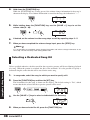
1.
In song mode, select the song for which you want to specify a kit.
2.
Press the [FUNCTION] key and then the [KIT] key.
The kit number for that song is shown on the display. The default setting is "Pat", which
means that the kit selected for the respective pattern will be used.
PAT
3.
Use the [VALUE +/-] keys to select a dedicated kit for that song.
05P
4.
38
When you have selected the kit, press the [FUNCTION] key.
ZOOM MRT-3
The kit for that song is stored, and the unit returns to the song mode.
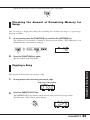
Checking the Amount of Remaining Memory for
Songs
You can call up a display that shows the remaining free memory for songs as a percentage.
Proceed as follows.
1.
In song mode, press the [FUNCTION] key, and then the [PATTERN] key.
The amount of free memory is shown in percent on the display. This indication is for
information only and cannot be changed.
78
2.
Press the [FUNCTION] key again.
The unit returns to the song mode.
Copying a Song
1.
In song mode, select the song you want to copy.
Copy source song number
0100
2.
Press the [INSERT/COPY] key.
The [INSERT/COPY] key flashes and the current song is selected as copy source.
The indication "CoPy" flashes on the display.
Creating Songs (Song Mode)
This section describes how you can copy a song.
COPY
ZOOM MRT-3
39
3.
Use the [VALUE +/-] keys to select a song number as copy target.
N OTE
When the copy is executed, the existing contents of the song selected as copy target will be erased.
Make sure that the song you have selected is one that you don't mind erasing.
4.
To execute the copy process, press the [INSERT/COPY] key. When wishing to
cancel the process, press the [STOP] key.
When copying is completed, the unit returns to the song mode with the copy target song
being selected.
If copying was canceled, the unit returns to the song mode with the copy source song being
selected.
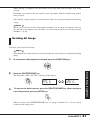
Deleting a Song
Creating Songs (Song Mode)
If you wish to delete a song, proceed as follows.
1.
In song mode, select the song you want to delete.
2.
Press the [DELETE/ERASE] key.
The [DELETE/ERASE] key flashes and the indication "dEL" alternates on the display with
the song number.
0100
3.
40
DEL
To execute the delete process, press the [DELETE/ERASE] key. To cancel the
process, press the [STOP] key.
ZOOM MRT-3
When deleting is completed, the unit returns to the song mode with an empty song being
selected.
If deleting was canceled, the unit returns to the song mode with the original song pattern
being selected.
Once deleted, a song cannot be restored. Proceed with care to prevent inadvertently deleting
a song.
H INT
You can also reset the unit to the factory default condition, with all songs, user patterns, and user
kits returned to the original state. For details, see "Returning the MRT-3 to the Factory Default
Condition" (➝ p. 48).
Deleting All Songs
If desired, you can delete all songs.
N OTE
Once deleted, the songs cannot be restored. Proceed with care to prevent inadvertently deleting
songs.
In song mode, while playback is stopped, press the [FUNCTION] key.
2.
Press the [DELETE/ERASE] key.
The indications "dEL" and "ALL" alternate on the display.
ALL
3.
DEL
To execute the delete process, press the [DELETE/ERASE] key. When wishing to
cancel the process, press the [STOP] key.
Creating Songs (Song Mode)
1.
When you press the [DELETE/ERASE] key, all songs in numbers 01 - 99 are erased
(returned to the empty state).
ZOOM MRT-3
41
Other Functions
This section describes other convenient functions of the MRT-3 and how to return the unit to the
factory default condition.
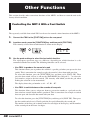
Controlling the MRT-3 With a Foot Switch
The separately available foot switch FS01 can be used to control various functions of the MRT-3.
1.
Connect the FS01 to the [FOOT SW] jack on the rear panel.
2.
In pattern mode, press the [FUNCTION] key and then pad 4 (FOOT SW).
The currently selected foot switch function is shown on the display.
STRT
3.
Use the pads and keys to select the foot switch function.
The subsequent operation steps are different, depending on which function is to be
controlled with the foot switch. The following functions can be selected.
Other Functions
• Use FS01 to produce the sound of a pad
This function allows you to produce the sound of a specific pad when you operate the foot
switch. This is convenient for example to play the sound of a bass drum with your foot.
To select this function, press the [FUNCTION] key and then pad 4 (FOOT SW). Then
press the foot switch, release it, and use the [PAD BANK] key and pads 1 – 7 to select the
pad sound to assign to the foot switch. (The intensity with which you hit the pad when
making the selection is also memorized.)
The display shows the pad number as A1 – A7, B1 – B7.
• Use FS01 to switch between the sounds of two pads
This function allows you to assign two drum or percussion sounds to a pad and use the
foot switch to control which sound is produced. This is convenient for example to switch
between open and closed hi-hat sound with your foot.
To select this function, press the [FUNCTION] key and then pad 4 (FOOT SW). Then press
the foot switch and release it. Finally, push the first pad, followed by the second pad.
The number of the first pad is shown on the first two digits of the display, and the number
of the second pad on the lower last digits.
42
ZOOM MRT-3
Second pad
First pad
A7A5
The sound of the first pad can now be toggled with the foot switch. While the foot switch
is pressed, the sound of the first pad is produced. When the foot switch is released, the
sound of the second pad is produced. Also without hitting the pad, pressing the foot
switch produces the sound of the first pad.
• Use FS01 to set the tempo
The foot switch can be made to function in the same way as the [TEMPO] key. To specify
the tempo, you can press the foot switch twice or more in the desired tempo (tap input
function).
To select this function, press the [FUNCTION] key and then pad 4 (FOOT SW). Then
press the [TEMPO] key (the indication "tAP" appears on the display).
• Use FS01 to control start/pause
The foot switch can be made to function in the same way as the [PLAY] key. Pressing the
foot switch then toggles between play and pause: "Start play" ➝ "Pause" ➝ "Resume
play" etc.
To select this function, press the [FUNCTION] key and then pad 4 (FOOT SW). Then
press the [PLAY] key (the indication "Cont" appears on the display).
• Use FS01 to control start/stop
The foot switch can be made to function in the same way as the [PLAY] and [STOP]
keys. Pressing the foot switch then toggles between play and stop: "Start play" ➝ "Stop"
➝ "Start play from beginning" etc.
To select this function, press the [FUNCTION] key and then pad 4 (FOOT SW). Then
press the [STOP] key (the indication "Strt" appears on the display).
4.
Other Functions
• Use FS01 to mute a pattern/song
The foot switch can be made to mute the pattern or song while pressed. (Playback
continues also while the sound is muted.)
To select this function, press the [FUNCTION] key and then pad 4 (FOOT SW). Then
press the [KIT] key (the indication "MutE" appears on the display).
When you have selected the function, press the [FUNCTION] key once more.
The FS01 function is now set, and the MRT-3 returns to the previous mode. Try pressing the
foot switch while using the MRT-3, to check the effect.
N OTE
The setting cannot be canceled. If you want to select another function, repeat the above procedure.
ZOOM MRT-3
43
Synchronizing Playback With an External Device
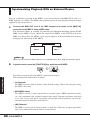
You can synchronize operation of the MRT-3 to an external device with MIDI OUT, such as a
MIDI sequencer or recorder. The MRT-3 then performs pattern or song playback using the tempo
supplied by the external device.
1.
Connect the MIDI OUT jack of the MIDI sequencer/recorder to the [MIDI IN]
connector of the MRT-3, using a MIDI cable.
The illustration shows an example for connecting the Multitrak Recording Studio ZOOM
MRS-4 to the MRT-3. If you connect the output of the MRT-3 to the AUX IN jack of the
MRS-4, as shown here, the MRT-3 can be used to supply a dedicated rhythm track without
taking up any audio tracks of the MRS-4
AUX IN
MIDI OUT
MRS-4
MIDI IN OUT PUT
STEREO
MRT-3
N OTE
Make sure that the external MIDI sequencer can send MIDI Clock, Start, Stop, and Continue signals.
2.
In pattern mode, press the [FUNCTION] key and then pad 6 (MIDI).
Other Functions
The clock currently used by the MRT-3 is shown on the display.
The meaning of the indication is as follows.
• Int (Internal)
The MRT-3 operates with its internal clock (default setting). This is the setting for using
the MRT-3 on its own.
• Midi (MIDI clock)
The MRT-3 receives a clock signal from an external source (MIDI sequencer/recorder
etc.) and synchronizes the playback tempo to this signal. Transport operations (playback
start, stop, restart) and locate operations (moving the current position) can also be
controlled remotely from the external device.
• rMt (Remote)
The MRT-3 operates on its internal clock, as with "Int". However, transport operations
only can be controlled remotely from an external device.
44
ZOOM MRT-3
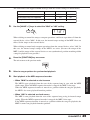
The clock source and supported MIDI messages with the various settings are shown below.
Int
rMt
Internal clock
MIDI clock
Internal clock
Start/Stop/Continue supported
No
Yes
Yes
Song Position Pointer supported
No
Yes
No
Clock source
3.
Midi
Use the [VALUE +/-] keys to select the "Midi" or "rMt" setting.
MIDI
When wishing to control the tempo, transport operations, and locate operations all from the
external device, select "Midi". In this case, the internal tempo settings of the MRT-3 have no
effect. Set the tempo at the external device.
When wishing to control only transport operations from the external device, select "rMt". In
this case, the internal tempo settings of the MRT-3 are active. (Because the tempo of the
MRT-3 and the tempo of the external device are not synchronized, position matching within
a song for playback is not possible.)
4.
Press the [FUNCTION] key once more.
The unit returns to the previous mode.
5.
Select a song or pattern for synchronized playback.
6.
Start playback at the MIDI sequencer/recorder.
Other Functions
• When "Midi" is selected as clock source
The MRT-3 starts playback from the start of the sequence/song in sync with the MIDI
clock tempo. When the MIDI sequencer/recorder is stopped, the MRT-3 also stops.
When the MIDI sequencer/recorder is moved to a position within the song for playback,
the MRT-3 also starts playback from that position.
• When "rMt" is selected as clock source
The MRT-3 starts playback from the start of the sequence/song, using its internal tempo
setting. When the MIDI sequencer/recorder is stopped, the MRT-3 also stops.
If the MIDI sequencer/recorder is moved to a position within the song for playback, the
MRT-3 cannot start playback from that position.
ZOOM MRT-3
45
Playing MRT-3 Sounds From an Exter nal MIDI
Component
Using an external MIDI sequencer or MIDI keyboard, you can play the sound sources of the
MRT-3. To do this, the MIDI receive channel setting of the MRT-3 must match the MIDI send
channel of the external device.
1.
Connect the MIDI OUT jack of the MIDI sequencer or similar to the [MIDI IN]
connector of the MRT-3, using a MIDI cable.
MIDI OUT
MIDI sequencer
2.
MIDI IN
MRT-3
In pattern mode, press the [FUNCTION] key and then pad 6 (MIDI).
The clock currently used by the MRT-3 is shown on the display.
INT
3.
Press and hold the [KIT] key.
While the [KIT] key is being pressed, the display shows the current MIDI receive channel
setting (default setting: 10).
10
4.
Other Functions
Use the [VALUE +/-] keys to select the MIDI receive channel.
The MIDI receive channel can be set to OFF (no MIDI messages are received), or 1 – 16.
1
5.
46
When the setting is complete, press the [FUNCTION] key again.
The unit returns to the previous mode.
ZOOM MRT-3
6.
Play the external MIDI sequencer or keyboard.
The MRT-3 produces drum/percussion sound according to the note numbers received via the
[MIDI IN] connector. For information on note number assignments, please refer to the
"Reference" section at the end of this manual.
It is also possible to send a program change message to the MRT-3 to switch the kit. For
information on program change number assignments, please refer to the "Reference" section
at the end of this manual.
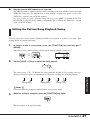
Setting the Pattern/Song Playback Swing
You can adjust the swing amount (rhythm flourish) for playback of patterns and songs. This
setting affects all patterns and songs.
1.
In pattern mode or song mode, press the [FUNCTION] key and then pad 7
(SWING).
The current swing amount setting is shown on the display (default setting: 50).
50
2.
Use the [VALUE +/-] keys to adjust the swing amount.
The setting range is 50 – 75. Raising the setting from the default of 50 (no swing) increases
the interval between upbeat and downbeat in a measure, resulting in a swinging rhythm.
Swing=60%
Other Functions
Swing=50%
Swing=75%
H INT
If necessary, press the [PLAY] key to play a pattern and check the effect.
3.
When the setting is complete, press the [FUNCTION] key again.
The unit returns to the previous mode.
ZOOM MRT-3
47
Setting the Precount for Real-Time Recording
The MRT-3 can perform a countdown before the start of real-time recording. The number of
precount measures can be changed, and precount can also be turned off. This setting affects all
patterns.
1.
In pattern mode, press the [FUNCTION] key and then pad 2 (PRE COUNT).
The current precount setting is shown on the display (default setting: 1).
1
2.
Use the [VALUE +/-] keys to select one of the following settings.
0:
1:
2:
PAd:
No precount
Precount of 1 measure
Precount of 2 measures
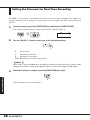
Recording starts when any pad is hit.
H INT
When "PAd" is selected, holding down the [REC] key while pressing the [PLAY] key in pattern mode
brings up the indication "rEAdy" on the display, and the unit goes into recording standby mode.
3.
When the setting is complete, press the [FUNCTION] key again.
Other Functions
The unit returns to the previous mode.
48
ZOOM MRT-3
Returning the MRT-3 to the Factory Default Condition
You can return all stored data and settings of the MRT-3 to the factory default condition. This is
called initialization.
N OTE
Use this function with care. Initialization will clear all user pattern data, user kit data, and song data
that you have created.
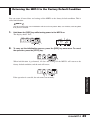
1.
Hold down the [REC] key while turning power to the MRT-3 on.
The display shows "Init".
IN
2.
T
To carry out the initialization process, press the [REC] key once more. To cancel
the operation, press the [STOP] key.
When initialization is performed, all data and settings of the MRT-3 will return to the
factory default condition, and the unit will restart.
Other Functions
If the operation is canceled, the unit comes on normally.
ZOOM MRT-3
49
Troubleshooting
Check the following items first if there seems to be a problem with the MRT-3.
Troubleshooting
No sound or very low volume.
Song cannot be recorded.
• Is the [POWER] switch set to ON?
Turn power on, as described in the section
"Preparations" (page 8).
• Is [OUTPUT] jack connected correctly
to the playback system?
Make connections as described in "Getting
Connected" (page 7).
• Is there a problem with the shielded
cable?
Try using another cable.
• Is the connected playback system
operating normally and is the volume
setting appropriate?
Check the system and make sure that the
level is adjusted properly.
• Is [OUTPUT LEVEL] control of MRT-3
set correctly?
Set the control to a suitable position.
• Is MRT-3 set to mode other than
song mode?
Activate song mode (➝ p. 33).
• Is memory capacity limit reached?
Check remaining memory capacity(➝ p.
39), and delete unneeded patterns and
songs.
Sound is distorted or intermittent.
FS01 has no effect.
• Is output level of MRT-3 set too
high?
Set [OUTPUT LEVEL] control of MRT-3
to a suitable position.
• Is foot switch connected correctly to
the [FOOT SW] jack?
Make connections as described in "Getting
Connected" (➝ page 7)
• Is correct function selected for
FS01?
Use [FUNCTION] key and pad 4 (FOOT
SW) to select the proper setting (➝ p. 42).
Cannot record pattern.
• Is MRT-3 set to mode other than
pattern mode?
Activate pattern mode (➝ p. 14).
• Is memory capacity limit reached?
Check remaining memory capacity(➝ p.
39), and delete unneeded patterns and
songs.
50
ZOOM MRT-3
Playback sound is not in stereo.
• Is Y cable connected to [OUTPUT
STEREO/PHONES] jack?
Make connections as described in "Getting
Connected" (page 7).
• Is the panning setting appropriate?
Check whether the pan parameter for the
instrument sounds in the currently used kit
is set properly (➝ p. 28).
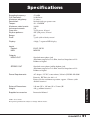
Specifications
Sampling frequency:
D/A Converter:
Maximum polyphony:
Resolution:
Tempo:
Maximum notes/events:
Instrument sounds:
Drum kits:
Rhythm patterns:
Songs:
Pads:
47.6 kHz
16-bit linear
21 voices
96 clock ticks per quarter note
40 – 250 BPM
20,000
199
70 (50 preset, 20 user)
495 (396 preset, 99 user)
99
7 pads (with velocity sensor)
Display:
4-digit, 7-segment LED display
Inputs
Control:
MIDI:
FOOT SW IN
MIDI IN
Outputs
MONO OUT
STEREO OUT
Standard mono phone jack
(Maximum output level +3 dBm, into load impedance of 10
kilohms or higher)
Standard stereo phone jack/headphone jack
(Maximum output level +3 dBm, into load impedance of 10
kilohms or higher)
AC adapter 9 V DC, center minus, 300 mA (ZOOM AD-0006)
Batteries IEC R6 (size AA) x 4
Battery life for continuous operation: approx. 15 hours (with
alkaline batteries)
External Dimensions:
Weight:
144 mm (W) x 165 mm (D) x 52 mm (H)
440 g (without batteries)
Supplied accessories:
Instruction Manual
Specifications
Power Requirements:
0 dB = 0.775 Vrms
Design and specifications subject to change without notice.
ZOOM MRT-3
51
Reference
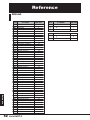
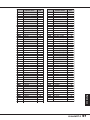
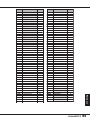
Kit List
Reference
52
KIT#
KIT NAME
MIDI PC#
KIT#
01
02
03
04
05
06
07
08
09
10
11
12
13
14
15
16
17
18
19
20
21
22
23
24
25
26
27
28
29
30
31
32
33
34
35
36
37
38
39
40
41
42
43
44
45
46
47
48
49
50
Live Rock
Studio
Standard
Funk Trap
Epic Rock
Ballad
Modern
Rap/HipHop
Techno Beat
General Drum
Live Rock variation 1
Live Rock variation 2
Live Rock variation 3
Studio variation 1
Studio variation 2
Studio variation 3
Standard variation 1
Standard variation 2
Standard variation 3
Funk Trap variation 1
Funk Trap variation 2
Funk Trap variation 3
Epic Rock variation 1
Epic Rock variation 2
Ballad variation 1
Ballad variation 2
Modern variation 1
Modern variation 2
Rap/HipHop variation 1
Rap/HipHop variation 2
Rap/HipHop variation 3
Techno Beat variation 1
Techno Beat variation 2
Techno Beat variation 3
General Drum Room
General Drum Power
General Drum Electronic
General Drum Analog
General Drum Brush
Latin Special
Percussions
Live Rock Mastering
Studio Mastering
Funk Trap Mastering
Epic Rock Mastering
Ballad Mastering
Modern Mastering
Power-benddown
Special Effect Sounds 1
Special Effect Sounds 2
3
4
5
6
7
8
10
11
12
13, 33
14
15
16
18
2, 19
20
1, 21
22
23
24
27
28
29
30
31
32
34
35
36
37
38
39
40
42
9, 43
17, 44
25, 45
26, 46
41, 47
48
49
50
51
52
53
54
55
56
57
58
51
USER 51
59
70
USER 70
78
PRESET 01
79
PRESET 50
128
ZOOM MRT-3
KIT NAME
MIDI PC#
MIDI Note Number Chart
Note #
24
25
26
27
28
29
30
31
32
33
34
35
36
37
38
39
40
41
42
43
44
45
46
47
48
49
50
51
52
53
54
55
56
57
58
59
INST NAME
PAD #
* MIDDLE C
High Q
Slap
Scratch Push
Scratch Pull
Sticks
Square Click
Metronome Click
Metronome Bell
KICK 2
KICK 1
EXTRA1(Side Stick)
SNARE 1
EXTRA2(Hand Clap)
SNARE 2
(TOM 3)
CLOSED HAT
TOM 3
Pedal HiHat
(TOM 2)
OPEN HAT
TOM 2
(TOM 1)
CRASH
TOM 1
RIDE
Chinese Cymbal
CUP
Tambourine
Splash Cymbal
Cowbell
Crash Cymbal 2
Vibraslap
Ride Cymbal 2
PAD B-1
PAD A-1
PAD B-5
PAD A-3
PAD B-7
PAD B-3
(PAD B-6)
PAD A-5
PAD B-6
(PAD B-4)
PAD A-7
PAD B-4
(PAD B-2)
PAD A-2
PAD B-2
PAD A-6
Note #
INST NAME
60
61
62
63
64
65
66
67
68
69
70
71
72
73
74
75
76
77
78
79
80
81
82
83
84
85
86
87
88
High Bongo
Low Bongo
Mute High Conga
Open High Conga
Low Conga
High Timbale
Low Timbale
High Agogo
Low Agogo
Cabasa
Maracas
Short Whistle
Long Whistle
Short Guiro
Long Guiro
Claves
High Wood Block
Low Wood Block
Mute Cuica
Open Cuica
Mute Triangle
Open Triangle
Shaker
Jingle Bell
Belltree
Castanets
Mute Surdo
Open Surdo
PAD A-4
(PAD A-2)
Reference
ZOOM MRT-3
53
Instrument List
Category Inst #
1: KICK
2: SNARE
Reference
54
1
2
3
4
5
6
7
8
9
10
11
12
13
14
15
16
17
18
19
20
21
22
1
2
3
4
5
6
7
8
9
10
11
12
13
14
15
16
17
18
19
20
21
22
23
24
25
26
27
28
ZOOM MRT-3
Name
Live Kick 1
Live Kick 2
Studio Booth Kick
Small Booth Kick
Middle Booth Kick
Muted Kick
Tight Shell Kick
Huge Kick
Deep Hard beater Kick
Ambient Kick
Stage Ambient Kick 1
Stage Ambient Kick 2
Dry Kick
Resonated Kick
Deep Shell Kick
Deep Muffed Kick
Analog Kick
Short Analog Kick
DIGI-ANA Kick
Long DIGI-ANA Kick
Synth Kick
Velocity Bend Kick
Live Ambient 1
Live Ambient 2
Booth Ambient
Booth Dry
Dry Snappy
Dry High Tuned
High Tuned 1
High Tuned 2
High Tuned 3
Deep Body Ambient
Deep Snappy
High Tensioned Snappy
Tight Muted
Resonated Tuning
Tighten Gate
Mono Analog
Stereo Analog
Mono DIGI-ANA
Stereo DIGI-ANA
Reverb Snare 1
Reverb Snare 2
Room Snare
Power Snare
Electric Snare
Brush Short
Brush Long
Brush Slap
Bend Down
Category Inst #
3: TOM
4: HI HATS
1
2
3
4
5
6
7
8
9
10
11
12
13
14
15
16
17
18
19
20
21
22
23
24
25
26
27
28
29
30
31
32
33
34
35
36
37
38
39
40
41
42
1
2
3
4
5
6
7
8
Name
Live Tom 1
Live Tom 2
Live Floor
Studio Tom 1
Studio Tom 2
Studio Floor
Dry Tom 1
Dry Tom 2
Dry Floor
Loose Tom 1
Loose Tom 2
Loose Floor
Ambient Tom 1
Ambient Tom 2
Ambient Floor
Low Tune Tom 1
Low Tune Tom 2
Low Tune Floor
Hard Hit Tom 1
Hard Hit Tom 2
Hard Hit Floor
808 Tom 1
808 Tom 2
808 Floor
Power Gate Tom 1
Power Gate Tom 2
Power Gate Floor
Acoustic Tom 1
Acoustic Tom 2
Acoustic Floor
Room Tom 1
Room Tom 2
Room Floor
Electric Tom 1
Electric Tom 2
Electric Floor
Bend Down Tom 1
Bend Down Tom 2
Bend Down Floor
TOMVERB
FLOORVERB
Synth Drum Tom
Live Close-Hat
Live Open-Hat
Studio Close-Hat
Clear Close-Hat
Clear Open-Hat
Analog Close-Hat
Analog Open-Hat
DIGI-ANA Close-Hat
Category
4: HI HATS
5: CYMBAL
6: EXTRA
7: GLOBAL
Inst #
Name
DIGI-ANA Open-Hat
Acoustic Foot-Hat
Acoustic Short Foot
Analog Foot-Hat
Bend Down Close-Hat
Bend Down Open-Hat
Bend Down Foot-Hat
Crash 1
Crash 2
Analog Crash
Thin Crash
Splash 1
Splash 2
Bend Down Crash
China 1
China 2
Ride 1
Ride 2
Ride 3
Bend Down Ride
Cup
SFX Cup
Live Rim
Live Long Rim
Dry Rim
Velocity Bend Down Rim
Cowbell 1
Analog Cowbell
Velocity Bend Down Cowbell
Live Tambourine
Velocity Bend Down Tambourine
Clap
Filtered Clap
Velocity Bend Down Clap
Analog Claves
DIGI-ANA Snap
Click Noise
High Q
Slap
Scratch Push
Scratch Pull
Sticks
Square Click
Metronome Click
Metronome Bell
Tambourine
Vibraslap
High Bongo
Low Bongo
Mute High Conga
Category
7: GLOBAL
8: SFX
Inst #
14
15
16
17
18
19
20
21
22
23
24
25
26
27
28
29
30
31
32
33
34
35
36
37
38
39
1
2
3
4
5
6
7
8
9
10
11
12
13
14
15
16
17
18
19
20
21
22
23
Name
Open High Conga 1
Open High Conga 2
Low Conga
High Timbale
Low Timbale
High Agogo
Low Agogo
Cabasa
Maracas
Short High Whistle
Long Whistle
Short Guiro
Long Guiro
Claves
High Wood Block
Low Wood Block
Mute Cuica
Open Cuica
Mute Triangle
Open Triangle
Shaker
Jingle Bell
Bell Tree
Castanets
Mute Surdo
Open Surdo
Filter Swept Cymbal
Gamelan
Bass Slide
REV Wet 1
REV Wet 2
Bell
Odaiko
ChuDaiko
Oedo
Chinese Temple
Mokugyo
Huge Clock
UFO
Door Close
Door Open
Kishimi
Sliding
Engine Cell
Sonar
Space
Sequence
Minor7
Major7
ZOOM MRT-3
Reference
9
10
11
12
13
14
15
1
2
3
4
5
6
7
8
9
10
11
12
13
14
15
1
2
3
4
5
6
7
8
9
10
11
12
13
14
15
1
2
3
4
5
6
7
8
9
10
11
12
13
55
Pattern List
Display
Reference
A01
A02
A03
A04
A05
A06
A07
A08
A09
A10
A11
A12
A13
A14
A15
A16
A17
A18
A19
A20
A21
A22
A23
A24
A25
A26
A27
A28
A29
A30
A31
A32
A33
A34
A35
A36
A37
A38
A39
A40
A41
A42
A43
A44
A45
A46
A47
A48
A49
A50
56
ZOOM MRT-3
Pattern name
08Beat01
08Beat02
08Beat03
08Beat04
08Beat05
08Beat06
08Beat07
08Beat08
08Beat09
08Beat10
08Beat11
08Beat12
16Beat01
16Beat02
16Beat03
16Beat04
16Beat05
16Beat06
16Beat07
16Beat08
16FUS01
16FUS02
JAZZ01
JAZZ02
JAZZ03
JAZZ04
BOSSA
CNTRY
68BLUS
DANCE
Rock01
Rock02
Rock03
Rock04
Rock05
Rock06
Rock07
Rock08
Rock09
Rock10
Rock11
Rock12
Rock13
Rock14
Rock15
Rock16
Rock17
Rock18
Rock19
Rock20
KIT
Display
1
1
1
1
2
2
4
4
4
4
20
20
35
35
6
6
6
6
2
2
36
36
14
26
25
14
40
3
6
10
5
15
23
4
4
7
23
36
3
7
2
1
20
20
3
3
1
3
36
1
A51
A52
A53
A54
A55
A56
A57
A58
A59
A60
A61
A62
A63
A64
A65
A66
A67
A68
A69
A70
A71
A72
A73
A74
A75
A76
A77
A78
A79
A80
A81
A82
A83
A84
A85
A86
A87
A88
A89
A90
A91
A92
A93
A94
A95
A96
A97
A98
A99
Pattern name
Rock21(shuffle)
Rock22(shuffle)
Rock23
Rock24
Rock25
Rock26
Rock27
Rock28
Rock29
Rock30
Rock31
Rock32
Rock33
Rock34
Rock35T
HRK01
HRK02
HRK03
HRK04
HRK05
HRK06
HRK07(shuffle)
HRK08
HRK09
HRK10
HRK11
MTL01
MTL02
MTL03
MTL04
MTL05
MTL06
THRS01
THRS02
THRS03
PUNK01
PUNK02
FUS01
FUS02
FUS03
FUS04
FUS05
FUS06
FUS07
FUS08
FUS09
FUS10
FUS11
FUS12
KIT
2
14
4
1
1
4
1
4
1
2
1
4
1
14
1
1
24
13
13
17
5
17
1
24
2
1
11
1
1
35
1
4
36
36
1
24
11
20
4
20
22
22
18
4
17
4
10
10
3
Display
Pattern name
POP01
POP02
POP03
POP04
POP05
POP06
POP07
POP08
POP09
POP10(shuffle)
POP11(shuffle)
POP12
POP13
POP14
POP15
POP16
POP17
POP18
POP19T
RnB01
RnB02
RnB03
RnB04
RnB05
RnB06
RnB07
RnB08
RnB09(shuffle)
RnB10
RnB11
RnB12
RnB13
RnB14
FUNK01
FUNK02
FUNK03
FUNK04
FUNK05
FUNK06
FUNK07
FUNK08
FUNK09
FUNK10
FUNK11
FUNK12
FUNK13
FUNK14
FUNK15
16ROCK01
16ROCK02
KIT
Display
3
3
18
18
3
17
17
17
17
4
22
32
33
22
40
2
35
20
26
20
4
6
2
4
27
10
11
15
1
4
22
8
35
22
4
14
14
13
21
4
4
4
19
3
19
6
22
2
20
21
B51
B52
B53
B54
B55
B56
B57
B58
B59
B60
B61
B62
B63
B64
B65
B66
B67
B68
B69
B70
B71
B72
B73
B74
B75
B76
B77
B78
B79
B80
B81
B82
B83
B84
B85
B86
B87
B88
B89
B90
B91
B92
B93
B94
B95
B96
B97
B98
B99
Pattern name
16ROCK03
16ROCK04
16ROCK05
16ROCK06
GrvDrm01
GrvDrm02
GrvDrm03
BALD01
BALD02
BALD03
BALD04
BALD05
BALD06
BALD07(shuffle)
BALD08(shuffle)
BALD09(shuffle)
BALD10(shuffle)
BALD11(shuffle)
BALD12T
BALD13T
BLUS01(shuffle)
BLUS02(shuffle)
BLUS03(shuffle)
BLUS04(shuffle)
BLUS05(shuffle)
BLUS06T
BLUS07T
BLUS08T
CNTR01
CNTR02
CNTR03
CNTR04
CNTR05
JAZZ01
JAZZ02
JAZZ03
JAZZ04
JAZZ05
JAZZ06
JAZZ07
JAZZ08T
JAZZ09P
SHFL01
SHFL02
SHFL03
SHFL04
SHFL05
SHFL06
SHFL07
KIT
4
4
4
2
40
4
1
40
2
40
6
20
20
3
3
3
7
7
4
5
11
20
20
11
11
7
1
17
18
3
3
17
40
3
4
4
3
4
40
7
3
40
15
15
14
2
2
4
4
ZOOM MRT-3
Reference
B01
B02
B03
B04
B05
B06
B07
B08
B09
B10
B11
B12
B13
B14
B15
B16
B17
B18
B19
B20
B21
B22
B23
B24
B25
B26
B27
B28
B29
B30
B31
B32
B33
B34
B35
B36
B37
B38
B39
B40
B41
B42
B43
B44
B45
B46
B47
B48
B49
B50
57
Display
Reference
C01
C02
C03
C04
C05
C06
C07
C08
C09
C10
C11
C12
C13
C14
C15
C16
C17
C18
C19
C20
C21
C22
C23
C24
C25
C26
C27
C28
C29
C30
C31
C32
C33
C34
C35
C36
C37
C38
C39
C40
C41
C42
C43
C44
C45
C46
C47
C48
C49
C50
58
ZOOM MRT-3
Pattern name
HIP01
HIP02
HIP03
HIP04
HIP05
HIP06
HIP07
HIP08
HIP09
HIP10
HIP11
HIP12
HIP13
HIP14
HIP15
HIP16
HIP17
HIP18
HIP19
HIP20
HIP21
HIP22
HIP23
HIP24
HIP25
HIP26
HIP27
HIP28
HIP29
HIP30
HIP31
HIP32
DANC01
DANC02
DANC03
DANC04
DANC05
DANC06
DANC07
HOUS01
HOUS02
HOUS03
HOUS04
HOUS05
HOUS06
TECH01
TECH02
TECH03
TECH04
TECH05
KIT
Display
33
8
17
9
8
24
9
9
1
3
3
39
8
24
1
31
9
30
11
4
4
3
30
5
8
4
9
30
33
33
40
40
33
21
40
21
9
40
33
40
8
40
40
9
34
8
9
9
8
9
C51
C52
C53
C54
C55
C56
C57
C58
C59
C60
C61
C62
C63
C64
C65
C66
C67
C68
C69
C70
C71
C72
C73
C74
C75
C76
C77
C78
C79
C80
C81
C82
C83
C84
C85
C86
C87
C88
C89
C90
C91
C92
C93
C94
C95
C96
C97
C98
C99
Pattern name
TECH06
TECH07
TECH08
DnB01
DnB02
DnB03
DnB04
DnB05
DnB06
DnB07
TRIP01
TRIP02
TRIP03
AMB01
AMB02
AMB03
AMB04
INDUSTRIAL01
INDUSTRIAL02
INDUSTRIAL03
REGG01
REGG02
REGG03
REGG04
SKA01
SKA02
SKA03
LATN01
LATN02
LATN03
LATN04
LATN05
LATN06
LATN07
LATN08
LATN09
LATN10
LATN11
LATN12
BOSSA01
SAMBA01
SAMBA02
AFRO01
AFRO02
AFRO03
MidE01
MidE02
MidE03
MidE04T
KIT
9
8
40
32
8
4
9
30
22
29
34
3
34
22
2
1
4
23
24
9
18
21
40
40
20
18
15
40
40
40
40
40
40
40
40
40
4
4
18
40
4
22
16
40
40
13
3
40
22
Pattern name
KIT
Display
D01
D02
D03
D04
D05
D06
D07
D08
D09
D10
D11
D12
D13
D14
D15
D16
D17
D18
D19
D20
D21
D22
D23
D24
D25
D26
D27
D28
D29
D30
D31
D32
D33
D34
D35
D36
D37
D38
D39
D40
D41
D42
D43
D44
D45
D46
D47
D48
D49
D50
INTRO01
INTRO02
INTRO03
INTRO04
INTRO05
INTRO06
INTRO07
INTRO08
INTRO09(shuffle)
INTRO10
INTRO11
INTRO12
INTRO13
INTRO14
INTRO15
INTRO16
INTRO17
INTRO18
INTRO19
ROCK-FILL01
ROCK-FILL02
ROCK-FILL03
ROCK-FILL04
ROCK-FILL05
ROCK-FILL06
ROCK-FILL07
ROCK-FILL08
ROCK-FILL09
HARDROCK-FILL01
HARDROCK-FILL02
HARDROCK-FILL03
HARDROCK-FILL04
METAL-FILL01
METAL-FILL02
THRASH-FILL01
FUSION-FILL01
FUSION-FILL02
FUSION-FILL03
FUSION-FILL04
FUSION-FILL05
FUSION-FILL06
POPS-FILL01
POPS-FILL02
POPS-FILL03
POPS-FILL04
POPS-FILL05
POPS-FILL06
POPS-FILL07
RnB-FILL01
RnB-FILL02
1
1
2
4
3
20
5
6
1
5
20
2
3
20
3
6
19
4
14
2
2
1
1
4
5
1
4
5
14
4
6
14
6
6
2
22
35
35
4
4
4
3
17
18
3
17
17
18
7
19
D51
D52
D53
D54
D55
D56
D57
D58
D59
D60
D61
D62
D63
D64
D65
D66
D67
D68
D69
D70
D71
D72
D73
D74
D75
D76
D77
D78
D79
D80
D81
D82
D83
D84
D85
D86
D87
D88
D89
D90
D91
D92
D93
D94
D95
D96
D97
D98
D99
Pattern name
FUNK-FILL01
FUNK-FILL02
FUNK-FILL03
FUNK-FILL04
GROOVE-FILL01
GROOVE-FILL02
BALAD-FILL01
BALAD-FILL02
BLUES-FILL03
BLUES-FILL04
COUNTRY-FILL01
COUNTRY-FILL02
JAZZ-FILL01
JAZZ-FILL02
SHUFFLE-FILL01
SHUFFLE-FILL02
HIP-FILL01
HIP-FILL02
DANCE-FILL01
DANCE-FILL02
DANCE-FILL03
DANCE-FILL04
HOUSE-FILL01
HOUSE-FILL02
TECHNO-FILL01
TECHNO-FILL02
DRUMnBAS-FILL01
DRUMnBAS-FILL02
AMBIENT-FILL01
AMBIENT-FILL02
INDUSTRIAL-FILL01
SHUFFLE-FILL01
REGGAE-FILL01
REGGAE-FILL02
LATIN-FILL01
LATIN-FILL02
BOSSA-FILL01
BOSSA-FILL02
AFRO-FILL01
AFRO-FILL01
MidE-FILL01
MidE-FILL02
ENDING01
ENDING02
ENDING03
ENDING04
ENDING05
ENDING06
ENDING07
KIT
4
4
20
20
4
22
7
7
20
20
3
3
6
6
23
1
8
30
9
9
32
33
4
40
9
9
22
21
24
4
23
15
21
21
4
4
18
4
40
40
4
40
1
2
4
3
6
6
4
ZOOM MRT-3
Reference
Display
59
MIDI Implementation
1. Recognized Messages
Status
1st
2nd
Description
----------------------------------------------------------------------------------8nH
kk
vv
Note Off kk: note number
(See Note 1)
vv: velocity will be ignored
9nH
kk
00H
Note Off
kk: note number
9nH
kk
vv
Note On
kk: note number
vv: velocity
BnH
BnH
BnH
BnH
07H
11H
78H
7BH
vv
vv
xx
xx
Channel Volume
vv: volume value
Channel Expression vv: expression value
All Sounds Off
All Notes Off
CnH
pp
F2H
F3H
sl
ss
Program Change
sh
F8H
FAH
FBH
FCH
pp: program number
(See Note 1)
(See Note 2)
Song Position Pointer shsl: song position (See Note 3)
Song Select ss: song number 0-98
Timing Clock
Start
Continue
Stop
NOTE: n = MIDI Channel Number ( 0000 - 1111 )
1. Note Off Messages is recognized but will be ignored.
2. Relationship between Program Numbers and Kit Numbers are assigned as
"Kits List" attached.
3. SongPositionPointer for a pattern, new location is wrapped around
the bar length of the pattern.
4. Note On messages can be recorded into a pattern.
2. Transmitted Messages
Reference
NONE.
3. System Exclusive Messages
No SysEx messages are recognized/transmitted.
60
ZOOM MRT-3
MIDI Implementation Chart
[DRUM MACHINE
Model MRT-3
]
MIDI Implementation Chart
Transmitted
Date :
Recognized
20.Feb.,2002
Version :1.00
Remarks
Function ...
Basic
Channel
Default
Changed
1-16
1-16
Default
Messages
Altered
3
Mode
******************
True voice
******************
Note
Number
Memorized
0-127
Velocity Note ON
Note OFF
o
x
After
Touch
x
x
Key's
Ch's
Pitch Bend
x
Control
7
11
Volume
Expression
120
All Sounds Off
Change
Prog
Change
o 0-127
True #
******************
System Exclusive
x
System
o
o
x
Song Pos
Song Sel
Tune
Common
System
Real Time
Aux
Local ON/OFF
All Notes OFF
Active Sense
Reset
o
o
Notes
x
o
x
x
Reference
Messages
Clock
Commands
Mode 1 : OMNI ON, POLY
Mode 3 : OMNI OFF, POLY
No messages will be transmitted.
Mode 2 : OMNI ON, MONO
Mode 4 : OMNI OFF, MONO
o : Yes
x : No
ZOOM MRT-3
61
Index
■ Display ■
■A■
ALL (ALL)
COPY (COPY)
DEL (DEL)
DEMO (DEMO)
FULL (FULL)
INIT (INIT)
INT (INT)
MIDI (MIDI)
NORM (NORM)
PAT (PAT)
READY (READY)
STRT (STRT)
••••••••••••••••••••••••
•••••••••••••
25, 41
23, 30, 39
••••••••••••••••••••••••
24, 40
••••••••••••••••••••••
••••••••••••••
11
18, 20, 34
•••••••••••••••••••••••••
49
•••••••••••••••••••••••••••••
46
••••••••••••••••••••••••
45
••••••••••••••••••••••
29
•••••••••••••••••••••••••••••
38
•••••••••••••••••
48
•••••••••••••••••••••••
42
AC adapter
•••••••••••••••••••••••••••••••••••
7
■B■
Bank • • • • • • • • • • • • • • • • • • • • • • • • • • • • • • • • • • • • • • • • • • • • 9
Switching • • • • • • • • • • • • • • • • • • • • • • • • • • • • • • 14
Battery operation • • • • • • • • • • • • • • • • • • • • • • • • • • • 8
■C■
Clock source • • • • • • • • • • • • • • • • • • • • • • • • • • • • • • 45
Connection example • • • • • • • • • • • • • • • • • • • • • • • 7
■D■
Demo song
•••••••••••••••••••••••••••••••••
11
■F■
Factory default condition, returning to 49
Foot switch • • • • • • • • • • • • • • • • • • • • • • • • • • • • • • • • 42
■I■
Initialization • • • • • • • • • • • • • • • • • • • • • • • • • • • • • • • •
INST LEVEL • • • • • • • • • • • • • • • • • • • • • • • • • • • • • •
INST PAN • • • • • • • • • • • • • • • • • • • • • • • • • • • • • • • • •
INST TUNE • • • • • • • • • • • • • • • • • • • • • • • • • • • • • • •
Instrument list • • • • • • • • • • • • • • • • • • • • • • • • • • • • •
49
29
28
28
54
■K■
Kit level • • • • • • • • • • • • • • • • • • • • • • • • • • • • • • • • • • • •
Kit list • • • • • • • • • • • • • • • • • • • • • • • • • • • • • • • • • • • • • •
Kit mode • • • • • • • • • • • • • • • • • • • • • • • • • • • • • • • • • • • •
Kit • • • • • • • • • • • • • • • • • • • • • • • • • • • • • • • • • • • • • • • • •
Copying • • • • • • • • • • • • • • • • • • • • • • • • • • • • • • • •
Editing user kit • • • • • • • • • • • • • • • • • • • • • • •
Selecting • • • • • • • • • • • • • • • • • • • • • • • • • • • • • •
29
52
26
10
30
26
12
Index
■M■
Master tempo • • • • • • • • • • • • • • • • • • • • • • • • • • • • • • 32
MIDI components
Playing MRT-3 sound • • • • • • • • • • • • • • • 46
62
ZOOM MRT-3
Synchronizing • • • • • • • • • • • • • • • • • • • • • • • •
MIDI implementation chart • • • • • • • • • • • • •
MIDI implementation • • • • • • • • • • • • • • • • • • • •
MIDI note number chart • • • • • • • • • • • • • • • •
44
61
60
53
■P■
Volume change • • • • • • • • • • • • • • • • • • • • • •
Step recording • • • • • • • • • • • • • • • • • • • • • • • • • • • • •
Swing • • • • • • • • • • • • • • • • • • • • • • • • • • • • • • • • • • • • • • •
Synchronized playback • • • • • • • • • • • • • • • • • •
37
19
47
44
■T■
Pad bank • • • • • • • • • • • • • • • • • • • • • • • • • • • • • • • 10, 12
PAD INST • • • • • • • • • • • • • • • • • • • • • • • • • • • • • • • • • 28
PAD SENS • • • • • • • • • • • • • • • • • • • • • • • • • • • • • • • • • 29
Pad • • • • • • • • • • • • • • • • • • • • • • • • • • • • • • • • • • • • • • 10, 12
Pattern list • • • • • • • • • • • • • • • • • • • • • • • • • • • • • • • • • • 56
Pattern mode • • • • • • • • • • • • • • • • • • • • • • • • • • • • • • • 14
Pattern • • • • • • • • • • • • • • • • • • • • • • • • • • • • • • • • • • • • • • • • 9
Changing the beat of a user
pattern • • • • • • • • • • • • • • • • • • • • • • • • • • • • • • • • • • 22
Copying • • • • • • • • • • • • • • • • • • • • • • • • • • • • • • • • 23
Erasing a single user pattern • • • • • • • 24
Erasing all user patterns • • • • • • • • • • • • 25
Playing • • • • • • • • • • • • • • • • • • • • • • • • • • • • • • • • • 14
Real-time recording • • • • • • • • • • • • • • • • • 16
Step recording • • • • • • • • • • • • • • • • • • • • • • • • 19
Precount • • • • • • • • • • • • • • • • • • • • • • • • • • • • • • • • • • • • 48
Preset kit • • • • • • • • • • • • • • • • • • • • • • • • • • • • • • • • • • • • 10
Preset pattern • • • • • • • • • • • • • • • • • • • • • • • • • • • • • • • 9
Tempo change • • • • • • • • • • • • • • • • • • • • • • • • • • • • • 32
Tempo • • • • • • • • • • • • • • • • • • • • • • • • • • • • • • • • • • • • • • • • 15
■U■
User kit • • • • • • • • • • • • • • • • • • • • • • • • • • • • • • • • • • • • • • 10
User pattern • • • • • • • • • • • • • • • • • • • • • • • • • • • • • • • • • • 9
■V■
Volume change
••••••••••••••••••••••••••••
32
■Q■
Quantize
•••••••••••••••••••••••••••••••••••
17
■R■
Real-time recording
••••••••••••••••••••••
16
■S■
Index
Song mode • • • • • • • • • • • • • • • • • • • • • • • • • • • • • • • • • 32
Song • • • • • • • • • • • • • • • • • • • • • • • • • • • • • • • • • • • • • • 9, 32
Copying • • • • • • • • • • • • • • • • • • • • • • • • • • • • • • • • 39
Dedicated kit • • • • • • • • • • • • • • • • • • • • • • • • • • 32
Deleting a single song • • • • • • • • • • • • • • 40
Deleting all songs • • • • • • • • • • • • • • • • • • • • 41
Deleting a step • • • • • • • • • • • • • • • • • • • • • • • 34
Inserting a step • • • • • • • • • • • • • • • • • • • • • • • 34
Pattern recording • • • • • • • • • • • • • • • • • • • • • 33
Remaining memory • • • • • • • • • • • • • • • • • • 39
Selecting a kit • • • • • • • • • • • • • • • • • • • • • • • 38
Tempo change • • • • • • • • • • • • • • • • • • • • • • • 36
ZOOM MRT-3
63
ZOOM CORPORATION
NOAH Bldg., 2-10-2, Miyanishi-cho, Fuchu-shi, Tokyo 183-0022, Japan
PHONE: +81-42-369-7116 FAX: +81-42-369-7115
Web Site: http://www.zoom.co.jp
MRT-3 – 5000-2