1
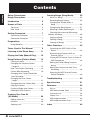
Contents
Contents
Safety Precautions/
Usage Precautions • • • • • • • • • • • • • • • • • • • • • • • • • 2
Introduction
•••••••••••••••••••••••••••••••••••
32
Recording Song Patterns
••••••••••••••••
33
••••••••••••••••••••••••••••••
6
6
Changing the Song Volume
•••••••••••••••••••••••••••••••••••
6
Selecting a Dedicated Song Kit
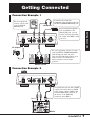
Getting Connected
•••••••••••••••••••••••••
7
Connection Example 1
••••••••••••••••••••
7
Connection Example 2
••••••••••••••••••••
7
Preparations
••••••••••••••••••••••••••••••••••
Using Batteries
••••••••••••••••••••••••••••••
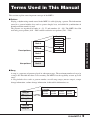
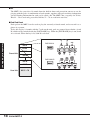
Terms Used in This Manual
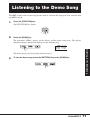
Listening to the Demo Song
•••••••••••••
••••••••••
8
8
9
11
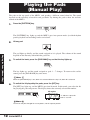
Playing the Pads (Manual Play)
••••••
12
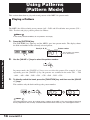
Using Patterns (Pattern Mode)
••••••
14
••••••••••••••••••••••••••
14
Playing a Pattern
Changing the Tempo of Pattern
Playback • • • • • • • • • • • • • • • • • • • • • • • • • • • • • • • • • • 15
•••••••••••
16
••••••••••••••••••
19
Real-Time Pattern Recording
Pattern Step Recording
Changing User Pattern Resolution
After Recording • • • • • • • • • • • • • • • • • • • • • • • • • • • 21
Changing the User Pattern
Length • • • • • • • • • • • • • • • • • • • • • • • • • • • • • • • • • • • • • 21
Changing the User Pattern Beat
Copying a Pattern
•••••••
22
••••••••••••••••••••••••
23
Deleting All User Patterns
Editing a User Kit
Copying a Kit
ZOOM MRT-3
39
•••••••••••••••••••••••••••
40
Deleting All Songs
•••••••••••••••••••••••
Controlling the MRT-3 With a Foot
Switch • • • • • • • • • • • • • • • • • • • • • • • • • • • • • • • • • • • • • 42
Synchronizing Playback With an
External Device • • • • • • • • • • • • • • • • • • • • • • • • • • 44
Playing MRT-3 Sounds From an External
MIDI Component • • • • • • • • • • • • • • • • • • • • • • • • 46
Setting the Pattern/Song Playback
Swing • • • • • • • • • • • • • • • • • • • • • • • • • • • • • • • • • • • • • • 47
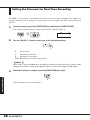
Setting the Precount for Real-Time
Recording • • • • • • • • • • • • • • • • • • • • • • • • • • • • • • • • • 48
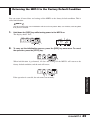
Returning the MRT-3 to the Factory
Default Condition • • • • • • • • • • • • • • • • • • • • • • • • 49
Troubleshooting
•••••••••••••••••••••••••••
50
••••••••••••••••••••••••••••••
51
••••••••••••••••••••••••••••••••••••
52
••••••••••••••••••••••••••••••••••••••
52
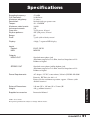
Specifications
Reference
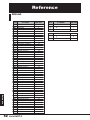
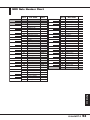
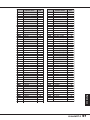
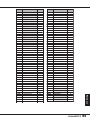
MIDI Note Number Chart
••••••••••••••••••••••••••••••
28
30
41
Other Functions • • • • • • • • • • • • • • • • • • • • • • • • • • • • 42
25
••••••••••••••••••••••••••••••••••••
38
•••••••••••••••••••••••••••
•••••••••••••••
26
37
Deleting a Song
Kit List
•••••••••••••••••••••••••
••••••••
Copying a Song
24
Creating Your Own Kit
(Kit Mode) • • • • • • • • • • • • • • • • • • • • • • • • • • • • • • • • • • • 26
•••••••••••••
Checking the Amount of Remaining
Memory for Songs • • • • • • • • • • • • • • • • • • • • • • • • • • • 39
••••••••••
Erasing a Single User Pattern
4
32
••••••••••••••••••••••••••••••••••••
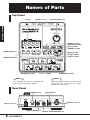
Rear Panel
Kit Items
What Is a Song?
•••••••••
••••••••••••••••••••••••••
Changing the Tempo Within a
Song • • • • • • • • • • • • • • • • • • • • • • • • • • • • • • • • • • • • • • • 36
Names of Parts
Top Panel
5
Creating Songs (Song Mode)
••••••••••••••••
53
••••••••••••••••••••••••••••
54
•••••••••••••••••••••••••••••••••
56
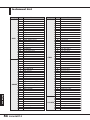
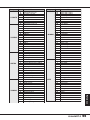
Instrument List
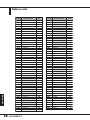
Pattern List
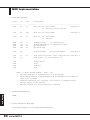
MIDI Implementation
•••••••••••••••••••••
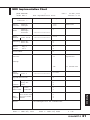
MIDI Implementation Chart
Index
60
••••••••••••••
61
•••••••••••••••••••••••••••••••••••••••••••
62