1
Using Remote Unit
Like the Host Unit, the Remote Unit performs two functions: it allows a user at the
Remote Unit to assume control of Computer A if the Host Unit is set to Auto or Remote
mode, and it also permits the user seated at the Remote Unit to use a locally connected
computer (Computer B) as though the SV565UTP KVM extender was transparent.
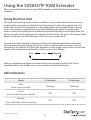
You can use either keyboard shortcuts or the mode switch on the top of the Remote
Unit to alternate control between A and B. Unlike the Host Unit, however, the switch on
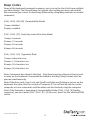
top of the Remote unit only offers two selectable modes:
Local
Remote
Mode
‘A’ Indicator
‘B’ Indicator
Remote Access
(Computer A)
ON
OFF
Local Access
(Computer B)
OFF
ON
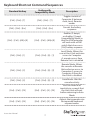
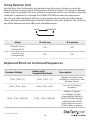
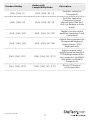
Keyboard Shortcut Command Sequences
Standard Hotkey
Hotkey with
Compatibility Mode
Description
[Ctrl] - [Ctrl] - [T]
[Ctrl] - [Ctrl] - [T]
Toggles console control
between Local Access and
Remote Access
[Ctrl] - [Ctrl] - [Esc]
[Ctrl] - [Ctrl] - [Esc]
Cancels the hotkey
sequence
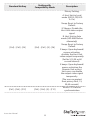
[Ctrl] - [Ctrl] - [Alt]+[E]
Enables (2 beeps)
or disables (1beep)
Compatibility Mode so
that the KVM extender
will work with a KVM
switch that also uses a
[Ctrl] hotkey sequence
[Ctrl] - [Ctrl] - [Alt]+[E]
Instruction Manual
10