1
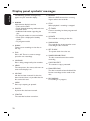
Display panel symbols/ messages
English
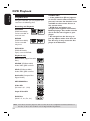
The following symbols/ messages may
appear on your recorder display:
00:00:00
Multi-function display/ text line
– Title/ track number
– Total/ elasped/remaining title/track time
– Disc/title name
– Additional information regarding the
disc
– TV channel number or source of video
– Clock (This is displayed in Standby
mode).
– TV programme title
BLANK
There are no recordings in the disc on
the tray.
FULL
Disc is full. There is no more storage
space for new recordings.
LOADING
Disc is being recognised by the recorder.
MENU
The setup menu, disc menu, title menu or
timer menu display is on.
NO DISC
No disc has been inserted. If a disc has
been inserted, then it is possible that the
disc cannot be read.
OPEN
Disc tray is opening or opened.
PHOTO
A picture disc has been inserted.
STARTUP
The recorder has been turned on.
70
REGION
When the DVD inserted is in a wrong
region code as the recorder.
STOP
When playback / recording is stopped.
X TIMER
A timer recording has been programmed
or is active.
UPDATE
The recorder is writing to the disc.
UNKNOWN
The recorder has encountered an error
in handling the disc inserted.
SET CLOCK
The system clock has to be set.
UNRECORDABLE DISC
The disc inserted cannot be used for
recording.
COPY PROTECT
The content is copy- protected.
FINALIZED DISC
The disc inserted has been finalised. No
further recordings can be made on the
disc.
RECORDING
A recording is in progress.