1
ASC-29320 IG.fm Page 14 Wednesday, August 14, 2002 2:00 PM
INSTALLATION GUIDE
ADAPTEC SCSI CARD 29320
ASC-29320 IG.fm Page 1 Wednesday, August 14, 2002 2:00 PM
INTRODUCTION
The Adaptec SCSI Card 29320 enables you to connect up to 15
Low Voltage Differential (LVD) and/or 15 Single-Ended (SE)
SCSI devices—such as very large arrays of high-performance
hard disk drives, external storage subsystems, Ultra320/160 hard
disk drives, scanners, and CD-ROM drives—to any Intel-based
computer with 64- or 32-bit PCI/PCI-X expansion slots.
The Adaptec SCSI Card 29320 has one internal and one external
68-pin LVD/SE connector and two internal SE SCSI connectors
(one 68-pin and one 50-pin).
68-pin internal LVD/SE
connector
68-pin internal SE
connector
68-pin external
LVD/SE connector
50-pin SE
connector
Although the Adaptec SCSI Card 29320 is a 64-bit PCI/PCI-X
card, it also works in a 32-bit PCI slot. When installed in a 32-bit
PCI slot, the card automatically runs in the slower 32-bit mode.
This installation guide explains how to:
• Install the Adaptec SCSI Card 29320
• Set up SCSI devices
• Connect SCSI devices
NOTE If you connect Wide Ultra/Ultra SCSI devices to the
same SCSI connectors as Ultra320/160 and Ultra2 SCSI
devices, the data transfer rate for the Ultra320/160 and Ultra2
SCSI devices will drop to Ultra SCSI performance levels.
Attach only Ultra320/160 and Ultra2 SCSI devices to the
LVD/SE connectors to achieve maximum data transfer rates.
1
ASC-29320 IG.fm Page 2 Wednesday, August 14, 2002 2:00 PM
INSTALLING THE ADAPTEC SCSI CARD 29320
STEP 1
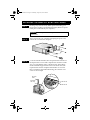
Discharge any static electricity build-up before handling your
SCSI card by touching a grounded metal object (like the exposed
metal parts on the back of your computer).
WARNING Turn OFF power to the computer and disconnect the
power cord.
STEP 2
STEP 3
After you turn off your computer and unplug the power cord,
remove the cover from the computer.
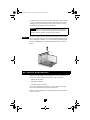
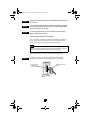
Locate an unused 64-bit PCI/PCI-X expansion slot and remove
the expansion slot cover. If the computer does not have a 64-bit
slot, you can install the card in a 32-bit PCI slot. The Adaptec
SCSI Card 29320 supports both 5V and 3.3V 64-bit slots. (The
expansion slot must be compliant with PCI Rev. 2.1 or PCI-X
Rev. 1.0 and must support Bus Mastering.) Save the slot cover
screw for use in Step 4.
Slot cover
screw
Expansion
slot cover
64-bit PCI slot
32-bit PCI slot
2
ASC-29320 IG.fm Page 3 Wednesday, August 14, 2002 2:00 PM
Computers may have vertical or horizontal expansion slots. Refer
to your computer manual to locate the PCI/PCI-X slots. If your
computer is a tower model, lay it on its side to allow for easier
installation of the Adaptec SCSI Card 29320.
WARNING Be careful when inserting the Adaptec SCSI Card
29320 in a PCI slot. Some 32-bit slots will not accommodate it,
and the card may break if you force it into the slot.
STEP 4
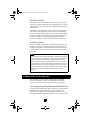
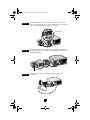
Insert the Adaptec SCSI Card 29320 in the 64-bit (or 32-bit) PCI or
PCI-X expansion slot; press down firmly until the card clicks into
place, then replace the slot cover screw. When installed properly,
the card should appear level with the expansion slot, as shown
below.
SETTING UP SCSI DEVICES
There are several things you may need to do to your SCSI devices
before you connect them to the Adaptec SCSI Card 29320:
• Check the SCSI IDs
• Set the termination
• Connect the power cables
Since setup can vary from device to device, always refer to the
device’s documentation for specific instructions.
Below are some guidelines for setting SCSI IDs and termination
on your devices.
3
ASC-29320 IG.fm Page 4 Wednesday, August 14, 2002 2:00 PM
Check the SCSI IDs
The Adaptec SCSI Card 29320 and each device you connect to it
must have a unique SCSI ID number ranging from 0 to 15 on each
channel. No two devices on the same SCSI channel can have the
same SCSI ID.
The Adaptec SCSI Card 29320 is preset to ID 7 for each channel
and should not be changed. If you boot from a SCSI hard disk,
make sure the hard disk SCSI ID is set to 0. (Most SCSI hard disks
are preset to SCSI ID 0 at the factory.) The SCSI IDs for internal
devices are usually set with jumpers; SCSI IDs for external
devices are usually set with a switch on the back of the device.
Terminate the Ends
To ensure reliable communication on the SCSI bus, the device at
the end of each cable, or the end of the cable itself, must have a
terminator installed (or enabled). Terminators must be removed,
or termination must be disabled, on devices between the ends of
each cable.
NOTE When connecting Ultra320/160 or Ultra2 SCSI devices,
the SCSI bus must be terminated either on the end of the cable
(with a permanent terminator) or with a separate terminating
connector. Ultra SCSI and earlier single-ended devices can
terminate the bus directly from the device. If you use an Ultra
SCSI terminator on an LVD Ultra320/160 and Ultra2 SCSI bus,
the SCSI devices will not operate properly. For this reason be
sure that you have the necessary Ultra320/160 or Ultra2 cable
and terminator before installing the Ultra320/160 SCSI
devices.
CONNECTING SCSI DEVICES
You can connect a total of up to 15 LVD and/or 15 SE SCSI
devices to the Adaptec SCSI Card 29320. Before connecting
devices, be sure to review Setting Up SCSI Devices on page 3.
Connecting Internal Ultra320/160 and Ultra2 Devices
A special 68-pin internal LVD cable is needed to connect internal
Ultra320/160 or Ultra2 SCSI devices. If your cables are not
marked, you can identify most LVD cables as having twisted
pairs of the flat ribbon cable between the device connectors. Some
4
ASC-29320 IG.fm Page 5 Wednesday, August 14, 2002 2:00 PM
cables are laminated so that they lay flat. Internal LVD cables
usually have a terminator built into the end of the cable.
The Adaptec SCSI Card 29320 has one internal 68-pin LVD/SE
connector and two internal SE connectors to which you can
connect internal SCSI devices, as shown in the figure on page 1.
NOTE Adaptec recommends that you keep your Ultra320/160
and Ultra2 SCSI devices separate from your Ultra SCSI
devices. This allows the Ultra320/160 and Ultra2 SCSI devices
to transfer data at their maximum speed.
Follow these steps to connect your internal Ultra320/160 and
Ultra2 devices:
STEP 1
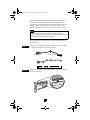
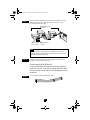
Locate a 68-pin internal LVD SCSI cable, which may have either
twisted wires or flat wires, shown as follows.
Nonterminated end
Terminated end
STEP 2
Plug the nonterminated end of the cable(s) to one of the internal
LVD/SE connectors.
5
ASC-29320 IG.fm Page 6 Wednesday, August 14, 2002 2:00 PM
STEP 3
Plug the internal Ultra320/160 and Ultra2 SCSI devices to the
other cable connectors, starting with the connector at the
terminated end of the cable.
Ultra320/160 or Ultra2
SCSI devices
Plug first device
to this connector
Built-in terminator
on cable
NOTE Internal Ultra320/160 and Ultra2 SCSI devices come
from the factory with termination disabled and cannot be
changed. Proper termination is provided by the terminator at
the end of the LVD SCSI cable.
STEP 4
Connect a power cable from your computer’s internal power
supply to each internal SCSI device.
Connecting Wide SCSI Devices
Connect internal Wide SCSI devices to the 68-pin internal SE
Wide SCSI connector. To do this, use a 68-pin Wide SCSI cable
like the one shown in Step 1 below. Follow these steps to connect
the devices:
STEP 1
Locate a 68-pin internal Wide SCSI cable.
6
ASC-29320 IG.fm Page 7 Wednesday, August 14, 2002 2:00 PM
STEP 2
Plug one end of the cable to the Wide SCSI connector on the
Adaptec SCSI Card 29320.
STEP 3
Plug the other end of the cable to a terminated Ultra/Fast Wide
SCSI device.
STEP 4
If you have other Ultra/Fast Wide SCSI devices, attach them to
the connectors between the two ends of the cable. Be sure these
other devices are un-terminated.
STEP 5
Connect a power cable from your computer’s internal power
supply to each internal device.
Connecting Internal Ultra/Fast Narrow Devices
Connect internal Ultra/Fast Narrow SCSI devices that have
standard 50-pin connectors to the 50-pin internal SE Narrow
SCSI connector. To do this, use a 50-pin internal Ultra Narrow
SCSI cable. Follow these steps to connect the devices:
STEP 1
STEP 2
Locate a 50-pin internal Ultra Narrow SCSI cable.
Plug one end of the cable to the 50-pin internal SE Narrow SCSI
connector on the Adaptec SCSI Card 29320.
7
ASC-29320 IG.fm Page 8 Wednesday, August 14, 2002 2:00 PM
STEP 3
Plug the other end of the cable to a terminated Ultra/Fast Narrow
SCSI device.
STEP 4
If you have other Ultra/Fast Narrow SCSI devices, attach them to
the connectors between the two ends of the cable. Be sure these
other devices are un-terminated.
STEP 5
Connect a power cable from your computer’s internal power
supply to each internal device.
Connecting External SCSI Devices
You can connect external Ultra320/160 and Ultra2 SCSI devices
to the 68-pin external LVD/SE SCSI connector. Each external
device will require a 68-pin external LVD SCSI cable.
NOTE We recommend that you do not combine legacy SCSI
devices with the Ultra320/160 and Ultra2 SCSI devices on the
same SCSI channel of the Adaptec SCSI Card 29320.
Follow these steps to connect your external SCSI devices:
STEP 1
Connect one end of an external SCSI cable to the external
Ultra320/160 connector on the Adaptec SCSI Card 29320.
68-pin external
LVD/SE SCSI
connector (Ch B)
External LVD SCSI
cable
8
ASC-29320 IG.fm Page 9 Wednesday, August 14, 2002 2:00 PM
STEP 2
Connect the other end of the cable to a SCSI connector on the
back of an external device. If you are installing only one external
device, terminate the device and skip to Step 4.
4
SCSI terminator
4
STEP 3
Connect the other external SCSI devices by linking each device to
the previous one, as shown below. Terminate only the device at
the end of the chain.
Terminated SCSI device
STEP 4
Connect power cables to all external device(s) and to the
computer.
9
ASC-29320 IG.fm Page 10 Wednesday, August 14, 2002 2:00 PM
MORE INFORMATION ABOUT TERMINATION
The last SCSI device on the end of each SCSI bus cable must be
terminated, and termination must be disabled for all other devices
in the middle of the cables. Ultra320/160 and Ultra2 SCSI devices
are automatically unterminated, but Ultra SCSI and Fast/Wide
SCSI devices do have termination that you must check. For more
information, refer to the documentation for each SCSI device.
If you are using external Ultra2 or Ultra320/160 devices, be sure
to use an LVD terminator to terminate the last device in the chain.
If you use a single-ended, active terminator (sometimes called an
Ultra terminator) the SCSI devices will not operate properly.
TROUBLESHOOTING
If you have any problems while installing the Adaptec SCSI Card
29320, check the following items first:
• Are all SCSI devices powered on?
• Are all SCSI cables and power cables properly connected?
• Does each device on each SCSI bus have a unique SCSI ID?
• Does the total SCSI cable length exceed the maximum
allowable length?
• Is the SCSI bus properly terminated?
If you are still unable to resolve a problem, contact the system
manufacturer for help.
10
ASC-29320 IG.fm Page 11 Wednesday, August 14, 2002 2:00 PM
ADAPTEC SCSI CARD DRIVER SOFTWARE
NOTE To use the Adaptec SCSI Card 29320, driver software
must be installed for your operating system. Installation of the
driver software varies depending on how and where you
purchased the Adaptec SCSI Card 29320.
Preloaded Adaptec Drivers
If the Adaptec SCSI Card 29320 was included as part of a
computer system you purchased, the system already has the
appropriate Adaptec driver preinstalled by the computer
manufacturer. No further action is necessary to install the driver.
Embedded Adaptec Drivers
Some operating systems have embedded driver support for the
Adaptec SCSI Card 29320. To determine if the card is supported
by the operating system you are using, read the operating system
manual or contact the operating system vendor for information.
11
ASC-29320 IG.fm Page 12 Wednesday, August 14, 2002 2:00 PM
Copyright
© 2002 Adaptec, Inc. All rights reserved. No part of this publication may be reproduced,
stored in a retrieval system, or transmitted in any form or by any means, electronic,
mechanical, photocopying, recording or otherwise, without the prior written consent of
Adaptec, Inc., 691 South Milpitas Blvd., Milpitas, CA 95035.
Trademarks
Adaptec, and the Adaptec logo are trademarks of Adaptec, Inc., which may be registered
in some jurisdictions.
All other trademarks are the property of their respective owners.
Changes
The material in this document is for information only and is subject to change without
notice. While reasonable efforts have been made in the preparation of this document to
assure its accuracy, Adaptec, Inc. assumes no liability resulting from errors or omissions
in this document, or from the use of the information contained herein.
Adaptec reserves the right to make changes in the product design without reservation
and without notification to its users.
Disclaimer
IF THIS PRODUCT DIRECTS YOU TO COPY MATERIALS, YOU MUST HAVE
PERMISSION FROM THE COPYRIGHT OWNER OF THE MATERIALS TO AVOID
VIOLATING THE LAW WHICH COULD RESULT IN DAMAGES OR OTHER
REMEDIES.
Regulatory Compliance Statements
Federal Communications Commission Radio Frequency Interference Statement
WARNING: Changes or modifications to this unit not expressly approved by the party responsible for
compliance could void the user’s authority to operate the equipment.
This equipment has been tested and found to comply with the limits for a Class B digital device,
pursuant to Part 15 of the FCC rules. These limits are designed to provide reasonable protection
against harmful interference in a residential installation. This equipment generates, uses, and can
radiate radio frequency energy, and if not installed and used in accordance with the instruction
manual, may cause harmful interference to radio communications. However, there is no guarantee
that interference will not occur in a particular installation. However, if this equipment does cause
interference to radio or television equipment reception, which can be determined by turning the
equipment off and on, the user is encouraged to try to correct the interference by one or more of the
following measures:
■
Reorient or relocate the receiving antenna.
■
Increase the separation between equipment and receiver.
■
Connect the equipment to an outlet on a circuit different from that to which the receiver is
connected.
■
Consult the dealer or an experienced radio/television technician for help.
■
Use a shielded and properly grounded I/O cable and power cable to ensure compliance of this
unit to the specified limits of the rules.
12
ASC-29320 IG.fm Page 13 Wednesday, August 14, 2002 2:00 PM
This device complies with part 15 of the FCC rules. Operation is subject to the following two
conditions: (1) this device may not cause harmful interference and (2) this device must accept any
interference received, including interference that may cause undesired operation.
Adaptec, Inc.
Adaptec SCSI
Card 29320
Tested to Comply
With FCC Standards
FOR HOME OR OFFICE USE
European Union Compliance Statement
This Information Technology Equipment has been tested and found to comply with EMC
Directive 89/336/EEC, as amended by 92/31/EEC and 93/68/EEC, in accordance with:
■ EN55022 (1998) Emissions
■ EN55024 (1998) Immunity:
–
–
–
–
–
–
EN61000-4-2 (1998) Electrostatic discharge: ±4 kV contact, ±8 kV air
EN61000-4-3 (1998) Radiated immunity
EN61000-4-4 (1995) Electrical fast transients/burst: ±1 kV AC, ±0.5 kV I/O
EN61000-4-5 (1995) Surges ±1 kV differential mode, ±2 kV common mode
EN61000-4-6 (1996) Conducted immunity: 3 V
EN61000-4-11 (1994) Supply dips and variation: 30% and 100%
In addition, all equipment requiring U.L. listing has been found to comply with EMC
Directive 73/23/EEC as amended by 93/68/EEC in accordance with EN60950 with
amendments A1, A2, A3, A4, A11.
Australian/New Zealand Compliance Statement
This device has been tested and found to comply with the limits for a Class B digital device,
pursuant to the Australian/New Zealand standard AS/NZS 3548 set out by the Spectrum
Management Agency.
Canadian Compliance Statement
This Class B digital apparatus meets all requirements of the Canadian Interference-Causing
Equipment Regulations.
Cet appareil numérique de la classe B respecte toutes les exigences du Règlement sur le
matériel brouilleur du Canada.
Japanese Compliance (Voluntary Control Council Initiative)
This equipment complies to class B Information Technology equipment based on VCCI
(Voluntary Control Council for Interface). This equipment is designed for home use but it
may causes radio frequency interference problem if used too near to a television or radio.
Please handle it correctly per this documentation.
R
© 2002 Adaptec, Inc. All rights reserved
Part Number: 513281-06, Ver. AA JG 08/02
Printed in Singapore