1
2. Installation
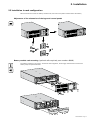
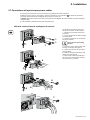
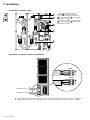
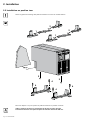
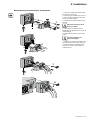
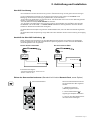
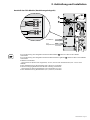
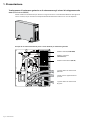
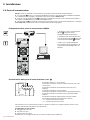
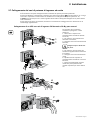
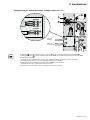
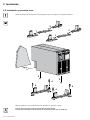
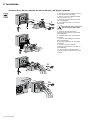
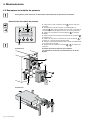
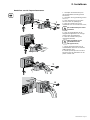
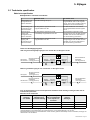
2.7 Connections of input/output power cables
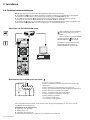
zz This type of connection must be carried out by qualified electrical personnel.
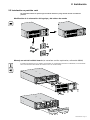
zz Before carrying out any connection, check that the battery circuit breaker 12 and that the upstream
protection devices (Normal and Bypass AC sources) are open ("0").
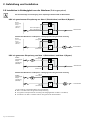
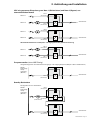
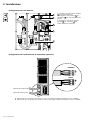
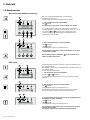
zz EX RT UPS always comes from factory with Normal and Bypass AC inputs already connected together,
using a bridge.
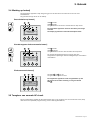
zz Use included insulated ferrules with stranded wires.
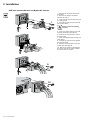
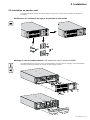
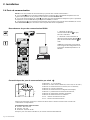
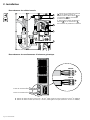
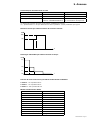
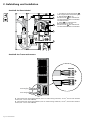
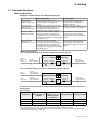
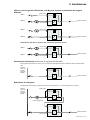
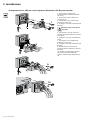
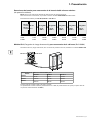
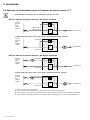
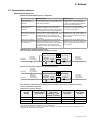
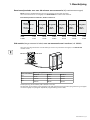
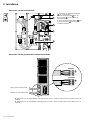
UPS with common Normal and Bypass AC sources
t
Outpu
N
L
s Input
Bypas
ut
ier Inp
Rectif
L1
L2
L3
N1
L1
N2
L2
1
1
1
t
Outpu
N
Bypas
ut
ier Inp
Rectif
L1
L2
L3
L1
N2
1
5
L2
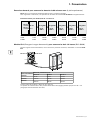
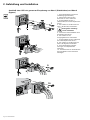
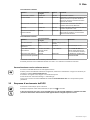
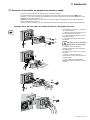
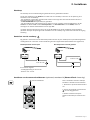
Always connect the earthing
wire first.
4 - Insert the output cable to the load
through the output cable gland,
5 - Connect the 3 wires to the output
terminal block,
6 - Refit the terminal block cover and
tighten the cable glands,
7 - Secure the junction Input/Output
box to the rear of the power module
by means of the 3 screws.
L
s Input
N1
1
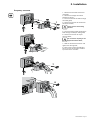
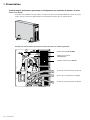
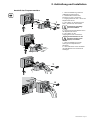
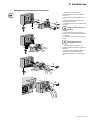
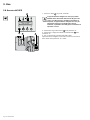
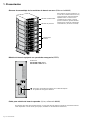
To access the connection terminal
blocks, see section 1.2 "Rear panel":
1 - Remove the terminal block cover
(5 screws),
2 - Insert the Normal AC cable through
the cable gland,
3 - Connect the 5 wires to the Normal
AC terminal block,
4
2
3
t
Outpu
N
L
s Input
Bypas
ut
ier Inp
Rectif
N1
L3
6
L2
L1
L1
N2
6
L2
6
6
6
7
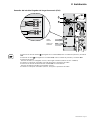
10
100
Reset
1 2
ON
IP=
MAC=00E0D8FF855E
AL
NORM
7
7
RS232 Download
ETHERNET
UPS
data
Card Settings
66074
φ
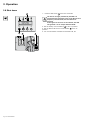
34007724EN/AD - Page 21