1
Appendix G
PCL Font Call Commands
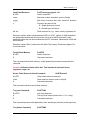
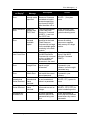
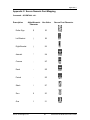
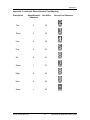
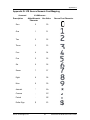
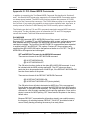
After PJL has unlocked the MICR flash resources, the printer uses standard PCL5e
commands to print. The five resident Source Technologies’ MICR font resources are all
bitmapped fonts and therefore cannot be scaled larger or smaller than the bitmapped
images. These fonts can be called by either a PCL Font Selection String or by their ID.
The commands are:
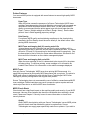
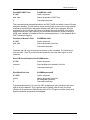
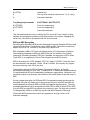
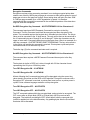
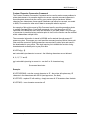
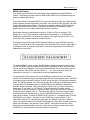
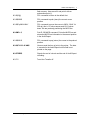
E13B MICR FONT
String
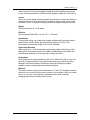
SECURE NUMERIC
String
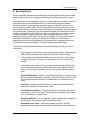
ICR SECURE
String
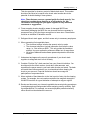
MICROPRINT
String
CMC7 MICR FONT
String
<ESC>(10O<ESC>(s0p8h8v0s7b360T
The Selection
<ESC>(30802X
The ID Call
<ESC>(16C<ESC>(s0p5h36v0s0b112T
The Selection
<ESC>(30043X
The ID Call
<ESC>(1O<ESC>(s1p12v0s0b110T
The Selection
<ESC>(30066X
The ID Call
<ESC>(2Q<ESC>(s1p1v0s0b112T
The Selection
<ESC>(30055X
The ID Call
<ESC>14Y<ESC>(s0p8h8v0s0b361T
The Selection
<ESC>(30803X
The ID Call
MICR Font Note
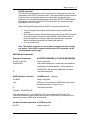
The E-13B and CMC7 Fonts are 8 characters per inch. To position correctly, at exactly 8
characters per inch, the printer must be set to an internal Unit of Measure of 600 DPI or
greater or must have a horizontal motion index command at 8 CPI be issued after the
font call. This is true even if the base printer is at 600 DPI. The default character
positioning is at 300 DPI and 8 into 300 is 37.5 pixels. The printer will either round down
to 37 or up to 38 pixels causing characters to creep. To resolve this there are multiple
options.
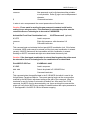
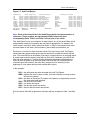
1. If you are using a printer driver that is set to 600 DPI, the printer data stream
should include a Unit of Measure PCL command set to 600. The command is
<ESC>&u600D
2. If the application controls the printer data stream, add the Unit of Measure
command early in the data stream. The command also affects X & Y positioning
commands. Add <ESC>&u600D
3. After calling the E-13B MICR font, issue a HMI (Horizontal Motion Index)
command set to 8 characters per inch. The command must be included with
every E-13B MICR font call using either the Selection String or ID call. The
command string is:
Source Technologies, LLC
58
ST9720 Secure MICR Printer User’s Guide