1
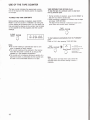
PESElTlNG THE ACTIVE CHANNELS IN YOUR AREA
Y o v recorder is m
e
l of m i n g VHF chennela
2-43,UW channels -1
and ceMe TV chmnels
l~(AtoW),~(w+30toW+50)and9&125
(A-2toW+&l).8eectrennelrnanpeoe31.
Youcan~f4chnneCssohtontytWdeai~
channels will apptxw in
when you s8I-t a
channel Iakw on.
AFT w
W
;
F
C
E
lA
R
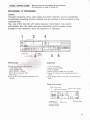
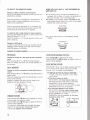
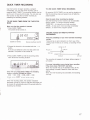
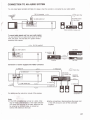
1 Open ttw tunlng compartment on the top of
CHANNEL
the
recorder.
2 Turn an the reoorder and the TV.
Make w e that ttm TV is wt to the c m t channel
{channel 3 or 4) for the recorder.
3 Set the INPUT SELECT switch on the recorder to
TUNER.
4 Pmsa TUNING
t m.
The first channel appadng on the swem will k
memized.
'7
Lights when SET
\"""':I::
If thls Is not tha channel you wish, r e p d
-.
prmlng 'TUNING t or
Every tlm yw press
TUNING, a hlgh-numbered c h n e l will be tuned
In by presalng t, and a lower-nuchannel
5 Ch&qethe number displayed at the far right of the
window to lndlcate the actual channel number
m l v e d (oreny number).
Press 'CHANNEL 10" (in the tuning compartment) to
chenge the tens-digit disptay.
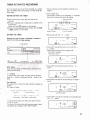
I n d i i the band In which
channels am belng tuned In.
Mhtea the m x 1 m
I
Actual ohannel
numb# or any numbw
tolmd@ayed.
locationofmchanr#l
m n s d in i b bend.
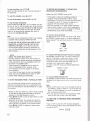
2 Select a channel memwy podtian with the
CHANNEL
or - button on the front of the
murder fw the h i r e d channel to be tuned in.
3 P m s CLEAR.
The channel numder display will be changed to
u
"and therecorderIsreSabothebwd
f i G k c y of the VHF band.
+
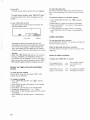
P m e 'CHANNEL 1" (in the tuning corn-)
change the unitsdi~itdisplay.
to
Emy time "10" is pre#ed, the display changes
Blank-.ld2-.3
9-tBIankI +2 .....1Q
CATW CATV CAlVCATV
t
.....
€my tlm 7" Is
Blrk+O+l+2+3
m.
the display c k w x
.....9
6 R e p a t steps 2 b 5 for
positions to be preset.
7
SET.
The "TUNE"indicatw d.-l
o t bd
m
d memary