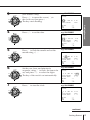
1
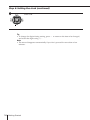
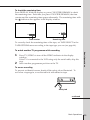
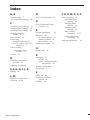
Index
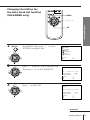
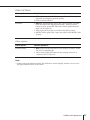
A, B
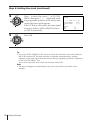
N
Aerial hookup 7
AFT (Auto Fine Tuning) 20
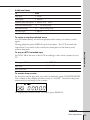
NTSC recorded tape
T, U, V, W, X, Y, Z
25
O
C
Cancelling timer settings 41
Changing timer settings 41
Checking timer settings 41
Cleaning the video
heads 48
Clock setting 12
Connecting
the VCR and your TV 7
to a TV with a LINE (TV)
connector 7
Colour system
compatible colour
systems 2
Counter 25
Disabling programme
position 20
Dubbing. See Editing
E, F, G, H, I, J, K
46
Sony Corporation
Picture adjustment
43
Playback 24
at various speeds 38
frame-by-frame 38
slow motion 38
Presetting channels 18
Q
Quick timer 40
R
S
L, M
LINE (TV) connection
LP mode 26, 28
P
Recording 27
saving 29
while watching another
programme 29
Remote commander 5
RF channel 8
D
Editing
OPC (Optimum Picture
Control) 43
7
Safety tab 29
Searching at various
speeds 38
SP mode 28
Timer recording 35
cancelling timer
settings 41
changing timer
settings 41
checking timer
settings 41
daily/weekly
recording 33, 37
overlapping timer
recordings 42
Tracking adjustment
43
3-861-455-13(1)
Video Cassette
Recorder
Operating Instructions
PAL NTSC 4.43
SLV-E480EG
SLV-E477EG
SLV-E380EG
©1998 by Sony Corporation
WARNING
To prevent fire or shock hazard, do not expose
the unit to rain or moisture.
To avoid electrical shock, do not open the
cabinet. Refer servicing to qualified personnel
only.
The mains lead must be changed only at a
qualified service shop.
Precautions
Safety
• This unit operates on 220 – 240 V AC, 50 Hz.
Check that the unit’s operating voltage is
identical with your local power supply.
• If anything falls into the cabinet, unplug the
unit and have it checked by qualified
personnel before operating it any further.
• The unit is not disconnected from the mains
as long as it is connected to the mains, even
if the unit itself has been turned off.
• Unplug the unit from the mains if you do
not intend to use it for an extended period of
time. To disconnect the lead, pull it out by
the plug, never by the lead.
Installing
• Allow adequate air circulation to prevent
internal heat buildup.
• Do not place the unit on surfaces (rugs,
blankets, etc.) or near materials (curtains,
draperies) that may block the ventilation
slots.
• Do not install the unit near heat sources
such as radiators or air ducts, or in a place
subject to direct sunlight, excessive dust,
mechanical vibration or shock.
• Do not install the unit in an inclined
position. It is designed to be operated in a
horizontal position only.
• Keep the unit and cassettes away from
equipment with strong magnets, such as
microwave ovens or large loudspeakers.
• Do not place heavy objects on the unit.
• If the unit is brought directly from a cold to
a warm location, moisture may condense
inside the VCR and cause damage to the
video head and tape. When you first install
the unit, or when you move it from a cold to
a warm location, wait for about one hour
before operating the unit.
2
Introduction
Caution
Television programmes, films, video tapes and
other materials may be copyrighted.
Unauthorized recording of such material may
be contrary to the provisions of the copyright
laws. Also, use of this recorder with cable
television transmission may require
authorization from the cable television
transmitter and/or programme owner.
Compatible colour systems
• This VCR is designed to record and play
back using the PAL and MESECAM colour
systems (TV systems B/G and D/K) and
play back using the NTSC 4.43 colour
system. Recording of video sources based
on other colour systems cannot be
guaranteed.
• Tapes recorded with the NTSC colour
system can be played back on this unit using
a TV or a colour monitor for the PAL colour
system.
Table of contents
Getting Started
Step 1: Unpacking
Step 2: Setting up the remote commander
Step 3: Connecting the VCR
Step 4: Tuning your TV to the VCR
Step 5: Setting up the VCR with the Auto Set Up function
Step 6: Setting the clock
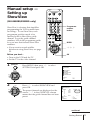
Manual setup —
Selecting a language, Presetting channels, Setting up ShowView*
Basic Operations
24 Playing a tape
27 Recording TV programmes
31 Recording TV programmes using
ShowView
35 Setting the timer manually
Getting Started
4
5
7
8
10
12
17
Additional Information
48 Troubleshooting
51 Specifications
52 Index to parts and controls
Back cover
Index
Additional Operations
38 Playing/searching at various
speeds
40 Recording TV programmes using
the quick timer
41 Checking/changing/cancelling
timer settings
43 Adjusting the picture
44 Changing menu options
46 Editing with another VCR
* ShowView is a trademark applied for by Gemstar Development Corp. ShowView system is
manufactured under license from Gemstar Development Corporation.
Introduction
3
Getting Started
Step 1
Unpacking
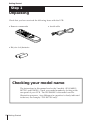
Check that you have received the following items with the VCR:
• Remote commander
• Aerial cable
• R6 (size AA) batteries
Checking your model name
The instructions in this manual are for the 3 models : SLV-E480EG,
E477EG, and E380EG. Check your model number by looking at the
rear panel of your VCR. The SLV-E480EG is the model used for
illustration purposes. Any difference in operation is clearly indicated
in the text, for example, “SLV-E477EG only.”
4
Getting Started
Step 2
Setting up the remote commander
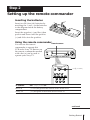
Inserting the batteries
Getting Started
Insert two R6 (size AA) batteries by
matching the + and – on the batteries
to the diagram inside the battery
compartment.
Insert the negative (–) end first, then
push in and down until the positive
(+) end clicks into the position.
Using the remote commander
You can use this remote
commander to operate this
VCR and a Sony TV. Buttons on
the remote commander marked
with a dot (•) can be used to
operate your Sony TV.
Remote sensor
[TV]
/[VIDEO]
1
2
3
4
5
6
To operate
Set [TV]/ [VIDEO]to
the VCR
[VIDEO]and point at the remote sensor on the VCR
a Sony TV
[TV]and point at the remote sensor on the TV
continued
Getting Started
5
Step 2 : Setting up the remote commander (continued)
ON/STANDBY
AUDIO MONITOR
DISPLAY
TV/VIDEO
WIDE
1
2
3
4
5
6
7
8
9
Programme
number
buttons
0
PROG+/–
VOL+/–
MENU/
> /. /? //
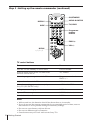
TV control buttons
To
Press
Turn the TV into standby or active mode
ON/STANDBY
Select an input source of the TV either from
aerial in or from line in
TV/VIDEO
Select the programme position of the TV
Programme number buttons
PROG +/–
Adjust the volume of the TV
VOL +/–
Select the sound type (stereo/mono) of your stereo
Sony TV (SLV-E477EG only)
AUDIO MONITOR
Call up on-screen display
DISPLAY
Operate TV menu options
MENU/> /. /? //
Switch the wide mode
WIDE
Notes
• With normal use, the batteries should last about three to six months.
• If you do not use the remote commander for an extended period of time, remove
the batteries to avoid possible damage from battery leakage.
• Do not use a new battery with an old one.
• Do not use different types of batteries.
• Some buttons may not work with certain Sony TVs.
6
Getting Started
Step 3
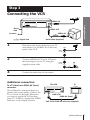
Connecting the VCR
AERIAL IN
AERIAL OUT
AERIAL IN
to mains
: Signal flow
1
Aerial cable (supplied)
Disconnect the aerial cable from your TV
and connect it to AERIAL IN on the rear
panel of the VCR.
IN
ENTREE
AERIAL
ANTENNE
2
3
Getting Started
Mains
lead
Connect AERIAL OUT of the VCR and
the aerial input of your TV using the
supplied aerial cable.
OUT
SORTIE
IN
ENTREE
AERIAL
ANTENNE
OUT
SORTIE
Connect the mains lead to the mains.
Additional connection
To a TV that has a EURO-AV (Scart)
connector
This additional connection improves
picture and sound quality. Connect the
TV as shown on the right. Whenever
you want to watch the VCR picture,
press TV/VIDEO to display the VIDEO
indicator in the display window.
This VCR
:
TV
LINE-1(TV)
EURO-AV (Scart)
VMC-2121 EURO-AV cable (not supplied)
Getting Started
7
Step 4
Tuning your TV to the VCR
If you connect the VCR to your TV using the EURO-AV cable, skip this step.
ON/STANDBY
PROGRAM +/–
RF CHANNEL
1
2
ON/STANDBY
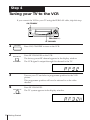
Press ON/STANDBY to turn on the VCR.
Press RF CHANNEL on the VCR.
AUTO SET UP
RF CHANNEL
3
The factory-preset RF channel appears in the display window.
The VCR signal is output through this channel to the TV.
Turn on your TV and select a programme position for the VCR
picture.
This programme position will now be referred to as the video
channel.
4
Press RF CHANNEL.
AUTO SET UP
RF CHANNEL
8
Getting Started
The TV system appears in the display window.
5
PROG
Tune the TV to the same channel as that
shown in the display window so that
the picture on the right appears on the
TV screen.
SONY VIDEO CASSETTE
RECORDER
Refer to your TV manual for tuning
instructions.
Getting Started
6
Press PROGRAM +/– (repeatedly) to select the correct TV system.
If you watch the system B/G, select “G”. If you watch the system
D/K, select “K”.
If the picture does not appear clearly,
see “To obtain a clear picture from the
VCR” below.
7
AUTO SET UP
Press RF CHANNEL.
RF CHANNEL
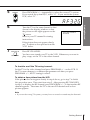
You have now tuned your TV to the VCR. Whenever you want to
play a tape, set the TV to the video channel.
To check to see if the TV tuning is correct
Set the TV to the video channel and press PROGRAM +/– on the VCR. If
the TV screen changes to a different programme each time you press
PROGRAM +/–, the TV tuning is correct.
To obtain a clear picture from the VCR
If the picture does not appear clearly in step 6 above, go to step 7 to finish
this procedure once. Then start from step 2. After pressing RF CHANNEL
in step 2 to display the RF channel, press PROGRAM +/– so that another RF
channel appears. Then tune the TV to the new RF channel until a clear
picture appears.
Note
• If you set the wrong TV system, you may have no sound or sound may be distorted.
Getting Started
9
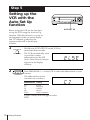
Step 5
Setting up the
VCR with the
Auto Set Up
function
Before using the VCR for the first time,
set up the VCR using the Auto Set Up
function. With this function, you can set
the language for the on-screen display
and TV channels, guided by the
sequence indicated in the display
window.
1
AUTO SET UP
RF CHANNEL
2
PROGRAM
TRACKING
Hold down AUTO SET UP on the VCR for
more than three seconds.
The VCR automatically turns
on, and the country
abbreviation for the ATP
(Auto Tuner Preset) function
appears in the display
window.
Press PROGRAM +/– on the VCR to select the abbreviation of your
country.
The abbreviations of the
countries are as follows:
Abbreviation Contry
CZ
H
PL
RU
ELSE
Czech
Hungary
Poland
Russia
Other countries
If your country does not appear, select
ELSE.
10
Getting Started
AUTO SET UP
3
AUTO SET UP
RF CHANNEL
Press AUTO SET UP.
The ATP function starts
searching for all of the
receivable channels and presets
them in numerical order.
Getting Started
When no more receivable channels can be
found, presetting stops and “SET UP”
disappears from the display window.
(SLV-E380EG only)
The current time appears in the display
window for any stations that transmit a
time signal.
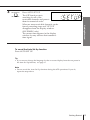
To cancel the Auto Set Up function
Press AUTO SET UP.
Tip
• If you want to change the language for the on-screen display from the one preset in
the Auto Set Up function, see page 17.
Note
• Do not cancel the Auto Set Up function during the ATP operations. If you do,
repeat the steps above.
Getting Started
11
Step 6
Setting the clock
MENU
You must set the time and date on the
VCR to use the timer recording features
properly.
> /. /? //
SLV-E380EG only:
The Auto Clock Set function works only
if a station in your area is broadcasting a
time signal. If the Auto Set Up function
did not set the clock correctly for your
local area, try another station for the
Auto Clock Set function.
OK
Before you start…
• Turn on the VCR and the TV.
• Set the TV to the video channel.
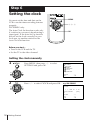
Setting the clock manually
1
MENU
Press MENU, then press > /. to select
SETTINGS and press OK.
PAUSE
REW
PLAY
SETTINGS
OPTIONS
TUNER
SHOWVIEW
CLOCK
LANGUAGE
FF
SELECT
SET
OK
: Vv
: OK
STOP
2
REW
PAUSE
PLAY
Press > /. to select CLOCK and press OK.
FF
e.g. SLV-E380EG
tCLOCK
OK
1.
1. 1998
TH
AUTO ADJUST
SELECT
SET
END
12
Getting Started
0 : 00
[OFF ]
STOP
: Vv
: Bb
: OK
3
REW
PAUSE
PLAY
FF
OK
(SLV-E380EG only):
Press > /. to move the cursor ( ) to
the clock row, then press / .
The day starts flashing.
tCLOCK
1.
1. 1998
0 : 00
[OFF ]
[ 1 ]
: Bb
: Vv
: OK
e.g. SLV-E380EG
tCLOCK
REW
PLAY
FF
11.
1. 1998
SU
0 : 00
Getting Started
Press > /. to set the date.
PAUSE
TH
AUTO ADJUST
CLOCK PROG
SELECT
SET
END
STOP
4
e.g. SLV-E380EG
OK
AUTO ADJUST
CLOCK PROG
STOP
5
REW
SELECT
SET
END
Press / to flash the month and set the
month using > /. .
PAUSE
PLAY
FF
[OFF ]
[ 1 ]
: Bb
: Vv
: OK
e.g. SLV-E380EG
tCLOCK
11.
1. 1998
SU
0 : 00
OK
AUTO ADJUST
CLOCK PROG
SELECT
SET
END
STOP
6
REW
Set the year, hour, and minutes in
sequence, using / to flash the item to be
set, and press > /. to select the digits.
PAUSE
PLAY
FF
The day of the week is set automatically.
OK
7
: Bb
: Vv
: OK
e.g. SLV-E380EG
tCLOCK
11. 12. 1998
Press / to start the clock.
PAUSE
FR
15 : 30
AUTO ADJUST
CLOCK PROG
SELECT
SET
END
STOP
[OFF ]
[ 1 ]
[OFF ]
[ 1 ]
: Bb
: Vv
: OK
e.g. SLV-E380EG
tCLOCK
REW
PLAY
FF
11. 12. 1998
FR
15 : 30
OK
AUTO ADJUST
CLOCK PROG
STOP
SELECT
SET
END
[OFF ]
[ 1 ]
: Vv
: Bb
: OK
continued
Getting Started
13
Step 6: Setting the clock (continued)
8
REW
PAUSE
PLAY
Press OK.
FF
OK
STOP
Tip
• To change the digits during setting, press ? to return to the item to be changed,
and select the digits using > /. .
Note
• The menu disappears automatically if you don’t proceed for more than a few
minutes.
14
Getting Started
Changing the station for
the Auto Clock Set function
(SLV-E380EG only)
MENU
> /. /? //
Getting Started
OK
1
MENU
Press MENU, then press > /. to select
SETTINGS and press OK.
PAUSE
REW
PLAY
SETTINGS
OPTIONS
TUNER
SHOWVIEW
CLOCK
LANGUAGE
FF
SELECT
SET
OK
: Vv
: OK
STOP
2
REW
Press > /. to select CLOCK and press OK.
PAUSE
PLAY
FF
The cursor ( ) is on AUTO ADJUST.
tCLOCK
1.
1. 1998
TH
0 : 00
OK
AUTO ADJUST
CLOCK PROG
SELECT
SET
END
STOP
3
REW
[OFF ]
[ 1 ]
: Vv
: Bb
: OK
Press / to select ON.
PAUSE
tCLOCK
PLAY
FF
11. 12. 1998
FR
15 : 30
OK
AUTO ADJUST
CLOCK PROG
STOP
SELECT
SET
END
[ON ]
[ 1 ]
: Vv
: Bb
: OK
continued
Getting Started
15
Step 6: Setting the clock (continued)
4
REW
PAUSE
PLAY
FF
OK
If the VCR does not receive the time signal
from any station, AUTO ADJUST returns
to OFF automatically.
STOP
5
REW
PAUSE
PLAY
Press . to move the cursor ( ) to CLOCK
PROG, then press ? // repeatedly until
the programme position of the station that
carries the time signal appears.
tCLOCK
1.
1. 1998
TH
AUTO ADJUST
CLOCK PROG
SELECT
SET
END
0 : 00
[ON ]
[ 4 ]
: Vv
: Bb
: OK
Press OK.
FF
OK
STOP
Tip
• If you set AUTO ADJUST to ON, the Auto Clock Set function is activated whenever
the VCR is turned off. The date and time is adjusted automatically by making
reference to the time signal from the station whose programme position is displayed
in the “CLOCK PROG” row.
If you do not need the Auto Clock Set function, select OFF.
Note
• The menu disappears automatically if you don’t proceed for more than a few
minutes.
16
Getting Started
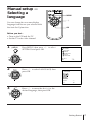
Manual setup —
Selecting a
language
MENU
> /.
Getting Started
You can change the on-screen display
language from the one you selected with
the Auto Set Up function.
OK
Before you start…
• Turn on the VCR and the TV.
• Set the TV to the video channel.
1
MENU
Press MENU, then press > /. to select
SETTINGS and press OK.
PAUSE
REW
PLAY
FF
SETTINGS
OPTIONS
TUNER
SHOWVIEW
CLOCK
LANGUAGE
SELECT
SET
OK
: Vv
: OK
STOP
2
REW
Press > /. to select LANGUAGE, then
press OK.
PAUSE
PLAY
LANGUAGE
FF
OK
STOP
SELECT
SET
3
REW
PAUSE
PLAY
: Vv
: OK
Press > /. to move the dot (r ) to the
desired language, then press OK.
FF
OK
STOP
Getting Started
17
Manual setup —
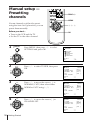
Presetting
channels
0
PROG +/–
MENU
If some channels could not be preset
using the Auto Set Up function, you can
preset them manually.
> /. /? //
Before you start…
• Turn on the VCR and the TV.
• Set the TV to the video channel.
1
MENU
Press MENU, then press > /. to select
SETTINGS and press OK.
PAUSE
REW
PLAY
OK
SETTINGS
OPTIONS
TUNER
SHOWVIEW
CLOCK
LANGUAGE
FF
OK
SELECT
SET
: Vv
: OK
STOP
2
REW
Press > /. to select TUNER, then press
OK.
PAUSE
PLAY
FF
TUNER
PROG14
SYSTEM
NORMAL/CATV
CHANNEL SET
[D/K ]
[CATV]
[S 0 1 ]
AFT
FINE TUNING
[ON
OK
STOP
3
REW
SELECT
SET
PAUSE
PLAY
FF
Press > /. to move the cursor ( ) to
NORMAL/CATV, then select either
NORM or CATV using ? // .
]
: Vv
: Bb
TUNER
PROG14
SYSTEM
NORMAL/CATV
CHANNEL SET
[D/K ]
[NORM]
[S 0 1 ]
AFT
FINE TUNING
[ON
OK
SELECT
SET
STOP
4
REW
Press > /. to move the cursor ( ) to
CHANNEL SET.
PAUSE
PLAY
FF
]
: Vv
: Bb
TUNER
PROG14
SYSTEM
NORMAL/CATV
CHANNEL SET
[D/K ]
[NORM]
[S 0 1 ]
AFT
FINE TUNING
[ON
OK
STOP
18
Getting Started
SELECT
SET
: Vv
: Bb
]
5
PROG
Press PROG +/– to select the
programme position.
Selected programme position
TUNER
PROG 7
SYSTEM
NORMAL/CATV
CHANNEL SET
[D/K ]
[NORM]
[S01 ]
AFT
FINE TUNING
[ON
6
REW
Press ? // repeatedly until the channel
you want is displayed.
PAUSE
PLAY
TUNER
FF
OK
STOP
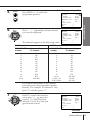
The channels appear in the following order.
D/K TV system
CHANNEL SET
number
2
5
6
12
13
14
15
16
17
18
19
20
21-69
: Vv
: Bb
PROG 7
SYSTEM
NORMAL/CATV
CHANNEL SET
[D/K ]
[NORM]
[C02 ]
AFT
FINE TUNING
[ON
SELECT
SET
]
Getting Started
SELECT
SET
]
: Vv
: Bb
B/G TV system
Corresponding
TV channel
R1
R6
R7
R12
R2
R3
R4
R5
R8
R9
R10
R11
R21-R69
CHANNEL SET
number
2
3
4
5
6
7
8
9
10
11
12
21-69
CATV 1-41
CATV 42-46
Corresponding
TV channel
E2
E3
E4
E5
E6
E7
E8
E9
E10
E11
E12
E21-E69
S1-S41
S01-S05
If you know the number of the channel
you want, press the programme number
buttons. For example, for channel 5, first
press “0” and then press “5.”
7
REW
PAUSE
PLAY
OK
FF
If the TV sound is distorted or
noisy, press > /. to move the
cursor ( ) to SYSTEM, then
select B/G or D/K so that you
get the better sound.
TUNER
PROG 7
SYSTEM
NORMAL/CATV
CHANNEL SET
[B/G ]
[NORM]
[C02 ]
AFT
FINE TUNING
[ON
]
STOP
SELECT
SET
: Vv
: Bb
continued
Getting Started
19
Manual setup — Presetting channels (continued)
8
9
REW
To allocate another channel to another programme position, repeat
steps 3 to 7.
PAUSE
PLAY
Press OK.
FF
OK
STOP
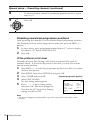
Disabling unwanted programme positions
After presetting the channels, you can disable unused programme positions.
The disabled positions will be skipped later when you press the PROG +/–
buttons.
1
In step 6 above, press programme number button “0” twice to display
the number “00” beside CHANNEL SET.
2
Press OK.
If the picture is not clear
Normally, the Auto Fine Tuning (AFT) function automatically tunes in
channels clearly. If, however, the picture is not clear, you may also use the
manual tuning function.
1
Press PROG +/– to select the programme position for which you cannot
obtain a clear picture.
2
3
4
Press MENU, then select SETTINGS and press OK.
5
Select TUNER and press OK.
Select FINE TUNING.
The fine tuning meter appears.
Press ? // to get a clearer picture,
then press OK. The menu disappears.
Note that the AFT (Auto Fine Tuning)
setting switches to OFF.
Selected programme position
TUNER
PROG14
SYSTEM
NORMAL/CATV
CHANNEL SET
[D/K ]
[CATV]
[S 0 1 ]
AFT
FINE TUNING
[OFF ]
SELECT
SET
: Vv
: Bb
Note
• The menu disappears automatically if you don’t proceed for more than a few
minutes.
20
Getting Started
Manual setup —
Setting up
ShowView
(SLV-E480EG/E380EG only)
2
3
4
5
6
7
8
9
Programme
number
button
0
MENU
• If you want to record satellite
broadcasts using ShowView, see page
22 .
> /. /? //
Before you start…
• Turn on the VCR and the TV.
• Set the TV to the video channel.
OK
1
MENU
Press MENU, then press > /. to select
SETTINGS and press OK.
PLAY
SETTINGS
OPTIONS
TUNER
SHOWVIEW
CLOCK
LANGUAGE
PAUSE
REW
Getting Started
ShowView is a feature that simplifies
programming the VCR to make timer
recordings. To use ShowView, each
programme position needs to be
matched with its ShowView guide
channel. To get the guide channel
numbers, look in the programme guide
for your area that features ShowView
numbers.
1
FF
OK
SELECT
SET
: Vv
: OK
STOP
2
REW
Press > /. to select SHOWVIEW and
press OK.
PAUSE
PLAY
OK
STOP
FF
The preset channels are displayed on the
screen. “- - -” in the GUIDE CH column
means that the guide channel has not been
preset.
SHOWVIEW
PROG
1
2
3
4
5
SELECT
SET
CANCEL
CH
C01
C02
C03
S15
GUIDE CH
[–––]
–––
–––
–––
–––
: Vv
: 0–9
: CLEAR
continued
Getting Started
21
Manual setup — Setting up ShowView (continued)
3
PAUSE
REW
FF
PLAY
Press > /. to move the cursor ( ) to the
row on which you want to set the guide
channel.
To display other pages for programme
positions 6 to 60, press > /. repeatedly.
OK
STOP
4
1
2
3
4
5
6
7
8
9
Press programme number buttons to enter
the guide channel number assigned in the
programme guide.
0
5
6
REW
SHOWVIEW
PROG
1
2
3
4
5
SELECT
SET
CANCEL
CH
C01
C02
C03
S15
GUIDE CH
–––
–––
[–––]
–––
–––
: Vv
: 0–9
: CLEAR
SHOWVIEW
PROG
1
2
3
4
5
SELECT
SET
CANCEL
CH
C01
C02
C03
S15
GUIDE CH
–––
–––
[123]
–––
–––
: Vv
: 0–9
: CLEAR
To set the guide channel of another station, repeat steps 3 to 4.
Press OK.
PAUSE
PLAY
FF
OK
STOP
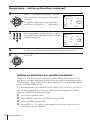
Setting up ShowView for satellite broadcasts
When your satellite tuner is connected via the AERIAL IN connector, first
you have to set the programme position for each satellite channel using the
TUNER menu. Then set the guide channel number for each satellite channel
using the SHOWVIEW menu.
If your satellite tuner is connected via the LINE-1(TV) connector, you don’t
have to set programme positions nor guide channel numbers for satellite
channels. Skip the following procedure.
1
2
3
4
22
Getting Started
Turn on the satellite tuner.
Press MENU, then select SETTINGS and press OK.
Select TUNER and press OK.
Press PROG +/– to select a programme position you want to use for
watching a satellite channel.
5
Select CHANNEL SET, then press ? // repeatedly to tune the VCR to
the satellite tuner.
The channel number displayed beside CHANNEL SET is used for
receiving all satellite broadcasts from the satellite tuner.
TUNER
AFT
FINE TUNING
[ON
]
: Vv
: Bb
Press PROG +/– to select another programme position for the next
satellite channel, and press the programme number buttons to enter the
same channel number as the one displayed in step 5.
Getting Started
[D/K ]
[CATV]
[S 3 0 ]
SELECT
SET
6
PROG 6
SYSTEM
NORMAL/CATV
CHANNEL SET
Repeat this step for all satellite channels.
7
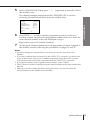
Set the guide channel number for each programme position assigned to
the satellite channel, following the procedures on pages 21 and 22.
Notes
• The menu disappears automatically if you don’t proceed for more than a few
minutes.
• If you use a satellite tuner connected via the LINE-1 (TV) connector, you don‘t have
to set up ShowView. Just record a satellite programme using ShowView, and the
VCR automatically records the programme from the LINE-1 (TV) connector.
• If you inadvertently entered a guide channel number, press CLEAR.
• The VCR does not allow entering the guide channel number if the same number has
been set.
• When you record a satellite broadcast using ShowView, you need to select the
desired channel on the satellite tuner manually.
Getting Started
23
Basic Operations
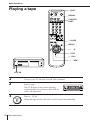
Playing a tape
6 EJECT
DISPLAY
COUNTER
RESET
1
2
3
4
5
6
7
8
9
0
P PAUSE
REPLAY
)#
FF
p STOP
Æ
03
PLAY
REW
NTSC PB
1
2
Turn on your TV and set it to the video channel.
Insert a tape.
The VCR turns on and starts playing
automatically if you insert a tape with its
safety tab removed.
3
Press Æ
PLAY
OK
24
Basic Operations
PLAY.
When the tape reaches the end, it will rewind automatically.
Additional tasks
To
Press
Stop play
p STOP
Pause play
P PAUSE
Resume play after pause P PAUSE or Æ
PLAY
Fast-forward the tape
)#
FF during stop
Rewind the tape
03
REW during stop
Eject the tape
6 EJECT
To replay a recently watched scene
You can immediately rewind and playback the scene you want to watch
again.
During playback, press REPLAY up to four times. The VCR rewinds the
tape about 10 seconds on the counter for each press of the button, and
restarts playback.
When your TV is
Set NTSC PB to
PAL only
ON PAL TV
PAL and NTSC
NTSC 4.43
Basic Operations
To play an NTSC-recorded tape
Set NTSC PB at the rear of the VCR according to the colour system of your
TV.
To use the time counter
At the point on the tape that you want to find later, press COUNTER RESET.
The counter in the display window resets to “0:00:00.” Search for the point
afterwards by referring to the counter.
To display the counter on the TV screen, press DISPLAY.
continued
Basic Operations
25
Playing a tape (continued)
Notes
• Tapes recorded in the LP mode can be played back on this VCR (SLV-E480EG/
E477EG only).
• The counter resets to “0:00:00” whenever a tape is reinserted.
• The counter stops counting when it comes to a portion with no recording.
• When you play back the tape recorded with the NTSC colour system, the counter
does not appear on the TV screen.
• Depending on your TV, the following may occur while playing an NTSC-recorded
tape:
– The picture becomes black and white.
– The picture shakes.
– No picture appears on the TV screen.
– Black streaks appear horizontally on the TV screen.
– The colour density increases or decreases.
– Deterioration of the picture quality may occur.
• If a tape has portions recorded in both PAL and NTSC systems, the time counter
reading will not be correct. This is due to the difference between the counting
cycles of the two video systems.
• While setting the menu on the TV screen, buttons for playback do not function.
26
Basic Operations
Recording TV
programmes
DISPLAY
COUNTER/
REMAIN
1
2
3
4
5
6
7
8
9
0
TV/VIDEO
r REC
PROG +/–
INPUT SELECT
SP/LP
Basic Operations
1
2
3
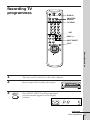
Turn on your TV and set it to the video channel.
Insert a tape with its safety tab in place.
INPUT
SELECT
Press INPUT SELECT until a programme
position number appears in the display
window.
continued
Basic Operations
27
Recording TV programmes (continued)
4
PROG
5
SP/LP
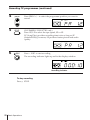
Press PROG +/– to select the programme position you want to
record.
(SLV-E480EG/SLV-E477EG only)
Press SP/LP to select the tape speed, SP or LP.
LP (Long Play) provides recording time twice as long as SP
(Standard Play), however, SP produces better picture and audio
quality.
6
REC
Press r REC to start recording.
The recording indicator lights up red in the display window.
Recording indicator
To stop recording
Press p STOP.
28
Basic Operations
To check the remaining time
Press DISPLAY. With the display on, press COUNTER/REMAIN to check
the remaining time. Each time you press COUNTER/REMAIN, the time
counter and the remaining time appear alternately. The remaining time with
the
indicator also appears in the display window.
PROG12
PROG12
1H 46M
SP 0:00:22
Time counter
Remaining time
To correctly check the remaining time of the tape, set TAPE SELECT in the
TAPE OPTIONS menu according to the tape type you use (see page 44).
To watch another TV programme while recording
2
Press TV/VIDEO to turn off the VIDEO indicator in the display
window.
If the TV is connected to the VCR using only the aerial cable, skip this
step.
Select another programme position on the TV.
Basic Operations
1
To save a recording
To prevent accidental erasure, break off the safety tab as illustrated. To
record on a tape again, cover the tab hole with adhesive tape.
Safety tab
continued
Basic Operations
29
Recording TV programmes (continued)
Tips
• To select a programme position, you can use the programme number buttons on
the remote commander. For two-digit numbers, press the ?
(ten’s digit) button
followed by the programme number buttons.
• You can select a video source from the LINE-1 (TV) jacks using INPUT SELECT or
PROG +/–. When you use PROG +/–, “L” appears in the display window between
the lowest programme position and the highest one.
• The display appears on the TV screen indicating information about the tape, but the
information won’t be recorded on the tape.
• If you don’t want to watch TV while recording, you can turn off the TV.
Notes
• The display does not appear during still (pause) mode or slow-motion playback.
• The display will not appear while playing an NTSC-recorded tape.
• If a tape has portions recorded in both PAL and NTSC systems, the time counter
reading will not be correct. This discrepancy is due to the difference between the
counting cycles of the two video systems.
• When you insert a non-standard commercially available tape, the remaining time
may not be correct.
• The remaining time doesn’t work for an NTSC-recorded tape. “–:– –” appears in the
display window.
• The remaining time is intended for rough measurement only.
• If you play back the tape for about 30 seconds after you have inserted it, the
remaining time will be displayed.
30
Basic Operations
Recording TV
programmes
using ShowView
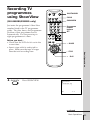
CLEAR
(SLV-E480EG/E380EG only)
SHOWVIEW
Just enter the programme’s ShowView
number listed in the TV programme
guide. The date, times, and programme
position of that programme are set
automatically. You can preset up to
eight programmes at a time.
ON/STANDBY
1
2
3
4
5
6
7
8
9
Programme
number
buttons
SET
0
Before you start…
• Check that the VCR clock is set to the
correct time.
• Insert a tape with its safety tab in
place. Make sure the tape is longer
than the total recording time.
P PAUSE
PLAY
Æ
1
SHOWVIEW
Press SHOWVIEW.
Basic Operations
p STOP
SHOWVIEW
SHOWVIEW NO.
[–––––––––]
SET
: 0–9
continued
Basic Operations
31
Recording TV programmes using ShowView (continued)
2
1
2
3
4
5
6
7
8
9
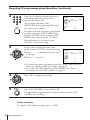
Press the programme number buttons to
enter the programme’s ShowView
number, then press SET.
If you make a mistake, press
SHOWVIEW before pressing SET and reenter the correct number.
0
SET
tTIMER
DATE
TODAY
11. 12
TIME
19:00b20:00
FR
PROG
35
SP/LP
SP
SELECT
SET
OK
: Bb
: Vv
: OK
The date, start and stop times, programme
position, tape speed (SLV-E480EG only),
and the VPS/PDC function setting (SLVE380EG only) appear on the TV screen.
If the information is incorrect, press
CLEAR to cancel the setting.
3
REW
If you want to change the date, tape
speed, and the VPS/PDC function setting:
PAUSE
PLAY
FF
OK
1 Press ? // to flash the item you want
to change.
2 Press > /. to reset it.
tTIMER
DATE
TODAY
FR
PROG
35
SP/LP
LP
SELECT
SET
OK
STOP
11. 12
TIME
19:00b20:00
: Bb
: Vv
: OK
• To record the same programme every day or the same day every
week, see “Daily/weekly recording” on page 33.
• To use the VPS/PDC function on SLV-E380EG, see “Timer
recording with VPS/PDC signals” on page 33.
4
REW
PAUSE
Press OK to complete the setting.
PLAY
FF
OK
STOP
5
ON/
STANDBY
Press ON/STANDBY to turn off the VCR.
The
indicator appears in the display window and the VCR
stands by for recording.
To stop recording
To stop the VCR while recording, press p STOP.
32
Basic Operations
Daily/weekly recording
In step 3 above, press . to select the recording pattern. Each time you press
. , the indication changes as shown below. Press > to change the indication
in reverse order.
TODAY n SU-SA (Sunday to Saturday) n MO-SA (Monday to Saturday) n
MO-FR (Monday to Friday) n SA (every Saturday) .....
n MO (every Monday) n SU (every Sunday) n 1 month later n (dates
count down) n TODAY
Timer recording with VPS/PDC signals (SLV-E380EG only)
The broadcast systems transmit VPS (Video Programme System) or PDC
(Programme Delivery Control) signals with their TV programmes. These
signals ensure that your timer recordings are made regardless of broadcast
delay, early starts or broadcast interruptions.
To use the VPS/PDC function, set VPS/PDC to ON. You can also use the
VPS/PDC function for a source connected to the LINE-1(TV) connector.
1
2
Turn on the satellite tuner.
3
Keep the satellite tuner turned on until the VCR finishes recording the
satellite programme for which you have made a timer setting.
On the satellite tuner, select the satellite programme for which you
want to make a timer setting.
Basic Operations
To record satellite broadcasts
If you connect the satellite tuner and the VCR, you can record satellite
programmes.
To use the VCR after setting the timer
To use the VCR before a timer recording begins, just press ON/STANDBY.
The
indicator turns off and the VCR switches on. Remember to press
ON/STANDBY to reset the VCR after using the VCR.
You can also do the following tasks while the VCR is recording:
•
•
•
•
Reset the counter.
Display tape information on the TV screen.
Check the timer settings.
Watch another TV programme.
continued
Basic Operations
33
Recording TV programmes using ShowView (continued)
Tips
• For SLV-E480EG, you can also use the SP/LP button to set the tape speed.
• For SLV-E480EG, when you are recording a progamme in the SP mode and the
remaining tape becomes shorter than the recording time, the tape speed is
automatically changed to the LP mode. Note that some interference will appear on
the picture at the point the tape speed is changed. If you want to keep the same tape
speed, set AUTO TAPE SPEED to OFF in the OPTIONS menu (page 44).
Note
• If the ShowView number is incorrect, the SHOWVIEW menu appears instead of the
TIMER menu after pressing SET.
34
Basic Operations
Setting the timer
manually
If ShowView is not available in you area,
follow the instructions below to set the
timer to record programmes.
Before you start…
• Check that the VCR clock is set to the
correct time.
• Insert a tape with its safety tab in
place. Make sure the tape is longer
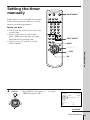
than the total recording time.
• Turn on your TV and set it to the
video channel.
ON/STANDBY
1
2
3
4
5
6
7
8
9
0
INPUT SELECT
MENU
> /. /? //
Basic Operations
p STOP
OK
1
Press MENU, then press > /. to select
TIMER and press OK.
MENU
tTIMER
DATE
TODAY
PAUSE
11. 12
TIME
19:00b20:00
FR
PROG
35
SP/LP
SP
REW
PLAY
OK
FF
SELECT
SET
OK
: Bb
: Vv
: OK
STOP
continued
Basic Operations
35
Setting the timer manually (continued)
2
REW
PAUSE
PLAY
FF
OK
Set the date, programme position, start
and stop times, tape speed (SLV-E480EG/
E477EG only) and VPS/PDC function
(SLV-E380EG only):
1 Press ? // to flash each item in turn.
2 Press > /. to set each item.
To correct a setting, press ? to return to
that setting and reset.
STOP
tTIMER
DATE
TODAY
11. 12
TIME
19:00b20:00
FR
PROG
35
SP/LP
LP
SELECT
SET
OK
: Bb
: Vv
: OK
• To record the same programme every day or the same day every
week, see “Daily/weekly recording” on page 37.
• To use the VPS/PDC function on SLV-E380EG, see ”Timer
recording with VPS/PDC signals” on page 37.
• To record from a source connected to the LINE-1 (TV) connector,
press INPUT SELECT to display “L” in the “PROG” position.
3
REW
PAUSE
PLAY
Press OK.
FF
OK
STOP
4
ON/
STANDBY
Press ON/STANDBY to turn off the VCR.
The
indicator appears in the display window and the VCR stands
by for recording.
To record from a source, leave the connected equipment switched
on.
To stop recording
To stop the VCR while recording, press p STOP.
To use the VCR after setting the timer
To use the VCR before a timer recording begins, just press ON/STANDBY.
The
indicator turns off and the VCR switches on. Remember to press
ON/STANDBY to reset the VCR after using the VCR.
36
Basic Operations
You can also do the following tasks while the VCR is recording:
•
•
•
•
Reset the counter.
Display tape information on the TV screen.
Check the timer settings.
Watch another TV programme.
Daily/weekly recording
In step 2 above, press . to select the recording pattern. Each time you press
. , the indication changes as shown below. Press > to change the indication
in reverse order.
TODAY n SU-SA (Sunday to Saturday) n MO-SA (Monday to Saturday) n
MO-FR (Monday to Friday) n SA (every Saturday) .....
n MO (every Monday) n SU (every Sunday) n 1 month later n (dates
count down) n TODAY
To use the VPS/PDC function, set VPS/PDC to ON. You can also use the
VPS/PDC function for a source connected to the LINE-1(TV) connector.
Tips
• To set the programme position, you can also use the PROG +/– or programme
number buttons.
• For SLV-E480EG/E477EG, you can also use the SP/LP button to set the tape speed.
• For SLV-E480EG/E477EG, when you are recording a progamme in the SP mode and
the remaining tape becomes shorter than the recording time, the tape speed is
automatically changed to the LP mode. Note that some interference will appear on
the picture at the point the tape speed is changed. If you want to keep the same tape
speed, set AUTO TAPE SPEED to OFF in the OPTIONS menu (page 44).
Basic Operations
Timer recording with VPS/PDC signals (SLV-E380EG only)
The broadcast systems transmit VPS (Video Programme System) or PDC
(Programme Delivery Control) signals with their TV programmes. These
signals ensure that your timer recordings are made regardless of broadcast
delay, early starts or broadcast interruptions.
Notes
• For SLV-E380EG, when setting the timer with VPS/PDC signals, enter the start and
stop times exactly as indicated in the TV programme guide, otherwise the VPS/
PDC function won’t work.
• If the VPS/PDC signal is too weak or the broadcasting station failed to transmit
VPS/PDC signals, the VCR will start recording at the set time without using the
VPS/PDC function.
• The
indicator flashes in the display window when you press ON/STANDBY
with no tape inserted.
Basic Operations
37
Additional Operations
Playing/searching
at various speeds
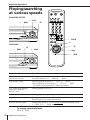
SLV-E480EG/E477EG
Æ
REW
03
PLAY
)#
FF
1
2
3
4
5
6
7
8
9
0
& SLOW
×2
SLV-E380EG
)
0
)#
FF
REW
PLAY
Æ
PLAY
Æ
03
Playback options
REW
Operation
View the picture during fast- During fast-forward, hold down )#
forward or rewind
rewind, hold down 03
REW or 0
FF or )
REW.
FF. During
Play at high speed
•During playback, press )#
FF or 03
REW.
•During playback, hold down )#
FF or 03
REW.
To resume normal playback, release the button.
Play at twice the normal
speed (SLV-E480EG/
E477EG only)
During playback, press ×2
Play in slow motion
During playback or pause, press & SLOW.
Play frame by frame
During pause, press )#
FF or 03
REW. Hold down the
button to play one frame each second.
Rewind and start play
During stop, press Æ PLAY on the VCR while holding down
0 REW or 03
REW on the VCR.
To resume normal playback
Press Æ PLAY.
38
FF
Additional Operations
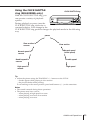
Using the CLICK SHUTTLE
ring (SLV-E380EG only)
CLICK SHUTTLE ring
With the CLICK SHUTTLE ring, you
can operate a variety of playback
options.
During playback or pause, turn the
CLICK SHUTTLE ring clockwise or
counterclockwise. Each change in the
CLICK SHUTTLE ring position changes the playback mode in the following
way.
pause
Slow motion in
reverse
Normal speed in
reverse
Double speed in
reverse
High speed in
reverse
Slow motion
Normal speed
(Initial speed)
Double speed
High speed
Tip
• Adjust the picture using the TRACKING +/– buttons on the VCR if:
– streaks appear while playing in slow motion
– the picture shakes while pausing.
To set tracking to the centre position, press both buttons (+/–) at the same time.
Notes
• The sound is muted during these operations.
• The picture may have a snow:
– when playing at high speed in reverse
– when playing in reverse slow motion
– when playing in reverse.
Additional Operations
39
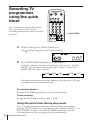
Recording TV
programmes
using the quick
timer
After starting recording in the normal
way, you can have the VCR stop
recording automatically after a specified
duration.
1
2
3
4
5
6
7
8
9
0
QUICK TIMER
While recording, press QUICK TIMER once.
The
2
1
indicator appears in the display window.
Press QUICK TIMER repeatedly to set the duration.
Each press advances the time in increments of 30 minutes. For SLVE380EG, you can specify the duration up to 6 hours, and for SLVE480EG/E477EG, up to 11 hours.
0:00
0:30
1:00
10:30
11:00
The duration decreases minute by minute to 0:00, then the VCR stops
recording and turns off automatically.
To extend the duration
Press QUICK TIMER repeatedly to set to the new duration.
To stop recording
To stop the VCR while recording, press p STOP.
Using the quick timer during stop mode
You can set the quick timer and start recording during stop mode by
pressing QUICK TIMER. To set the channel, you can use the PROG +/– or
INPUT SELECT buttons. Press QUICK TIMER repeatedly to set the
recording duration. The recording will start automatically.
40
Additional Operations
Checking/
changing/
cancelling timer
settings
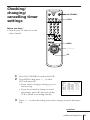
Before you start…
• Turn on your TV and set it to the
video channel.
ON/STANDBY
CLEAR
1
2
3
4
5
6
7
8
9
0
MENU
> /. /? //
OK
1
2
Press ON/STANDBY to turn on the VCR.
Press MENU, then press > /. to select
LIST and press OK:
• If you want to change a setting, go on to
the next step.
• If you do not need to change or cancel
the settings, press OK, then turn off the
VCR to return to recording standby.
3
tLIST
DATE
TU
13. 12
11. 12
MO-FR
MO-SA
SU-SA
––. –
11. 12 FR
TIME
PROG
1900b2000
6 SP
0930b1000
3 5 SP
0500b0530
4 4 LP
1200b1300
L LP
2300b2330
L SP
1212b1313
2 7 LP
–––b –––
–– –
Press > /. to select the setting you want to change or cancel, then press
OK.
continued
Additional Operations
41
Checking/changing/cancelling timer settings (continued)
4
• To change the setting, press ? // to flash
the item you want to change, and press
> /. to reset it.
• To cancel the setting, press CLEAR.
5
tTIMER
DATE
TODAY
FR
PROG
35
SP/LP
LP
SELECT
SET
OK
Press OK.
11. 12
TIME
19:00b20:00
: Bb
: Vv
: OK
If any settings remain, turn off the VCR to return to recording standby.
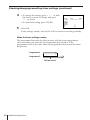
When the timer settings overlap
The programme that starts first has priority and the second programme
starts recording only after the first programme has finished. If the
programmes start at the same time, the programme listed first in the menu
has priority.
Programme 1
Programme 2
Will be cut off
42
Additional Operations
Adjusting the picture
Adjusting the tracking
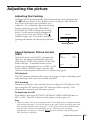
Although the VCR automatically adjusts the tracking when playing a tape
indicator flashes in the display window, then goes off), distortion
(the
may occur if the tape was recorded in poor
condition. If so, manually adjust the tracking.
During playback, press the TRACKING +/–
buttons on the VCR to display the tracking
meter. The distortion should disappear as
you press one of the two buttons. (The
indicator lights up.) To resume automatic
tracking adjustment eject the tape and restart
it.
TRACKING
Tracking meter
About Optimum Picture Control
(OPC)
VIDEO OPTIONS
OPC
SYSTEM
Optium Picture Control (OPC) automatically
improves recording and playback quality by
adjusting the VCR to the condition of the video
heads and tape. To maintain better picture
SELECT
SET
quality, we recommend that you set OPC to ON
in the VIDEO OPTIONS menu (with the OPC
indicator in the display window lit). For details, see page 44.
[ON ]
[ AUTO]
: Vv
: Bb
OPC playback
The OPC function automatically works on all types of tapes, including rental
tapes and tapes that were not recorded with OPC.
OPC recording
Whenever you insert a tape and first start recording, the VCR adjusts to the
tape using the OPC function (the OPC indicator flashes rapidly). This
adjustment is retained until the tape is ejected.
To deactivate the OPC
Press MENU and select SETTINGS, OPTIONS, VIDEO OPTIONS then set
OPC to OFF. The OPC indicator in the display window goes off.
Note
• There is a delay of a few seconds before the VCR actually starts recording while the
VCR analyses the tape. To avoid the delay, first set the VCR to recording pause (the
OPC indicator flashes slowly) and press r REC to have the VCR analyse the tape.
After the OPC indicator stops flashing, press P PAUSE to start recording
immediately. If you press P PAUSE before the OPC indicator stops flashing, the
OPC function is cancelled.
Additional Operations
43
Changing menu options
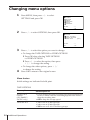
1
Press MENU, then press > /. to select
SETTINGS and press OK.
SETTINGS
OPTIONS
TUNER
SHOWVIEW
CLOCK
LANGUAGE
SELECT
SET
2
Press > /. to select OPTIONS, then press OK.
: Vv
: OK
OPTIONS
TAPE OPTIONS
VIDEO OPTIONS
POWER SAVE
[OFF ]
SELECT
SET
3
: Vv
: OK
Press > /. to select the option you want to change:
• To change the TAPE OPTIONS or VIDEO OPTIONS
1 Press OK after selecting TAPE OPTIONS
or VIDEO OPTIONS.
2 Press > /. to select the option, then press
? // to change the setting.
• To change the other options, press ? //
to change the setting.
4
Press OK to return to the original screen.
Menu choices
Initial settings are indicated in bold print.
TAPE OPTIONS
44
Menu option
Set this option to
AUTO TAPE
SPEED
(SLV-E480EG/
E477EG only)
• ON to change the timer recording tape speed automatically
to the LP mode when the remaining tape becomes shorter
than the recording time.
• OFF to keep the set tape speed.
TAPE SELECT
• 300 to use an E-300 type tape.
• 240 to use an E-240 type tape.
• 195 to use an E-195 or shorter type tape.
Additional Operations
VIDEO OPTIONS
Menu option
Set this option to
OPC
• ON to switch on the OPC (Optimum Picture Control)
function and improve picture quality.
• OFF to switch off OPC.
SYSTEM
• AUTO to automatically detect the colour system and play
back the tape in the appropriate mode. If the picture’s
colour is poor, manually select the colour system that the
tape was recorded in.
• PAL to play back a tape recorded in the PAL system.
• MESECAM to play back a tape recorded in the MESECAM
system.
Other options
Menu option
Set this option to
POWER SAVE
• OFF to turn on the indicators in the display window while
the VCR is standing by.
• ON to turn off the indicators in the display window to
conserve the VCR power.
Note
• When you set a timer recording, the indicators in the display window are on even
though POWER SAVE is set to ON.
Additional Operations
45
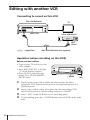
Editing with another VCR
Connecting to record on this VCR
This VCR (Recorder)
:
LINE-1 (TV)
TV
Other VCR (Player)
LINE
(Scart)
: Signal flow
VMC-2121 LINE cable (not supplied)
Operation (when recording on this VCR)
Before you start editing
• Turn on your TV and set it to the
video channel.
• Press INPUT SELECT to display
“L” in the display window.
• Press SP/LP to select the tape
speed, SP or LP (SLV-E480EG/
E477EG only).
46
P PAUSE
r REC
1
Insert a source tape with its safety tab removed into the other
(playback) VCR. Search for the point to start playback and set it to
playback pause.
2
Insert a tape with its safety tab in place into this (recording) VCR.
Search for the point to start recording and press P PAUSE.
3
4
Press r REC on this VCR and set it to recording pause.
To start editing, press the P PAUSE buttons on both VCRs at the same
time.
Additional Operations
To stop editing
Press the p STOP buttons on both VCRs.
Tips
• To edit more precisely, press the P PAUSE buttons on the VCRs to release pause.
• To cut out unwanted scenes while editing, press P PAUSE on this VCR when an
unwanted scene begins. When it ends, press P PAUSE again to resume recording
(Assemble Editing).
Note
• If you start recording following the procedure above, the VCR won’t start recording
with the OPC function. To record a tape with the OPC function, press r REC again
during recording pause in step 3 so that the VCR analyses the tape. Then, when you
start editing in step 4, press P PAUSE after the OPC indicator stops flashing. If you
press P PAUSE before the OPC indicator stops flashing, the OPC function is
cancelled.
Additional Operations
47
Additional Information
Troubleshooting
Symptom
Remedy
The ON/STANDBY switch
does not function.
• Connect the mains lead to mains securely.
The power is turned on but the
VCR does not operate.
• Moisture condensation occurs. Turn the power off,
unplug the mains lead and leave the VCR to dry for
over one hour.
The clock has stopped and
“–:– –” lights in the display
window.
• The clock stops if the VCR is disconnected from the
mains for more than an hour. Reset the clock (and
timer).
The playback picture does not
appear on the TV screen.
• Make sure the TV is set to the video channel. If you are
using a monitor, set it to video input.
The picture is not clear.
• Adjust the tracking with the TRACKING +/– buttons.
• The video heads are dirty (see below). Clean the video
heads using the Sony T-25CLD, E-25CLDR, or T25CLW video head cleaning cassette. If these cleaning
cassettes are not available in your area, have the heads
cleaned at your nearest Sony service facility (a
standard service charge will be required). Do not use a
commercially available liquid-type cleaning cassette
other than Sony’s, as it may damage the video heads.
• The video heads may have to be replaced. Consult
your local Sony service facility for more information.
The picture rolls vertically
during picture search.
• Adjust the vertical hold control on the TV or monitor.
The picture has no sound.
• The tape is defective. Use a new tape.
Playback
Clock
Power
If you have any questions or problems not covered below, please consult your
nearest Sony service facility.
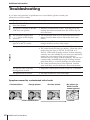
Symptoms caused by contaminated video heads
• Normal picture
• Rough picture
initial contamination
48
Additional Information
• Unclear picture
• No picture (or
black & white
screen appears)
terminal
Recording
Timer recording
Symptom
Remedy
No TV programme appears
on the TV screen.
• Make sure the TV is set to the video channel. If you are
using a monitor, set it to video input.
TV reception is poor.
• Adjust the TV aerial.
• Make sure the TV system (B/G or D/K) is set to the
system in your area.
The tape starts playing as soon
as it is inserted.
• The safety tab has been removed. To record on this
tape, cover the tab hole.
The tape is ejected when you
press r REC.
• Check that the safety tab has not been removed.
Nothing happens when you
press r REC.
• Make sure the tape is not at its end.
• Select the correct source with the INPUT SELECT
button. Select a programme position when recording
TV programmes; select “L,” when recording from
other equipment.
The timer does not operate.
•
•
•
•
•
Check that the clock is set.
Make sure a tape has been inserted.
Check that the safety tab has not been removed.
Make sure the tape is not at its end.
Make sure a programme has been set for timer
recording.
• Make sure your timer settings have not already passed
the current time.
• The clock stops if the VCR is disconnected from the
mains for more than one hour. Reset the clock and
timer.
continued
Additional Information
49
Troubleshooting (continued)
Others
Symptom
50
Remedy
A tape cannot be inserted.
• Check that a tape isn’t already in the tape
compartment.
The remote commander does
not function.
• Make sure you are pointing the remote commander at
the remote sensor on the VCR.
• Replace all the batteries in the remote commander with
new ones if they are weak.
• Make sure the [TV]
/[VIDEO]
remote control switch is set
correctly.
The tracking meter does not
appear on the screen.
• The recording condition of the tape is very poor and
tracking cannot be adjusted or the NTSC system is
being used.
The VCR needs to be cleaned.
• Clean the cabinet, panel and controls with a dry, soft
cloth, or a soft cloth slightly moistened with a mild
detergent solution. Do not use any type of solvent,
such as alcohol or benzine.
Additional Information
Specifications
System
Supplied accessories
Channel coverage
PAL (D/K, B/G)
VHF R1 to R12, E2 to E12
UHF R21 to R69, E21 to E69
CATV S01 to S05, S1 to S41
HYPER S21 to S41
RF output signal
UHF channels 21 to 69
Aerial out
75-ohm asymmetrical aerial socket
Remote commander (1)
R6 (size AA) batteries (2)
Aerial cable (1)
Design and specifications are subject to change without
notice.
Inputs and outputs
:
LINE-1 (TV)
21-pin
Video input: pin 20
Audio input: pins 2 and 6
Video output: pin 19
Audio output: pins 1 and 3
General
Power requirements
220 – 240 V AC, 50 Hz
Power consumption
20 W
Operating temperature
5°C to 40°C
Storage temperature
–20°C to 60°C
Dimensions
Approx. 355 × 96 × 285 mm (w/h/d)
including projecting parts and controls
Mass
Approx. 3.9 kg
Additional Information
51
Index to parts and controls
Refer to the pages indicated in parentheses ( ) for details.
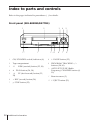
Front panel (SLV-E480EG/E477EG)
1
!“
52
2
!`
!… 9
3
4
5
8
7
6
1
ON/STANDBY switch/indicator (8)
8
P PAUSE button (25)
2
Tape compartment
9
3
03
PROGRAM/TRACKING +/–
buttons (28, 43)
4
Æ
5
)#
38)
6
r REC (record) button (28)
7
p STOP button (25)
REW (rewind) button (25, 38)
PLAY button (24, 38)
FF (fast-forward) button (25,
Additional Information
!… AUTO SET UP/RF (Radio
Frequency) CHANNEL button (8,
10)
!` Remote sensor (5)
!“ 6 EJECT button (25)
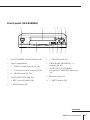
Front panel (SLV-E380EG)
1
!£
2
3 4
!“
!` !…
9
5
6
8
7
1
ON/STANDBY switch/indicator (8)
9
P PAUSE button (25)
2
Tape compartment
0
3
0
REW (rewind) button (25, 38)
PROGRAM/TRACKING +/–
buttons (28, 43)
4
)
FF (fast-forward) button (25, 38)
5
Æ
PLAY button (24, 38)
6
CLICK SHUTTLE ring (39)
!“ Remote sensor (5)
7
r REC (record) button (28)
!£ 6 EJECT button (25)
8
p STOP button (25)
!` AUTO SET UP/RF (Radio
Frequency) CHANNEL button (8,
10)
continued
Additional Information
53
Index to parts and controls (continued)
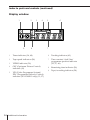
Display window
1
2
9
54
3
4
8
5
6
7
1
Timer indicator (36, 40)
6
Tracking indicator (43)
2
Tape speed indicators (28)
7
3
VIDEO indicator (29)
Time counter/clock/line/
programme position indicator
(25, 27, 46)
4
OPC (Optimum Picture Control)
indicator (43)
8
Remaining time indicator (29)
VPS (Video Programme System)/
PDC (Programme Delivery Control)
indicator (SLV-E380EG only) (33, 37)
9
5
Tape/recording indicator (28)
Additional Information
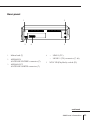
Rear panel
1
2
5
4
1
Mains lead (7)
2
AERIAL IN
ANTENNE ENTREE connector (7)
3
AERIAL OUT
ANTENNE SORTIE connector (7)
3
LINE-1 (TV)
LIGNE-1 (TV) connector (7, 46)
4
:
:
5
NTSC PB (PlayBack) switch (25)
continued
Additional Information
55
Index to parts and controls (continued)
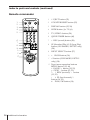
Remote commander
1
2
3
4
5
1
2
3
4
5
6
7
8
9
6
7
8
9
!…
!`
!“
0
1
6 EJECT button (25)
2
COUNTER RESET button (25)
3
DISPLAY button (25, 29)
4
WIDE button (for TV) (6)
5
TV/VIDEO button (29)
6
QUICK TIMER button (40)
7
r REC (record) button (28)
8
SP (Standard Play)/LP (Long Play)
button (SLV-E480EG/E477EG only)
(28)
9
INPUT SELECT button (27)
!… & SLOW button (38)
!` ×2 button (SLV-E480EG/E477EG
only) (38)
!“ Tape/menu operation buttons
MENU button (12, 44)
P PAUSE/> button (12, 25)
p STOP/. button (12, 25)
0 3 REW (rewind)/? button
(13, 25)
) # FF (fast-forward)//
button (14, 25)
Æ PLAY/OK button (19)
56
Additional Information
1
2
3
4
5
6
7
8
9
0
!£
!¢
!
!⁄
!ƒ
!¥
!»
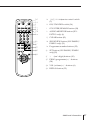
!£ [TV]
/[VIDEO]
remote control switch
(5)
!¢ ON/STANDBY switch (36)
!
COUNTER/REMAIN button (29)
!⁄ AUDIO MONITOR button (SLVE477EG only) (6)
!ƒ CLEAR button (42)
@…
@`
@“
@£
@¢
!¥ SHOWVIEW button (SLV-E480EG/
E380EG only) (31)
!» Programme number buttons (22)
@… SET button (SLV-E480EG/E380EG
only)(32)
@` ?
(ten’s digit) buttons (30)
@“ PROG (programme) +/– buttons
(28)
@£ VOL (volume) +/– buttons (6)
@¢ REPLAY button (25)
Additional Information
57
58
Additional Information
Additional Information
59