1
Full Synchronization
Full synchronization starts a full copy operation from the primary volume to the
secondary volume. It also enables replication concurrently from the primary volume
to the secondary volume; any new writes to the primary volume are also replicated
to the secondary volume. After the operation is complete, the Sun SNDR software
maintains the normal replicating mode for the volume: either synchronous or
asynchronous replication.
Note – The volumes may be made identical using other methods, not just a Sun
SNDR full synchronization. When network latencies justify it, you can perform the
initial synchronization of an volume set by backing up a source or primary volume
on magnetic tape on one site, then restoring the volume from the tape on the other
site. During the intervening period (that is, the period between when the backup is
completed and the restore is started), place the source or primary volume in logging
mode.
Make sure that the backup copy is a physical copy (for example, by using the
dd(1M) command) and not a logical copy (for example, one made using the tar(1M)
or cpio(1M) commands). The copies must have identical blocks, not just identical
files.
Data Flow
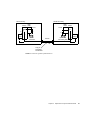
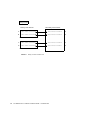
FIGURE 2-1 shows the full forward synchronization process.
1. The Sun SNDR software on the primary system (host1) requests disk blocks from
the active primary volume. The data might already be resident in the primary
system data cache, or might require a local disk access.
2. The Sun SNDR software transmits the disk blocks, with destaging instructions,
over the connection to a cache region on the secondary system.
3. The Sun SNDR software on the secondary system updates its remote volume and
acknowledges the update to the primary system.
18
Sun SNDR 3.0/3.0.1 Software Architecture Guide • December 2001