1
Using your Sunbeam Mixmaster benchtop mixer (continued)
Note: Be sure both beaters or dough hooks
click firmly in place, you may need to twist
the attachments slightly to engage them in
position prior to pushing them into place.
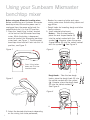
4. Depending on the amount of ingredients
required for mixing, select bowl size by
placing the turntable into either of the
two holes on the base of the Mixmaster
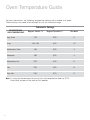
benchtop mixer stand, see Figure 5.
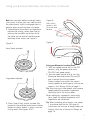
Figure 6
Figure 5
Figure 7
Press tilting
button in and
tilt mixer head
forward
Small bowl selected
Large bowl selected
5. Press ‘head tilting’ button to lower the
head with the selected attachments (either,
beaters or dough hooks) in place, into the
mixing bowl. See Figures 6 & 7.
Using your Mixmaster benchtop mixer
1. With the speed control dial in the OFF
position, plug the power cord into a
230-240 volt power outlet.
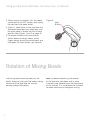
2. Use the speed control dial to turn the
Mixmaster benchtop mixer ON and OFF
and to control the mixing speeds.
Clearly marked instructions for correct
mixing speeds for each type of mixture are
shown in the ‘Mixing Guide’ on page 7.
Tip: Start mixing at slow speeds and increase
speed gradually to prevent ingredients
splashing out of the mixing bowl.
When adding dry ingredients, particularly
flour, lower the speed temporarily until
ingredients are combined.
Tip: When kneading yeast doughs, use speed
1 to achieve best results. For specific
instructions for the use of dough hooks see
'Helpful Hints for a Successful Dough' on
page 13.
5