1
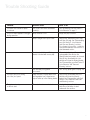
Trouble Shooting Guide
Problem
Possible cause
What to do
Juicer will not start when speed is selected.
The juicer hasn’t been assembled
correctly.
See ‘Assembling your Café Series™ Juice Extractor’ on page 7.
The juicer motor appears to struggle Pulp container is full.
during operation.
Empty the pulp container.
Pulp is caught in the juicer cover.
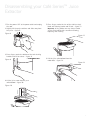
Stop juicing, remove the juicer cover
and clean out pulp. See ‘Disassembling your Café Series™ Juice Extractor’ and ‘Care and Cleaning’ sections.
Try a slower juicing action – guide the
food pusher down the feed chute in a slow downward motion.
Stainless steel blade and filtering basket is blocked with excess pulp.
After extended juicing of fibrous fruit
and vegetables the mesh on the filtering basket may need to be cleaned.
Stop juicing, disassemble the juice
extractor and clean the filtering basket.
See ‘Disassembling your Café Series™
Juice Extractor’ and ‘Care and
Cleaning’ sections.
The selected juicing speed is incorrect.
See ‘Juicing speed guide’ on page 10.
You notice less juice coming out of the juice spout.
Large amounts of highly fibrous fruit Stop juicing, disassemble the juice
and vegetables have caused excess extractor and clean the filtering
pulp to build up in the filtering basket. basket. See ‘Disassembling your Café
Series™ Juice Extractor’ and ‘Care and Cleaning’ sections.
The juicer motor stops or will not start.
The motor has been overloaded. Unplug the juicer, allow it to cool and
press the re-set button located
underneath the machine.
13