1
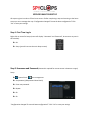
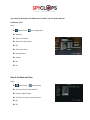
SPYCLOPS BASIC DVR SETUP All steps are given in order as if from home screen. If after completing a step and returning to the home screen you see a message that says “Configuration changed! To save the latest configuration?” Click “Yes” to save your settings. Step 1: First Time Log In Right click on mouse for Setup (screen will display “Username” and “Password”, do not enter any text in this window). OK. Setup (you will now see the main Setup screen). Step 2: Username and Password (Password is required for remote access in browsers or apps) Setup System Tools -- User management Set password, (Old password leave blank). Enter new password. Repeat. Ok. Ok. “Configuration changed! To save the latest configuration?” Click “Yes” to save your settings.