1
Operating
optional
components
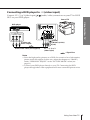
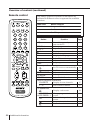
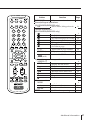
You can use the supplied remote to
operate Sony video equipment such as
Beta, 8 mm, VHS, MDP, CD or DVD.
1
2
3
4
5
6
7
8
9
0
JUMP
Number buttons
MENU
PIC MODE
MENU
PIP PROGR
V/v/B/b/ ENTER
ENTER
FAVORITE
RESET
PIP PROGR
SOUND
MODE SURROUND
PROGR
VIDEO
VIDEO I/1
Video equipment
operation buttons
TITLE
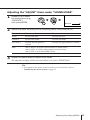
Setting up the remote to work with other
connected equipment
While holding down VIDEO
?/1, press the following
number combinations to
enter the equipment’s code
number (see the chart
below.)
For example, to operate a
Sony 8 mm VCR:
VIDEO
+
0
b
2
Code numbers for Sony video equipment
To control
Hold down VIDEO I/1 and press
DVD
00
VTR1 (Beta)
01
VTR2 (8 mm)
02
VTR3 (VHS)
03
MDP
04
CD
06
MD
07
Notes
• If your video equipment is furnished with a COMMAND MODE selector, set this
selector to the same position as the setting code.
• If the equipment does not have a certain function, the corresponding button on the
remote will not operate.
• When you remove the batteries, the code number may revert to the factory setting.
continued
Advanced Operations
25