1
Enjoying stereo or
bilingual programs
DRC-MF
(KV-EX34M39/EX29M39 only)
A/B
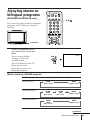
You can enjoy stereo sound or bilingual
programs of NICAM and A2 stereo
systems.
1
2
3
4
5
6
7
8
9
0
JUMP
MENU
PIC MODE
PIP PROGR
ENTER
L(MONO)
4
R
ENTER
MENU
AUTO
PROGR
SELECT
PROGR
 indicator
FAVORITE
RESET
PIP PROGR
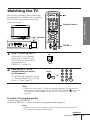
Press A/B repeatedly until
you receive the sound you
want.
The on-screen display
changes to show the
selected sound.
NICAM
A/B
The  indicator on the TV
lights up red when
receiving any stereo or
bilingual program.
When receiving a NICAM program
Broadcasting
NICAM stereo
On-screen display (Selected sound)
NICAM
MONO
(Regular sound)
(Stereo sound)
NICAM bilingual
NICAM monaural
NICAM
MAIN
NICAM
SUB
(Main sound)
(Sub sound)
NICAM
MAIN
MONO
(Regular sound)
MONO
(Regular sound)
(Main sound)
continued
Advanced Operations
21