1
7
.
.
/
or
/
.
OK
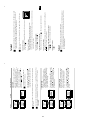
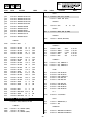
Mode: Personal
Contrast
Brightness
Colour
Sharpness
Hue
Reset
Picture Adjustment
Level 2
OK
.
MENU
OK
Menu System
9
continued...
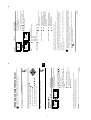
Personal (for individual settings).
Live (for live broadcast programmes, DVD
and Digital Set Top Box receivers).
Movie (for films).
To do this: after selecting the item you want to
alter press
, then press repeatedly
/
/
or
to adjust it and finally press OK to
store the new adjustment.
This menu also allows you to customise the
picture mode based on the programme you are
watching:
PICTURE ADJUSTMENT
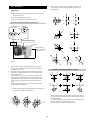
The “Picture Adjustment” menu allows you to
alter the picture adjustments.
Level 3 / Function
or
• Brightness, Colour and Sharpness can only be altered if “Personal” mode is selected.
• Hue is only available for NTSC colour signal (e.g: USA video tapes).
• Select Reset and press OK to reset the picture to the factory preset levels.
Mode: Personal
Contrast
Brightness
Colour
Sharpness
Hue
Reset
Picture Adjustment
Level 1
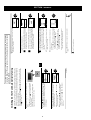
Menu Guide
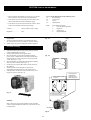
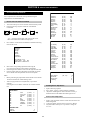
3 Press the MENU button to remove the menu from the screen.
• To confirm and store your selection, press OK.
• To alter settings of your selected option, press
• To return to the last menu or option, press
• To enter to the selected menu or option, press
2 • To highlight the desired menu or option, press
1 Press the MENU button to switch the first level menu on.
MENU
Your TV uses an on-screen menu system to guide you through the operations. Use the
following buttons on the Remote Control to operate the menu system:
Introducing and Using the Menu System
GB
OK
OK
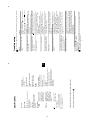
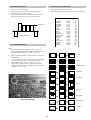
Sound Adjustment
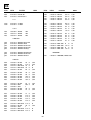
Mode: Personal
Treble
Bass
Balance
Reset
Dual Sound: Mono
Detail Adjustment
Level 2
OK
To do this: after selecting the item you want to
alter, press
. then press repeatedly
/
/
or
to adjust it and finally press OK
to store the new adjustment.
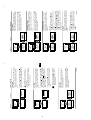
SOUND ADJUSTMENT
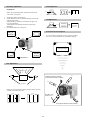
The “Sound Adjustment” menu allows you to
alter the sound adjustments.
Level 3 / Function
On:
Off:
On:
Off:
Sound from external amplifier
connected to the audio outputs on
the rear of the TV set.
Sound from the TV set.
Volume level changes according
to the broadcast signal.
Volume level of the channels will
stay the same, independent of the
broadcast signal (e.g. in the case of
advertisements).
10
Menu System
symbol
are trademarks of Dolby Laboratories.
continued...
*Manufactured under license from Dolby Laboratories. “Dolby”, “Pro Logic” and the double-D
of four speakers with two speakers, when the broadcast audio signal is Dolby Surround encoded.
The sound effect can also be improved by connecting a suitable external amplifier (for details refer
to “Connecting to external audio Equipment” on page 19).
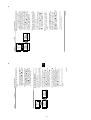
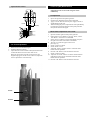
* This TV has been designed to create the “Dolby Surround” sound effect by simulating the sound
• If you switch “Dolby Virtual” to “On”, the “Auto volume” option will automatically be switched to
“Off” and vice versa.
• If you are listening to the TV through headphones, “Dolby Virtual” option will automatically be
switched to “Off”.
• In case of a bilingual broadcast select Dual Sound and set A for sound channel 1, B for sound channel
2 or Mono for mono channel if available. For a stereo broadcast you can choose Stereo or Mono.
• Select Reset and press OK to reset the sound to the factory preset levels.
• Treble and Bass can only be altered if “Personal” mode is selected.
TV Speakers:
Auto volume:
Normal.
Simulates the sound effect of Dolby
Pro Logic surround.
Dolby* Virtual:
Detail Adjustment
Off:
On:
Personal (for individual settings)
Rock
Pop
Jazz
Mode
This menu also contains two submenus as following:
Sound Adjustment
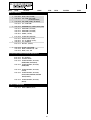
Mode: Personal
Treble
Bass
Balance
Reset
Dual Sound: Mono
Detail Adjustment
Mode: Personal
Contrast
Brightness
Colour
Sharpness
Hue
Reset
Picture Adjustment
Level 1