1
D:\_SONY TV\SY140159_JASMINE 10 (Rev-1)\4536804121\01GB-KDL55W807B\010COVTOC_GB.fm
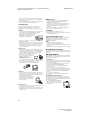
• Do not install the TV over or under an air conditioner.
• Be sure to install the Wall-Mount Adapter
securely to the wall following the instructions
in this instruction manual. If any of the screws
are loose or fall out, the Wall-Mount Adapter
may fall and cause injury or property
damage.
• Be sure to use the supplied screws and
attachment parts properly following the
instructions given in this instruction manual.
If you use substitute items, the TV may fall
and cause bodily injury to someone or damage to the TV.
• Be sure to assemble the bracket properly following the
instructed procedure explained in this instruction manual.
• Be sure to tighten the screws securely in the designated
position.
• Be careful not to subject the TV to shock during installation.
• Be sure to install the TV on a wall that is both perpendicular and
flat.
• After proper installation of the TV, secure the cables properly.
• Do not allow the AC power cord (mains
lead) or the connecting cables to be
pinched as the internal conductors may
become exposed and cause a short
circuit or an electrical break.
Precautions
Viewing the TV
• Some people may experience discomfort (such as eye strain,
fatigue, or nausea) while watching 3D video images or playing
stereoscopic 3D games. Sony recommends that all viewers take
regular breaks while watching 3D video images or playing
stereoscopic 3D games. The length and frequency of necessary
breaks will vary from person to person. You must decide what
works best. If you experience any discomfort, you should stop
watching the 3D video images or playing stereoscopic 3D
games until the discomfort ends; consult a doctor if you believe
necessary. You should also review (i) the instruction manual of
any other device or media used with this television and (ii) our
website (http://www.sony-asia.com/support) for the latest
information. The vision of young children (especially those
under six years old) is still under development. Consult your
doctor (such as a paediatrician or eye doctor) before allowing
young children to watch 3D video images or play stereoscopic
3D games. Adults should supervise young children to ensure
they follow the recommendations listed above.
• Do not use, store, or leave the 3D Glasses or battery near a fire,
or in places with a high temperature, e.g., in direct sunlight, or
in sun-heated cars.
• When using the simulated 3D function, please note that the
displayed image is modified from the original due to the
conversion done by this television.
• View the TV in moderate light, as viewing the TV in poor light or
during long period of time, strains your eyes.
• When using headphones, adjust the volume so as to avoid
excessive levels, as hearing damage may result.
LCD Screen
• Although the LCD screen is made with high-precision
technology and 99.99% or more of the pixels are effective, black
dots may appear or bright points of light (red, blue, or green)
may appear constantly on the LCD screen. This is a structural
property of the LCD screen and is not a malfunction.
• Do not push or scratch the front filter, or place objects on top of
this TV set. The image may be uneven or the LCD screen may be
damaged.
• If this TV set is used in a cold place, a smear may occur in the
picture or the picture may become dark. This does not indicate a
failure. These phenomena disappear as the temperature rises.
• Ghosting may occur when still pictures are displayed
continuously. It may disappear after a few moments.
• The screen and cabinet get warm when this TV set is in use. This
is not a malfunction.
• The LCD screen contains a small amount of liquid crystal. Follow
your local ordinances and regulations for disposal.
masterpage: Right
Handling and cleaning the screen surface/
cabinet of the TV set
Be sure to unplug the AC power cord (mains lead) connected to
the TV set from AC power outlet (mains socket) before cleaning.
To avoid material degradation or screen coating degradation,
observe the following precautions.
• To remove dust from the screen surface/cabinet, wipe gently
with a soft cloth. If dust is persistent, wipe with a soft cloth
slightly moistened with a diluted mild detergent solution.
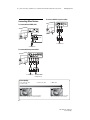
• Never spray water or detergent directly on
the TV set. It may drip to the bottom of the
screen or exterior parts and enter the TV set,
and may cause damage to the TV set.
GB
• Never use any type of abrasive pad, alkaline/acid cleaner,
scouring powder, or volatile solvent, such as alcohol, benzene,
thinner or insecticide. Using such materials or maintaining
prolonged contact with rubber or vinyl materials may result in
damage to the screen surface and cabinet material.
• Periodic vacuuming of the ventilation openings is
recommended to ensure to proper ventilation.
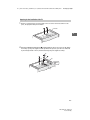
• When adjusting the angle of the TV set, move it slowly so as to
prevent the TV set from moving or slipping off from its table
stand.
Optional Equipment
Keep optional components or any equipment emitting
electromagnetic radiation away from the TV set. Otherwise
picture distortion and/or noisy sound may occur.
Wireless Function of the unit
• Do not operate this unit near medical equipment (pacemaker,
etc.), as malfunction of the medical equipment may result.
• Although this unit transmits/receives scrambled signals, be
careful of unauthorised interception. We cannot be responsible
for any trouble as a result.
Caution about handling the remote control
• Observe the correct polarity when inserting batteries.
• Do not use different types of batteries together or mix old and
new batteries.
• Dispose of batteries in an environmentally friendly way. Certain
regions may regulate the disposal of batteries. Please consult
your local authority.
• Handle the remote control with care. Do not drop or step on it,
or spill liquid of any kind onto it.
• Do not place the remote control in a location near a heat source,
a place subject to direct sunlight, or a damp room.
WALL-MOUNT ADAPTER
• If you use the TV installed on the Wall-Mount Adapter for a long
time, the wall behind or above the TV may become discoloured
or the wallpaper may come unglued, depending on the material
of the wall.
• If the Wall-Mount Adapter is removed after installing it on the
wall, the screw holes remain.
• Do not use the Wall-Mount Adapter in a place where it is
subjected to mechanical vibration.
Disposal of the TV set
Disposal of Old Electrical &
Electronic Equipment (Applicable in
the European Union and other
European countries with separate
collection systems)
This symbol is on the remote control and AC
adapter.
5GB
KDL-55W807B / 55W800B
4-536-804-12(1)