1
Picture Enlargement
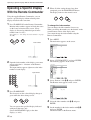
Picture Enlargement
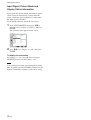
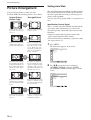
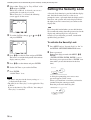
You can enlarge pictures to suite your taste.
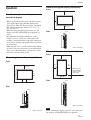
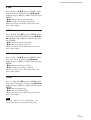
For Wide Mode, the following choices are available.
Original Picture
(Picture Type)
Enlarged Picture
Wide
Zoom
Ordinary pictures with a 4:3
aspect ratio (screen aspect
ratio: 4:3).
Images are enlarged naturally
to full screen size.
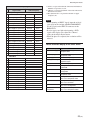
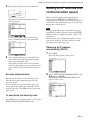
Zoom
Hey! How ya doing?
Hey! How ya doing?
• Images from a video camera
or DVD software with aspect
ratio information (ID-1 type)
Images are enlarged to full
screen size aligned with the
right and left sides of the
screen. (Black bars may
remain at the top and bottom
of the screen, depending on
the type of picture.)
Setting Auto Wide
The Auto Wide function faithfully reproduces images
based on the identification control signal to identify
the video signal format or enlarges various types of
pictures to the optimum.
You can also enlarge picture with a 4:3 aspect ratio to
16:9.
Identification Control Signal
This is a control signal for faithfully reproducing the
aspect ratio of the original image on a television
screen. Images that contain this signal consist of the
following:
• Images recorded with a television camera with
aspect ratio information (ID-1 format).
• Television broadcasts containing a signal for setting
the aspect ratio to 4:3.
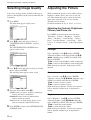
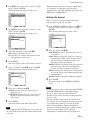
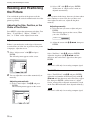
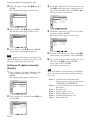
1
Press MENU.
The main menu appears on the screen.
PICTURE/SOUND CONTROL
Picture Mode:
Adjust Picture
Adjust Sound
Vivid
Sub
title
Hey! How ya doing?
Hey! How ya doing?
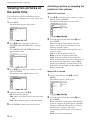
Movies filmed in CinemaVision
and so forth that appear long
in the horizontal direction of
the screen and contain captions
outside the picture (aspect
ratio: 2.35:1)
The picture is displayed on
the screen with the area where
captions are displayed while
enlarging to full screen size
and aligning with the left and
right sides of the screen.
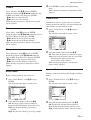
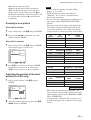
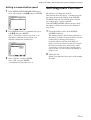
2
The left and right edges of the
picture are enlarged to full
screen size without changing
the top and bottom.
Normal
28 (GB)
ENTER
Exit
MENU
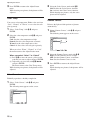
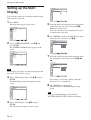
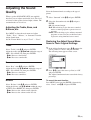
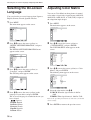
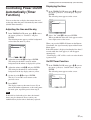
Press M/m to move the cursor (yellow) to
“SCREEN CONTROL” and press ENTER.
The SCREEN CONTROL menu appears on the
screen.
Multi Display Setup
Wide Setup
Aspect:
Adjust Screen
Over Scan:
Select
Ordinary pictures with a 4:3
aspect ratio (screen aspect
ratio: 4:3).
Set
SCREEN CONTROL
Full
Images from a video camera
or DVD software containing
aspect ratio information (ID1 type)
Select
Pictures are displayed in the
original 4:3 aspect ratio
without being enlarged.
Wide Zoom
On
Set
ENTER
Exit
MENU