1
Qualitative Measurement
Video monitors on most ultrasound systems contain a “grey bar” which shows the grey
levels available for display. Grey bars normally contain between sixteen and sixty-four
steps of increasing brightness. Pixel values can be estimated by locating a grey bar step
that approximates the brightness of the region of interest.
Note: It is absolutely critical that all system control settings be precisely reproduced for
these tests. Errors will introduce variations in your data and potentially invalidate your
results.
Method
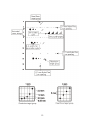
Assign a step on the grey bar to each grey scale target and the background.
Procedure
1.
Assign a unique number to each grey level on the grey bar.
2.
Scan the grey scale targets and display them as large as possible. Freeze the
image.
3.
For each target, determine which step on the grey bar is the same brightness as
the target and record this number on the data sheet. Do the same for the background material directly beside the anechoic target. Keep a print out of the image
for reference.
Analysis
Contact your service engineer if any target varies from the baseline by more than two
steps.
21