1
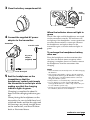
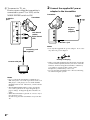
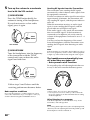
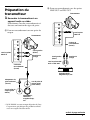
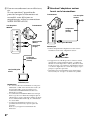
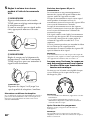
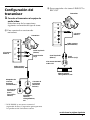
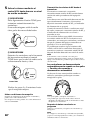
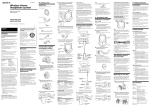
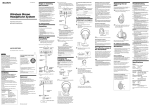
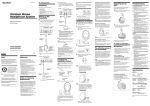
C To connect to TV, etc.
If noise occurs when the transmitter is
connected to your TV or VCR, set the
NOISE FILTER switch to ON.
2 Connect the supplied AC power
adaptor to the transmitter.
Transmitter
to an AC
outlet
Transmitter
to INPUT B
jacks
1
2
3
CHANNEL
NOISE FILTER
ON
OFF
AC power
adaptor
(supplied)
INPUT
A
Left channel
(white)
L
INPUT
B
Right channel
(red)
R
DC IN 9V
!
to DC IN 9 V jack
Connecting cord
(supplied)
Notes
• Use only the supplied AC power adaptor. Do not use
any other AC power adaptor.
Polarity of the plug
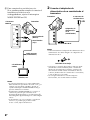
to stereo mini jack
TV, etc.
Notes
• If you connect the transmitter to LINE OUT or
REC OUT jacks of an audio reproducer such as an
MD player or CD player, do not set the NOISE
FILTER switch to ON. Otherwise, volume will be
limited.
• The NOISE FILTER switch is active only in the
case of the connection shown in diagram A on
page 7 and C. In diagram B, the switch has no
effect.
• When the transmitter is placed on or near a TV, it
may pick up a noise.
In such case, place the transmitter away from the
TV.
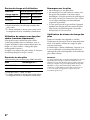
8GB
• If the connected equipment has the AVLS (Automatic
Volume Limiter System) function, be sure to turn the
function off when using the transmitter. Otherwise,
you will have to turn up the volume of the
headphones, and that may cause noise.
• Do not place the transmitter near a fluorescent lamp,
etc. when using the system.