1
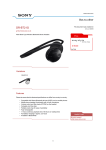
Location and Function of Parts Bluetooth headset Headset indicator (blue) Indicates the communication status of the headset. Headset indicator (red) Indicates the power status of the headset. Multi function button RESET button Push this button when the headset does not operate properly. Pairing information is not deleted by this operation. VOL (volume) +*⁄– buttons Controls various functions when calling with a headset by combining with a Bluetooth mobile phone. Press the button on the tactile dots. Neckband Controls various functions when listening to music with a headset. Microphone Jog switch Left housing Ear pad Right housing POWER button DC IN 3 V jack * This button has a tactile dot.