1
Instructions for the User
7.2.3 Programming
Cooking duration: the cooking duration can be set. Before it can be set, the
thermostat must be turned to the desired cooking temperature and the function
selector knob to any setting. To set the cooking duration, proceed as follows:
•
Press
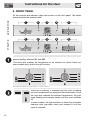
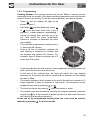
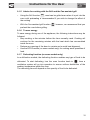
and the display will light up as
shown in figure 1;
•
Hold down
•
or
to set the timer. Each time a key is
pressed, 1 outside segment, representing 1
minute of cooking time, will light up or go
out. Hold down the value modification
buttons to increase or decrease the value
more rapidly;
The maximum programmed cooking time is
11 hours and 59 minutes;
Once a full turn is complete, numbers will
start flashing in sequence to indicate that
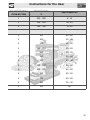
the duration has passed 60 minutes. For
example, figure 2 shows a cooking time of 2
hours and 40 minutes;
•
•
•
•
and simultaneously press
2)
A few seconds after the last pressure, the programmed cooking process will
start, and at the end a buzzer will sound;
At the end of the cooking time, the timer will switch the oven heating
elements off, the buzzer will start to sound and the numbers on the display
will start to flash;
The buzzer sequence which sounds at the end of the set time consists of 10
beeps repeated 3 times, at intervals of one minute. This sequence can be
stopped at any time by pressing
•
•
1)
or
;
The tone can be set by pressing
while the buzzer is active;
The duration can also be reset by resetting the program selected: press the
central key
for a few seconds to delete the time set, after which the oven
will have to be manually switched off.
At the end of the programmed cooking time, the oven must be reset to
manual by pressing
for a few seconds.
23