1
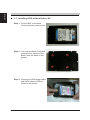
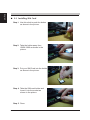
English 2.9 Installing SIM Card Step 1. Use thin stick to push the button as shown in the picture. Step 2. Take the holder away from VBOX-3000 as shown in the picture. Step 3. Put your SIM Card into the holder as shown in the picture. Step 4. Take the SIM card holder and Insert it into the socket as shown in the picture. Step 5. Done. 32