1
RUGGEDCOM RS910
Chapter 3
Installation Guide
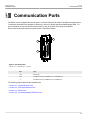
Communication Ports
1
1
2
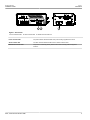
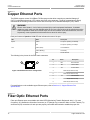
Figure 11: LC Port
Figure 10: MTRJ Port
1. Tx Connector
2
Figure 12: SC Port
1. Tx Connector
1. Tx Connector
2. Rx Connector
1
2. Rx Connector
2
2. Rx Connector
1
2
Figure 13: ST Port
1. Tx Connector
2. Rx Connector
For specifications on the available fiber optic Ethernet ports, refer to Section 4.5, “Fiber Optic Ethernet Port
Specifications”.
Section 3.3
Serial Ports
The RS910 supports DB9, RJ45 and SC (Standard or Subscriber Connector) fiber serial ports, all of which can be
run in RS232, RS485 or RS422 mode.
NOTE
On power-up, all serial ports default to RS485 mode. Each port can be individually set to RS232,
RS485 or RS422 mode through ROS . For more information, refer to the ROS User Guide for the
RS910.
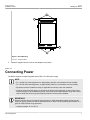
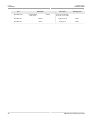
All serial ports feature an LED that indicates the current state of the port.
State
Description
Green
Link activity detected
Off
No link detected
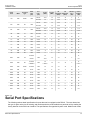
For specifications on serial ports, refer to Section 4.6, “Serial Port Specifications”.
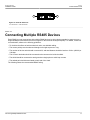
For information about how to connect devices configured to run in RS485 mode, refer to Section 3.4, “Connecting
Multiple RS485 Devices”.
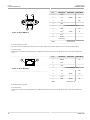
The following are the pin-outs for the DB9, RJ45 and SC connectors:
Serial Ports
15