1
RUGGEDCOM RS900GP
Chapter 3
Installation Guide
Communication Ports
Section 3.3.2
Removing an SFP Optical Port
To remove an SFP optical port, do the following:
CAUTION!
Electrical hazard – risk of damage to equipment. Make sure all electrostatic energy is dissipated before
performing installing or removing components from the device. An electrostatic discharge (ESD) can
cause serious damage to the component once it is outside the chassis.
1.
Make sure all potential electrostatic build-up has been properly discharged to prevent electrostatic
discharges (ESD). This can be accomplished by wearing an ESD wrist strap or by touching Earth or the
chassis ground.
2.
Disconnect the cable from the port.
3.
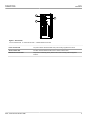
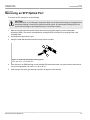
Swing the metal bail-latch down and pull the port from the module.
1
2
Figure 13: Removing an SFP Optical Port (Typical)
1. SFP Optical Port
2. Metal Bail-Latch
4.
Store the port in an ESD-safe bag or other suitable ESD-safe environment, free from moisture and stored at
the proper temperature (-40 to 85 °C or -40 to 185 °F).
5.
Insert a plug in the empty port opening to prevent the ingress of dust and dirt.
Removing an SFP Optical Port
15