1
Newly Updated Applications Make It Easy
to Build Advanced-Level Systems
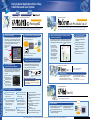
Screen Creation
Logic Program Development
=
Data Collection Software
Screen Editor and Logic Program Development Software
Windows® XP compatible
Windows® XP compatible
C Package02
with Pro-Studio Ver.4.1
Collect data from PLCs and other production-line devices quickly and easily on a host PC,
then use the data immediately in familiar applications like Microsoft® Excel and Word.
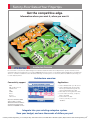
Enjoy the benefits of having screen creation and logic program development in a single, integrated
package. Create easy-to-use HMI systems by simply dragging and dropping pre-made Parts.
1
3
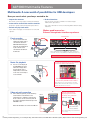
Faster, easier editing
The Parts Palette and Editor Screen now appear in the
same screen, so you can place parts quickly and easily
by simply dragging them from the palette and dropping
them on the screen. Positioning the cursor over a tag
icon also brings up an explanation of that tag's
operation, to help you
create and edit
screens.
Easily edit and transfer CSV data with your GP
File and log CSV data directly to a CF Card –
Edit it using a PC or the GP.
Office PC
Edit CSV data
using just the GP’s
touch panel.
GP/GLC
Edit on
your PC.
Editor Screen
2
Change recipe data with the GP touch panel.
Transfer recipe data in batches.
ag & Dro
Dr
Parts Palette
Choose the parts from
this list, and place them
where you want them
with simple drag and
drop operation.
4
Daily reports have typically required a complicated format programmed in VBA or
a similar type of software. Now they can be created with no programming at all.
"Create Report Action" makes it extremely easy to create even complex reports.
Connect a variety of devices with special
scripts for extended SIO communication
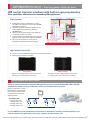
When devices do not operate as expected and you need
to check your programming, the GLC Ladder Monitor in
GP-PRO/PBIII C-Package02 lets you do it right on the
GLC screen.
Windows® XP and Office® XP
support.
Data distributed to Pro-Server can
be output in CSV format.
Trigger 2
Trigger 3
Pro-Server Add-on Software
Ver.1.1
SIO
Easily view present and past
production data screens.
Upgrade Features
Monitor device variables.
No need to stop PLC
communications or control.
Select either decimal or
hexadecimal display.
Scroll the ladder monitor
screen for easy viewing.
Connect your existing peripherals quickly
and easily.
M-tags are supported, so you can take full
advantage of existing screen data.
The new trend graph display function lets you
upload trend data and display it as an Excel graph.
No More Device Limitations
The alarm display function executes a
preset alarm application in accordance with
your Q-tag setting.
* Pro-Server with Pro-Studio Ver. 4.1 or higher required.
The extended SIO scripts are designed exclusively
for LS devices. You can write a variety of programs
into a single script.
GLC2400T, GLC2600T Only
Factory Software
Data distribution reliability is now
increased with the addition of a
"distribution completed" bit.
In addition to device
values, you can collect
logging, trend, and other
data, and paste text
strings and JPEG images
onto the forms you create.
Switch and print GP data
and sheet/book data at
preset time intervals.
Update your data right on
an open Excel screen.
GP/GLC extended SIO communication has been further
enhanced with the addition of special scripts. Extra
functions also help you create commands, making it
easier to write communication programs.
Check programs on-site
with the GLC Ladder Monitor
Write to and read from Oracle®
databases (Oracle ODBC driver
supported).
Trigger 1
PLC
p
Other Upgrade Features
New "Create Report Action" collects a variety
of data in a single sheet
Web Operation Software
Other Upgrade Features
Display previous trend graphs
Display alarm history dates
Display the previous data for up to
65,000 past events.
Display your alarm acknowledge
and recovery dates.
Change connected equipment
Enhanced settings for
keypad input displays
Devices can be easily altered when
changing PLCs, and the address
strings for D-scripts can be
changed at the same time.
Integer fonts
Select font sizes using integers (1 to 8)
for text strings, part label, tags and load
marks.
Make settings for K-tags (except
for the calculation function) and
use pop-up keypad interlock.
Enhanced numeric display
features
Numerical display style is now
the same as N-tag display style.
Automatic project back-up
Enhanced functions for message displays
SRAM back-up function
Global cross references for direct screen
opening
Transfers block number and item name
for filing data
Loop operation and end bit added for
JPEG captures
Function added to disable offline
passwords
Index text string sorting
Function to disable window parts screen display
Improved video display setting area
Ver.1.6
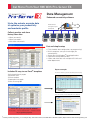
Check your factory data via the Internet.
Simplify maintenance and support.
Upgrade Features
M-tags are supported, so you can take full
advantage of existing screen data.
The new trend graph display function lets
you upload trend data from GP/GLC and
display it as an Excel graph.
The alarm display function performs
a preset alarm application in
accordance with your Q-tag setting.
Courtesy of Steven Engineering, Inc. ● 230 Ryan Way, South San Francisco, CA 94080-6370 ● General Inquiries: (800) 670-4183 ● www.stevenengineering.com
Office
Terminal
Factory
See back page for software operation environment details.