1
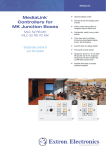
MediaLink
MLC 62 RS EU
MEDIALINK CONTROLLER
FOR EUROPEAN JUNCTION
BOXES
®
➤ Customizable backlit buttons
➤ Mounts in a single size European
junction box with 60mm mounting
centers
➤ Volume control with level status
indicators
➤ IR and unidirectional RS-232 for
universal display control
Simple and Easy-to-use AV System Control
➤ Centralized AV and room control with
two relays and one digital input for
controlling screens or lighting
➤ Configuration options: IR learning
and easy-to-use Extron configuration
software
➤ Inactivity timer for display shut off
➤ Front panel security lockout
➤ Includes six and eight button bezels,
adapter plate, and matching cover
frame
➤ Available in RAL9010 white
FPO
MLC 62 RS EU
Introduction
The MLC 62 RS EU MediaLink® Controller is an easy-to-use
keypad controller for classrooms and meeting facilities. The
controller is designed to mount in a single size European junction
box and includes a matching cover frame. The MLC 62 RS EU
offers backlit soft touch buttons for a contemporary look and
feel while providing control capabilities for common AV functions
including display power on/off, input switching, and volume
control, as well as other devices in the room.
Consistent Control in Every Room
The MLC 62 RS EU controller acts as an extended remote
control panel providing user-friendly control for a display’s
power, volume, and input selection. Because the controller offers
a central point of control for a display device’s key functions,
it eliminates the need for a handheld IR remote control. There
are no misplaced remotes to search for, no confusing menus
to navigate, and no dead batteries to replace. No matter what
brand of display is installed in each presentation venue, the
MLC 62 RS EU MediaLink Controller provides a consistent control
method. Presenters with little or no training can walk into any
MediaLink equipped classroom and operate the AV system with
minimal effort.
Universal Display Control
The MLC 62 RS EU includes an IR/serial port and unidirectional
RS-232 for universal display control. Extron creates and
administers thousands of certified, ready-to-use projector control
drivers that enable MediaLink Controllers to communicate with
almost any display device. They enable control of standard
projector functions such as power, input selection, and volume
adjustment.
Room Control
The MLC 62 RS EU has two relays, which allow it to control room
functions, such as raising or lowering a projector screen, and
turning lighting on or off. In addition, a digital input allows the
MLC 62 RS EU to monitor a switch or sensor on a device such as
a door/window contact, motion detector, or heat sensor.
Front Panel Security Lockout
The MLC 62 RS EU controller features Front Panel Security
Lockout. When the lockout mode is engaged, the front panel of the
MediaLink Controller becomes inoperable. This feature safeguards
the system from unauthorized access. Lockout mode is engaged
by holding down specific buttons simultaneously for three seconds.
The same procedure is repeated to disable lockout mode.
Customizable Backlit Buttons
The controller’s backlit, soft touch buttons are fully configurable in
their function and labeling. Standard buttons consist of power on,
power off, volume up, volume down, and source selections. These
buttons can be configured to send out IR or RS-232 commands
to the display using the intuitive setup software provided. This
makes it easy to configure the controller to meet the needs of
most single-display AV systems. A variety of pre-labeled button
options are included.
Single - function button options
Dual - function button options
The source buttons offer a choice between a single or dual
function setup by simply swapping out the bezel and buttons.
The MLC 62 RS EU ships with both six-button and eight-button
bezels. The eight-button bezel is ideal for applications that
require up to four inputs or functions, while the six-button bezel
is best for supporting two inputs or functions on larger buttons.
MLC 62 RS EU
Introduction
Configurable IR/Serial Port
The IR/Serial port of the MLC 62 RS EU provides expanded control
capability. This port supports either IR or RS-232, allowing control
of a secondary device. With two separate control ports, the
MLC 62 RS EU can control both a display and a switcher or
source device.
IR Learning
Inactivity Timer
The MLC 62 RS EU controller is equipped with an adjustable
timer that automatically shuts down the projector or flat panel
display after a set period of inactivity, to conserve energy and
extend projector lamp life.
Mini USB Port
Macro Capability and Toggle Mode
With the macro capability built into the MLC 62 RS EU, any button
can be configured to execute multiple actions. For instance, the
touch of a single button could trigger commands to turn on the
display, select the display’s computer input, and trigger a relay
for screen control. Toggle mode provides additional flexibility by
allowing two different sets of commands to be executed with
alternating presses of a button.
Easy configuration via software or
IR Learning
Free Extron Certified Device Drivers
Easy to Configure
Extron creates and administers a large library of certified, readyto-use device drivers. Drivers designated as “Extron Certified”
were written by Extron and have been reviewed and tested with
third party devices. These IR and RS-232 drivers enable the
MLC 62 RS EU controller to communicate with a variety of AV
devices, and provide control of standard functions such as power,
input selection, and volume adjustment. Visit the Extron Web site
at www.extron.com to download drivers for the latest and most
popular devices.
The MLC 62 RS EU controller offers easy setup using configuration
software or IR learning. Easy-to-use Extron configuration software
provides fast and simple setup via USB, and includes support
for the extensive library of Extron certified, ready-to-use IR and
RS-232 device drivers. The USB port offers easy configuration
connectivity with most PCs and laptops. Configurations may be
saved, then restored to other controllers for replicating common
room configurations. IR learning allows the controller to learn
commands from an existing handheld IR remote.
Relay
AY
PL
DIS
RS-232 or
IR Projector
Control
ON
F
OF
ME
U
OL
V
RS-232
Switcher
Control
EO
VID
PC
TE
MU
OP
PT
LA
Extron
MLC 62 RS EU
VGA
Video
CLASS 2 WIRING
MediaLink Controller
T
TPU FT
LE
D OU
FIE
PLI
AM
HT
RIG
Projector
12V
Tx
DIO
AU
1
Screen
Control
DIO
S
AU
UT
INP
DIO
5
IX
T
X/M
AU
JUS
AD dB
-42
TO
dB
+24
EL
E LEV
LIN NO
MO
Rx
IR
/IR
C
B
LC
A
2/M
-23 MP
RS EA R
PR
S
UT
INP 2
ST
4/8
ER
EO
OR
DU
AL
MO
NO
ohm
Amplified Output
L
UT
EO
L
LIN
R
L
L
R
R
R
AU
•
•
•
•
•
RS-232 Display Control
On/Off Control
Input Switching
Volume Control
Screen Control
6
B
TS
TPU G
T
OU
OR
OU
NIT
MO
R
V
H
S
UT
INP
Extron
MLS 304SA
0Hz
V
100
MediaLink Switcher
EO
VID
2
50-6
-240
1
1.0A
MAX
VGA
.
VGA
Audio
VGA
Audio
Extron
SI 3
Video
Laptop
w/ Audio
DVD
PC
Surface-Mount
Speakers
MLC 62 RS EU
MLC 62 Configuration Software
The MLC 62 RS EU is easy to configure…
no programming knowledge is required
Extron’s free MLC 62 configuration
software puts all of the most commonly
used system control options at your
fingertips. One of the costliest aspects
of building an AV control system, in
terms of human resources and time, is
programming. AV system programming
can be a complex task that requires the
skills of an experienced programmer.
Configuring MLC 62 RS EU controllers is as
simple as selecting choices from intuitive,
drop-down menus instead of writing,
compiling, and debugging complicated
computer source code. Future system
changes, such as replacing the display
device, are easy to accomplish.
System Configuration is Easy
System Changes Take Less Time
With our free MLC 62 configuration software, users
can build a complete AV control system.
Initial system setup time is reduced, and there’s no
need to wait for a programmer to make changes.
IR Learning
iPod
Music
Video
Photos
Podcasts
Extras
Songs Songs
Shuttle
Playing
Now
MENU
®
IPL 250
COM
PWR ON: 02 00 01 00
TX
INPUT
RELAY
1
3
1
3
1
3
2
IR
4
2
4
2
4
RX
1
R
100
LINK
2
ACT
3
Projector Manufacturers
Manual
Extron
IPL 250
DVD's Remote
VER
DBS
RECEI
Extron offers thousands of drivers from many major
projector and display manufacturers
PC
Projector
Extron-provided software allows
for customized device control
IR Learning from a handheld IR Remote
Free Extron Certified Device Drivers
Custom RS-232 Control
IR Learning
Extron creates and administers thousands of
certified, ready-to-use device drivers. These IR and
serial RS-232 drivers allow MediaLink Controllers to
communicate with a variety of AV devices. They enable
control of standard functions such as power, input
selection, and volume adjustment. Visit the Extron Web
site at www.extron.com to download drivers for the
latest and most popular devices.
In environments where customizable device control
is needed, integrators can easily enter in their own
RS-232 commands on the MLC 62 RS EU. RS-232
commands can be assigned to any button using
the provided configuration software. The MediaLink
Controllers will work with virtually any RS-232
controlled device.
Serial RS-232 is the preferred method of
control; however, many ultra portable
projectors and flat panel displays can only
support IR control. The MLC 62 RS EU can
learn IR commands from virtually any
handheld IR remote control.
MLC 62 RS EU
Overview
Visual and Audible
Feedback
Soft Touch Buttons
Buttons are clearly labeled for easy
identification. Soft touch buttons
provide an intuitive feel and
ease-of-use
LED blinks green and audible
chirp sounds to indicate power
on and confirm button presses
Volume Control
Compact Size
Provides up and down
volume control of the
display with LED lights that
show audio levels
Single size EU design easily
mounts in a wall or lectern
Display ON/OFF
Clearly labeled buttons make it
easy to turn the display on and
off, eliminating the need for a
handheld IR remote
Backlit Buttons
Illuminated buttons can be
customized with supplied
replacement buttons for
easy labeling. Backlighting
is helpful for presenters in
low-light environments
Jung-style Frame
Adds a contemporary look
that blends in with any AV
environment. RAL9010 white
frame and bezel are included
Front Panel Lockout
Safeguards the system
from unauthorized access
Multiple Actions
MLC 62 RS EU - Front
Each button can store multiple
IR or RS-232 commands
Two Relays
Controls room functions such as lowering
projector screens and turning lights on/off
Extron Certified Drivers
Thousands of Extron certified
ready-to-use device drivers
communicate with the display
device, enabling control of
standard AV functions
Inactivity Timer for
Display Shut-off
RS-232 and IR ports
Adjustable timer controls
automatic shutdown to
conserve energy, and
extend projector lamp life
RS-232 and IR for
universal display
and MediaLink Switcher
control
Digital Input
Provides external input
for interfacing with a
sensor or switch
MLC 62 RS EU - Back
MLC 62 RS EU
specifications
Specifications
MLC 62 EU
CONTROL — HOST PORTS
Serial control port1 bidirectional RS-232 on a 3.5 mm captive screw
connector, 3 pole
Baud rate and protocol9600 baud, 8 data bits, 1 stop bit, no parity
Serial control pin configurationPin 1 = Tx, pin 2 = Rx, pin 3 = GND
USB control ports
MK and EU models1 side panel female mini USB B
USB standardsUSB 2.0, low speed
IR learning frequencies30 kHz to 60 kHz
IR learning distance4” (10 cm) to 14” (36 cm) from the receiver (on front
panel for Decora models, side panel for MK and EU
models)
Program controlExtron configuration program for Windows®
Extron Simple Instruction Set (SIS™)
DISPLAY
OFF
1
VOLUME
1
MUTE
Rear
Front
CONTROL — SERIAL PORT
Number/type2 momentary or latching (configurable via software)
Connector(1) 3.5 mm captive screw connector, 3 pole
Contact rating24 V, 1 A
CONTROL — DIGITAL INPUT MONITORING PORT
Number/type1 digital input (configurable)
Connector(1) 3.5 mm captive screw connector, 2 pole
Digital inputs
Input voltage range0-24 VDC
Input impedance12k ohms
Programmable pullup2k ohms to +5 VDC
Threshold low to high>1.5 VDC
Threshold high to low<1.0 VDC
GENERAL
External power supply100 VAC to 240 VAC, 50-60 Hz, external; to 12 VDC, 1 A,
regulated
Power input requirements12 VDC, 0.4 A, max.
Temperature/humidityStorage: -40 to +158 ˚F (-40 to +70 ˚C) / 10% to 90%,
noncondensing
Operating: +32 to +122 ˚F (0 to +50 ˚C) / 10% to 90%,
noncondensing
CoolingConvection, no vents
Mounting
Rack mountNo
1
CONTROL — RELAY
DIGITAL
INPUT
MUTE
Tx Rx
HOST/
CONFIG
LAPTOP
IR control port(1) 3.5 mm captive screw connector, 2 pole for IR or IR/
Serial* (transmit only)
TTL level (0 to 5 V) modulated infrared control from
Front
30 kHz up to 60 kHz, or ±5 V RS-232
control
(Transmit only)
IR/serial ports are configurable via software, serial
communication is the default.
Baud rate and protocolFor RS models:
9600 (default), 19200, 38400, 57600, 115,200 baud;
8 (default) or 7 data bits; 1 stop bit; no parity (default), or
even or odd parity
Tx/
IR
IR/S
Tx
RS-232
PWR
VIDEO
C
12V
PC
2
RELAYS
N/O
R
CONTROL — IR/SERIAL PORT
1
Rear62 RS EU - Back
MLC
Furniture or wall mount
EU modelsMounts in a standard 1 gang EU electrical junction box
with 60 mm mounting centers (40 mm depth). An adapter
frame is included.
Enclosure typePlastic
Enclosure dimensions
MLC 62 RS EU
Faceplate2.2” H x 2.2” W x 0.3” D (1-gang EU, fits a Jung AS
500 wallplate)
(5.5 cm H x 5.5 cm W x 0.7 cm D)
Device1.9” H x 2.0” W x 0.7” D
(4.8 cm H x 5.2 cm W x 1.8 cm D)
(Overall rear dimensions, including connectors. Allow at
least 1.25” [3.2 cm] depth in the junction box for device
and cable clearance.)
Product weight
MLC 62 RS EU1.0 lb (0.5 kg)
Shipping weight3 lbs (2 kg)
VibrationISTA 1A in carton (International Safe Transit Association)
Regulatory compliance
SafetyCE, c-UL, UL
EMI/EMCCE, C-tick, FCC Class A, ICES, VCCI Class A
AccessibilitySection 508 of the Rehabilitation Act (29 U.S.C. 794d)
MTBF30,000 hours
Warranty3 years parts and labor
NOTE: All nominal levels are at ±10%.
Model
MLC 62 RS EU
MLC 62 Button Kit MLC 62 Button Kit Version Description
IR and RS-232 Control - EU Frame
English French/German Part number
60-1005-35
70-728-01
70-728-11
For complete specifications, please go to www.extron.com
Specifications are subject to change without notice.
Extron USA - West
Headquarters
+800.633.9876
Inside USA / Canada Only
+1.714.491.1500
+1.714.491.1517 FAX
www.extron.com
Extron USA - East
Extron Europe
Extron Asia
Extron Japan
Extron China
Extron Dubai
+800.633.9876
+800.3987.6673
+800.7339.8766
+81.3.3511.7655
+81.3.3511.7656 FAX
+400.883.1568
+971.4.2991800
+971.4.2991880 FAX
+1.919.863.1794
+1.919.863.1797 FAX
+31.33.453.4040
+31.33.453.4050 FAX
+65.6383.4400
+65.6383.4664 FAX
Inside USA / Canada Only
Inside Europe Only
Inside Asia Only
DIGITAL
INPUT
VIDEO
R
PC
LAPTOP
MLC 62 MLC
EU
62 RS EU - Front
DISPLAY
Display control port(1) 3.5 mm captive screw connector, 2 pole for
ON
OFF
unidirectional RS-232 control (±5 V)
VOLUME
Baud rate and protocol (RS-232)9600 (default), 19200, 38400, 57600, 115,200 baud;
8 (default) or 7 data bits; 1 stop bit; no parity (default), or
even or odd parity
2
C
RELAYS
N/O
Inside China Only
+86.21.3760.1568
+86.21.3760.1566 FAX
© 2011 Extron Electronics. All rights reserved. All trademarks mentioned are the property of their respective owners.
04-2011
68-1806-01
REV. B
Tx/
IR
IR
x
ST/
NFIG
ON