1
MLP 101 D, cont’d
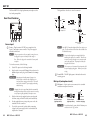
Remote connection
e
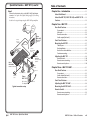
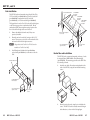
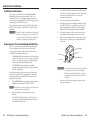
Remote — An optional 3-pin, captive screw connector allows
a wall mounted audio controller or MediaLink product to
remotely control volume and mute levels for the MLP 101
unit. See “Remote Control”, later in this chapter, for more
information.
d
XLR mic input — An XLR connector for a standard microphone
connection
1
2
3
Front Panel Features
3-pin
Female
2
1
ACTIVE
MUTE
3
MIC IN
4
a
b
c
4-4
Balanced
Pin
Unbalanced
Description
Pin
Description
1
External cable (sheild/ground)
1
Ground
2
Live (”hot” positive phase)
2
Signal
3
Return signal (”cold” negative phase)
3
Ground
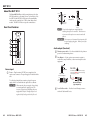
Adjusting the MLP 101 D
Most adjustment options for the MLP 101 D are located on its
rear panel (see “Rear Panel Features” in this chapter for details).
Therefore, you must perform these adjustments prior to final
mounting into a wall.
To adjust the MLP 101 D, do the following:
1. If using a condenser microphone, flip the Phantom power
switch to the “on” position.
If using a dynamic microphone, flip the Phantom power
switch to the “off” position.
2. Active LED — This LED lights green to indicate that the unit is
receiving power.
When using the microphone for voice audio, flip the Low
Cut switch to “on” to reduce wind and “table rumble”
noise.
When using the microphone for music audio, flip the Low
Cut switch to “off” to preserve the optimum sound quality.
Mute LED — This LED lights red to indicate mute.
3. Set the Mic Gain pot by saying a few words into the
microphone and adjusting for the maximum sound level
that is free of distortion.
Mic Gain — A recessed, adjustable pot defines the amount of
input signal (between 25 and 72 dB) allowed into the preamp.
This pot is covered by a plastic cap to avoid tampering. To
adjust the pot, use a provided Extron Tweeker to remove the
covering, make adjustments, then replace the cap.
MLP 101 Series • MLP 101 D
N If there is a remote control connection, unplug it while
adjusting the Mic Gain pot. Replace the remote control
when finished.
If there is minimal distortion, but greater volume is
required, turn the Mic Gain pot clockwise (towards the
75 dB mark) to increase the volume, but not past the point
where distortion occurs.
MLP 101 Series • MLP 101 D
4-5