1
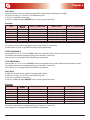
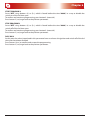
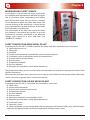
Chapter 6 CHRONO SET MENU Controls procedure: Press key 3 (menu/ok) to access the menu. Press key 3 (menu/ok) to access the “USER MENU”. Select “CHRONO SET MENU” using buttons 4(-) and 5(+) and press key 3 (menu/ok) to confirm. The boiler is equipped with a weekly programmer which allows to program 3 time spans within a day to use every day of the week. The ignition and switch-off times must be within the arc of one day, from 0 to 24 and not over several days: E.g. switch-on 07:00 / switch-off 18:00 OK switch-on 22:00 / switch-off 05:00 ERROR switch-on 22:00 / switch-off 23:59 OK PARAMETER FUNCTION KEYS ADJUSTMENT DISPLAY CONFIRMATION KEY CHRONO ON-OFF START PROGRAM 1 STOP PROGRAM 1 DAYS ON 1 START PROGRAM 2 STOP PROGRAM 2 DAYS ON 2 START PROGRAM 3 STOP PROGRAM 3 DAYS ON 3 Act./deact. weekly programmer Time 1st switch-on Time 1st switch-off Consents for 1st switch on/off for various days Time 2nd switch-on Time 2nd switch-off Consents for 2nd switch on/off for various days Time 3rd switch-on Time 3rd switch-off Consents for 3rd switch on/off for various days 4(-) o 5(+) 4(-) o 5(+) 4(-) o 5(+) 4(-) o 5(+) 4(-) o 5(+) 4(-) o 5(+) 4(-) o 5(+) 4(-) o 5(+) 4(-) o 5(+) 4(-) o 5(+) ON/OFF OFF or from 00:00 to 23:50 OFF or from 00:00 to 23:50 ON/OFF Monday ... ON/OFF Sunday OFF or from 00:00 to 23:50 OFF or from 00:00 to 23:50 ON/OFF Monday ... ON/OFF Sunday OFF or from 00:00 to 23:50 OFF or from 00:00 to 23:50 ON/OFF Monday ... ON/OFF Sunday 3(menù/ok) 3(menù/ok) 3(menù/ok) 3(menù/ok) 3(menù/ok) 3(menù/ok) 3(menù/ok) 3(menù/ok) 3(menù/ok) 1(esc) Let’s suppose that the weekly programmer function is to be used and 3 time periods are to be used in the following way: 1st time span: from 08:00 to 12:00 every day of the week excluding Saturday and Sunday 2nd time span: from 15:00 to 22:00 only Saturday and Sunday 3rd time span: not used Let’s set the weekly programmer. CHRONO ON-OFF Use buttons 4(-) or 5(+) to activate the weekly programmer by setting the value at ON. To confirm and continue programming, press button 3 (menu/ok). START PROGRAM 1 Use buttons 4 or 3 to set “08:00”, which corresponds to the switch-on time of the 1st time span. To confirm and continue programming, press button 3 (menu/ok). Press button 2 (set) to go back to the previous parameter. STOP PROGRAM 1 Use buttons 4(-) or 5(+) to set “12:00”, which corresponds to the switch-on time of the 1st time span. To confirm and continue programming, press button 3 (menu/ok). Press button 2 (set) to go back to the previous parameter. CHRONO SET MENU 21