1
Cybertec Pty Limited
c 2009
Copyright Document: 0013-001-000172
Series 5000 Quick Start Guide
Version: 1.0
22 October, 2009
To add an ADSL connection click the “Add new profile” button, the first of 3 configuration pages will be displayed. The
values required will depend on the service provider.
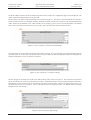
The first page is for general and ATM settings and is shown in Figure 17. The label is used to described the connection
and is for reference only. The Enabled checkbox should be checked to enable the connection. The Virtual Path Identify
(VPI), Virtual Circuit Identifier (VCI) values and the service category type are service provider dependent. The default
values will work with most Australian service providers. Once the values have been entered click Next.
Figure 17: New connection - General and ATM settings
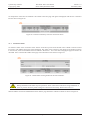
The second page is for the connection settings and is shown in Figure 18. The connection type and encapsulation will be
provided by the service provider. Usually the connection type is PPP over Ethernet (PPPoE) or PPP over ATM (PPPoA)
and the encapsulation is LLC. Click Next to continue.
Figure 18: New connection - Connection settings
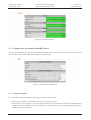
The third pages for the Point to Point Protocol (PPP) settings and is shown in Figure 19. The username and password
will be provided by the service provider when the account is established. In order to enter a password click the check-box
marked New, the password can now be entered in the text field. The password is visible as it is being typed so that it can
be checked for errors prior to being set. Once set the password will no longer be visible. The default values are usually
adequate for the other settings.
Figure 19: New connection - PPP settings
Page 14 of 18