1
QuickSpecs
HP Integrity rx8640 Server
Overview
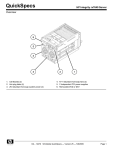
HP Integrity rx8640 Server System Overview-Front View
1. Hot plug disks
4. Redundant hot-swap fans
2. Cell boards
5. PCI power supplies
3. Redundant hot-swap power
6. Removable media - DVD/DAT
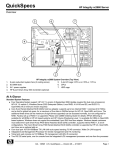
Integrity rx8640 Server System Overview-Rear View
1. System backbone
4. Hot-swap redundant fans
2. Core I/O
5. Hot-plug PCI slots
3. 2N redundant power inputs
DA - 12471
Worldwide QuickSpecs — Version 28 — 8-1-2009
Page 1
QuickSpecs
HP Integrity rx8640 Server
Overview
At A Glance
rx8640 Server Product Number (base)
AB297A
Standard System Features
HP UX 11i v2 and HP UX 11i v3 operating system
Microsoft Windows Server 2008
Linux RHEL AS 5 and AS 4 and SLES 10 SP 1. Mad9M rx8640 configuration not supported.
OpenVMS V8.3-1H1 or higher (for Montvale). Mad9M rx8640 configurations not supported.
External Ultra320 SCSI channel
Two Internal Ultra320 SCSI channels, one channel to each internal disk
1 GbE LAN ports
Management Processor technology with Integrated LAN console
Rackmountable into HP 19 inch cabinets (factory or field integration)
Rackmountable into some 3rd party cabinets
Two hardware partitions (nPartitions)
Four hardware partitions when configured with the Server Expansion Unit
Factory integration of processors, memory, disk drives, removable media drives, and I/O cards
HP site planning and installation
One year warranty with same business day on site service response
Owner's Guide and General Usage media set
DA - 12471
Worldwide QuickSpecs — Version 28 — 8-1-2009
Page 2
QuickSpecs
HP Integrity rx8640 Server
HP Integrity rx8640 Server Flexible Advantage Starter (FAST) Base Systems
The Flexible Advantage STarter base systems for the HP Integrity rx8640 Server allow for faster configurations due to the
semi configured base system bundles. Configurations built from FAST base systems will have substantially lower prices than
systems built from the parts.
HP Integrity rx8640 Server FAST bundles
Product Number1
Number of Intel dual
core Itanium
processors
Number of Cell
Boards in bundle
Number of Core I/O
Cards in bundle
Number of Power
Supplies in bundle
AB443A
4 (4P/8C)
1
1
3
AB444A
8 (8P/16C)
2
1
4
AB446A
16 (16P/32C)
4
1
6
1
Includes base chassis and power supplies
DA - 12471
Worldwide QuickSpecs — Version 28 — 8-1-2009
Page 3
QuickSpecs
HP Integrity rx8640 Server
Standard Features
Minimum System
One active core in an Intel Dual core Itanium (1P/2C) processor
One processor per cell board (Dual core Itanium requires one active core per cell board)
One cell board
4GB memory module (1 pair of 2GB DIMMs)
One core I/O
One internal DVD drive for OpenVMS and Windows
Two power cords
8 hot plug 33 /66 /133 /266 MHz 64 bit PCI X slots or 8 mix of hot plug 64 bit PCI X and
PCIe x8 IO slots with adaptive signaling technology
Maximum Server
Capacities
Sixteen (16) Intel Dual core Itanium (16P/32C) processors
Four (4) processors per cell board
Four (4) cell boards
512GB memory (32 pairs of 8 GB DIMMs)
Four power cords, providing 2N power and dual grid support
Four internal hot plug LVD SCSI disks
Two removable media drives-DVD or DAT
Sixteen PCI expansion cards
Maximum capacities when configured with the Server Expansion Unit 2 (SEU 2):
Four core I/O cards
Eight internal hot plug LVD SCSI disks
Four removable media drives-DVD or DAT
32 hot plug 33 /66 /133 /266 MHz 64 bit PCI X slots or 32 mix of hot plug 64 bit PCI X and
PCIe x8 IO slots with adaptive signaling technology
Standard System
Features
HP UX 11i v3 and HP UX 11i v2 operating system
Microsoft Windows Server 2008
Linux RHEL AS 5 and AS 4 and SLES 10 SP 1. Mad9M rx8640 configuration not supported.
OpenVMS V8.3 1H1 or higher (for 91X0N processors Montvale). Mad9M rx8640
configurations not supported.
External Ultra320 SCSI channel
Two Internal Ultra320 SCSI channels, one channel to each internal disk
1 GbE LAN ports
Management Processor technology with Integrated LAN console
Rackmountable into HP 19 inch cabinets (factory or field integration)
Rackmountable into some 3rd party cabinets
Two hardware partitions (nPartitions)
Four hardware partitions when configured with the Server Expansion Unit
Factory integration of processors, memory, disk drives, removable media drives, and I/O
cards
HP site planning and installation
One year warranty with same business day on site service response
Owner's Guide and General Usage media set
DA - 12471
Worldwide QuickSpecs — Version 28 — 8-1-2009
Page 4
QuickSpecs
HP Integrity rx8640 Server
Standard Features
High Availability
N+1 Hot swap cooling
Redundant and hot swap power supplies
Cell Hot plug (implemented as dynamic nPars in HP UX 11i v3)
Hot plug disks
2N power inputs
On line memory page deallocation
ECC protected DDR II memory
Full parity protection of data and address buses
On chip processor cache with ECC protection
Memory double chip spare
Dynamic Processor resilience and deallocation (processor deallocation on failure)
On line addition and replacement of PCI I/O cards
UPS power management
Four independent UltraSCSI buses to internal disks for mirroring across disks and
controllers
Journal file system (HP UX)
Auto reboot
On line diagnostics and system health monitor
Microsoft Cluster Services for Windows Server 2008
HP StorageWorks Software for HP Integrity Servers running Windows Server 2008.
Includes Cluster Extension XP and EVA, Continuous Access, Business Copy and SQL
Server Fast Recovery
HP OpenVMS Cluster Software
Security
Separate console LAN port for system management
Password protection on console port
Disablement of remote console ports
Internet Server
Functions
Internet server (inetd)
Domain name server
Routing (OSPF, BIND, RIP, EGP, HELLO, gateD)
Network Time Protocol
Client Configuration
Services
Automatic configuration for printers, PCs, workstations, and X terminals (DHCP, Bootp, tftp,
rbootp)
Optional Web Services
Netscape Communication Server
Netscape Navigator
Email
Mail, MailX, ELM
Sendmail, MIME, SMTP, ESMTP
Remote Access
Services
Telnet, ftp, anonymous ftp server
DA - 12471
Worldwide QuickSpecs — Version 28 — 8-1-2009
Page 5
QuickSpecs
HP Integrity rx8640 Server
Configuration
Configuration
The HP Integrity rx8640 Server is a symmetrical multiprocessing (SMP) server supporting up to
sixteen high performance Intel dual core Itanium processors (90X0 series or 91X0N series). The
server supports HP's advanced sx2000 chip set. The rx8640 can be configured as a single SMP
server or divided into up to four smaller, hardware partitioned (nPars), logical servers.
Cell Boards
A minimum of one and a maximum of four cells can be ordered in HP Integrity rx8640 Servers.
Each cell can be purchased with up to four active Intel dual core Itanium processors (90X0 series
or 91X0N series) or in combination with Instant Capacity processors. The rx8640 can support a
mix of 90X0 and 91X0N series processors; however, within a single cell, all processors must be
identical.
The HP Integrity rx8640 and HP Integrity rx7640 (8 processor) servers share the same cell board.
The rp8400/rp8420/rx8620 cell boards cannot be carried forward to the rx8640 server.
Cell Details
4 processor slots (supporting up to eight processor cores with dual core)
HP sx2000 cell controller
16 DDR-2 Memory DIMM slots
DC-DC Power converters
Manageability and Processor Dependent Hardware Circuitry
Cell Board
Configuration Rules
Cell boards are ordered individually
Minimum: 1 cell board; Maximum: 4 cell boards
Cell slots 0 or 1 must be loaded first
Recommended Cell board loading order: 0,1,2,3
Cell Board and
Processor Mixing
Rules
Cannot Mix
Cannot Mix
Cannot Mix
Cannot Mix
Cannot Mix
partition
Montecito processors with Mad9M on same cell board
Montecito processors with Mad9M in same partition
Montecito processors with Montvale processors on same cell
Montecito processors with Montvale processors in same partition
Montecito 1.4GHZ with Montecito 1.6GHZ on same cell board or in the same
Cannot Mix Montecito 12MB with Montecito 18MB or 24MB on same cell board or in same
partition
Cannot Mix Montecito 18MB with Montecito 12MB or 24MB on same cell board or in same
partition
Cannot Mix Montecito 24MB with Montecito 12MB or 18MB on same cell board or in same
partition
Cannot Mix Montvale 1.4GHZ with Montvale 1.6GHZ on same cell board or in the same
partition
Cannot Mix Montvale 12MB with Montvale 18MB or 24MB on same cell board or in same
partition
Cannot Mix Montvale 18MB with Montvale 12MB or 24MB on same cell board or in same
partition
Cannot Mix Montvale 24MB with Montvale 12MB or 18MB on same cell board or in same
partition
NOTE: If slower speed processor is installed on cell (1.4 with 1.6) the slowest speed will be used
DA - 12471
Worldwide QuickSpecs — Version 28 — 8-1-2009
Page 6
QuickSpecs
HP Integrity rx8640 Server
Configuration
Intel Dual-Core Itanium Intel Dual-Core Itanium Details
Details
1.6-GHz
Level 3 cache: 24 MB
Level 2 cache: 1 MB instr
+ 256 KB data
Level 3 cache: 16 KB instr
+ 16 KB data
Single-bit cache error
correction
44-bit physical addressing
64-bit virtual addressing
4-GB maximum page size
Intel Itanium 9150N
(Montvale)
1.6 GHz
Level 3 cache: 24 MB
Level 2 cache: 1 MB instr
+
256 KB data
Level 3 cache: 16 KB instr
+
16 KB data
Single bit cache error
correction
44 bit physical addressing
64 bit virtual addressing
4 GB maximum page size
Intel Itanium 9050
(Montecito)
Processor
Configuration Rules
1.6 GHz
Level 3 cache: 18 MB
Level 2 cache: 1 MB instr
+ 256 KB data
Level 3 cache: 16 KB instr
+ 16 KB data
Single-bit cache error
correction
44-bit physical addressing
64-bit virtual addressing
4-GB maximum page size
Intel Itanium 9140N
(Montvale)
1.6 GHz
Level 3 cache: 18 MB
Level 2 cache: 1 MB instr
+
256 KB data
Level 3 cache: 16 KB instr
+
16 KB data
Single bit cache error
correction
44 bit physical addressing
64 bit virtual addressing
4 GB maximum page size
Intel Itanium 9040
(Montecito)
1.4 GHz
Level 3 cache: 12 MB
Level 2 cache: 1 MB instr
+ 256 KB data
Level 3 cache: 16 KB instr
+ 16 KB data
Single-bit cache error
correction
44-bit physical addressing
64-bit virtual addressing
4-GB maximum page size
Intel Itanium 9120N
(Montvale)
1.4 GHz
Level 3 cache: 12 MB
Level 2 cache: 1 MB instr
+
256 KB data
Level 3 cache: 16 KB instr
+
16 KB data
Single bit cache error
correction
44 bit physical addressing
64 bit virtual addressing
4 GB maximum page size
Intel Itanium 9020
(Montecito)
The Intel dual core Itanium processor consists of 2 processor cores. You may order and
upgrade the dual core Itanium processor in increments of one core (the second core in a
processor being iCAP).
There must be one active processor core (the other being iCAP) for dual core Itanium
processors on each cell board.
On each cell board, processors must be installed in the following sequence 0, 2, 1, 3.
HP Integrity rx8620 1.6 GHz 6 MB Level 3 cache processors may be carried forward to
rx8640 servers.
Intel single core Itanium processors and Intel dual core Itanium processors can be mixed in
the same chassis as long as they are in separate hard partitions (requires the same chipset
sx1000 or sx2000).
Memory Configuration The memory DIMMs used in the HP Integrity rx8640 Server are custom designed by HP and are
sold in pairs or as bundles. Each DIMM contains DDR II memory chips qualified to run at 267/533
MHz, with full ECC protection. DIMM sizes of 2 GB, 4 GB, and 8 GB are supported. HP 9000
rp8400/rp8420/rx8620 memory modules cannot be carried forward to the rx8640 server. Each HP
Integrity rx8640 Server cell board supports up to 16 DIMM slots and 17 GB/s of peak memory
bandwidth.
HP Integrity rx8640 Memory DIMMs
Memory Module size
(pairs)
rx8640 Product Number
HP Integrity rx8640 Server
Maximum Capacity Using
single DIMM Size
Single DIMM Size
4 GB (2 x 2GB)
AB454A
128 GB
2048 MB
8 GB (2 x 4GB)
AB455A
256 GB
4096 MB
16 GB (2 x 8GB)
AB456A
512GB
8192 MB
Bundle size
rx8640 Product Number
Equivalent Memory Module
Single DIMM SIze
128 GB (16 x 4GB)
AH411A
Qty 16 of AB455A
4096 MB
128 GB (8 x 8GB)
AH412A
Qty 8 of AB456A
8192 MB
256 GB (32 x 4GB)
AH413A
Qty 32 of AB455A)
4096 MB
256 GB (16 x 8GB)
AH414A
Qty 16 of AB456A
8192 MB
DA - 12471
Worldwide QuickSpecs — Version 28 — 8-1-2009
Page 7
QuickSpecs
HP Integrity rx8640 Server
Configuration
Memory Loading Rules
Memory must be installed in pairs - modules (2 DIMMs of equal density)
Memory modules (pairs of DIMMS) are available in three densities: 4 GB (2×2048MB
DIMMs), 8 GB (2×4096MB DIMMs), and 16 GB (2×8192MB DIMMs).
Memory bundle product numbers consist of DIMMS already qualified in the memory
modules
DIMM pairs must be loaded in slot order
Minimum memory is 2 GB per cell
Maximum memory per system is 512 GB-using 32 16 GB memory modules (8GB pairs) per
system.
Larger DIMMs must be loaded first across a cell, followed by progressively smaller DIMM
sizes.
On each cell board, Memory pairs must be installed in the following order:
(0A, 0B), (1A, 1B), (2A, 2B), (3A, 3B), (4A, 4B), (5A, 5B), (6A, 6B), (7A, 7B)
DIMM mixing other than recommended configurations is supported as long as the memory
loading rules are followed
rx8640 Recommended Memory Configurations
Desired
Memory per
Cell (GBs)
Number of DIMMs
2 GB
4 GB
Quad Echelon
8 GB
2
1
OA, OB 1A, 1B
4
2
2 GB
3
0
2
1
3
0
2A, 2B
3A, 3B
4A, 4B
5A, 5B
6A, 6B
7A, 7B
8
4
2 GB
2 GB
16
8
2 GB
2 GB
2 GB
2 GB
32
16
2 GB
2 GB
2 GB
2 GB
2 GB
2 GB
2 GB
2 GB
48
8
4 GB
4 GB
4 GB
4 GB
2 GB
2 GB
2 GB
2 GB
8
64
16
96
8
128
Performance Tuning
Guidelines
Memory Latencies
4 GB
4 GB
4 GB
4 GB
4 GB
4 GB
4 GB
4 GB
8
8 GB
8 GB
8 GB
8 GB
4 GB
4 GB
4 GB
4 GB
16
8 GB
8 GB
8 GB
8 GB
8 GB
8 GB
8 GB
8 GB
For best performance, a cell should be configured with a multiple of 8 DIMMs or four pairs
(although the server will execute properly with an odd number of pairs). It takes 8 DIMMs to
populate both memory buses. Populating only one of the two memory buses on a cell board
will deliver only half the peak memory bandwidth.
Load memory equally across the available cell boards.
There are two types of memory latencies within the HP Integrity rx8640 Server:
1. Memory latency within the cell refers to the case where an application either runs on a
partition that consists of a single cell or uses cell local memory.
2. Memory latency between cell refers to the case where the partition consists of two or more
cell and cell interleaved memory is used. For example, for an rx8640 server with four cells in
the partition, 25% of the addresses are to memory on the same cell as the requesting
processor, and the other 75% of the addresses are to memory on the other three cells.
The HP Integrity rx8640 Server memory latency depends on the number of processors in the
partition. Assuming that memory accesses are equally distributed across all cell boards and
memory controllers within the partition, the average idle memory latency (load to use) is as shown
below:
Number of processors
Average Memory Latency
4-processor
185 ns
8-processor
249 ns
16-processor
334 ns
DA - 12471
Worldwide QuickSpecs — Version 28 — 8-1-2009
Page 8
QuickSpecs
HP Integrity rx8640 Server
Configuration
I/O Architecture
Components within the I/O subsystem are the I/O controllers, internal peripheral bay, and
multifunction Core I/O. The figure below shows the basic block diagram of the I/O subsystem. The
Integrity I/O architecture utilizes industry standard PCI buses in a unique design for maximum
performance, scalability, and reliability. To achieve maximum performance and availability, each
PCI/PCI-X slot on the I/O board is controlled by its own Bus Converter ASIC and is also
independently supported by its own half of the dual hot swap controllers. All PCI slots are
designed to be compliant with PCI Rev.2.2, PCI-X Rev.2.0a, and PCI-express Gen1
specifications.
The PCI-X 2.0 I/O Backplane implemented an important change to power distribution to the I/O
partitions. The PCI-X Power supply bricks have been redesigned to allow the pair of them to be
N+1 redundant in operation. Both I/O partitions will sustain their operational state even if one of
the PCI bricks has failed. All the PCI voltages will remain within the PCI specification. These
power bricks are not part of the PCI-X I/O board assembly. They plug into the edge of the PCI-X
I/O Backplane to provide power to the board and they are not backwards compatible with the
previous PCI power bricks. Any PCI brick failures will be reported to the system so the failing brick
could be hot swapped.
The HP Integrity rx8640 Server supports both PCI-X 2.0 and PCI-Express. Two different
backplanes are available. The PCI-X 2.0 backplane (AB160A) supports sixteen (16) PCI-X slots. A
combination PCI-Express/PXI-X 2.0 backplane (AD161A) supports eight (8) PCI-X slots and eight
(8) PCI-Express slots. Each backplane contains two master I/O controller chips located on the
backplane. Each I/O controller contains sixteen high performance 12 bit wide links, which connect
to sixteen slave I/O controller chips supporting the PCI X or PCI-Express card slots and core I/O.
Two links, one from each master controller is routed through the crossbar backplane and is
dedicated to core I/O. The remaining thirty links are divided among the sixteen I/O card slots. This
one card per link architecture leads to greater I/O performance and higher availability. Each
controller chip is also directly linked to a host cell board. This means that at least two cell boards,
located in cell slots 0 and 1, must be purchased in order to access all sixteen I/O card slots. With
one cell board, access to eight slots is enabled.
The HP Integrity rx8640 Server can be purchased with either one or two core I/O boards (if an
SEU 2 is added, then four core I/O boards with two core I/O in the SEU). Both core I/O boards are
identical and provide console, SCSI, serial, and Management Processor (MP) functionality. The
second core I/O is used to enable the dual hard partitioning in the HP Integrity rx8640 Server and
provide access to a second set of disk drives.
The internal peripheral bay is divided into two identical halves. Each half supports up to two low
profile disks and one removable media device. A SCSI controller chip located on each core I/O
board supports each half of the internal peripheral bay. This means that both core I/O boards must
be purchased to access both halves of the peripheral bay.
PCI Backplane
Eight of sixteen I/O card slots are supported by dual high performance fat links. Each link is
capable of providing 1060 MB/s of bandwidth. This means that half HP Integrity rx8640 Server I/O
slots are capable of sustained 2.12 GB/s. Six of the sixteen I/O card slots are supported at 1060
MB/s of bandwidth. Aggregate I/O slot bandwidth is approximately 23 GB/s. In addition, because
each I/O slot has a dedicated bus, any slot can be "hot plugged" or serviced without affecting other
slots. The hot plug operation is very easy, and can be done with minimal training and effort.
The HP Integrity rx8640 Server supports a number of PCI, PCI X, and PCI Express HBA (I/O)
cards for I/O expansion.
NOTE: The PCI X backplane is backward compatible with the older PCI backplane and can
support many PCI HBA (I/O) cards.
When HP 9000 rp8400 servers are upgraded to HP Integrity rx8640 servers using the chassis
upgrade kit, the older and slower PCI backplanes in the HP 9000 rp8400 server must be upgraded
to the newer and faster PCI X (AD160A) or PCI Express/PCI X (AD161A) backplanes
When the rx8640 Server Expansion Unit 2 is connected to the HP Integrity rx8640 Server, its I/O
backplanes act as PCI X or PCI Express I/O backplanes. See the rx8640 Server Expansion Unit 2
section for more details.
DA - 12471
Worldwide QuickSpecs — Version 28 — 8-1-2009
Page 9
QuickSpecs
HP Integrity rx8640 Server
Configuration
Supported I/O Cards
Cards can be in any combination (see Special Note section). Servers with one (1) cell board, minimum 1 - maximum 8.
Severs with two (2) cell boards in base system, minimum 1 - maximum 16. Servers configured with SEU-2 and three (3) cell
boards, minimum 1 - maximum 24. Servers with SEU-2 and four (4) cell boards, minimum 1 - maximum 32.
SEU-2 only, cards can be in any combination (see Special note Section), minimum 1 - maximum 8 with three (3) cell boards
in base server. SEU-2 only with four (4) cell boards in base server, minimum 1 - maximum 16.
NOTE: While ordering Windows Server 2008, do not mix differing brands of HBAs (Emulex and Qlogic) within the same
server configuration in an MPIO environment.This is to avoid issues which occur when different Fibre Channel HBAs are
used within the same server which support different I/O max transfer packet sizes in an MPIO environment. For example,
the Emulex Fibre Channel HBAs support a max I/O transfer packet size of 1MB and the Qlogic Fibre Channel HBAs support
a max I/O transfer packet size of 2MB. Mixing these two cards in an MPIO configuration can cause the system to hit a BSOD
0X000000D1 with a reference to elxstor.sys
This applied to the following products:
Emulex:
HP StorageWorks single port 8 Gigabit PCI-e FC Emulex HBA (AH402A)
HP StorageWorks dual port 8 Gigabit PCI-e FC Emulex HBA (AH403A)
HP StorageWorks 2 Gb Fibre Channel HBA (AB232A)
HP StorageWorks 2 Gb, 64-Bit/133 MHz PCI-X-to-Fibre Dual Channel HBA (AB466A)
HP StorageWorks 2 Gb, 64-Bit/133 MHz PCI-X-to-Fibre Single Channel HBA (AB467A)
HP StorageWorks 4 Gb Single Port 64-bit 266 MHz Fibre Channel HBA (AD167A)
HP StorageWorks 4 Gb Dual Port 64-bit 266 MHz Fibre Channel HBA (AD168A)
HP StorageWorks FC2142 PCIe Single Port 4 Gb Fibre Channel adapter (A8002A)
HP StorageWorks FC2242 PCIe Dual Port 4 Gb Fibre Channel adapter (A8003A)
Qlogic:
HP StorageWorks single port 8 Gigabit PCI-e FC Qlogic HBA (AH400A)
HP StorageWorks dual port 8 Gigabit PCI-e FC Qlogic HBA (AH401A)
HP StorageWorks 4 Gb Single Port 64-bit 266 MHz Fibre Channel HBA (AB429A)
HP StorageWorks 4 Gb Dual Port 64-bit 266 MHz Fibre Channel HBA (AB379A)
HP StorageWorks 4 Gb Dual Port 64-bit 266 MHz Fibre Channel HBA (AB379B)
HP StorageWorks FC1142 PCIe Single Port 4 Gb Fibre Channel adapter (AE311A)
HP StorageWorks AD300A PCIe Dual Port 4 Gb Fibre Channel adapter (AD300A)
I/O Card Description
Product
Number
Mass Storage Host Bus
Adaptors
Operating Environment
Special Notes
HP-UX
Win
Linux
Open VMS
Y
Y
Y
Y
PCI-X 2-port Ultra 320
SCSI
A7173A
PCI X 2 port Fiber
Channel 2Gb HBA for
Windows 64-bit
AB466A
PCI X 266 1 port Fiber
Channel 4Gb HBA
AB378B
Y
PCI X 266 2 port Fiber
Channel 4Gb HBA
AB379B
Y
PCI X 266 1 port Fiber
Channel 4Gb HBA
Cannot be factory integrated with
AD167A or AD168A
Y
Y
Y
Y
AB429A
Y
Y
PCI X 1 port Fiber
Channel4Gb HBA
AD167A
Y
Y
Cannot be factory integrated with
AB466A or AB467A in the same
partition.
PCI X 2 port Fiber
Channel 4Gb HBA
AD168A
Y
Y
Cannot be factory integrated with
AB466A or AB467A in the same
partition.
Y
Cannot be factory integrated with
AB466A or AB467A in the same
partition. Windows maximum 12;
Linux maximum 8.
Y
Cannot be factory integrated with
AB466A or AB467A in the same
partition. Windows maximum 12;
Linux maximum 8.
PCIe 1 port Fiber
Channel 4Gb HBA
(Emulex)
A8002A
PCIe 2 port Fiber
Channel 4Gb HBA
(Emulex)
A8003A
PCIe 1 port Fiber
Channel 4Gb HBA
(Emulex)
AD299A
PCIe 2 port Fiber
Channel 4Gb HBA
(Qlogic)
AD300A
DA - 12471
Y
Y
Y
Y
Y
Y
Y
Y
Supported by HP UX 11i v3 and
v2. OpenVMS maximum 8 per
partition.
Y
HP UX maximum 8; Windows
maximum 8; Linux maximum 8;
OpenVMS maximum 8 per
partition.
Worldwide QuickSpecs — Version 28 — 8-1-2009
Page 10
QuickSpecs
HP Integrity rx8640 Server
Configuration
PCIe 1 port Fiber
Channel 4Gb HBA
(Emulex)
AE311A
PCIe 2 port Fiber
Channel 4-Gb HBA
(Emulex)
AD355A
Y
HP PCIe 1-port 8-Gb FC
SR (QLogic) HBA
AH400A
Y
Y
HP PCIe 2-port 8Gb FC
SR (QLogic ) HBA
AH401A
Y
Y
HP PCIe 1-port 8GB FC
SR (Emulex) HBA
AH402A
Y
Y
HP PCIe 2-port 8Gb FC
Sr (Emulex) HBA
AH403A
Y
Y
Y
Windows maximum 12; Linux
maximum 8.
Y
Y
OpenVMS maximum 8 per
partition
Mass Stoarge Adapters - Smart Array
I/O Card Description
Product
Number
Mass Storage Adaptors
- Smart Array
Operating Environment
HP-UX
Win
Linux
Special Notes
Open VMS
SmartArray E500 SAS
AH226A
Y
Y
Battery pack is not supported at
this time. Windows maximum 8;
Linux maximum 4.
SmartArray 6402/128MB
cache controller with
factory integrated internal
RAID 1 array
AB362A
Y
Y
Must be ordered with two (2)
indentical HDD in the hard
partition.
AB338A cables are included
Max (1) per partition
SmartArray 6404/256MB
cache controller with
factory integrated internal
RAID 1 array
AB363A
Y
SmartArray 6402/128MB
cache controller
A9890A
Y
Y
Must be ordered with two (2)
indentical HDD in the hard
partition.
AB338A cables are included
Max (1) per partition
Y
Y
Max (8) any combination of
A9890A + AB262A. For
OpenVMS, max (2) per partition
Order AB363A for SmartArray
6404 controller with factory
integrated internal RAID
SmartArray 6404/256 MB
cache controller
A9891A
SmartArray P600/256MB
cache controller
337972-B21
512MB cache memory
upgrade for SmartArray
P600, 6402, and 6404
372538-B21
SmartArrayPCIe P800
SAS RAID controller
Y
Y
Y
Max (8) any combination of
A9891A + AB263A. For
OpenVMS, max (1) per partition
Order AB363A for SmartArray
6404 controller with factory
integrated internal RAID
Y
Y
Y
Y
Y
Y
No factory integration
AD335A
Y
Y
Y
Y
OpenVMS max (8). HP-UX 11i v3
support expected March, 2008.
PCIe SC44Ge SAS Host
Bus Adapter
AH303A
Y
Y
Y
Max (8)
SmartArray Internal RAID
cables (Qty 2) for
rx76xx/rx86xx servers
AB338A
Y
Y
Max (8)
For external storage only
Includes two (2) cables
One (1) cable required per
SmartArray controller for field
installation of internal RAID
Local Area Network (LAN) Adapters
DA - 12471
Worldwide QuickSpecs — Version 28 — 8-1-2009
Page 11
QuickSpecs
HP Integrity rx8640 Server
Configuration
I/O Card Description
Product
Number
Local Area Network
(LAN) Adapters
Operating Environment
Special Notes
HP-UX
Win
Linux
Open VMS
Y
Y
Y
Intel chip.
Y
Intel chip.
HP PCI X 2-port
1000Base SX (optical)
Gigabit Adapter
A7011A
Y
PCI X 1000Base T dual
port (Intel Chip)
A7012A
Y
PCI X 1000Base T dual
port (Intel Chip) for
Windows and Linux
A9900A
HP PCI X 4 port
1000Base T Gigabit
Adapter
AB545A
Y
Y
HP PCI X 1 port
1000Base T Adapter
AD331A
Y
Y
HP PCI X 1 port
1000Base SX Adapter
AD332A
Y
Y
HP PCI X 266MHz.
10GigE SR (card half
height PCI X card)
AD385A
Y
Y
Y
Y
HP UX maximum 4; Linux
maximum 2; OpenVMS maximum
4 per partition
PCIe 2 port 1000Base-T
GbE Network Adapter
AD337A
Y
Y
Y
Y
HP UX maximum 8; Windows
maximum 12; Linux maximum 8;
OpenVMS maximum 8 per
partition. OpenVMS boot not
supported.
PCIe 2 port 1000Base
SX GbE Network Adapter
AD338A
Y
Y
Y
Y
HP UX maximum 8; Windows
maximum 12; Linux maximum 8;
OpenVMS maximum 8 per
partition. OpenVMS boot not
supported.
HP NC364T PCIe 4-port
1000Base-T Gigabit
Adapter
AD339A
Y
HP PCIe 10GbE SR card
AD386A
Y
HP PCIe 2-port 4x DDR
Fast IB HCA
AH304A
Y
Y
Y
Intel chip.
OpenVMS (3) per partition.
Y
No HP-UX boot support
I/O Combination Adapters (Mass Storage/LAN)
I/O Card Description
Product
Number
I/O Combination
Adapters (Mass
Storage/LAN)
Operating Environment
HP-UX
Win
Linux
Special Notes
Open VMS
PCI X 1000Base-SX
GigE / 2G FC Combo
A9782A
Y
Y
OpenVMS maximum 4 per
partition.
PCI X 2 port U320
SCSI/2 port 1000Base T
adapter
AB290A
Y
Y
OpenVMS maximum 2 per
partition.
PCI X 1000Base T
GigE/1 port 4G Fibre
Channel combo
AD193A
Y
Y
PXI X 1000Base T
GigE/2 port 4G Fibre
Channel combo
AD194A
Y
Y
PCIe 4-Gb Fibre Channel
/ GbE-T HBA combo
AD221A
Y
Y
For HPUX, pnly HPUX v3 is
supported today.
PCIe 2-port 4Gb Fibre
Channel / 2-port GbE-T
HBA combo
AD222A
Y
Y
For HPUX, pnly HPUX v3 is
supported today.
PCIe 2-port 4Gb Fibre
Channel / 2-port GbE-SX
HBA combo
AD393A
Y
Y
For HPUX, pnly HPUX v3 is
supported today.
Wide Area Network (WAN) Adapters
DA - 12471
Worldwide QuickSpecs — Version 28 — 8-1-2009
Page 12
QuickSpecs
HP Integrity rx8640 Server
Configuration
I/O Card Description
Product
Number
Wide Area Network
(WAN) Adapters
Operating Environment
HP-UX
Win
Linux
Special Notes
Open VMS
2 port serial
(X25/FR/SDLC)
J3525A
Y
Order appropriate cable (RS 232
C; V.35; X.21/V11; RS 499; or RS
530). Must order at least one
appropriate software product.
X.25/9000 SW Media
J2793B
Y
SNAplus2 Link Server
LTU
J6380AA
Y
Required for use with any of the
SNAplus2 software products.
SNAplus2 Enterprise
Extender
J6378AA
Y
Order one per processor core.
SNAplus2 APPN End
Node Server LTU
J6382AA
Y
Order one per processor core.
SNAplus2 3270/3179G
Server LTU
J6383AA
Y
Order one per processor core.
SNAplus2 RJE Server
LTU
J6384AA
Y
Order one per processor core.
SNAplus2 API Server
LTU
J6385AA
Y
Order one per processor core.
TN3270 System LTU for
Servers and
Workstations
J6381AA
Y
Order one per processor core.
Serial Multiplexer Products
I/O Card Description
Product
Number
Serial Multiplexer
Products
Operating Environment
HP-UX
Win
Linux
Special Notes
Open VMS
HP PCI 8 port serial MUX
adapter
AD278A
Y
HP PCI 64 port serial
MUX adapter
AD279A
Y
Minimum 1, maximum 4 port
modules AD280A and/or AD281A
is required. AD280A and AD281A
port modules can be intermixed.
HP 16 port RS 232 RJ45
port module
AD280A
Y
Power supplies required for third
and fourth modules connected to
AD279A.
HP 16 port RS 232 DB25
port module
AD281A
Y
Power supplies required for third
and fourth modules connected to
AD279A.
Cluster Interconnect
I/O Card Description
Product
Number
HP-UX
Cluster Interconnect
PCI X 2 port 4x Infiniband
Fabric Host Channel
Adapter
Operating Environment
AB286C
Win
Linux
Special Notes
Open VMS
Y
Remote Manageability & Graphics/ USB Cards
I/O Card Description
Product
Number
Remote Manageability
& Graphics/ USB Cards
Operating Environment
HP-UX
Win
Special Notes
Linux
Open VMS
HP Lights Out Advanced
KVM
AD307A
Y
Y
Y
Y
HP UX, Linux, OpenVMS support
USB only - no VGA support.
Maximum 1 per partition.
HP USB/VGA PCIK
adapter
A6869B
Y
Y
Y
Y
HP UX, Linux, OpenVMS support
USB only - no VGA support.
Maximum 1 per partition
DA - 12471
Worldwide QuickSpecs — Version 28 — 8-1-2009
Page 13
QuickSpecs
HP Integrity rx8640 Server
Configuration
Integrity Integrated
Lights Out (iLO-2)
Management
Processor
Functionality
for sx2000-based
servers
Advanced Features,
available through
Integrity Lights Out
Advanced / KVM card
(option AD307A):
Lights-Out remote management port with both HP 9000 command line interface and new iLO-2
web GUI interface. iLO-2 standard features are part of the iLO-2 management processor. iLO-2
advanced features are added with optional PCI card per managed partition (option AD307A).
Standard Features:
Password protected console ports
Console mirroring between all local, modem, LAN, and web consoles
Remote power up and power down control, per OS partition
Configurable remote access control
Interface to system monitoring and diagnostic hardware via an internal IC bus
System Event logs and event notification to system console-Provides connectivity,
information, and support for HP UX tools (such as STM and EMS) to notify by email, pager
and/or HP response centers.
Integration with HP management tools such as Systems Insight Manager
Secure Sockets Layer security on web console
(LDAP is not yet available for this product)
Physical VGA/USB 2.0
Integrated Remote Console (virtual Keyboard Video Mouse)
Virtual Media USB 1.1
Card provides one physical VGA port and two physical USB ports, should be used instead of
graphics/USB option A6869A. One card should be installed in each nPar where additional
management features are required. Card cannot be used in systems without iLO-2
management processor firmware installed.
AD307A card Integrated Remote Console (virtual Keyboard Video Mouse) and virtual Media (readonly CD/DVD/ISO file) support per OS:
Operating System
Integrated Remote Console (vKVM)
Virtual Media
HP UX
not supported
supported
Windows
supported
supported
Linux
not supported
not supported
OpenVMS
not supported
supported
VGA port is supplied by an ATI ES1000 controller. Supported resolutions and refresh rates include:
Operating System
Refresh Rate
Maximum Resolution
Windows
75 Hz
640x480
Windows
75 Hz
800x600
Windows
75 Hz
1024x768
Windows
75 Hz
1280x1024
Windows
60 Hz
1600x1200
External Server storageHP has the broadest, most robust server and storage line up in the industry, providing exactly the
connectivity
right fit for every need. Refer to the Storage Server matrix to see a matrix that highlights which
storage device, server and operating system is interoperable.
DA - 12471
Worldwide QuickSpecs — Version 28 — 8-1-2009
Page 14
QuickSpecs
HP Integrity rx8640 Server
Configuration
Integrated
Multifunction Core I/O
The HP Integrity rx8640 Server chassis supports either one or two Core I/O cards (AB314A). Core
I/O slots are located along the right rear vertical edge of the chassis. One core I/O card is included
with each system. The first core I/O card will support up to four cell boards in the server and all I/O
slots. For support of two hard partitions, a second core I/O is required in the host system. For
support of three or four hard partitions (nPars), a third and/or fourth core I/O card can be added in
the rx8640 Server Expansion Unit 2. See the SEU-2 section for more details.
HP Integrity rp8400/rp8420/rx8620 Core I/O cards cannot be carried forward to the HP Integrity
rx8640 server.
Each Integrity core I/O card provides the following features:
Management Processor: The Management Processor (MP) is a dedicated processor that
simplifies and extends system management, as well as, enhances serviceability. The MP feature
set was designed to minimize/eliminate the need for the System Administrator to be physically at
the system to perform tasks such as diagnostics, system management, or even hard resets.
Features:
System management over the Internet or Intranet
System console redirection
Console mirroring
System configuration for automatic restart
Viewing history log of system events
Viewing history log of console activity
Setting MP inactivity timeout thresholds
Remote system control
Remote power cycle (except for MP housekeeping power)
Viewing system status
Event notification to system console, e-mail, pager, and/or HP Response Centers
Automatic hardware protection of critical environmental problems
Access to management interface and console(s) on LAN failure (modem required)
Auto system restart
Remote resetting of hardware partitions
Forward progress indicator (Virtual front-panel)
Out-of-band Manageability and PDC firmware update
Configure manageability and console security
SSL
External LAN port: 1-GbE LAN port using an RJ-45 connector
External SCSI port: Ultra320 SCSI port for connections to mass storage or media. (A second
U320 external port only available when internal drive off of LAN/SCSI is connected to Smart
Array).
Access to internal peripheral bay: The first core I/O card enables half of the HP Integrity rx8640
Server peripheral bay, which includes one removable media and two low profile disks. The second
core I/O card enables the remaining internal peripherals, two disks, and one removable media
bays. Customers that require access to more than two internal disks and/or one removable media
slot must purchase the second core I/O card and more than one cell board.
Core I/O Loading Rules The integrated multifunction I/O provides core I/O functionally and includes the Management
Processor technology.
1 Core I/O card is included with each HP Integrity rx8640 Server
Load the first Core I/O board into slot 0.
Core I/O slot 0 corresponds to Cell Board slot 0. Core I/O slot 1 corresponds to Cell Board
slot 1.
A cell board must be installed in slot 0 to enable use of Core I/O 0. Likewise, a cell board
must be installed in slot 1 to enable use of Core I/O 1.
Access to two internal disk drives and one Removable Media bay is enabled with the
installation of the first Core I/O board.
The optional second Core I/O board must be ordered to enable hardware partitioning
(systems not using the Server Expansion Unit 2).
The optional second Core I/O board must be ordered to enable access to the third/fourth
internal disks and second removable media drive. (NOTE: For support of 3 or 4 hard
partitions [nPartitions], a third and fourth core I/O board is included in the rx8640 Server
Expansion Unit 2. See the SEU 2 section for more details.)
Internal Disk Drives
HP Integrity rx8640 Server supports up to four internal low-profile hot-plug disk drives.
Internal Disk Drive Specifications
DA - 12471
Worldwide QuickSpecs — Version 28 — 8-1-2009
Page 15
QuickSpecs
HP Integrity rx8640 Server
Configuration
Product Number
Disk Capacity
Rotational speed
Average seek time
(read/write)
Sustained
Bandwidth
AD147A
73 GB
15,000 RPM
3.6 msec (read); 3.9 msec
(write)
40 MB/s
AD210A
146 GB
15,000 RPM
3.6 msec (read); 3.9 msec
(write)
40 MB/s
AD265A
300 GB
15,000 RPM
3.6 msec (read); 3.9 msec
(write)
40 MB/s
HP Integrity rp8400/rp8420/rx8620 disk drives can be carried forward to the HP Integrity rx8640 server.
For HP-UX:
Independent UltraSCSI controllers provide each disk drive with an independent SCSI channel
Supported by MirrorDisk/UX across disk drives, controllers, and Core I/O boards
Must order two Core I/O cards to support more than two internal disk drives
For Windows:
An rx8640 customer need only order AB362A-0D1 in order to receive an SA6402 Smart Array card cabled and
configured for RAID-1 mirroring in the factory. The AB362A product includes both the SA6402 Smart Array Card
(A9890A) and the internal RAID cables (AB338A).
An rx8640 customer need only order AB363A-0D1 in order to receive an SA6404 Smart Array card cabled and
configured for RAID-1 mirroring in the factory. The AB363A product includes both the SA6404 Smart Array Card
(A9891A) and the internal RAID cables (AB338A).
The customer is limited to maximum of one AB362A or AB363A per partition.
The customer may order additional Smart Array controllers as add in cards for connection to external storage devices.
When these products are ordered with option 0D1 they will be installed, but will not be connected to the internal HDDs.
The supported Smart Array products (for external storage) on rx8640 are:
A9890A–SA6402
A9891A–SA6404
337972 B21–SA P600
Internal Removable
Media
HP Integrity rx8640 Server contains two removable media bays, which will support either a
DVD+RW or DAT drive. Removable media drives are not hot plug capable.
DVD+RW drive provides enhanced features while preserving backward read compatibility
with CD-ROM. Data transfer rates of up to 6.75 MB/s are achieved with the DVD format; 4.8
MB/s can be achieved with the CD format. (NOTE: Installing the Smart Array card
connected to the internal drives does not affect the function of the DVD-ROM.)
A DVD drive is required for all OpenVMS and Windows configurations.
DAT 72-GB drive has a maximum storage capacity of 72 GB and is RoHS compliant.
Must order two Core I/O cards to enable more than one Internal Media device.
HP Integrity rp8400/rp8420/rx8620 removable media drives can be carried forward to the
HP Integrity rx8640 server
Internal Removable Media Specifications
Product Number
Device
AB351B*
DVD+RW
AB400A**
DAT-72
Capacity
Data transfer rate
72 GB
* Third Party software (not included with AB351A) is required to support DVD write capability with Windows.
** Not supported with Linux
I/O Configuration
Rules
The following table summarizes previously mentioned configuration rules pertaining to usage of
I/O slots and internal peripherals.
Configuration
Minimum Required Number of Cells
Minimum Number of Core I/Os
>8 I/O card slots
2
1
>2 Internal Disks
2
2
2 Internal Removable Media
2
2
2 Partitions
2
2
DA - 12471
Worldwide QuickSpecs — Version 28 — 8-1-2009
Page 16
QuickSpecs
HP Integrity rx8640 Server
Configuration
Additional I/O
resources using the
Server Expansion Unit
2 (SEU-2)
Additional I/O resources can be obtained by adding the HP Server Expansion Unit 2 (SEU-2). The
SEU-2 is an add on chassis containing I/O resources that complement the I/O and partitioning
capabilities within the HP Integrity rx8640 Server. The SEU-2 mirrors the I/O resources embedded
within the HP Integrity rx8640 Server chassis, adding 16 I/O card slots, 4 disk bays, 2 removable
media slots, and enabling 2 additional hard partitions.
The SEU-2 must be installed in the same cabinet and directly above the host rx8640 server.
Please refer to the Server Expansion Unit 2 section in this guide or more specific details.
The following table summarizes the I/O configuration rules when an SEU-2 is configured with the
HP Integrity rx8640 Server.
Required Configuration
Minimum Required Number of Cells
Minimum Required Number of Core
I/Os
>16 I/O card slots
3
4(1)
>24 I/O card slots
4
4(1)
>4 Disks
3
4(1)
>6 Disks
4
4(1)
3 Removable Media
3
4(1)
4 Removable Media
4
4(1)
3 Hard Partitions
3
4(1)
4 Hard Partitions
4
4(1)
(1) Two Core I/O cards are included each SEU
External Storage
HP has the broadest, most robust server and storage line up in the industry, providing exactly the
right fit for every need. Refer to the Storage Server matrix to see a matrix that highlights which
storage device, server and operating system is interoperable.
AC/DC Power
DC Power Supplies
The HP Integrity rx8640 Server supports up to six hot swap bulk power supplies for 2N+1
protection. The hot swap design allows for the replacement of a failed power supply without
interrupting server operation. Two supplies are included with the base system. A minimum of one
additional supply is required for each cell board. Following this rule, all configurations will have
2N+1 power protection. HP Integrity rp8400/rp8420/rx8620 DC power supplies can be carried
forward to the HP Integrity rx8640 server.
PCI Power Supplies
PCI power supply is now a redundant N+1 design. One PCI power supply failure will not affect the
I/O bay since the remaining PCI power supply will power both I/O bays (this is an upgrade from
the sx1000 based systems). PCI power supplies are hot swap capable (this is an upgrade from
the sx1000 based systems). HP Integrity rp8400/rp8420/rx8620 PCI power supplies cannot be
carried forward to the HP Integrity rx8640 server.
AC Power
The HP Integrity rx8640 Server contains four C20 power receptacle ports located at the bottom
rear bulkhead. A minimum of two power cords must be used to maintain normal operation of the
HP Integrity rx8640 Server. A second set of two cords can be added to improve system availability
by protecting, for example, against power grid failures or accidentally tripped circuit breakers. The
HP Integrity rx8640 Server hardware is capable of receiving AC input from two different AC power
sources. The objective is to maintain full equipment functionality when operating from power
source A and power source B, or A alone, or B alone. This capability is called "fault tolerant power
compliance."
Although many HP Integrity rx8640 Server configurations can be sufficiently powered from a single
16 /20 amp branch circuit, HP strongly recommends using one 16-amp (minimum) branch circuit
per power cord. Due to the variety of 16/20 plugs used throughout the world, the HP Integrity
rx8640 Server menu offers a choice of plug options.
All HP Integrity rx8620 servers are shipped with four AC power cords.
The drawing below represents the power receptacle ports on the HP Integrity rx8640 Server. If
only two power cords are used, they must be plugged into either A0 and A1, or B0 and B1.
AC Power Consumption
The HP Integrity rx8640 Server power consumption will vary greatly depending on the hardware
configuration and the input line voltages supplied at customer sites. Because of the disparity of
line voltages throughout the world it's best to represent power consumption in VA (Volt Amperes).
With power consumption being of high concern throughout the world, it's necessary to specify
consumption in a couple of different ways.
Maximum Theoretical Power or "Maximum Configuration" (input power at the AC input
DA - 12471
Worldwide QuickSpecs — Version 28 — 8-1-2009
Page 17
QuickSpecs
HP Integrity rx8640 Server
Configuration
expressed as volt amps to take into account power factor correction)–The calculated sum of
the maximum worst case power consumption for every subsystem in the server. This
number will never be exceeded by a functioning server for any combination of hardware and
software under any conditions.
Marked Electrical Power (input power at the AC input expressed as volt amps)–The server
Marked Electrical Power is the rating given on the chassis label and represents the input
power required for facility AC power planning and wiring requirements. This number
represents the expected maximum power consumption for the server based on the power
rating of the bulk power supplies. This number can safely be used to size AC circuits and
breakers for the system under all conditions.
Typical Maximum Power, User Expected Maximum Power, or "Typical Configuration"
(expressed as volt amps)–The measured maximum worst case power consumption. This
number represents the larges power consumption that HP engineers were able to produce
for the server with any combination of hardware under laboratory conditions using
aggressive software applications designed specifically to work the system at maximum load.
This number can safely be used to compute thermal loads and power consumption for the
system under all conditions.
Power Numbers per configuration are shown below. For further power consumption details, see
the HP Integrity rx8640 Installation Manual.
Configuration
HP Integrity rx8640 Server Fully Loaded Configuration
16 Intel Dual core Itanium processor or 1.6 GHz Itanium processors
256 GB of Memory
16 PCI cards
4 cell boards
4 internal hard drives
2 DVD drives
2 Core I/O cards
6 bulk power supplies
Typical maximum power: 3,962 VA (3,883 W) (19.81 A @ 200 VAC across 2 cords)
Marked Electrical for the server: 5400 VA (30A @ 180 VAC across 2 cords)
Marked Electrical per line cord: 2700 VA (15A @ 180 VAC across each cord)
Maximum theoretical power: 5,982 VA (5,862 W)
HP Integrity rx8640 Server Average Configuration
8 Intel Dual-core Itanium processors or Eight Intel Itanium processors
16 GB of Memory
8 PCI cards
2 cell boards
2 internal hard drives
1 DVD drives
2 Core I/O cards
3 bulk power supplies
Typical power consumption: 1870 VA (9.35 A @ 200 VAC across 2 cords)
DA - 12471
Worldwide QuickSpecs — Version 28 — 8-1-2009
Page 18
QuickSpecs
HP Integrity rx8640 Server
Configuration
Power Distribution
Units
60 amp Power Distribution Unit
AF916A (NA/JPN) and AF917A (International)–supported with 10K G2 rack
E7683A (US) and E7684A (International)–supported in Rack System E
A 60-amp Power Distribution Unit (PDU) has been developed for Integrity customers that prefer to
use fewer, higher amperage connections into their wall electrical infrastructure. This PDU is sold
separately and can be ordered with any HP Server solution. For more details on PDUs, please
refer to the PDU sales collateral.
The drawing below is an example of how the PDU can be configured with the HP Integrity rx8640
Server in a dual grid configuration. In this case there are two HP Integrity rx8640 servers (average
configurations drawing ~9 amps each) and two 60-amp PDUs configured with redundant power.
The blue cords represent the primary power connections needed for normal operation. In this
example, cords from each server are plugged into a separate branch circuits. However, it is
acceptable, for lower VA configurations, for each server to plug both grid A cords into one branch
circuit and both grid B cords into second branch circuit. The remaining PDU outlets can be used to
power other components as long as the specifications for the PDU rating are not exceeded.
For redundant power inputs, the second set of red cords is added. If the second PDU is plugged
into a second grid this configuration provides protection against:
Losing power from a single power grid
Accidental tripping of one or two circuit breakers
Accidental disconnect of a single-PDU power cord
Accidental disconnect of up to four system power cords
30 amp Power Distribution Unit
252663-D75 (NA/JPN) and 252663-B33 (International)-supported on 10K G2 rack
E7681A (NA/JPN) and E7682A (International)-supported on Rack System E
A 30 amp Power Distribution Unit (PDU) is also supported with HP Integrity rx8640 Server. This
PDU is sold separately and can be ordered with any HP Server solution.
The following configuration guidelines apply when using the 30-amp PDU:
HP Integrity rx8640 Server plugs A0 and A1 should be plugged into the same PDU
Ax and Bx cords should never be plugged into the same PDU
Use two 30-amp PDUs to achieve input power redundancy. A0/A1 and B0/B1 into separate
PDUs.
Ordering tools will not force the purchase of a second PDU for input power redundancy. A
second PDU must be manually selected if redundant input power is desired.
24-amp Power Distribution Unit
252663-D74 4.9kVA
Partitioning
A hardware partition corresponds roughly to a single, standalone system. The HP Integrity rx8640
Server can be subdivided into four partitions, each containing one or more cells that communicates
coherently over a high bandwidth, low latency crossbar fabric. Special programmable hardware in
the cells defines the boundaries of a partition in such a way that the isolation is enforced from the
actions of other partitions. Each partition runs its own independent instance of the operating system
(HP UX 11i v3, HP UX 11i v2, Windows Server 2008, Linux, or OpenVMS). Applications cannot
span partitions since each partition runs its own instance of the OS, essentially functioning as a
stand alone server. However, different partitions may be executing the same or different revisions
of an operating system, or they may be executing different operating systems altogether (such as
HP UX 11i v3, HP UX 11i v2, Windows Server 2008, Linux, or OpenVMS), with OS availability.
Each partition has its own independent processors, memory and I/O resources consisting of the
resources of the cells that make up the partition. Resources may be removed from one partition
and added to another without having to physically manipulate the hardware just by using
commands that are part of the System Management interface. With future releases of HP-UX and
Windows, using the related capabilities of dynamic reconfiguration (e.g. on line addition, on line
removal), new resources may be added to a partition and failed modules may be removed and
replaced while the partition continues in operation.
Partitioning the resources of the complex in this way makes it easy to run multiple applications on
the same physical system; you can allocate physical resources and tune the operating system
running on each partition depending on the needs of the application (or the most important
application) you intend to run on it. Alternatively, you can configure the HP Integrity rx8640 Server
as a single partition, allowing all the resources to be focused on a single set of tasks, for example a
large online transaction processing application.
You can increase or reduce the processing power of a partition by adding or deleting cells. With the
DA - 12471
Worldwide QuickSpecs — Version 28 — 8-1-2009
Page 19
QuickSpecs
HP Integrity rx8640 Server
Configuration
rx8640, you must shut down the operating system running on the affected partition(s) before
moving cells, and before making configuration changes that will take effect. Though the OS may
include commands for some configuration tasks, HP recommends you use the Partition Manager
(parmgr) to configure partitions.
Hardware based partition configuration changes may require a reboot of the partition depending
upon the configuration change. The reboot of the partition only affects the partition that is being
reconfigured. The other partitions defined in the chassis are not affected and will continue to
execute without interruption. In a future HP-UX release, dynamic hard partitions will be supported.
Dynamic partitions imply that partition configuration changes do not require a reboot of the partition.
The HP Integrity rx8640 Server can be divided into four independent hardware partitions when
configured with the HP Server Expansion Unit 2. In a partitioned configuration, I/O bay resources
such as I/O slots, core I/O, disk and removable media bays, are always dedicated to the
corresponding cell board slot. In other words, I/O bay 0 resources are always configured to the cell
board in Cell slot 0. Therefore, in a partitioned system, the amount of resources within a partition is
always proportional to the number of cells within that partition. There is no flexibility to otherwise
divide these components. For example, in a system configured with two cells in separate nPars, it
is not possible to include twelve I/O slots in partition 0 and four I/O slots in partition 1. Please refer
to the "HP Server Expansion Unit 2" section in this document for more specific details.
The table below summarizes the resource availability based on hardware partitions.
Software Partitioning
Number of Hard
Partitions
Minimum Number Minimum
of Cells
Available I/O
slots
Core I/O
(Rquired)
Minimum
Available
Disk/Media Bays
1 Partition
Any one cell
8
1
2/1
2 Partitions
Any two cells
16
2
4/2
3 Partitions
Any three cells
24
4
6/3
4 Partitions
Four cells
32
4
8/4
HP Integrity rx8640 servers support virtual partitioning (vPars) to the single processor level similar
to support on HP 9000 servers with HP-UX 11i v1. With vPars, a user will be able to support up to
eight separate virtual partitions each with an instance of HP-UX within each hard partition. VPars
will provide many of the features of nPars but without the electrical isolation and support for
hardware failures that nPars provides.
HP Virtual Machines is supported on the rx8640 server. HP Virtual Machines:
increases server utilization
enables server consolidation
provides rapid deployment of new environments (a requirement for test and development
environments)
enhances the HP Virtual Server Environment by providing soft partitioning with shared I/O,
sub CPU granularity, and built in dynamic resourcing for all Integrity servers
HP System Insight Manager
HP Systems Insight Manager (SIM) is the central point of administration for management
applications that address the Integrity rx7640 and rx8640 server's management requirements. HP
SIM delivers powerful monitoring and control, notifying the administrator of potential hardware or
software problems before they occur. It also provides inventory reporting capabilities that
dramatically reduce the time and effort required to track server assets. HP SIM provides secure
communications as well as role based security to make certain that its powerful capabilities are
kept secure from unauthorized users.
HP-UX
Please see: http://www.hp.com/go/hpux for latest details regarding HP-UX.
HP Integrity Essentials for HP-UX 11i are advanced plug ins to HP SIM that provides
modular, integrated system management software for complete HP Integrity server
management. It integrates with many other HP-UX-specific system management tools,
including the following tools available on Integrity servers:
Ignite-UX addresses the need for HP-UX system administrators to perform fast deployment
for one or many servers. It provides the means for creating and reusing standard system
configurations, enables replication of systems, permits post installation customizations, and
is capable of both interactive and unattended operating modes.
Software Distributor-UX (SD-UX) is the HP-UX administration toolset used to deliver and
maintain
HP-UX operating systems and layered software applications. Delivered as part of HP-UX,
SD-UX can help you manage your HP-UX operating system, patches, and application
software on HP Integrity servers.
System Management Homepage (SMH) is used to manage accounts for users and groups,
perform auditing and security operations, and handle disk and file system management and
DA - 12471
Worldwide QuickSpecs — Version 28 — 8-1-2009
Page 20
QuickSpecs
HP Integrity rx8640 Server
Configuration
peripheral device management. HP Systems Insight Manager allows these tasks to be
distributed to multiple systems and delegated using role based security.
HP-UX Kernel Configuration is used for self optimizing kernel changes. The new HP-UX
Kernel Configuration tool allows users to tune both dynamic and static kernel parameters
quickly and easily from a Web based GUI to optimize system performance. This tool also
sets kernel parameter alarms that notify you when system usage levels exceed thresholds.
Partition Manager creates and manages nPars for high end servers. After the partitions are
created, the systems running on those partitions can be managed consistently with all the
other tools integrated into SIM.
HP-UX 11i Webmin based Admin is a Web based system management framework that
allows a wide variety of open source Webmin system management modules to be plugged
in. HP supports this tool for the configuration of the HP-UX 11i Apache based Web Server
and the HP-UX 11i Tomcat based Servlet Engine.
HP-UX Bastille is a security hardening/lockdown tool that enhances the security of an HPUX 11i UNIX® host. It accommodates the various degrees of hardening required of servers
used for webs, applications, and databases.
Security Patch Check efficiently improves systems security by performing analysis of file
sets and patches installed on an HP-UX 11i system and generating a report of
recommended security patches.
System Inventory Manager is for change and asset management. It enables you to easily
collect, store, and manage inventory and configuration information for HP-UX-based
servers. It provides an easy to use, web based interface, superior performance, and
comprehensive reporting capabilities.
Event Monitoring Service (EMS) keeps the administrator of multiple systems aware of
system operation throughout the cluster, and it notifies the administrator of potential
hardware or software problems before they occur. HP Systems Insight Manager can launch
the EMS interface and configure EMS monitors for any node or node group that belongs to
the cluster, resulting in increased reliability and reduced downtime.
HP Process Resource Manager (PRM) controls the resources that processes use during
peak system load. PRM can manage the allocation of processor, memory resources, and
disk bandwidth. It allows administrators to run multiple mission critical applications on a
single system, improve response time for critical users and applications, allocate resources
on shared servers based on departmental budget contributions, provide applications with
total resource isolation, and dynamically change configuration at any time–even under load.
HP-UX Workload Manager (WLM) provides automatic processor resource allocation and
application performance management based on prioritized service level objectives (SLOs).
In addition, WLM allows administrators to set real memory and disk bandwidth entitlements
(guaranteed minimums) to fixed levels in the configuration. The use of workload groups and
SLOs improves response time for critical users, allows system consolidation, and helps
manage user expectations for performance.
HP OpenView Operations Agent provides a fully integrated, single pane of glass
management solution for systems, networks, applications, and databases. A powerful ability
to monitor, filter, correlate, and respond to events enables IT organizations to establish
central management control over their managed environments and improve overall
availability and reliability.
HP OpenView Performance Agent monitors and analyzes the performance of systems and
applications to compare SLOs with actual application performance, and it enables real time
performance monitoring as well as action on alarm.
HP OpenView GlancePlus is a powerful system monitoring and diagnostic tool that provides
online performance information, examination of system activities, identification and
resolution of performance bottlenecks, and system fine tuning.
HP OpenView Data Protector (Omniback II) provides reliable, high performance data
protection for enterprise wide heterogeneous environments without impacting system or
application performance. It centralizes and automates backup and recovery operations and
tracks file versions and media to enable swift recovery of information.
HP OpenView Network Node Manager (NNM) management station runs on Itanium based
HP UX servers. NNM provides a powerful network management solution that includes
concise, in depth views of network devices and their status in an intuitive graphical format.
NNM helps network managers evaluate network performance, pinpoint problem sources,
and proactively manage their networks and network availability.
All other HP OpenView management tools, such as HP OpenView Operations, Service
Desk, and Service Reporter, will be able to collect and process information from the agents
running on Integrity servers with HP-UX.
Windows
Please see: http://www.hp.com/go/windows and select Integrity Windows for latest details
regarding Integrity Windows
The HP Integrity Essentials Foundation Pack for Windows is a complete toolset for
installing, configuring, and managing HP Integrity rx7640 and rx8640 Servers running
Windows. The following tools are included in the package:
Smart Setup CD includes an EFI based setup utility designed for easy server and array
controller configuration. The CD also includes all the latest tested and compatible drivers,
HP firmware, HP utilities, and HP management agents that assist in the server deployment
DA - 12471
Worldwide QuickSpecs — Version 28 — 8-1-2009
Page 21
QuickSpecs
HP Integrity rx8640 Server
Configuration
process (by preparing the server for installation of a standard Windows operating system)
and in the ongoing management of the server.
System Management Homepage for HP Integrity servers with Windows helps system
administrators rapidly respond to potential and actual system failures, increases system
stability, and reduces troubleshooting complexity. It provides consolidated information about
system health and configuration through a simple, web based user interface. All system
faults and major subsystem status are reported within the System Management Homepage.
The System Management Homepage is accessible directly through a browser or through a
management application such as System Insight Manager or an enterprise management
application.
Microsoft Windows System Resource Manager (WSRM) provides resource management
and enables the allocation of resources, including processor and memory resources, among
multiple applications based on business priorities. An administrator sets targets for the
amount of hardware resources that users or running applications are allowed to consume.
This means resources can be allocated among multiple applications on a server according
to business priorities.
HP OpenView management tools, such as HP OpenView Operations and Network Node
Manager, will be able to collect and process information from the SNMP agents and WMI
running on Itanium-based Windows servers, proactively monitoring and measuring the
availability and performance of heterogeneous servers and applications from a services
perspective and a Windows management platform. In the future, OpenView agents will be
able to directly collect and correlate event, storage, and performance data from Itaniumbased Windows servers, enhancing the information HP OpenView management tools will
process and present.
Linux
The HP Integrity Essentials Foundation Pack for Linux is a set one DVD and one CD that
includes tools for server install, configure and manage the Integrity rx7640 and rx8640
servers as a part of an adaptive infrastructure.
The Smart Setup CD contains the latest documentation, firmware, and tools that assist in
the server deployment process by preparing the server for installation of the Linux operating
systems. This EFI based setup utility application assists with tasks such as configuring
storage adapters, upgrading firmware, preparing a system hardware inventory, and installing
diagnostics tools.
HP Integrity Essentials Foundation Pack for Linux also includes one Management DVD to
assist in the on going server management tasks. These media contain the complimentary
HP value added software that aid in remotely diagnosing and monitoring system resources,
and storage attached to the system. This software includes:
HP Insight Management Agents
WBEM providers
System Management Homepage
HP System Insight Manager
System Management Homepage provides a consolidated view of system hardware health,
configuration, performance and status information for individual HP servers. Included with
the HP Integrity Essentials Foundation Pack for Linux, the System Management Homepage
is a secure web based application that helps systems administrators respond rapidly and
proactively to potential and actual system failures, increasing system stability and reducing
troubleshooting complexity. It provides a consolidated view of all system health, in depth
instrumentation and configuration data, and simplifies access to HP web enabled
management tools that include the Insight Management Agents, Software Version Control
Agents and the Array Configuration Utility.
The HP Systems Insight Manager is a core management element of the Integrity Essentials
Foundation Pack that is also included on the Management DVD. This application gathers
and organizes raw system management agent information that enables operators to more
effectively monitor system usage and troubleshoot system problems. Customer benefits
include greater system uptime, quicker problem resolution, and lower cost of ownership for
your Integrity and ProLiant servers.
Serviceguard Manager can monitor and manage Serviceguard on Linux and HP-UX 11i
clusters from a single point. It provides a GUI to administer HP Serviceguard, Serviceguard
Extension for RAC, Metrocluster, and Continentalclusters and to display their status.
OpenVMS
Factory installed software
Partition Manager creates and manages nPartitions-hard partitions for high end servers.
Once the partitions are created, the systems running on those partitions can be managed
consistently with all the other tools integrated into HP Systems Insight Manager. See
"Partitioning" for more information.
OpenVMS Management Station to manage user accounts, printers, and disks
Availability Manager for real time performance monitoring
Global Workload Manager (gWLM)–Global Workload Manager provides automatic CPU
resource allocation and application performance management based on prioritized service
level objectives (SLOs).
DA - 12471
Worldwide QuickSpecs — Version 28 — 8-1-2009
Page 22
QuickSpecs
HP Integrity rx8640 Server
Configuration
Class Scheduler for resource management
HP Systems Insight Manager (see above) in conjunction with (Web) Management Agents
Central Management Server (CMS)-Management agent for gWLM
HP-UX Kernel Configuration allows users to tune both dynamic and static kernel parameters
quickly and easily from a Web based GUI to optimize system performance. This tool also
sets kernel parameter alarms that notify you when system usage levels exceed thresholds.
Partition Manager creates and manages nPartitions-hard partitions for high end servers.
Once the partitions are created, the systems running on those partitions can be managed
consistently with all the other tools integrated into HP Systems Insight Manager. See
"partitioning" for more information.
HP-UX webmin based Admin is a Web based system management framework that allows a
wide variety of open source webmin system management modules to be plugged in. HP
supports this tool for the configuration of the HP-UX Apache based Web Server and the HPUX Tomcat based Servlet Engine.
HP-UX Bastille is a security hardening/lockdown tool that enhances the security of an HPUX UNIX® host. It accommodates the various degrees of hardening required of servers
used for webs, applications, and databases.
Security Patch Check performs analysis of file sets and patches installed on an HP-UX
system and then generate a report of recommended security patches. Use of the Security
Patch Check software tool can help efficiently improve system security.
Event Monitoring Service (EMS) keeps the administrator of multiple systems aware of
system operation throughout the cluster, and notifies the administrator of potential hardware
or software problems before they occur. HP Systems Insight Manager can launch the EMS
interface and configure EMS monitors for any node or node group that belongs to the
cluster, resulting in increased reliability and reduced downtime.
OpenView Operations Agent-collects and correlates OS and application events (fee based)
OpenView Performance Agent-determines OS and application performance trends (fee
based)
Instant Capacity (iCAP, formerly known as Instant Capacity on Demand [iCOD])-For HP-UX and
OpenVMS only (Windows is currently not supported)
For a complete description of how to configure Instant Capacity (iCAP), please refer to the Instant
Capacity QuickSpec.
Racking
The HP Integrity rx8640 Server was designed to provide industry leading performance density and
availability when ordered in a racked configuration. At 17 EIA units (29.75 inches), two HP Integrity
rx8640 servers can be mounted into a single HP rack two-meter cabinet with 7 or 8 EIA units of
extra space for mounting external peripherals. One rx8640 can be mounted in a rack along with a
Server Expansion Unit 2.
The HP Integrity rx8640 Server industrial design and packaging was designed to allow easy and
quick access to all of the system's components. The most frequently handled devices, removable
media and disks, are directly accessible at the system's front. By removing the front bezel, hotswap fans, hot-swap power supplies, and PCI power supplies can be completely serviced. At the
rear, core I/O and more hot-swap fans are directly accessible. For access to all other components,
the rack-mounted HP Integrity rx8640 Server comes with rack sliders.
These rack sliders enables the HP Integrity rx8640 Server to be slid forward out of the HP Rack
cabinet for servicing of internal components such as fans, cell boards, and I/O cards, while the
system is still running. The sliders also allows for servicing or replacement of any FRU (field
replaceable unit) without removing the chassis from the cabinet. The HP Integrity rx8640 Server
industrial design and slider strategy enables access and removal of any FRU within 15 minutes or
less. This design feature minimizes the downtime associated with system upgrades in the rare
event of a component failure. Also included with ever rack mounted HP Integrity rx8640 Server is
a cable management arm (CMA). The CMA neatly secures data cables and prevents cables from
becoming entangled while servicing of the system.
The following racking rules apply for HP Integrity rx8640 servers configured with an HP Server
Expansion Unit 2 that is factory integrated.
The HP Server Expansion Unit 2 must be mounted in the same cabinet as the host HP
Integrity rx8640 Server.
The HP Integrity rx8640 Server must be mounted directly below the HP Server Expansion
Unit
When adding an SEU-2 in the field to an existing host server, It is preferred that the SEU-2 be
installed directly above the host server. When not possible to install the SEU-2 above the host
server in the field, it is supported to install the SEU-2 in an adjacent rack. Please consult the SEU2 install guide for more details.
DA - 12471
Worldwide QuickSpecs — Version 28 — 8-1-2009
Page 23
QuickSpecs
HP Integrity rx8640 Server
Configuration
Heavy Duty Stabilizing
Kit for 10K G2
Universal Rack (not
used with Rack System
E)
A heavy duty stabilizing kit is required for the rack of the rx8640 server to add stability for the HP
Universal 10K G2 rack. With this stabilizing kit, the ballast is no longer needed with the new HP
Universal rack. Use of the Heavy Duty Stabilizing kit is mandatory and should be installed
immediately.
Ballasts for Rack
Due to the weight of the HP Integrity rx8640 Server, ballast kits have been developed to add
System E Cabinets (not stability to HP Rack Systems/E cabinets while the system is being serviced. Every HP Integrity
used with Universal
rx8640 Server shipped to customers will be shipped with a ballast kit. These ballasts were
Rack 10K G2)
designed to easily attach to the rear anti tip foot that comes standard with every HP Rack System
E cabinet. Use of the HP Integrity rx8640 Server ballast kit is mandatory and should be installed
immediately.
UPS
Management of local UPSs for the rx7640 and rx8640 is now through a LAN port on the core I/O
card. Management of UPSs by the predecessor, rx7620 and rx8620 servers was through a serial
port on the core I/O. The serial port is not available on the rx7640 and rx8640 servers. Therefore,
when upgrading or adding rx7640 and rx8640 servers to your environment and using local UPSs
(as opposed to datacenter wide UPSs), make sure there is a LAN management card available on
the local UPS.
10000 and 9000 Racks
(These racks are the
pre-merger Compaq
racks)
The HP 9000 and Integrity servers are supported for field installs into these racks. Factory
integration will not be supported for HP 10000 and HP 9000 racks. Differing depth requirements of
the HP 9000/Integrity racking kits preclude racking HP 9000/Integrity servers and HP ProLiant
servers in the same racks.
Refer to the 10000 G2 Series Rack Best Practices Guide for Information on rack deployment,
stabilization, and transportation. Go to:
http://h18004.www1.hp.com/products/servers/platforms/rackandpower.html for more information.
When field racking for the mid-range servers in any rack (10K G2, System E or third-party), the
customer will have t order the appropriate service product (HA124A1 option 570 - HP Startup Field
Racked Mid Server Service).
For further details, refer to the racking solutions section in the configuration guide.
Third-Party Racking
HP Servers are designed to maximize performance density when installed into HP Rack Systems.
HP Rack Solutions maintain the high level of safety and reliability of HP Server solutions that
customers have come to expect. Although HP strongly recommends racking servers in HP Rack
Solutions, it recognizes that some customer circumstances may prohibit this. For those
customers, HP has developed a set of guidelines that when followed, enables server installations
into third party cabinets. It is extremely important that the guidelines be followed due to the wide
variety of cabinets in the market place.
Please refer to the racking solutions section in the configuration guide for configuration guidelines.
DA - 12471
Worldwide QuickSpecs — Version 28 — 8-1-2009
Page 24
QuickSpecs
HP Integrity rx8640 Server
Upgrades
HP Integrity rx86xx/HP All HP rp84xx, rx84xx servers are in box upgradeable to rx8640 servers in the current chassis. In
9000 rp84xx Upgrades box upgrades may take one to two 8 hour periods either of successive days or using successive
to HP Integrity rx8640 shifts on the same day. In box upgrades will have the advantage of asset tag retention.
Servers
You can also accomplish an upgrade by combining the purchase of a new server with Trade Up
credits on the older server. Box swap upgrades may have the advantage of less upgrade down
time.
In box upgrades and box swap upgrades may have similar prices depending on the amount of
memory and number of cell boards and processors that have to be upgraded.
Included in the In box Upgrade Kit (AD056A)
System Backplane–The HP Integrity rx8640 server backplane is a new design with the
following feature modifications:
New high speed differential links
Redesign of the crossbar ASIC
Additional switch fabric on the backplane
Redesign of the backplane power subsystem
Redesign of the system clock infrastructure
New high speed, impedance controlled, board to board connectors will be used
Mass Storage Backplane PCA–the mass storage subsystem upgrades from SCSI SE
interconnect to U320.
Other Miscellaneous
Nameplates and labels
"Read Me" documents, Upgrade Guide, CD ROM
Miscellaneous cables
Must Order Separately for an In box Upgrade
Processors–Unless already have supported processors
Cell Boards–New Cell board design to support new chipset and future Itanium CPUs
Memory DIMMs–The memory system uses Double Data Rate DRAMs (DDR II)
I/O Backplane–The I/O backplane must be ordered
Core I/O–U320 support
Installation services
Material to be Reused in an In Box Upgrade
Chassis
1.6-GHz, 6-MB cache single core Itanium processor modules
System fans
AC power distribution PCA
DC power distribution PCA
OL* PCA (I/O cards)
Bulk power supplies
Hard disk drives
Removable media drives
Supported I/O cards (please refer to supported I/O card list)
DA - 12471
Worldwide QuickSpecs — Version 28 — 8-1-2009
Page 25
QuickSpecs
HP Integrity rx8640 Server
Technical Specifications
Server model number
Server product
numbers
Fast Bundles (all
include base chassis
and power supplies)
rx8640
Number of Single-core Itanium processor cores
1-16
Number of Dual-core Itanium processor cores
1-32
Chipset
sx2000
Server Product Number (Base)
AB297A
Product
Number
Number of
Processor
cores
AB443A
8
1
1
3
1.4 GHz Itanium 9120N (Montvale) processor 12 MB cache
Option 004
1.6 GHz Itanium 9140N (Montvale) processor 18 MB cache
Option 005
AB444A
16
2
1
4
1.4 GHz Itanium 9120N (Montvale) processor 12 MB cache
Option 004
1.6 GHz Itanium 9140N (Montvale) processor 18 MB cache
Option 005
1.6 GHz Itanium 9150N (Montvale) processor 24 MB cache
Option 006
AB446A
Supported Processors
Number of Cell
Number of Core Number of Power
Boards in bundle
I/O Cards in
Supplies in
bundle
bundle
32
4
1
6
1.4 GHz Itanium 9120N (Montvale) processor 12 MB cache
Option 004
1.6 GHz Itanium 9140N (Montvale) processor 18 MB cache
Option 005
1.6 GHz Itanium 9150N (Montvale) processor 24 MB cache
Option 006
1.6 GHz Itanium 9150N (Montvale) processor*
24 MB cache
1.6 GHz Itanium 9140N (Montvale) processor*
18 MB cache
1.4 GHz Itanium 9120N (Montvale) processor*
12 MB cache
1.6 GHz Itanium 9050 (Montecito) processor*
24 MB cache
1.6 GHz Itanium 9040 (Montecito) processor*
18 MB cache
1.4 GHz Itanium 9020 (Montecito) processor*
12 MB cache
* Intel Dual-core processor
NOTE: All processors contain Floating Point Coprocessor
Memory
Memory slots
64 (16 per cell board)
Min memory module (1pair of 2GB DIMMs)
Internal Disks
Core I/O
(items per Core I/O)
I/O Buses and Slots
(Numbers double with
SEU-2)
4 GB
Maximum memory capacity
512 GB (128 GB per cell board)
Maximum disk mechanisms
4
Maximum disk capacity
1.2 TB
Maximum disk capacity (8 mechanisms with
SEU-2)
2.4 TB
Internal removable media
2 slots
Internal removable media (with SEU-2)
4 slots
DVD+RW (2 additional slots with SEU-2)
2 slots
DAT-72 GB (2 additional slots with SEU-2)
2 slots
Ultra320 SCSI-LVD
1
1 GbE (RJ-45 connector)
1
RS-232 serial port (one console)
1
100Base-T port (LAN console connection)
1
Total hot plug PCI X/PCIe Slots
16
Either BP1 config: 16 PCI-X slots (8 @ 266Mhz, 8 @ 133Mhz) or
BP2 config: 8 PCI-X slots @ 133Mhz + 8 PCI-e slots @ 266Mhz)
DA - 12471
Worldwide QuickSpecs — Version 28 — 8-1-2009
Page 26
QuickSpecs
HP Integrity rx8640 Server
Technical Specifications
Maximum I/O Cards
(Maximums double with SEU-2)
(See supported I/O table Mass Storage
for specific products)
LAN
8-16
4-16
WAN
16
Multi-Function (Mass Storage/LAN)
14-16
Additional Interface Cards
Electrical
Characteristics
4-16
AC Input power
200-240V 50/60 Hz
Hot swap Power supplies
6 total, 2 included with base
Redundant AC power inputs
Typical maximum power dissipation for
maximum processor, memory, disk, I/O
configurations
2 required, 4 cords for 2N
3,962 VA (3,883 W)
19.8A @200VAC
Marked Electrical for server
5,400 VA, (30A @180VAC)
Marked Electrical per line cord
2,700 VA (15A @180VAC)
Power factor at full load
0.98 (approximately)
kW rating for UPS loading*
6.0
* Represents theoretical maximum power/heat dissipation under worst case conditions, may
increase with future upgrades
Site Preparation
Site planning and installation included
Depth (in/mm)
30 in (762 mm)
Width (in/mm)
19 in (482 mm)
Height (in/mm/EIA) Racked
Environmental
Characteristics
Yes
29.75 in (755 mm)/17 units
Height (in/mm) Pedestal
32.8 in (833 mm)
Weight (lbs/kg)
378 lbs (171.4 kg)
Acoustics (sound power) at 25°C
7.2 Bels LwA
Acoustics (sound power) at 30°C
7.5 Bels LwA
Acoustics (operator/bystander) at 24°C
61.0 dB LpA
Operating Temperature (up to 5000 ft)*
41° to 89° F (5° to 32° C)
Non-operating Temperature
Maximum rate of temperature change
Operating relative humidity
Non-operating relative humidity
-40° to 158° F (-40° to 70° C)
68° F (20° C)/hour
15% to 80%, non-condensing, max. web bulb =
78.8° F (26° C)
5% to 90%, non-condensing
Operating altitude above sea level
To 10,000 feet (3.0 km)
Non-operating altitude above sea level
To 15,000 feet (4.5 km)
* Maximum operating temperature range up to 1524 meters (5000 feet.) For higher altitudes,
derate the maximum temperature by 1°C/350 meters (1000 feet) above 1524 meters (5000 feet).
Regulatory
Compliance
Regulatory
Model Number
Electromagnetic
Interference
Complies with FCC Rules and Regulations, Part 15, as a Class A digital
device. Manufacturer's Declaration to EN55022 Level A, VCCI
Registered, Class 1, Korea RLL
Safety
UL Listed, cUL Certified, compliant with EN 60950
© Copyright 2009 Hewlett-Packard Development Company, L.P.
The information contained herein is subject to change without notice.
Intel and Itanium are registered trademarks or trademarks of Intel Corporation in the U.S. and/or other countries.
The only warranties for HP products and services are set forth in the express warranty statements accompanying such
products and services. Nothing herein should be construed as constituting an additional warranty. HP shall not be liable for
technical or editorial errors or omissions contained herein.
DA - 12471
Worldwide QuickSpecs — Version 28 — 8-1-2009
Page 27