Transcript
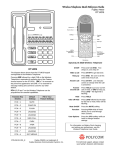
Avaya™ 3606 Wireless IP Telephone Quick Reference Guide
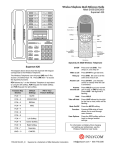
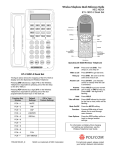
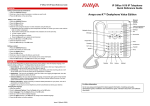
Accessing the Function Menu
Press FCN followed by a digit (1-4, and * or #) while off-hook
to access the feature options programmed for your Wireless
Telephone template.
When you are on a call, your Wireless Telephone display will
show a solid number indicating which line you are currently
using. If a second call comes in on another line, a flashing
second number will appear to indicate which line is ringing.
The Line appearances administered for your extension are
displayed by pressing the LINE key when the Wireless
Telephone is off hook. If the > icon is on, additional
appearances can be displayed by repeatedly pressing the LINE
key. The line is selected by pressing the number key
corresponding to the number to the left of the “=” in the menu.
The line does not have to be on the current display to be
selected.
The Wireless Telephone has two volume levels, low and high.
You can set your low volume level by pressing FCN while
your Wireless Telephone is on-hook, and selecting a volume 1
through 8. While you are talking on the Wireless Telephone,
press VOL once to switch your volume level from low to high
and vice versa. The Wireless Telephone will reset to the low
volume when powered off.
Press FCN followed by a character (1-4, and * or #) while offhook to access the feature options programmed in your
Wireless Telephone template.
Function Key
Strokes
Fill In Your
Feature Settings
FCN + 1
Mute
FCN + 2
Last Number Dialed
FCN + 3
Transfer
FCN + 4
Conference
3606 Wireless IP Telephone
On/Off
Make a call
Hang up
Press and hold PWR. Two chirps on, one
chirp off
Press START to get dial tone.
Press END. Be sure to do this at the end of
each call.
Answer call
Press START. Line indicator comes on
steady when the call is answered.
Answer
second call
Press HOLD to put your current call on hold,
or END to hang up. Press LINE + the digit
that is flashing.
Hold
Take off Hold
Function
User Options
FCN + *
Adjust Volume
FCN + #
Press HOLD
Press LINE followed by the digit for the line
on hold, which will be flashing.
Pressing FCN while off hook allows you to
scroll through menu screens.
Press FCN while on hook to change
handset settings.
Press VOL while in a call to toggle between
base and louder level
Status/Tone Indicators
NOTE: For example, if FCN+* corresponds to an
abbreviated dialing button press START and FCN+*.
The phone will then dial the number corresponding to
that abbreviated dialing button.
For information on Battery Pack charging and setting
user preferences, see the Avaya™ 3606 Wireless IP
Telephone User Guide.
555-301-705, Issue 1
Part Number 72-0170-19, Revision A
February 2003
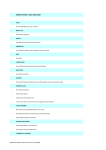
NO SVC
Alarm / Restore
BATT
Beep
MSG
An alarm sounds when the Wireless
Telephone cannot receive or place calls.
You may be outside of the coverage area.
Walk back into the covered area. A restore
tone indicates service is re-established.
Your Battery Pack charge is low. Your
Battery Pack needs to be recharged or
replaced.
You have a voice mail message.
1