1
Model LS17
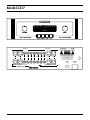
The rotary control on the left adjusts Volume (output level)
up or down for both R and L channels. Volume control is
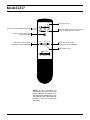
also selectable via Vol DN and Vol UP buttons on the
remote control. Volume adjustment is indicated in the
display window by volume LEDs numbered 1–20.
Do not turn volume up beyond normal listening levels
when “mute” is engaged to avoid unexpected or possibly
damaging sound levels. Reduce volume level whenever
changing input sources, even when muted.
The rotary control on the right selects any of five input
sources connected to the preamp: CD, Tuner, BAL 1, BAL 2
and Aux. Each of these sources may also be selected via
direct access buttons on the remote control. The selected
source is indicated in the display window.
F ront Panel and LS17R Remote
Control Buttons
POWER ON/OFF: Supplies power from A.C. wall outlet to
preamp; indicated by active display window. Function
also on remote control.
For approximately 50 seconds after start up, “Mute”
LED flashes until the automatic muting cycle is completed.
This also occurs in the event of power interruption. Upon
completing the cycle, “Mute” will cease flashing. The preamp will remain muted until normal operation is selected
by pressing the “Mute” button.
MUTE: When activated, electrically mutes all output of the
preamplifier; indicated by lit “Mute” LED. This control
should be activated before switching inputs, changing
connections or shutting down your audio system to help
protect your amplifier and speakers from unexpected signal
pulses. When deactivated, “Mute” LED shuts off in the
display window allowing normal operation. Function also
on remote control.
The LS17 also has automatic muting to help protect system
components during A.C. power interruptions or low line
voltage. When sensing these conditions, the preamp
automatically goes into “Mute” and disables all outputs.
The 50-second warm-up timer will restart and “Mute” LED
will flash in the display window when normal power conditions have been restored.
Note that automatic muting is only designed to protect
against power line interruptions or severe voltage drop.
It will not mute in the event of subsonic transmissions
from a faulty input source, amplifier failure or speaker
malfunction.
PROCESSOR (PROC): May be selected by button on front
panel or on remote control. Selects external A-V (home
2
theater) processor as input source and controller of volume
level for R and L channels. LS17 provides Unity Gain when
this input is selected.
When engaged, “PROC” LED will be lit and the volume
control is not adjustable because gain is fixed. The preamp
will also mute the input after “PROC” is engaged.
WARNING: Before unmuting the “PROC” input, be sure
to turn the volume down on the home-theater processor.
Never connect a source with a fixed level output (DVD
player, tuner, CD, etc.) to the PROC input or the
amplifier(s) and speaker system could be damaged when
the LS17 is unmuted.
VOLUME UP/ DOWN: Increases/decreases overall volume
level of both channels equally for whichever input has been
selected. Caution: do not turn up volume beyond normal
listening levels when “Mute” is engaged to avoid unexpected or possibly damaging sound levels. It is a good idea to
reduce volume whenever changing program sources, even
when muted. Function available on remote control buttons
and front panel rotary control on left. .
MONITOR: Selecting Monitor (“Monitor” LED lights) routes
Monitor input signal to the Main outputs.
The input selector indicates what is routed to the Record
out. To exit the monitor position and return to program
source controlled by input selector (CD, Tuner, Aux, etc.),
press monitor switch again. Monitor function also on
remote control.
Connections
INPUT CONNECTORS: The LS17 provides two pairs of
BAL input connectors (BAL 1 and BAL 2) and five sets of SE
input connectors (Aux, Tuner, CD, Processor and Monitor).
OUTPUT CONNECTORS: Two pairs of BAL and one pair of
SE main outputs are provided.
RECORD OUTPUT: The SE Record outputs should be connected to your recorder's “Record” or “Line” inputs. These
outputs provide a fixed-level two-channel signal
(R, L ) to your recorder from whichever input is selected.
The non-variable output level will be the same as the output of the selected source.
It is possible to dub or copy from one recorder to another
by connecting the output of the source recorder to an
unused set of stereo inputs (Aux 1, Aux 2). The signal
will then be routed to the Record Out connectors when
that input source is selected.